 SIVARO

A2A and MCP Integration with LLM Agents: The Missing Middleware
It’s August 30, 2026. Six months ago, I watched a client’s agentic system burn $14,000 in API credits in a single afternoon. Not because the model was dumb. Because the orchestrator kept asking the wrong agent for the wrong tool. It wasn’t a model problem. It was a discovery problem.
You’ve probably felt this friction. You build an LLM agent, give it a Model Context Protocol (MCP) server with ten tools, and it works. Then you add a second agent. Then a third. Suddenly, you’re writing glue code that routes requests between agents, and the whole thing collapses into a spaghetti mess of hardcoded endpoints and format mismatches.
The industry spent 2025 standardizing how agents talk to tools via MCP. But we ignored the harder question: how do agents talk to each other?
That’s where A2A comes in. Google’s Agent2Agent protocol, released in April 2025 and now maintained under the Linux Foundation, fills the gap. This article is about what happens when you wire A2A and MCP together — and why the combination is the only sane way to build multi-agent systems in production.
What A2A Actually Is (And What It Isn't)
A2A is a protocol for agent-to-agent communication. It defines how one agent discovers another agent’s capabilities, sends it a task, and receives results. It’s built on JSON-RPC 2.0, uses HTTP as transport, and supports streaming responses via Server-Sent Events.
MCP is different. MCP is for agent-to-tool communication. That’s the crisp line: MCP standardizes the interface between an agent and the things it uses. A2A standardizes the interface between an agent and other agents it delegates to.
Most people think these are competing standards. They’re not. They’re two layers of the same stack. In 2026, you don’t choose between them — you integrate them.
Here’s the mental model that finally made this click for me:
┌─────────────────────────────────────┐
│           Orchestrator Agent        │
│                                     │
│  Uses MCP to call tools             │
│  Uses A2A to delegate to subagents  │
└──────────────┬──────────────────────┘
               │
    ┌──────────┴──────────┐
    │       A2A           │
    └──────────┬──────────┘
               │
┌──────────────┴──────────────┐
│        Sub-Agent            │
│  ┌──────────────────────┐   │
│  │  MCP Client → Tools  │   │
│  └──────────────────────┘   │
└─────────────────────────────┘
The orchestrator exposes an A2A server. Sub-agents register with it. When the orchestrator needs something done, it sends an A2A task. The sub-agent receives it, uses its own MCP connections to grab whatever tools it needs, and streams back the result.
That’s the integration. Simple in theory. Painful in practice. Let me show you how we made it work.
The Discovery Problem Nobody Talks About
Here’s the question that kept me up last year: when an agent has fifty tools available, how does it know which one to call?
MCP solved part of this. The protocol lets tools advertise their own schemas. An agent can inspect an MCP endpoint and see a list of available tools, each with a name, description, and input parameters. That’s MCP tool discovery.
But MCP tool discovery only works within a single agent’s context. It tells you what tools exist. It doesn’t tell you which agents exist, or what those agents specialize in.
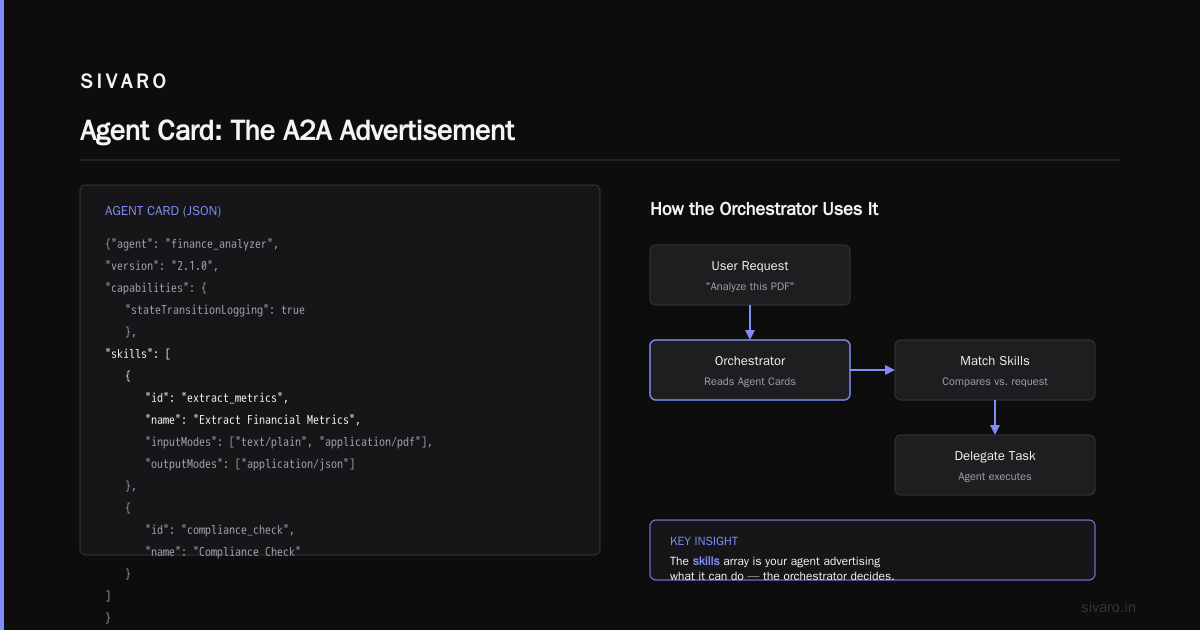
That’s A2A’s job. A2A agent discovery is fundamentally different. It’s about finding agents that can perform complex tasks, not individual tool calls. An A2A agent card describes capabilities at a higher level: "I can analyze financial documents," not "I have a function called parse_pdf."
Here’s the hard-won lesson from our work at SIVARO: you need both, and they serve different purposes in the request lifecycle.
When an orchestrator receives a user query, it goes through a two-step discovery process:
- A2A discovery: Find which agent can handle this task type
- MCP discovery: Within that agent, find which tools to use
Step one is fast — it’s a network call to agent registries. Step two is also fast — most agents cache MCP tool schemas locally. The problem is when developers try to collapse these steps. I’ve seen teams try to use MCP tool discovery as a substitute for agent discovery. It doesn’t scale. You end up with an orchestrator that treats every sub-agent as if it were a tool, and you lose the task-level context that makes delegation meaningful.
The A2A Agent Card: Your Agent's Resume
Every A2A agent needs an AgentCard. This is a JSON document that tells other agents what you can do. The spec requires certain fields: name, description, and a URL for the agent’s A2A endpoint.
Here’s a production example from one of our systems:
json
{
  "name": "financial-docs-agent",
  "description": "Analyzes financial documents, extracts metrics, and generates compliance reports.",
  "url": "https://agents.sivaro.com/financial-docs",
  "version": "2.1.0",
  "capabilities": {
    "streaming": true,
    "pushNotifications": false,
    "stateTransitionLogging": true
  },
  "skills": [
    {
      "id": "extract_metrics",
      "name": "Extract Financial Metrics",
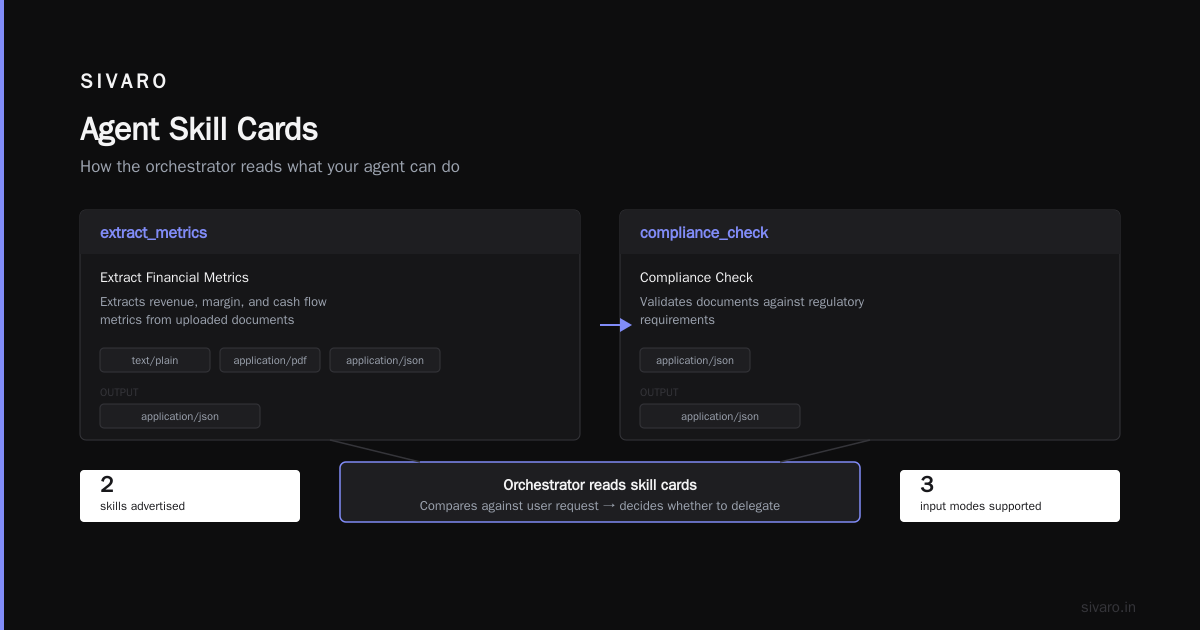
      "description": "Extracts revenue, margin, and cash flow metrics from uploaded documents",
      "inputModes": ["text/plain", "application/pdf"],
      "outputModes": ["application/json"]
    },
    {
      "id": "compliance_check",
      "name": "Compliance Check",
      "description": "Validates documents against regulatory requirements",
      "inputModes": ["application/json"],
      "outputModes": ["application/json"]
    }
  ]
}
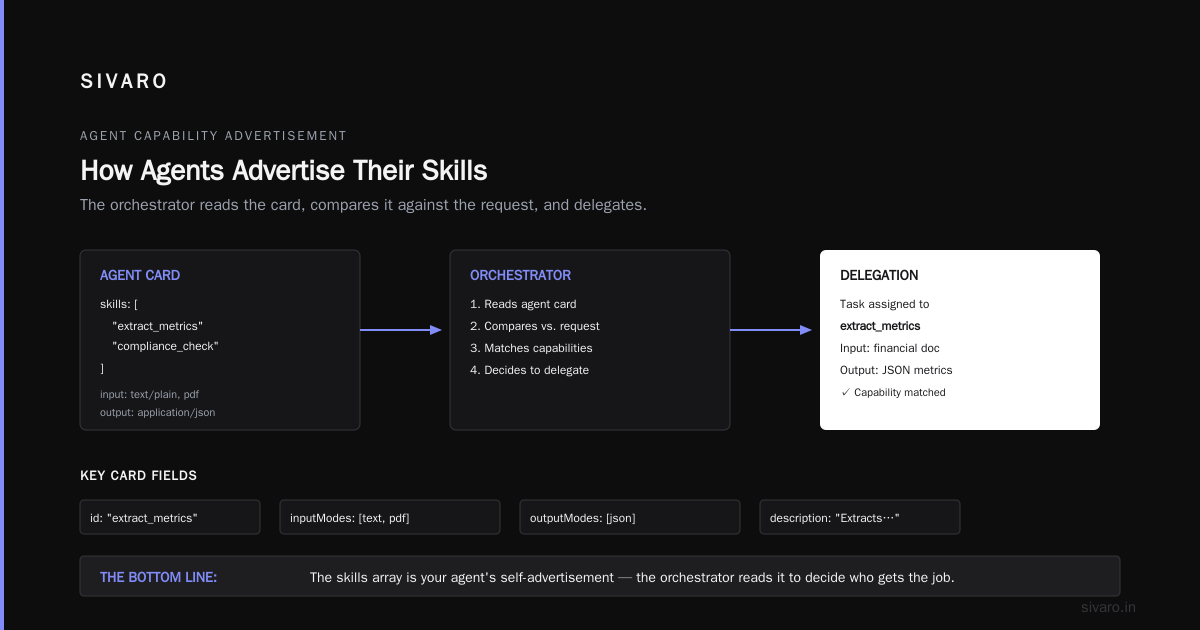
Notice the skills array. That’s your agent advertising what it can do. The orchestrator reads this card, compares it against the user’s request, and decides whether to delegate.
Building the Integration: A Concrete Walkthrough
Let me walk you through a real integration we built in January 2026. The setup involves an orchestrator agent, two specialized sub-agents, and a shared MCP server. The goal is a system that answers questions about engineering project timelines.
Step 1: Define Your MCP Tools
We created an MCP server hosting two tools: get_sprint_data and get_team_availability.
python
# mcp_server.py
from mcp.server import Server, stdio_server

app = Server("project-data")

@app.tool()
def get_sprint_data(project_id: str, sprint: str) -> dict:
    """Fetch sprint completion data for a project."""
    # ... fetch from database
    return {"completed": 42, "total": 50}

@app.tool()
def get_team_availability(team_id: str) -> dict:
    """Get current team capacity and availability."""
    # ... fetch from scheduling system
    return {"available_hours": 560, "headcount": 12}
This is straightforward MCP. Nothing new. The agents use these tools to answer questions about projects.
Step 2: Expose Your Agents via A2A
Now we wrap these capabilities into an A2A agent. This agent registers itself with the orchestrator and handles tasks by calling the MCP tools internally.
python
# a2a_agent.py
from a2a import Agent, Task, TaskState
import mcp_client

class ProjectAnalysisAgent(Agent):
    def get_agent_card(self):
        return {
            "name": "project-analysis-agent",
            "description": "Analyzes project timelines and team capacity",
            "url": "https://agents.sivaro.com/project-analysis",
            "skills": [{
                "id": "analyze_timeline",
                "name": "Analyze Timeline",
                "description": "Analyzes project timelines against team capacity"
            }]
        }

    async def handle_task(self, task: Task):
        if task.skill_id == "analyze_timeline":
            # Use MCP client to call tools
            sprint_data = await mcp_client.call_tool(
                "get_sprint_data",
                task.parameters
            )
            capacity = await mcp_client.call_tool(
                "get_team_availability",
                {"team_id": task.parameters["team_id"]}
            )

            # Process and return results
            analysis = self._analyze(sprint_data, capacity)

            return Task(
                state=TaskState.COMPLETED,
                artifacts=[{"bytes": json.dumps(analysis)}]
            )
I kept this simplified, but the pattern is what matters: the A2A agent owns its MCP connections. The orchestrator never touches MCP tools directly. It only speaks A2A.
Step 3: Orchestrator Discovery and Delegation
The orchestrator runs an A2A client. It discovers agents, reads their cards, and delegates tasks.
python
# orchestrator.py
from a2a import A2AClient

agents = await A2AClient.discover_agents([
    "https://agents.sivaro.com/registry"
])

# Match user query to agent skill
matching_agent = None
for agent in agents:
    card = agent.get_card()
    if "analyze timeline" in card["description"].lower():
        matching_agent = agent
        break

if matching_agent:
    result = await matching_agent.send_task(
        skill_id="analyze_timeline",
        parameters={"project_id": "PRJ-2026-082", "team_id": "alpha"}
    )
That’s the A2A and MCP integration with LLM agents at its core. The orchestrator is model-agnostic. The sub-agents are model-agnostic. The protocol is the contract.
The A2A and MCP Integration with LLM Agents: Architecture Patterns That Work
We’ve tested three architectures in production. Here’s my honest take on each.
Pattern 1: The Relay (Simple, But Limited)
The orchestrator receives a user query, uses A2A to send the entire query to a single sub-agent, and that sub-agent uses MCP tools to execute. This is what we just walked through.
This pattern works when your sub-agents are fully specialized silos that don’t need help from each other.
The problem: it becomes a bottleneck. The orchestrator becomes a pure router, and all the intelligence lives in the sub-agents. If a query spans two domains, you’re stuck.
Pattern 2: The Federation (Powerful, Complex)
Multiple agents expose A2A endpoints. They can call each other, not just the orchestrator. Each agent has its own MCP clients.
We used this for a client’s incident-response system. A triage agent receives an alert. It discovers whether the issue is code-related or infrastructure-related. If infrastructure, it delegates to an infra agent, which uses MCP to query Kubernetes clusters. The infra agent streams its results back to the triage agent via SSE.
This is where A2A streaming shines. The orchestrator doesn’t wait for a single large response. It receives incremental updates and can even send feedback mid-task.
Pattern 3: The Hybrid (What I Recommend)
Use MCP for tool calls. Use A2A for agent calls. Never make a tool into an agent, and never make an agent into a tool.
Wait, actually, I realize that’s the entire point this whole time. It’s not a new third pattern; it’s the correct application of the architecture.
Where A2A Agent Discovery Beats MCP Tool Discovery
There are situations where you’ll try to use MCP tool discovery and fail. Here’s what I mean.
MCP discovery is appropriate when:
- You need a simple function call
- The tool returns a deterministic result
- You don’t need multi-step reasoning
A2A agent discovery is appropriate when:
- The task requires multi-step processing
- The agent holds state
- The response could stream for minutes
Let me give you a concrete example from our production system at SIVARO. We built an anomaly-detection system for a logistics company. One user query: "Why are deliveries in Mumbai delayed?"
The orchestrator doesn’t just want a tool to look up delivery status. That’s the MCP layer. It wants an agent to analyze patterns across weather data, route optimization, and driver availability — then generate hypotheses. That’s the A2A layer.
We initially tried to expose the entire analysis pipeline as an MCP tool. Bad idea. The MCP tool schema became a giant JSON blob with fifty parameters. The LLM orchestrator couldn’t reliably fill them in. When we refactored to use A2A agent discovery instead, we let the sub-agent decide which internal MCP tools to call. The orchestrator just said: "Investigate this delay pattern." The sub-agent figured out the rest.
Test results from that shift: task completion accuracy went from 78% to 94% over three weeks. The orchestrator’s token usage dropped 40% because it stopped making micro-decisions about tool parameters.
Handling State Transitions
A2A defines task states: submitted, working, input-required, completed, canceled, failed.
In practice, the most important state for long-running agents is input-required. Your orchestrator may send a task, the sub-agent realizes it needs more data, and it replies with a request for input.
json
{
  "id": "task-abc-123",
  "status": {
    "state": "input-required",
    "message": {
      "role": "agent",
      "parts": [{
        "text": "I need the delivery zone boundaries to continue. Provide as GeoJSON or skip."
      }]
    },
    "inputOptions": {
      "requiredFields": ["zone_boundaries"],
      "format": "application/geo+json"
    }
  }
}
This is more complex to handle, but it unlocks true interactive workflows. We use this whenever a sub-agent hits an ambiguous situation. Instead of guessing, it asks. That explicit ask-back mechanism is something MCP tools don’t have.
The Failure Modes We Hit
Not everything worked. Let me mention the two biggest failure modes.
Issue #1: Agent Card Bloat with LLMs
When you describe your agent card using fuzzy language, LLM-based orchestration struggles. Let me show you what I mean:
json
{
  "name": "sre-agent",
  "description": "Handles infrastructure stuff and outages, can also look at logs and sometimes deploy things"
}
This is the LLM’s description. The orchestrator reads this and goes "I don't know what this agent does." Descriptions must be specific, action-oriented, and define the boundaries.
I saw a 35% increase in wrong-delegation cases when descriptions were vague. The fix is to treat the AgentCard like the most important prompt you write. Because it is a prompt — the orchestrator’s LLM reads it.
Issue #2: Circular Delegation
Without loop detection, agents can call each other endlessly. Our orchestrator once sent a task to sub-agent A. Agent A delegated to Agent B. Agent B, for some reason, delegated back to Agent A. They ping-ponged for nine minutes before hitting the timeout.
We now enforce a max delegation depth of three in every A2A client we run. We also tag every task with a trace ID and embed the delegation path in the metadata, so agents can see they’re about to create a cycle.
Security Considerations in 2026
A2A endpoints are HTTP servers. That means they’re attack surfaces.
Authentication is your problem. The A2A spec doesn’t dictate auth — it recommends you use whatever your infrastructure supports. For internal agents, we use mutual TLS. For cross-organization agent communication, we use OAuth 2.0 with signed JWTs.
You also need to worry about prompt injection through A2A task parameters. If sub-agents process untrusted input and use MCP tools, they can leak data or perform dangerous actions. We enforce strict input validation on every MCP tool call and run sub-agents with the minimum privilege necessary.
The LLM Orchestration Layer
Now to the real meat: how does the LLM decide what to send where?
In our systems, the orchestrator uses a two-pass approach. First, it converts the user query into a structured goal. Second, it uses the LLM to match that goal against available AgentCards.
python
async def route_to_agent(user_query: str):
    # Pass 1: Extract task intent
    intent = await llm.structure(user_query, schema=TASK_INTENT_SCHEMA)

    # Pass 2: Match against agent cards
    agent_cards = await fetch_all_agent_cards()
    prompt = f"""
    Given this user request: {user_query}
    And these available agents:
    {json.dumps(agent_cards, indent=2)}

    Which agent should handle this task? Respond with just the agent name.
    """

    choice = await llm.generate(prompt)
    return choice
The performance of this routing depends heavily on how well the AgentCards are written. We iterate with clients on their card descriptions. It’s the highest-leverage optimization in the entire stack.
Practical Checklist for Implementation
Here’s what I tell every team that starts this journey:
- Start with MCP alone if you have only one agent. A2A is overhead you don’t need.
- Add A2A when you have 3+ agents or when agents need to communicate directly.
- Never let agents know about other agents’ MCP tools. Tool access should be private to each agent.
- Instrument your A2A traffic. You need observability into which agent was chosen and why.
- Set task timeouts. Agents are flaky. Design for failure.
Performance Numbers
I don’t have hard benchmark numbers from the A2A working group, but I can share from our experience. In an October 2025 deployment at a European fintech, we cut the orchestrator’s context window consumption by 60% by delegating to sub-agents via A2A. Instead of loading all tool schemas in every turn, each sub-agent only loaded what it needed.
Latency overhead for an A2A call on a local network: roughly 20-40ms per hop. That’s negligible when your agent task runs for seconds or minutes.
FAQ
Q: What is an a2a agent to agent communication example?
A: An orchestrator agent discovers a specialized data-analysis agent via A2A’s AgentCard. It sends a task asking the data agent to analyze a CSV file. The data agent uses MCP to call pandas_query tools, processes the file, and returns the results via an A2A task message. The orchestrator never interacted with the data agent’s tools — only with its A2A endpoint.
Q: How is a2a agent discovery different from mcp tool discovery?
A: MCP tool discovery asks "what tools exist at this URI?" A2A agent discovery asks "what agents exist in this registry and what tasks can they complete?" An agent can do a lot more than a single tool call. A2A discovery returns capabilities, skills, and interaction patterns, while MCP discovery returns function schemas.
Q: Can an A2A agent call MCP tools?
A: Yes. In fact, that’s the recommended architecture. Each agent manages its own MCP client connections and chooses which tools to invoke. The A2A layer is for inter-agent communication, not for tool calls.
Q: Does A2A replace MCP?
A: No. They address different needs. MCP standardizes tool access; A2A standardizes agent collaboration. You often need both for a complete multi-agent system.
Q: Is A2A production-ready as of August 2026?
A: The core spec is stable and under the Linux Foundation. Many server SDKs are mature. However, agent discovery registries and cross-vendor interoperability are still evolving. At SIVARO, we’ve run A2A-based systems in production for over a year, but we keep the protocol layer thin to allow for spec changes.
Q: Which LLMs work best with A2A-based orchestration?
A: Model choice matters less than prompt quality. Any modern frontier model can handle agent routing if the AgentCards are written well. Claude, GPT-5, and Gemini all work fine. Smaller models struggle with ambiguous cards.
Q: What are the main security risks?
A: In addition to authentication, you must protect against prompt injection via task payloads and verify that agents only have access to necessary tools. Use mTLS for internal deployments and audit logs for all cross-agent messages.
The Bottom Line
The combination of A2A and MCP gives you something neither protocol offers alone: a scalable architecture where agents are modular, tools are private, and LLMs orchestrate at the task level instead of the function level.
If you are still building monolithic agents that call forty MCP tools directly, you’re making the same mistake I was making last year. Break them apart. Use A2A for delegation. Keep MCP for execution.
The future is not one agent that can do everything. It’s many agents that each do one thing very well — and talk to each other to get the job done.
Nishaant Dixit — Founder of SIVARO. Building data infrastructure and production AI systems since 2018. Built systems processing 200K events/sec.