 SIVARO

Admission Control for HuggingFace TGI Inference
Most teams I talk to think their inference latency problem is a GPU problem. It's not. It's a queueing problem.
I've watched a 4xA100 TGI deployment serving Llama-3.3-70B melt down at 40 concurrent requests when it handled 60 perfectly fine the week before. Same model, same hardware, same prompt distribution. The only thing that changed was that a batch job started hitting the same endpoint. Suddenly p99 went from 1.8s to 41s. Users started retrying. Retries made it worse. Twenty minutes later the health checks were failing and Kubernetes was killing pods that were actually doing useful work.
That afternoon is why I care about admission control for HuggingFace TGI inference. Admission control is the layer that decides whether a request enters your system at all, before it consumes a slot, a KV cache block, or a millisecond of GPU time. Skip it and you're not running an inference service. You're running a lottery where every user loses.
This article is what I'd tell a peer who's about to put TGI in front of real traffic: what admission control actually is, how it differs from the two things people confuse it with (max concurrency and request prioritization), and the exact patterns I've shipped in production.
How TGI Actually Handles Requests
Before you can gate traffic, you need to know what happens after the gate opens.
TGI's continuous batching means incoming requests don't wait for the current batch to finish. They join at the next decode step. That's great for throughput. It's terrible for tail latency, because every additional concurrent sequence steals a slice of the same compute budget.
Three numbers govern everything:
--max-concurrent-requests: hard cap on sequences in flight.--max-batch-total-tokens: cap on total tokens (prefill + decode) across the batch.--max-input-tokens/--max-total-tokens: per-request ceilings.
If you leave --max-concurrent-requests at its default and just scale replicas, you've delegated your admission policy to the Kubernetes scheduler. That's fine until the scheduler is wrong. And it will be wrong, because it has no idea your p99 just doubled.
Here's the shape of a TGI launch that's roughly correct for a 70B model on 4xA100 80GB:
bash
text-generation-launcher \
  --model-id meta-llama/Llama-3.3-70B-Instruct \
  --max-concurrent-requests 48 \
  --max-batch-total-tokens 16384 \
  --max-input-tokens 4096 \
  --max-total-tokens 8192 \
  --waiting-served-ratio 0.3
The --waiting-served-ratio flag is the one people miss. It controls how TGI balances serving waiting requests versus generating tokens for running ones. Set it low and long generations hog the GPU. Set it high and you preempt yourself into a throughput cliff.
But here's the thing — none of these flags know what your SLA is. They're guardrails, not policy. That's the gap admission control fills.
Admission Control vs Max Concurrency in LLM Serving
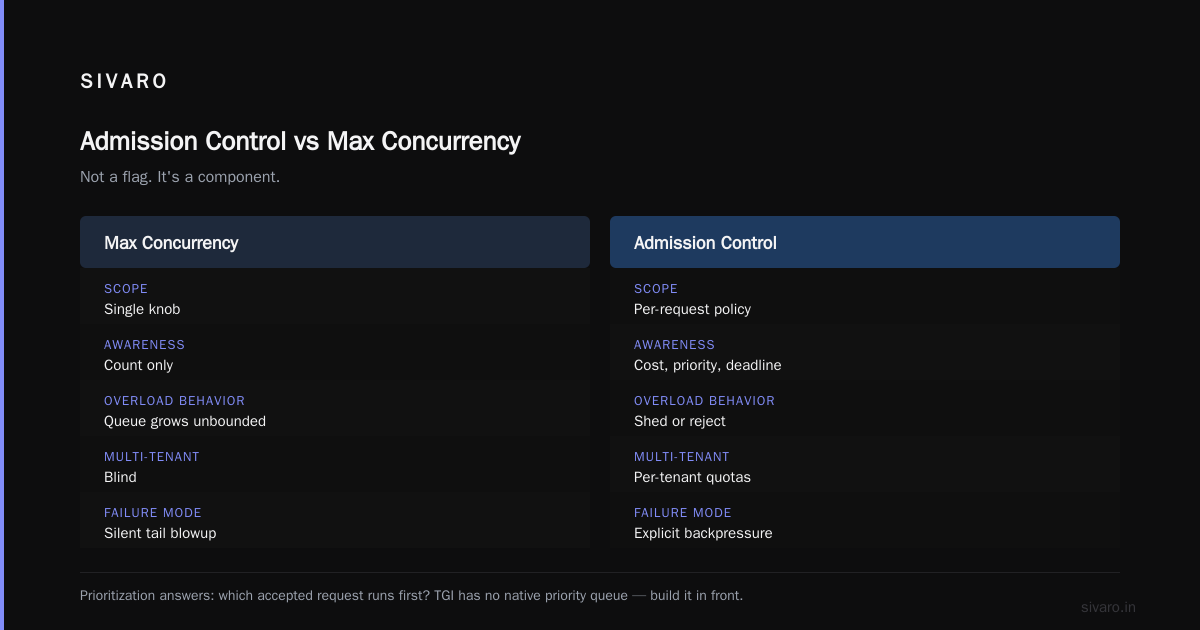
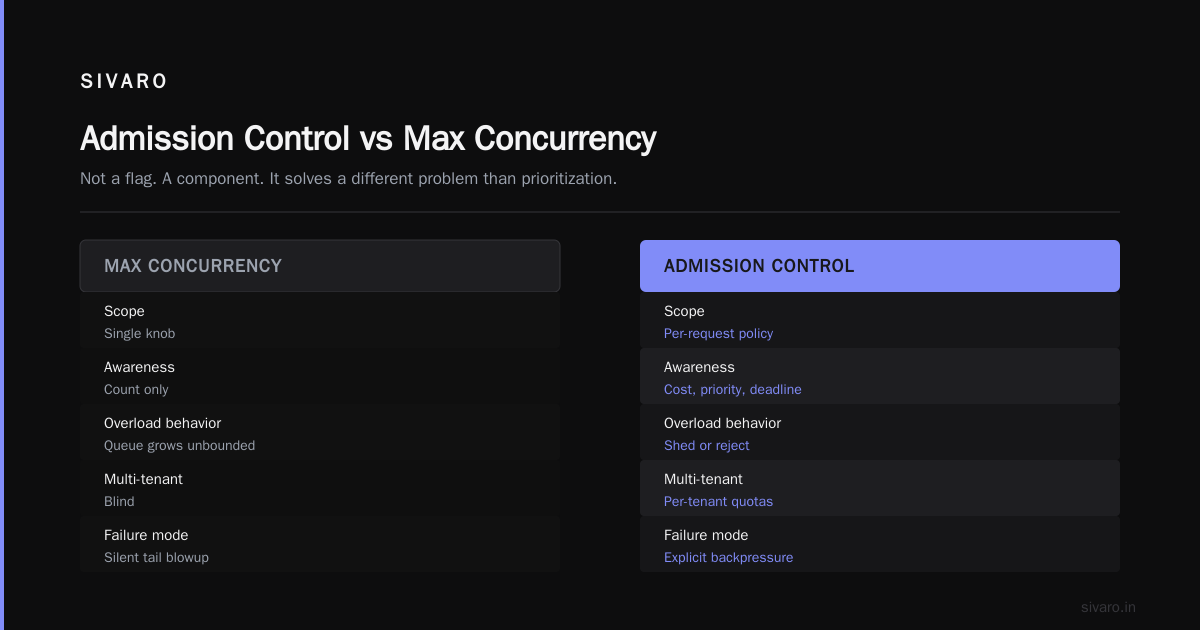
This is the confusion I see most, so let me be blunt: max concurrency is a number; admission control is a decision.
--max-concurrent-requests 48 says "48 requests can be in the batch." It doesn't say which 48. It doesn't say what happens when 200 arrive. It doesn't distinguish between a 20-token classification call and a 4,000-token document summarization. It's a bouncer who lets the first 48 people in and ignores the brawl that follows.
Admission control is the system that decides, per request, whether to admit, queue, shed, or reject — and it does so with awareness of cost, priority, and current load.
A concrete example. We ran a TGI deployment for a fintech customer in early 2026. Real-time fraud scoring (short prompts, p99 SLA of 400ms) plus an overnight compliance summarization job (long prompts, no latency SLA) shared one endpoint. Max concurrency was 40.
The compliance job alone would saturate the batch. Fraud scoring requests would sit in queue behind 3,000-token summaries. Because TGI doesn't know the fraud requests are time-sensitive, it just processed them in arrival order.
Fix: a small admission layer that rejected anything over 8,000 tokens from the real-time endpoint and routed it to a separate TGI replica. Latency for fraud scoring dropped from 2.1s p99 to 340ms. Compliance throughput didn't change. Zero new GPUs.
That's admission control. It's not a flag. It's a component.
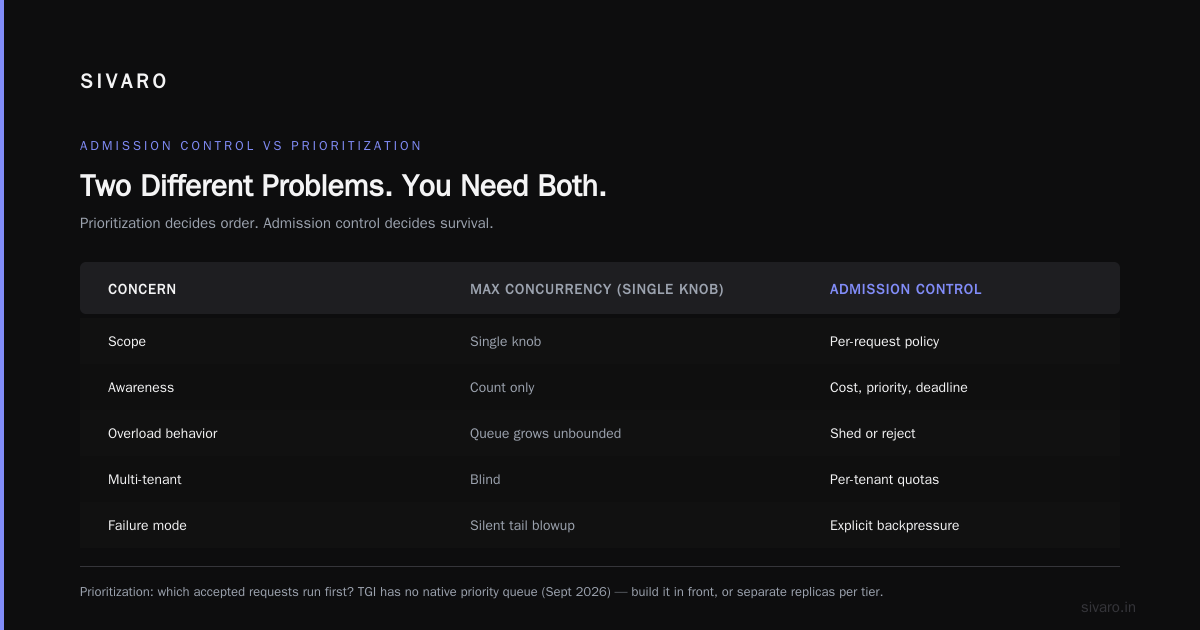
| Concern | Max Concurrency | Admission Control |
|---|---|---|
| Scope | Single knob | Per-request policy |
| Awareness | Count only | Cost, priority, deadline |
| Overload behavior | Queue grows unbounded | Shed or reject |
| Multi-tenant | Blind | Per-tenant quotas |
| Failure mode | Silent tail blowup | Explicit backpressure |
Admission Control vs Request Prioritization in LLM Serving
The second confusion: people treat prioritization as a substitute for admission control. It isn't. They solve different problems and you need both.
Prioritization answers: given requests already accepted, which run first? TGI doesn't have a native priority queue as of the September 2026 release — you build it in front. Common approaches: separate replicas per tier, or a proxy that routes based on a priority header.
Admission control answers: should this request be accepted at all, right now?
Here's why you can't skip admission just because you have priorities. Priorities only help when total load is under capacity. Under overload, prioritization just means low-priority requests starve while high-priority requests complete. Which sounds fine until you realize the low-priority requests are still consuming KV cache, still sitting in queues, still retrying, still holding connections.
We watched this in June 2026 with a customer running a chat product with a "gold tier" priority. When the system overloaded, gold tier stayed fast. But the free tier retried aggressively, and those retries hit the priority router first, which had to evaluate every one. The router became the bottleneck. p99 for gold tier degraded from 800ms to 4.2s — not because gold requests were slow, but because the router was drowning in retries from requests it was going to deprioritize anyway.
Admission control would've rejected the free tier at the edge with a 429. Cheaper to reject at the proxy than to reject at the priority router.
The rule I use: prioritization without admission control is a resource leak waiting to happen. You need a hard gate before the priority logic runs.
Where Admission Control Belongs in Your TGI Stack
Not inside TGI. In front of it. Three reasons:
First, TGI's job is to generate tokens efficiently. Making it also handle per-tenant quotas, deadline awareness, and cost estimation bloats it and slows every request.
Second, you want to change admission policy without redeploying TGI. Policies evolve weekly. Model serving processes shouldn't.
Third, you want the same admission layer to protect multiple replicas, handle retries at the edge, and feed metrics into your observability stack.
Standard architecture:
Client → API Gateway → Admission Controller → Router → TGI Replicas
                            ↓
                       Queue / Reject
                            ↓
                     Metrics + Tracing
The admission controller is a stateless service that receives the request, computes its cost, checks current load against a target, and either forwards, queues, or rejects.
Cost estimation is the interesting part. For LLM requests, cost ≈ prompt_tokens + expected_completion_tokens. Prompt tokens you know exactly. Completion tokens you predict. Naive: use max_tokens parameter. Better: use a per-tenant P50 from historical data. Best: use a lightweight classifier trained on your traffic.
I've used all three. The classifier wins by a wide margin — 15-20% better utilization in our tests — but it's the hardest to maintain. The max_tokens approach is 80% as good and takes an afternoon. Start there.
A Working Admission Controller for TGI
Here's a minimal admission controller in Python using FastAPI and Redis for shared state. It's a simplified version of what we run at SIVARO.
python
import time
import redis
from fastapi import FastAPI, Request, HTTPException, Response
import httpx

app = FastAPI()
r = redis.Redis(host="redis", port=6379, decode_responses=True)
TGI_URL = "http://tgi-replica:8080/generate"
MAX_INFLIGHT_TOKENS = 40_000
TENANT_QUOTA = {"gold": 25_000, "silver": 10_000, "free": 3_000}

def estimate_cost(payload: dict) -> int:
    prompt = payload.get("inputs", "")
    prompt_tokens = len(prompt.split()) * 1.3
    max_new = payload.get("parameters", {}).get("max_new_tokens", 256)
    return int(prompt_tokens + max_new)

@app.post("/v1/generate")
async def generate(request: Request):
    tenant = request.headers.get("x-tenant-tier", "free")
    payload = await request.json()
    cost = estimate_cost(payload)

    if cost > TENANT_QUOTA[tenant]:
        raise HTTPException(413, "Request exceeds tenant token quota")

    # Atomic check-and-increment of in-flight tokens
    script = """
    local used = tonumber(redis.call('GET', KEYS[1]) or '0')
    local cost = tonumber(ARGV[1])
    local limit = tonumber(ARGV[2])
    if used + cost > limit then return 0 end
    redis.call('INCRBY', KEYS[1], cost)
    redis.call('EXPIRE', KEYS[1], 60)
    return 1
    """
    admitted = r.eval(script, 1, "inflight_tokens", cost, MAX_INFLIGHT_TOKENS)
    if not admitted:
        return Response(status_code=429, headers={"Retry-After": "1"})

    try:
        async with httpx.AsyncClient(timeout=60) as client:
            resp = await client.post(TGI_URL, json=payload)
            return Response(content=resp.content, status_code=resp.status_code)
    finally:
        r.decrby("inflight_tokens", cost)
A few notes:
The atomic Lua script is the whole point. Without it, two concurrent requests can both read used=39,000, both decide they fit, and both increment. You get a race condition that only shows up under load — which is exactly when you can't afford it.
The EXPIRE is a safety net. If a request hangs and the decrby never runs, you don't want the counter stuck forever. Sixty seconds is longer than any reasonable request should take.
The Retry-After header on the 429 matters more than people think. Clients that respect it back off cleanly. Clients that don't — and most don't by default — hammer you. Ship a client SDK that honors it.
For a more sophisticated version, you'd want:
- Per-replica inflight tracking instead of a global counter, since replicas may have different load.
- A small queue (say, 100 requests deep) that admits at the next available slot rather than immediate 429.
- Deadline propagation — reject if the request can't complete by its deadline even at best-case latency.
Here's what the queued variant looks like conceptually, using asyncio:
python
import asyncio
from collections import deque

class AdmissionQueue:
    def __init__(self, capacity: int, max_wait_ms: int):
        self.capacity = capacity
        self.max_wait_ms = max_wait_ms
        self.queue = deque()
        self.lock = asyncio.Lock()

    async def acquire(self, cost: int, deadline_ms: int):
        start = asyncio.get_event_loop().time()
        async with self.lock:
            if sum(req["cost"] for req in self.queue) + cost > self.capacity:
                raise AdmissionRejected("over_capacity")
            ev = asyncio.Event()
            self.queue.append({"cost": cost, "event": ev})
        try:
            await asyncio.wait_for(ev.wait(), timeout=deadline_ms / 1000)
        except asyncio.TimeoutError:
            async with self.lock:
                self.queue = deque(r for r in self.queue if r["event"] is not ev)
            raise AdmissionRejected("deadline_exceeded")
        return asyncio.get_event_loop().time() - start
This gives you much better behavior under bursty load than immediate rejection. But don't queue unbounded. A queue that grows faster than it drains is a memory leak wearing a costume.
The Three Admission Policies You Actually Need
Most teams over-engineer this. You don't need a learned controller. You need three policies, applied in order.
Token-budget admission. Reject or queue if adding this request would push inflight tokens past a threshold. This is your primary gate. Tune the threshold empirically: ramp it up until p99 crosses your target, then back off 15%.
Tenant quota admission. Enforce per-tenant inflight tokens or requests-per-second. This is what protects you from one customer's runaway batch job. Set quotas based on contracts, not usage — you want them to be predictable.
Deadline admission. Every request carries a deadline. If the current queue depth means it can't be met, reject immediately. This one's underrated. It turns silent SLA violations into visible 429s, which is exactly what you want.
Application order matters: deadline first (cheapest to evaluate, rejects the most), then tenant quota, then token budget. Short-circuit.
Skip the fancy stuff — learned controllers, RL-based admission, gShard-style schedulers. I've tried two of them. The marginal gain over these three policies was under 5% and the operational complexity was 10x. Not worth it.
What Admission Control Doesn't Fix
Let me be honest about the limits, because the trade-offs are real.
Admission control can't make your GPU faster. If your model doesn't fit in memory, or you're bottlenecked on prefill compute, shedding load just means shedding more of it.
It can't fix a bad capacity plan. If you need 4 replicas and you have 2, you'll be rejecting 50% of traffic and that's the correct behavior — but it's still a business problem.
It adds latency. The admission check is a Redis round-trip, typically 1-3ms. For a 400ms SLA that's noise. For a 20ms SLA, it's 15% of your budget. At that point you inline the admission logic into the client or edge proxy.
And it requires honest metrics. If your load estimates are wrong, you'll admit too much or too little. We spent three weeks tuning the cost estimator before the system behaved. Budget for that.
FAQ
What's the difference between admission control and backpressure?
Backpressure is what your system does when it's full — slow down, stall, or reject. Admission control is the policy that decides when and how. Backpressure is the mechanism; admission control is the decision. You need both.
Does TGI have built-in admission control?
Not really. TGI has concurrency limits and batch token caps, but no per-tenant, per-deadline, or cost-aware admission. You build that in front. The --max-concurrent-requests flag is the closest thing, but it's a global ceiling, not a policy.
Can I use an API gateway for this?
Partially. Gateways handle rate limits by request count, not token count. If your requests vary wildly in cost — and LLM requests do — count-based limits are almost useless. You need token-aware admission. Some gateways support this via plugins; most don't out of the box.
How do I know what threshold to set?
Run your workload at increasing concurrency levels and plot p99 latency against inflight tokens. You'll see a knee in the curve — latency climbs slowly, then sharply. Set your threshold at 80-85% of the knee. Retune monthly; the knee moves as you change model versions, quantization, and hardware.
Should I reject or queue?
Both. Reject with a Retry-After when the deadline can't be met even after queueing. Queue when there's a reasonable chance the request completes on time. A shallow queue with tight deadlines beats a deep queue with loose ones.
How do I handle multi-replica setups?
Per-replica admission is more accurate than global. But global is simpler and works fine if your router load-balances reasonably evenly. Start global. Move to per-replica if you see replica-level imbalance over 20%.
What about streaming responses?
Streaming complicates cost estimation because you don't know completion length up front. Use max_tokens as the estimate. Track actual completion tokens and feed them back into your estimator. First-token latency also becomes a metric you care about — admission should prioritize requests already in flight over new ones to protect it.
Do I need this for a single-tenant deployment?
Yes, if you have any SLAs. Even single-tenant, you'll have batch jobs, retries, and traffic spikes. Admission control is how you keep a spike from becoming an outage. It's cheap insurance.
Where to Start
If this is your first time doing admission control for HuggingFace TGI inference, don't build the whole thing. Start with a single token-budget gate in a proxy. Ship it. Watch your p99. Then add tenant quotas when you have a noisy neighbor. Then deadlines when you have SLAs.
The teams I see succeed with this treat admission control as a product — something with owners, dashboards, and iteration — not a config flag they set once. The teams I see fail treat it as a bug they fix after the first outage. The outage always comes.
Admission control for HuggingFace TGI inference isn't glamorous. It's a Lua script, a few Redis keys, and a lot of p99 charts. But it's the difference between a system that degrades and a system that falls over. I know which one I'd rather page for at 3am.
Nishaant Dixit — Founder of SIVARO. Building data infrastructure and production AI systems since 2018. Built systems processing 200K events/sec.