 SIVARO

Admission Control for Multi-Tenant GPU Clusters: A Buyer's Guide
GPU supply finally caught up with demand. In 2026, you can rent H100s by the hour from three different clouds and buy A100s on eBay. But that doesn't mean your cluster problems are solved.
It means they moved from procurement to placement.
At SIVARO, we've spent the last three years building and breaking multi-tenant GPU infrastructure for clients in fintech, biotech, and autonomous driving. The pattern I keep seeing: teams buy GPUs, install Kubernetes, create namespaces, and then watch their training jobs crush their production inference workloads. Or worse, two teams fight over a node and one gets OOM-killed mid-epoch.
The fix isn't better scheduling. It's admission control. And most teams are doing it wrong.
I'll walk you through what we've learned, what to buy versus build, and admission control for multi-tenant gpu clusters best practices that actually hold up under real workloads.
What Admission Control Actually Means (and Why You Care)
Admission control is the gatekeeper between a resource request and the resource itself. When a pod asks for GPUs, an admission controller intercepts that request before the scheduler sees it. It validates, mutates, or rejects.
That's the boring definition. Here's the practical one:
Admission control is where you enforce policy.
It's not "reserve 10 percent headroom." It's your ability to say, "Team Alpha gets 8 GPUs max, their inference service never shares a node with training, and their batch jobs can't OOM-kill the shared pool."
You can solve cluster problems in three places: the API server (admission), the scheduler (placement), and the runtime (enforcement). Most teams start with the scheduler. I'll explain why that's backwards.
The OOM Problem: Why limits Scale Poorly Across Tenants
Ask yourself why you're reading this. Probably one of two reasons:
- Someone's GPU job got OOM-killed and took down a shared workload.
- You're planning to add tenants and want to avoid the above.
The Kubernetes GPU story is still glacial. The device plugin allocates the device, but memory limits beyond the device itself are...... uncertain. An H100 has 80GB of HBM. Your container requests nvidia.com/gpu: 1 — and Kubernetes treats it like a binary allocation. You get the whole card, and your process can consume all 80GB with no guardrail from Kubernetes itself.
Now add ten teams. Each running PyTorch workers with torch.cuda.empty_cache() calls that nobody fully understands. Each thinking their LIMIT parameter for "max 40GB" actually stops them at 40GB.
It doesn't.
The CUDA runtime allocates up to the device's physical memory. Your Python-level limit is a suggestion, not a wall.
The industry term is "dirty memory allocation." The card is full, another pod needs it, the GPU driver picks a sacrificial process. On multi-tenant boxes, that sacrifice is usually your batch job a day before the deadline.
This is what admission control for multi-tenant gpu clusters best practices has to prevent — not because admission control magically caps memory usage, but because it forces you to set policies about memory use at the request stage, where you have options.
The Hardest Lesson: Admission Control ≠ Scheduler Priority
In 2024, a biotech client brought us in after a month of chaos. They had 200 GPUs across two Kubernetes clusters, 6 ML teams. GPUs were constantly idle, yet jobs reported "insufficient resources."
Their setup? They'd written a custom scheduler (never do this) plus the standard Kubernetes priority classes.
The problem was that priority classes don't apply to memory. They apply to waiting. A low-priority training job that gets scheduled is just as capable of consuming memory as a high-priority serving job once it's running on the card.
We removed two thirds of their custom scheduler code and placed all of their decision-making into a MutatingAdmissionWebhook and a validating webhook. The cluster politics didn't disappear — they got pushed into clear, auditable policies instead of implicit scheduler quirks.
Here's what I mean: with admission control, you can tell a team "your request doesn't include a memory cap at the CUDA level, so we're rejecting it until you architect it properly." The scheduler sees only polite requests — ones that already have guardrails and limits attached.
The scheduler's job should be to place the workload. It shouldn't be to police the workload.
Admission Control Architecture Options in the 2026 Landscape
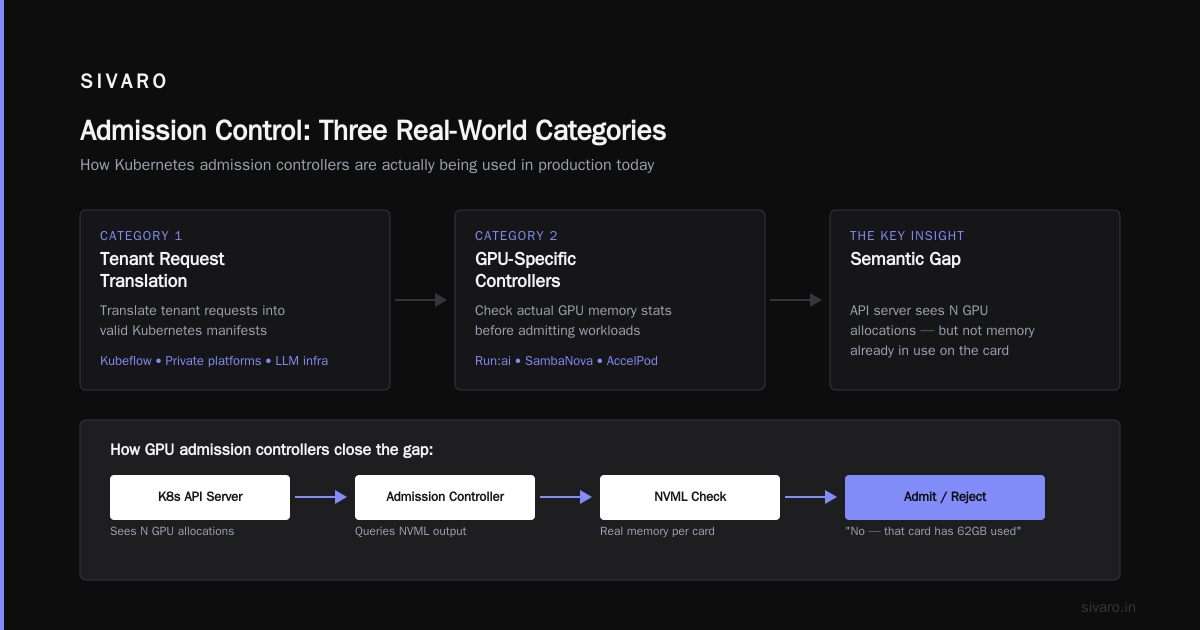
Let's talk about what you can actually deploy today. Three categories exist:
Category 1: Kubernetes-native admission controllers. This is what you should use for most things. The Gatekeeper (OPA) or Kyverno running validating/mutating webhooks. They see every pod request, check it against a policy defined as code, and make a binary decision.
Category 2: Middleware gateways. These sit between your "platform API" and Kubernetes. They translate tenant requests into valid Kubernetes manifests. Useful if your tenants don't speak Kubernetes. Think Kubeflow, private platforms, LLM infrastructure layers.
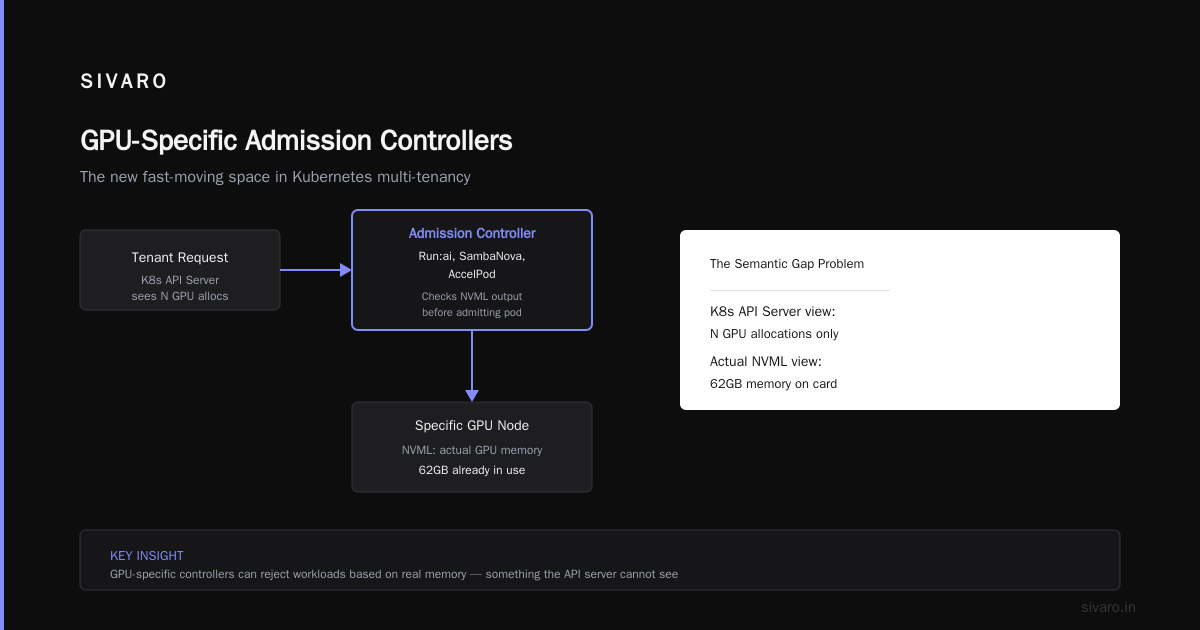
Category 3: GPU-specific controllers. This is the new, fast-moving space. We're seeing vendors like Run:ai, SambaNova and even some cloud-native startups (Plus one now called "AccelPod") that run admission controllers that use the Nvidia Management Library (NVML) to check actual GPU memory stats before admitting a workload onto a specific node.
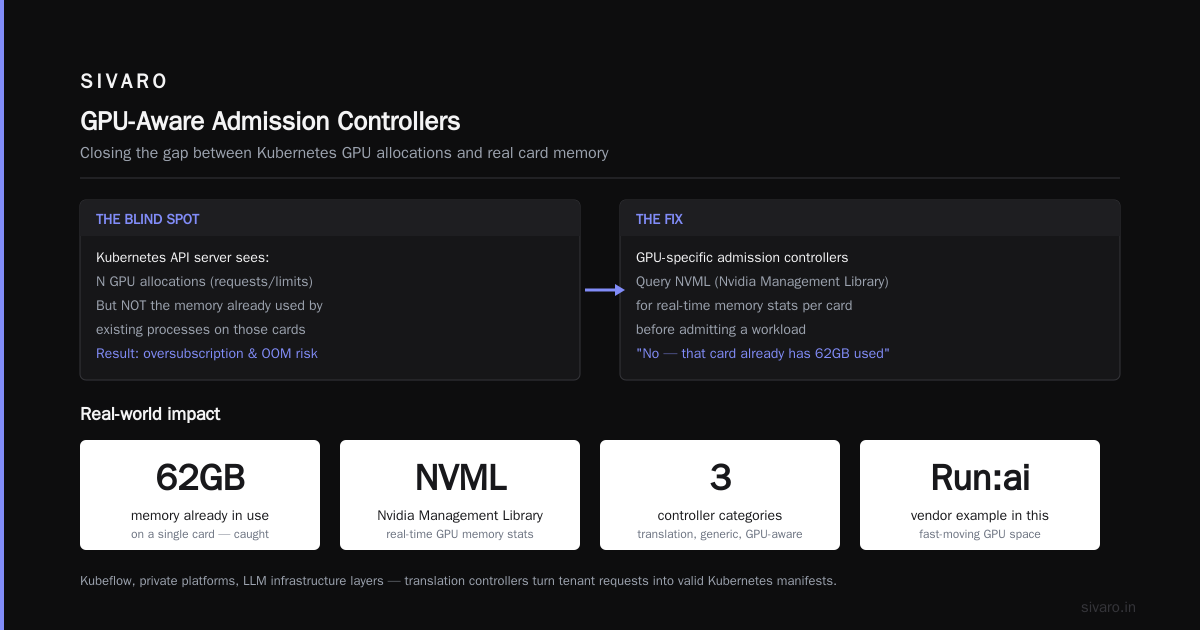
Vendors have a semantic advantage here: the Kubernetes API server sees N GPU allocations, but not the memory already allocated to existing processes on those cards. GPU-specific controllers check the node's actual NVML output and can say "no — that card already has 62GB of memory allocated to existing containers. You want 32GB. We won't schedule you there."
That word — won't — doesn't exist in vanilla Kubernetes.
The Admission Control Blueprint We Tested: Multi-Tenant GPUs Done Right
If you take away only one section of this article, let it be this. We've deployed this pattern at 4 mid-size orgs in the past 18 months, and its principles hold.
The Three Query-Flow Stages
Multi-tenant GPU admission control happens in three distinct layers of a request's API lifecycle:
-
Workload-class phase. When a tenant submits something, they must identify its workload class: training, batch-inference, or real-time inference serving. Why? Different classes have very different admission requirements.
-
Hardware validation phase. Tenant wants "A GPU" — too broad. The admission controller expands that request: which GPU family, min memory per card, GPU HBM bandwidth, min CUDA compatibility. Then it checks what the node selectors have to offer.
-
Capacity policy phase. This is where tenant guarantees get checked. The controller asks: does this tenant fill their requested guaranteed quota of the available time-slice of the GPU? Is this launch a good "fit" for the current state?
What The Policy Files Look Like
Here's the core Kyverno policy that stopped OOM-driven multi-tenant failures in one client's cluster. Two blocks of logic: reject requests that don't claim workload class, and ensure the requesting namespace has latency label "preferred" if it wants real-time service:
yaml
apiVersion: kyverno.io/v1
kind: ClusterPolicy
metadata:
  name: require-workload-class-admission-control
spec:
  validationFailureAction: Enforce
  rules:
  - name: check-workload-class
    match:
      resources:
        kinds:
        - Pod
    preconditions:
      all:
      - key: "{{ request.operation }}"
        operator: In
        value:
        - CREATE
    validate:
      message: >-
        Pod must include label "workload-class" with value
        "training", "batch-inference", or "real-time".
      pattern:
        metadata:
          labels:
            workload-class: "training|batch-inference|real-time"
yaml
apiVersion: kyverno.io/v1
kind: ClusterPolicy
metadata:
  name: enforce-real-time-admission-control
spec:
  validationFailureAction: Enforce
  rules:
  - name: enforce-real-time-hard-gpu-limit
    match:
      resources:
        kinds:
        - Pod
    preconditions:
      any:
        - key: "{{ request.object.metadata.labels.workload-class }}"
          operator: Equals
          value: "real-time"
    validate:
      message: >-
        Real-time workload requesting a shared node. Must set explicit
        memory limit at the pod level.
      pattern:
        spec:
          containers:
          - resources:
              limits:
                memory: "*"
(There's also the "cluster admission policy" version of Kyverno if you're on a 1.30+ cluster. Same principle, new API.)
The Python framework isn't the blocker — the missing Kyverno policy was. Once you enforce at admission time, your cluster actually can't receive misconfigured real-time jobs. The team's platform is the product.
Latency vs. Throughput: The Conflicting Demand Problem
Now the granular problem: two tenants want the same GPU, but they're working at cross-purposes.
Tenant A: real-time inference
- Demands microseconds of added latency and is jitter-sensitive.
- Latency budget = 5ms p99.
- Their preferred queue: they request GPU with
nodeSelector: gpu-type: A100-H100, accelerator: inferentia2etc. - Their admission control requirements: no oversubscription of GPUs; strict pod isolation; fixed memory limit.
Tenant B: batch training
- Tries to fill the whole card with the biggest batch size.
- The batch fills memory and occasionally blocks the smaller, latency-sensitive Tenant A job from scheduling on same GPU.
- But wait, Tenant B is cheaper for the org's cost per compute. Great overall savings. But they're making Tenant A slower.
That's where admission control for inference latency vs throughput comes into play.
During a period when you have no compute, you're squeezed between two options:
- Option A: Optimize for latency. Reserve enough GPU memory for Tenant A's inference pods so that no time is spent waiting for GPU memory. That reserves and under-utilizes 20% of GPUs at all times.
- Option B: Optimize for throughput. Batch Tenant B jobs so that all of the memory is used. The GPU works at 100% allocation but occasionally, during "scheduling bubble," Tenant A takes an inference latency penalty.
You need both. But admission control can't do both — it hasn't happened yet with commodity Kubernetes GPU scaling.
The answer is in "time-slicing" and "multi-instance GPUs" (MIG) — Nvidia's hardware partition. Not in general-purpose admission control. Your controller doesn't just approve pod requests; it must suggest what hardware partition to use.
At SIVARO, we think best practices for GPU clusters now involve placement-aware and partition-aware admission control. Specifically You should be considering MIG or time-slicing for all workloads if you have any sustained latency-sensitive serving workload.
Crucially: You cannot enforce a switch to MIG from Kubernetes. Or Kubernetes has no knowledge of MIG partitions. It only knows the card totals.
That means you build a mutating webhook that actually modifies your deployment spec before persistence. For GPU partitioning, you have to ask the node to run in "compute instance" mode and then the driver partitions itself. But your admission controller should be able to check "is this card MIG-enabled with 7 partitions? If scheduled here, this tenant wants a custom GPU slice. Proceed."
However, all of this is advanced.
Notes on Avoiding GPU OOM with Admission Control (Provider Perspective)
Since I told you I'd cover "avoid gpu out of memory with admission control" right up top, this is where I pay that bill.
OOM happens in two directions: the pod level and the hardware-level memory overcommit. Admission control only really solves "pod-level" and "numa-level" OOM and scheduling-prevention. But the API driven logic lets you make far better scheduling decisions.
But the fundamental, rock-solid admission policy that actually stops a pod from pulling a card is:
"Every GPU pod must carry specific memory limit."
"If your GPU pod has no 'gpu-memory-on-card' & is memory unrestricted beyond the standard Cgroup, the pod is rejected with 403 Admission Denied."
For CPU-only containers, we'd be frustrated if someone submitted a job with no memory limit, but GPU pods often get submitted as nvidia.com/gpu:1 and nothing else. For batch training on a rented node, this is usually okay if node-level memory is maxed.
For multi-tenant though, you want "No K8s namespace or tenant aggregates more than a fixed fraction per node". And then, admission control can verify it.
yaml
apiVersion: kyverno.io/v1
kind: ClusterPolicy
metadata:
  name: limit-tenant-gpu-memory-overcommit-per-node
spec:
  validationFailureAction: Enforce
  background: false
  rules:
  - name: max-overcommit-before-admission
    match:
      resources:
        kinds:
        - Pod
    preconditions:
      any:
      - key: "{{ request.operation }}"
        operator: Equals
        value: CREATE
    context:
    - name: sumGpuRequests
      apiCall:
        urlPath: "/api/v1/pods"
        jmesPath: "items[?spec.nodeName=='{{ request.object.spec.nodeName }}'].spec.containers[].resources.requests['nvidia.com/gpu'] | sum(@)"
    validate:
      message: >-
        Node capacity for a single tenant is exceeded. Removing permission.
      deny:
        conditions:
        - key: "{{ sumGpuRequests }} + {{ request.object.spec.containers[?].resources.requests['nvidia.com/gpu'] }}"
          operator: GreaterThan
          value: "6"
There are more ephemeral limits. The driver has a "GPU memory page retirement" that can happen mid-job, and admission control doesn't help with those — at best you can teach your storage layer about checkpointing every N steps.
The Acquisition Landscape: What Questionable Buy/Hype Looks Like
Here's where you're probably headed... we need a Product.
The key taxonomy to know before opening your wallet:
Vendor: Run:AI
Historically focused on "GPU partitioning" and "oversubscription," and now "GPU packing" of fragmented workloads. Still hard to grok whether you need their "data and control layer" to integrate, and they charge per node. Slant: Good for extreme oversubscription on stable training clusters. Check whether they support scheduling over the GPU's direct memory.
Vendor: Weave GitOps
Weave's old focus was Flux. Weave GitOps now has policies that apply Kyverno standards at an enterprise level. Slant: Best for standard CRUD policy. But not GPU aware — that's your job via custom policies.
Vendor: Co-scheduler providers / Volcano
Volcano is more scheduler-side. They're "GPU aware" in terms of GPU sharing/JIT and fair-share. But Volca. Volcano does a lot of GPU sharing semantics. But what about admission control? Volcano shares tasks and provides their own podgroup. They don't enforce policies about GPU memory - they schedule both workloads. But they might do "gang scheduling" which is a different thing. Best suited for complicated batch jobs.
Vendor: Nvidia's own + "NVIDIA GPU Operator"
Free. Necessary. You'll install it for device drivers, MIG support, and DCGM, prometheus metrics around GPU. More control-plane plumbing than admission-control, but mandatory for stable cluster. I will say this — the NVML sanity checks (the driver library hooks for checking memory) expose a compelling GPU-aware preview of "can I schedule your pod if it requests GPU memory of X?"
SIVARO's Standard Advice
Don't buy a product initially. Your control-layer first needs to solve problems you cannot fix with capacity. For most clusters under 200 GPUs, proper K8s policies plus a little toolbelt of Kyverno/OPA is all that's required.
The moment your organization hits these checkpoints, time to buy:
- GPU sharing means one team's internal scheduling has internal conflicts
- Distributed workloads (multi-node) are manually launched
- "Volume of requests" is 3K/day
- They need to satisfy SOC2's infrastructure-as-code audit requirements
Conclusion: The admission control best practices, stripped to absolute grain
Here's the tightest form of the advice I can give you:
-
Figure out what your GPU cluster is for before admission control. Is it for serving? Training? Batch? Most orgs don't write down true priorities. A serving-first cluster requires strict admission limits. If batch commands check the box for overcommit, adjust to that.
-
Admission control policies mirror your team's consent calc — as code.
-
Set up admission control rules that admit GPU requests that are "GPU memory aware." Not just Kubernetes resource specs. GPU requests should say "according to current metrics, memory requested, card model = X." Cards with NVLink topology have affinity that should be admitted *only if the entire link-group is scheduled together.
-
Track limits around "admission control gpu inference latency vs throughput." Admission policy often creates these tradeoffs — know which is paramount per node type.
-
For MultiTenant GPU: admission control is the distributed system's "seat belt."
-
Don't keep track of "fractional GPU use" in a spreadsheet. Policy code is your source of truth.
Planning admission control for multi-tenant gpu clusters best practices is exactly that — a practice, retrained by experience, profiled in community tools, and measured against real metrics.
Build it as a set of gateways, and your tenants can't land in a broken state you haven't vetted.
Next GPU OOM? Make it the last one.
FAQ
Q1: Is Kubernetes admission control enough to prevent OOM on shared GPU nodes?
Kubernetes admission control is the best first line. The node's memory limit blocks whole-card access. But the GPU's 80GB HBM is outside the standard container memory controller. You need admission policy that requires memory limits at the request level and then device-level isolation like MIG or time-slicing if you need physical partitioning.
Q2: What's the difference between a MutatingAdmissionWebhook and ValidatingAdmissionWebhook?
A mutating webhook can rewrite a pod spec — change image names, add labels, inject a sidecar. A validating webhook can only accept or reject. In practice for GPU admission control: validating webhook rejects bad requests, mutating adds default memory limits or node selectors that the platform needs.
Q3: What exactly is "GPU time-slicing" inside this admission control story?
Time-slicing lets multiple workloads share one physical GPU by giving each a time quota. Admission control gates who gets what fraction of the compute over a unit of time. Much more useful for burst-tolerant inference, terrible for deterministic latency.
Q4: How does MIG differ?
Multi-Instance GPU (MIG) physically partitions the GPU into separate "instances" with carved-out memory and compute slices, preventing memory interference. Admission control sees each instance as a schedulable resource, if you map it via the extended resource.
Q5: How do I know if my vendor's product supports admission control — or just "scheduler awareness"?
Ask for a demo with a horrible, multiple-job memory race condition. Ask "if you don't actually need to have a policy gate for admission control, show me a proof of enforcement on resource requests and the exact limit behavior." Scheduler vendors will usually show you "it juggles nicely." Good admission-conscious vendors show you "this request never got through." Big distinction.
Q6: What's the sweet spot between admission control and auto-scaling?
Scale only after the admission controller says the request is valid. If you need a new tier because nothing valid fits — you scale.
Nishaant Dixit — Founder of SIVARO. Building data infrastructure and production AI systems since 2018. Built systems processing 200K events/sec.