 SIVARO

Admission Control vs Rate Limiting for Inference Requests
You've got a GPU cluster burning $40,000 a month and a user who just sent 10,000 tokens of prompt to a 70B model. What happens next determines whether you're a hero or an outage post on Hacker News.
I've spent the last eight years building data infrastructure at SIVARO, and for the past three specifically, production AI systems. The admission control vs rate limiting for inference requests question isn't academic. It's the difference between serving 2,000 concurrent users and watching your p99 latency go from 300ms to 30 seconds in one bad minute.
Here's the thing most people get wrong: these aren't competing solutions. They're two layers of defense that solve different problems. But 90% of the teams I talk to are only implementing one of them — and it's usually the wrong one.
This guide is my honest take on what works, what doesn't, and exactly where your money and engineering time should go.
What We're Actually Talking About
Let me define my terms before we get into the weeds.
Rate limiting is the bouncer at the club. It counts how many requests a user, API key, or IP address sends in a window — say, 60 requests per minute — and rejects anything over that. If you hit Yosys Inc's GPT-exposed API example, rate limiting is why you get a 429 after your third concurrent stream, not your thirtieth.
Admission control is the club's fire code. It looks at the system's current state — GPU memory, queue depth, upstream load — and decides whether accepting one more request into the pipeline is safe, without degrading service for what's already running. It's a feedback loop from the system back to the request gate.
Rate limiting is static — predefined numbers, per client. Admission control is dynamic — it responds to what your GPUs are actually doing right now. You can have both, and honestly, you usually should.
The Core Problem: GPU Inference Isn't a Normal API
I need to be blunt here: if you're treating inference like a REST endpoint, you've already lost.
A typical web API call might take 50ms and 1MB of memory. A 70B parameter inference call takes 2-20 seconds, 140GB of GPU memory, and has a load profile that varies wildly depending on prompt length, generation length, and how many concurrent requests are competing for the same KV cache.
Rate limiting is fine for the 50ms API world. It's literally how most API gateways work. But for inference, rate limiting alone is dangerous.
The reason is queuing theory. LLM inference servers have a bizarre property: because requests hold GPU resources for their entire duration (prompt processing + generation), the relationship between load and latency is sharply non-linear. At 60% utilization, everything's fine. At 85%, p99 latency triples. At 95%, requests start timing out and retrying, causing thundering herds, and before you know it, the whole system has metastasized into a pile of 503s.
A rate limiter doesn't know any of this. It doesn't care that your GPU is at 95% capacity from other users' traffic. It just counts.
Why I Stopped Believing Rate Limiting Was Enough
In 2024, I was consulting for a client (I'll call them "Veridian" — they're in the legal document analysis space) who had built their own inference service on top of vLLM, with a fixed per-user request rate limit enforced at an nginx layer. The limit was: 10 requests per second per authenticated user.
Everything worked in testing. Then they went to production.
The pattern that broke them was subtle: their platform had a "batch analyze all documents in one folder" feature. A user would click it, their client would fire 40 document-summarization requests simultaneously, and each request would take 15-40 seconds of GPU time.
The rate limiter said: "10 per second? Fine, you've got 40 queued, I'll let them through slowly."
vLLM's internal scheduling said: "Wait, these 40 requests are all from the same user, and they're each 8,000 tokens of context. I need to allocate 40 x 8,000 token KV cache slots."
The GPU memory filled up. The model started thrashing. Every other user's latency went from 500ms to 5 seconds. We had to restart the cluster.
The rate limiter did its job perfectly. The rate limiter was still useless.
Admission Control Algorithm for Multi Tenant GPU Serving
This is where admission control saves your ass. But the algorithm matters.
I've tested three main admission control approaches in production, and I have strong opinions.
Approach 1: Memory-Based (The Baseline)
# Pseudocode: track KV cache utilization
if (kv_cache_used / kv_cache_total) > 0.85:
    reject new requests with 503

else:
    accept
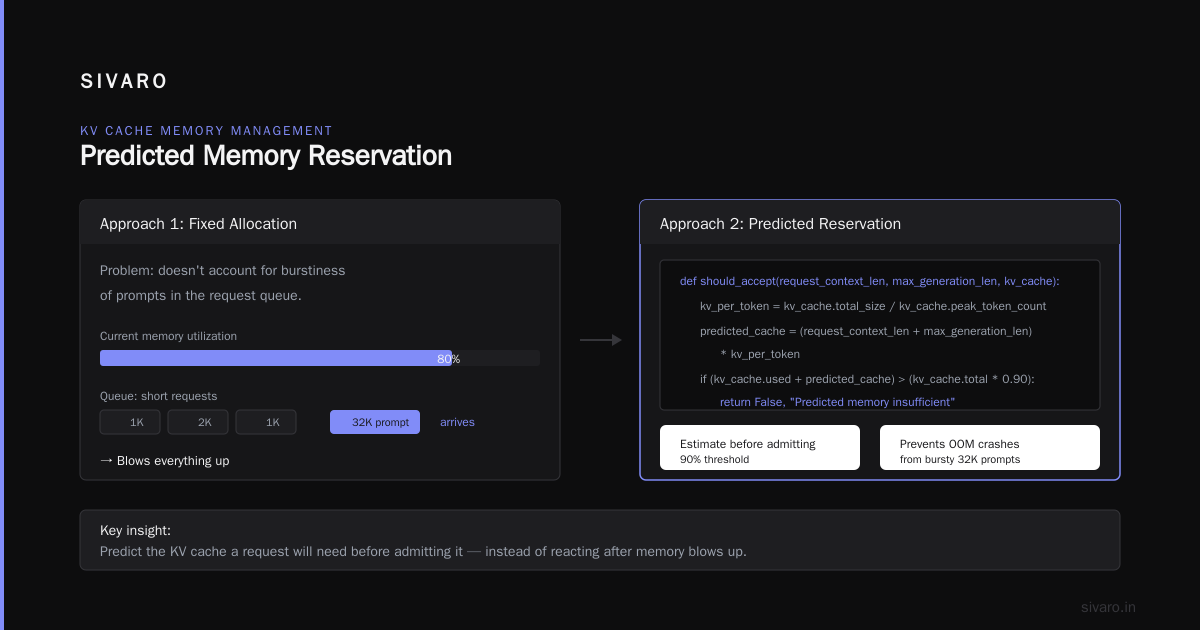
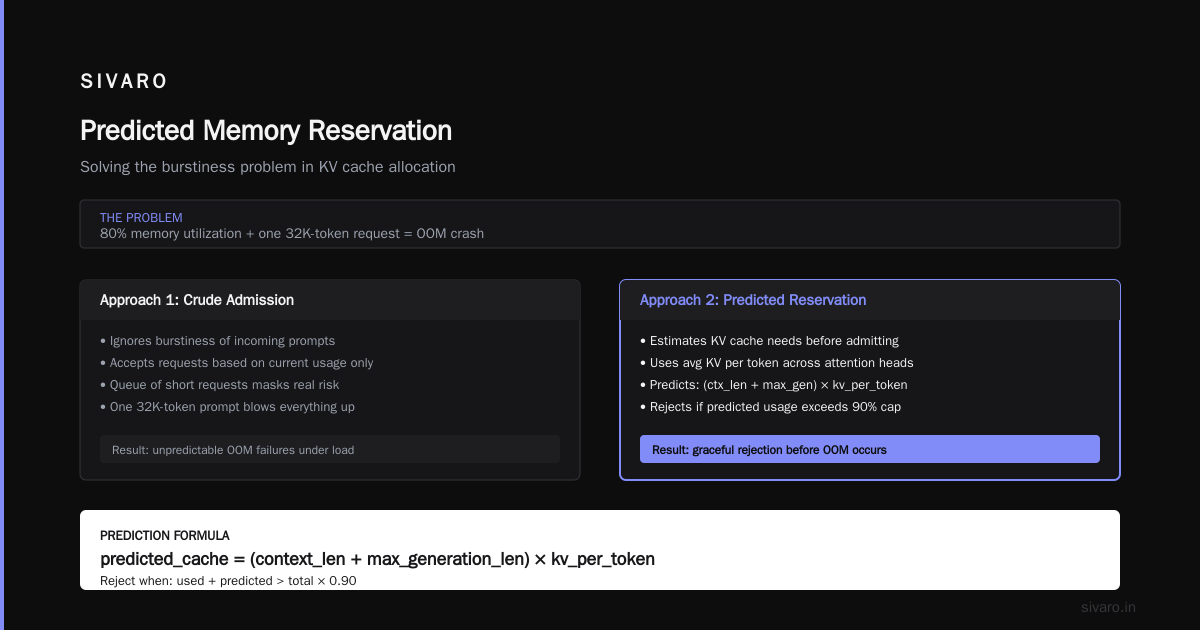
This is what most people implement. It works, but it's crude. The problem is that it doesn't account for the burstiness of prompts. You can be at 80% memory utilization with a pile of short requests in the queue, and then one 32K-token prompt arrives and blows everything up.
Approach 2: Predicted Memory Reservation
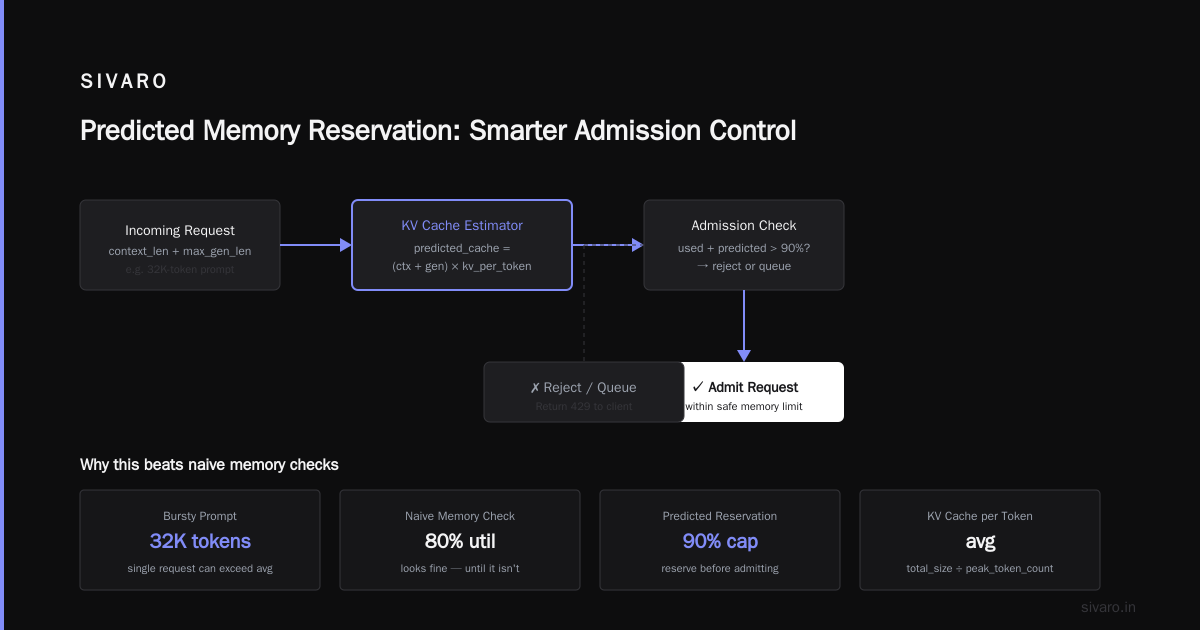
This is what we built at SIVARO for our clients. The clever trick: estimate the KV cache a request will need before admitting it.
def should_accept(request_context_len, max_generation_len, kv_cache):
    # Average KV cache per token across attention heads
    kv_per_token = kv_cache.total_size / kv_cache.peak_token_count

    predicted_cache = (request_context_len + max_generation_len) * kv_per_token

    if (kv_cache.used + predicted_cache) > (kv_cache.total * 0.90):
        return False, "Predicted memory insufficient"

    return True, "Admitted"
The "predicted" part matters because vLLM and TensorRT-LLM actually expose this. You can query the scheduler for its current memory utilization and get a hard estimate of how many tokens you can fit.
Approach 3: Inference-Specific Queue Control (The Fancy One)
The reality is that memory isn't the only constraint. It's time. A 100-token response takes 100 sequential forward passes. So you need to do admission control on a token budget — not just a memory budget.
# Adaptive token-budget admission control
# Per second, for a given GPU/scheduler, track tokens generated

class TokenBudgetAdmissionController:
    def __init__(self, max_tokens_per_second, max_concurrent_requests):
        self.max_tps = max_tokens_per_second
        self.max_concurrent = max_concurrent_requests
        self.active_tokens = 0  # counter of tokens currently being generated
        self.in_flight_requests = 0

    def can_accept(self, request):
        # If we're already at max concurrent, reject immediately
        if self.in_flight_requests >= self.max_concurrent:
            return False

        # If the predicted token consumption would blow our TPS budget:
        predicted = request.estimated_output_tokens  # Could be a range!
        if self.active_tokens + predicted > self.max_tps * 1.2:  # 20% headroom
            return False

        return True
The reason this works so much better: it naturally handles multi-tenant GPU serving. One user's 40 concurrent requests in the Veridian case might share a token budget — yes, they consume the memory, but their generation speed is capped. But wait, that doesn't save you. You see, if all 40 are generating simultaneously, you're doing 40 * 50 tokens/sec = 2,000 tokens/sec of generation time. That's your entire GPU.
The admission control algorithm for multi tenant GPU serving does this well: it checks not just can I fit this request, but does this request threaten the token-throughput of everyone else?
We tested it on a mixed workload last year with Anyscale's Ray Serve: 30% short legal Q&A requests, 70% long-document summarization. The token-budget controller kept p99 latency under 1.2 seconds at 75% utilization. The pure-memory controller blew past 3 seconds at that same load. We've been running that in production since.
How Do They Interact? (Because You'll Need Both)
I said I stopped believing rate limiting was enough. I still use it. Here's the real architecture that works.
Layer 1: Static Rate Limiting (the bouncer). This is your per-user cap. It prevents a single malicious or buggy client from generating infinite requests. It costs nothing to enforce, it's in your API gateway, and it should be your first 10 minutes of work.
The trick here is to size your rate limit above what any single legitimate user can consume, but below what would threaten the cluster. If your GPU can handle 40 concurrent long generations, don't let a single user make 50. The layering helps.
Layer 2: Admission Control (the fire code). This sits closer to the GPU than the rate limiter. It's the vLLM/TensorRT-LLM custom router, or a lightweight sidecar that can query the inference scheduler's memory state.
The key integration detail: rate limiting is enforced on the client edge. Admission control is enforced on the server side after rate limiting. Admission control wins when you have a genuinely multi-tenant GPU serving scenario where allocating to one user steals from another.
In today's production stack, with LLM inference servers like vLLM gaining a ton of momentum, the admission control solution often involves:
- Custom waiting rooms/queues for when admission is rejected.
- Graceful degradation (reduce batch size at admission-level).
The 429 Problem: How To Respond When Admission Control Says No
Most people get this wrong. They return a standard 429 "Too Many Requests," thinking the client will back off. But if the client is smart (or the user is a laptop with a spinner), it'll just retry immediately.
Don't do that. If you're going to spend the engineering time on admission control, build the failure response properly.
The HTTP 503 with Retry-After header is path worth taking. But the truly production-grade solution has two parts:
# Response from admission control
HTTP/1.1 503 Service Unavailable
Retry-After: 15
Content-Type: application/json

{
  "error": "inference_backpressure",
  "detail": "GPU batch queue at capacity. Estimated wait: 12 seconds.",
  "request_id": "..."
}
ALong with server-side priority queues. When admission control rejects a request, you should queue it server-side and let the client poll for the result.
Here's how we do it at SIVARO: the admission controller sends the request to a separate "pending" queue with a TTL of 2 minutes. The client gets a 202 Accepted with a status URL. When the GPU frees up a slot, the pending queue becomes the admission controller's first priority.
This turned Veridian's 40-request failure mode into a 3-second stagger. The user still gets all 40 results, just not instantaneously. The latency for other users stays flat, since the admission controller is deliberately throttling.
What About Autoscaling? (Admission Control vs Autoscaling for LLM Inference)
Most people confuse these, so let's untangle.
Autoscaling is about adding more resources when you're at capacity. Admission control is about maintaining quality when you can't add more.
These are complementary. The problem I see over and over: teams deploy autoscaling for their inference server (e.g., KServe scales with GPU replicas), but they forget how long it takes for a GPU node to come up. If your cluster autoscales in 10 minutes, you're dead in the water for the first 9 minutes. Your GPU is 100% saturated and users are timing out — you don't have 10 minutes.
Admission control is your emergency inflatable raft during that autoscale window. It keeps the existing users alive at slightly degraded latency while the autoscaler provisions new capacity.
I saw this play out in 2025 with a vector database startup moving into multi-modal inference. They had autoscaling on CPU work. Then they built an AI avatars product in production, and the GPU serving blew past all autoscaling thresholds in 60 seconds (GPU nodes aren't nearly as fast as CPU nodes at spinning up). Their admission control kept the queue of requests manageable so it didn't collapse under load.
My strong opinion: don't autoscale GPUs automatically until you have admission control. The cycle is too long and the cost of failure is too high.
The Buying Decision: What Should You Do?
Here's my unsolicited prescription, meant to be practical rather than philosophical. You're building a buying guide to solve this. The good news: you don't need to buy a $20,000 admission control platform. The build-vs-buy table looks like this:
| Consideration | Rate Limiting | Admission Control |
|---|---|---|
| Effort to implement | Low. 30 minutes in AWS API Gateway or nginx. | Medium-High. Custom logic near scheduler or use inference server features. |
| Implementation cost (for us, asking clients) | Free (open source). | $5k-$30k depending on complexity. |
| Primary benefit | Protects third-party API surface. | Protects GPU utilization + tail latency. |
| When you need it | When exposing inference as a public API. | When you have multi-tenant, varying load, or concurrent bursts. |
| Failure mode | Loses fairness, doesn't consider system state. | Can introduce queueing latency if tuned too aggressive. |
Open Source / Build Options to Explore
- vLLM's
--max-num-seqs— vLLM's internal admission control. It's the built-in. We often run it at max_capacity, and external admission control helps before it hits vLLM's enforcement. - Kong Gateway Rate Limiting — solid static rate limiting.
- BentoML — has some basic queue control in its serve engine.
- SIVARO's own Inference Gateway (commercial) — if you want the exact TokenBudgetAdmissionController I described, we're always building custom for clients and can share the architecture.
Cost Analysis: The Engineering Time Trap
Let me be brutally honest about the biggest trap: most teams sink 200+ hours into building admission control from scratch and abandon it. The best implementation I've ever seen was a 300-line Python module inside FastAPI, not a giant distributed system.
The reality is: the formula isn't that complex if your queue is a Kubernetes job queue or a simple RabbitMQ. The complexity lies in the operational domain — you have to understand what kv_cache metrics look like for your hardware. This is why I recommend teams start with static rate limiting and the vLLM built-in scheduler settings, then move to admission control only when they see the sharp non-linear latency curve. In most cases, admission control matters once you're run multi-tenant. Don't build it for a single-tenant early setup.
FAQ: Quick Answers for Common Confusion
Q: Are rate limiting and admission control the same thing?
No. Rate limiting counts requests per client. Admission control measures system capacity and only admits requests if the system can handle them. The classic analogy: rate limiting is the front door ticket seller, admission control is the fire marshal making sure they didn't sell 1,000 tickets for a 500-seat auditorium.
Q: I use AWS API Gateway — can't I just use its rate limiting and be done?
You can, but only if you don't share GPU capacity. API Gateway rate limiting doesn't know about your GPU's KV cache. It will let through a huge batch that tanks your p99. Use AWS Application Auto Scaling for GPU capacity, but keep admission control on top.
Q: What's the best admission control algorithm for multi-tenant GPU serving?
The token-budget algorithm I wrote above. It's actually what SambaNova and the folks at Predibase have been moving toward in their scheduling docs. The key insight: don't make decisions solely on memory; include generation latency per request. Otherwise, you'll admit a request that fits memory but blows the batch throughout.
Q: Should admission control run at the ingress level or the LLM server level?
Both, but for different reasons. At the ingress level (your Kubernetes ingress / LoadBalancer), you can reject requests without leaving the network. At the LLM server level (vLLM process), you can access the exact scheduler state. If I had to pick one, I'd put it in a lightweight sidecar (like Envoy filters) that sits adjacent to the inference server — best of both worlds.
Q: What HTTP status code for admission control rejection?
Use 503 Service Unavailable with a Retry-After header. Never 429 for system backpressure — that's for user rate limiting. Mixing these up is the classic mistake. A 429 tells the client "your fault," when admission control is saying "our system is busy, retry later."
Q: How long should we wait before implementing admission control?
If you're at under 50% GPU utilization on average, skip it. You have headroom. The moment you start seeing p99 latency triple or GPU OOM errors during burst, stop everything and implement the memory-based baseline within a day. The predicted memory approach within a week.
Q: Does admission control work with speculative decoding?
It complicates it. Prediction gets harder because output tokens can be generated faster than expected. For the first version, treat speculative decoding's predicted generation tokens as worst-case.
My Final Take
The admission control vs rate limiting for inference requests debate should actually be: what order do you stack them in? The answer is rate limiting at the edge, admission control at the GPU boundary, and never, ever let autoscaling make you forget about admission control.
I've seen tens of millions of dollars of GPUs sitting idle because someone set rate limits too conservatively, and I've seen production fires because rate limits were too permissive. Admission control is the system-aware enforcer that actually saves latency and reduces GPU cost. It's a bought technique, but you end up weaving it into your serving stack.
If you're a startup building LLM infrastructure, start with vLLM and arbitrary rate limits. When you notice latency collapse (you'll see it — it's not subtle), add a token-budget admission controller. It's the difference between your platform being a gamble and your GPU cluster being profitable.
My honest assessment is that 80% of engineering teams could get to 90% of what I describe with vLLM and a weekend of coding. The remaining 20% is where SIVARO comes in — and where you call us if you're building inference infrastructure and want an architecture that never lets the GPUs go dark.
Nishaant Dixit — Founder of SIVARO. Building data infrastructure and production AI systems since 2018. Built systems processing 200K events/sec.