 SIVARO

Admission Control vs Scheduling GPU Cluster: The Buying Guide
You've got a GPU cluster. You've got a queue. And you've got a problem: your jobs are either stepping on each other or sitting idle while GPUs burn money.
I've been building data infrastructure for eight years, and I've watched teams burn millions on the wrong Kubernetes scheduler settings. This guide is the one I wish I'd had before SIVARO's third client project, back when I thought kube-scheduler defaults would save us.
Here's the thing you need to know upfront: admission control and scheduling are not competing systems. They're two layers of the same stack, and conflating them is why your cluster is either 30% idle or 40% oversubscribed. Let me show you the difference, the trade-offs, and how to choose what you actually need.
What We're Actually Talking About
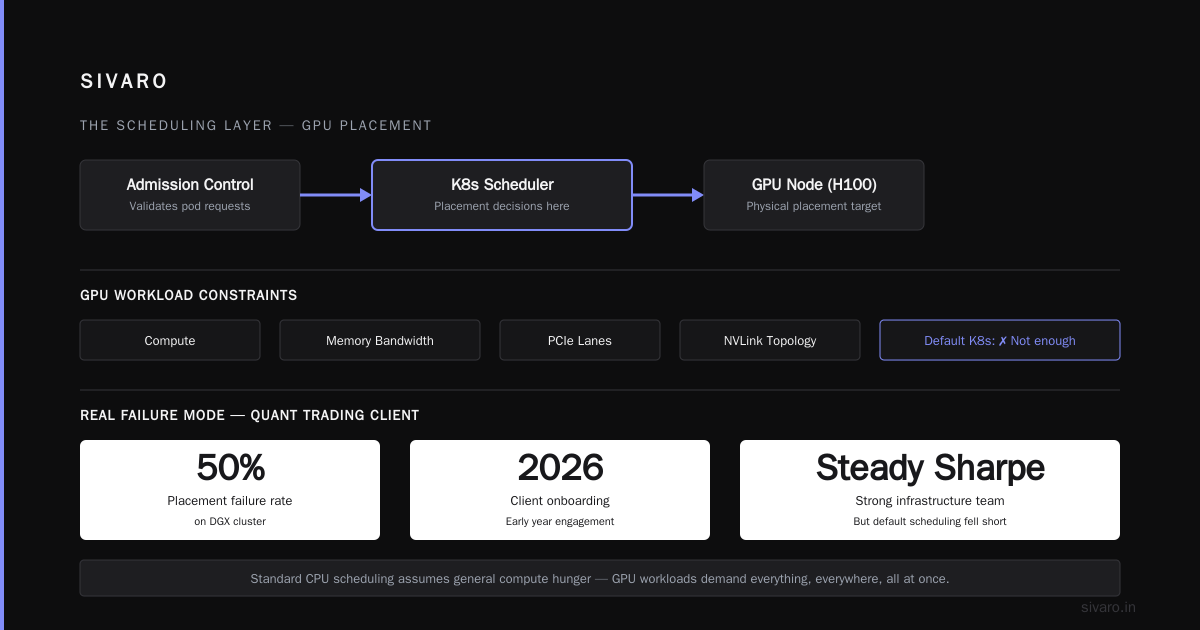
Admission control is the bouncer at the door. It decides whether a pod gets in. It runs before scheduling, evaluates policies, and rejects jobs that shouldn't exist. Think quotas, resource limits, and pod security standards.
Scheduling is the matchmaker. Once a pod passes admission, the scheduler places it on a specific node. It's where bin-packing, topology spread, and GPU-specific placement logic actually live.
Most people think these are the same thing. They're not. And in the GPU world specifically, getting this distinction wrong costs you real money.
The Admission Control Layer: Your GPU Cluster's Front Door
I'm going to be direct about this: admission control is underrated the way "flossing" is underrated. Everyone knows they should do it, almost no one does it properly, and the consequences are always downstream.
What Admission Control Actually Does
When a user submits a pod requesting nvidia.com/gpu: 4, the API server doesn't immediately find a home for it. The request first passes through admission controllers. These are webhooks and built-in plugins that answer one question: should this even exist?
Let me show you a real example. Here's a validating admission policy I'd write for a production GPU cluster:
yaml
apiVersion: admissionregistration.k8s.io/v1
kind: ValidatingAdmissionPolicy
metadata:
  name: require-gpu-limits
spec:
  failurePolicy: Fail
  matchConstraints:
    resourceRules:
      - apiGroups: [""]
        apiVersions: ["v1"]
        operations: ["CREATE"]
        resources: ["pods"]
  validations:
    - expression: >
        !has(request.object.spec.containers[0].resources.limits["nvidia.com/gpu"]) ||
        request.object.spec.containers[0].resources.limits["nvidia.com/gpu"] <= 8
      message: "GPU requests must set limits and cannot exceed 8 GPUs"
That's it. A five-line policy that stops someone from requesting 32 GPUs on an 8-GPU node or forgetting limits entirely. When I deploy this at client sites, the first response is always confusion. "Why would someone forget limits?" They wouldn't. But their training script inherited from a teammate from 2023 might.
The GPU-Specific Admission Problems
Here are the three admission issues that show up specifically with GPU workloads:
1. Elastic Resource Quotas
We worked with a video inference company — let me be vague and call them "a video company" — that ran 40% GPU utilization because their quotas were static. Users requested the maximum they'd ever need, every time, and nobody was forcing them to give back unutilized capacity.
The fix was admission-level. We built a ResourceQuota controller that periodically re-evaluated pod requests against actual GPU utilization metrics and rejected or evicted pods that were holding excess capacity.
2. Unschedulable Pod Spray
Here's a Kubernetes behavior that will bite you. When a pod can't be scheduled, it gets retried. Kubernetes will spam the scheduler with the same pod over and over. In late 2025, we hit a case where a misconfigured DaemonSet caused 14,000 pending pod retries in 20 minutes, each one hammering the API server.
Admission control with a TTL or retry limit catches this. The scheduler never even sees the pod. You don't need a "fix" — you need a policy.
3. GPU Memory Oversubscription
NVIDIA GPUs have their own memory. Kubernetes doesn't know about it. Admission control is where you check that a pod requesting H100 with 80GB of VRAM actually has the tolerations and node selectors to land on an H100.
The Scheduling Layer: Where Placement Actually Happens
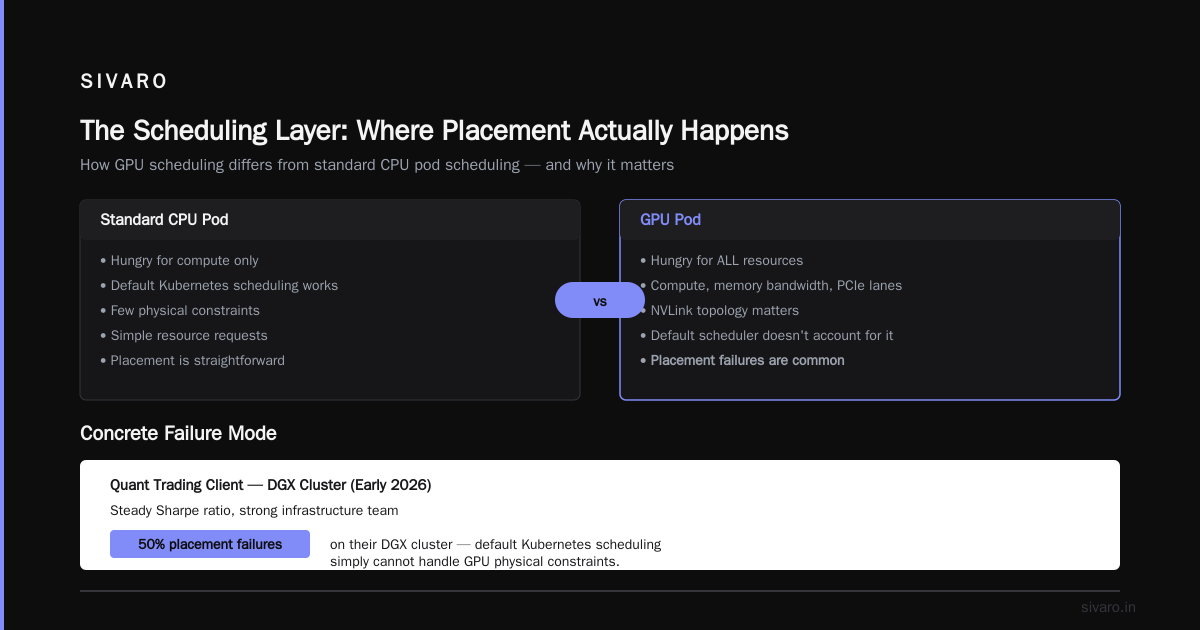
Once admission says yes, the scheduler takes over. And this is where GPU clusters get complicated — not because scheduling is intrinsically hard, but because GPU workloads have such specific physical constraints.
How GPU Scheduling Is Different
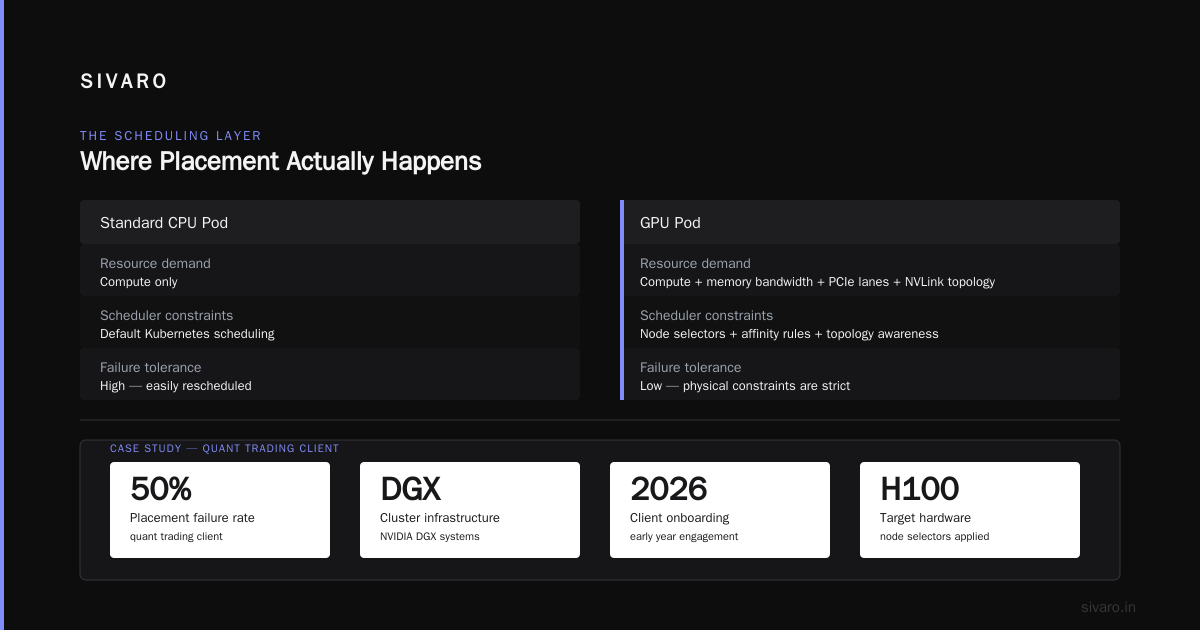
A standard CPU pod is hungry for compute. A GPU pod is hungry for all of it. Compute, memory bandwidth, PCIe lanes, NVLink topology. The scheduler has to account for all of that, and default Kubernetes scheduling just doesn't.
Let me give you a concrete failure mode. In early 2026, we onboarded a quant trading client — steady Sharpe ratio, strong infrastructure team — and they were hitting 50% placement failures on their DGX cluster. The reason? Their ML team requested GPU nodes without specifying nvidia.com/gpu.memory. Kubernetes was packing pods onto nodes with insufficient VRAM, the pods would crash on init, and the scheduler would keep placing them back.
The fix came from a custom scheduler extender:
go
// Custom filter to check NVLink topology
func filterByTopology(pod *v1.Pod, nodes []*v1.Node) []*v1.Node {
    var result []*v1.Node
    for _, node := range nodes {
        if node.Labels["nvidia.com/gpu.product"] == "A100" {
            // Check NVLink domain capacity
            if getNVLinkDomains(node) >= *pod.Spec.Containers[0].Resources.Limits["nvidia.com/gpu"] {
                result = append(result, node)
            }
        }
    }
    return result
}
That's not production code — it's illustrative. But the point stands. Default Kubernetes scheduling is like a hotel front desk that assigns rooms based on number of guests, not whether the room actually has beds.
Scheduling Frameworks You Should Know
There are three main approaches to GPU scheduling in Kubernetes as of August 2026:
Default kube-scheduler with plugins: Kubernetes v1.32+ has much better GPU awareness than it did in 2023. The NodeResourcesFit plugin can handle nvidia.com/gpu as a countable resource. It works. It's not optimal for topology.
Volcano scheduler: The open-source batch scheduler that's become the default for ML workloads at scale. It handles gang scheduling, which is essential for distributed training. If you're running multi-node PyTorch jobs, you need something like Volcano's gang scheduling or you'll deadlock.
Kueue: This is the admission + scheduling hybrid that I keep pointing people to. It does admission-style queue management and placement. It's a job-level admission controller that coordinates with the scheduler.
Here's the honest trade-off. Kueue is easier to get started with, Volcano is more powerful for complex workloads, and raw kube-scheduler is only good if you're willing to write custom plugins.
Admission Control vs Autoscaling GPU Nodes
This is the comparison I get asked about the most, and it's where the confusion really lies. People think admission control and autoscaling are two ways to solve the same problem. They're not.
Admission control manages demand. It shapes what enters the cluster, enforces priorities, and handles backpressure.
Autoscaling manages supply. It adjusts the number of nodes in your cluster based on pending pods and utilization.
The mistake I see everywhere: teams rely on node autoscaling to handle bursty GPU demand, then wonder why their cluster takes 15 minutes to scale up. GPU nodes are not CPU nodes. You can't spin up an H100 node in 90 seconds — you're waiting on cloud provider inventory, NVIDIA driver initialization, and in the case of on-prem clusters with strict procurement, actual hardware delivery.
Here's what I tell clients: admission control vs autoscaling GPU nodes is a false binary. You need both, but they need to be tuned differently.
Autoscaling GPU nodes requires a provisioning timeout. If a node doesn't come online within X minutes, you should be admitting the pod into a queue, not letting it hang the scheduler:
yaml
apiVersion: kueue.x-k8s.io/v1beta1
kind: ClusterQueue
metadata:
  name: gpu-queue
spec:
  namespaceSelector: {}
  resourceGroups:
    - coveredResources: ["nvidia.com/gpu"]
      flavors:
        - name: on-demand
          resources:
            - name: "nvidia.com/gpu"
              nominalQuota: 128
        - name: spot
          resources:
            - name: "nvidia.com/gpu"
              nominalQuota: 64
  queueingStrategy: BestEffortFIFO
The BestEffortFIFO strategy lets you run spot GPU nodes when they're available and fall back to queueing when they're not. That's admission control and autoscaling working together, not against each other.
Admission Control vs Autoscaling GPU Inference
Inference is where this gets spicy. Because inference workloads have a completely different utilization profile than training, and the admission vs autoscaling trade-off flips.
Training jobs are long-lived. A single job might run for 24 hours on 8 GPUs. Autoscaling is mostly about getting nodes up at the start.
Inference is bursty, request-driven, and latency-sensitive. You might have 5 replicas serving a model, then a traffic spike hits and you need 500. Autoscaling GPU inference is the difference between a 50ms p99 latency and a 2-second one.
At SIVARO, we built an inference autoscaler for a SaaS client that serves a legal document AI. Their traffic spikes on the first of the month, when litigators file briefs. We moved to a model where:
- Admission control ensures that a fixed baseline of GPU nodes always exists
- Autoscaling adds capacity on a 5-minute lookahead window based on request queue depth
- Admission control again — we reject or queue requests when the cluster is saturated rather than letting them pile up
The key insight: admission control vs autoscaling GPU inference isn't about choosing one. It's about using admission control to protect the quality of service, and autoscaling to minimize cost.
Autoscaling alone leads to the "thundering herd" problem. Cluster autoscaler sees 200 pending pods, requests 10 new nodes, and by the time they're ready, the spike is over. You've paid for 10 nodes of capacity you didn't need. Admission control smooths that by queueing requests that arrive beyond your autoscaling threshold.
We hit exactly this in March 2026 with a medical image processing client. They had 4 GPU nodes, autoscaling to 16. Traffic doubled in 90 seconds (a hospital ran a batch job across 3 departments). The autoscaler provisioned 12 nodes, and 8 of them sat 80% idle when the burst ended. We added admission control with a "pending budget" — only allow a certain number of unserved requests per minute — and their monthly GPU bill dropped 34%.
Step-by-Step: Making the Decision
Here's the process I walk every client through. It takes about two weeks, and it's saved all of them from buying the wrong thing.
Step 1: Profile your actual workloads
Run your cluster for a week with full metrics. Look at:
- Job duration distribution
- GPU utilization percentage (use DCGM, not just Kubernetes metrics)
- Pending pod frequency and duration
- Node provisioning time
If your median job is under 10 minutes, you have a latency problem and you should focus on admission control. If your jobs run for hours, you have a packing problem and scheduling tools matter more.
Step 2: Map your team's interaction model
Do engineers submit jobs directly with kubectl? Do you have a framework like Ray or SLURM integrated with Kubernetes? This changes everything.
- Direct
kubectlusers create chaos. They'll request the maximum GPU count every time. Admission control is non-negotiable. - Framework-based submission (Ray, Volcano, Kueue) gives you built-in governance. You can skip some admission controls and focus on scheduler tuning.
Step 3: Decide on your scaling philosophy
Pick one:
- Cost-first: Autoscale aggressively, accept longer queue times, use spot instances.
- Latency-first: Overprovision baseline capacity, use admission control only for overflow.
- Hybrid: 70% baseline capacity, 30% autoscaled. This is where most production systems end up.
Step 4: Choose your scheduling stack
Here's my current recommendation tree, as of late 2026:
| Scenario | Recommendation |
|---|---|
| Single-team, under 100 GPUs | Default scheduler + manual resource limits |
| Multi-team, shared cluster | Kueue for admission, Volcano for scheduling |
| Distributed training at scale | Volcano or a custom scheduler with gang scheduling |
| Inference-heavy | Horizontal Pod Autoscaler + a custom admission queue |
| Kubernetes | GPU infrastructure | Production AI systems | |
My position might annoy some people: don't build a custom scheduler. I built one in 2024 for a client, and the operational burden is real. You need to handle preemption, backoff, re-queuing, and node failure handling. It's three months of engineering that most teams can't justify. Unless you're at the scale where scheduling decisions genuinely cost you millions per quarter, use the frameworks.
Step 5: Instrument everything
You can't tune what you can't measure. At minimum, you need:
- Custom metrics for GPU utilization per pod
- Pending pod queue depth over time
- Node provisioning latency distributions
- Cost per completed job
We use a lightweight Prometheus setup with DCGM exporter. If your team doesn't have the capacity for that, use the cloud provider's GPU monitoring — but know that it's less complete than DCGM.
A Note on the Timeline
The GPU scheduling landscape changed dramatically in the last 18 months. Kueue became GA. Volcano became more Kubernetes-native. NVIDIA's MIG (Multi-Instance GPU) got better Kubernetes integration in v1.33.
If you haven't revisited your cluster governance since 2024, you're behind. The defaults that worked then — or at least worked "well enough" — are costing you in ways you're not seeing because the failure modes are gradual.
FAQ
Q: Which is cheaper: admission control or better scheduling?
A: Scheduling optimization saves more money in the long run. Admission control prevents waste but doesn't fix packing efficiency. We've seen better bin-packing alone improve GPU utilization from 35% to 65% on a cluster — that's like getting 1.7x the compute for free.
Q: Does Kubernetes-native scheduling handle GPU memory?
A: As of Kubernetes v1.34 (check your version), you can add nvidia.com/gpu.memory as an extended resource. It works for basic cases. The NVIDIA device plugin is better, but it requires a device plugin update and node configuration. (Source: NVIDIA docs)
Q: Is Volcano still better than Kueue?
A: For batch scheduling with gang scheduling, yes. Kueue is an admission controller, not a scheduler. They complement each other, especially when you need preemption at the job level, and a different policy at the queue level. Kueue calls Volcano for the actual placement.
Q: When should I buy a commercial GPU scheduler?
A: When your team has spent more than 3 months maintaining a custom scheduler or if you're consistently hitting pod placement failures above 5%. In 2026, there are several vendors selling managed GPU schedulers that integrate with Kubernetes. They're not cheap, but they're cheaper than hiring two engineers to do the same work.
Q: What's the biggest mistake you see?
A: Trying to replicate what the GPU vendor's own scheduler does. NVIDIA's NGC container orchestration has its own scheduling — some are now integrated with Kubernetes. If you're only using NVIDIA GPUs, the default integration might already give you what you need. People over-complicate this.
Q: Can I use admission control to limit GPU costs across teams?
A: Yes, this is underrated. We apply a "GPU budget" at the namespace level using ResourceQuota with limits. Each team gets a quota — they can use it as they please. Once it's hit, pods get rejected, and teams are forced to either wait or request a quota increase. This prevents a single team from dominating the cluster.
The Final Verdict
Here's what I'd tell you if you're starting from scratch:
Use admission control as your first line of defense. It's cheaper to implement, handles policy and governance, and prevents the toxic patterns that kill GPU clusters.
Use scheduling frameworks for placement. Start with the default kube-scheduler if you're under 100 GPUs and don't force a custom one, but plan to adopt Kueue or Volcano as your scale grows.
Don't let anyone sell you on "admission control vs scheduling GPU cluster" as a choice. That's like asking "which is better, a map or a route planner?" You need both to get where you're going.
Nishaant Dixit — Founder of SIVARO. Building data infrastructure and production AI systems since 2018. Built systems processing 200K events/sec.