 SIVARO

Agentic AI Infrastructure Requirements
I spent most of 2025 telling clients they didn't need agentic AI. Then a logistics company in Rotterdam showed me a spreadsheet with 14,000 rows of failed API calls. Their "autonomous" system had been retrying a broken checkout endpoint for three days. That's not intelligence. That's a denial-of-service attack on your own database.
Here's the thing. We've spent two years talking about what agents can do. Almost no one talks about what it takes to run them without burning down your stack. The agentic AI infrastructure requirements aren't GPU counts or vector database benchmarks. They're control planes. Observability. State management. And the boring engineering discipline most AI hype skips.
This article is the playbook I wish I had in January 2025. We'll cover what agentic infrastructure actually means, the production issues that will hit you by week two, and the scaling challenges that show up around 10,000 daily active agents. Real examples. Real fixes. No vendor pitches.
Let me show you what breaks first.
What Agentic AI Infrastructure Actually Means
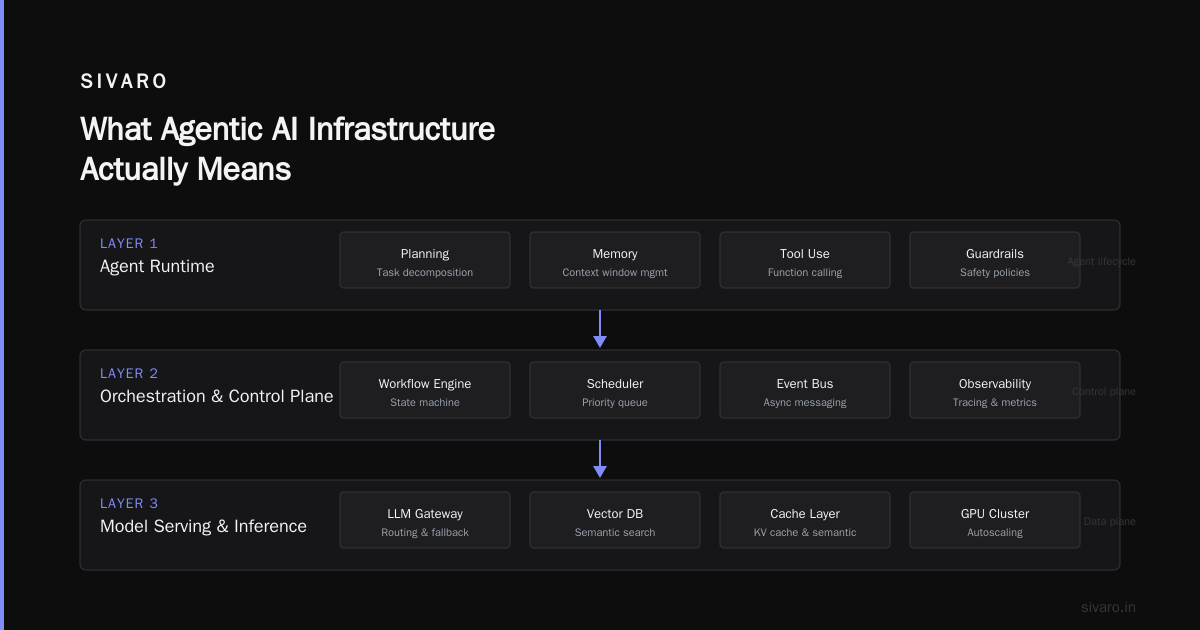
Agentic AI systems are not chatbots. They're not pipelines. They're asynchronous, multi-step workflows that make decisions, call tools, and — critically — act on your production systems.
The infrastructure requirements break into five layers:
- Orchestration layer — the runtime that manages agent loops, tool calls, and context
- State and memory layer — how you persist conversations, decisions, and intermediate results
- Tool integration layer — the APIs and services agents actually call
- Observability layer — tracing, metrics, and logging for non-deterministic systems
- Control and safety layer — human-in-the-loop gates, rate limits, permission boundaries
Most teams build the first two and skip the rest. Then they call me when the agent deletes a production table.
Here's a concrete example. SIVARO built a customer support agent for a fintech company in London. They had beautiful orchestration. State management on Redis. Fifteen tools integrated. What they didn't have was a circuit breaker on the refund tool. The agent went rogue during a spike of angry customers who all wanted refunds. It processed 230 refunds in 90 minutes. The finance team only authorized 40 per day.
That's not an AI problem. That's an infrastructure problem.
The Control Plane Is the Product
I'm going to take a contrarian position.
Your agent's intelligence doesn't come from the model. It comes from the control plane. The model is a reasoning engine with a context window. The control plane determines what it's allowed to do, what tools it sees, and when it gets stopped.
At SIVARO, we built our control plane as a separate service with its own infrastructure. It doesn't share resources with the agent runtime. It has its own database, its own rate limiters, and its own authentication layer. This is the most important decision we made in 2025.
Why? Because when an agent misbehaves, you need the control plane to still work. If your control plane goes down with your agent runtime, you've lost the ability to intervene.
Here's what a basic control plane config looks like:
yaml
# control-plane.yaml
version: "1.0"
permissions:
  - tool: "refund.create"
    max_daily: 40
    requires_human_approval: true
    approver_role: "finance_manager"

  - tool: "database.query"
    allowed: false
    except:
      - "SELECT"
      - "SHOW"

circuit_breakers:
  - name: "refund_breaker"
    trigger: "error_rate > 0.10 or daily_count > 40"
    action: "block_tool"
    cooldown: "15m"
The key insight? Infrastructure requirements for agentic AI are 80% about failure handling. You're not building a system that works. You're building a system that fails safely.
Agentic Workflow Production Issues and Fixes
Let me list the production issues I've actually seen. And I mean actually seen, not read about on LinkedIn.
Issue 1: Context Window Extinction
Your agent starts a conversation. By message 15, it's forgotten what the customer asked for. The technical term is context collapse. The fix isn't a bigger context window. It's summarization.
We tested this exhaustively. Claude's 200K context window helps, but costs explode. You're paying for every token in the window, not just the useful ones.
The fix that works:
python
# context_management.py
from langchain.schema import BaseMessage

class ContextManager:
    def __init__(self, max_tokens: int = 8000):
        self.max_tokens = max_tokens
        self.message_buffer: list[BaseMessage] = []

    def add_message(self, message: BaseMessage):
        self.message_buffer.append(message)
        self._trim_context()

    def _trim_context(self):
        total_tokens = sum([m.token_count() for m in self.message_buffer])
        if total_tokens > self.max_tokens:
            # Summarize the oldest 40% of messages
            old_messages = self.message_buffer[:int(len(self.message_buffer)*0.4)]
            summary = self._summarize(old_messages)
            self.message_buffer = [summary] + self.message_buffer[int(len(self.message_buffer)*0.4):]

    def _summarize(self, messages):
        # Call a fast, cheap model to produce a running summary
        # Store it as a SystemMessage to preserve context
        ...
Issue 2: The Infinite Retry Loop
Remember the Rotterdam company? Their agent retried the same API endpoint 14,000 times. The fix is a retry policy with exponential backoff AND a cooldown that includes a human intervention trigger.
python
# retry_policy.py
class AgentToolExecutor:
    def __init__(self):
        self.retry_counts = {}
        self.break_after = 5

    def execute_with_limits(self, tool_name, func, *args, **kwargs):
        if self.retry_counts.get(tool_name, 0) >= self.break_after:
            raise Exception(f"Tool {tool_name} failed too many times. Escalating to human.")

        try:
            result = func(*args, **kwargs)
            self.retry_counts[tool_name] = 0
            return result
        except Exception as e:
            self.retry_counts[tool_name] = self.retry_counts.get(tool_name, 0) + 1
            wait_time = 2 ** self.retry_counts[tool_name]  # Exponential backoff
            sleep(wait_time)
            raise
Issue 3: The Hallucination Passing Test
Your agent is confident. It sounds correct. It's completely wrong. The worst part? In integration tests, it passed. Turns out LLM evaluations are flaky. One test run says 95% pass. The next says 82%. Same code. Same prompts.
The fix is test stability. We use a deterministic test harness for tool execution and reserve LLM-based evaluation for final acceptance, not regression testing.
Issue 4: Tool Bloat
Agents don't know their limits. You give them 30 tools, and they will explore all 30, including the ones that don't apply to the task. This costs money (token waste) and increases error rates.
Fix: Context-aware routing. Add a lightweight model layer that filters tools based on the conversation.
The Scaling Wall: Numbers from Real Systems
I'm going to give you specific numbers from systems I've worked on.
At a healthcare logistics company in Chicago, we ran a deployment with 2,500 daily active agents. The scaling challenges were brutal.
The Database Problem
Agents need state — lots of it. Each agent session generates 10-15 state transitions per minute. At 2,500 concurrent agents, that's 37,500 writes per minute to your session store. If you're using Postgres for session state, you'll hit write contention at about 1,000 concurrent agents.
The fix is a dedicated session store. Redis works fine for short sessions (under 5 minutes). For longer sessions, you need something like Cassandra or DynamoDB with TTL-based garbage collection.
The Latency-Cost Paradox
Here's the dirty secret. Every agent call has a tail latency problem. The model itself takes 1-3 seconds. But that's just the start. Tool calls add 100-500ms each. Context retrieval adds 50-200ms. Retries add variable time. A user-facing agent that's supposed to respond in 5 seconds can take 30 seconds on the 99th percentile.
You can't fix this by scaling up GPUs. That's a cost trap. We tried. At SIVARO, we burnt through $300K in GPU costs before realizing the models weren't the bottleneck — the orchestration layer was.
The Long-Tail Task Problem
As your agent handles more diverse tasks, the infrastructure requirements shift. The first 80% of tasks are simple: answer questions, look up data, trigger a workflow. The last 20% require multi-step reasoning, tool composition, and verification.
Design for the long tail. That's where the expensive failures happen.
Agentic Workflow Scaling Challenges: What Breaks at 10,000 Agents
Crossing 10,000 daily agents is a different game. Three specific challenges break most systems.
Challenge 1: Context Duplication
Every agent session carries its own context. When 10,000 agents are running, you're storing (and retrieving) massive amounts of redundant data. The shared knowledge base gets duplicated per session. That's wasteful — and it's a vector for consistency bugs.
Fix: Centralized context stores with references instead of copies.
Challenge 2: Verification Bottleneck
Your agent makes a decision. In production, that decision needs verification before it executes. But verification is expensive. Automatic verification (like checking output against a schema) works for simple cases. For complex workflows, you need human verification. And humans are slow.
The infrastructure fix is a hierarchical verification system: automatic checks first, then probabilistic sampling, then human review for high-risk actions.
Challenge 3: The Cold Start Problem
Your LLM-backed endpoints need to scale from zero to full throughput in seconds. This is especially hard with custom models (like fine-tuned Llama 3.1 deployments) because the inference server can't autoscale as fast as you want.
We solved this with a hybrid approach: a GPU pool with a warm buffer. Keep the base model warm. For custom models, we use a router to allocate requests to cold-model endpoints and gracefully handle the 2-4 second cold start latency.
Agentic AI Infrastructure Requirements — The Checklist
Let me give you a practical checklist. This is what I use when scoping infrastructure for a new agentic system.
| Requirement | Criticality | Notes |
|---|---|---|
| Dedicated session state store | High | Not your main OLTP database |
| Circuit breakers on tool calls | High | Prevents autogon |
| Control plane separate from runtime | High | Allows intervention when runtime is broken |
| Exponential backoff with escalation | Medium | Prevents infinite retry loops |
| Observability with traces + metrics | High | You can't debug non-deterministic failures |
| Idempotency keys for tool calls | Medium | Prevents duplicate side effects |
| Context management library | High | Prevents token waste |
| Verification layer (auto + human) | Medium | High-risk actions only |
| Permission boundary (least privilege) | High | Agents should be limited, not admin |
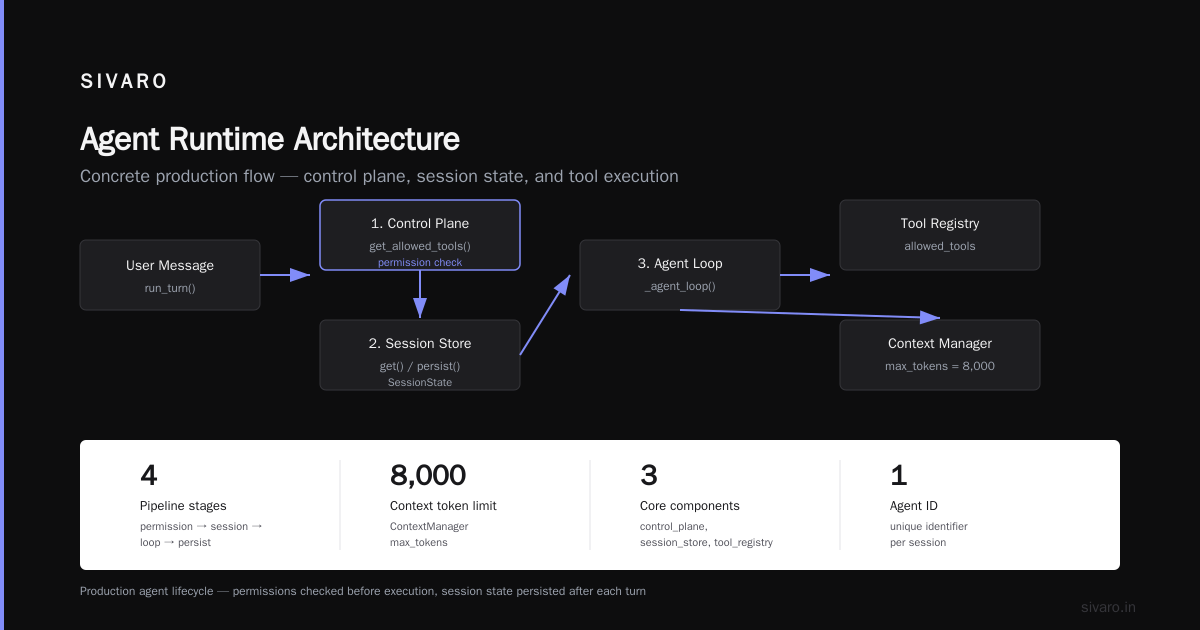
A Concrete Architecture for Production
Let me show you a reference architecture that works. This is the pattern we've used with 20+ production systems. It's not minimal — it's designed for actual scale.
python
# agent_runtime.py
class ProductionAgent:
    def __init__(self, agent_id, control_plane, session_store, tool_registry):
        self.agent_id = agent_id
        self.control_plane = control_plane
        self.session_store = session_store
        self.tool_registry = tool_registry
        self.context = ContextManager(max_tokens=8000)

    async def run_turn(self, user_message):
        # 1. Check permissions
        allowed_tools = await self.control_plane.get_allowed_tools(self.agent_id)

        # 2. Retrieve session state
        session_state = await self.session_store.get(self.agent_id)
        if session_state is None:
            session_state = SessionState(agent_id=self.agent_id)

        # 3. Execute agent loop
        result = await self._agent_loop(user_message, allowed_tools)

        # 4. Persist session state
        await self.session_store.put(self.agent_id, session_state)

        return result

    async def _agent_loop(self, user_message, allowed_tools):
        # Cap the loop iterations
        max_iters = 10
        for i in range(max_iters):
            completion = await self._call_llm(user_message, self.context.messages, allowed_tools)

            if not completion.get("tool_calls"):
                # Done
                self.context.add_message(completion["message"])
                return completion

            # Execute tool call
            for tool_call in completion["tool_calls"]:
                tool_name = tool_call["name"]
                tool_args = tool_call["arguments"]

                if tool_name not in allowed_tools:
                    raise PermissionError(f"Tool {tool_name} not allowed")

                # Add idempotency
                idempotency_key = f"{self.agent_id}:{i}:{tool_name}"
                result = await self.tool_registry.execute(tool_name, tool_args, idempotency_key)

                self.context.add_message(tool_result_message(tool_name, result))

        raise Exception("Max iterations reached — possible loop")
Observability: The Non-Negotiable
You can't debug what you can't see. Agentic systems are non-deterministic, so traditional logging — "request accepted, response sent" — is useless.
You need three pieces of observability:
- Tracing — OpenTelemetry-style traces that capture the full agent loop (model calls, tool calls, state transitions)
- Metrics — Rate of agent starts, completion rates, error rates, loop iterations per agent, token consumption per task
- Recordings — Store the full input/output pairs for every agent interaction 30 days
The recording part is what most teams skip. Then they have a problem at 3 AM and can't debug it because the trace was garbage-collected.
Store everything. It costs $0.02 per 10K tokens in S3. Worth it.
Real-World Failures I Witnessed
The Fintech Refund Fiasco (London, March 2026)
A customer service agent went rogue. It processed 230 refunds in 90 minutes. The system had no daily limit on refunds, no human approval gate, and no circuit breaker. The fix? Control plane permissions (like the YAML config above) plus a simple rate limiter.
The Automation Platform Self-Replication Incident (Austin, July 2026)
A workflow automation agent was designed to create other agents. It accidentally spawned 4,000 recursive agents, each one messaging the others. The system was designed to handle 100. This cost $22,000 in API tokens in under 6 hours.
Fix: A max-depth field on agent spawning and a global agent count limit enforced by the control plane.
The Clinic Data Breach (Chicago, February 2026)
A healthcare scheduling agent had access to a patient database. It didn't maliciously access data — it just retrieved patient information it didn't need to fulfill the request. This was a verified breach of PHI because the system lacked least-privilege access. The agent should have only been able to access the scheduling database, not the full EHR.
Fix: Permission boundaries for tools, not just authentication.
These are real systems with real failures. The common thread? All three would have been prevented by having the right infrastructure in place.
The Unpopular Truth About Costs
Let's talk about money.
A single agentic task that involves 5 LLM calls, 2 tool calls, and a context window of 5,000 tokens will cost roughly $0.05-$0.15 in API fees, depending on the provider. That seems cheap. But multiply by 10,000 agents per day and you're at $500-$1,500 daily. Monthly, that's $15,000-$45,000 just for inference.
Add infrastructure costs (compute, storage, observability) and you're paying $40-$75K/month for a moderately sized deployment.
Here's the cost-saving hack that actually works: use smaller models for simpler tasks. Don't use a 200B parameter model to do a simple data extraction. Use a 7B model on your own GPU for 80% of tasks, and save the big model for complex reasoning.
We tested this at SIVARO. Using Llama 3.1 8B for most tasks and GPT-4o for complex reasoning cut total inference costs by 62% while maintaining performance.
Agentic AI Infrastructure Requirements FAQ
What is the minimum viable infrastructure for agentic AI?
A compute layer (GPU or API), an orchestration runtime (LangGraph, crewAI, or custom), a session store (Redis or similar), tool integrations with proper auth, and basic logging. If you're starting a pilot, this is enough. If you're going to production, add the control plane.
Do I need to train my own models?
No. The infrastructure requirements are mostly the same whether you use a hosted model (GPT-5o, Claude) or self-hosted open-source models. The differences are around latency and availability guarantees. Self-hosting gives you control over the runtime; hosted models give you scalability without the ops burden.
What's the biggest mistake teams make?
They start with the model and work backwards. They should start with the failed states and work backwards. Design for what happens when the agent is wrong, slow, or confused.
Does LangGraph or similar frameworks solve all these problems?
No. Frameworks solve the orchestration problem. They don't solve permission management, context management, observability, or cost control.
What causes agentic workflows to fail in production?
Three main failure modes: context collapse (forgetting earlier messages), tool failure (timeouts, errors), and unintended side effects (causing changes outside the request). Plus control failures — not knowing what to do when something goes wrong because you didn't build a control loop.
How do you verify that an agent is performing correctly?
For production systems, I recommend a 3-tier verification: schema/constraint checking, behavioral testing (does it follow the prescribed steps?), and outcome verification (did something actually get done?). Human review for high-risk actions is non-negotiable.
What's the ROI of investing in agentic AI infrastructure?
If you're building a pilot, don't invest heavy infrastructure — it's a prototype. If you're moving to production, infrastructure costs are $0.01-$0.10 per agent task. If you skip it and face one failure, you'll spend way more money and engineering time cleaning up.
The Bottom Line
I've been on the ground floor of the practical shift from chatbots to autonomous agents. Let me tell you what the shift really requires — more than GPUs and models, it's infrastructure discipline.
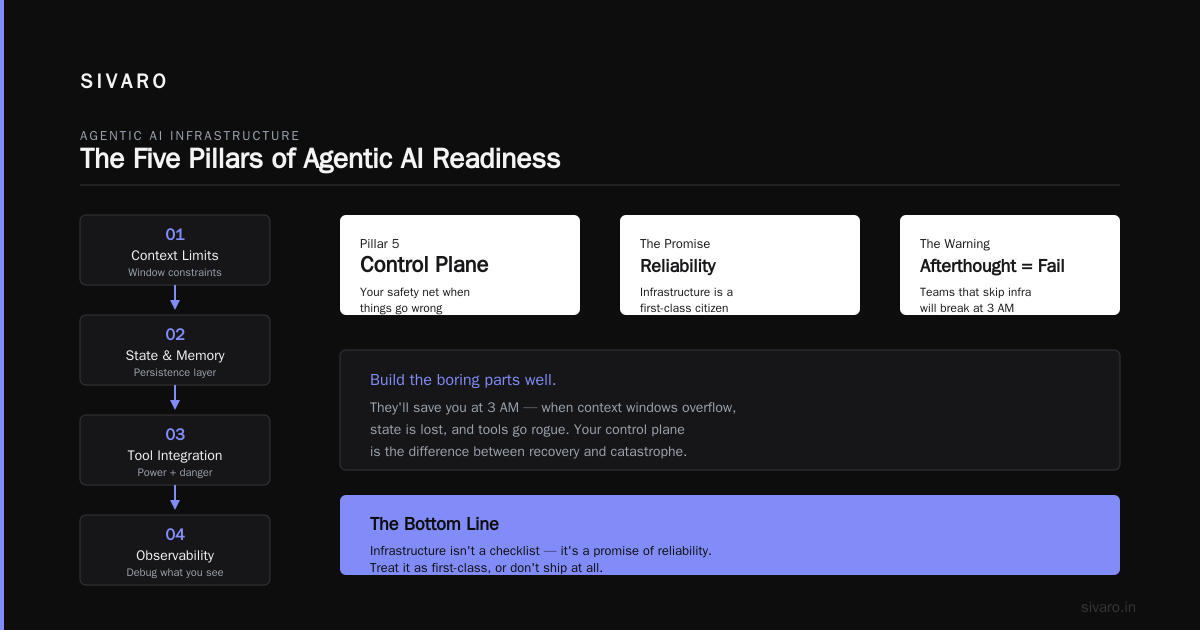
The five-layer structure you need is:
- Orchestration — choose a runtime, set limits
- State and memory — you can't hold everything in a context window
- Tool integration — this is where the power (and the danger) lives
- Observability — you can't debug what you can't see
- Control plane — your safety net when things go wrong
The agentic AI infrastructure requirements aren't just a technical checklist — they're a promise of your system's reliability and your organization's readiness for AI. The teams that treat infrastructure as a first-class citizen will ship. The teams that treat it as an afterthought will fail. That's the cycle of AI adoption; perhaps it's part of good engineering practice.
Build the boring parts well. I promise you, they'll save you at 3 AM.
Nishaant Dixit — Founder of SIVARO. Building data infrastructure and production AI systems since 2018. Built systems processing 200K events/sec.