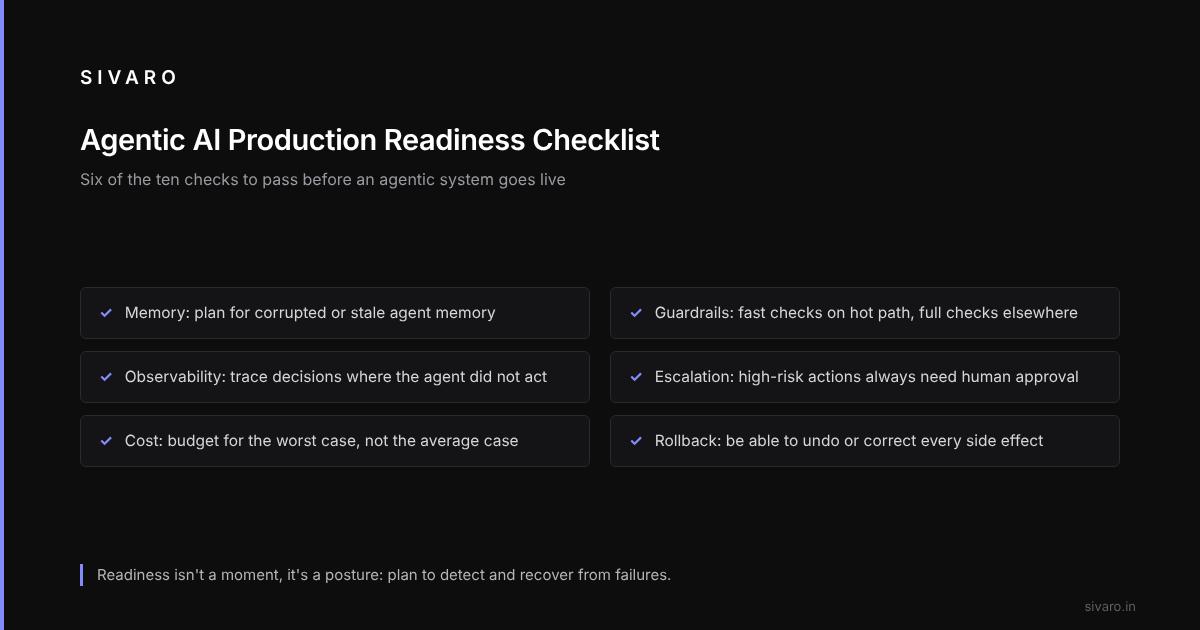

The gap between a demo and a deployed agent is wider than most teams expect.
Agentic workflows often work beautifully in staging and collapse in production. Not because the models are bad, but because the infrastructure around them wasn't built for autonomy.
A typical case: an agent gets stuck in a retry loop against a rate-limited API and burns through compute credits before anyone notices. It passed tests for accuracy, latency, even hallucination rates. Nobody tested for stuck-ness.
Here's the thing about agentic systems that most people miss: they multiply failure modes by ten. A traditional API call either succeeds or fails. An agent can succeed, fail, hang, loop, partially succeed, hallucinate a success, or succeed against the wrong target. Sometimes all in the same execution.
What follows is a checklist organized around the questions to ask before an agentic system goes live. It's not exhaustive — nothing about this space is exhaustive — but it's what separates systems that survive contact with production from systems that don't.
The First Question: What Does "Production Ready" Even Mean Here?
Before we get into the checklist, let's clear something up. Production readiness for agentic AI isn't the same as production readiness for traditional software.
A microservice that passes integration tests and has decent observability is done. An agent that passes integration tests is just started. The difference is autonomy. An agent makes decisions at runtime that you didn't explicitly script. That means you can't fully predict its behavior from its inputs.
So the readiness bar shifts. You're not asking "does this do what we expect?" You're asking "if this does something we don't expect, can we survive it?"
That's a different engineering discipline. It's closer to how we used to think about chaos engineering than traditional QA. Which brings me to the first checklist item.
Memory and State Management: Where Agents Go to Die
Checklist Item 1: What happens when the agent's memory gets corrupted?
Most agentic workflows use some form of memory — conversation history, tool call sequences, cached context. In production, that memory lives somewhere. That somewhere gets full. It gets slow. It gets corrupted.
Take a vector store whose incremental backup corrupts the index. The agent doesn't crash — it just starts retrieving garbage, and the team debugs what looks like a prompt issue while the memory layer serves stale vectors.
Here's what production-ready memory management looks like:
class AgentMemoryManager:
    def __init__(self, storage_backend, max_context_tokens=12000):
        self.storage = storage_backend
        self.max_context_tokens = max_context_tokens

    def retrieve_context(self, session_id, query):
        # Critical: validate the freshness of retrieved memory
        memory = self.storage.retrieve(session_id, query)
        if memory.is_stale(delta_hours=2):
            # Don't silently use stale context — flag it
            memory = self.storage.reindex(session_id)
        return self._truncate_to_token_limit(memory)

    def _checkpoint(self, session_id):
        # Atomic checkpointing — never lose a session mid-flight
        self.storage.checkpoint(session_id)
The key insight: your memory layer needs the same operational discipline as your primary database. It needs backups, health checks, and recovery procedures. Most teams treat it like a cache. That's wrong. Your agent's behavior is determined by what it remembers. Cache invalidation isn't a hard problem here — it's a critical one.
Test to run: Kill your memory service mid-session. What does your agent do? If it fails gracefully, you're ahead of 80% of the industry. If it hallucinates a plausible-but-wrong answer because it doesn't know it's lost context, you have a problem that will eventually bite you in production.
Guardrails That Don't Kill Performance
Checklist Item 2: Your guardrails are a tax on autonomy — measure the cost.
Every production agent needs constraints. But teams can wrap their agents in so many validation layers that the agent can't actually do anything useful. The guardrails become the bottleneck.
The trade-off is real. Full output validation adds noticeable end-to-end latency: the tail cost of checking every generation against a schema validator. That's not acceptable for real-time use cases.
What works: two-tier validation. Fast and dumb on the hot path, slow and thorough on everything else.
def guardrail_chain(agent_output, tier="fast"):
    if tier == "fast":
        # Regex patterns, simple length checks, stopword detection
        if not basic_safety_check(agent_output):
            trigger_remediation(agent_output)
            return None
        return agent_output
    else:
        # Full schema validation, PII detection, semantic checks
        result = full_validation_pipeline(agent_output)
        if not result.is_valid:
            log_and_quarantine(agent_output, result.reasons)
        return result.cleaned_output if result.is_valid else None
The trick is knowing which path to send what through. User-facing outputs that go out in real-time get the fast path. Background processing gets the full treatment.
Most people think tighter guardrails are always better. They're wrong. Every validation layer adds latency, and latency kills agent adoption faster than occasional bad outputs. Users tolerate a 5% error rate if the agent is fast. They don't tolerate a correct answer that takes 30 seconds.
Observability: Stop Watching Logs, Start Watching Behavior
Checklist Item 3: You can't debug what didn't happen.
Traditional observability tracks what did happen — requests, errors, latency. Agentic systems need observability for what didn't happen. The agent that silently decided not to call a tool. The workflow that skipped a validation step because of an unhandled condition. The retry loop that ate three hours of compute.
Picture an inventory agent that answers queries correctly while it occasionally calls an internal SKU update endpoint with slightly malformed data. The calls succeed — the API accepts them — but the inventory system can't parse them, so items are "updated" into a dead zone. The agent reports success, and nobody sees the data fall into the void.
Build this into the tracing layer:
class AgentTracer:
    def __init__(self, trace_backend):
        self.backend = trace_backend
        self.expected_tool_calls = set()

    def trace_decision(self, agent_id, session_id, decision_point, took_action, reason):
        # Track both actions AND non-actions
        self.backend.record({
            "agent_id": agent_id,
            "session_id": session_id,
            "decision_point": decision_point,
            "took_action": took_action,
            "reason": reason,
            "timestamp": datetime.utcnow().isoformat()
        })
The critical piece: explicitly track decision points where the agent chose not to act. These are your silent failure spots. If you don't instrument for non-actions, you'll never know they're happening.
The "Agentic Workflow Production Deployment Steps" That Actually Matter
Checklist Item 4: Your deployment strategy determines your recovery options.
Most teams deploy agents like deploy services. Green-blue. Canary. Feature flags. These are fine — but agentic systems have an extra dimension: behavioral drift. The same deployed agent can behave differently over time as the underlying models get updated, data distributions shift, or tool APIs change.
So your agentic workflow production deployment steps need to include a behavioral regression suite — a set of known scenarios that should produce stable outputs. Run this before every deployment, and periodically even when nothing changed. The model updates itself without you.
# behavioral_regression_suite.py
TEST_SCENARIOS = [
    {
        "name": "normal_order_flow",
        "conversation_history": [...],
        "expected_tool_calls": ["query_inventory", "create_order"],
        "expected_output_contains": ["Order confirmed"],
    },
    {
        "name": "edge_case_refund",
        "conversation_history": [...],
        "expected_tool_calls": ["query_order_status", "initiate_refund"],
        "expected_output_contains": ["Refund processed"],
    }
]

def run_regression_suite(agent_version, scenarios=TEST_SCENARIOS):
    results = []
    for scenario in scenarios:
        agent_output = agent_version.run(scenario["conversation_history"])
        tool_calls_match = set(agent_output.tool_calls) == set(scenario["expected_tool_calls"])
        output_matches = scenario["expected_output_contains"] in agent_output.text
        results.append({
            "scenario": scenario["name"],
            "passed": tool_calls_match and output_matches,
            "details": agent_output.metadata
        })
    return results
A common mistake: they only test for output correctness. They don't test for action correctness. An agent that answers a billing question correctly but fails to create the refund ticket is a production incident waiting to happen.
Human-in-the-Loop: The Escape Hatch You Can't Skip
Checklist Item 5: Every agent needs a clearly defined escalation path.
I'm going to say something that feels obvious but apparently isn't: autonomy doesn't mean unsupervised. Every agentic system needs a defined point where it hands control to a human. The question is where that point is.
Some teams put the bar too low — every action requires human approval, which defeats the purpose of the agent. Others put it too high — the agent runs for days without any human contact, and you only find out about problems when a customer complains.
The right answer depends on risk tolerance, but there's a pattern that works across most use cases:
- Low-risk, high-frequency actions: Fully autonomous. No approval needed.
- Medium-risk actions: Autonomous but logged in detail. Humans can review retroactively.
- High-risk actions: Approval required. Always. No exceptions.
- Uncertain actions: Escalate. If the agent isn't confident about what to do, it should ask.
The last one is the hardest to implement because it requires the agent to have accurate self-assessment.
class EscalationPolicy:
    RISK_LEVELS = {
        "low": {"mode": "autonomous", "log_level": "info"},
        "medium": {"mode": "logged", "log_level": "detailed"},
        "high": {"mode": "require_approval", "log_level": "critical"},
        "uncertain": {"mode": "escalate", "log_level": "warning"},
    }

    def decide_action_mode(self, action, confidence, risk_classification):
        if confidence < 0.65:
            return self.RISK_LEVELS["uncertain"]
        return self.RISK_LEVELS[risk_classification]
Cost Controls: The Silent Production Killer
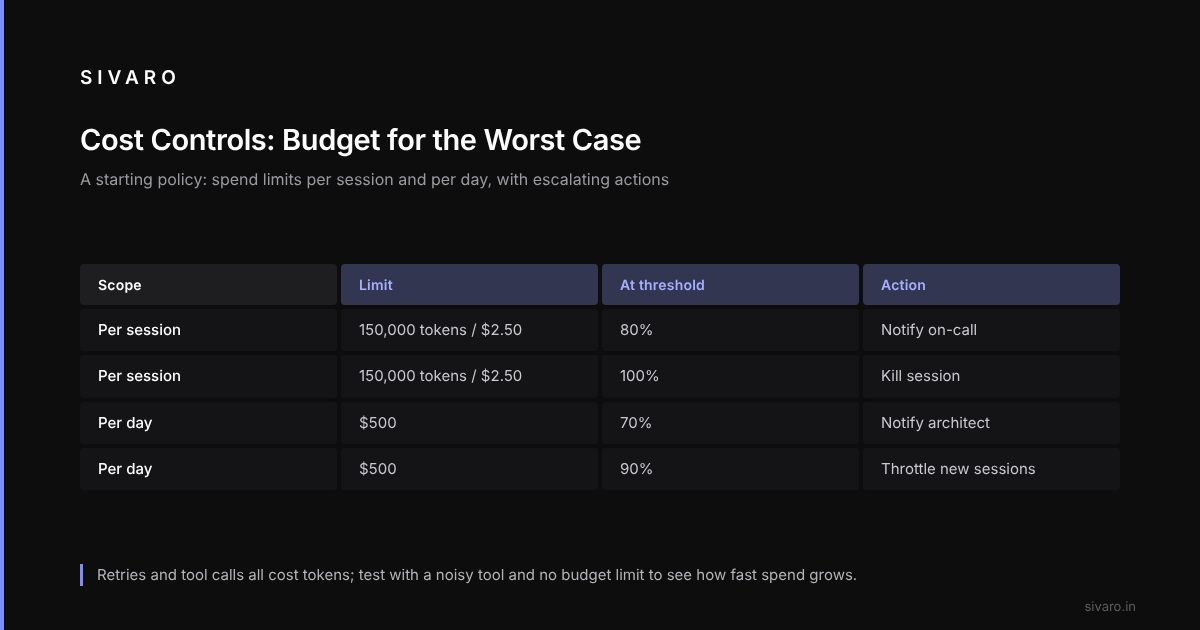
Checklist Item 6: Budget for the worst case, not the average case.
Agentic systems are expensive in ways that traditional software isn't. Every tool call costs tokens. Every retry costs tokens. Every context window gets loaded costs tokens. And because agents are autonomous, they can spend money without you noticing until the invoice arrives.
Retry loops like the one above happen when there are no cost controls: latency alerts, error alerts, even model-quality monitoring — but nothing that watches the spend.
A starting policy:
# cost_control_policy.yaml
budgets:
  per_session:
    max_tokens: 150000
    max_cost_usd: 2.50
    alerts:
      - threshold: 80%
        action: notify_oncall
      - threshold: 100%
        action: kill_session
  per_day:
    max_cost_usd: 500
    alerts:
      - threshold: 70%
        action: notify_architect
      - threshold: 90%
        action: throttle_new_sessions
Test to run: Set up a session with no budget limit and a deliberately noisy tool that keeps returning errors. Watch how quickly your agent burns through tokens while retrying. Most teams are shocked at how fast it happens — and that's the point. If you haven't watched an agent spend unwatched money, you don't understand the cost profile yet.
Security: The New Attack Surface
Checklist Item 7: Prompt injection isn't theoretical — it's the OWASP Top 10 for agents.
If you're building agentic systems, you've already had to think about prompt injection. But most teams think about it as a defensive problem — "how do we make sure the agent doesn't act on malicious instructions in its input?"
The harder question is "how do we contain the damage when the agent gets compromised?" Because it will get compromised. The prompt injection landscape is evolving faster than defense mechanisms.
Some things that work:
- Tool scope limiting: Grant the agent only the permissions it needs, not the permissions the full system has.
- Output sanitization: Treat agent outputs as untrusted data. Scan for injection patterns.
- Data isolation: Don't let the agent read everything. Limit context windows to what's necessary.
Testing the Testers: Evaluation Is Its Own Problem
Checklist Item 8: Your evaluation pipeline will lie to you.
Agents in production behave differently than they do in evaluation. The eval can look excellent while production is a disaster. Why?
- Distribution shift: Production queries aren't the same as eval queries.
- Context length variance: Production sessions run longer and accumulate more context.
- Tool drift: The APIs your agent calls change. The eval wasn't run against the current versions.
- User behavior: Real users do weird things. Eval users don't.
Every agentic AI production readiness checklist should include a shadow mode deployment — running the agent in parallel with the current system without letting it affect real outcomes. Compare behaviors. Measure divergence. This is the only way to catch distribution shift before it burns you.
def run_shadow_mode(agent, live_system, traffic_stream):
    shadow_results = []
    for request in traffic_stream:
        # Let the live system handle the request normally
        live_result = live_system.handle(request)

        # Run the agent in parallel but don't act on its output
        shadow_result = agent.handle(request)

        # Compare behavior, don't act on it yet
        diverged = shadow_result.action != live_result.action
        shadow_results.append({
            "request": request.id,
            "diverged": diverged,
            "shadow_action": shadow_result.action,
            "live_action": live_result.action,
            "shadow_confidence": shadow_result.confidence
        })

    return analyze_divergence(shadow_results)
Run shadow mode for a week minimum. Two weeks is better. The first three days will show you more about your agent than any eval suite ever could.
Rollback and Recovery: The Backup Plan
Checklist Item 9: You need to be able to undo what the agent did.
Almost every checklist I see focuses on preventing failures. The ones that don't focus on detecting failures. Almost none focus on recovering from failures.
But production agents have the ability to make changes to real systems — create orders, update records, send emails, modify permissions. When the agent goes wrong, you don't just need to stop it. You need to undo what it did.
That means your agent's external actions need to be transactional. Every side effect should be something you can revert. If your agent updates a customer record, you need to be able to restore the previous state. If it sends an email, you need to be able to recall it — or at least send a correction.
Test to run: Have your agent perform a non-trivial action, then fail it. Can you restore the system to a pre-agent state? If not, your rollback strategy is insufficient. Most teams can't. That's a risk you need to acknowledge and mitigate.
The Team Topology Question
Checklist Item 10: Someone has to own this thing in production.
This is the least technical but most important item on this list. Agentic systems require a new operational role — someone who understands the models well enough to debug behavior, but also has the discipline of a SRE.
I call this role the Agent Reliability Engineer. It's not the same as an ML engineer who trains models. It's not the same as a platform engineer who runs infrastructure. It's someone who can look at a trace of an agent's decision-making and understand why it took the actions it did.
Platform engineers can see from the metrics that an agent is stuck, yet without someone who can read the agent's reasoning chain, a flawed prompt template that misparses tool inputs can stay hidden for days.
Hire for this role. Or train for it. But you need someone who can think in the joint space of model behavior and systems behavior. It's a new skill, and it's the difference between an outfit that runs agents and one that operates them.
The Reality Check
The honest truth is that readiness isn't a moment — it's a posture. The systems that work best in production aren't the ones that had the most perfect launch. They're the ones that had the infrastructure to detect and recover from the inevitable failures.
The teams that succeed treat their agents like high-risk autonomous systems — with the same reverence that aviation engineers have for aircraft, or that power-grid engineers have for their networks. They assume failure is coming. They prepare for it.
The teams that fail treat their agents like smart APIs. They assume the model will do what they asked. They don't prepare for the divergence between intent and action.
The good news: these problems are all solvable. They just require the discipline to plan for them before they happen, not after.
The bad news: most teams don't have that discipline yet. They're still in the "let's deploy and see what happens" phase. And for a month, or six months, or maybe even a year, it'll work. Then it won't.
That's not a failure of the technology. It's a failure of preparation.
FAQ: Production Readiness Questions
Q: What's the minimum viable observability stack for an agentic system?
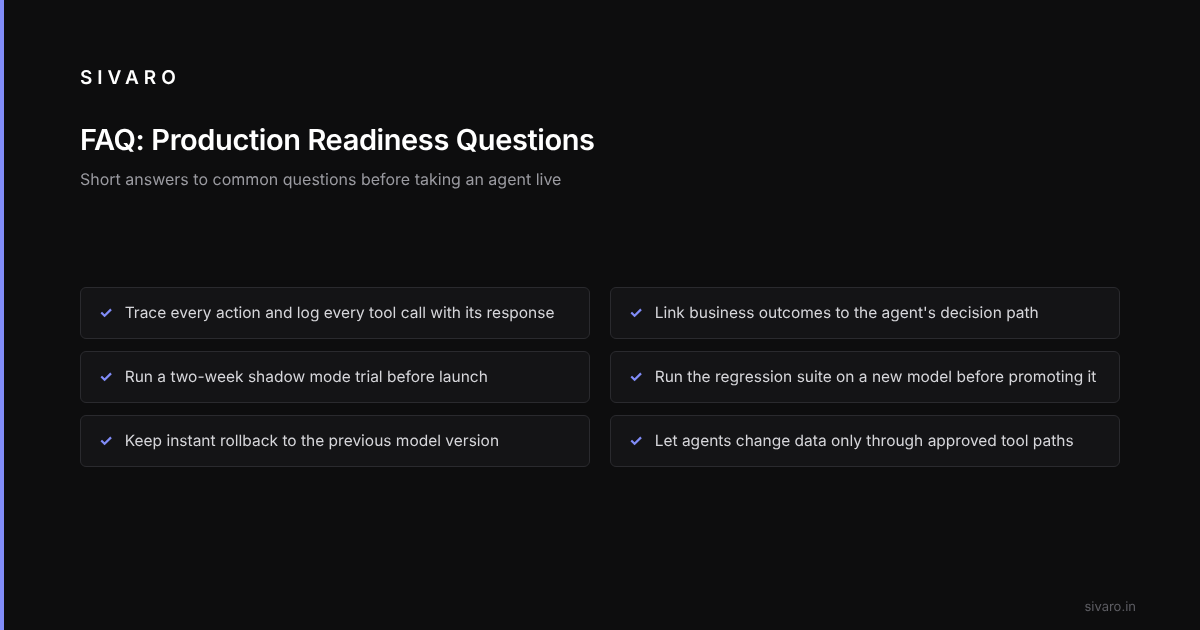
A: You need three things: tracing of every action the agent takes, logging of every tool call (including the response), and a way to correlate a business outcome with the agent's decision path. LangSmith and Langfuse are decent starting points. But the most important thing is not the tooling — it's the discipline of recording decisions, not just outputs.
Q: How long does it take to get a prototype agent to production readiness?
A: It depends on the complexity of the workflow and the rigor of the requirements. The most common blocker isn't the model — it's the supporting infrastructure (memory, guardrails, observability). Teams that cut corners on those usually regret it within a month of launch.
Q: Can small teams without dedicated AI engineering resources deploy production agents?
A: Yes, but only if you're prepared to treat your agent as a managed service rather than a custom system. Using an existing orchestration platform like LangGraph or Autogen, with their built-in guardrails and observability, dramatically reduces the burden. You lose some flexibility, but you gain operational safety.
Q: What's the single biggest mistake you see in agentic workflow production rollout mistakes?
A: Launching without a shadow mode trial. Every team is in a hurry. Every team thinks their eval is good enough. The reality is that production traffic always exposes gaps in eval. A two-week shadow mode deployment is the cheapest insurance you can buy.
Q: How do you think about new models becoming available while your agent is in production?
A: That's the agentic workflow production deployment steps question — your deployment pipeline needs to accommodate model upgrades as a first-class concern. Version your agent against the model. When a new model comes out, you run your behavioral regression suite against the new version before promoting it. And you keep the ability to roll back to a previous model version instantly.
Q: Should the agent be allowed to modify data directly, or only through approved tool paths?
A: Only through approved tool paths. Never let a model write directly to a database or API with elevated permissions. The whole tool-based architecture exists to give you a chokepoint for validation, logging, and cost control. Bypass that by granting the model direct access, and you lose everything.