 SIVARO
Agentic Workflow Deployment Steps: The 2026 Playbook
You've built a demo that works. The agent responds perfectly to your scripted prompts. Your stakeholders are impressed. And then you deploy it to production, where the real world lives — and it falls apart in seventeen minutes.
I've been there. SIVARO has spent the last four years deploying agentic systems for clients in logistics, fintech, and healthcare. We've made the mistakes so you don't have to. This guide walks through agentic workflow deployment steps that actually work in production, not just in a notebook.
What We Mean When We Say "Agentic Workflow"
Here's the definition that matters: an agentic workflow is a sequence of steps where an LLM makes decisions about control flow — not just generating text, but choosing what to do next. The model might pick a tool, decide to ask a clarifying question, or branch down a completely different path based on context.
The distinction between workflows and agents gets muddied constantly. Orkes draws a clean line: workflows are predefined paths with LLM decision points, while agents are autonomous systems that plan and execute their own paths. In practice, you'll deploy something in between — and that's fine.
This guide covers the actual deployment sequence. Architecture. Orchestration. State. Memory. Evaluation. Observability. Scaling. The boring stuff that determines whether your agent survives contact with real users.
Architecture Is a Choice, Not a Ceremony
Most teams start with the most autonomous architecture they can imagine. They read about agent frameworks and immediately build a fully autonomous loop where the LLM controls everything. This is almost always a mistake.
Start with the simplest architecture that solves the problem. For most use cases, that's a structured workflow with LLM decision points. You can add autonomy later — you can't easily subtract it.
At SIVARO, we deployed a document processing system for a logistics client in early 2026. The first version gave the agent free rein to extract, validate, and route shipping documents. It hallucinated a port code and nearly rerouted a container to the wrong country. We rebuilt it as a structured workflow: extraction step, validation step with fixed rules, routing decision handled by the LLM only when rules were ambiguous. AWS's guidance on agentic patterns matches what we learned — the pattern you choose determines failure modes more than any prompt engineering.
Here's the architecture decision tree we use:
- Do you need multi-step reasoning with external tool use? That's an agent.
- Does every request follow the same general path with occasional variations? That's a workflow with decision points.
- Are you just transforming text? That's a pipeline, not an agent. Stop overcomplicating it.
The most common failure I see is teams building agents when they need workflows. The second most common is the reverse.
Orchestration: The Boring Middle That Decides Everything
Your orchestration layer is the skeleton of your system. It coordinates the LLM calls, tool invocations, retries, and fallbacks. Get this wrong and nothing else matters.
We tested several orchestration approaches at SIVARO. We started with a custom Python orchestrator, moved to a framework, then came back to a hybrid. What we learned: the orchestration framework matters less than the conventions you enforce around it.
The Google ADK and Agent Engine guide shows a practical approach. They separate the agent definition from the deployment configuration, which is exactly right. You want your workflow logic to be testable without spinning up cloud infrastructure.
Here's a minimal example of what a workflow definition looks like when done right:
python
from workflow_framework import Workflow, Step

def validate_invoice(invoice_data):
    # Business rule validation - no LLM needed
    if not invoice_data.get("invoice_number"):
        raise ValueError("Missing invoice number")
    return invoice_data

def extract_with_llm(invoice_data, llm_client):
    # LLM step with structured output
    prompt = build_extraction_prompt(invoice_data)
    return llm_client.extract_structured(prompt, schema=InvoiceSchema)

workflow = Workflow(
    steps=[
        Step("validate", validate_invoice),
        Step("extract", extract_with_llm),
        Step("approve", approve_for_payment)
    ],
    retries=2,
    fallback="human_review_queue"
)
This is deliberately boring. That's the point. The orchestration layer shouldn't be clever — it should be reliable.
State Management: Your Agent Has Amnesia
LLMs are stateless. Your workflow is not. State management is the thing most teams don't think about until their agent forgets what it was doing mid-task and starts hallucinating from an empty context.
You need to answer three questions before you write a single line of orchestration code:
- Where does conversation state live?
- How do you persist intermediate results?
- How do you resume a workflow that crashed?
We use Redis for short-term state and Postgres for durable records. Every step in the workflow writes its output to the state store before the next step starts. If a step fails, we can resume from the last completed checkpoint instead of restarting the entire workflow.
The practical guide from arxiv makes a point I've seen play out in production: state management and memory are the difference between a demo and a deployed system. You can't separate the agent's "memory" from your infrastructure decisions.
Here's the state pattern that has worked for us:
python
class WorkflowState:
    def __init__(self, workflow_id):
        self.workflow_id = workflow_id
        self.context = {}
        self.checkpoint = None

    def save_checkpoint(self, step_name, data):
        self.checkpoint = {
            "step": step_name,
            "data": data,
            "timestamp": time.time()
        }
        redis_client.set(
            f"workflow:{self.workflow_id}:checkpoint",
            json.dumps(self.checkpoint)
        )

    def resume(self):
        if self.checkpoint:
            return self.checkpoint["step"], self.checkpoint["data"]
        return None, None
The context window is not your state store. You need persistence outside the prompt. If your agent crashes and loses its context, users won't forgive it.
Memory: Short-Term, Long-Term, and Everything Between
Memory in agentic systems is genuinely hard. It's not just "remember what the user said in this session" — it's remembering across sessions, across users, and across tasks.
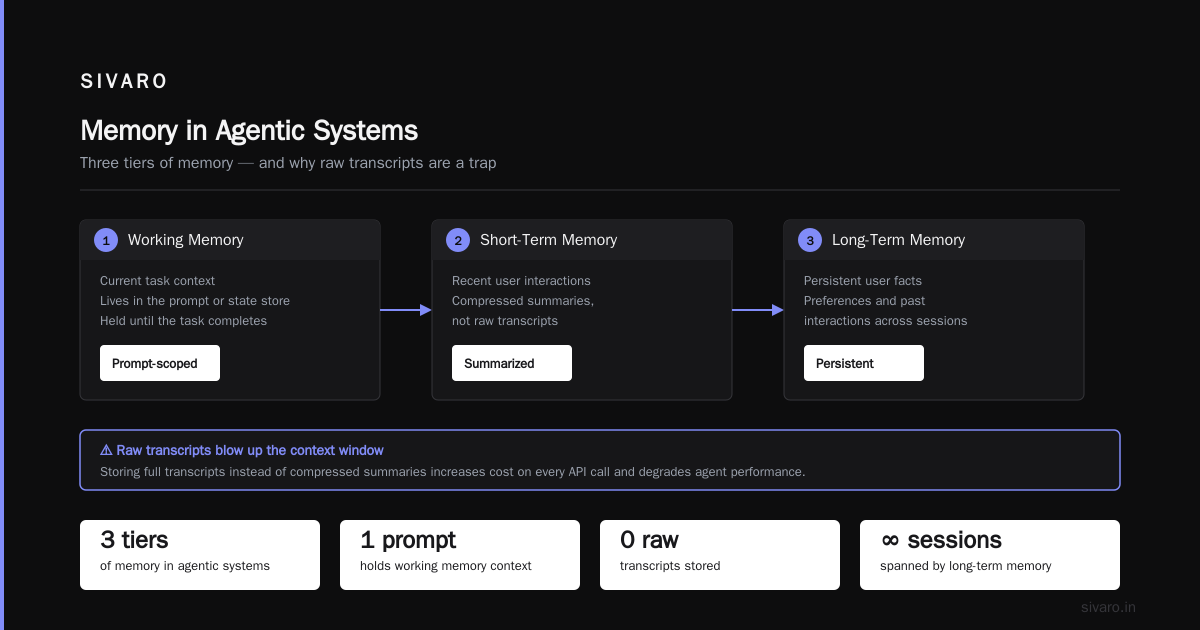
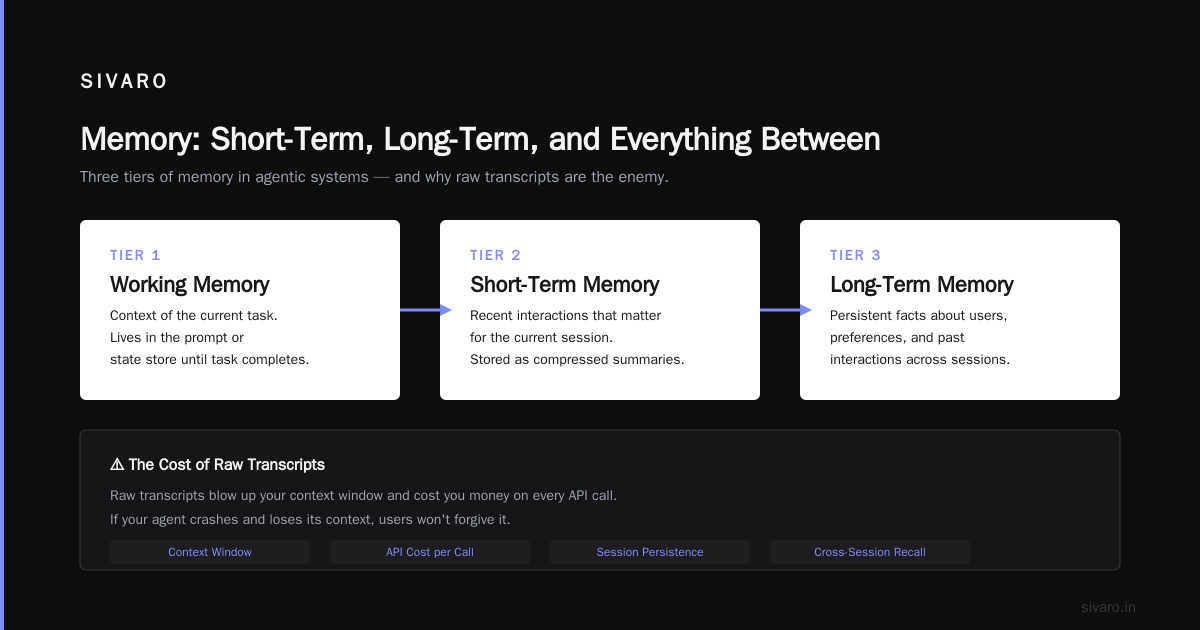
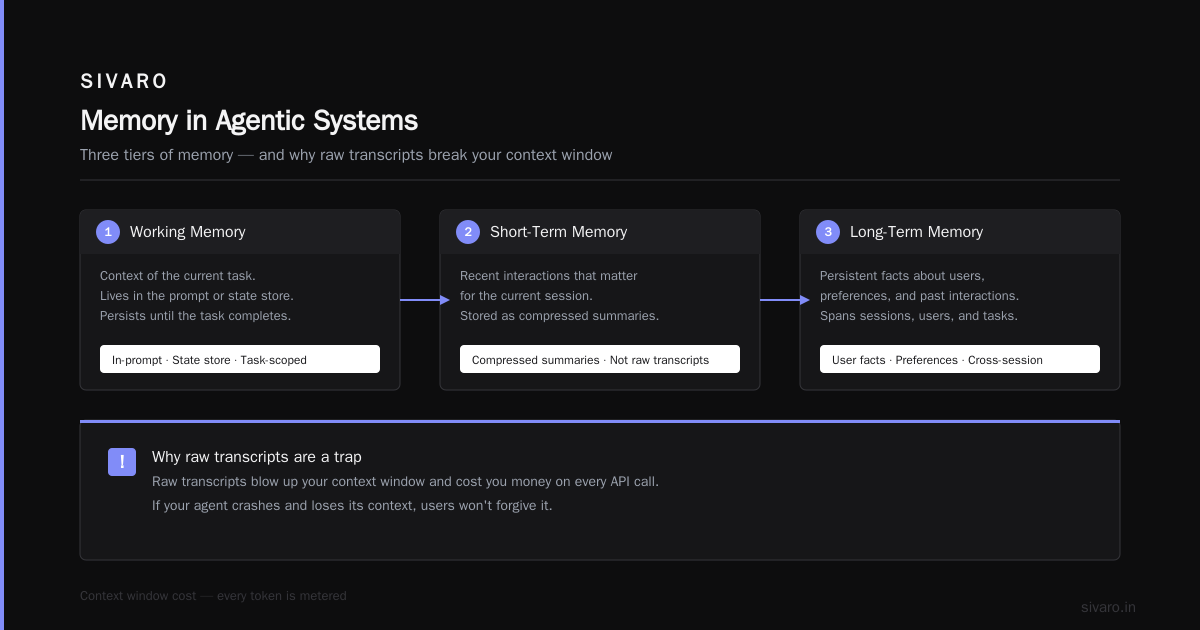
We classify memory into three tiers:
Working memory — the context of the current task. This lives in the prompt or state store)Skip until the task completes.
Short-term memory — recent interactions with a user that might matter for the current session. We store this as compressed summaries, not raw transcripts. Raw transcripts blow up your context window and cost you money on every API call.
Long-term memory — persistent facts about users, preferences, and past interactions. We store this in a structured database with embeddings for retrieval.
Here's what we learned the hard way: you need memory management policies before you need memory infrastructure. Decide what gets stored, what gets summarized, and what gets deleted. If you don't, your costs will spiral and your agent will start generating irrelevant responses from stale context.
The McKinsey analysis of agentic AI deployment found that companies who succeeded treated memory as an architectural concern from day one. Companies who failed treated it as an afterthought.
Evaluation Is the Job Nobody Wants
You cannot deploy an agentic system without an evaluation suite. This is non-negotiable. The problem is that evaluating LLM outputs is fundamentally different from evaluating traditional software.
Traditional software: deterministic inputs produce deterministic outputs. You write tests, they pass or fail.
Agentic systems: the same input can produce different outputs on different runs. The LLM can take different paths. The tools can return different results. You're testing a distribution, not a point.
We use three evaluation layers:
Unit tests — deterministic tests for individual tools and functions. The validation step either validates or it doesn't. No LLM involved.
Golden set tests — a curated set of 50-100 inputs with known-good outputs. We run the workflow against these on every change. We compare outputs using LLM-as-judge plus human review.
Production evaluation — we sample production traffic and manually review agent performance. This catches edge cases your test set missed.
The ijoer analysis of POC-to-production failures makes a critical point: most agentic AI projects fail at scale because the evaluation methodology doesn't scale. A POC works on 10 test cases. Production has 10,000 edge cases. Without automated evaluation, you can't ship updates confidently.
Here's a simple evaluation harness pattern:
python
def evaluate_workflow(test_cases):
    results = []
    for test in test_cases:
        output = run_workflow(test["input"])
        score = llm_as_judge(
            expected=test["expected_output"],
            actual=output,
            criteria=["correctness", "completeness", "format"]
        )
        results.append({
            "test_id": test["id"],
            "score": score,
            "output": output
        })

    pass_rate = sum(r["score"] > 0.8 for r in results) / len(results)
    return results, pass_rate
You need a baseline. Run this evaluation before you start optimizing prompts or adding features. If you don't know your current pass rate, you can't tell if changes are helping or hurting.
Observability: See Your Agent Think
Traditional logging doesn't work for agentic systems. You need to see the reasoning process, not just the final output. When an agent makes a bad decision, you need to know which prompt, which tool call, and which context led to that decision.
We built our observability stack around three data types:
Trace logs — every LLM call, tool invocation, and decision point gets logged with full context. We can replay any workflow run step by step.
Cost tracking — token usage per workflow run, per user, per feature. Without this, your agent could silently burn through your API budget.
Quality metrics — pass/fail rates, user satisfaction scores, escalation rates.
A trace log for a tool call looks like this:
json
{
  "timestamp": "2026-08-18T14:32:07Z",
  "workflow_id": "wf_8f3k2j",
  "step": "route_inquiry",
  "llm_call": {
    "model": "gpt-4o",
    "prompt_version": "v3",
    "input_tokens": 1243,
    "output_tokens": 86,
    "temperature": 0.2
  },
  "decision": "route_to_human",
  "confidence": 0.72,
  "tool_calls": []
}
The Virtido enterprise guide suggests treating observability as a feature, not a tool. I agree. Your stakeholders should be able to see why an agent made a decision. If they can't, you'll get blamed for every failure even when the agent was right.
Human-in-the-Loop: When to Intervene
Here's my contrarian take: most agents should have humans in the loop, and that's not a failure of the technology. It's a design decision.
For high-stakes actions — financial transactions, medical recommendations, legal decisions — a human should always approve the agent's plan before execution. For low-stakes actions — answering a support ticket, retrieving information — the agent should operate autonomously.
The tension is latency. If every agent action requires human approval, you've just built a slower version of the old system. But if no action requires approval, you're one hallucination away from a disaster.
We use confidence thresholds. The agent acts autonomously when its confidence is above 0.9. Between 0.7 and 0.9, it proposes actions for human approval. Below 0.7, it escalates to a human with full context.
python
def route_decision(agent_output):
    if agent_output.confidence > 0.9:
        return "autonomous"
    elif agent_output.confidence > 0.7:
        return "requires_approval"
    else:
        return "human_escalation"
This isn't a perfect system. Confidence scores are unreliable — LLMs are poorly calibrated. But as a rough heuristic, it beats either extreme.
Deployment Infrastructure: Ships in the Night
The deployment infrastructure for agentic workflows is not dramatically different from deploying any modern application. Containers, orchestration, CI/CD pipelines, autoscaling. The differences are in the details.
You need to version your prompts. Prompt changes are code changes. They should go through the same review process. We store prompts in version-controlled files and reference them by version number in the workflow definition.
yaml
# workflow-config.yaml
version: "1.4.2"
prompts:
  extract_invoice: prompts/extract_invoice_v3.txt
  validate_shipment: prompts/validate_shipment_v2.txt
models:
  default: gpt-4o
  fallback: claude-3.5-sonnet
retry_policy:
  max_retries: 3
  backoff: exponential
  max_wait: 30s
You also need a fallback model. When your primary provider has an outage — and they will — your workflow should automatically switch to a backup. The ADK deployment guide covers this pattern well.
We deploy to Kubernetes with a sidecar for metrics. Each workflow instance gets its own pod, and we scale based on queue depth, not request volume. Agentic workflows are longer-running than traditional API calls, so your autoscaling logic needs to account for that.
Scaling: The Load That Kills
Load testing an agentic workflow is nothing like load testing a REST API. Each workflow run makes multiple LLM calls. Each LLM call has variable latency — anywhere from 300ms to 30 seconds. Your scaling behavior has to account for this variability.
The ijoer article on scaling failures nails the core issue: most teams load test with synthetic data that doesn't match production patterns. Their agents collapse under real traffic because the test data didn't include edge cases, duplicate requests, or malicious inputs.
Our approach:
- Run load tests with recorded production traffic, not synthetic data.
- Test at 2x expected peak load.
- Monitor token consumption per workflow, not just request count.
- Rate limit LLM calls at the workflow level, not just the API level.
- Implement circuit breakers for downstream tools.
The scariest scaling problem is cost, not performance. An agent that works well on 100 requests might cost 10x more than expected at 100,000 requests. You need per-request cost budgets and alerting when they're exceeded.
Security: The New Attack Surface
Agentic workflows introduce security risks that traditional software doesn't have. The most dangerous one is prompt injection — a malicious user crafting input that makes your agent take unintended actions.
We take a layered approach:
Input sanitization — strip or escape potentially malicious content before it enters the prompt.
Tool isolation — tools run in sandboxed environments with minimal permissions. An agent can't execute arbitrary code on your infrastructure.
Output validation — agent outputs are validated against a schema before execution. The agent can't call a tool with malformed arguments.
Human approval for dangerous actions — as covered above, high-stakes actions require human signoff.
Here's what a tool sandbox looks like:
python
def safe_database_query(agent_query):
    # Validate the query is a SELECT statement
    if not agent_query.strip().upper().startswith("SELECT"):
        raise PermissionError("Only SELECT queries allowed")

    # Use a restricted database user
    with restricted_connection() as conn:
        result = conn.execute(agent_query, timeout=5)
        return result.fetchall()
The AWS agentic patterns guide covers security in more depth, and it's worth reading before you deploy. The threat model is genuinely different. A prompt injection attack on a traditional API is annoying. On an agentic workflow, it's a data breach.
Cost Optimization: Token Economics
Let's talk about money. Token costs are the dirty secret of agentic workflows. Every decision point costs tokens. Every tool call result gets fed back into context and costs more tokens. Context windows fill up, and you either truncate (losing information) or expand (paying more).
Our cost optimization playbook:
-
Use the smallest model that works. Don't use GPT-4-class models for tasks a smaller model can handle. We route simple classification to a smaller model and only escalate to a larger model for complex reasoning.
-
Cache aggressively. If the same question is asked multiple times, cache the answer. We've seen 30-40% cost reduction from caching alone.
-
Compress context between steps. Don't pass the full conversation history to every step. Summarize what matters.
-
Set token budgets per workflow. Kill workflows that exceed their budget instead of letting them spiral.
-
Batch where possible. If you're processing a queue of items, batch the LLM calls rather than making individual requests.
The Virtido guide mentions that enterprises underestimate token costs by 3-5x in their initial planning. That matches what we've seen. Budget for 3x your estimate, and you'll be in the right ballpark.
Failure Modes You Will Encounter
Let me give you the real failures we've seen. Not the theoretical ones — the ones that actually happen.
Failure 1: The Context Blowout. The agent accumulates context over multiple steps until the prompt is 90,000 tokens and costs $2 per run. This happened to us with a document processing workflow. Fix: aggressive summarization between steps.
Failure 2: The Tool Loop. The agent decides to call a tool, gets a result, and then decides to call the same tool again with slightly different arguments. And again. And again. This loops for 15 iterations before hitting the max limit. Fix: max iterations per workflow, plus a "does this look like a loop?" check.
Failure 3: The Confidence Mirage. The agent outputs high confidence but is completely wrong. This happens when the LLM is in a "trance" state, generating plausible but incorrect output. Fix: validation steps between critical transitions.
Failure 4: The Integration Fragility. The workflow depends on three external APIs. One returns a slightly different format. The whole workflow crashes. Fix: defensive parsing at every integration point.
Failure 5: The Overengineered Agent. The team builds a fully autonomous agent for a problem that needs a simple workflow. The agent is slow, expensive, and unpredictable. Fix: start simple, add autonomy only where it adds value.
Security and Governance
If you're deploying agentic workflows in a regulated industry, governance is your biggest challenge. Agents that make autonomous decisions raise questions about accountability, audit trails, and compliance.
The McKinsey piece has good advice on this: treat agentic AI deployment as a change management problem, not just a technical one. Your compliance team needs to understand what the agent does, how it makes decisions, and how to audit its actions.
We maintain an audit log for every workflow run: input, output, decisions, tool calls, human approvals. This isn't optional if you're in a regulated industry.
Agentic Workflow Production Deployment Challenges
Let's be honest about what goes wrong in production. The agentic workflow production deployment challenges we've hit:
Challenge 1: Data drift. Your training data doesn't match production data. The agent was tested on clean inputs but production has messy inputs.
Challenge 2: Dependency hell. Your workflow depends on APIs that change. The Google ADK guide has a pragmatic approach to testing against mock APIs before integrating with real ones.
Challenge 3: The "good enough" trap. The agent works 85% of the time. It fails on edge cases. Your team spends forever chasing 100% accuracy. The right move is to accept 85% and build a fallback for the remaining 15%.
Challenge 4: Organizational friction. Agents change workflows, roles, and responsibilities. Teams resist. The McKinsey lessons emphasize that success depends on getting people to adopt the technology.
Challenge 5: Evaluation drift. Your evaluation suite becomes stale. The agent changes, the test cases don't. Your pass rate starts lying to you.
A Practical Workflow for Software Development
One pattern we've seen work well is using agentic workflows to help with software development itself. Tim Deschryver's approach keeps the agentic workflow simple: a small number of steps, clearly defined responsibilities, and heavy human oversight.
The principle is simple: don't let your agent do everything. Give it specific, narrow tasks — review this code, suggest a fix for this bug, generate tests for this function. Then have a human review its output. This keeps the agent's failure modes bounded.
The same principle applies to any agentic workflow: scope it tightly. An agent that does one thing well is better than an agent that does ten things poorly.
The Deployment Checklist
Here's the checklist we use before any production deployment. It's not comprehensive, but it catches the most common issues.
Pre-deployment:
- [ ] Evaluation suite with baseline pass rate
- [ ] Load test at 2x expected peak
- [ ] Cost estimate per workflow run
- [ ] Fallback model configured
- [ ] Security review completed
- [ ] Human approval workflow tested
- [ ] Observability dashboards ready
Post-deployment:
- [ ] Monitor pass rate for regression
- [ ] Track token costs per workflow
- [ ] Review sampled production runs for quality
- [ ] Alert on failure rate threshold
- [ ] Update evaluation suite with production edge cases
The Pragmatic Path Forward
You don't need the perfect architecture. You need an architecture that works, that you can iterate on, and that you can observe. Start with a structured workflow with LLM decision points. Add autonomy gradually. Test everything. Accept imperfection. Build fallbacks.
The teams I see succeeding are the ones that treat agentic workflows as engineering problems, not magic. They version prompts like code, test like QA, and monitor like SREs. They ship small, iterate fast, and learn from failures.
Agentic AI is here to stay. The question is whether you can deploy it without burning money or credibility. The steps above are the difference between a demo and a production system.
Frequently Asked Questions
What's the difference between an agentic workflow and a regular API call?
A regular API call has fixed input and output. An agentic workflow can make decisions mid-execution — choosing tools, adapting prompts, and changing course based on intermediate results. The LLM influences the control flow, not just the output text.
How many steps should an agentic workflow have?
As few as possible. We start with 3-5 steps and only add more when the evaluation suite shows a gap. Each step is a chance for failure, added latency, and added cost.
What's the most common reason agentic workflows fail in production?
Context mismanagement. The agent loses track of what it was doing, or the context grows until it's too large and too expensive. State management and context compression are the most undervalued skills in agentic system design.
Do I need a specialized framework to deploy agentic workflows?
No. We've deployed successful systems with plain Python and simple orchestration code. Frameworks can help, but they can also constrain you. Start with the simplest tool that works and add complexity when needed.
How do you handle hallucination in production agents?
Validation steps between critical transitions. If the agent's output doesn't match the expected schema or fails business rules, we don't act on it. We either retry with a more constrained prompt or escalate to a human. Hallucinations are unavoidable — acting on them is a design failure.
What's the realistic timeline for production deployment?
For a well-scoped problem with a good team, 4-6 weeks from POC to production is realistic. But that assumes you have clean data, clear success metrics, and stakeholder buy-in. If any of those are missing, expect it to take longer.
Should I build or buy the agent infrastructure?
For a first deployment, use managed services. You have enough problems without also maintaining your own orchestration infrastructure. Once you've proven the use case, you can consider building your own. We've seen too many teams build infrastructure before they've built a working agent.
Nishaant Dixit — Founder of SIVARO. Building data infrastructure and production AI systems since 2018. Built systems processing 200K events/sec.