 SIVARO
Agentic Workflow Deployment Strategy: A Field Guide
Your first agentic workflow will fail in production. Not because the model is bad. Not because the code is wrong. Because you treated it like a microservice, and it isn't one.
I learned this the hard way at SIVARO in early 2025. We deployed a customer-support triage agent that was flawless in staging. Ninety-seven percent accuracy on our test set. Three weeks later, it was costing us customers. The agent kept making the same routing decision over and over, and nobody noticed until the queue backed up.
The problem wasn't the AI. It was the deployment strategy.
An agentic workflow deployment strategy is the complete set of practices for getting AI agents from your laptop into production safely—and keeping them there. It covers orchestration architecture, observability, rollback, and the messy reality of non-deterministic systems. It's not the same as deploying a web service. It's closer to deploying a new employee.
This guide covers what worked for us, what failed, and what I'd do differently. By the end, you'll have a concrete playbook for shipping agents that don't blow up.
The Architecture Decision Most People Get Wrong
Here's the thing about agentic systems: there's a spectrum between fully autonomous agents and rigid workflows. Most teams pick one extreme and defend it like it's a religion. Orkes explains the distinction well: workflows are deterministic paths, agents are autonomous decision-makers. The reality is that production systems need both.
We tested this directly. Two teams at SIVARO built the same invoice-processing system. Team A used a pure agent—the LLM had full autonomy to call tools, decide the order of operations, and handle exceptions. Team B used a fixed workflow with an LLM only at the extraction step.
Team A was more flexible. It handled weird invoice formats we hadn't anticipated. But it was also impossible to debug. When an invoice went wrong, we couldn't replay the exact sequence because the sequence was different every time. Team B was boring and reliable. It failed on edge cases, but the failures were predictable.
The right answer, as the AWS guidance on agentic patterns points out, is a hybrid. Use workflows for the steps you understand, and give the agent autonomy only where it adds real value. That sounds obvious, but most teams I talk to haven't made that decision explicitly.
Our current reference architecture looks like this:
yaml
orchestration:
  type: hybrid
  workflow_engine: temporal
  agent_runtime: custom
  patterns:
    - name: prompt_chaining
      use: when_steps_are_fixed
    - name: routing
      use: when_classification_is_required
    - name: evaluator_optimizer
      use: when_quality_matters_more_than_speed
    - name: autonomous_loop
      use: only_when_human_oversight_exists
The critical insight: define the boundaries between deterministic and non-deterministic components before you write a single line of agent code. You can't retrofit safety onto an autonomous agent.
Deploying the First Workflow: What Actually Works
Let's talk about the deployment itself. A practical guide from Google on production-ready agentic workflows suggests starting with a single workflow and obsessing over observability. I agree, but I'd go further: start with a workflow that has zero autonomous decision-making.
I'm serious. Deploy a deterministic workflow with an LLM doing a single task. Measure everything. Then add one degree of freedom. Then another. This is the opposite of what most teams do—they build the autonomous agent first and then try to constrain it.
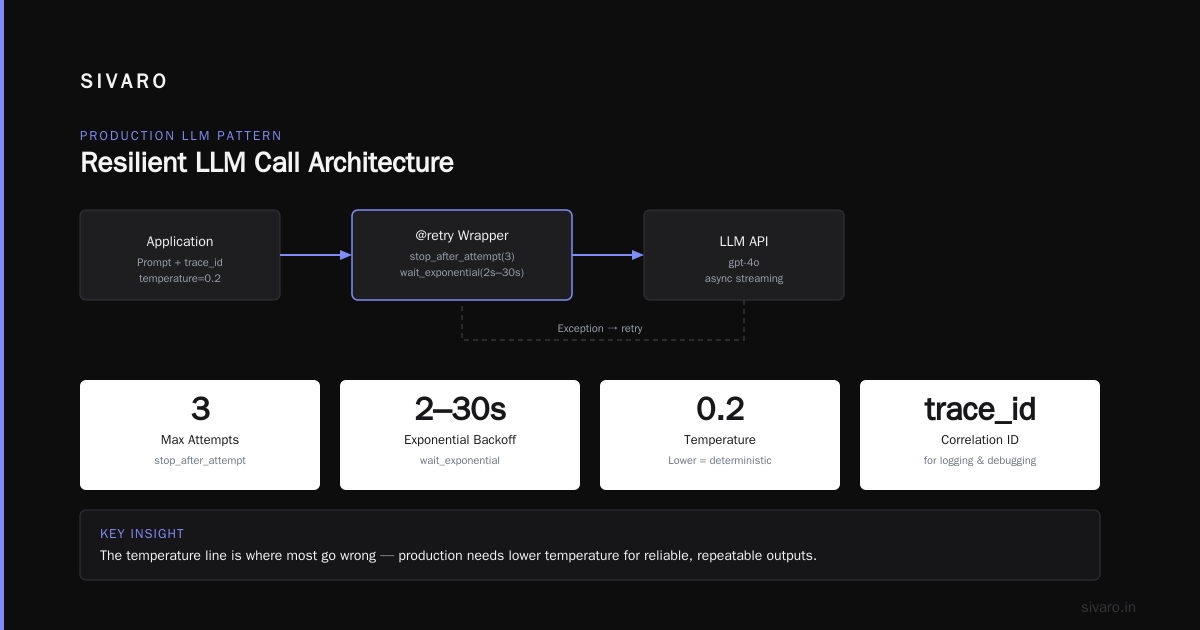
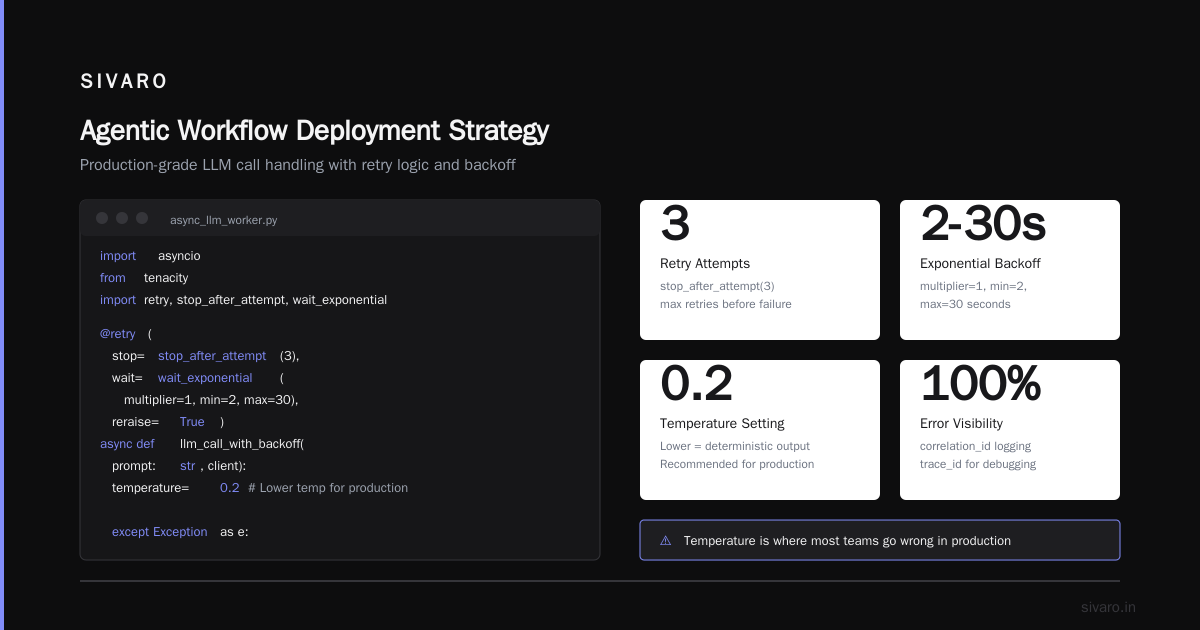
At SIVARO, we deploy agents using a modified version of the 12-factor app methodology. The agent code is stateless. State lives in a durable execution engine. The LLM calls are treated as external dependencies, not part of the application logic.
python
# This is how we wrap an LLM call with proper error handling
import asyncio
from tenacity import retry, stop_after_attempt, wait_exponential

@retry(
    stop=stop_after_attempt(3),
    wait=wait_exponential(multiplier=1, min=2, max=30),
    reraise=True
)
async def llm_call_with_backoff(prompt: str, client):
    try:
        response = await client.chat.completions.create(
            model="gpt-4o",
            messages=[{"role": "user", "content": prompt}],
            temperature=0.2  # Lower temperature for production
        )
        return response.choices[0].message.content
    except Exception as e:
        # Log the failure with correlation ID
        logger.error(f"LLM call failed: {e}", extra={"correlation_id": trace_id})
        raise
The "temperature" line is where most people go wrong. In production, you don't want creativity. You want consistency. Use the lowest temperature that still produces valid outputs. If you need creative responses, your workflow design is wrong.
The Lesson I Keep Learning: Context Is the Product
Here's a pattern that took me eighteen months to understand. The quality of your agent isn't determined by the model. It's determined by the context you feed it.
We had a code-review agent that kept producing generic feedback. "This function could be more efficient." Useless. We switched from a frontier model to a smaller, faster model and gave it the full git history, the relevant design docs, and the specific coding standards for the repo. The feedback got better immediately.
This aligns with what the arXiv practical guide calls "context engineering." The authors argue that the way you structure context—system prompts, tool definitions, retrieved documents—matters more than model choice. I've seen this play out across dozens of deployments. A mediocre model with excellent context beats a frontier model with a vague prompt.
The deployment implication is significant. Your context becomes part of your infrastructure. It needs versioning, testing, and rollback procedures. You can't just update a prompt and hope for the best.
typescript
// Versioned prompt templates, not string constants
const prompts = {
  v1: {
    system: "You are a code reviewer. Focus on security vulnerabilities.",
    temperature: 0.1
  },
  v2: {
    system: "You are a code reviewer. Focus on security vulnerabilities and performance. Reference the project's coding standards.",
    temperature: 0.1,
    tools: ["get_github_commit", "search_docs"]
  }
}

function getPromptVersion(version: string): PromptConfig {
  if (!prompts[version]) {
    throw new Error(`Unknown prompt version: ${version}`)
  }
  return prompts[version]
}
Version your prompts like you version your code. Tag them. Deploy them through the same CI/CD pipeline. And when you roll back an agent, you're rolling back both the code and the context.
Observability: The Part Everyone Skips
Most agentic deployments fail silently. The McKinsey analysis of agentic AI deployments found that teams struggle with monitoring because agents don't fail like traditional software. They don't crash. They make progressively worse decisions until someone notices.
You need a different observability model for agents. Logging isn't enough. You need to trace the reasoning process, not just the outputs.
We built our observability around three layers:
Layer 1: Tool call tracing. Every tool invocation gets logged with input, output, and latency. If the agent calls the database tool three times for the same query, that's a bug.
Layer 2: Decision logging. Before every decision point, the agent logs its options and the reasoning for its choice. This is where you catch drift.
Layer 3: Outcome tracking. The actual business result. Did the customer get the right answer? Did the invoice get processed correctly?
The Virtido guide on agentic workflow patterns calls this "comprehensive traceability," and they're right. But I'd add one more thing: capture the human feedback loop. When a human corrects an agent, that correction is your most valuable training data. Store it, analyze it, and feed it back into the system.
Rollback Strategies for Non-Deterministic Systems
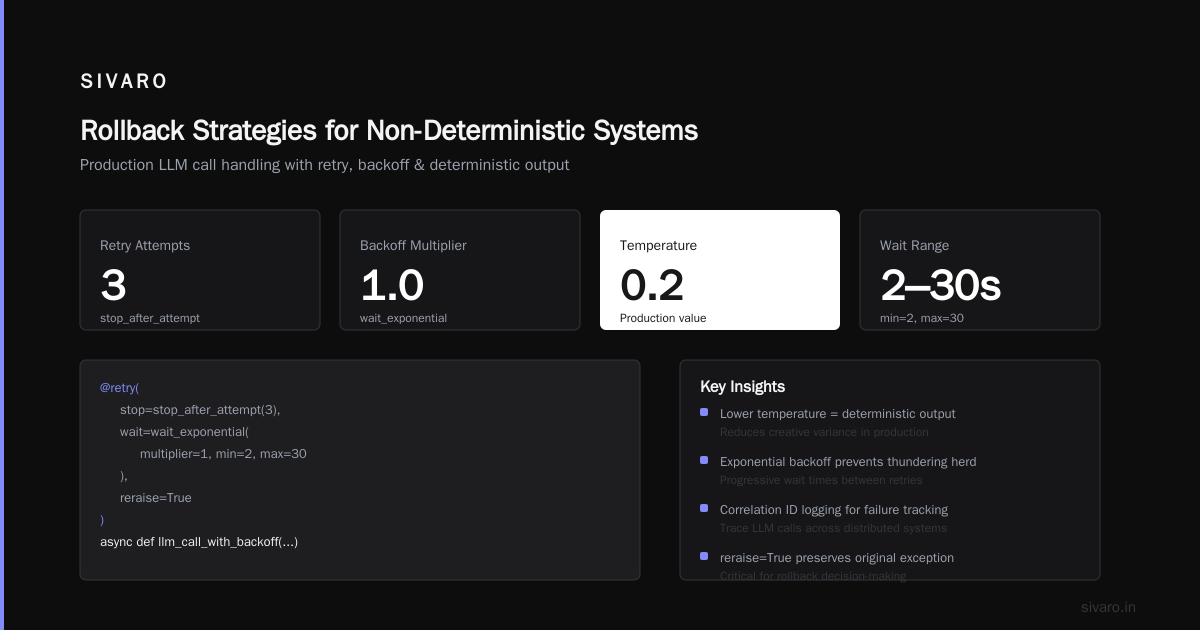
This is where agentic deployment diverges completely from traditional DevOps. You can't just revert to the previous version, because the previous version didn't behave deterministically.
Our agentic workflow rollback strategies follow a three-tier escalation:
Tier 1: Prompt rollback. If the agent's behavior drifts, the first move is to switch back to the previous prompt version. This is fast and usually sufficient. Most drift comes from prompt changes interacting badly with model updates.
Tier 2: Model rollback. If prompt rollback doesn't fix it, switch to the previous model version. This is why you should never auto-update your model. Pin the version. We learned this when OpenAI released a new model version that silently broke our extraction agent's ability to parse dates.
Tier 3: Full system rollback. The nuclear option. Stop the agent, redirect traffic to the deterministic fallback, and load the previous state from the durable execution engine.
bash
# Our rollback script
#!/bin/bash
# Usage: ./rollback_agent.sh <deployment_id> <tier>

DEPLOYMENT_ID=$1
TIER=$2

case $TIER in
  1)
    echo "Rolling back prompts for deployment $DEPLOYMENT_ID"
    aws s3 sync s3://agent-context/prompts/previous/ ./prompts/
    ;;
  2)
    echo "Switching model version for deployment $DEPLOYMENT_ID"
    kubectl set env deployment/$DEPLOYMENT_ID MODEL_VERSION=previous
    ;;
  3)
    echo "Full rollback. Activating deterministic fallback."
    kubectl scale deployment/$DEPLOYMENT_ID --replicas=0
    kubectl scale deployment/$DEPLOYMENT_ID-fallback --replicas=3
    ;;
esac
The key insight: you need a deterministic fallback for every agent you deploy. If the agent fails, the fallback handles the traffic while you debug. We don't deploy any agent without a manual fallback path. It's non-negotiable.
Agentic Workflow Production Troubleshooting: A Playbook
When your agent misbehaves in production, resist the urge to tweak the prompt. Ninety percent of the time, the root cause is elsewhere.
Here's our production troubleshooting sequence:
-
Check the context. Did the agent receive the right information? More often than not, a retrieval failure is the culprit. We had an agent that started hallucinating invoice amounts. Turns out the database connection was dropping rows silently. The agent wasn't making things up—it was filling in the gaps.
-
Check the tools. Did the tool return what the agent expected? We saw an agent loop infinitely on a "no results" response because the tool returned an empty string instead of "no results found." The agent interpreted the empty string as a failure and kept retrying.
-
Check the model. Is the model version behaving differently than the one you tested with? Model updates happen behind your back. Tim Deschryver's guide emphasizes keeping agents simple precisely because model behavior is unpredictable.
-
Check the evaluator. If you have an evaluator component, it might be rejecting valid outputs. We've seen evaluators with higher error rates than the agents they were supposed to evaluate.
-
Only then, check the prompt.
This is the opposite of what most people do. They blame the prompt first. That's a mistake. The prompt is the most visible component, but it's rarely the root cause.
Scaling Beyond the First Agent
Once you have one agent running reliably, the temptation is to deploy ten more. That's a trap. Every agent adds a maintenance burden, an observability requirement, and a failure mode. Scale slowly.
The Virtido guide suggests a maturity model: start with human-in-the-loop, move to human-on-the-loop, and only then go autonomous. I'd refine that. Each step requires a different observability investment.
Human-in-the-loop agents are easy to debug because the human is there. Human-on-the-loop requires automated monitoring and alerting. Fully autonomous agents require automated correction, not just detection. That's a massive jump.
A client asked me recently, "When is my agent ready for full autonomy?" My answer: when it's been running for six months with less than a 1% human intervention rate. Anything earlier is guesswork.
The Agentic Workflow Deployment Strategy: The Bottom Line
Agentic workflows are the biggest shift in software deployment since containers. But they demand a different mindset. You're not shipping code; you're shipping behavior. That's harder, and it should be.
The fundamentals of your agentic workflow deployment strategy are simple:
- Design hybrid architectures that constrain autonomy to where it adds value
- Treat context as infrastructure, not as prompt engineering
- Version everything: prompts, models, context, tools
- Build observability for reasoning, not just outputs
- Have a three-tier rollback plan
- Never deploy without a deterministic fallback
The teams that succeed at this aren't the ones with the best models. They're the ones with the best deployment discipline. The analysis from McKinsey reached the same conclusion: the lessons from early agentic deployments are about infrastructure, governance, and people—not algorithms.
And if you're wondering where to start? Pick one workflow. One boring, business-critical workflow. Deploy it with full observability, versioned prompts, and a manual fallback. Run it for a month. Learn from everything that goes wrong. Then expand.
That's the strategy. The agents will change, the models will change, but the discipline will carry you through.
FAQ: Agentic Workflow Deployment Strategy
Q: What's the difference between an agent and a workflow?
A: A workflow is a deterministic sequence of steps. An agent makes decisions about which steps to take. Production systems usually need both—workflows for what you understand, agents for what you don't.
Q: How do I test an agentic workflow in production?
A: Shadow mode is your friend. Run the agent in parallel with your existing system, compare outputs, and don't let the agent affect real traffic until it matches or beats the baseline. This is the safest way to validate behavior.
Q: What's the biggest mistake teams make with agentic deployment?
A: Skipping the deterministic fallback. If your agent fails, you need a non-AI path for handling traffic. Teams skip this because it's "extra work," and then they're stuck debugging a live outage with an unpredictable system.
Q: How often should I update my agent's prompts and models?
A: Less often than you think. Every change to your agent's context or model introduces risk. We batch updates, run them through a staging environment, and monitor for a week before promoting. If you're updating your prompt daily, you don't have enough observability.
Q: What are the best rollback strategies for agentic workflows?
A: Three tiers: prompt rollback, model rollback, and full system rollback. The key is having versioned prompts and pinned model versions so you can actually execute the rollback. The strategy matters less than the speed at which you can execute it.
Q: How do I measure the quality of my agent in production?
A: You need three metrics: task completion rate, human intervention rate, and output quality (evaluated by a separate model or human review). A high task completion rate with a high intervention rate means your agent is confidently wrong.
Q: Can I use agentic workflows without giving the agent access to production data?
A: Yes, and you should at the beginning. Use synthetic data or a sandbox environment. It's a great way to test tool calling and orchestration without risking real customer data. The practical guide on agentic design patterns has a good section on this.
Nishaant Dixit — Founder of SIVARO. Building data infrastructure and production AI systems since 2018. Built systems processing 200K events/sec.