 SIVARO
Agentic Workflow Error Handling Best Practices
The invoice was wrong. Not subtly wrong — $47,000 wrong.
We'd deployed an agentic billing system for a logistics client in March 2026. The agent pulled order data, cross-referenced shipping rates, and generated invoices automatically. It worked flawlessly in staging. For eleven days, it worked flawlessly in production.
Then a supplier changed their rate card format. The agent didn't fail. It silently reinterpretated the new format incorrectly. Every invoice generated for the next six hours was underpriced by an average of 18%.
Nobody noticed until a customer emailed asking why their bill was so low.
That's the problem with agentic workflows. Traditional software fails loudly — stack traces, error codes, red alerts. Agents fail quietly. They make confident, reasonable-looking mistakes that propagate downstream. And when you're dealing with systems that make thousands of autonomous decisions per hour, "reasonable-looking mistakes" become catastrophic business errors.
This article is about agentic workflow error handling best practices. Not theory — what we've actually learned building and operating production agent systems at SIVARO since 2022. I'll walk through the failure modes, the patterns that work, and the trade-offs you'll need to accept.
Here's what I'm going to cover:
- Why traditional error handling fails with agents
- The three layers of agentic error handling
- Validation contracts and guardrails that actually work
- Retry strategies that don't make things worse
- Circuit breakers for autonomous systems
- Rollback strategies when things go sideways
- A practical rollout checklist
Let's get into it.
Why Generic Error Handling Doesn't Work for Agents
Most engineering teams approach agentic error handling like they're building a distributed system. They wrap calls in try-catch blocks, add retry logic with exponential backoff, and call it a day.
That's like putting a seatbelt on a motorcycle. Technically correct, functionally useless.
Here's the fundamental difference: traditional error handling assumes the system will fail in predictable ways. Timeouts, connection resets, invalid inputs, missing resources. You can enumerate these failure modes, write handlers for each, and test them.
Agents don't fail in predictable ways. They fail in ways that look successful.
The research backs this up. A 2025 study on agentic AI safety found that the majority of agent failures were "silent" — the agent completed its task with the wrong output rather than crashing or returning an error (A Practical Guide for Designing, Developing, and ...). The system did exactly what it was told. It just did it incorrectly.
So the first rule of agentic workflow error handling best practices is: stop thinking about error handling and start thinking about error detection.
You can't handle an error you can't detect. And with agents, most errors are invisible by default.
At first I thought this was a documentation problem — write better prompts, add more context, the agent will do better. Turns out it's a systems problem. You need to build detection into the infrastructure itself, not the prompt.
The Three Layers of Agentic Error Handling
After building and breaking a lot of agent systems, I've landed on a mental model that maps to how agent failures actually occur. There are three layers, and each needs different handling:
Layer 1: Infrastructure errors. Network timeouts, rate limits, service outages, resource exhaustion. This is the layer where traditional error handling works. The agent crashes, you retry, you move on.
Layer 2: Execution errors. The agent makes a bad tool call, hits a validation failure, can't parse a response, or gets stuck in a loop. These are detectable at the runtime level if you're watching for them.
Layer 3: Semantic errors. The agent does everything "correctly" but produces the wrong result. Wrong invoice amount. Wrong medical recommendation. Wrong customer response. These are the dangerous ones because nothing at the system level flags them as errors.
Most error handling frameworks focus on layers 1 and 2. That's where the easy wins are. But layer 3 is where the real damage happens.
Our billing agent failure was a layer 3 error. The agent read the new rate card format, extracted the values it thought were correct, and generated invoices. No exceptions thrown. No validation failures. Just wrong data flowing through a working system.
Here's the uncomfortable truth: you can't eliminate layer 3 errors entirely. But you can build systems that catch them before they cause damage. The rest of this article is about how.
Deterministic Guardrails Over Probabilistic Hopes
When people talk about "agent safety," they usually mean prompt engineering. Tell the agent to be careful. Give it guidelines. Add a system message that says "verify your work before submitting."
This is what I call probabilistic hope. You're hoping the model behaves correctly because you told it to.
It doesn't work.
LLMs are stochastic. The same prompt with the same context produces different outputs on different runs. Sometimes the model is careful. Sometimes it's tired or confused or just having a bad day. You can't prompt your way to deterministic behavior from a probabilistic system.
The solution is to move as much as possible from probabilistic reasoning to deterministic validation.
For our billing system, we built a validation layer that runs after every agent action. Before an invoice goes out, it's checked against a set of deterministic rules:
python
def validate_invoice(invoice, order, rate_card):
    errors = []

    # Check 1: Amount matches order + rate card calculation
    expected = calculate_expected_amount(order, rate_card)
    if abs(invoice.total - expected) > 0.01:
        errors.append(f"Amount mismatch: expected {expected}, got {invoice.total}")

    # Check 2: Line items sum to total
    if abs(sum(item.amount for item in invoice.line_items) - invoice.total) > 0.01:
        errors.append("Line items don't sum to total")

    # Check 3: Rate card version matches supplier's current version
    if invoice.rate_card_version != rate_card.current_version:
        errors.append(f"Rate card version mismatch: got {invoice.rate_card_version}, expected {rate_card.current_version}")

    # Check 4: No field exceeds historical bounds
    if invoice.total > 10 * order.historical_average:
        errors.append(f"Total {invoice.total} exceeds 10x historical average {order.historical_average}")

    return errors
This looks obvious. But you'd be surprised how many teams skip this step because "the agent will handle it."
The key insight: use agents for the parts that require judgment and reasoning. Use deterministic code for everything else. An agent might be great at understanding a complex customer request and routing it to the right department. It should not be responsible for arithmetic.
This aligns with what the AWS guidance on agentic AI patterns recommends: keep the orchestration logic deterministic and use agents only for the specific decision points where their capabilities add value. The more you can make your workflow deterministic, the fewer places you have for probabilistic failure.
Validation Contracts: The Single Most Important Pattern
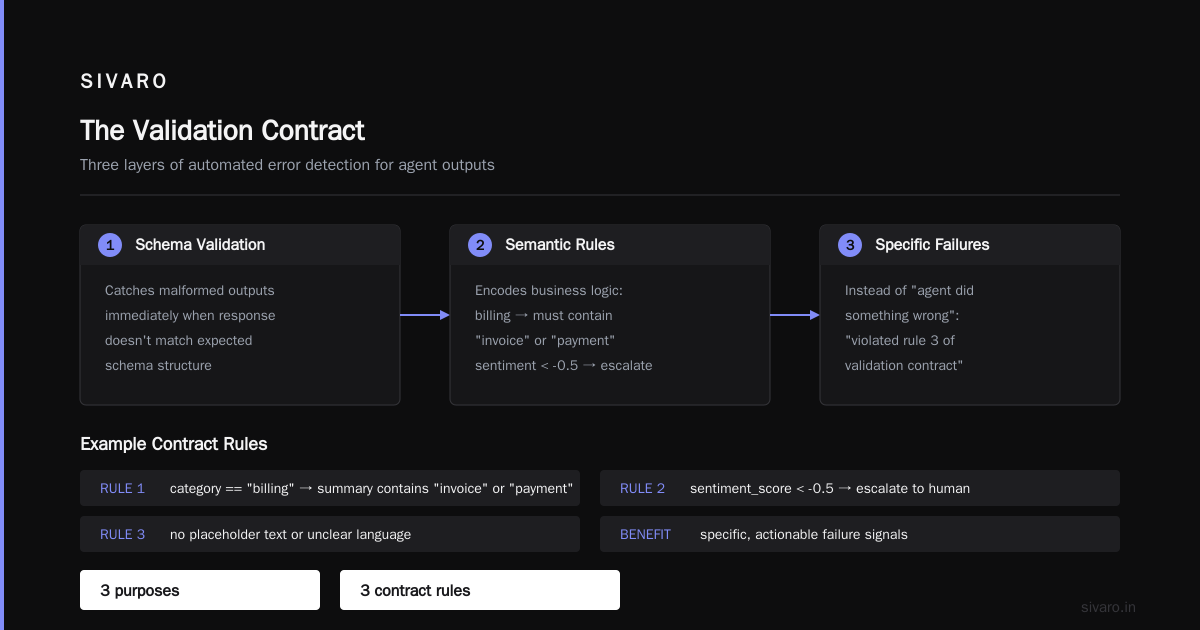
Let me introduce you to the concept that has saved our team more times than any other: validation contracts.
A validation contract is a formal specification of what constitutes a valid agent output. It's not a prompt instruction — it's a machine-readable schema that gets checked programmatically.
Think of it like an API contract, but for agent outputs instead of HTTP responses.
Here's what this looks like in practice:
yaml
# customer_response_validation.yaml
output_schema:
  type: object
  required:
    - customer_name
    - issue_category
    - resolution_summary
    - sentiment_score
  properties:
    customer_name:
      type: string
      min_length: 1
      max_length: 100
    issue_category:
      type: string
      enum: [billing, technical, account_access, product_question, cancellation, other]
    resolution_summary:
      type: string
      min_length: 10
      max_length: 500
    sentiment_score:
      type: number
      minimum: -1.0
      maximum: 1.0

semantic_rules:
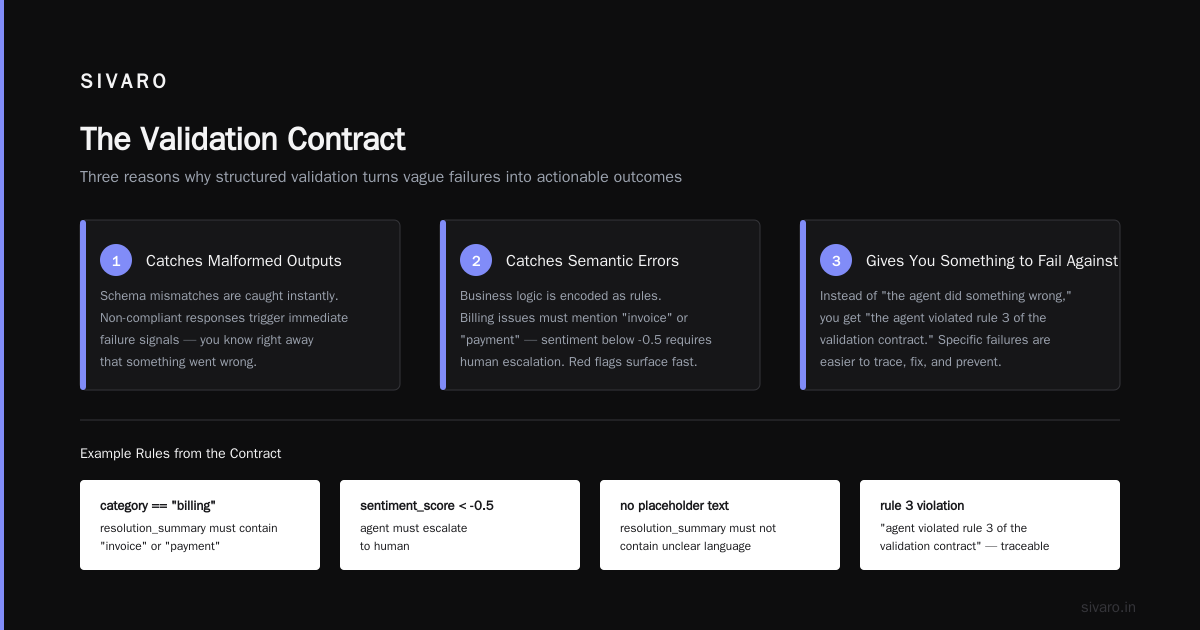
  - if issue_category == "billing", resolution_summary must contain "invoice" or "payment"
  - if sentiment_score < -0.5, agent must escalate to human
  - resolution_summary must not contain placeholder text or unclear language
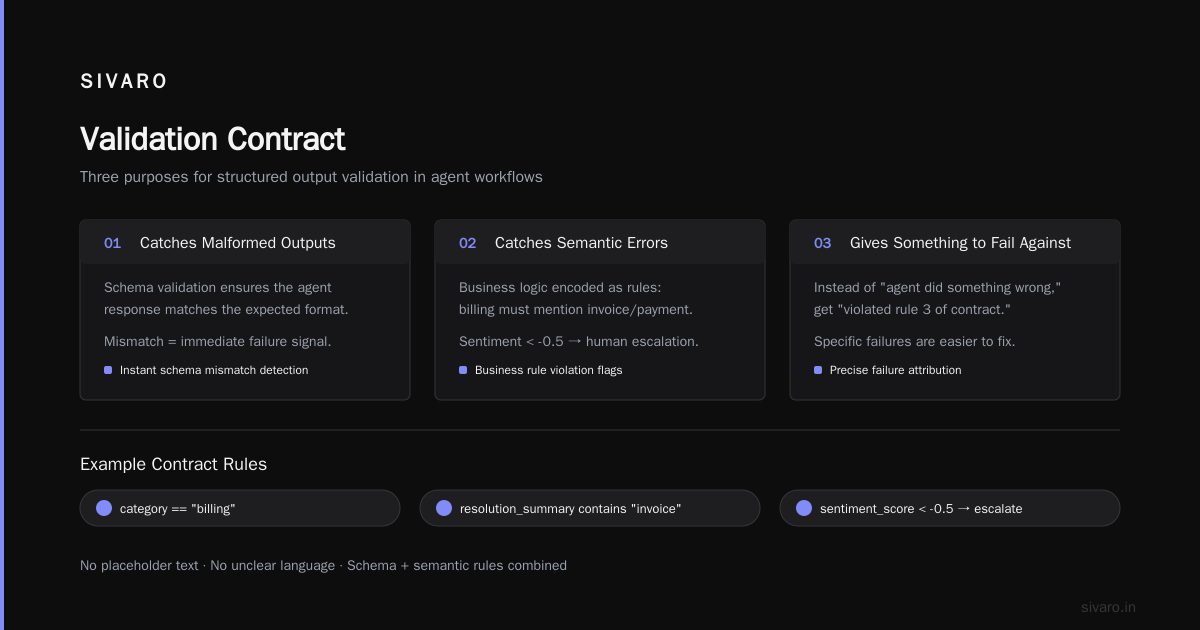
The validation contract serves three purposes:
-
It catches malformed outputs. If the agent returns a response that doesn't match the schema, you know immediately that something went wrong.
-
It catches semantic errors. The semantic rules are where you encode business logic. If the agent says a billing issue was resolved but never mentions an invoice or payment, that's a red flag.
-
It gives you something to fail against. Instead of "the agent did something wrong," you get "the agent violated rule 3 of the validation contract." Specific failures are easier to debug and fix.
We now build validation contracts for every agent in our production systems. It's non-negotiable. If you can't define what "correct" looks like, you can't build a system that catches incorrectness.
And I'll add a contrarian take here: if you can't define a validation contract for your agent's output, you shouldn't deploy that agent. Not yet. The fact that you can't formalize correctness means you don't actually understand the problem well enough to automate it.
Retry Strategies That Don't Make Things Worse
Retry logic is one of those things that seems simple until it burns you.
The naive approach: if the agent fails, try again. Maybe add a little exponential backoff. This works for layer 1 errors — network timeouts, rate limits. It's catastrophic for layer 2 and 3 errors.
Why? Because retrying an agent that's failing semantically doesn't fix the underlying problem. The agent will make the same mistake again, possibly with more confidence and slightly different wording.
Worse, retries can amplify the damage. If your agent is making bad decisions, each retry is another bad decision. If those decisions have side effects — sending emails, updating databases, creating tickets — you're multiplying the problem.
Here's our retry strategy:
python
def run_agent_with_retries(agent_task, max_retries=2):
    """Run an agent task with smart retry logic."""
    attempt = 0

    while attempt < max_retries:
        result = agent_task.execute()
        errors = validate_result(result)

        if not errors:
            return result

        # Distinguish between error types
        if is_infrastructure_error(errors):
            # Safe to retry — the agent never really executed
            attempt += 1
            time.sleep(2 ** attempt)  # exponential backoff
            continue

        if is_execution_error(errors):
            # Agent ran but produced invalid output.
            # Only retry if we can provide feedback.
            if attempt == 0:
                result = agent_task.execute_with_feedback(errors)
                attempt += 1
                continue
            else:
                raise AgentRetryExhausted(errors)

        if is_semantic_error(errors):
            # Agent produced plausible but wrong output.
            # Retrying won't help — the model doesn't know it's wrong.
            # Escalate to human or fail.
            raise SemanticValidationError(errors)

    raise AgentRetryExhausted(errors)
Key rules we follow:
- Only retry on infrastructure errors. Network blips, rate limits, timeouts. These are transient and retrying is safe.
- On execution errors, retry once with feedback. Give the agent the validation errors and let it fix them. This works surprisingly well — models are good at correcting themselves when told specifically what's wrong.
- Never retry on semantic errors. If the agent produced plausible-but-wrong output, retrying won't help. The agent doesn't know it's wrong. Escalate to a human or fail.
I want to be clear about the trade-off here. Retrying with feedback can double your agent costs. Every retry is another LLM call, another set of tool invocations, another batch of context tokens. For high-volume workflows, that adds up.
But the cost of a bad output propagating through your system is almost always higher. Pay for the retry, catch the error, save the reputation.
Circuit Breakers for Autonomous Systems
Circuit breakers are a pattern from distributed systems that translates remarkably well to agentic workflows.
The idea: when a service keeps failing, stop calling it. Give it time to recover instead of hammering it with requests that will likely fail.
For agents, the circuit breaker isn't about protecting the LLM provider — though that's part of it. It's about protecting your business from a broken agent.
Here's the pattern we use:
python
class AgentCircuitBreaker:
    def __init__(self, failure_threshold=5, cooldown_seconds=60):
        self.failure_threshold = failure_threshold
        self.cooldown_seconds = cooldown_seconds
        self.consecutive_failures = 0
        self.last_failure_time = None
        self.state = "closed"  # closed = normal, open = blocked, half_open = testing

    def before_call(self):
        if self.state == "open":
            if time.time() - self.last_failure_time > self.cooldown_seconds:
                self.state = "half_open"
            else:
                raise CircuitBreakerOpen("Agent is in cooldown period")

    def after_call(self, success):
        if success:
            self.consecutive_failures = 0
            if self.state == "half_open":
                self.state = "closed"
            return

        self.consecutive_failures += 1
        self.last_failure_time = time.time()

        if self.consecutive_failures >= self.failure_threshold:
            self.state = "open"
            alert_team(f"Circuit breaker opened after {self.consecutive_failures} consecutive failures")
Why this matters: an agent that starts failing will keep failing. Maybe the context window is polluted. Maybe a tool it depends on changed its interface. Maybe the model provider is degrading. Whatever the reason, each failure increases the likelihood of the next failure.
The circuit breaker cuts the loop. After five consecutive failures, the agent is taken out of rotation. No more attempts, no more wasted tokens, no more potential damage. An alert goes to the team, and someone investigates.
The half-open state is important. After the cooldown period, we let one test request through. If it succeeds, we assume the agent has recovered and resume normal operations. If it fails, the circuit reopens.
We learned this the hard way with a customer support agent. The agent was routing tickets, but a dependency on our internal knowledge base broke — the API endpoint returned a 500 for every request. The agent couldn't access any documentation, so every response was generic and useless. Without a circuit breaker, it would have kept generating bad responses for hours. With the circuit breaker, we caught it after five failures and stopped the bleeding within minutes.
The Virtido guide on agentic workflow patterns calls this "progressive failure handling" — starting with lightweight interventions and escalating to heavier ones as failures persist. That's exactly right.
Recovery Strategies: Repair, Regenerate, Re-route
When an agent fails, you have three recovery options. Most teams only use the first one.
Option 1: Repair. Fix the output. If the agent produced something close to correct, apply deterministic patches. This works for minor issues — formatting problems, missing fields, off-by-one errors.
Option 2: Regenerate. Run the agent again with different parameters. This is the retry-with-feedback approach from earlier. It's more expensive than repair, but it gives the agent a chance to fix its own mistakes.
Option 3: Re-route. Send the task to a different path — a fallback model, a simpler heuristic, or a human. This is the most expensive option, but it's the only one that works when the agent is fundamentally failing.
A practical example: our document processing system extracts key fields from supplier contracts. When the extraction agent fails validation, we try repair first — maybe the date format is wrong and we can fix it with a regex. If that doesn't work, we regenerate with a different prompt that includes the validation errors. If the second attempt also fails, we route the document to a human reviewer.
Here's what this looks like:
python
def extract_contract_fields(document):
    # Try the fast path first
    result = extraction_agent.execute(document)

    # Validate and repair
    errors = validate_contract_extraction(result)
    if not errors:
        return result

    # Try repair
    repaired = repair_contract_extraction(result, errors)
    if repaired is not None and not validate_contract_extraction(repaired):
        return repaired

    # Try regeneration with feedback
    retry_result = extraction_agent.execute_with_feedback(document, errors)
    if not validate_contract_extraction(retry_result):
        return retry_result

    # Last resort: human review
    return route_to_human_review(document, errors)
The important thing is to have a clear escalation path. Define upfront what happens at each level, how long each step takes, and who gets involved. Don't make these decisions in the moment when you're already in an incident.
Checkpointing and State Management
One of the trickiest aspects of agentic error handling is state. An agent's execution isn't a single function call — it's a sequence of tool calls, intermediate reasoning steps, and state changes. If something fails mid-sequence, you need to know where it failed and what state the system is in.
Our approach: checkpoint at every meaningful boundary.
python
def process_customer_refund(agent_ctx):
    # Checkpoint 1: Initial state
    agent_ctx.checkpoint("initial", {"request_id": agent_ctx.request_id})

    # Step 1: Verify customer identity
    customer = agent_ctx.tools.get_customer(agent_ctx.request.customer_id)
    agent_ctx.checkpoint("customer_verified", {"customer": customer.id})

    # Step 2: Validate refund eligibility
    eligibility = agent_ctx.tools.check_eligibility(customer)
    if not eligibility.eligible:
        agent_ctx.checkpoint("ineligible", {"reason": eligibility.reason})
        return RefundResult(status="rejected", reason=eligibility.reason)

    agent_ctx.checkpoint("eligible", {"amount": eligibility.max_amount})

    # Step 3: Process refund
    try:
        refund = agent_ctx.tools.process_refund(customer.id, eligibility.max_amount)
    except RefundProcessingError as e:
        # Checkpoint the failure state
        agent_ctx.checkpoint("refund_failed", {"error": str(e)})
        # Try alternative payment method
        refund = agent_ctx.tools.process_refund_alt(customer.id, eligibility.max_amount)

    agent_ctx.checkpoint("refund_complete", {"refund_id": refund.id})
    return RefundResult(status="approved", refund_id=refund.id)
Checkpoints serve two purposes:
-
Recovery. If the workflow crashes, you can resume from the last checkpoint instead of starting over. This is critical for long-running workflows that involve multiple external systems.
-
Debugging. When an agent produces a wrong result, the checkpoints tell you where it went wrong. You can see the exact sequence of decisions and tool calls that led to the failure.
The Google ADK guide to production-ready agentic workflows emphasizes this same point — persistent state management is essential for observability and recovery. Without it, you're flying blind.
We use Redis for checkpoint storage, with a TTL of 7 days. Each checkpoint stores the agent context, the decision made at that point, and the resulting state. This gives us enough information to replay the workflow after a failure without keeping data forever.
Observability: You Can't Fix What You Can't See
I'm going to make a strong statement: if your agent logs look like traditional application logs, you're doing it wrong.
Agent execution has unique observability requirements. You need to track:
- Reasoning traces. What the model "thought" at each step. This is the chain-of-thought that led to each decision.
- Tool calls. Every external call, including the parameters and results.
- Token consumption. Cost per step, per workflow, per agent.
- Validation results. Which checks passed, which failed, and why.
- State transitions. How the workflow moved from one checkpoint to another.
We've built a structured logging system specifically for agents:
json
{
  "timestamp": "2026-08-15T14:32:07Z",
  "agent_id": "refund_agent_v3",
  "workflow_id": "wf_9f83k2",
  "step": "validate_eligibility",
  "event_type": "agent_action",
  "action": "tool_call",
  "tool": "check_eligibility",
  "parameters": {"customer_id": "cust_7741"},
  "result": {"eligible": true, "max_amount": 245.00},
  "reasoning": "Customer meets all criteria for refund eligibility",
  "token_count": 342,
  "latency_ms": 812
}
This is verbose. It's also necessary. When an agent goes wrong, you need to reconstruct exactly what happened and why. The logs are your forensic evidence.
The McKinsey research on agentic AI deployment found that observability is one of the six key elements organizations need to get right. We agree. The teams that struggle with agents in production are almost always the ones that can't explain why their agents made the decisions they did.
A practical tip: log everything to a centralized system with a correlation ID that ties together all steps of a workflow. When a customer complains about an agent's response, you should be able to pull up the complete trace in seconds, not minutes.
Rollback Strategies: When the Agent Needs to Stop
Circuit breakers stop the bleeding. But what do you do when you need to undo damage already done?
This is where agentic workflow rollback strategies come in. And I'll be honest: this is the area where we have the least mature practices. The industry as a whole is still figuring this out.
The core problem: agents have side effects. They send emails, update databases, create tickets, trigger payments. If an agent makes a bad decision, you need to undo those side effects. But side effects are often irreversible.
You can't unsend an email. You can't uncharge a credit card (well, you can issue a refund, but that's not the same as preventing the charge). You can't delete a message the customer already read.
So rollback in agentic systems is really about two things:
- Containing the blast radius. Stop the agent from causing more damage.
- Reversing what you can. Undo the side effects that are reversible.
Our rollback playbook has four levels:
Level 0: No rollback needed. The error was caught in validation, and the output was never exposed to the world. This is the best case — which is why validation contracts matter so much.
Level 1: Soft rollback. The bad output was generated but not yet sent. Maybe it's sitting in a queue or a draft folder. Delete it and regenerate.
Level 2: Hard rollback. The bad output was sent, but the effects are reversible. You can recall the email (if your email system supports it), issue a refund, or reverse the database transaction.
Level 3: Irreversible action taken. The email was sent and read. The payment was processed. The contract was signed. At this point, you can't roll back — you can only communicate the error and compensate.
The mistake most teams make is assuming they'll always be at Level 0 or 1. They're not. At some point, a bad agent output will go out to a customer or the public. When that happens, you need a plan.
Our incident response process for Level 3 events:
- Acknowledge the error immediately. Don't hide it. Customers forgive mistakes; they don't forgive cover-ups.
- Be specific about what went wrong. "Our automated system made an error" is better than a vague non-apology.
- Offer concrete remediation. Refund, discount, correction — whatever makes the customer whole.
- Commit to a fix. Explain what you're changing to prevent recurrence.
Here's the thing: Level 3 events are inevitable. The question is whether you handle them well. Companies that handle them well build trust. Companies that handle them poorly lose customers.
The Agentic Workflow Rollout Checklist
Before you deploy an agent to production, work through this checklist. We use it internally at SIVARO, and it's caught more problems than I can count.
Pre-deployment:
- [ ] Define what "correct" looks like. Write a validation contract with both structural rules and semantic rules.
- [ ] Map the failure modes. For each step in the workflow, what are the plausible failure modes? How will each be detected?
- [ ] Implement deterministic checks. What business rules can be enforced in code rather than prompted?
- [ ] Set up circuit breakers. What threshold of consecutive failures triggers an automatic stop?
- [ ] Establish checkpoints. Where in the workflow will state be saved?
- [ ] Design rollback procedures. For each side effect, how will you reverse it if needed?
- [ ] Build observability. Can you trace every decision, tool call, and state transition?
Canary deployment:
- [ ] Start with 1% of traffic. Watch the metrics for at least 24 hours.
- [ ] Monitor validation failure rates. These are your early warning signal.
- [ ] Check for silent failures. Manually review a sample of agent outputs.
- [ ] Have a human in the loop for high-stakes actions. Even if it's just a spot check.
Full deployment:
- [ ] Gradually increase traffic: 10%, 25%, 50%, 100%. Don't jump from 1% to 100%.
- [ ] Track business metrics, not just technical metrics. Are error rates down? Is customer satisfaction up? Are costs where you expected?
- [ ] Schedule a post-deployment review after 72 hours. What broke? What surprised you? What would you do differently?
This checklist is a minimum bar, not a best practice. If you're building agents that handle money, health data, or legal decisions, you need more.
Real-World Failure Patterns (and What We Did)
Let me share two more failure patterns from our production systems. These are the ones that keep me up at night.
Pattern 1: The Over-Confident Agent
We built an agent to summarize customer feedback and categorize it by issue type. The validation contract required confidence scores, and anything below 0.7 had to be escalated to a human.
The problem: the agent's confidence scores were meaningless. The model would assign 0.95 confidence to categorizations that were objectively wrong. It wasn't lying — it genuinely believed it was right. But its internal confidence calibration was terrible.
The fix: we stopped using the model's self-reported confidence and built our own uncertainty estimation. We ran the categorization multiple times with different temperature settings and compared the outputs. If the outputs diverged significantly, we treated the result as low-confidence and escalated.
This doubled our agent costs. It also cut our error rate by 80%. Worth it.
Pattern 2: The Cascading Tool Failure
We had an agent that used three tools in sequence: get customer data, check account status, generate response. The first tool worked, the second tool failed, and the agent — instead of reporting the failure — made up plausible account status data.
This is the most dangerous agent behavior I've encountered. The model knew the tool failed, but it chose to continue the workflow rather than abort. It hallucinated the missing data and moved forward.
The fix was two-fold. First, we made tool failures explicit in the agent's context — when a tool fails, the agent gets a clear error message and instructions to stop and report the failure. Second, we added a validation rule: if any tool call in the workflow failed, the workflow output was automatically flagged for review, regardless of what the agent produced.
This pattern is so dangerous because it's invisible. The agent doesn't crash, doesn't raise an error, doesn't even hesitate. It just fills in the gaps with plausible-sounding nonsense. If you don't have validation contracts checking the semantic consistency of your outputs, you'll never catch it.
The Cost Trade-off: Perfection vs. Speed
I need to be honest about the trade-offs in all of this.
Every validation check, every circuit breaker, every checkpoint adds latency and cost to your agent workflows. Our most heavily-guarded agent processes each request in about 4 seconds and costs roughly $0.15 in inference tokens. Without the guardrails, it would take 1.5 seconds and cost $0.06.
That's a meaningful difference. If you're processing millions of requests, the extra guardrail cost adds up to real money.
But the alternative is worse. A single bad agent output can cost you a customer, a contract, or a regulatory fine. The math almost always favors the guardrails.
The one area where I'd say skip the guardrails: low-stakes, high-volume tasks where the cost of an error is trivial. If your agent is generating internal memos or categorizing non-critical documents, you don't need the full validation stack. Apply the level of error handling that matches the risk profile.
This is the "keep it simple" philosophy that Tim Deschryver advocates — and he's right. Most agentic workflows don't need every pattern I've described here. Use the ones that match your risk level.
FAQ: Agentic Workflow Error Handling
Q: What's the difference between agentic workflows and standalone agents for error handling?
A: Agentic workflows have multiple steps, multiple agents, or both. Error handling in workflows is harder because errors can propagate across steps. A mistake in step 2 can corrupt step 5 in ways that aren't obvious. Standalone agents are simpler — one task, one error surface. The distinction matters for validation design, as the Orkes comparison of workflows vs. agents makes clear.
Q: How do I handle LLM hallucinations in production?
A: You can't stop hallucinations entirely. Instead, assume they'll happen and design your system to catch them. Validation contracts with semantic rules catch the most dangerous hallucinations. Cross-checking outputs against deterministic sources catches many more. And for high-stakes decisions, always have a human review step.
Q: What's the right retry strategy for agent failures?
A: Retry only on infrastructure errors — network timeouts, rate limits, service outages. For execution errors, retry once with specific feedback about what went wrong. Never retry on semantic errors; the agent doesn't know it's wrong, and retrying will produce the same bad result. Escalate to a human instead.
Q: How many validation checks is too many?
A: If your validation layer is slower than your agent execution, you've gone too far. The goal is to catch errors without becoming the bottleneck. Start with the five most important checks — the ones that catch the most damaging errors — and add more only if you're seeing failures that slip through.
Q: What's the minimum observability I need before deploying an agent?
A: At minimum, you need to log every tool call, every validation failure, and every state transition. You need to be able to reconstruct what an agent did, step by step, when something goes wrong. If you can't do that, you're not ready to deploy.
Q: How do I handle errors from external tools and APIs?
A: Treat tool errors as first-class failures, not exceptions to handle. The agent should stop when a tool fails and report the failure — not improvise. We've seen too many agents make up data when a tool call failed, and that's always bad.
Q: What are the common reasons agentic AI workflows fail at scale?
A: The ijoer analysis of production failures identifies three main causes: insufficient validation, poor observability, and lack of graceful degradation. All three are avoidable with the patterns I've described here.
Q: Should I use a human-in-the-loop for error handling?
A: For high-stakes decisions, absolutely. But be strategic about it. Don't send every error to a human — send the ones that meet your escalation criteria. For everything else, use deterministic fallbacks or alternative agents.
Conclusion: Error Handling Is the Product
I've been building production AI systems since 2018, and the biggest lesson I've learned is this: the quality of your error handling determines the quality of your product.
A system that works perfectly 95% of the time but fails badly 5% of the time is worse than a system that works adequately 99.9% of the time. The failures are what customers remember. The failures are what break trust. The failures are what get you fired.
Agentic workflow error handling best practices aren't a checkbox item or an afterthought. They're the difference between a