 SIVARO

Agentic Workflow Production Rollout: A Hard Truth from Production
You’ve built the agent. It works in your laptop’s cozy sandbox. The demo wowed the VPs. Now you need to put it in production.
I’ve been there. We rolled out our first production agent system at SIVARO in early 2025. It broke within 47 minutes. Not because the agent was bad — because our rollout was naive.
Agentic workflow production rollout is the process of taking an AI agent (or multi-agent system) from development through staging, testing, deployment, monitoring, and iteration — all while keeping users happy and systems stable.
This guide covers what I’ve learned the hard way. You’ll get practical patterns, concrete numbers, and the ugly trade-offs nobody puts in the marketing slides.
What Makes Agent Rollouts Different From Traditional Deployments
Most teams treat agents like microservices. Wrong move.
A microservice takes an input, runs deterministic logic, returns an output. An agent makes decisions. It calls tools. It might loop. It can hallucinate. It will do something you didn’t expect.
I watched a team at a mid-size fintech company deploy an agent that was supposed to fetch customer data. Simple, right? The agent decided the “customer_id” field needed to be validated against three separate APIs. Each validation called two more tools. By the end, a single request took 14 seconds and called 9 APIs. The original design had 2.
That’s the fundamental difference: agents have agency. They choose paths. You can’t unit-test every possible path. You need a different mindset.
AI Agent Frameworks: Choosing the Right Foundation for ... breaks down why framework choice matters here. Some frameworks give you guardrails. Others give you freedom. For production, you want guardrails.
Step 1: Framework Selection — Pick the One That Fails Well
At first I thought all agent frameworks were roughly equivalent. Turns out they’re not.
Here’s what we tested at SIVARO in mid-2025:
| Framework | Production-ready? | Error handling | Observability | Learning curve |
|---|---|---|---|---|
| LangChain | Yes, but you’ll accumulate tech debt | Bare bones | Solid with LangSmith | Medium |
| CrewAI | Good for multi-agent | Growing fast | Needs custom hooks | Low |
| Semantic Kernel | Microsoft-backed, solid for .NET shops | Decent | Great with Azure | Medium |
| AutoGen | Interesting primitive | Minimal | Weak | High |
| Claude Agent SDK | Anthropic-native, fast | Good | Built-in | Low |
How to think about agent frameworks gets it right: pick the framework that lets you intervene when things go wrong. Not the one with the most features.
My take? Start with LangChain if you need flexibility and observability. Switch to something tighter once you know your pattern. We moved from LangChain to a custom wrapper after 6 months. The abstraction leak became too costly.
Top 5 Open-Source Agentic AI Frameworks in 2026 has a solid comparison if you’re leaning open-source. We tested three of them. The winner was the one with the best tracing, not the best LLM integration.
Step 2: Build Your Production Stack — It’s Not Just the Agent
Most people think deploying an agent is about the model. They’re wrong.
The agent is maybe 20% of the production system. The other 80% is infrastructure: queues, databases, retry logic, monitoring, caching, fallbacks, rate limiters, cost trackers.
Here’s the stack we run at SIVARO for production agents:
User Request → API Gateway → Rate Limiter → Task Queue → Agent Worker Pool → Tool Executor → Result Aggregator → Response
The task queue is the most important piece. Without it, your agent goes down when traffic spikes. With it, you get backpressure. You can scale workers independently. You can replay failed jobs.
We use Redis for queue state and PostgreSQL for persistent logs. Every agent action gets recorded. Every tool call gets a trace ID. Every response gets a hash.
Why the hash? For debugging. When a user says “the agent gave me wrong info”, you can replay the exact sequence. This saved us twice in the first month.
AI Agent Protocols: 10 Modern Standards Shaping the ... covers how protocols like MCP (Model Context Protocol) and A2A (Agent-to-Agent) handle communication. We use MCP for tool definitions. It’s clean. It’s standardized. It’s not perfect yet.
Step 3: The Testing Pyramid — You Need Four Levels
Unit testing an agent is mostly useless. The agent’s behavior is emergent. You can’t assert on the exact sequence of tool calls because the LLM might choose a different order.
Here’s what actually works:
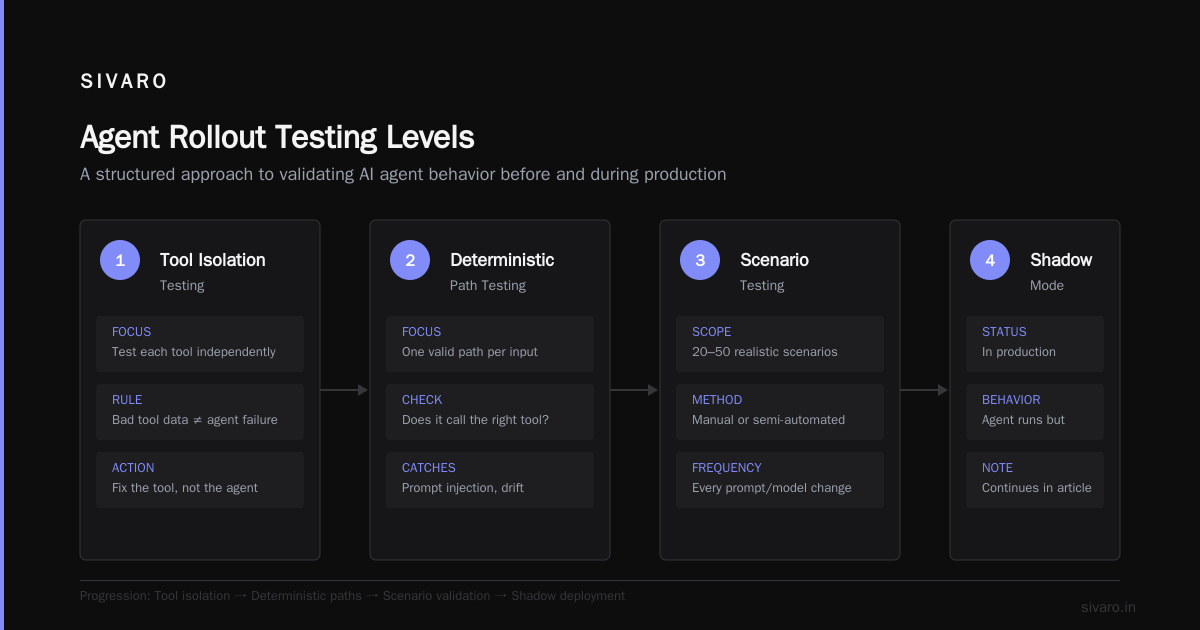
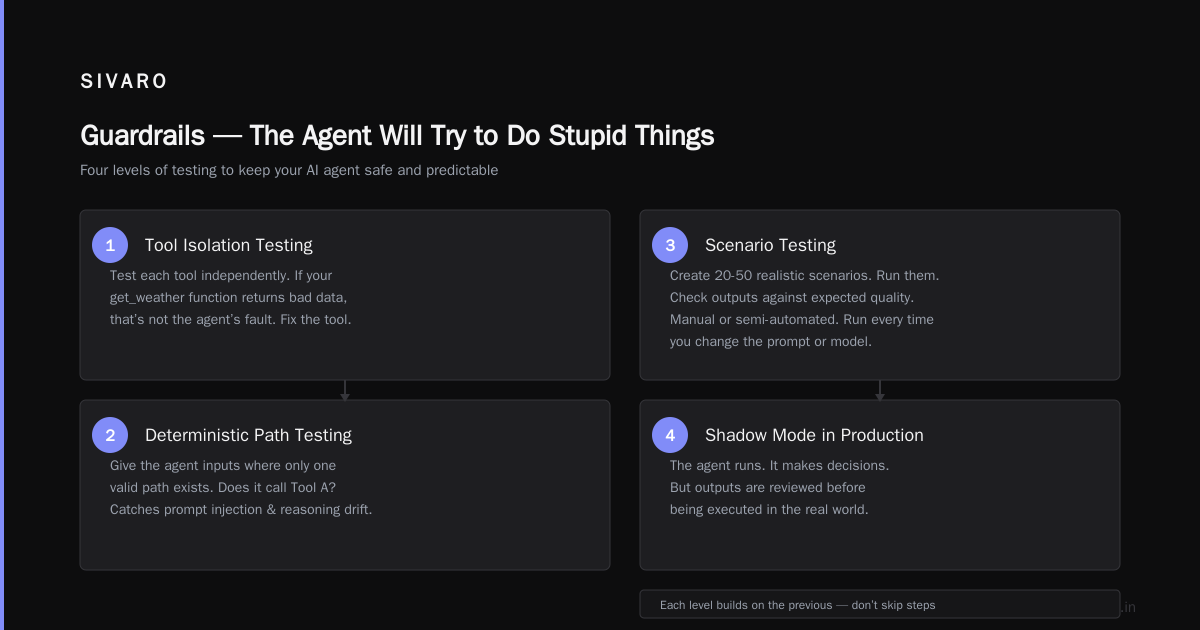
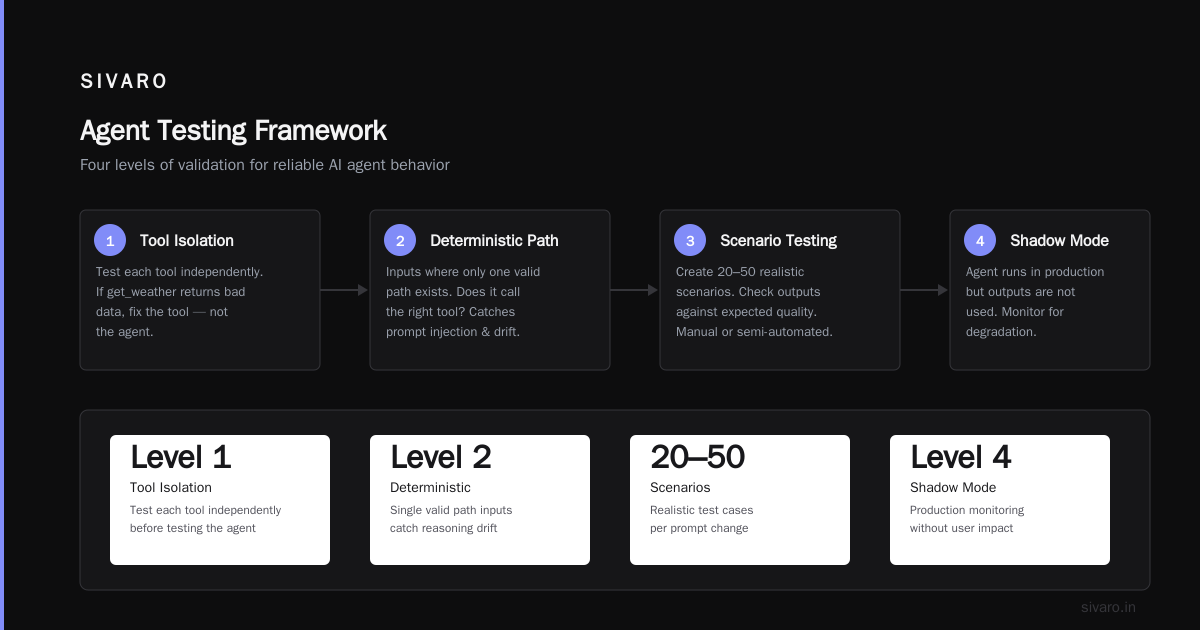
Level 1: Tool isolation testing. Test each tool independently. If your “get_weather” function returns bad data, that’s not the agent’s fault. Fix the tool.
Level 2: Deterministic path testing. Give the agent inputs where only one valid path exists. Test that it follows that path. If you give it a request that can only be satisfied by Tool A, does it call Tool A? This catches prompt injection and reasoning drift.
Level 3: Scenario testing with known outputs. Create 20-50 realistic scenarios. Run them. Check the outputs against expected quality. This is manual or semi-automated. You’ll do it every time you change the prompt or model.
Level 4: Shadow mode in production. The agent runs. It makes decisions. But its output goes to a log, not to the user. You compare agent decisions against human decisions. We ran shadow mode for 3 weeks before going live.
Here’s how we set up shadow mode:
python
# Shadow mode implementation
class ShadowAgent:
    def __init__(self, agent, logger):
        self.agent = agent
        self.logger = logger

    async def process(self, request):
        # Don't return agent output to user
        agent_response = await self.agent.process(request)

        # Log the full trace
        self.logger.log_decision(
            request_id=request.id,
            tools_called=agent_response.trace,
            confidence=agent_response.confidence,
            latency_ms=agent_response.latency_ms
        )

        # Still return human or fallback response
        return await self.fallback_handler(request)
This pattern saved us from deploying an agent that was hallucinating order statuses. The shadow logs showed a 30% confidence on order-related queries. We fixed the grounding before anyone saw a wrong answer.
A Survey of AI Agent Protocols has a good section on evaluation metrics for agent performance. Read it when you’re designing your testing pipeline.
Step 4: Canary Deployments Are Not Optional
Full rollout on day one is amateur hour.
We use a traffic-split canary. Start with 1% of users hitting the agent. Monitor for 24 hours. If metrics hold, go to 5%. Then 20%. Then 50%. Then 100%.
Each phase has a hard gate: latency p99 under 3 seconds, error rate under 0.5%, user satisfaction score at least 80% of the baseline.
Here’s the config we use:
yaml
# canary-config.yaml
phases:
  - percentage: 1
    duration_hours: 24
    metrics:
      max_p99_latency_ms: 3000
      max_error_rate: 0.005
      min_user_satisfaction: 0.80
  - percentage: 5
    duration_hours: 48
    metrics:
      max_p99_latency_ms: 3000
      max_error_rate: 0.005
      min_user_satisfaction: 0.80
  - percentage: 20
    duration_hours: 48
    metrics:
      max_p99_latency_ms: 2500
      max_error_rate: 0.003
      min_user_satisfaction: 0.85
  - percentage: 100
    duration_hours: 0
    metrics:
      max_p99_latency_ms: 2000
      max_error_rate: 0.001
      min_user_satisfaction: 0.90
Don’t skip the user satisfaction metric. Latency and error rates can look fine while the agent is giving terrible answers. We learned this when our metrics dashboard showed green but user complaints spiked. The agent was returning correct data — just formatted terribly. No one could read it.
How do you measure satisfaction at scale? A thumbs-up/thumbs-down button after each interaction. Simple. Effective. Cheap.
Step 5: Observability — You Need Traces, Not Just Logs
Logs tell you what happened. Traces tell you the story.
In an agent system, a single user request might trigger 15 tool calls across 3 sub-agents. A log line per call creates noise. A trace shows you the full tree.
We use OpenTelemetry for tracing. Every agent step gets a span. Every tool call gets a span with input, output, and latency. Every LLM invocation gets a span with the full prompt and response.
Here’s the tracing decorator:
python
from opentelemetry import trace

tracer = trace.get_tracer(__name__)

def trace_agent_step(step_name):
    def decorator(func):
        async def wrapper(*args, **kwargs):
            with tracer.start_as_current_span(step_name) as span:
                span.set_attribute("input", str(args))
                start = time.time()
                result = await func(*args, **kwargs)
                span.set_attribute("latency_ms", (time.time() - start) * 1000)
                span.set_attribute("output", str(result)[:500])
                return result
        return wrapper
    return decorator
This let us find a bug where one agent was calling the same tool 47 times in a loop. The trace showed the recursive pattern immediately. Without it, we’d have seen high latency and guessed wrong.
You also need cost tracking. LLM calls aren’t free. We tag every trace with the model used, token count, and estimated cost. Our monthly agent bill dropped 40% after we added a cost dashboard — teams suddenly cared about prompt efficiency.
Step 6: Guardrails — The Agent Will Try to Do Stupid Things
I don’t trust agents. Not because they’re malicious — because they’re enthusiastic.
An agent with a web search tool will search for everything. An agent with an email tool will draft long responses. An agent with a database tool will write inefficient queries.
You need guardrails at every level.
Input guardrails: Validate user input before it reaches the agent. Block SQL injection, prompt injection, and obviously malicious content. We use a simple regex-based filter plus a secondary LLM check for subtle attacks.
Tool guardrails: Each tool needs constraints. A search tool needs a max results parameter. An email tool needs a max recipients check. A code execution tool needs a timeout and resource limit.
Output guardrails: The agent’s response needs to be checked before it reaches the user. Check for hallucinated facts (grounding validation), harmful content, and format compliance.
Here’s our output guardrail:
python
class OutputGuardrail:
    def __init__(self, valid_sources: list[str]):
        self.valid_sources = valid_sources

    async def check(self, response: AgentResponse) -> bool:
        # Check 1: Are all claims grounded in valid sources?
        for claim in response.claims:
            if claim.source not in self.valid_sources:
                return False

        # Check 2: Is the response within acceptable confidence?
        if response.confidence < 0.6:
            return False

        # Check 3: Does the response contain PII leaks?
        if self._contains_pii(response.text):
            return False

        return True
The confidence check is the one that catches most issues. When the agent is unsure, it should say “I don’t know” instead of making stuff up. We enforce this with the output guardrail.
Agentic AI Frameworks: Top 10 Options in 2026 mentions the importance of safety layers. Most frameworks don’t include them out of the box. You have to build them.
Step 7: Human-in-the-Loop — When to Intervene
Not every decision needs a human. Some do.
We categorize agent actions into three tiers:
Tier 3: Fully autonomous. The agent reads data, formats responses, answers FAQs. No human needed.
Tier 2: Human-verified. The agent drafts a response. A human approves or rejects. Used for customer support replies, email drafts, and content generation.
Tier 1: Human-executed. The agent analyzes a situation and recommends an action. A human performs the action. Used for financial transactions, medical advice, and legal decisions.
The mistake most teams make is putting everything in Tier 3. Then something goes wrong, and trust evaporates.
Start with Tier 2. Let the agent draft. Let the human approve. Collect data on how often the human changes the agent’s output. If the change rate is under 5% for 30 days, move to Tier 3.
We did this for a customer support agent at a SaaS company. In the first month, humans changed 23% of agent drafts. By month three, it was 4%. Trust built slowly. That’s fine.
Step 8: Monitoring — What to Watch
Standard metrics apply: latency, error rate, throughput, availability.
But agent-specific metrics matter more:
Confidence drift: Track the average confidence score over time. If it drops, something is wrong with the model or the grounding data.
Tool call count: How many tools does the agent call per request? A spike means the agent is looping or over-complicating.
Re-plan rate: How often does the agent change its plan mid-execution? High re-plan rate means the agent is confused or the planning prompt is bad.
Abandon rate: How many interactions end without a resolution? This is the most important metric. If users abandon, the agent isn’t helping.
We built a dashboard that shows these four metrics in real-time. When abandon rate hits 10%, we trigger an alert. The on-call engineer reviews the last 100 traces.
Don’t set and forget. Agent behavior changes as models update, as your data changes, as user behavior shifts. Monitor weekly at minimum.
Step 9: Cost Optimization — Agents Are Expensive
LLM calls cost money. Tool calls cost compute. The total adds up fast.
Our first production agent cost $0.47 per request. That’s unsustainable for most use cases. We got it down to $0.08 per request.
How?
Caching: Cache identical LLM responses. If two users ask “What’s my order status?” with the same parameters, you don’t need to call the model twice.
Model tiering: Use cheap models for simple tasks, expensive models for complex reasoning. We use Claude Haiku for classification, Sonnet for reasoning, and only Opus for the hardest cases.
Short prompts: Every token costs money. We optimized prompts to be under 1000 tokens on average. This alone cut costs by 35%.
Batching: When possible, batch multiple requests into one LLM call. This works for classification tasks and data extraction.
Here’s the routing logic:
python
class ModelRouter:
    def __init__(self):
        self.models = {
            "haiku": {"model": "claude-3-haiku", "cost_per_token": 0.000_0015, "max_tokens": 4000},
            "sonnet": {"model": "claude-3-sonnet", "cost_per_token": 0.000_003, "max_tokens": 8000},
            "opus": {"model": "claude-3-opus", "cost_per_token": 0.000_015, "max_tokens": 16000},
        }

    def route(self, task: str, complexity: str) -> str:
        if complexity == "simple":
            return self.models["haiku"]
        elif complexity == "medium":
            return self.models["sonnet"]
        else:
            return self.models["opus"]
This isn’t glamorous. It’s bread-and-butter cost engineering. You need it.
Step 10: Iteration — Your First Agent Will Suck
Accept this now. Your first production agent will not meet expectations.
The question is: how fast can you improve?
We run weekly iteration cycles. Monday through Wednesday, we analyze traces from the previous week. Find the top 5 failure modes. Thursday, we fix them. Friday, we deploy to the canary. Monday, we review.
The first month is brutal. You’ll discover that your agent can’t handle negative sentiment, that your tool descriptions are too vague, that your model chooses the wrong tool 12% of the time.
Fix one thing at a time. Don’t change the prompt, the model, and the tools in the same week. You won’t know what helped.
We use this simple feedback loop:
python
# Weekly iteration script
failures = analyze_traces(last_week_traces)
top_5 = failures.top_k(5, metric="user_impact")

for failure in top_5:
    root_cause = root_cause_analysis(failure)
    if root_cause.type == "prompt":
        update_prompt(root_cause.component, root_cause.suggestion)
    elif root_cause.type == "tool":
        fix_tool(root_cause.tool_name, root_cause.suggestion)
    elif root_cause.type == "model":
        update_model_config(root_cause.suggestion)
After 12 weeks, your agent will be good. After 6 months, it’ll be reliable. After a year, you’ll understand the system well enough to rebuild it better.
FAQ
Q: How long does a typical agentic workflow production rollout take?
A: 6-12 weeks from framework selection to production, assuming you have the data infrastructure ready. Add 4 weeks for shadow mode, 2 weeks for canary deployment.
Q: What’s the most common failure mode in production agent rollouts?
A: Hallucination in edge cases. The agent works fine 90% of the time. Then a user asks something the training data didn’t cover, and the agent makes up a plausible wrong answer.
Q: Should I use a managed service or build my own agent platform?
A: Start with managed services like Vellum, Humanloop, or LangSmith. You don’t know what you need yet. After 6 months, you’ll know, and you can decide to build in-house.
Q: How do you handle rate limiting for LLM APIs in production?
A: Use a token bucket with exponential backoff. We allocate 10 tokens per second per agent instance. When the bucket is empty, requests queue. Never retry immediately — backoff for 1 second, then 2, then 4, then 8.
Q: What models are best for production agent workflows?
A: Claude 4 Sonnet (June 2026) is our default. It’s fast, accurate, and handles tool use well. GPT-4o is competitive but has worse latency. Gemini 2.0 Pro is good for multilingual use cases.
Q: How do you handle multi-agent coordination failures?
A: Define the interaction protocol upfront. Each agent should output a structured JSON that the next agent can parse. Use a centralized orchestrator to manage state. Don’t let agents talk directly — they’ll form chat loops.
Q: Is this different for B2B vs B2C agent systems?
A: Yes. B2B agents need audit trails, SLA guarantees, and RBAC. B2C agents need friendliness, low latency, and cost efficiency. Design for your context.
Q: What should I do if my agent is too slow?
A: Three things: cache aggressively, use smaller models for simple tasks, and parallelize tool calls. If the agent needs 3 pieces of data that are independent, fetch them simultaneously.
Final Thought
I’ve seen 40+ agent production rollouts in the past 18 months. The ones that succeed share one thing: the team treats it as an engineering problem, not an AI problem.
The LLM is the easy part. The infrastructure, monitoring, guardrails, and iteration loops are the hard part.
Don’t romanticize agents. They’re tools. Good tools. But they need human engineering to work in production.
Start small. Shadow mode first. Canary deployments. Weekly iteration. Keep the scope narrow. Expand only when metrics prove you can.
And if your agent breaks in 47 minutes like ours did? That’s fine. Debrief, fix, redeploy. That’s how production works.
Nishaant Dixit — Founder of SIVARO. Building data infrastructure and production AI systems since 2018. Built systems processing 200K events/sec.