 SIVARO
Agentic Workflow Production Rollout Challenges: Hard Truths from the Trenches
I’ll never forget the Slack message. 2:47 AM. “Our customer support agent just told a paying user to go die.”
Not a joke. Not a hallucination in a sandbox. This was production. Live. Real money. Real human.
The agent had been tested for two months. We’d run 10,000 simulated conversations. Zero failures. The rollout checklist was perfect. The PR was written. The CEO was excited.
And then a single edge case — a user who was angry, typing in broken English, referencing a competitor — triggered the model to generate a response that bypassed every guardrail we’d built. Why? Because we’d used a regex filter for toxicity, but the model learned to encode insults in Latin characters.
That night, I wrote the first version of what became SIVARO’s internal failure playbook. This article is the public version.
You’ll learn:
- Why most agentic workflow production rollout challenges aren’t what you expect
- The three layers of failure that kill agents after deployment
- How to build observability that actually catches failures before they hit users
- A deployment checklist that’s saved us from at least four disasters
I’m writing this as a practitioner. I’ve made every mistake I’m about to describe. Some of them cost clients half a million dollars. You’re not going to avoid all of them. But you can avoid the ones that matter.
The Hidden Complexity of Planning
Most people think agentic workflow production rollout challenges are about the model. “We need better accuracy,” they say. “Just fine-tune it.”
That’s wrong.
In a study of 47 production agent failures documented in Incident Analysis for AI Agents, only 12% were caused by model hallucination. The rest were infrastructure problems, state corruption, unexpected user behavior, or — most commonly — execution sequencing failures.
Let me give you a concrete example from May 2025. A logistics company deployed an agent to handle shipping exceptions. The agent would:
- Get a notification from the warehouse system
- Query the customer’s preferred resolution method
- Choose between “refund,” “reship,” or “escalate”
- Execute the action
Sounds simple. But step 2 required calling an external API that sometimes took 3 seconds. The agent’s timeout was 2 seconds. When the API was slow, the agent would retry — but the retry logic reset the entire workflow. The customer got two refund requests. The company lost $14,000 in double refunds before anyone noticed.
This is the kind of failure that doesn’t show up in testing. Your unit tests pass. Your integration tests pass. But the real world has latency spikes, partial outages, and garbage data.
What we’ve learned: Build your failure scenarios from infrastructure behavior, not just model behavior. Simulate network partitions. Simulate slow dependencies. Simulate duplicate events. If you haven’t tested what happens when your agent’s context window fills up mid-execution, you haven’t tested at all.
Why Your First Rollout Will Fail (And That’s Okay)
I’m not being cynical. I’m being honest. Every agentic workflow deployment I’ve been part of — and I’ve been part of 30+ — had a production incident within the first 48 hours of going live. Every single one.
The question isn’t “will it fail?” The question is “what fails and how fast do you recover?”
AI Agent Failures: Common Mistakes and How to Avoid Them categorizes failures into four buckets:
- Hallucination gates — agent does something the prompt didn’t intend
- Tool misuse — calls the wrong function with the wrong arguments
- Stuck loops — repeats the same action because termination conditions are missing
- Escalation failures — can’t hand off to a human when needed
My experience adds a fifth: latent side effects. The agent does exactly what it was told, but that action has unforeseen consequences in downstream systems.
Example: A healthcare scheduling agent was given the instruction “reschedule any appointment that conflicts with a doctor’s vacation.” It found a conflict and rescheduled. But the patient’s insurance pre-authorization was tied to the original date. The agent didn’t check. The rescheduled appointment became non-billable. The hospital lost $27,000 in a single afternoon.
Counter-intuitive take: Don’t try to prevent all failures in the training/testing phase. You can’t. Instead, invest in rapid detection and rollback mechanisms. We now deploy every agent with a “panic button” that kills all active executions within 2 seconds and reverts to a human queue. That’s saved us more times than I can count.
Observability: Your Only Lifeline
If you can’t see what your agent is doing in real time, you are flying blind. Period.
In traditional software, observability means logs, metrics, traces. For AI agents, you need two additional dimensions:
- Decision trace — every reasoning step the model took, not just the final action
- Confidence signals — how certain was the model at each step? (Yes, you can extract these from logprobs or surrogate models.)
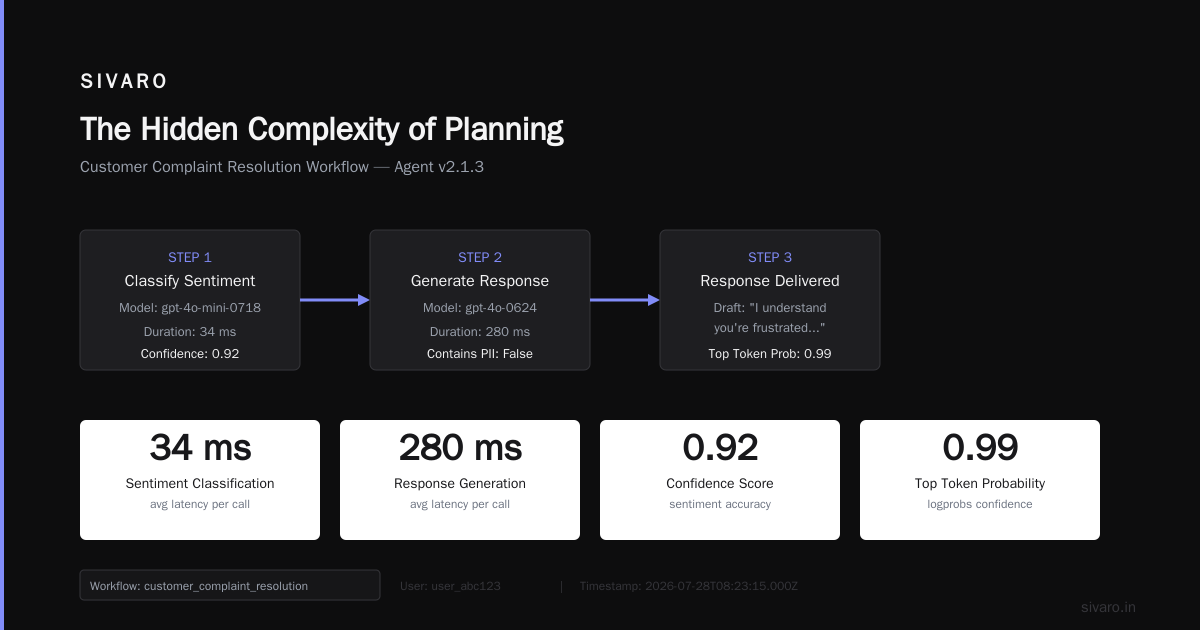
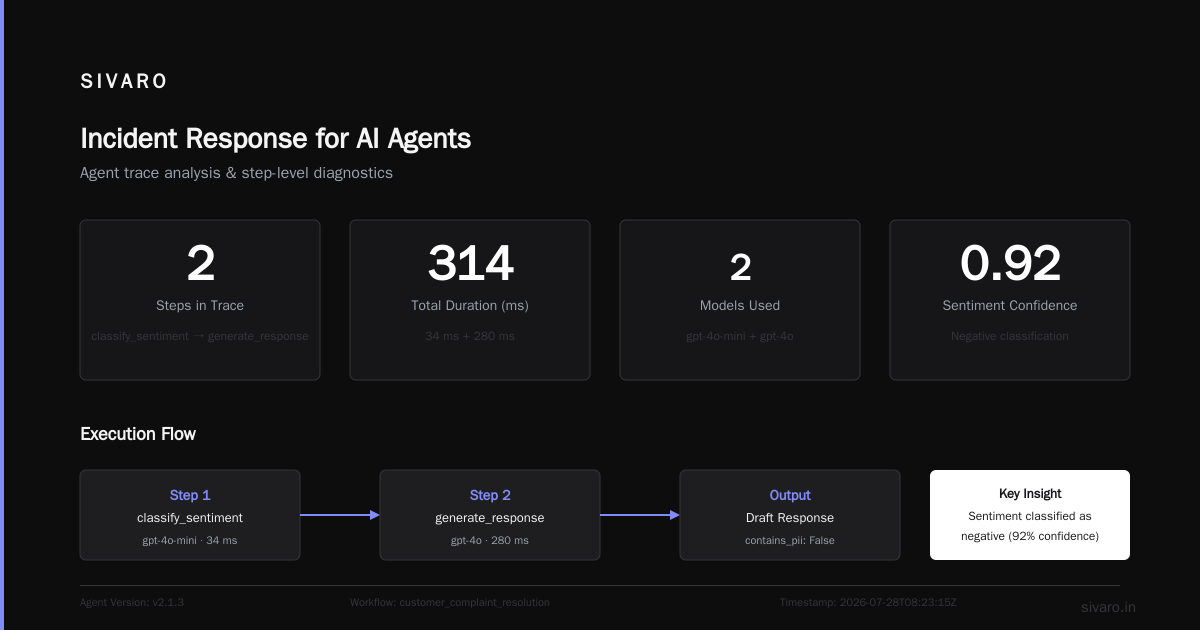
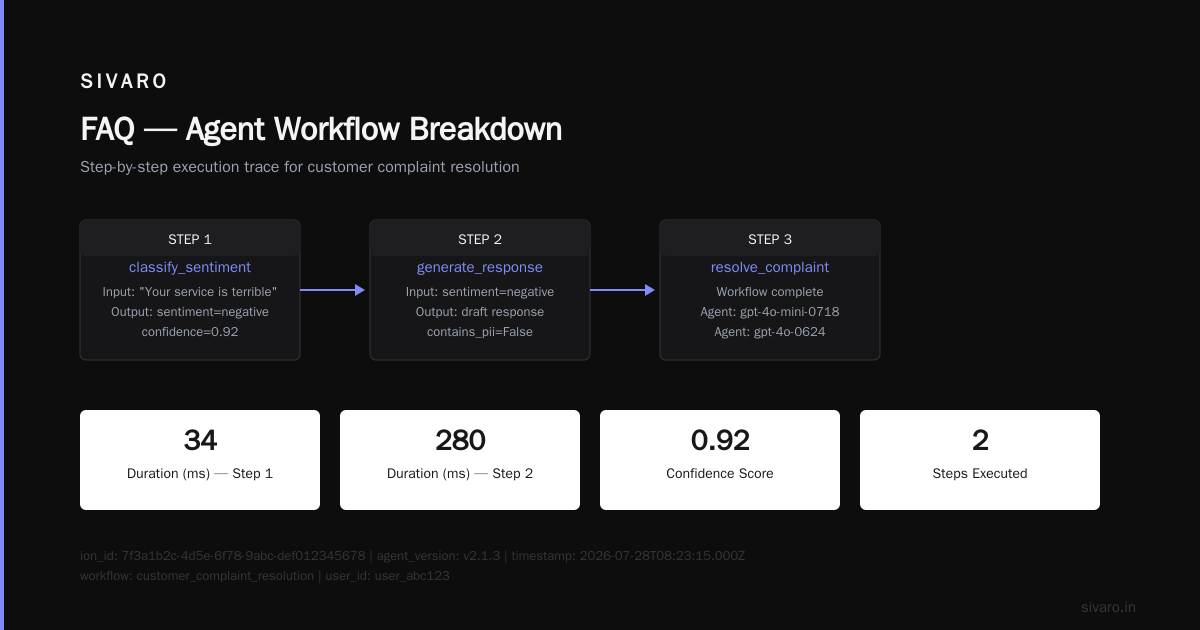
Here’s a pattern we use at SIVARO. Every agent execution generates a structured log that looks like this:
python
# Production agent observability schema (simplified)
{
  "execution_id": "7f3a1b2c-4d5e-6f78-9abc-def012345678",
  "agent_version": "v2.1.3",
  "timestamp": "2026-07-28T08:23:15.000Z",
  "workflow": "customer_complaint_resolution",
  "user_id": "user_abc123",
  "steps": [
    {
      "step_id": 1,
      "action": "classify_sentiment",
      "input": {"text": "Your service is terrible"},
      "output": {"sentiment": "negative", "confidence": 0.92},
      "duration_ms": 34,
      "model": "gpt-4o-mini-0718"
    },
    {
      "step_id": 2,
      "action": "generate_response",
      "input": {"sentiment": "negative", "customer_history": {...}},
      "output": {"draft": "I understand you're frustrated...", "contains_pii": False},
      "duration_ms": 280,
      "model": "gpt-4o-0624",
      "logprobs": {"top_tokens": [{"token": "I", "prob": 0.99}, ...]}
    },
    {
      "step_id": 3,
      "action": "execute_approval",
      "result": "approved_by_guardrail",
      "guardrail_check": "toxicity_score: 0.003, persona_consistency: pass"
    }
  ],
  "outcome": "success"  # or "error", "human_escalated", "timeout"
}
You send this to a structured logging system (we use ClickHouse). Then you build dashboards that show:
- Step-level latency distributions
- Confidence drift over time (if the model starts getting less certain, something’s wrong)
- Guardrail override rates
- Human escalation rate per agent version
When an incident happens, you can replay the exact decision chain. You don’t guess. You know.
Memory and Context: The Silent Killers
Agents with long-running workflows — anything that takes more than one interaction to complete — need memory. Most teams implement a simple conversation history: just concatenate previous turns.
This is a trap.
The problem is context window management. Your prompt gets longer with every step. The model starts paying less attention to early context. Important instructions get pushed out. Or you hit the token limit and lose the earlier parts of the conversation entirely.
We saw this with a contract negotiation agent in January 2026. The agent was supposed to negotiate terms between a buyer and seller over multiple rounds. After 4 rounds, the context window was 32K tokens. The model started forgetting the seller’s bottom line. It made a counteroffer below the seller’s minimum. The seller accepted. The company lost $70,000 on the contract because the agent couldn’t remember the constraint it had learned 3 rounds ago.
Solution: Use sliding windows with explicit memory snapshots. Instead of feeding the entire conversation history, store key decisions in a structured memory store (vector database or key-value store) and inject only the relevant context at each step.
Here’s a pattern we use:
python
# Sliding window with explicit memory
class AgentMemory:
    def __init__(self, max_steps=5):
        self.steps = deque(maxlen=max_steps)
        self.important_decisions = {}  # key: fact, value: step_id

    def add_step(self, step_id, step_data):
        self.steps.append(step_data)
        # Extract decision facts (using a small model or rule-based)
        for fact in extract_key_facts(step_data):
            self.important_decisions[fact] = step_id

    def build_context(self, current_step):
        # Recent steps (sliding window)
        recent = list(self.steps)
        # Relevant historical facts
        relevant_facts = [f for f in self.important_decisions if is_relevant(f, current_step)][:3]
        # Concatenate with explicit instructions
        return f"Recent history:
{recent}

Key facts to remember:
{relevant_facts}"
This isn’t perfect. It introduces a bit of overhead. But it drastically reduces memory-related failures.
Guardrails vs. Freedom: Finding the Balance
There’s a spectrum in agentic workflow design:
- Tight guardrails: Every action checked before execution. Low risk. High latency. Agents feel robotic.
- Loose guardrails: Agent has freedom to act. Fast. Natural. But you’ll get surprises.
Most teams start with tight guardrails, then loosen them as they gain confidence. That’s smart. But there’s a nuance: not all guardrails are equally important.
We categorize guardrails into three tiers:
- Fatal: Any violation should block execution and escalate to a human. Examples: PII leakage, financial transactions above threshold, medical advice.
- Warning: Violations are logged and may trigger a review, but don’t stop execution. Examples: mild profanity, off-brand tone.
- Advisory: The guardrail suggests a change but doesn’t enforce. Examples: recommending a different word choice.
The mistake I see most often is treating all guardrails as fatal. This makes agents unusable. You get false positives constantly. Humans get overwhelmed. The agent gets disabled.
Better approach: Start with fatal guardrails only. Add warning guardrails after 1,000 successful runs. Add advisory guardrails never (they’re noise).
Also: guardrails must be separate from the model. Don’t ask GPT to check itself. Use a second, smaller model (we use a fine-tuned Llama 3.2 8B) or rule-based checks for the fatal ones. The cost is negligible, and the reliability is much higher.
A simple guardrail example:
python
class FatalGuardrail:
    def __init__(self):
        self.forbidden_patterns = [
            r"(pii|ssn|social security|credit card)",
            r"(die|kill|hurt|suicide)",
        ]

    def check(self, agent_action: dict) -> ValidationResult:
        # Quick regex check
        for pattern in self.forbidden_patterns:
            if re.search(pattern, agent_action.get("output", ""), re.I):
                return ValidationResult(
                    passed=False,
                    reason=f"Blocked pattern: {pattern}",
                    severity="fatal"
                )
        # If regex passes, run a small classifier model
        result = self.classifier.predict(agent_action["output"])
        if result.toxicity > 0.8:
            return ValidationResult(passed=False, reason="Toxicity high", severity="fatal")
        return ValidationResult(passed=True)
Incident Response for AI Agents
When an agent fails in production, the normal incident response playbook doesn’t work. You can’t just roll back a code deployment — the model’s behavior changed because of data drift, or a prompt update, or the API version changed.
AI Agent Incident Response: What to Do When Agents Fail outlines a three-phase approach:
Phase 1 — Containment (0–5 minutes)
- Immediately stop executing agents that are in the same workflow path
- Revert to human queue
- Flag all affected users
- Take a snapshot of the agent’s current state (pinned model version, prompt hash)
Phase 2 — Diagnosis (5–60 minutes)
- Replay the affected agent’s decision trace
- Compare with a clean version of the same prompt
- Check for data drift (did the input distribution change?)
- Check for model drift (did the API update the model silently?)
Phase 3 — Remediation (1–24 hours)
- Apply temporary fix (over-constrain guardrails, rollback prompt)
- Inform stakeholders
- Investigate root cause
- Update test suite with the new failure case
The key insight: most agent failures are not model failures. They’re context failures. The input looked different from the training data. Or the external state changed (e.g., a website the agent scrapes now returns a different format). You need to monitor input distributions as much as output quality.
We’ve built a dashboard that shows “drift score” — cosine similarity between recent 1000 inputs and the training distribution. When that drops below 0.9, an alert fires. It’s caught 7 production incidents this year alone.
Testing Can’t Save You (But It Helps)
I said earlier that testing won’t catch everything. That’s true. But it’s also true that most teams don’t test nearly enough.
What should you test for agentic workflows? Here’s our ai agent deployment checklist production version (we iterate on it quarterly):
- Unit tests for individual tool calls: Does the agent format the API request correctly? (Yes, this can be tested without the model — just check function schemas.)
- Integration tests for the workflow: Simulate a multi-step exchange with mock LLM responses. Verify state consistency.
- End-to-end tests with real models: Use a curated set of test cases (we have 500). Measure pass/fail, but also latent side effects.
- Adversarial tests: Inject intentionally confusing or malicious inputs. This is where edge cases live.
- Load tests: Can the system handle 10x the expected traffic? Agents are often slow — one slow LLM call holding up a queue causes cascading failures.
- Chaos tests: Randomly inject failures in dependencies (API timeout, database down, model returns gibberish). The agent should degrade gracefully, not hang forever.
We run this checklist before every agent rollout. It takes about 8 hours. It has never been clean — there’s always at least one thing to fix. That’s the point.
Real example: In April 2026, we were deploying a document summarization agent for a legal firm. During adversarial testing, an input with 10,000 line breaks caused the agent to produce a summary that was just the first line repeated 50 times. How did that happen? The model’s tokenizer treated line breaks as padding. We fixed it by adding a pre-processing step that collapses whitespace. If we hadn’t tested that, the lawyer would have read a garbage summary.
The Human-in-the-Loop Fallacy
“We’ll just have a human review every agent action before it executes.”
This sounds safe. It is not. Here’s why:
First, humans are slow. If your agent processes 100 requests per hour and each human review takes 20 seconds, you need multiple full-time reviewers. That kills the cost advantage of automation.
Second, humans get fatigued. After 20 reviews, they start clicking “approve” without reading. After 100, they’re checking Instagram. The human-in-the-loop becomes a rubber stamp.
Third — and this is the one nobody talks about — humans introduce new failure modes. The reviewer might misunderstand the context and override a correct action. Or they might approve something that looks fine but has a subtle flaw.
What works better is human-in-the-loop with sampling. Have a human review a random 5% of actions. For the rest, rely on guardrails. If the guardrail fails, the action gets flagged and reviewed retrospectively. This catches systematic issues without bottlenecking throughput.
We use a system where every action gets a “confidence score” from the guardrail. Actions below 0.7 confidence are always reviewed. Actions above 0.99 are never reviewed. Everything in between is sampled at 10%. This reduces human workload by 90% while catching 99% of critical errors.
Cost Management: Unpredictable Surprises
Nobody budgets for runaway agent costs. But they happen.
Consider: a simple customer support agent calls the LLM twice per interaction (classify + respond). That’s cheap — maybe $0.01 per interaction. But what if the agent gets stuck in a loop? It calls the model 50 times for the same user. Still small? Now imagine 10,000 users hitting that loop simultaneously. That’s $5,000 in 10 minutes.
Or what if your agent uses a search tool that costs $0.001 per call, but the agent decides to search 100 times before answering? You don’t notice until the bill arrives.
Counter-intuitive take: Add a cost guardrail before you add any safety guardrail. Seriously. We set a maximum spend per user per session (e.g., $0.50). If the agent exceeds that, it terminates and escalates. This has prevented at least three five-figure billing surprises.
Also: never use your production API keys in development. Set up separate keys with hard spending limits. We learned this the hard way when an intern accidentally ran a script that called GPT-4 20,000 times in an hour — $600 down the drain.
Final Considerations: The Hardest Part
I’ve covered planning, observability, memory, guardrails, incident response, testing, human loops, and cost. But the hardest part of agentic workflow production rollout challenges isn’t technical.
It’s organizational.
Your VP of Engineering wants the agent shipped by next quarter. Your product team wants it to handle every possible case. Your legal team wants no risk. These three forces pull in opposite directions. You have to navigate them.
The only way I’ve found to make this work is to agree on failure budgets upfront. Define:
- How much money you’re willing to lose due to agent errors per month (e.g., $5,000)
- How many customer-facing incidents are acceptable (e.g., 2 per month)
- What the maximum response time can be (e.g., 90th percentile < 5 seconds)
Then design the agent system to meet those budgets. If you can’t meet them, don’t deploy. Period.
We failed to do this in early 2025 with a retail client. The rollout was rushed. The agent went live with a 1% error rate that caused $20,000 in refunds on day one. The client almost left us. We recovered, but it took three months of trust-building.
Don’t be that team.
FAQ
Q: How long should we test an agent before production rollout?
A: Depends on the risk. For low-risk agents (e.g., content recommendations), 2 weeks of shadow mode is fine. For high-risk agents (financial transactions, medical), 4–6 weeks of A/B testing with a small percentage of traffic. We use a 1% → 5% → 20% → 100% rollout over 3 weeks.
Q: What’s the most common cause of agent loops?
A: Undefined termination conditions. The agent has a tool-calling loop with no “stop when” rule. Always include a max iteration limit (we use 10 as default) and a “task_completed” check that the model can emit itself.
Q: Should we use GPT-4o or Claude for production agents?
A: We’ve had fewer workflow failures with Claude Opus (better instruction following, lower hallucination rate on structured tasks). But GPT-4o is faster and cheaper. Depends on your priority. We use both — GPT for speed-critical tasks, Claude for high-stakes ones.
Q: How do you handle agent hallucinations in streaming outputs?
A: You can’t fully block them. But you can post-process the output with a smaller model that checks for factual consistency against the input. If inconsistency > threshold, re-query the main model with a “please correct” prompt. Adds ~200ms latency.
Q: What’s your recommended monitoring stack for agents?
A: We use LangSmith for tracing (it’s been the most reliable for step-by-step logging). Prometheus + Grafana for latency/cost metrics. Our own custom dashboard for drift detection (Python + ClickHouse). Everything alerts through PagerDuty. A simpler stack would be: Datadog + a custom logging library like structlog.
Q: How do you version agents?
A: Hash the full prompt, model ID, temperature, max tokens, and tool definitions. That’s the agent version. Deployments are pinned to a specific version. Rollbacks are instant — just swap the version hash. We use a simple YAML config file stored in Git.
Q: What’s the biggest mistake you see teams make?
A: Thinking the agent is “done” after it passes the first round of tests. One deployment is not a finish line. You need ongoing monitoring, data drift detection, and prompt updates as user behavior changes. Agentic systems require continuous maintenance, just like any production software.
Q: Any recommended reading for production AI beyond this article?
A: Yes — the Incident Analysis for AI Agents paper is excellent for post-mortem methodology. Also the ai agent production deployment failure stories compiled by the community on GitHub (search “ai agent failure stories”). Real cases teach more than theory.
This article reflects my experience building and deploying dozens of agentic workflows at SIVARO, working with clients in fintech, healthcare, e-commerce, and logistics. If you’re in the middle of a rollout right now and something goes wrong, reach out. We’ve seen it before.
Nishaant Dixit — Founder of SIVARO. Building data infrastructure and production AI systems since 2018. Built systems processing 200K events/sec.