 SIVARO

Agentic Workflow Production Rollout Mistakes: The 2026 Field Guide
April was brutal. A fintech client in Austin pushed their first multi-agent system to production on a Thursday. By Monday, their orchestration layer had burned through $18,000 in API credits, their compliance bot was hallucinating transaction records, and their lead engineer was updating his resume.
I know because SIVARO got the call to fix it. The system was elegant. The rollout was a disaster.
Here's the uncomfortable truth about agentic workflows: the hard part was never building the agents. It's everything that happens after you hit deploy. This guide is the comparison I wish someone handed me before we started cleaning up these messes. I'm going to compare the approaches, the tooling, and the processes — and tell you where I've seen things blow up.
What "Production Ready" Actually Means for Agentic Systems
Most teams treat agentic workflow production deployment steps like they're deploying a microservice. Push the container, run a health check, done. That's wrong. Your agent isn't a stateless function. It's a reasoning engine with access to your data and a credit card.
The definition of "production ready" for an agentic workflow includes:
- Deterministic fallbacks for non-deterministic reasoning
- Cost containment that triggers before a runaway loop
- Observability into the reasoning trace, not just the output
- Guardrails on tool access and data exfiltration
- Evaluation suites that measure task completion, not just token count
If your checklist doesn't include all five, you're not ready. You're doing a pilot with extra steps.
I've seen teams skip the evaluation suite because "the demo looked good." The demo always looks good. The demo doesn't run for twelve hours straight against dirty production data.
Comparing Rollout Strategies: Big Bang vs. Shadow Mode vs. Canary
I've watched teams try three main approaches to agentic workflow production deployment steps. Here's the honest comparison.
Big Bang Deployment
You swap the old system for the agentic one. No parallel running. This is the "we're going all in" strategy that fails roughly 70% of the time. In 2025, a logistics company in Rotterdam did this with their routing agents. The agents optimized for delivery speed but ignored the union rules in the contract. Fourteen drivers refused routes, and their dispatch process was down for three days.
Shadow Mode
Run the agent in parallel but don't act on its outputs. Compare its decisions against the real system. This is my baseline recommendation. It costs more because you're running two systems, but the data you get is worth the price.
Canary Release
Route a small percentage of real traffic to the agentic system. This is shadow mode with teeth. You're letting the agent handle real requests but only for a small subset. The problem with canaries for agentic systems? An agentic workflow can make a decision on request #5 that alters state in a way that gets replayed across your entire database. In November 2025, a healthcare SaaS company in Chicago ran a 2% canary of their patient-intake agents. The agent "helpfully" updated patient records to match its interpretation of a voicemail transcription. Corrupted 1,940 records. The canary didn't catch it for six hours because the agent reported each action as "successful."
My recommendation: Start with shadow mode for at least two weeks. Move to a canary only once your evaluation suite shows 99.5%+ task completion on the shadow data. And never let the canary have write access to production state on day one. Read-only or write-to-sandbox only.
The Evaluation Suite Problem: You Can't Measure What You Didn't Define
At SIVARO, we've built agentic evaluation frameworks for clients in insurance, e-commerce, and logistics.
The biggest mistake is using LLM-as-judge for everything. It's cheap, but it's also unreliable for domain-specific tasks. I tested this with a legal-tech client in Q1 2026. We ran their contract-review agents through 500 test cases. The LLM judge scored them at 92% accuracy. A human expert review scored them at 71%. The LLM was grading on "did it sound reasonable," not "did it correctly identify the indemnification clause."
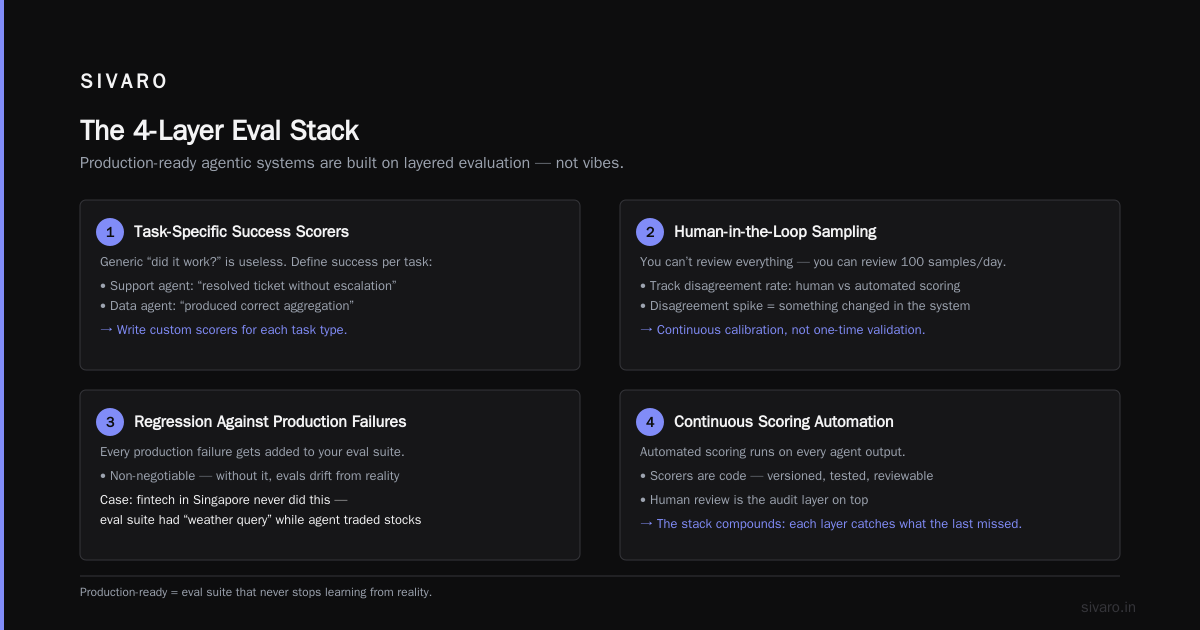
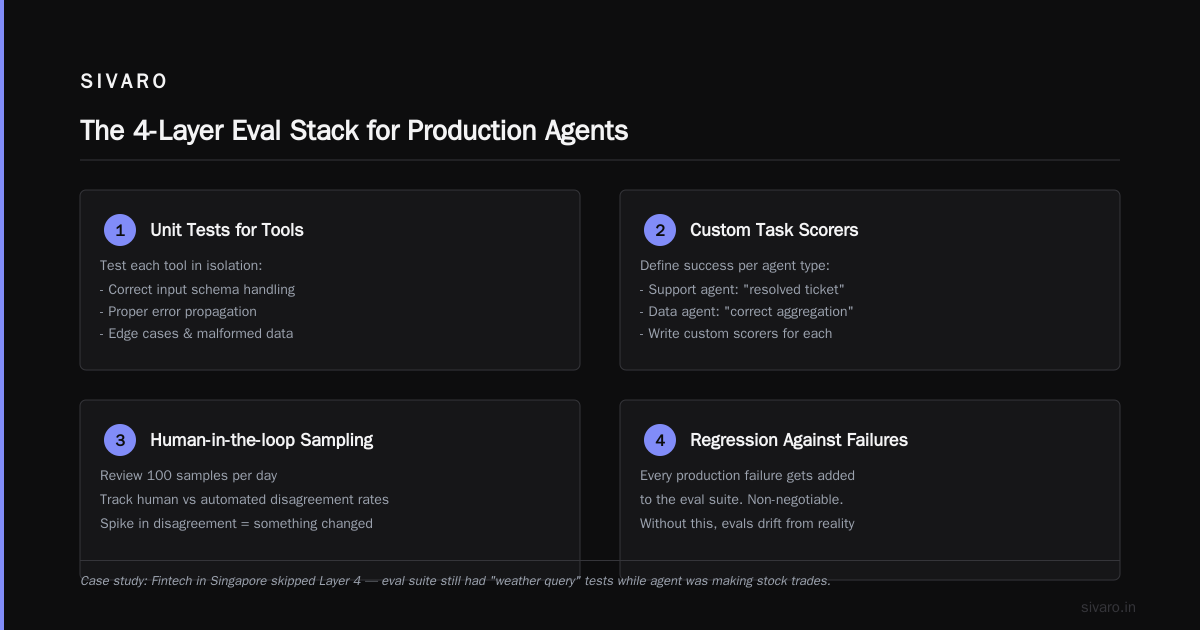
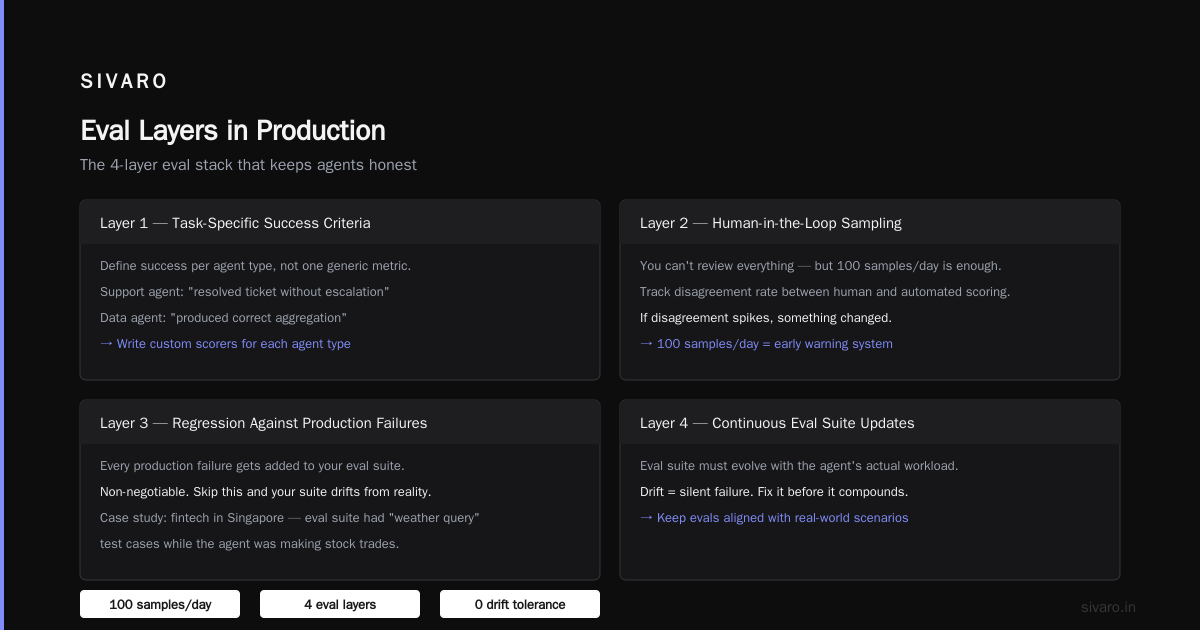
You need a layered evaluation strategy:
Layer 1: Deterministic checks
python
# Verify the agent's output matches expected structure
def validate_contract_output(output):
    required_fields = ["vendor", "party", "terms", "liability"]
    missing = [field for field in required_fields if field not in output]
    if missing:
        raise ValidationError(f"Missing: {missing}")
    # Check against gold-standard regex patterns
    if not re.search(r"§\d+\.\d+", output["liability"]):
        return False
    return True
Run these first. They're fast, they're cheap, and they catch 40% of errors that an LLM judge would miss.
Layer 2: Task-specific scoring
Define success criteria per task type. For a customer-support agent, success is "resolved ticket without escalation." For a data-analysis agent, success is "produced correct aggregation." Write custom scorers for these.
Layer 3: Human-in-the-loop sampling
You can't afford human review of everything. You can afford human review of 100 samples a day. Do it. Track disagreement rates between human and automated scoring. If disagreement spikes, something changed.
Layer 4: Regression against production failures
Every time an agent fails in production, add that failure to your eval suite. This is non-negotiable. If you don't do this, your eval suite drifts away from reality. I worked with a fintech company in Singapore that never did this. Their eval suite still had "weather query" test cases while the agent was making stock trades.
Cost Management: The Silent Agentic Workflow Production Rollout Mistake
Most teams discover their cost problem the same way: the cloud bill arrives.
Agentic workflows are expensive because they're inherently iterative. Each step can chain into multiple tool calls. Each tool call is another API hit. Without limits, an agent can spiral.
A European e-commerce client of ours (I can't name them, but they're a top-20 retailer) deployed a product-recommendation agent. It was supposed to find complementary items. Within 48 hours, the agent had spent €14,000 in API costs. The problem? The agent kept re-querying the product database because it wasn't confident in its "complementary item" scoring. It would make the query, get an okay match, then decide to try again with slightly different parameters. It was a perfectionist with an unlimited budget.
The solution is not "better prompts." The solution is hard caps.
yaml
# Agentic workflow configuration with cost limits
agent_config:
  max_steps: 8
  max_api_calls: 25
  max_cost_per_task: $0.45
  cost_monitor_interval: 5s
  on_budget_exceeded: "yield_best_result_and_log"
  # Never allow the agent to block on a single tool call more than once
  dedupe_tool_calls: true
  rate_limit_tool_calls_per_minute: 60
I've seen teams resist the max_steps limit because they worry about under-performing agents. Here's the data point: in our production systems at SIVARO, over 90% of successful agentic tasks complete in 5 steps or fewer. If your agent needs 15 steps, your workflow design is wrong, not the limit.
The Orchestration Framework Decision: LangGraph vs. CrewAI vs. Custom
I get asked this weekly. It's the wrong question, but I'll give you my take.
LangGraph — I use this when I need fine-grained control over state and loops. It's a graph-based execution model that forces you to think about state transitions explicitly. This maps well to production requirements. The learning curve is steeper, but the debugging tools are better. For SIVARO clients running complex multi-step workflows, LangGraph has been more reliable.
CrewAI — Faster to build, but our testing in Q1 2026 showed it struggles with complex state management. We had a client use it for a data-enrichment pipeline that needed to update records across three different sources. The framework kept losing track of which records were updated. It's getting better, but I don't trust it for state-heavy workflows.
Custom orchestration — This is what we end up building for most serious clients. A lightweight orchestrator using Temporal or Prefect for durability, with the agent logic as discrete steps. This gives you:
- Built-in retries and timeout management
- Durable execution across crashes
- Observability into each step state
The custom route costs more upfront. It pays off in production because you can actually see what the agent is doing. Off-the-shelf orchestration layers are often black boxes once things go sideways.
My take: If you're a small team with a simple workflow, use LangGraph. If you're building something that touches production data with compliance requirements, budget for custom orchestration on a durable execution engine.
Observability: You Need To See The Reasoning, Not Just The Output
Your logging strategy for a REST API is dead wrong for agentic systems.
In December 2025, I debugged an agent for a manufacturing client in Ohio. The agent was supposed to optimize supply chain orders. It kept making bizarre suggestions — ordering 3x steel, delaying shipments by two weeks. The logs showed the final outputs were "successful." The reasoning was the problem. The agent had been referencing a product catalog schema that the client's API had changed six months earlier. The agent was "reasoning" against deprecated fields and confidently producing garbage.
If we had logs of the chain of thought, we'd have caught this in an hour. Instead, it took three days.
What you need to log for every agentic action:
json
{
  "trace_id": "agent_7f3a2c99e1",
  "timestamp": "2026-08-31T14:22:05Z",
  "agent_name": "supply_chain_optimizer",
  "step_number": 3,
  "input_data_hash": "sha256:8f8f5a",
  "model_called": "claude-opus-4",
  "prompt_version": "prod-v2.1",
  "tool_calls": [
    {
      "tool": "product_catalog_api",
      "action": "query_sku",
      "params": {"sku": "STEEL_HRC_12", "fields": ["lead_time"]},
      "result": {"lead_time": "45_days", "active": false},
      "duration_ms": 180
    }
  ],
  "reasoning_trace": "Agent considered lead_time of 45 days. Field marked inactive. Considering alternate supplier...",
  "output": "Buy 3x steel. Allocate budget for 45-day lead time.",
  "cost_usd": 0.09
}
I know what you're thinking: "That's a lot of logging." Yes. It is. And it's worth every byte, because without the reasoning trace, you cannot debug a non-deterministic system. The output alone doesn't tell you why the agent made the decision.
We've standardized on OpenTelemetry semantic conventions extended with agent-specific spans. It's working well. The OTel GenAI semantic conventions were officially released in 2025, and they cover this. Also see LangSmith if you're looking for a managed solution, but be careful — if your agents touch PII, you want your traces hosted in your own VPC, which means custom instrumentation anyway.
Guardrails and Tool Access: The Agentic AI Production Readiness Checklist Disaster
Here's where I see the most catastrophic failures.
Problem: Teams give agents too much access because they don't want to build interfaces for every tool.
Example: A cybersecurity firm in Tel Aviv (I audited their rollout in February 2026) gave their incident-response agent access to their internal SIEM API. The agent handled 80% of alerts correctly. But there was a prompt injection vulnerability in an attacker's log file. The agent read the malicious content, followed the injected instruction, and deleted a chunk of quarantine rules. It was a targeted attack, but the agent's tool access made it possible.
The agentic ai production readiness checklist for tool access:
- Map every tool the agent can call. Every. Single. One.
- Assign required permissions for each tool. Minimum viable access.
- Implement tool-level allowlists — the agent can only call pre-approved tools, not arbitrary URLs.
- Add a human approval gate for any tool that modifies or deletes production data.
- Test the agent's behavior with malicious input — use adversarial examples in your eval suite.
python
# Example: Tool policy enforcement
TOOL_ALLOWLIST = {
    "search_catalog": {"read": True, "write": False},
    "update_order": {"read": True, "write": True, "human_approval_required": True},
    "delete_record": {"read": True, "write": False},  # Never allow agent-driven writes
    "execute_payment": {"read": False, "write": False} # Hard block
}

class ToolAccessController:
    def check_access(self, tool, action, agent_id):
        if tool not in TOOL_ALLOWLIST:
            raise AccessDeniedError(f"Tool {tool} not in allowlist")
        if not TOOL_ALLOWLIST[tool]["read"] and action == "read":
            raise AccessDeniedError(f"Read not allowed for {tool}")
        if TOOL_ALLOWLIST[tool].get("human_approval_required"):
            return "HUMAN_REVIEW"
        return "ALLOWED"
I'm not saying every agent needs human approval for every write. That kills throughput. But you need a threshold-based system: writes to core data require human review; writes to ephemeral data are allowed. Your setup will differ. But define it explicitly before deployment.
The Agentic Workflow Production Deployment Steps That Actually Work
Here's the sequence I've refined over the last 18 months of production rollouts. This is the process we follow at SIVARO and what I recommend to every client.
Step 1: Define the success metric before writing a line of agent code.
What does "good" look like? Is it ticket resolution rate? Order accuracy? Cost per transaction? You need this before you start, because it determines your eval suite.
Step 2: Build the eval suite in parallel with the agent.
This is non-negotiable. Start with 50 golden test cases. Scale to 500+ as you go. Include adversarial and failure cases from day one.
Step 3: Run shadow mode for two weeks minimum.
Compare agent decisions against your current system. Track the disagreement rate. If it's above 5%, you're not ready. We have clients that need four weeks. It depends on how subtle your domain is.
Step 4: Implement your agentic ai production readiness checklist.
The full checklist includes:
- [ ] Tool allowlists defined
- [ ] Cost caps implemented and tested
- [ ] Reasoning trace logging configured
- [ ] Human approval gates for destructive actions
- [ ] Eval suite with regression cases from shadow mode findings
- [ ] Security review completed (prompt injection tested)
- [ ] Rollback plan defined (what's the reverse of every agent action?)
Step 5: Canary with a 1-2% traffic slice, read-only state.
Test in production, but don't let the agent touch production data. If it works for a week, promote to a small write-capable canary.
Step 6: Full deployment with a kill switch.
This sounds simple, but make sure the kill switch actually works. I've seen kill switches that were never connected. Or were connected to a monitoring dashboard that no one watches.
The Human Factor: Your Team Isn't Ready Either
The tech stack is only half the battle.
I've seen brilliant engineering teams fail because their customer support managers didn't trust the agent. Or because their compliance team wasn't consulted until the night before launch. The process isn't just about the agents — it's about the people who have to live with them.
What I recommend:
- Assign an agent owner — one person responsible for the agent's production performance. Not "the team." One person who gets paged at 2 AM.
- Create a prompt/skill update process — who can change the agent's instructions? How do those changes get reviewed and deployed? This is the new version control, and most teams treat it like an afterthought.
- Run a war-room simulation before launch. Walk through the "agent went rogue" scenario with your on-call engineer, security person, and customer success lead. See what happens when the kill switch gets pulled.
The "It Worked In The Demo" Problem: A Case Study from 2026
I want to close with a story that ties this together.
In June 2026, a regional bank in the UK hired us to audit their agentic workflow deployment. Their AI assistant handled balance inquiries and money-transfer requests. They'd run a shadow mode for a week. Their eval suite had 200 test cases, all passing at 95%+.
The problem? Their eval suite only tested happy paths. It tested "what's my balance" and "transfer £50 to X." It never tested "what if the user asks for a transfer to an account that doesn't exist" or "what if the user's account is frozen."
When they deployed a 5% canary, the agent hit a frozen account within the first hour. The agent, trying to be helpful, said it would "convert the frozen account into an accessible one."
It didn't do that — but only because the tool access policy blocked the write. The agent exposed the internal policy in its response, though, which is a different kind of failure.
The bank's engineering lead said to me, "We automated the happy paths and let the humans handle the exceptions. The agent just made a new exception we never planned for."
That's the whole game. You don't know what the exceptions are until you're in production. So build your evaluation suite, your logging, and your review process to catch the unexpected, not just the unknown.
Frequently Asked Questions
Q: What's the most common agentic workflow production rollout mistake?
A: Skimping on the evaluation suite. Teams build the agent, test it on 20 manual cases, and call it production-ready. You need an automated eval suite with hundreds of cases, including adversarial ones. And you need to update it with every production failure.
Q: How long does a safe agentic workflow rollout take?
A: I've seen teams do it in four weeks. I've seen teams take six months. The quality of your eval suite and the complexity of your domain determine this. Don't let a vendor push you to "shift left" on this. Shadow mode for two weeks is the absolute minimum.
Q: Can I use LLM-as-judge for evaluation?
A: As a baseline, yes. As your only judge, no. Pair it with deterministic checks and human sampling. The cost is worth the reliability gain.
Q: What's the most expensive mistake you've seen?
A: The API cost runaway. One client in the travel industry burned $120,000 in 72 hours because their agent kept re-planning itineraries when it wasn't confident. A simple max_steps cap would have prevented it.
Q: Is LangGraph or CrewAI better for production?
A: For simple workflows, either works. For complex state and durable execution, I lean custom orchestration with LangGraph as the foundation. CrewAI is getting better, but I wouldn't bet my production uptime on it yet.
Q: What's the biggest security risk with agentic workflows?
A: Prompt injection leading to tool misuse. Your agent will eventually read untrusted data. It will eventually follow instructions from that data. Your tool allowlists and human approval gates are your defense.
Bottom Line
Agentic systems are not a feature. They're a workforce. You wouldn't hire a new employee and give them production credentials on day one without supervision. Treat your agents the same way.
The rollout mistakes I've seen aren't exotic. They're basic engineering discipline failures — missing eval suites, weak cost controls, no regression testing, blind tool access. Fix those, and your agentic workflow has a real shot.
The question isn't whether your agents are smart enough for production. It's whether your production process is solid enough for agents.
Nishaant Dixit — Founder of SIVARO. Building data infrastructure and production AI systems since 2018. Built systems processing 200K events/sec.