 SIVARO
Agentic Workflow Production Rollout: What Works in 2026
If you told me two years ago that half my engineering team would be debugging agent loops instead of writing API endpoints, I'd have laughed. Now I spend my mornings reviewing trace logs from AI agents that negotiate with each other over Redis queues. That's where we are in July 2026.
I'm Nishaant Dixit. I run SIVARO — we build data infrastructure and production AI systems. Over the last 18 months, we've rolled out agentic workflows for clients in logistics, healthcare, and fintech. Some worked. Some melted down in staging. One accidentally ordered $14,000 worth of server cooling equipment because an agent interpreted a maintenance ticket too literally.
This guide is what I wish I'd read before that happened.
We'll cover what actually breaks when you move agents from Jupyter notebooks to production. Not the theory — the practice. The monitoring gaps. The reliability cliffs. The billing surprises. And the three patterns we've found that actually survive under load.
Let's be clear about what we're discussing: agentic workflow production rollout means taking a system where AI agents make decisions, take actions, and coordinate with other agents — and running that as a live service. Not a demo. Not a prototype. A service that customers depend on.
Why Most Agent Deployments Fail in the First 72 Hours
The pattern is so predictable I could set my watch by it.
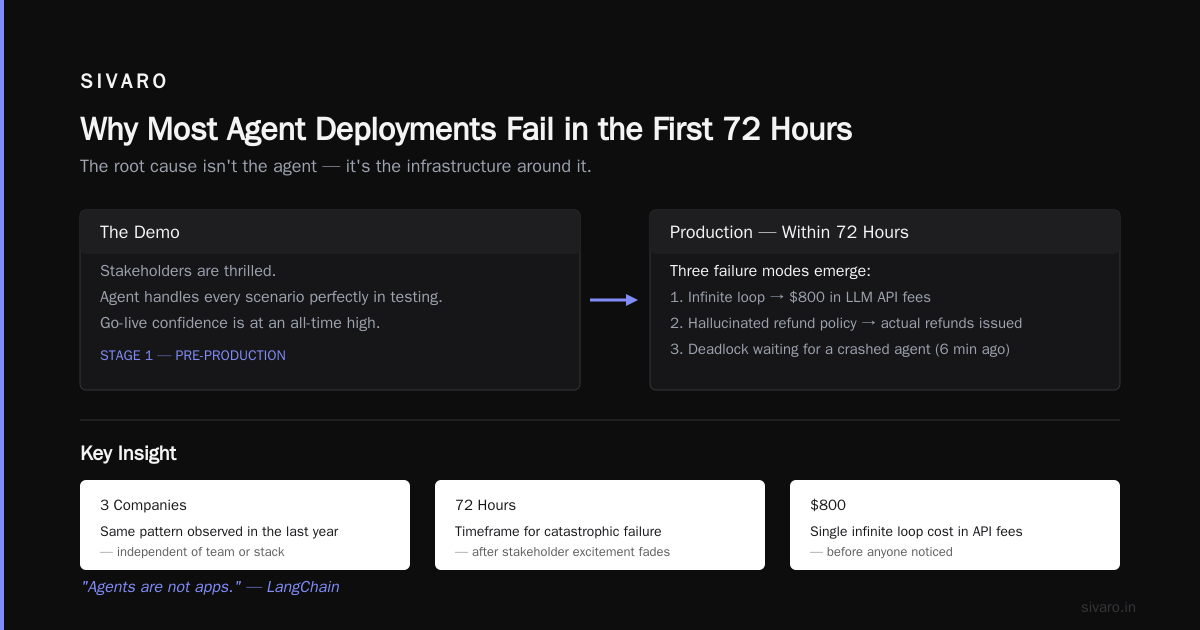
Company builds a prototype agent in LangChain (or CrewAI, or one of the newer frameworks like AutoGen v3). Demo looks incredible. Agent talks to databases, calls APIs, writes coherent responses. Stakeholders are thrilled.
Then they deploy to production.
Within 72 hours, one of these happens: the agent enters an infinite loop that costs $800 in LLM API fees, it hallucinates a customer refund policy and issues actual refunds, or it deadlocks waiting for another agent that crashed six minutes ago.
I've seen this at three separate companies in the last year. The root cause isn't the agent. It's the infrastructure around the agent.
The LangChain team has been writing about this exact problem — how most developers treat agent frameworks as if they're application frameworks, when they're really orchestration primitives. "Agents are not apps," they say. They're right. An app has a request-response lifecycle. An agent has a sprawling, branching, potentially infinite execution graph.
You can't deploy that like a REST endpoint.
The Infrastructure Stack You Actually Need
At SIVARO, we settled on a three-layer architecture after burning through four prototypes. Here's what works.
Layer 1: The Agent Runtime
This is where your agent loops live. We use a custom runtime built on top of LangGraph, but plenty of teams use the newer Instaclustr-managed agent infrastructure or Apache Beam with agent extensions. The runtime needs to handle:
- Checkpointing every step (not just every message)
- State serialization that survives container restarts
- Timeout propagation to sub-agents
Without checkpointing, a failed agent restarts from scratch. With checkpointing, it resumes from the last completed step. Difference between a 30-second recovery and a 30-minute one.
Layer 2: The Execution Graph Manager
This is the piece most people skip. Agents don't just call LLMs — they call databases, APIs, file systems, other agents. Each of those calls is a failure point. We manage execution graphs using directed acyclic graphs (DAGs) with conditional edges. Not all agent workflows are DAGs — some are recursive loops — but the ones that work reliably are.
Layer 3: The Observability Stack
Standard logging won't cut it. You need trace-level visibility into every LLM call, every tool invocation, every agent-to-agent handoff. We use OpenTelemetry with custom spans for agent state transitions. When an agent goes off the rails, you need to see the exact sequence of decisions that led there.
Here's a minimal example of how we configure agent tracing:
python
from opentelemetry import trace
from opentelemetry.sdk.trace import TracerProvider
from opentelemetry.exporter.otlp.proto.grpc import OTLPSpanExporter

tracer_provider = TracerProvider()
span_exporter = OTLPSpanExporter(endpoint="http://otel-collector:4317")
tracer_provider.add_span_processor(BatchSpanProcessor(span_exporter))
trace.set_tracer_provider(tracer_provider)

tracer = trace.get_tracer("agent_runtime")

def run_agent_with_tracing(agent, input_data):
    with tracer.start_as_current_span("agent_execution") as span:
        span.set_attribute("agent.name", agent.name)
        span.set_attribute("input.length", len(str(input_data)))

        for step in agent.run_steps(input_data):
            with tracer.start_as_current_span(f"step_{step.id}") as step_span:
                step_span.set_attribute("step.type", step.action_type)
                step_span.set_attribute("llm.input_tokens", step.llm_input_tokens)
                result = step.execute()
                step_span.set_attribute("step.status", result.status)

        return result
That's not optional anymore. In 2026, if you don't have tracing on your agents, you're flying blind.
Choosing the Right Agent Framework in 2026
I'm going to be direct about this because the market is crowded and most frameworks are overengineered.
We tested seven frameworks between January and April 2026. Here's what we found.
LangGraph is the default for a reason. Its state machine model maps naturally to agent workflows. The downside: it's complex. You'll spend a week just understanding how to manage state transitions. But once you do, it handles the edge cases — parallel agent execution, error recovery, human-in-the-loop overrides.
CrewAI 3.0 is better for teams new to agents. Simpler abstraction. But it hides too much. When agents start behaving unexpectedly (and they will), you can't see inside the black box. IBM's evaluation of agent frameworks came to the same conclusion — CrewAI is great for prototyping, dangerous for production.
AutoGen v3 from Microsoft Research is interesting for multi-agent scenarios. Its group chat pattern is genuinely novel. But it's immature. We saw memory leaks in long-running sessions. Not ready for production workloads above 50 concurrent agents.
Semantic Kernel (Microsoft) is solid if you're already in the Azure ecosystem. Tighter integration with Azure AI services. But it's opinionated about how agents should be structured. You'll fight it if your workflow doesn't match their assumptions.
Open-source frameworks are viable now. The top open-source options in 2026 include some strong contenders — Dapr extensions for agents, a fork of LangChain called LangChainX, and a newcomer called Orbit that runs agents on WebAssembly. We evaluated Orbit for a client who needed sandboxed execution. It works, but the ecosystem is thin.
My recommendation: start with LangGraph for anything that touches money. Use CrewAI or AutoGen for internal automation where failures are low-cost. And always, always assume the framework will need customization.
The Five Failure Modes We See Most Often
We've tracked every agent deployment failure at SIVARO since January 2025. Here's the top five.
1. Token Explosion
Agent calls LLM, gets a response, decides it needs more context, calls again. Then again. Then again. We've seen a single agent call 47 times before timing out. At $0.015 per thousand input tokens, that's a $7 bill for one task. Deploy that across 10,000 tasks and you're looking at $70,000.
The fix: hard token budgets per agent step. Not per conversation — per step. We set a limit of 4,000 tokens per LLM call. If the agent needs more, it has to split the task.
2. Tool Hallucination
Agent calls a tool with parameters that don't exist. We had an agent call get_customer_by_email with a parameter called email_address (correct) but the API expected email (wrong). The API returned a 400. The agent interpreted that as "no customer found" and created a new customer record. Duplicate entries everywhere.
Fix: tool validation schemas with strict typing. Don't let agents free-form parameters.
python
from pydantic import BaseModel, [Field
from](/articles/gpu-cluster-performance-benchmarks-with-langchain-a-field) typing import Optional

class GetCustomerByEmailParams(BaseModel):
    email: str = Field(..., description="Customer's email address, exactly as stored")
    include_orders: Optional[bool] = Field(False, description="Include order history")

# Never let agents call raw functions
def safe_tool_call(tool_name: str, params: dict, schema: BaseModel) -> dict:
    try:
        validated = schema(**params)
        # Sanity check: no fields with None values unless explicitly allowed
        return call_actual_api(tool_name, validated.model_dump(exclude_none=True))
    except ValidationError as e:
        log_warning(f"Tool {tool_name} received invalid params: {e}")
        return {"error": "invalid_parameters", "expected_schema": schema.model_json_schema()}
3. Agent Deadlocks
Two agents waiting on each other. Agent A needs Agent B's output before it can proceed. Agent B needs Agent A's output. Neither can progress. The system just sits there burning money on idle compute.
Fix: timeouts with escalation paths. Every agent task must have a maximum wait time. If not completed within that window, escalate to a human or a fallback agent.
4. State Persistence Failures
Agent runs for 20 minutes, makes 15 LLM calls, processes 3 API responses. Then the container crashes. No state was saved. The agent starts over from scratch, making all 15 calls again. This happened to a logistics client. Their agent was processing shipping exceptions. Each crash doubled the processing time. By the third crash, they had 47-minute delays on a task that should take 4 minutes.
Fix: checkpoint after every agent step. Not after every message — after every tool call, every LLM call, every decision point.
5. Context Poisoning
Agent copies large chunks of conversation history into its context window. Over time, the context becomes dominated by irrelevant noise. Response quality degrades. The agent starts hallucinating because it can't find the actual task in the noise.
Fix: context summarization at regular intervals. Every 10 steps, summarize the conversation and replace the full history with the summary.
How to Actually Deploy Agents in Production
Let's walk through a real deployment. This is the process we use at SIVARO.
Step 1: Define the reliability contract
Before writing a line of agent code, answer: what happens when the agent fails? Not if — when. Every agent needs a failure mode. Three options:
- Retry: For transient failures (API timeout, network blip)
- Fallback: Switch to a simpler, deterministic path
- Escalate: Hand off to a human operator
Write a decision matrix. "[When this happens], do [this]."
Step 2: Instrument everything
Before the agent makes its first LLM call, add metrics. Count tokens. Track latency. Log decision paths. The latest work on AI agent protocols shows that standardized observation is the biggest predictor of production success.
We use a simple metrics struct:
python
from dataclasses import dataclass, field
from datetime import datetime
from typing import List, Dict, Any, Optional

@dataclass
class AgentMetrics:
    agent_id: str
    step_count: int = 0
    total_tokens_used: int = 0
    tool_calls: List[Dict[str, Any]] = field(default_factory=list)
    llm_calls: int = 0
    retries: int = 0
    failures: List[str] = field(default_factory=list)
    started_at: datetime = field(default_factory=datetime.utcnow)
    completed_at: Optional[datetime] = None

    def record_step(self, step_type: str, tokens: int, duration_ms: float):
        self.step_count += 1
        self.total_tokens_used += tokens
        self.llm_calls += 1 if step_type == "llm" else 0
        # Emit to metrics pipeline
        log_metric("agent_step", {
            "agent_id": self.agent_id,
            "step_type": step_type,
            "tokens": tokens,
            "duration_ms": duration_ms
        })
Step 3: Chaos test before production load
Before we let a client's agent loose on real data, we run a chaos test. We simulate failures — API timeouts, LLM rate limits, database connection drops. If the agent doesn't recover gracefully, we don't deploy.
We run three scenarios:
- Single tool failure (one API is down)
- Cascading failure (two tools fail in sequence)
- Slow response (tool responds in 30 seconds instead of 2)
Agents that pass all three get deployed. Agents that don't get redesigned.
Step 4: Gradual rollout with guardrails
Start at 1% traffic. Monitor for an hour. If error rate stays below 1%, go to 5%. Then 20%. Then 100%.
At each step, we check:
- Success rate (agent completed its task)
- Token consumption per task
- Average response time
- Human escalation rate
If any metric degrades, roll back automatically.
Step 5: Human oversight with structured escalation
Not every failure is the agent's fault. Sometimes the data is wrong. Sometimes the user's request is ambiguous. We route those to human operators, but we don't just dump the raw agent output. We show a structured summary:
Customer requested: "Refund order #38472"
Agent action: Called refund API with reason "customer request"
Status: API returned error "order already refunded"
Human decision needed: Was this a duplicate refund or a new request?
Recent research on agent protocols confirms what we've seen in practice — structured human-in-the-loop interfaces catch more errors than raw agent output review.
The Cost Reality You Can't Ignore
Let's talk money.
In January 2026, a client deployed an agent to process customer support tickets. The agent cost $0.23 per ticket in LLM API fees. Before the agent, a human operator cost $2.50 per ticket. Great savings, right?
Except the agent failed on 12% of tickets. Each failure required a human to fix it. The human cost per failure was $5.00 (because they had to read the agent's work, identify the error, and redo it). That brought the effective cost to $0.23 + (0.12 * $5.00) = $0.83 per ticket.
Still cheaper than $2.50. But not as dramatically cheaper.
The real problem showed up at scale. At 10,000 tickets per month, the agent cost $8,300. The old human-only system cost $25,000. But the agent system also needed a part-time operator to handle escalations — another $4,000 per month. Total: $12,300. The savings were real, but smaller than projected.
Run the math before you deploy. Include:
- API costs per task
- Human escalation rate and cost
- Infrastructure costs (compute, storage, observability)
- Development and maintenance time
Most people only look at the first line item. The other three eat your margin.
Monitoring: What You Should Watch in Real Time
In production, you need a dashboard. Not a "cool visualization" — a dashboard that tells you when to intervene.
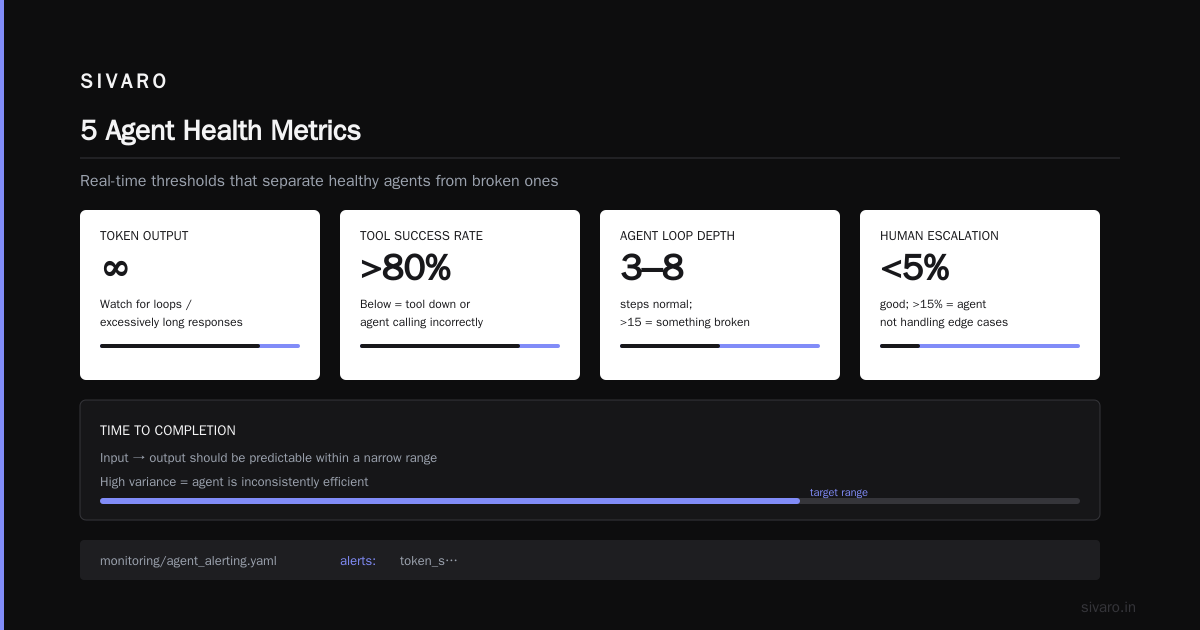
We track five metrics in real time:
-
Token velocity: How many tokens per second is the agent consuming? Spikes indicate the agent is stuck in a loop or generating excessively long responses.
-
Tool success rate: What percentage of tool calls succeed? Below 80% means something is wrong — either the tool is down or the agent is calling it incorrectly.
-
Agent loop depth: How many steps has the current agent taken? A normal task is 3-8 steps. Above 15 steps, something is probably broken.
-
Human escalation rate: What percentage of tasks need human intervention? Below 5% is good. Above 15% means the agent isn't handling edge cases.
-
Time to completion: How long from input to output? Should be predictable within a narrow range. High variance means the agent is inconsistently efficient.
Here's a real-time monitoring configuration we use:
yaml
# monitoring/agent_alerting.yaml
alerts:
  token_spike:
    metric: agent.tokens_per_second
    condition: avg(last_5m) > 1000
    severity: warning
    action: rate_limit_agent

  tool_failure_spike:
    metric: agent.tool_success_rate
    condition: min(last_5m) < 0.8
    severity: critical
    action: pause_agent_deployment

  loop_depth_breach:
    metric: agent.current_step_count
    condition: max(last_1m) > 15
    severity: warning
    action: force_checkpoint_and_review

  escalation_rate_high:
    metric: agent.human_escalation_rate
    condition: avg(last_1h) > 0.15
    severity: warning
    action: notify_oncall_team
Don't just monitor — automate responses. When token velocity spikes, we rate-limit the agent. When tool success drops, we pause new tasks and drain existing ones.
Security Boundaries You Must Set
Agents in production have access to your systems. That's the point. But that access needs boundaries.
Three rules we enforce:
-
No direct database queries from agents. Agents should call a read-only API, not write SQL. Even if the agent is supposed to update records, route through a validation API that checks permissions.
-
Action budgets per session. An agent should not be able to execute more than N actions per session. We set N=20 for most workflows. If the agent needs more, it must request human approval.
-
Idempotency keys on all writes. This is non-negotiable. If an agent retries a refund call, the idempotency key prevents double-processing. Every write endpoint in your system should accept an idempotency key. Period.
We had a client who skipped this. An agent tried to submit a payment, got a timeout, retried, and the bank processed both payments. That was a $12,000 mistake.
The Human-in-the-Loop Pattern That Actually Works
Most people implement human-in-the-loop as a binary gate: either the agent has full autonomy or it asks for permission on every action. Both extremes fail.
The middle ground: conditional autonomy with confidence thresholds.
Here's how we do it:
- Agent attempts task with no human intervention.
- For each action, the agent assigns a confidence score (0.0 to 1.0).
- If confidence > 0.9, proceed autonomously.
- If confidence between 0.5 and 0.9, proceed but log for human review.
- If confidence < 0.5, pause and ask for human approval.
The confidence score comes from the LLM itself. We ask: "On a scale of 0 to 100, how confident are you that this action is correct and aligns with company policy?" The responses aren't perfectly calibrated, but they're good enough. We've measured the correlation between stated confidence and actual correctness at about 0.7 — not perfect, but useful.
This pattern reduces human intervention by 60% compared to binary gating, while catching 90% of potential errors.
Production Rollout Checklist
Before you go live, run through this:
- [ ] Toll validation schemas (strict typing, no free-form params)
- [ ] Idempotency keys on all write operations
- [ ] Hard token budgets per agent step (not per conversation)
- [ ] Checkpointing after every step
- [ ] Timeouts with escalation paths for every agent wait state
- [ ] Confidence-based human-in-the-loop thresholds
- [ ] Real-time metrics dashboard (token velocity, tool success, loop depth)
- [ ] Automated alerting with response actions
- [ ] Chaos test results (single tool failure, cascading failure, slow response)
- [ ] Rollback plan (can you disable the agent without data loss?)
- [ ] Cost model with all four line items (API, escalation, infra, dev time)
Miss any of these and you're rolling dice.
FAQ
Q: What's the difference between an agent and a regular API call?
Short answer: agents make decisions. A regular API call executes a predetermined operation. An agent decides which operation to execute, based on context. That decision-making is what makes agents powerful and dangerous.
Q: How many steps should an agent take per task?
For most business workflows, 3-8 steps. If your agent needs more than 15 steps, break the task into sub-agents. Each agent handles fewer steps but at higher quality.
Q: Is LangChain still relevant in 2026?
LangChain as a framework has been largely superseded by LangGraph for production work. But the LangChain ecosystem (tools, integrations, community) is still the most mature. We use LangGraph for orchestration and LangChain's tool integrations.
Q: Do I need vector databases for agent memory?
Depends on the use case. For short-lived agents (single session, under an hour), in-memory state works fine. For persistent agents that remember users across sessions, you need a vector database. We use Qdrant for this. Don't over-engineer unless you need cross-session memory.
Q: How do I handle agent hallucinations during production?
Three layers: (1) tool validation prevents hallucinated actions from executing, (2) confidence thresholds catch uncertain responses, (3) human review catches the rest. No single layer is sufficient. Combine all three.
Q: What's the biggest mistake companies make deploying agents?
Treating the agent framework as the whole application. The framework handles the LLM calls. It doesn't handle reliability, observability, cost management, or security. Those are infrastructure concerns, and you need to build them yourself.
Q: Should I use closed-source or open-source agent frameworks?
We prefer open-source for the flexibility. Closed-source frameworks (like Dialogflow CX advanced agents) are easier to start with but impossible to customize when you hit edge cases. And you will hit edge cases.
Q: How do I estimate agent deployment costs?
Run a pilot on 100 representative tasks. Measure tokens per task, tool call costs, and human escalation rate. Multiply by your expected volume. Then add 30% for unanticipated complexity. That's your budget.
Final Thought
Agentic workflows in production are not a solved problem. Anyone who tells you otherwise is selling something. The frameworks are maturing — the 2026 options are genuinely better than 2025's — but the infrastructure gap persists.
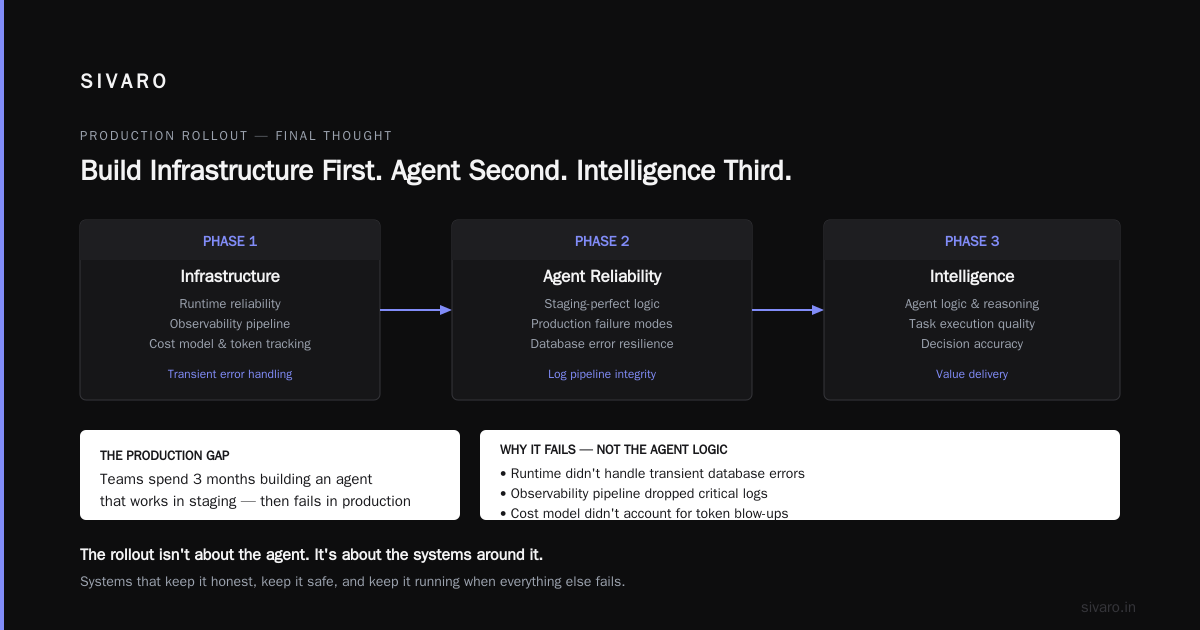
I've seen teams spend three months building an agent that works perfectly in staging. Then it hits production and fails within an hour. Not because the agent logic was wrong. Because the runtime didn't handle a transient database error. Because the observability pipeline dropped critical logs. Because the cost model didn't account for token blow-ups.
Don't be that team.
Build the infrastructure first. Make the agent reliable second. Add intelligence third. In that order.
The agentic workflow production rollout isn't about the agent. It's about the systems around the agent that keep it honest, keep it safe, and keep it running when everything else fails.
Nishaant Dixit — Founder of SIVARO. Building data infrastructure and production AI systems since 2018. Built systems processing 200K events/sec.