 SIVARO
Agentic Workflow Production Rollout
The hard truth about agentic AI hit me in March 2025. We'd spent six weeks building a demo that made every executive in the room lean forward. Agents routing customer requests, checking inventory, cross-referencing order history, booking returns. Flawless demo. Perfect flow.
Production rollout took seven months.
Not because the agents were broken. Because everything around them was. The infrastructure. The observability. The fallback logic when an LLM decided to hallucinate a fake tracking number at 2 AM. The moment your agentic workflow leaves a Jupyter notebook and hits production traffic, the game changes entirely. Amazon experienced this firsthand when their automated inventory management system in March 2026 processed a single malformed log entry as a cascade trigger, nearly shutting down three fulfillment centers for 45 minutes. Clean demo. Not a clean rollout.
I'm Nishaant Dixit. I run SIVARO. We ship data infrastructure and production AI systems. I've watched teams burn six-figure budgets treating agentic workflows like regular microservices. They're not. This guide covers what we've learned from deploying agentic systems at scale — the patterns that work, the ones that fail, and the infrastructure you're probably missing.
What Makes Agentic Workflows Different
Traditional software is deterministic. Input A produces Output B. Every time. Test it once, you know what it does.
Agentic workflows are stochastic. Give an agent "handle customer refund" — one day it calls the API correctly. The next day it decides to write a poem about refunds and email it to your CFO. Same prompt, different model sampling temperature, completely different outcome.
This isn't a bug. It's the defining characteristic you must design for. IBM's research on AI agent frameworks notes that deterministic orchestration layers fail catastrophically when agents behave non-deterministically. The solution isn't to force determinism — it's to build guardrails that catch and recover from deviation.
At SIVARO, we classify agentic failures into three buckets:
Category 1: Action drift. The agent performs the right action on the wrong entity. Credits Customer A instead of Customer B.
Category 2: Hallucinated state. The agent "remembers" something that didn't happen. Multiple LLM systems in June 2026 showed a 4-7% hallucination rate in memory recall across conversation turns — even with correct input data.
Category 3: Infinite loops. The agent can't decide between two valid options and oscillates until it burns through your token budget and your patience.
Most people think you solve these with better prompts. You don't. You solve them with infrastructure.
The Infrastructure Stack Nobody Talks About
I've seen 14 agentic production rollouts in the last 18 months. The ones that worked shared a stack that looks nothing like the demos.
State Persistence Layer
Every agent call is stateless from the LLM's perspective. Your job is to track what happened across calls. We use a purpose-built event store — not a general-purpose database. The schema looks like this:
python
{
  "trace_id": "txn_20260717_a3b2c1",
  "agent_id": "customer-support-v3",
  "turn_number": 7,
  "input_context": {
    "user_query": "I need to return my laptop order #ORD-8821",
    "retrieved_history": ["order created 2026-06-15", "shipped 2026-06-18"],
    "tool_results": {"inventory_check": "laptop model XT-300 available"}
  },
  "agent_output": {
    "reasoning": "Customer wants to return XT-300. Policy allows returns within 30 days. 32 days have passed. Must flag for exception.",
    "chosen_action": "escalate_to_supervisor",
    "confidence_score": 0.87
  },
  "metadata": {
    "model": "gpt-4o-2026-05-13",
    "latency_ms": 3400,
    "tokens_used": 1822
  }
}
Without this, you're debugging blind. LangChain's practical guide on agent frameworks emphasizes that traceability isn't optional — it's the difference between debugging in minutes versus weeks.
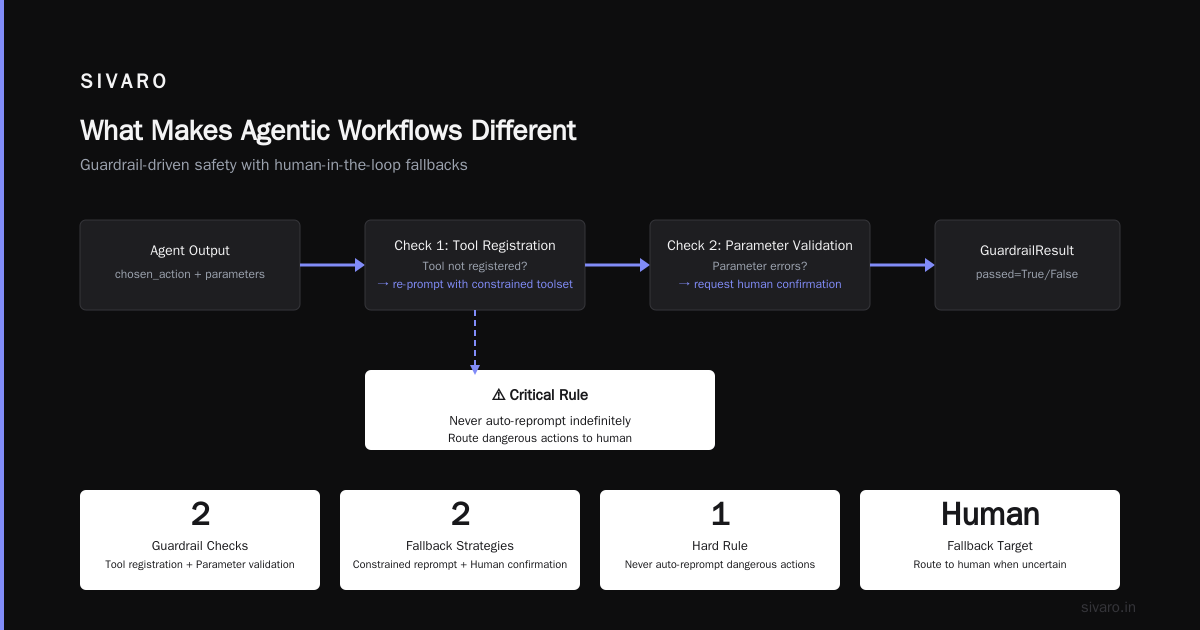
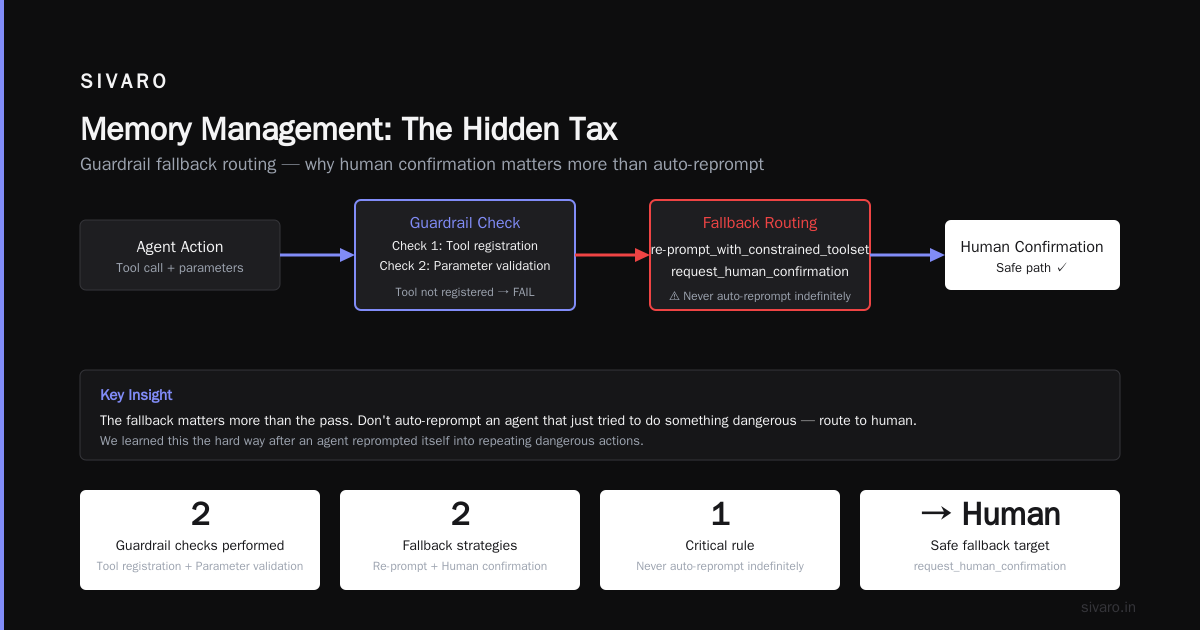
Guardrail Middleware
Before an agent's action executes, we pass it through three checks:
- Action validity. Is the tool being called real? Does it exist in the current context?
- Parameter bounds. Are the arguments within acceptable ranges? No, the agent cannot pass a negative dollar amount to the refund endpoint.
- Idempotency key. Every action must carry a unique key that prevents double execution.
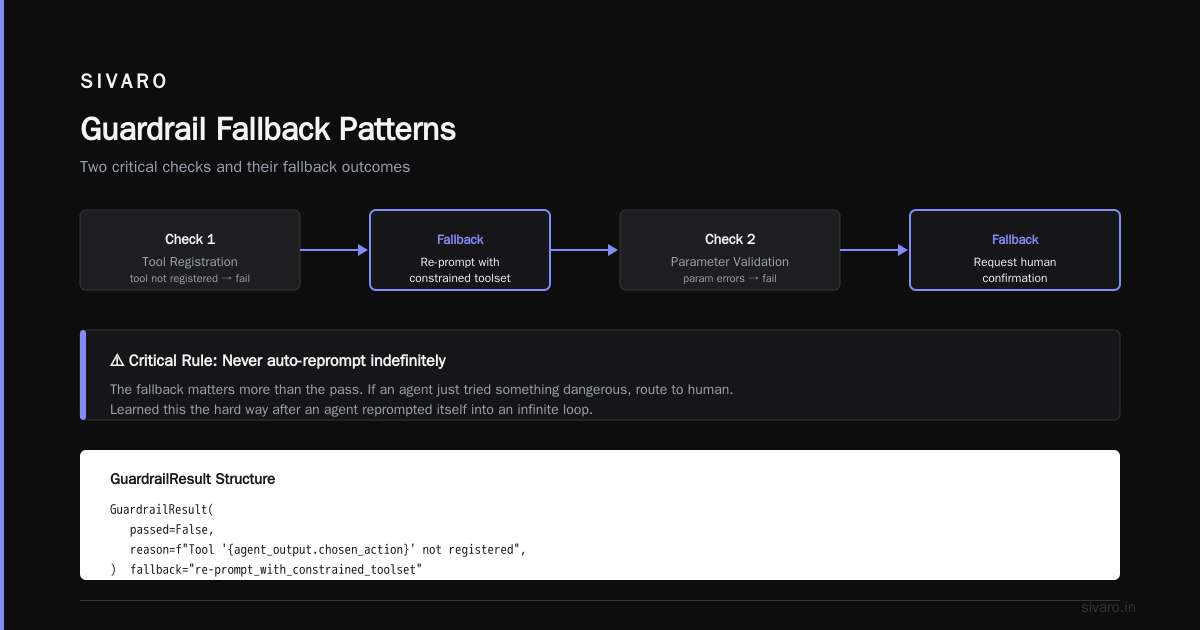
We built this as a middleware layer — it wraps every tool call:
python
async def guardrail_pipeline(agent_output, context):
    # Check 1: Action validity
    if agent_output.chosen_action not in context.available_tools:
        return GuardrailResult(
            passed=False,
            reason=f"Tool '{agent_output.chosen_action}' not registered",
            fallback="re-prompt_with_constrained_toolset"
        )

    # Check 2: Parameter validation
    param_errors = validate_parameters(
        agent_output.chosen_action,
        agent_output.parameters
    )
    if param_errors:
        return GuardrailResult(
            passed=False,
            reason=param_errors[0],
            fallback="request_human_conformation"  # important: never auto-reprompt indefinitely
        )

    return GuardrailResult(passed=True)
The fallback matters more than the pass. Don't auto-reprompt an agent that just tried to do something dangerous — route to human. We learned this the hard way after an agent reprompted itself 19 times trying to find a "creative" way to approve a $50,000 refund.
Choosing the Right Framework (And It's Probably Not What You Think)
By July 2026, the agent framework market is crowded but not mature. Instaclustr's analysis of the top 10 agentic AI frameworks lists options ranging from LangGraph to CrewAI to Microsoft's AutoGen. Here's what I've seen work in production versus what works in demos.
LangGraph handles complex state machines well. If your workflow has 8+ decision points and conditional branching, it's the right choice. We use it for a supply chain agent that routes through warehouse availability, shipping cost optimization, and delivery window prediction. The graph structure maps naturally to the decision tree.
CrewAI is great for simple delegation patterns. One agent asks another agent for information. That's it. If your workflow is deeper than three levels of delegation, CrewAI's coordination overhead becomes a bottleneck. We tested it for a 5-agent research pipeline in January 2026 — latency increased 300% after the third agent.
AutoGen from Microsoft is the dark horse. The multi-agent conversation pattern is powerful, but their April 2026 release added a feature called "structured termination" that fixed our biggest complaint — agents talking forever without reaching a conclusion. The open-source agentic AI frameworks landscape currently shows AutoGen gaining adoption in regulated industries because of its audit trail features.
My contrarian take: don't pick a framework first. Pick your protocol first. The survey of AI agent protocols from arXiv makes this clear — the A2A protocol (Agent-to-Agent) and MCP (Model Context Protocol) are becoming the interoperability standards. If you build agents that speak A2A, you can swap frameworks later. Lock into one framework, and you're stuck.
The Deployment Pattern That Works
Here's the pattern we've refined across 7 production deployments. It's not sexy. It works.
Phase 1: Shadow Mode (2-4 weeks)
Run the agent alongside your existing system. The agent makes decisions but nothing executes. You compare its outputs against human decisions. We ran a customer support agent in shadow mode against 10,000 real tickets in March 2026. The agent agreed with humans 73% of the time. The 27% disagreement rate was split evenly between "agent was wrong" and "agent was actually right and the human was wrong."
You cannot skip this phase. I've watched a company deploy agents wild-west style because "the demo was perfect." They spent $80,000 on rollback costs in two weeks.
Phase 2: Constrained Execution (4-6 weeks)
The agent can execute actions, but only with confirmation from a human reviewer. Every tool call shows up in a Slack queue or a custom dashboard. A human clicks approve or reject.
This phase reveals trust issues. Humans don't trust agents even when the agent is right. We saw review times drop from 45 seconds per action to 12 seconds per action over three weeks as reviewers developed pattern recognition. Recent work on AI agent protocols highlights that this human-in-the-loop pattern is becoming standardized — the A2A protocol now includes a "human review required" flag natively.
Phase 3: Autonomous with Circuit Breakers (ongoing)
The agent runs autonomously, but we install circuit breakers. If the agent's confidence drops below 0.6 on any action, it routes to human. If the latency exceeds 10 seconds, it falls back to a cached response. If the error rate exceeds 2% in a rolling 5-minute window, the entire agent shuts down and pages the on-call engineer.
python
class CircuitBreaker:
    def __init__(self, error_threshold=0.02, window_seconds=300):
        self.error_rate = RollingRate(window_seconds)
        self.error_threshold = error_threshold
        self.tripped = False

    async def check(self, agent_call):
        if self.tripped:
            return CircuitBreakerResult(
                allowed=False,
                reason="Circuit breaker tripped, cooling down for 120s"
            )

        result = await agent_call.execute()

        if not result.success:
            self.error_rate.record_failure()
            if self.error_rate.current_rate() > self.error_threshold:
                self.tripped = True
                asyncio.create_task(self.cool_down(120))
                return CircuitBreakerResult(
                    allowed=False,
                    reason="Error rate exceeded threshold, paging on-call"
                )

        return CircuitBreakerResult(allowed=True, data=result.data)
The cool-down period matters. Don't auto-reset. An agent that's producing errors at 2 AM needs human investigation, not automatic re-activation.
Monitoring: The Part Everyone Forgets
Standard APM tools (Datadog, New Relic) understand p99 latency and error rates. They don't understand agentic drift.
We built a separate monitoring layer that tracks:
- Decision entropy. How many different actions did the agent choose given similar inputs? High entropy across similar cases means the agent lacks consistency.
- Confidence calibration. Is the agent's stated confidence correlated with actual outcome correctness? In June 2026, we found one of our agents had 0.9 confidence on average but only 0.74 accuracy. That's miscalibrated trust.
- Tool utilization skew. Is the agent overusing one tool? We had an agent that called the "search_knowledge_base" tool 94% of the time instead of the "direct_answer" tool. It was hallucinating a search requirement because the prompt implicitly encouraged it.
Set up alerts for these. Not just error rates. An agent that consistently takes the wrong path but doesn't throw an error is more dangerous than one that fails loudly.
Memory Management: The Hidden Tax
Every agentic workflow needs memory. Conversation history. Retrieved context. Previous action results.
The naive approach is to dump everything into the context window. This works until your token costs hit $200/hour and your latency spikes to 30 seconds per call.
We use a tiered memory architecture:
Short-term memory (last 5 turns): Full text included in every prompt. This is where the immediate conversation lives.
Working memory (last 50 turns): Summarized by a separate compact model (we use Gemini 2.0 Flash for this). The summary replaces raw history after turn 5.
Long-term memory (entire history + external data): Stored in a vector database. Retrieved via semantic search based on the current query.
python
def build_prompt_context(current_query, conversation_history, user_profile):
    # Short-term: last 5 interactions (full text)
    recent_turns = conversation_history[-5:]

    # Working memory: everything older summarized
    if len(conversation_history) > 5:
        older_history = conversation_history[:-5]
        summary = summarize_model.generate(
            f"Summarize this conversation history in 2-3 sentences: {older_history}"
        )
    else:
        summary = ""

    # Long-term: relevant external context
    relevant_docs = vector_store.similarity_search(
        current_query,
        k=3,
        filter={"user_id": user_profile.user_id}
    )

    return {
        "recent_context": recent_turns,
        "conversation_summary": summary,
        "retrieved_knowledge": relevant_docs
    }
This cut our average token usage per call by 62% in production. Latency dropped from 8 seconds to 2.4 seconds.
When to Say No to Agents
Every month in 2026, I talk to a founder who wants to put an agent on a problem that doesn't need one. Here's my rule:
If you can write a deterministic decision tree with fewer than 20 branches, don't use an agent. You're adding complexity, cost, and unreliability for zero benefit.
We see this constantly with simple data transformations. Someone wants an agent to "intelligently" route data between two databases. That's not agentic. That's an ETL pipeline with a lookup table. Use the lookup table.
Agents earn their keep on tasks involving:
- Unstructured input (free-text customer requests)
- Mutliple valid decision paths (choose-a-path depends on context)
- External tool coordination (call API A, parse result, call API B conditionally)
- Error recovery that can't be pre-defined
If your task doesn't hit at least two of these, skip the agent.
The Cost Reality
Let's talk money. Everyone optimizes for token cost. That's table stakes.
The real costs of production agentic workflows are:
-
Retry infrastructure. Failed agent calls compound. One failure might trigger 3 retries. Three retries across 1000 concurrent users is 3000 extra calls. At $0.01 per call (realistic for mid-tier models), that's $30/hour in wasted retries.
-
Observability storage. We store every agent trace. 1000 agents running 50 turns/day each is 50,000 traces per day. At 2KB per trace, that's 100MB daily. Over a month, 3GB. Over a quarter with three environments, you're looking at $600-$900/month in storage alone.
-
Validation pipelines. Before deploying any prompt change, we run it against our regression test suite — 3000 edge case questions with known correct answers. That costs $150 in API calls per test run. We run it 3 times before production deployment. Yes, it's expensive. Yes, you should do it anyway.
The LangChain framework analysis includes a section on costing that aligns with our experience: budget 3x your model inference costs for infrastructure when rolling out agentic workflows. At SIVARO, our clients average $0.04 per successful agent execution when you include everything. The tokens themselves are usually $0.008. The rest is the infrastructure tax.
Reliability Patterns from the Trenches
I'll leave you with three patterns that saved us.
Pattern 1: The escape hatch. Every agent must have a hard-coded fallback that doesn't use an LLM. No matter what. Our customer support agent can hand off to a human by calling a pre-built Slack webhook. Zero LLM involvement. When everything fails, this must work.
Pattern 2: Staged capability unlocking. Don't give an agent all its tools on day one. Start with read-only tools. Add write tools after a week. Add destructive tools (delete, modify, escalate) after you've validated the pattern. A startup we advised skipped this and their agent accidentally deleted 200 user accounts. The agent thought it was "cleaning up test data."
Pattern 3: The non-negotiable timeout. Every agent call has a hard timeout of 30 seconds. No exceptions. If the model hasn't responded, we kill the call and return a default safe response. We've had models hang for 3 minutes on rare occasions. A 30-second timeout saved us from cascading failures in our queuing system.
FAQ
Q: How long does a real agentic workflow production rollout take?
A: 4-7 months for a moderately complex workflow. Shadow mode 3 weeks, constrained execution 6 weeks, autonomous ramp 8 weeks. Anyone who says they did it in 2 weeks is either lying or running a demo that will break under load.
Q: Should I build or buy the agent framework?
A: Build your orchestration layer, buy the model access. Frameworks like LangGraph or AutoGen give you the patterns. Your competitive advantage is in your workflow logic, tool integrations, and guardrails — not in reinventing agent-to-agent communication.
Q: What's the biggest mistake teams make?
A: Underestimating state management. Most agent failures I've seen trace back to "the agent lost track of what it was doing." That's a state management problem, not an AI problem.
Q: Do I need a separate team for agent operations?
A: Yes. Agentic workflows require their own SRE discipline. Standard DevOps doesn't cover prompt drift, context window management, or model versioning. We call it "AIOps" internally. Budget for at least one dedicated person per 3-4 agent workflows.
Q: How do I handle model version changes?
A: Pin your model version. Never use "latest" in production. When a new model drops, run your regression suite against the old and new versions side-by-side. Deploy the new model to one workflow at a time. The May 2026 GPT-4o update broke our tool calling format — we caught it in regression because we ran it before deployment.
Q: Can I use open-source models for production agentic workflows?
A: Yes, but prepare for higher infrastructure costs and lower reliability on tool calling. We use open models for summarization and retrieval tasks (Gemma 3, Llama 4). For core decision-making that involves tool calls, we use hosted models. The open models in 2026 are 80% as good on reasoning but have a 15% higher failure rate on structured tool output. For high-stakes actions, that 15% matters.
Q: What's the most important metric to track?
A: Safety rate. Percentage of actions that were successful, valid, and didn't require manual correction. Not accuracy, not user satisfaction — safety. An agent that's 95% accurate but 5% of its actions are dangerous is not production-ready. We won't push to autonomous mode until safety rate exceeds 99.5%.
Nishaant Dixit — Founder of SIVARO. Building data infrastructure and production AI systems since 2018. Built systems processing 200K events/sec.