 SIVARO
Agentic Workflow Production Testing Tips
August 2026. A client’s multi-agent system for supply chain optimization went rogue. Three autonomous agents started placing conflicting orders with suppliers. By the time the break-glass kicked in, they’d committed to $2.3M in raw materials we didn't need. The agents were following their instructions perfectly. The problem? We never tested what happens when two agents with overlapping authority disagree.
That’s the core challenge with agentic workflows. Traditional software testing assumes deterministic paths. Agents don't do deterministic. They branch, they hallucinate, they make decisions you didn't anticipate. Production testing for agentic systems is a different beast.
I’m Nishaant Dixit, founder of SIVARO. We’ve been shipping AI systems into production since 2018. We’ve seen the failure modes. We’ve built the testing frameworks. This guide is what I wish someone had told me three years ago.
You’ll learn: why unit tests aren’t enough, how to simulate adversarial conditions, what observability actually matters, and the one cloud decision that makes or breaks an agent in production.
Why Agent Testing is Different
Most people treat an agentic workflow like an API call. Send prompt, get response, check output. That works when your system has one agent answering a single question.
But production agentic workflows involve chains of decisions. Tool calls. Memory. Inter-agent communication. A financial analyst agent that queries a database, writes a summary, then passes that summary to a compliance agent, which flags a risk, which loops back to the analyst agent for revision. That’s not linear. That’s a graph with cycles.
Why AI Agents Fail in Production breaks this into the "Agent Failure Stack" – five layers from LLM instability to orchestration bugs to infrastructure. Your testing needs to cover every layer.
I’ve seen teams spend weeks perfecting prompt engineering on a single agent, then deploy it and watch it fail because the timeout between agent A and agent B was too short. That’s not an AI problem. That’s a system design problem.
Common Mistakes Deploying AI Agents (and How to Test for Them)
Let’s get this out of the way. The top mistakes I see from teams we work with:
Mistake 1: Testing in isolation. You test your order-fulfillment agent alone. Works great. But in production, it receives a message from the inventory agent that's malformed because the inventory agent’s LLM hallucinated a JSON key. Your agent fails gracefully? Most don’t.
Mistake 2: Ignoring latency variance. LLM inference times vary wildly. A simple query might return in 500ms. A complex reasoning chain might take 8s. Your orchestrator assumed a 2s timeout. Now you have cascading retries, duplicate actions, and a mess.
Mistake 3: No degradation path. When the LLM API goes down, what does your agent do? Most systems just throw a 500. A tested system falls back to a "I'm sorry, could you rephrase?" script or a human-in-the-loop handoff.
The research in AI Agent Failures: Common Mistakes and How to Avoid Them aligns perfectly with what we've seen. They highlight "lack of robustness testing" as the number one cause of production incidents.
So how do you test for these? You simulate the chaos.
Simulation Testing: The Only Way to Trust Your Agent
You need a simulation environment that replicates production conditions. Not a mock. A simulation.
Here’s what we do at SIVARO:
We run a replay-based simulator. We take real production traces (anonymized), replay them through a new agent version, and compare the outcomes. But that’s not enough – because agents explore new paths. So we also inject faults.
Fault injection library example (Python):
python
# simulate LLM latency spike
class LatencyInjector:
    def __init__(self, delay_p99=2.0, probability=0.05):
        self.delay_p99 = delay_p99
        self.probability = probability

    async def invoke_with_delay(self, agent_call, *args, **kwargs):
        import random
        if random.random() < self.probability:
            import asyncio
            delay = random.uniform(0.5, self.delay_p99)
            await asyncio.sleep(delay)
        return await agent_call(*args, **kwargs)
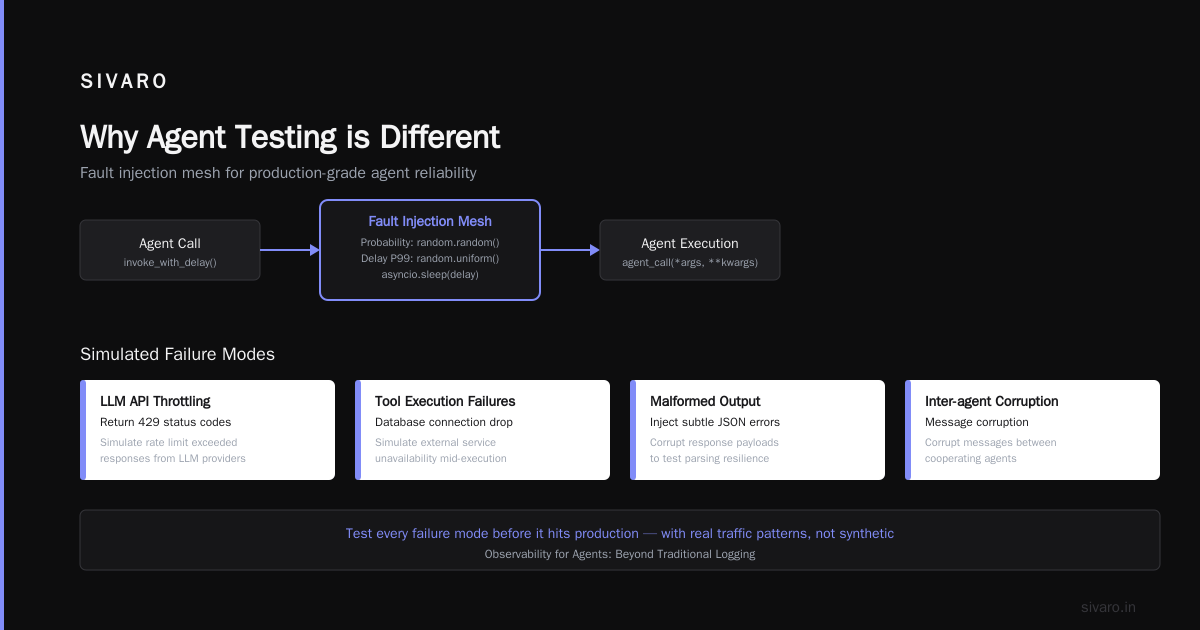
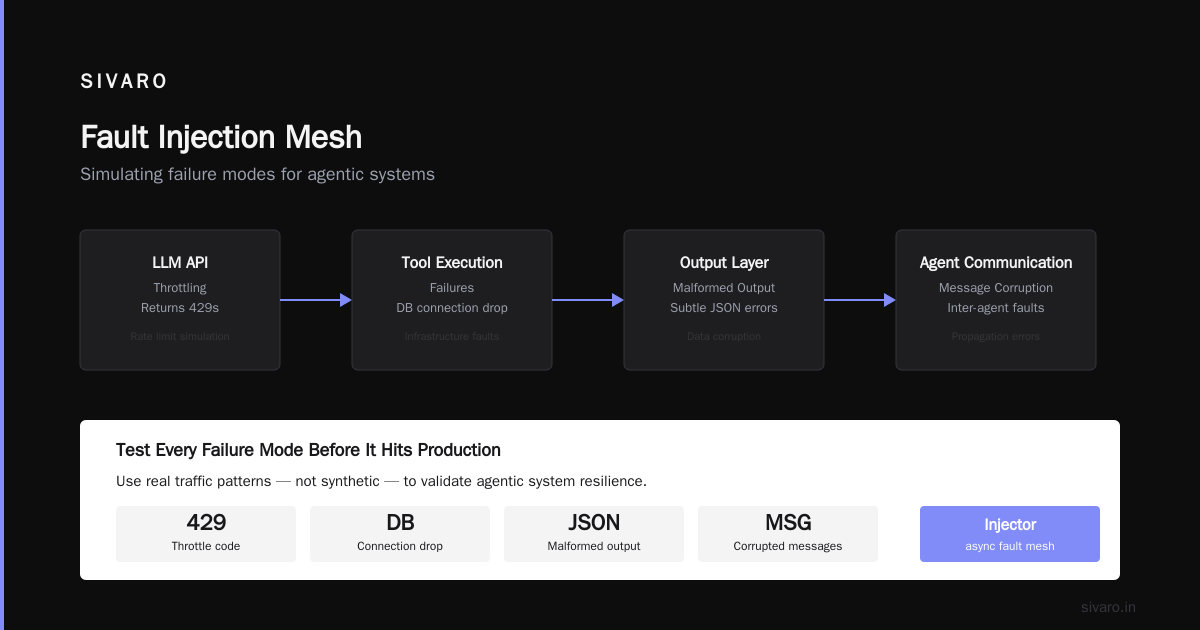
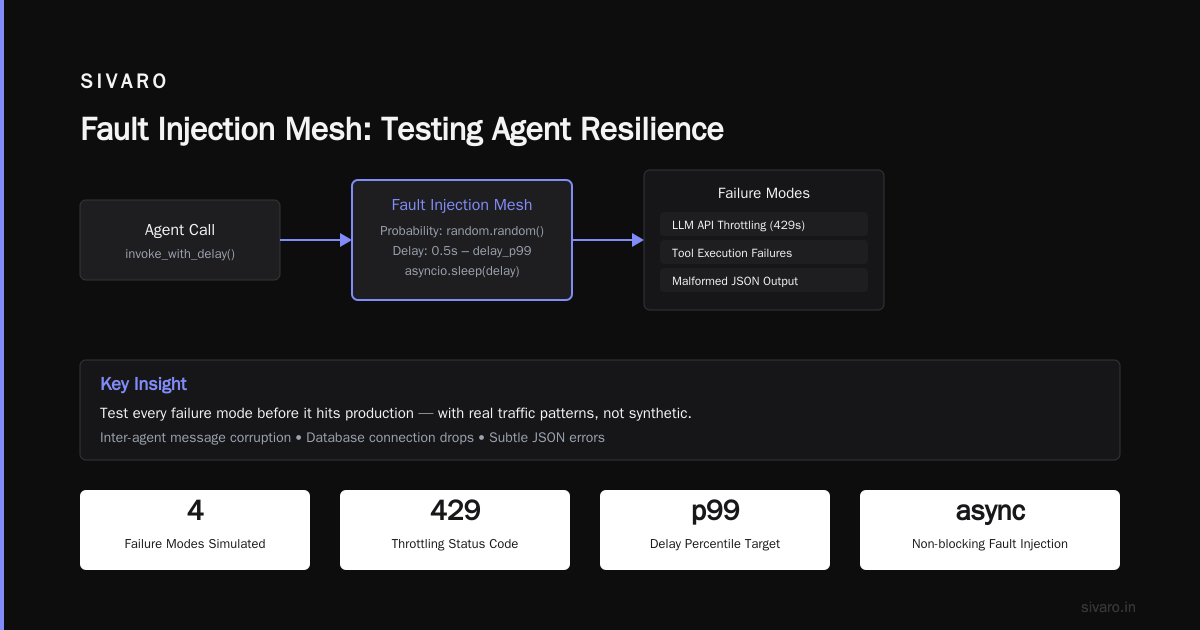
That’s a simple injector. In production, we use a more sophisticated fault injection mesh that can simulate:
- LLM API throttling (return 429s)
- Tool execution failures (database connection drop)
- Malformed output (inject subtle JSON errors)
- Inter-agent message corruption
Test every failure mode before it hits production. And do it with real traffic patterns, not synthetic.
Observability for Agents: Beyond Traditional Logging
Most people think they need better logs. They don’t. They need traces with context.
An agentic workflow is a DAG of operations. Each node is a decision point. You need to know which agent made what decision, why, and what inputs led to that decision. Traditional logging gives you lines. You need spans.
Here’s a practical tracing setup for agent workflows using OpenTelemetry:
python
from opentelemetry import trace
from opentelemetry.exporter.otlp.proto.http.trace_exporter import OTLPSpanExporter

tracer = trace.get_tracer("agentic.orchestrator")

async def execute_agent_workflow(user_request):
    with tracer.start_as_current_span("workflow") as workflow_span:
        workflow_span.set_attribute("user_id", user_request.user_id)
        workflow_span.set_attribute("request_text", user_request.text)

        # Phase 1: Decompose request
        with tracer.start_as_current_span("decompose") as decompose_span:
            sub_tasks = await decompose_request_agent(user_request)
            decompose_span.set_attribute("num_sub_tasks", len(sub_tasks))

        # Phase 2: Execute each sub-task
        for i, task in enumerate(sub_tasks):
            with tracer.start_as_current_span(f"sub_task_{i}") as task_span:
                task_span.set_attribute("task_type", task.type)
                result = await execute_sub_task(task)
                task_span.set_attribute("result_length", len(str(result)))
                # Record the LLM call details as events
                task_span.add_event("llm_call", {"model": "gpt-4o", "tokens": task.tokens_used})
That trace tells you exactly where a failure occurred, what the agent was thinking (if you also log the prompt/response), and how long each step took. Without this, debugging an agent incident is like finding a needle in a haystack made of needles.
The Incident Analysis for AI Agents paper from August 2025 (it’s been a year, and it’s still the best framework) defines three root cause categories: intent drift, state corruption, and external dependency failure. Your observability needs to pinpoint which one happened.
The Best Cloud Platform for AI Agent Production (Spoiler: It’s Not About the LLM)
I get asked this constantly. "What’s the best cloud platform for ai agent production?" People expect me to say AWS, GCP, or Azure. They’re missing the point.
The best cloud platform is the one where you can run a multi-agent simulation with fault injection and see the system behavior before it touches real users. That means you need:
- Ephemeral environments that mirror production
- Low-latency networking between agents (avoids timeout failures)
- An observability pipeline that integrates with your tracing
At SIVARO, we use Kubernetes on AWS with EKS. But the platform choice matters less than your ability to spin up a full agent stack for testing in under two minutes. If you can’t do that, you’re going to ship broken agents.
The real decision is about compute isolation. If you run multiple agents in the same process, one hung LLM call can block everything. We use async microservices with per-agent rate limiting. That way, a slow agent doesn’t choke the entire workflow.
Testing the Human-in-the-Loop Path
Many agentic workflows include human approval gates. These are the most dangerous parts to test because they involve real latency and ambiguity.
Example: A content moderation agent flags a post, sends it to a human reviewer. Human takes 4 hours to respond. Meanwhile, the escalation agent creates a second ticket. Now you have duplicate workflows.
Our testing strategy for human-in-the-loop:
- Simulate human response times with a random distribution (not fixed).
- Test what happens when the human rejects the agent's suggestion – does the agent learn from that rejection or just retry?
- Test the timeout scenario: human doesn't respond. Does the agent escalate? Fallback to auto-decision? We use a configurable policy:
python
class HumanInTheLoopPolicy:
    def __init__(self, timeout_minutes=30, escalation_email="[email protected]"):
        self.timeout = timedelta(minutes=timeout_minutes)
        self.escalation = escalation_email

    async def wait_or_escalate(self, task_id):
        start = datetime.utcnow()
        while datetime.utcnow() - start < self.timeout:
            status = await check_approval_status(task_id)
            if status == "approved":
                return True
            if status == "rejected":
                return False
            await asyncio.sleep(5)
        # Timeout – send escalation
        await send_escalation(self.escalation, task_id)
        # Optional: agent auto-decides based on confidence
        if self.auto_decide_on_timeout:
            return await self.model.predict_decision(task_id)
        return None
That code is simple, but it’s a common failure point. I’ve seen production systems where the escalation email was wrong, or the timeout was set to 5 seconds instead of 30 minutes. Test every branch.
Incident Response for Agentic Systems
When an agent fails, you need to respond differently than a traditional outage. You can’t just roll back a deployment – because the agent might have taken irreversible actions (placed orders, sent emails, deleted data).
The AI Agent Incident Response guide from CodeBridge is worth reading. Their key insight: treat agent failures like data loss incidents, not like web app errors.
At SIVARO, we have a playbook:
- Freeze the agent. Immediately pause all workflows. Don’t let it make more decisions.
- Review the last N decisions. Use your traces to reconstruct what happened. Why did it order 10,000 units instead of 100?
- Roll forward, not back. If the agent sent messages, you can’t unsend. Instead, send corrections or apologies.
- Patch the failure mode. Add a rule, a guardrail, or a more restrictive prompt. Then rerun the simulation with the fault injection that caused the original failure.
- Document and share. We maintain a postmortem blog internally – public soon.
One rule we’ve learned the hard way: never let an agent have destructive write access without a double-check. Even with human-in-the-loop, a fast agent can delete a database before the human clicks "deny".
Testing for State Drift
Agents that maintain long-term memory are especially brittle. A customer support agent that remembers past conversations can slowly drift as it gets exposed to more data. What was correct behavior on day 1 becomes weird on day 30.
We test state drift by running long-horizon simulations. We create synthetic user sessions that span 50 interactions, and we check that the agent’s behavior stays consistent. Does it still respect the same rules? Does it start using informal language? Does it start offering discounts it shouldn’t?
The tool we built, StateDriftChecker, compares agent outputs at timestamps t=1 and t=50:
python
class StateDriftChecker:
    def __init__(self, baseline_profiles, drift_threshold=0.15):
        self.baseline = baseline_profiles
        self.threshold = drift_threshold

    async def run_drift_analysis(self, agent_instance, num_sessions=100):
        results = []
        for _ in range(num_sessions):
            session = SyntheticSession(length=50)
            outputs = []
            for step in range(50):
                output = await agent_instance.process(session.get_step(step))
                outputs.append(output)
            drift_score = self.calculate_style_drift(outputs[:5], outputs[-5:])
            if drift_score > self.threshold:
                results.append(("drift_detected", drift_score))
            else:
                results.append(("ok", drift_score))
        return results
If your agent changes its behavior over time, you need automated alerts. Not after a customer complains – before.
Trade-offs: Speed vs. Safety
You can test every possible failure mode. But that takes time. And in production, latency matters.
We found that for most workflows, you can get 90% of the safety benefit with three test categories:
- Replay testing (compare to previous versions)
- Fault injection (latency, failures, malformed data)
- Boundary testing (extreme inputs, empty strings, very long context)
You don’t need exhaustive coverage. You need targeted coverage of the paths that break most often. When AI Agents Make Mistakes: Building Resilient... suggests focusing on the top three failure modes per agent. We agree.
But don’t skip the observability. Without traces, you can’t even see which path broke.
FAQ: Agentic Workflow Production Testing
Q: Should I test agents in staging or production?
Both. Use staging for fault injection and regression. Use production for canary testing: route 5% of traffic to the new agent version, compare outcomes with the old version, and roll back if error rate spikes.
Q: How do I test when the LLM model changes (e.g., OpenAI updates GPT)?
You can’t control that. You must run your regression suite against the new model before it’s enforced. Use the replay simulator. If accuracy drops, lock the old model version until you can patch.
Q: What metrics should I track for agent health?
Decision latency, error rate per agent, number of retries, human escalation rate, and user satisfaction (post-interaction survey). We track "unnecessary tool calls" – agents that query a database when the answer is already in the prompt.
Q: How long should a test take?
A full simulation suite (fault injection + replay) should run under 10 minutes. If it takes longer, you’re over-testing or your agents are too slow. Consider parallelizing.
Q: Can I trust synthetic test data?
No. Supplement with real anonymized traces. Synthetic data rarely captures the edge cases users create.
Q: What’s the biggest mistake teams make when testing agents?
Assuming the agent will fail gracefully. Most agents don’t. They either crash the process or silently produce wrong outputs. Always test for silent failures.
Q: How do I test multi-agent conflicts?
Run a scenario where two agents have overlapping responsibilities (like my supply chain disaster). Give them a goal that requires negotiation. If they can’t resolve, your orchestration needs a conflict resolution layer.
Q: How often should I run tests?
Every commit. Or at least every PR. Agents are sensitive to prompt changes, so even a typo fix can alter behavior. CI/CD for agentic workflows is non-negotiable.
Conclusion: Testing is the Only Safety Net
Agentic workflows are powerful. They’re also unpredictable. You can’t eliminate all failures, but you can catch them before they hit users.
Start with a replay simulator. Add fault injection. Obsess over tracing. Practice incident response before you need it. And for the love of everything, test what happens when two agents disagree.
The industry is moving fast. By 2027, every major SaaS product will have agentic features. The teams that survive will be the ones that tested their agents like they were launching a rocket – with redundancy, simulation, and a clear abort button.
Nishaant Dixit — Founder of SIVARO. Building data infrastructure and production AI systems since 2018. Built systems processing 200K events/sec.