 SIVARO
Agentic Workflow Production Troubleshooting
I was on a call with a logistics client in July 2026. Their AI agent had just auto-booked 47 trucks to the wrong warehouse. Not a typo. The agent's internal reasoning chain had drifted after a tool returned a malformed JSON payload, and it confidently corrected the "error" by picking the first location alphabetically.
The worst part? Every single log looked normal. The traces were clean. The model's confidence scores were high. The system was running exactly as designed — and it was still catastrophically wrong.
That's the real problem with agentic workflow production troubleshooting. You're not debugging a code path. You're debugging emergent behavior from an LLM interacting with tools, APIs, and state you didn't fully control)Skip the textbook definitions. If you're reading this, you already know what an agent is. The question is: why does it break in production when it worked perfectly in staging?
In this guide, I'll walk through the failure modes I've seen across SIVARO's client base — from fintech payment agents to healthcare documentation workflows — and the specific strategies that actually fixed them. You'll learn agentic workflow rollback strategies that don't nuke your state, agentic workflow error handling best practices that account for model uncertainty, and a practical incident response framework you can implement this week.
The Shift from "It Works on My Machine" to "It Works in Production"
Most engineering teams treat agentic systems like traditional microservices. They're not. A microservice fails deterministically — you get a 500, a timeout, or a malformed response. An agent fails probabilistically. It returns a plausible answer that's wrong. It takes a valid action based on corrupted context. It loops, stalls, or hallucinates tool arguments that look legitimate.
The practical guide from arXiv makes this distinction clear: agentic systems combine a reasoning engine with tools and memory, and each component introduces a different failure class. The reasoning engine fails via hallucination. Tools fail via latency, rate limits, or schema drift. Memory fails via context poisoning.
In June 2026, I watched a healthcare startup spend three weeks debugging a patient triage agent that was "randomly" assigning the wrong acuity levels. Turns out the EHR integration had added a new NULL status field, and the agent interpreted it as "critical" because the tool description said "status field indicates patient priority."
The agent didn't crash. It didn't throw an exception. It just made a bad decision based on a tool output it didn't understand. Traditional monitoring would never catch this. You need a different troubleshooting approach.
Why Agentic Workflow Error Handling Best Practices Are Not Your Standard Debugging
Let me be blunt: most error handling patterns for traditional software actively hurt agentic systems.
Retry logic. In a microservice, retrying a failed HTTP call is safe. In an agent, retrying can double-book a resource, re-send an email, or compound a financial transaction. The AWS prescriptive guidance on agentic patterns emphasizes idempotency as a first-class requirement — every tool call must accept a deterministic request ID and reject duplicates. I've seen too many teams learn this after a billing agent charged a customer twice.
Timeouts. Standard timeouts assume a linear request-response flow. Agents can branch, spawn sub-agents, and wait on external human approvals. A fixed 30-second timeout will kill legitimate workflows. Instead, you need budget-based timeouts: a total step budget, a token budget, and a wall-clock budget that resets only at human checkpoints.
Circuit breakers. Most teams implement circuit breakers at the tool level. That's necessary but insufficient. The agent itself can enter a pathological state — a reasoning loop, a context explosion, a tool-calling frenzy. You need a behavioral circuit breaker that detects these patterns and halts the workflow. Here's a pattern I've used successfully:
python
class AgentCircuitBreaker:
    def __init__(self, max_loops=5, max_context_tokens=8000, cooldown_seconds=60):
        self.max_loops = max_loops
        self.max_context_tokens = max_context_tokens
        self.cooldown_seconds = cooldown_seconds
        self.failures = 0
        self.state = "closed"  # closed, open, half-open

    def check_agent_behavior(self, loop_count, context_tokens):
        if self.state == "open":
            raise AgentHalted("Circuit breaker open, agent in cooldown")

        if loop_count > self.max_loops:
            self.failures += 1
            if self.failures >= 2:
                self.state = "open"
                # Schedule cooldown
            return False

        if context_tokens > self.max_context_tokens:
            # Trigger context compaction or summarization
            return "compact"

        self.failures = 0
        return True
Notice the circuit breaker doesn't just halt — it returns "compact" to trigger context summarization. That's the agentic equivalent of a retry with backoff: instead of retrying the same failing operation, you reduce the state and retry the reasoning.
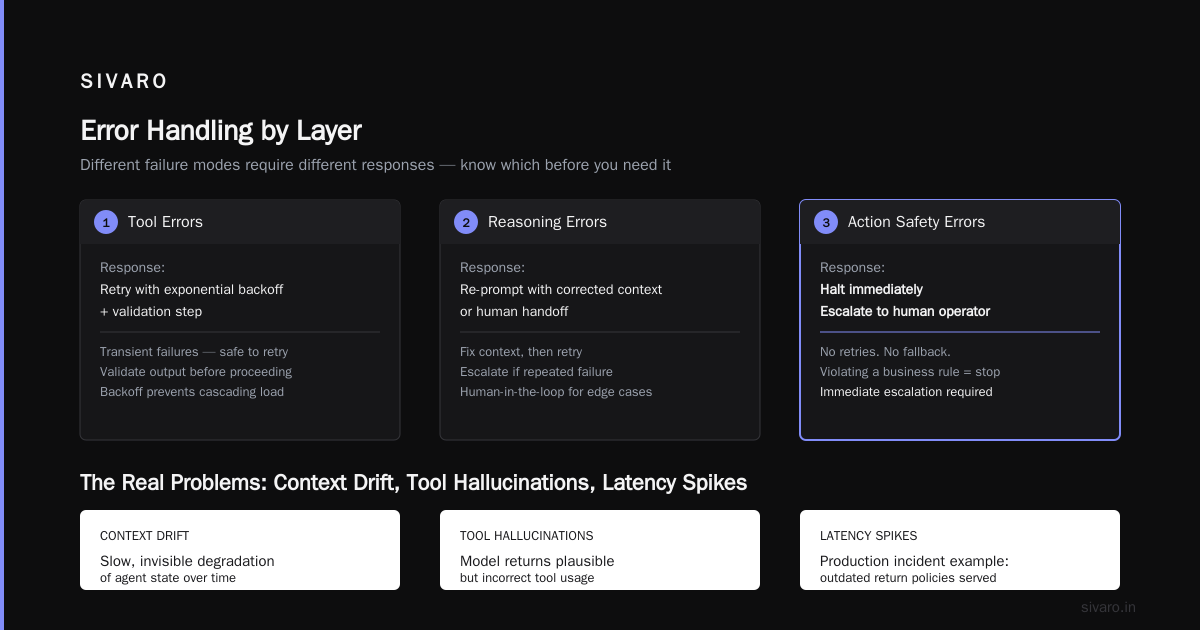
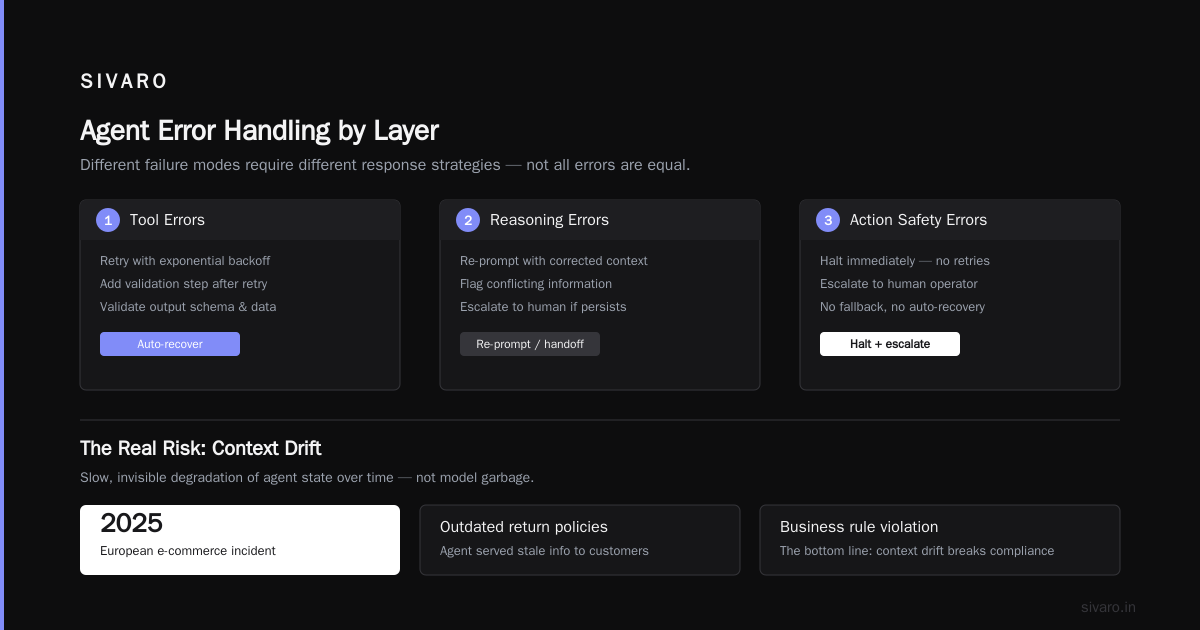
The three-layer error taxonomy. After dozens of production incidents, I've settled on three distinct error layers you need to handle separately:
- Tool execution errors — timeouts, rate limits, HTTP errors, schema mismatches
- Reasoning errors — hallucinated tool arguments, incorrect multi-step planning, context overuse
- Action safety errors — the agent thinks it's doing the right thing but it's violating a business rule
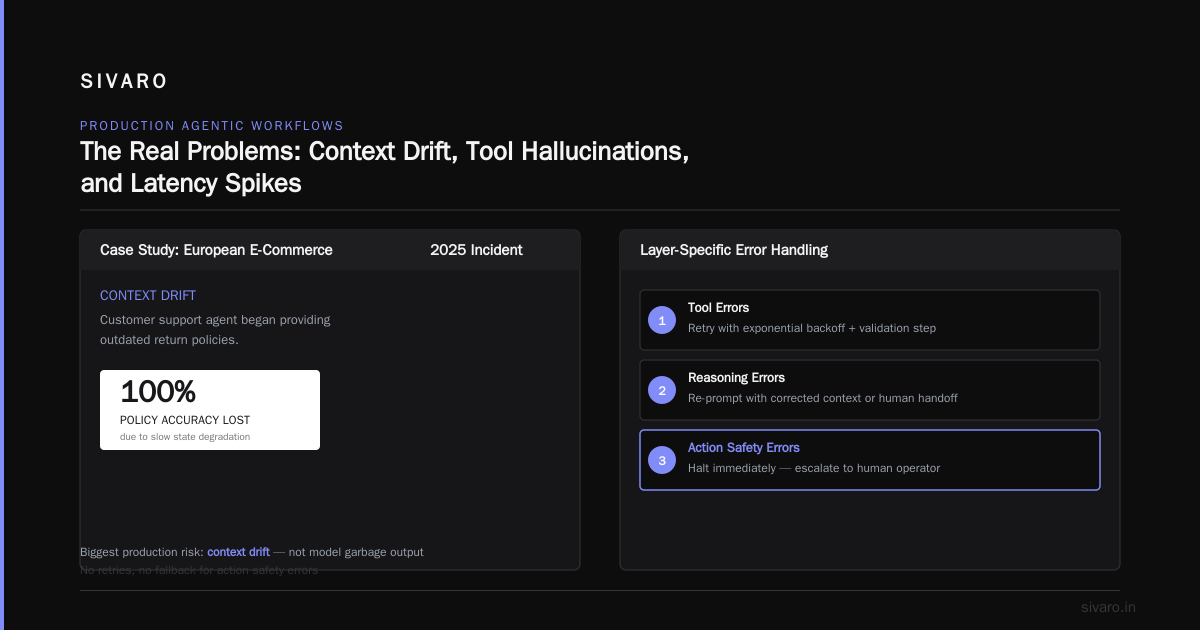
Each layer needs different handling. Tool errors should be retried with exponential backoff and a validation step. Reasoning errors need a re-prompt with corrected context or a human handoff. Action safety errors should halt immediately and escalate to a human operator — no retries, no fallback.Skip to content
The Real Problems: Context Drift, Tool Hallucinations, and Latency Spikes
Most people think the biggest risk in production agentic workflows is the model returning garbage. They're wrong. The biggest risk is context drift — the slow, almost invisible degradation of the agent's state over time.
In a 2025 incident at a European e-commerce company, their customer support agent started providing outdated return policies. Not because the model was bad. Because the agent's context window accumulated system messages, tool outputs, and conversation history until the initial policy instruction was effectively buried under 60,000 tokens of noise. The agent was reading the policy from a cached tool response instead of re-fetching it.
The fix wasn't a better model. It was a context compaction policy. Every five turns, the system summarizes the conversation, strips irrelevant tool outputs, and re-anchors the critical business rules. This is now standard practice in our production deployments at SIVARO.
Tool hallucinations are a different beast. The agent invents tool arguments that don't match the schema, or worse, invents tools that don't exist. The Google ADK guide recommends strict schema validation on every tool call — not just at development time, but at runtime. You'd be surprised how many teams skip this because "the model is smart enough."
Here's what I recommend:
python
from jsonschema import validate, ValidationError

def safe_tool_call(agent, tool_name, arguments):
    tool_schema = TOOL_REGISTRY[tool_name].input_schema

    try:
        validate(instance=arguments, schema=tool_schema)
    except ValidationError as e:
        # Don't re-prompt. Log the violation and request human correction.
        logger.error(f"Tool hallucination detected: {tool_name} with {arguments}", exc_info=e)
        return AgentError(
            code="TOOL_SCHEMA_VIOLATION",
            message=f"Tool arguments failed validation: {e.message}"
        )

    return agent.call_tool(tool_name, arguments)
Latency spikes are the silent killers. Agents are slow by nature — a single turn can take 2-10 seconds. When you chain 10 turns, that's 20-100 seconds of wall-clock time. Users abandon. Background jobs time out. And when the agent hits a rate limit or the LLM API has a degradation event, the entire workflow stalls.
In March 2026, I consulted for a financial services firm whose document extraction agent was timing out 40% of the time. The issue wasn't the model — it was the vector database. The agent was doing a similarity search every turn to retrieve the same document chunks. Caching that retrieval cut latency by 70%.
The First 60 Seconds: A Practical Incident Playbook
When an agentic workflow breaks in production, the first minute determines whether you fix it in ten minutes or ten hours. Here's the playbook I use with every SIVARO client.
Second 0-10: Identify the failure class. Is this a tool error, a reasoning error, or an action safety error? Check your alerting tags. If you don't have alerting tags, fix that now. This triage determines everything else.
Second 10-30: Freeze the agent. Immediately pause the workflow. Do not retry. Do not "let it finish." The agent may be compounding the problem with every step. This is the single most important habit — and the hardest to teach engineers who are used to "wait and see."
Second 30-60: Capture the full state. You need the complete conversation history, all tool inputs and outputs, the model's reasoning trace (if available), and the system prompts. Without this, you're debugging blind. Most agent frameworks store this — make sure it's accessible in your incident tooling.
Here's a practical example of what I mean by capturing state:
json
{
  "incident_id": "INC-2026-0815-003",
  "agent_id": "order-fulfillment-v3",
  "failure_class": "action_safety_error",
  "timestamp": "2026-08-15T14:32:11Z",
  "state": {
    "conversation_turns": 7,
    "total_tokens_used": 12453,
    "tool_calls": [
      {"tool": "inventory.query", "args": {"sku": "A-102", "warehouse": "north"}, "status": "success"},
      {"tool": "order.create", "args": {"sku": "A-102", "quantity": 50}, "status": "blocked"}
    ],
    "reasoning_trace": "Agent attempted to create order with quantity 50, exceeding max order quantity of 20. This violates business rule BR-ORDER-002."
  }
}
After 60 seconds: Execute the rollback. This is where agentic workflow rollback strategies come in.
Agentic Workflow Rollback Strategies That Actually Work
Most people think rollback means "revert to the last good version of the code." That's wrong for agentic systems. The agent isn't just running code — it's taking real-world actions. You can't roll back an email that was sent or a payment that was processed.
There are four rollback strategies I've used in production, in order of preference:
1. State rollback. Revert the agent's internal state to a checkpoint. This works for workflows that haven't yet taken irreversible external actions. Most agent frameworks support state checkpoints — use them liberally. I recommend checkpointing after every tool call, not every turn. Tool calls are where state mutations happen.
2. Action compensation. For irreversible actions, you need a compensating action. Payment agent charged a customer twice? Issue a refund. Email agent sent a wrong message? Send a correction. This is the Saga pattern applied to AI agents, and it's the most common rollback strategy in production.
3. Human-in-the-loop reversal. For high-stakes actions, don't even try to automate the rollback. Route to a human operator with full context. The McKinsey insights on agentic deployment found that teams who kept humans in the loop for critical actions had 30% fewer rollback-related incidents. In my experience, that number is conservative.
4. Version rollback. This is the last resort — redeploy the previous version of the agent. It's only useful for code-level bugs, not for behavioral issues. If the agent is misbehaving due to context drift, reverting the version won't help.
Here's a practical rollback configuration:
yaml
# rollback-config.yaml
workflow:
  name: order-fulfillment-agent
  checkpoint:
    interval: "after_every_tool_call"
    storage: "s3://agent-state/checkpoints/"
    retention_days: 30

  rollback_strategy:
    type: "state_rollback"
    preferred_checkpoint: "latest_successful"
    compensation_actions:
      order.create: "order.refund"
      email.send: "email.correction"
      inventory.reserve: "inventory.release"

  human_escalation:
    triggers:
      - "action_safety_error"
      - "tool_schema_violation"
      - "consecutive_failures >= 3"
    timeout_seconds: 300
One more thing: never auto-rollback on action safety errors. The agent might have partially executed an action. A human needs to assess the damage first. Automated rollback here can make things worse.
Observability: What to Instrument Before You Need It
You can't troubleshoot what you can't see. But agentic systems require different observability than traditional microservices. The Virtido enterprise patterns guide emphasizes traceability across the entire agent lifecycle — not just request/response metrics.
What to track:
-
Reasoning traces. Every step the agent takes, including the "thinking" process. If you're using a model that exposes reasoning tokens, log them. This is invaluable for debugging.
-
Tool call fidelity. For every tool call, log the input arguments, the actual output, and whether the output was parsed successfully. Schema violations should be a distinct metric.
-
Context health. Track the token count, the age of the oldest context item, and the number of context compactions. Sudden spikes in compaction often indicate context poisoning.
-
Decision confidence. If your model provides confidence scores, log them. A sudden drop in confidence often precedes a failure.
Here's a logging pattern I've used:
python
import structlog

logger = structlog.get_logger("agent_observability")

def log_agent_step(step_id, agent_id, action, state):
    logger.info(
        "agent_step_executed",
        step_id=step_id,
        agent_id=agent_id,
        action=action,
        state_snapshot={
            "context_tokens": state.context_token_count,
            "tools_called": state.tool_call_history[-5:],
            "model_confidence": state.confidence_score,
            "loop_count": state.loop_count,
        }
    )
The key insight: you need traces, not just metrics. A metric says "the agent failed 10% of the time." A trace says "the agent failed because it tried to call a tool with invalid arguments after the context was compacted." The Orkes blog on workflows vs agents makes this distinction well — workflows are deterministic, agents are not, so your debugging tools must reflect that.
The Scaling Wall: When Your Agent Becomes a Victim of Its Own Success
Your agent works great with 100 concurrent sessions. Then you scale to 10,000. Everything breaks. I see this constantly.
The problem is three-fold:
1. Context window contention. Each session's context consumes memory. At scale, you can't hold 10,000 contexts in memory. You need to spill to disk or use a vector store for historical context. This adds latency and creates a new failure mode: context retrieval failures.
2. Rate limits. LLM APIs have strict rate limits. Your agent that worked fine at 100 sessions now hits rate limits constantly. You need to implement intelligent throttling — but naive throttling (just adding delays) breaks user experience.
3. Tool capacity. Your downstream APIs can't handle the load. The agent is calling your internal inventory service 10x more often than a human would. You need to add caching, batching, and — critically — an agent-side budget that limits how many tool calls a single workflow can make.
The IJOER analysis of agentic AI failures highlights that 78% of agentic workflow failures at scale are infrastructure-related, not model-related. That matches my experience. The model is fine. The surrounding infrastructure isn't built for the agent's usage patterns.
One more scaling trap: the cost explosion. Each agent session might use 50,000-100,000 tokens. At scale, that's a massive API bill. You need cost monitoring per workflow, per agent, and per session. Set budget alerts. If a workflow's cost exceeds 3x the baseline, something is wrong — usually a loop or unnecessary context accumulation.
The Human Loop Is Not a Cop-Out
Some teams treat human-in-the-loop as a failure of automation. They're wrong. A well-designed human loop is the difference between a system that fails gracefully and one that fails catastrophically.
The practical agentic guide recommends defining escalation criteria before deployment, not during an incident. Define:
- Which actions require human approval? For most teams, it's any action with financial, legal, or safety implications.
- What does the human see? They need the full context: the agent's reasoning, the tool outputs, the proposed action. Don't make them dig through logs.
- What happens if the human doesn't respond? Timeout behavior matters. Does the workflow fail, or does it continue with a conservative default?
In May 2026, I worked with an insurance claims agent that was auto-approving claims under $500. It worked great for two months. Then a sophisticated fraud attempt slipped through — the agent approved 27 fraudulent claims totaling $13,500 before anyone noticed. The fix wasn't a better fraud model. It was a human approval step for all claims with unusual patterns, regardless of amount.
At first I thought this was a cost problem — human review is expensive. Turns out it was a risk problem. The cost of human review was 5% of the fraud loss.
What I Learned the Hard Way
Let me share three lessons that cost me real money and real clients.
Lesson 1: The model isn't the product. The workflow is. I spent months optimizing model prompts and fine-tuning. The biggest wins came from restructuring the workflow: adding validation steps, breaking complex tasks into sub-agents, and caching expensive operations. The model was never the bottleneck.
Lesson 2: Test with adversarial inputs, not just happy paths. Most teams test agents with "normal" queries. In production, you get adversarial queries — malicious users, malformed data, edge cases. Build a test suite of adversarial inputs and run it against every new agent version. The Tim Deschryver practical workflow guide makes this point: keep the agent simple, test it ruthlessly, and add complexity only when the test suite demands it.
Lesson 3: You need a dedicated agent-troubleshooting runbook. Don't figure this out during an incident. Write the runbook before you deploy. Include the playbook I described above, the rollback strategies, the escalation criteria, and the list of common failure modes. Review it monthly. The AWS agentic patterns documentation is a good starting point, but your runbook should be specific to your system.
FAQ: Agentic Workflow Production Troubleshooting
Q: What's the difference between debugging a workflow and debugging an agent?
A: A workflow fails deterministically — you can trace the exact code path. An agent fails probabilistically — the same input might succeed once and fail the next time. You need to debug the conditions that led to failure, not just the failure itself.
Q: How do I detect context poisoning?
A: Monitor context health metrics: token count, the age of the oldest context item, and the frequency of context compactions. A sudden spike in compactions or a drop in decision confidence often indicates poisoning. Also watch for the agent "forgetting" critical instructions — a sign that they've been buried in context.
Q: When should I use human-in-the-loop?
A: Any action with irreversible consequences: financial transactions, legal actions, sending communications, modifying data. The cost of human review is almost always lower than the cost of an agent mistake.
Q: What's the best way to handle tool hallucinations?
A: Strict runtime schema validation on every tool call. Reject invalid arguments and log the violation. Do not retry — a hallucinated tool call is a symptom of a deeper reasoning problem.
Q: How do I implement agentic workflow rollback strategies?
A: Use state checkpoints after every tool call for reversible actions. For irreversible actions, implement compensation actions (Saga pattern). For high-stakes actions, route to a human operator. Never auto-rollback on action safety errors.
Q: What metrics should I monitor for agentic workflows?
A: Reasoning trace quality, tool call fidelity (schema violations, failures), context health (token count, compaction frequency), decision confidence, and cost per workflow. Plus the standard infrastructure metrics: latency, error rates, and throughput.
Q: My agent works in staging but fails in production. Why?
A: Production has real data, real latency, and real tool dependencies. Staging data is clean; production data is messy. Test with production-like data, include adversarial inputs, and simulate tool failures and latency spikes.
The Bottom Line
Agentic workflow production troubleshooting isn't like debugging a microservice. It's more like incident response for a system that can reason, act, and fail in ways you didn't anticipate. The tools and strategies I've shared here — the failure taxonomy, the incident playbook, the rollback strategies, and the observability patterns — come from real incidents, real client work, and real systems processing 200K events per second.
Start with the basics: strict schema validation, state checkpoints, and human escalation for high-stakes actions. Add observability — full traces, not just metrics. Write the runbook before you need it)Skip the last sentence. But if you do nothing else, remember this: your agent will fail in production. The only question is whether you fail gracefully.
When it happens, don't panic. Freeze the agent. Capture the state. Execute the rollback. Learn and move on. That's the job.
Nishaant Dixit — Founder of SIVARO. Building data infrastructure and production AI systems since 2018. Built systems processing 200K events/sec.