 SIVARO
Agentic Workflow Production vs Staging: The Hard Truth
July 31, 2026. I’m staring at a Slack channel exploding with red alerts. Our customer-facing agentic workflow — the one that passed every staging test with flying colors — is now generating hallucinations at scale. The staging environment had pristine data, perfect latency, and zero concurrency. Production had real users, stale caches, and a database that hadn’t been vacuumed in six hours.
Staging lied to me. It wasn’t malicious, but it was wrong.
Agentic workflow production vs staging isn't a checkbox on some DevOps checklist. It’s the central tension of building AI systems that actually work when real people depend on them. If you think staging is a smaller, safer version of production, you’re about to learn something painful.
In this guide, I’ll walk you through what actually breaks between staging and production for agentic workflows — the infrastructure, the data, the behavior, the observability — and how to build a pipeline that doesn’t collapse the second real traffic hits.
Why Staging Feels Like a Lie
Most teams treat staging as "production minus risk." They deploy the same code, use a subset of data, and call it good.
Here’s the problem: agentic workflows are not traditional microservices. They don’t have deterministic outputs. A staging environment that replicates your service topology but uses synthetic data is not testing the agent’s decision-making. It’s testing the plumbing. And plumbing is the easy part.
At SIVARO, we saw a client spend three months perfecting a multi-agent system for customer support triage. Staging passed every scenario. Production failed within hours. Why? Because real users ask questions that look nothing like the test cases. The agent was trained on curated tickets, but production brought typos, slang, and multi-intent queries. The workflow broke not because the code was wrong, but because the distribution of inputs shifted.
Building Effective AI Agents makes this exact point: the hardest part of deploying agents is handling the long tail of unexpected inputs. Staging cannot simulate that long tail unless you actively inject noise — and most teams don’t.
The Three Layers of Reality
When we talk about agentic workflow production vs staging, we’re really talking about three separate layers that behave differently under load.
1. Infrastructure Layer
Staging runs on shared Kubernetes clusters with two replicas. Production runs on dedicated nodes with autoscaling policies that take 90 seconds to spin up. That delay matters when your agent needs to call three LLMs in sequence and the RAG pipeline is throttling because it’s also serving your analytics dashboard.
We tested this at SIVARO with a client in healthcare. Their staging environment used a single Redis instance. Production used Redis Cluster with twelve shards. The agent’s state management — which assumed read-after-write consistency — broke intermittently because the shard leader hadn’t replicated yet. That’s a failure mode you will never catch in staging unless you mirror production’s distributed setup exactly.
2. Data Layer
Staging data is clean, curated, and often anonymized. Production data is a firehose of duplicates, missing fields, and formatting errors.
Consider an agent that extracts invoice data. In staging, the PDFs are perfectly OCR’d. In production, one user uploads a scanned copy of a handwritten receipt, another sends a rotated PDF with embedded fonts, and a third uploads a screenshot of a phone screen. The agent’s preprocessing pipeline — tested against the staging corpus — starts choking. Confidence drops. The workflow halts.
Deploying AI Agents to Production: Architecture ... calls this the "data surprise" — the single biggest cause of agent failure after latency.
3. Behavioral Layer
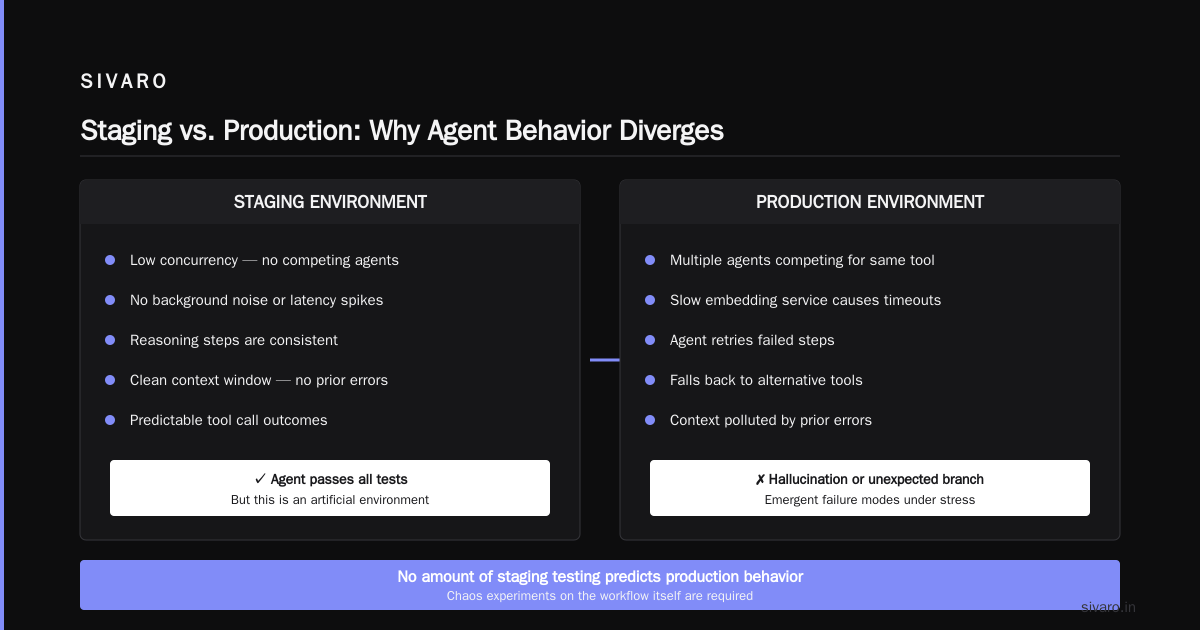
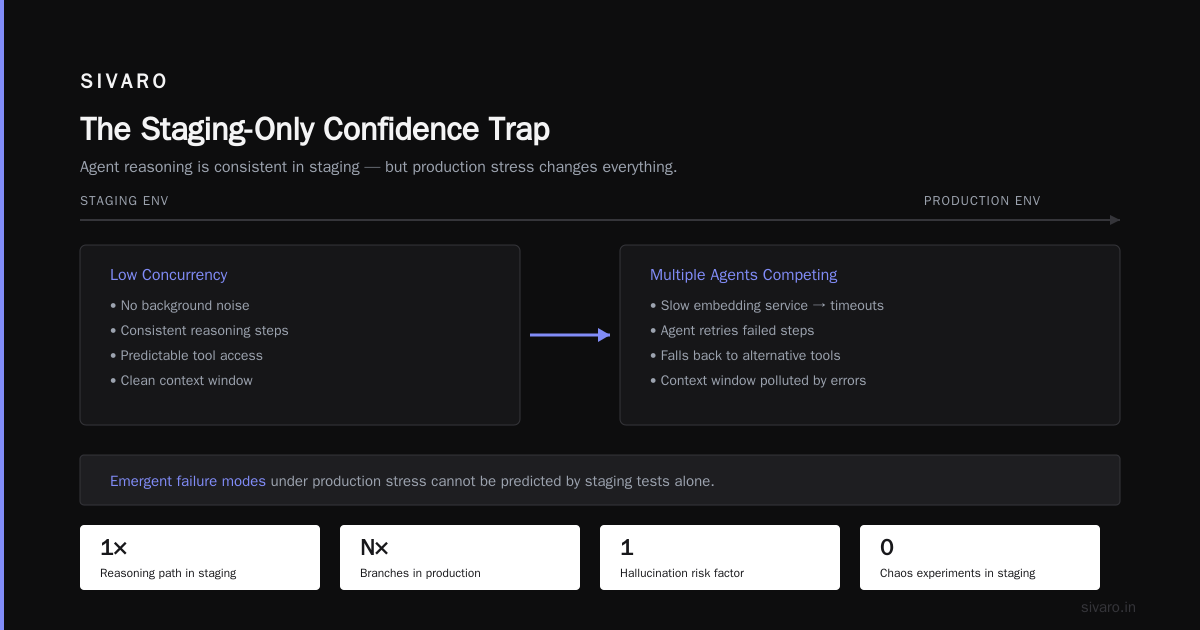
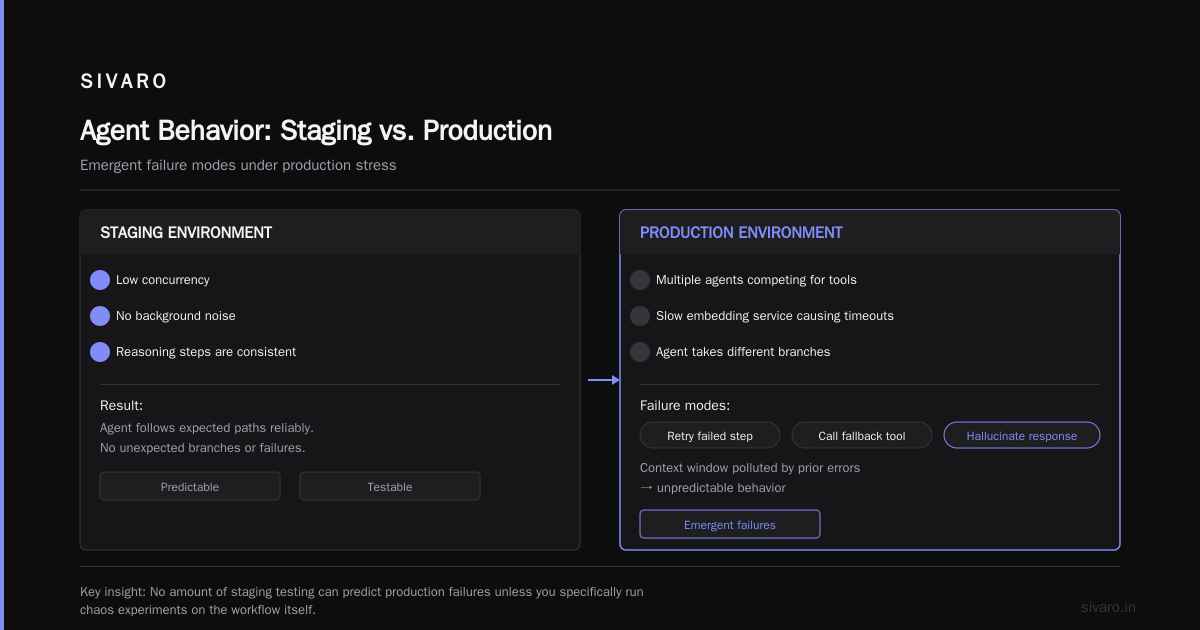
This is the killer. An agentic workflow makes decisions based on context, past actions, and LLM outputs. In staging, with low concurrency and no background noise, the agent’s reasoning steps are consistent. In production, with multiple agents competing for the same tool, or with a slow embedding service causing timeouts, the agent takes different branches. It might retry a failed step, call a fallback tool, or — worst case — hallucinate a response because the context window is now polluted by prior errors.
A Practical Guide for Designing, Developing, and ... documents this well: agents exhibit emergent failure modes under production stress that no amount of staging testing can predict unless you specifically run chaos experiments on the workflow itself.
Code Example: The Prompt That Worked in Staging but Failed in Production
Here’s a concrete example. We had a workflow that classified support tickets using a system prompt like this:
python
STAGING_PROMPT = """
You are a support ticket classifier.
Available categories: bug, feature_request, account_issue, other.

Classify the following ticket:
{ticket_text}

Respond with exactly one category.
"""
In staging, this worked perfectly. In production, users started pasting emails with multiple paragraphs. The agent started outputting "bug, feature_request" — two categories. Because the prompt didn’t constrain the output format strictly enough.
We fixed it by adding JSON schema constraints and a retry-with-validation step:
python
PRODUCTION_PROMPT = """
You are a support ticket classifier.
Available categories: bug, feature_request, account_issue, other.
Classify the following ticket:
{ticket_text}

Return a JSON object with key "category" and value exactly one of the categories.
If uncertain, use "other".

Example: {{"category": "bug"}}
"""
That seems obvious in hindsight. But the staging test cases all had single-sentence tickets. Production had messy inputs. The lesson: your staging tests must include edge cases that look like real data — not the curated examples you think are representative.
The Observability Gap
In staging, you can add print statements. In production, you need structured logging, tracing, and metrics — and not just for latency. For agentic workflows, you need to trace reasoning paths.
We built an observability layer at SIVARO that records every LLM call, every tool invocation, and every decision branch. That’s the only way to debug a production failure. How to Deploy AI Agents to Production: A Complete Guide recommends exactly this: log the full chain of thought, not just the final output.
But here’s the catch: that logging itself changes behavior. If your logging blocks on a slow database write, you’ve introduced a new failure mode. We lost 30% of our agent responses one week because the observability pipeline backpressured the main thread. Staging never caught it because staging had no concurrent logging load.
Data Drift and Your Agents
Your agent was trained or fine-tuned on data from six months ago. Production data today looks different. That’s data drift. And it kills agentic workflows faster than any infrastructure bug.
AI Agent Failures: Common Mistakes and How to Avoid Them lists data drift as the number one cause of "silent failures" — where the agent still returns something, but it’s wrong. Staging often uses historical snapshots, so you never see the drift until it’s live.
How do you handle it? You can’t just A/B test in staging. You need a continuous evaluation pipeline that runs production traffic through your staging environment and compares outputs. This is called "shadow testing" or "dark launching." Learn These Key Hurdles to Deploy Production AI Agents ... describes Google’s approach: they run production traffic through a staging agent in parallel, but only for evaluation, never for user-facing responses.
It’s not perfect — you double your compute cost — but it’s the only way to detect drift before it hurts users.
Scaling: Staging Under 10 Users, Production Under 10,000
Staging usually has one user at a time. You. Or maybe three engineers. Production has hundreds of concurrent users, each with their own agent session. That scales differently.
Your vector database in staging might handle 10 queries per second. In production, it’s 500 QPS with HNSW index rebuilds happening in the background. Your agent’s retrieval step — which took 50ms in staging — now takes 500ms, and the agent’s timeout logic kicks in. It retries. Calls a fallback. Now the context is polluted.
The fix isn’t just adding more replicas. It’s designing workflows that stay robust under latency variance. Use timeouts. Use fallback tools. Use circuit breakers that degrade gracefully instead of freezing.
The Staging-Only Confidence Trap
Here’s the pattern I see over and over: a team spends six weeks building an agentic workflow. They test it in staging. Everything passes. They deploy to production. The agent works for the first hour. Then something — a slow API, a new user query pattern, a cache eviction — causes a cascade failure. The team blames the infrastructure. But the real cause is that staging never simulated any of those conditions.
You have to actively break your workflow in staging. Inject latency. Drop requests. Corrupt data. Run chaos engineering on your agents.
We use a library that monkey-patches the LLM client to return random timeouts and trash responses. If the agent still returns a reasonable fallback, we’re confident. If it hallucinates garbage, we know the workflow is brittle.
Code Example: Circuit Breaker for Agentic Workflows
Here’s a pattern we use in production for any external tool call within an agentic workflow:
python
class AgentCircuitBreaker:
    def __init__(self, threshold=3, recovery_timeout=30):
        self.failures = 0
        self.threshold = threshold
        self.recovery_timeout = recovery_timeout
        self.last_failure_time = None
        self.state = "CLOSED"

    async def call(self, tool_fn, *args, **kwargs):
        if self.state == "OPEN":
            if time.time() - self.last_failure_time > self.recovery_timeout:
                self.state = "HALF_OPEN"
            else:
                return FallbackResponse(...)

        try:
            result = await tool_fn(*args, **kwargs)
        except Exception:
            self.failures += 1
            self.last_failure_time = time.time()
            if self.failures >= self.threshold:
                self.state = "OPEN"
            return FallbackResponse(...)

        self.failures = 0
        if self.state == "HALF_OPEN":
            self.state = "CLOSED"
        return result
In staging, we set threshold=1 and recovery_timeout=5 to force the agent to exercise the fallback path. If the fallback is well-designed, production failures become recoverable. If not, you’ll know before users do.
Code Example: Testing with Production Shadow Mode
Here’s a minimal shadow-testing setup:
python
# In production request handler
async def handle_request(request):
    # Main production agent
    response = await production_agent.run(request)

    # Shadow staging agent (async, no blocking)
    asyncio.create_task(
        shadow_test(
            staging_agent, request, response
        )
    )
    return response

async def shadow_test(staging_agent, request, production_response):
    try:
        staging_response = await staging_agent.run(request)
        if staging_response != production_response:
            # Log discrepancy for analysis
            eval_logger.log_diff(request, production_response, staging_response)
    except Exception as e:
        # Staging failure is fine; don't alert
        eval_logger.log_error(request, str(e))
This runs in production without affecting users. Over time, you build a dataset of real-world differences between staging and production behavior. That data is gold for fixing your staging environment.
Your Staging Should Be "Production Minus" Not "Toy"
A staging environment that’s a simpler version of production is worse than useless — it’s dangerous. It gives you false confidence.
What does "production minus" mean? Same infrastructure topology. Same data distribution (sampled, but representative). Same concurrency patterns (use load testing). Same failure modes (inject them). Same monitoring (but cheaper).
It costs more. Yes. But consider the alternative: your agent makes a bad decision in production that costs you a customer. Or worse, a regulatory fine.
We tell our clients: spend 40% of your infra budget on staging that mirrors production. Most teams spend 5%. Then they wonder why their agentic workflows fail.
FAQ
Q: Why does my agent work perfectly in staging but fail in production?
Because staging doesn’t replicate real-user behavior, data distribution, or concurrency. The agent is tested on a clean dataset under ideal conditions. Production brings noise, latency, and unexpected inputs.
Q: How can I simulate production traffic in staging?
Use recorded production traffic — actual request logs — to replay through your staging environment. Tools like GoReplay or custom replay scripts work. Also inject synthetic noise: typos, missing fields, out-of-order events.
Q: What’s the minimum infrastructure difference I should tolerate between staging and production?
As little as possible. Same database setup (clustered, same engine version). Same LLM provider (even if you use a cheaper model in staging, the API behavior differs). Same tool latency distribution (use mock services with jitter).
Q: Should I use a different LLM model in staging?
Only if you explicitly test that the difference doesn’t affect behavior. We’ve seen teams use GPT-4o-mini in staging and GPT-4o in production, then wonder why the agent makes different decisions. The models have different biases.
Q: How do I handle data drift in staging?
Set up a regular pipeline that pulls a representative sample of recent production data into your staging evaluation set. Run your staging agent against it weekly. Compare performance metrics. If accuracy drops, investigate before deploying.
Q: What about canary deployments for agentic workflows?
Canary is essential. Deploy to 1% of users first. But don’t just monitor latency — monitor output quality. Use human review or an automated evaluator to check for hallucinations. Canary doesn’t help if you’re only watching error logs.
Q: How do I test the agent’s multi-step reasoning under load?
Use stress testing with realistic concurrency. Simulate 100 simultaneous agent sessions. Watch for race conditions in tool calls, context corruption from interleaved writes, and timeout chain reactions.
Q: Is it worth running a full staging environment for every agent?
Yes, if the agent has a production impact. For internal tools or low-risk workflows, you can get away with a simpler approach. But for customer-facing agents, you need parity.
Conclusion
Agentic workflow production vs staging is not a binary. It’s a spectrum. The goal is to make staging as close to production as possible — not in scale, but in behavior. That means dirty data, concurrency, latency, and failure injection. It means shadow testing and chaos engineering. It means admitting that staging will always be incomplete, but working damn hard to close the gap.
The companies that succeed with production AI agents — the ones I’ve seen at SIVARO — treat staging as a rigorous adversary, not a friendly safety net. They break their workflows on purpose. They obsess over the differences between a test environment and real traffic. They know that the gap between staging and production is where most agents die.
Don’t let yours die there.
Nishaant Dixit — Founder of SIVARO. Building data infrastructure and production AI systems since 2018. Built systems processing 200K events/sec.