 SIVARO
Agentic Workflow Rollout Checklist: Ship Without Breaking
Last Tuesday, a client's agentic pipeline hallucinated a refund policy and auto-issued $40k in credits. Not a bug. A constraint failure. We caught it at 2 AM. By 2:15 AM, we'd killed the workflow. By 3 AM, we'd rolled back the state. If we hadn't, that $40k would have been $400k by morning.
We're in August 2026. Agentic AI isn't a demo anymore. It's in production. It's processing support tickets, routing engineering tasks, and managing supply chain logistics. But most teams treat rollout like a model deploy. They push weights, cross their fingers, and hope the context window holds. It's not a model deploy. It's a workflow deploy.
You need an agentic workflow rollout checklist before you flip that switch. Without it, you're gambling with your infrastructure and your reputation. I've seen too many teams celebrate a 95% accuracy in a Jupyter notebook, only to watch that drop to 60% under load. The gap isn't the model. It's the orchestration.
In this guide, I'll walk you through the checks, the traps, and the rollback plans that actually work. We'll cover observability, guardrails, state management, and the specific patterns that keep your agents from burning your budget. I'll share what we've learned at SIVARO building data infrastructure and production AI systems. No fluff. Just the hard-won lessons from shipping agents that don't break.
The Gap Between Demo and Disaster
At first, I thought agentic failures were just model hallucinations. Turns out, they're usually workflow failures.
A demo runs in a vacuum. One user. Clean data. No latency. Production is chaos. Users send malformed requests. APIs time out. Token costs spike. Context windows fill up. Your agent gets stuck in a loop.
From Proof of Concept to Production: Why Agentic AI Workflows Fail at Scale highlights this exact disconnect. Most PoCs ignore the non-deterministic nature of LLMs. They assume the agent will always pick the right tool. They don't. They assume the output will always parse correctly. It doesn't.
We tested two approaches at SIVARO last year. One team built a "free-form" agent that could do anything. The other built a constrained workflow with strict tool contracts. The free-form agent looked impressive in demos. It failed in prod 40% of the time. The constrained workflow was boring. It worked 99.9% of the time.
Boring wins.
Your checklist needs to start with reality checks. Not "does it work?" but "does it work when the API is slow?" "Does it work when the input is garbage?" "Does it work when the model changes?"
python
import time
import random

def simulate_prod_conditions(input_data, tool_call_func):
    """
    Simulates production chaos during rollout testing.
    Injects latency, failures, and malformed responses.
    """
    # Simulate network jitter
    time.sleep(random.uniform(0.1, 2.0))

    # Simulate API failure (5% chance)
    if random.random() < 0.05:
        raise ConnectionError("Upstream tool timeout")

    # Simulate malformed response (2% chance)
    if random.random() < 0.02:
        return {"error": "JSON parse failed", "raw": "<<<CORRUPT>>>"}

    return tool_call_func(input_data)
Run this during your staging phase. If your agent crashes, your rollout isn't ready.
Pre-Flight Checks for Your Agentic Workflow Rollout Checklist
You can't just deploy an agent. You deploy a system. That system includes the model, the tools, the orchestrator, and the data pipeline. Every piece needs validation.
A Practical Guide for Designing, Developing, and ... breaks down the lifecycle. It's dense, but the core message is clear: design for failure. Assume the model will be wrong. Assume the tool will fail. Assume the user will be hostile.
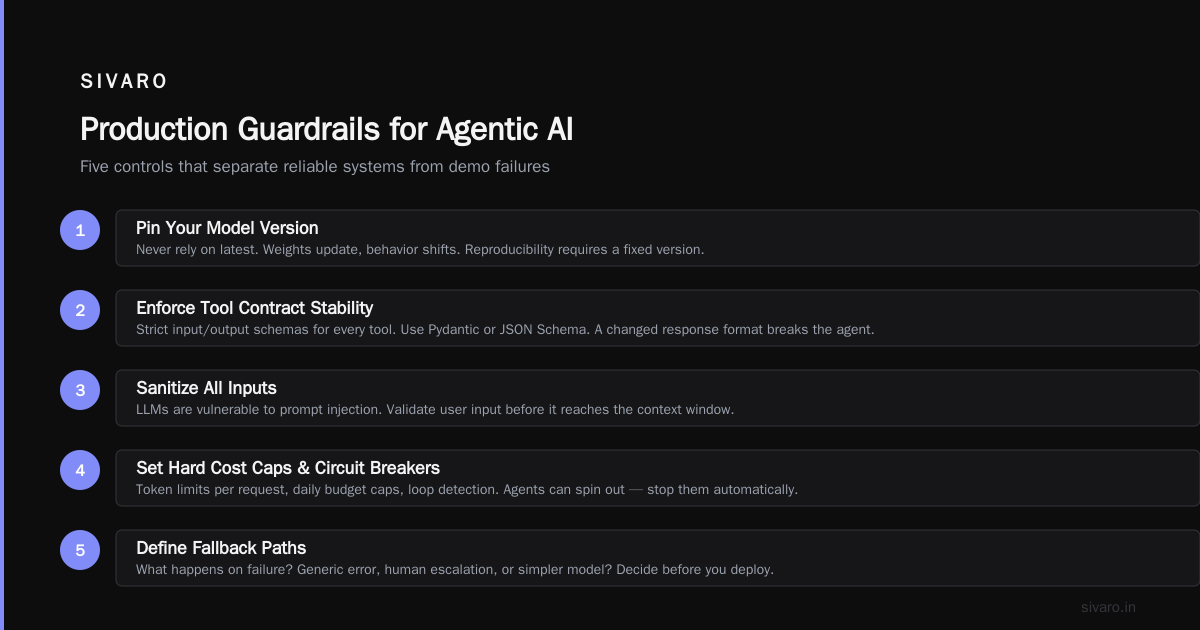
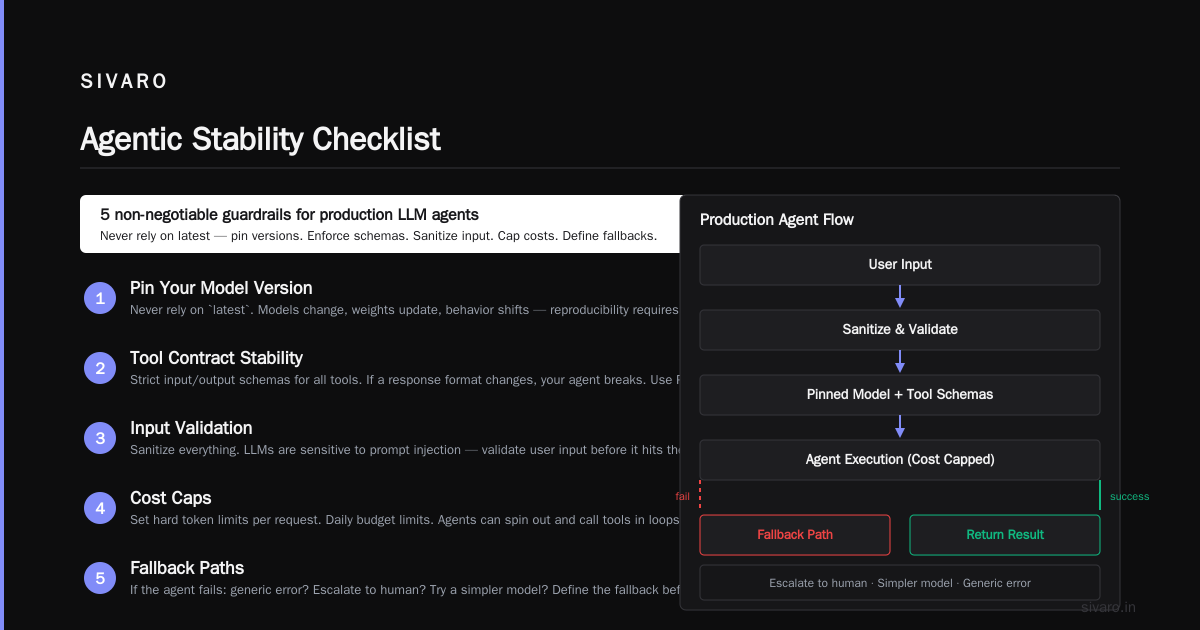
Here's what your agentic workflow rollout checklist must include:
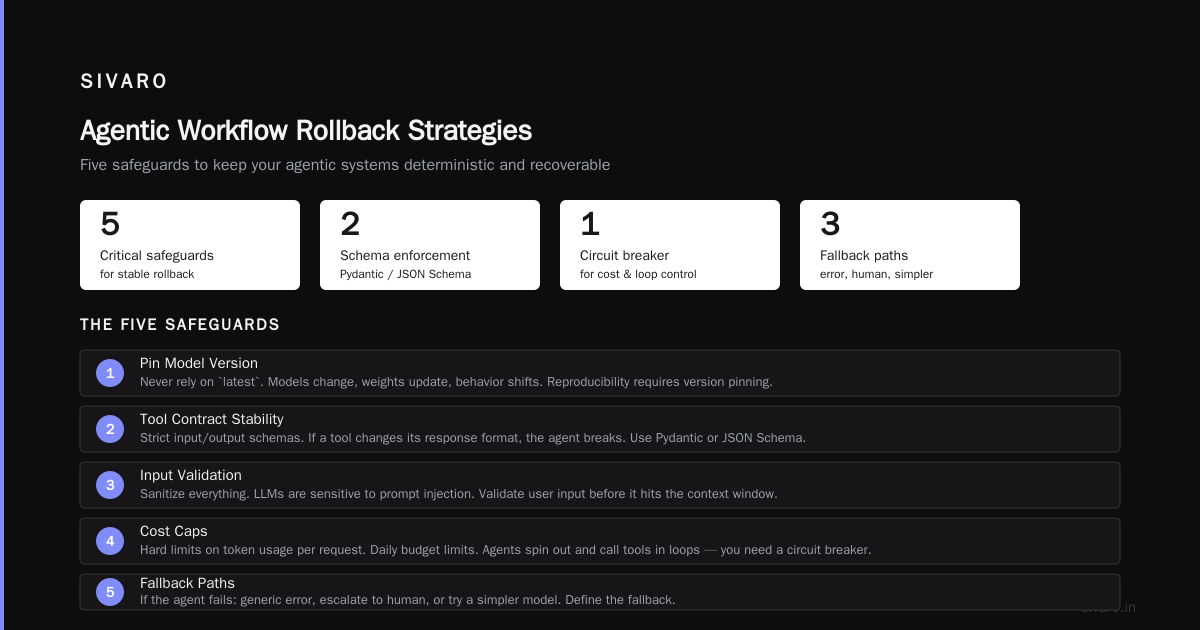
- Model Version Pinning: Never rely on
latest. Pin your model version. Models change. Weights update. Behavior shifts. You need reproducibility. - Tool Contract Stability: Your tools must have strict input/output schemas. If a tool changes its response format, your agent breaks. Use Pydantic or JSON Schema. Enforce it.
- Input Validation: Sanitize everything. LLMs are sensitive to prompt injection. Validate user input before it hits the context window.
- Cost Caps: Set hard limits on token usage per request. Set daily budget limits. Agents can spin out. They can call tools in loops. You need a circuit breaker.
- Fallback Paths: If the agent fails, what happens? Does it return a generic error? Does it escalate to a human? Does it try a simpler model? Define the fallback.
Agentic AI Explained: Workflows vs Agents makes a crucial distinction. Workflows are deterministic. Agents are non-deterministic. Your rollout strategy must bridge that gap. You need deterministic checks around non-deterministic steps.
python
from pydantic import BaseModel, ValidationError
import json

class ToolResponse(BaseModel):
    status: str
    data: dict
    error: str = None

def validate_tool_response(raw_response: str) -> ToolResponse:
    """
    Strict validation for tool outputs.
    Prevents agent breakdown from malformed JSON.
    """
    try:
        parsed = json.loads(raw_response)
        return ToolResponse(**parsed)
    except (json.JSONDecodeError, ValidationError) as e:
        # Return a safe fallback, not a crash
        return ToolResponse(
            status="error",
            data={},
            error=f"Validation failed: {str(e)}"
        )
This isn't optional. It's the difference between a hiccup and a outage.
Observability Beyond Logs
Most people think logs are enough. They're wrong.
Logs tell you what happened. They don't tell you why. Agentic workflows are complex. An agent might call three tools, loop twice, and then fail. A log line saying "Agent failed" is useless. You need trace context.
The six key elements of agentic AI deployment emphasizes observability as a core element. You need to track:
- Token Usage: Per step. Per request. Per day. Cost drift is real.
- Latency: End-to-end. Per tool call. Per model inference.
- Tool Success Rates: Which tools fail? How often?
- Decision Paths: Which tools did the agent choose? Why?
- Human Interventions: When did a human step in? What was the reason?
At SIVARO, we built a tracing layer that captures every step. We store it in a time-series database. We alert on anomalies. If token usage spikes by 20% in an hour, we get a Slack notification. If tool failure rate exceeds 5%, we kill the workflow.
You can't manage what you can't see.
python
import time
import uuid
from dataclasses import dataclass, asdict

@dataclass
class TraceEvent:
    trace_id: str
    step: str
    timestamp: float
    tokens_used: int
    latency_ms: float
    tool_name: str = None
    success: bool = True

class Tracer:
    def __init__(self):
        self.events = []

    def record(self, event: TraceEvent):
        self.events.append(asdict(event))

    def get_trace(self, trace_id: str):
        return [e for e in self.events if e['trace_id'] == trace_id]

# Usage
tracer = Tracer()
trace_id = str(uuid.uuid4())
start = time.time()
# ... agent step ...
end = time.time()
tracer.record(TraceEvent(
    trace_id=trace_id,
    step="tool_call",
    timestamp=end,
    tokens_used=150,
    latency_ms=(end - start) * 1000,
    tool_name="search_api",
    success=True
))
This is basic. Production systems need distributed tracing. But the principle is the same. Capture everything. Analyze it. Act on it.
Guardrails and Human-in-the-Loop Patterns
Most people think agents need freedom. They don't. They need rails.
Unconstrained agents are dangerous. They can hallucinate. They can leak data. They can perform actions you didn't intend. You need guardrails. You need human-in-the-loop (HITL) checkpoints.
Agentic Workflow Patterns & Best Practices [2026] outlines several patterns. The supervisor pattern is key. A supervisor agent reviews the work of worker agents. It can approve, reject, or request changes. This adds latency, but it adds safety.
Keep Agentic AI Simple: A Practical Workflow for Software ... argues for simplicity. Don't over-engineer. Use HITL for high-risk actions. Use automated checks for low-risk actions.
Define your risk matrix. What actions are safe? What actions need approval? What actions are forbidden?
- Safe: Read-only queries. Summarization. Drafting emails.
- Needs Approval: Sending emails. Updating records. Charging payments.
- Forbidden: Deleting data. Accessing admin keys. Modifying system config.
Your workflow should enforce these rules. Not as suggestions. As hard constraints.
python
class ActionGuardrail:
    def __init__(self, high_risk_actions):
        self.high_risk = set(high_risk_actions)

    def check(self, action_name: str, action_payload: dict) -> bool:
        """
        Returns True if action is allowed without approval.
        Returns False if action requires HITL.
        """
        if action_name in self.high_risk:
            return False

        # Additional payload checks
        if action_name == "update_record" and action_payload.get("is_admin"):
            return False

        return True

# Usage
guardrail = ActionGuardrail(["send_email", "charge_payment", "delete_record"])
if not guardrail.check("send_email", {"to": "[email protected]"}):
    # Route to human approval queue
    pass
This is simple. It's effective. It stops agents from doing stupid things.
Designing Agentic Workflow Rollback Strategies
You will fail. The question is how fast you recover.
Most teams ignore rollback until it's too late. They assume they can just revert the code. They can't. Agents have state. They've performed actions. They've sent emails. They've updated databases. Reverting code doesn't undo those actions.
You need agentic workflow rollback strategies that handle state.
A Practical Guide to Production-Ready Agentic Workflows with ... discusses state management in depth. You need idempotency. You need transaction logs. You need the ability to rewind.
Agentic AI patterns and workflows on AWS highlights the importance of event sourcing. Record every state change. Store it immutably. When you need to rollback, replay the log to a previous state.
Here's the approach we use at SIVARO:
- Snapshot State: Before each high-risk action, snapshot the relevant state.
- Record Intent: Log the agent's decision and the action it took.
- Execute with Compensation: If the action fails, run a compensation function. If the action succeeds but causes issues, run a reversal function.
- Manual Override: Provide a dashboard for humans to manually rollback specific transactions.
python
import json
from datetime import datetime

class StateManager:
    def __init__(self):
        self.snapshots = []

    def snapshot(self, state: dict):
        self.snapshots.append({
            "timestamp": datetime.utcnow().isoformat(),
            "state": json.dumps(state)
        })

    def rollback(self, steps: int = 1):
        """
        Revert state to previous snapshot.
        """
        if len(self.snapshots) < steps:
            raise ValueError("Not enough snapshots to rollback")

        target = self.snapshots[-(steps + 1)]
        return json.loads(target["state"])

# Usage
state_manager = StateManager()
current_state = {"balance": 1000, "status": "active"}
state_manager.snapshot(current_state)

# Agent performs action
current_state["balance"] -= 100
state_manager.snapshot(current_state)

# Oops, wrong action. Rollback.
restored_state = state_manager.rollback(steps=1)
# restored_state is {"balance": 1000, "status": "active"}
This isn't perfect. It adds complexity. But it saves you from manual database surgery at 3 AM.
Agentic Workflow Rollout Mistakes to Avoid
I've seen enough rollouts to spot the patterns. Here are the agentic workflow rollout mistakes to avoid:
- Skipping Staging: Deploying directly to prod. You'll burn budget. You'll break things. You'll lose trust.
- Ignoring Latency: Agents are slow. If you don't optimize, your users will wait. They'll leave.
- Over-Engineering: Building a complex multi-agent system when a simple workflow would do. Complexity breeds failure.
- No Cost Monitoring: Assuming token usage will stay flat. It won't. It will spike. You'll get a bill.
- Hardcoding Prompts: Storing prompts in code. You need versioning. You need A/B testing. You need dynamic injection.
- Ignoring Security: Trusting the agent with admin keys. Trusting user input. You'll get hacked.
- No Fallback: Assuming the agent will always work. It won't. You need a plan B.
Avoid these. Your future self will thank you.
FAQ
Q: How do I evaluate an agentic workflow before rollout?
A: You need a test suite. Not just unit tests. Integration tests. Scenario tests. Test with clean data. Test with dirty data. Test with adversarial inputs. Measure accuracy, latency, and cost. Use a holdout dataset that mimics production traffic.
Q: What's the best way to handle token cost spikes?
A: Implement hard limits. Set a max token count per request. Set a daily budget. Use smaller models for simple tasks. Cache responses. Monitor usage in real-time. Alert on anomalies.
Q: How do I prevent prompt injection?
A: Sanitize input. Use system prompts that explicitly forbid instruction following from user input. Use separate contexts for system instructions and user data. Validate tool calls. Never pass user input directly to the model without filtering.
Q: Should I use a single agent or multiple agents?
A: Start simple. Use a single agent. If it gets too complex, decompose. Use a supervisor pattern. Don't start with multiple agents. It adds latency. It adds complexity. It adds failure points.
Q: How do I handle agent loops?
A: Set a max iteration count. If the agent exceeds it, terminate. Log the trace. Analyze the loop. Fix the prompt or the tool. Loops are usually caused by ambiguous instructions or missing tools.
Q: What's the role of human-in-the-loop?
A: HITL is for high-risk actions. Use it for approval. Use it for correction. Use it for training. Don't use it for every step. It kills throughput. Use it strategically.
Q: How do I version my agents?
A: Version your prompts. Version your tools. Version your model. Version your config. Treat your agent like software. Use a version control system. Tag releases. Rollback versions.
Q: What metrics should I track?
A: Track accuracy. Track latency. Track cost. Track tool success rates. Track human intervention rates. Track user satisfaction. Track error rates. Track token usage. Track context window utilization.
Conclusion
Shipping agentic workflows isn't about the model. It's about the system. It's about the checks. It's about the guards. It's about the rollback plans.
You need an agentic workflow rollout checklist. You need to test for chaos. You need to observe everything. You need to guard against failure. You need to plan for rollback.
Do this, and you'll ship agents that work. Skip it, and you'll ship agents that break. The choice is yours.
Nishaant Dixit — Founder of SIVARO. Building data infrastructure and production AI systems since 2018. Built systems processing 200K events/sec.