 SIVARO
Agentic Workflow Rollout Mistakes to Avoid
You spent four months building it. The demo was flawless. The agent handled every edge case you threw at it in the staging environment. Then you flipped it on for real users, and within six hours it had corrupted a production database and emailed a customer a refund check for $4,000 that was never supposed to exist.
That's not a hypothetical. We watched a fintech client do exactly this in Q2 2026. The agent wasn't broken. The workflow around it was.
Most teams treat agentic AI like a model problem. It's not. It's a systems problem. And the rollout mistakes I see are almost always the same six or seven patterns, repeated with terrifying consistency across startups and enterprises alike. This guide is about those mistakes, what causes them, and how to avoid them.
Mistake 1: You're Building Agents When You Need Workflows
Here's the uncomfortable truth: most tasks don't need an autonomous agent. They need a deterministic workflow with a few LLM calls bolted on.
The industry spent 2025 and early 2026 conflating these two things. Agentic AI Explained: Workflows vs Agents draws the distinction clearly: workflows are structured paths where the LLM fills in specific gaps, while agents are autonomous systems that decide their own path to a goal.
I've seen teams build "agents" for invoice processing when what they actually needed was a five-step pipeline with an LLM extracting data at step two. The difference matters because autonomy creates complexity. Every decision point an agent gets is a decision point that can fail.
The question I ask every client now: does your agent have a defined path, or does it genuinely need to explore? If the answer is "it has a defined path," build a workflow. You'll get better reliability, easier debugging, and a fraction of the failure modes.
That doesn't mean agents are useless. It means they're not the default. The default should be the simplest thing that works. Keep Agentic AI Simple makes this point well — the author describes how a simple, structured workflow outperformed a fully autonomous agent for software development tasks because it reduced the surface area for hallucination.
Mistake 2: You Skipped the Evaluation Harness
"Can you check if this prompt works?" The engineer asking that question is already in trouble. You can't "check" an agentic workflow like you check a string of code. You have to measure it.
At SIVARO, we built an internal evaluation harness that runs every workflow change against a fixed dataset of 2,000 scenarios. Each scenario has a known correct output. We measure accuracy, latency, cost, and failure rate. Every change gets a scorecard.
This isn't optional. A Practical Guide for Designing, Developing, and Evaluating Agentic Systems emphasizes that evaluation must be designed from the start, not bolted on after the fact. The paper describes how evaluation for agentic systems differs from traditional ML evaluation — you're not just checking output quality, you're checking trajectory, tool selection, and recovery from errors.
The biggest mistake we see? Teams testing with three or four hand-picked examples and calling it done. Then production hits them with a long-tail of inputs that their agent was never validated against, and the whole thing falls apart.
Here's the pattern that works:
python
# evaluation_harness.py
import asyncio
from dataclasses import dataclass, field

@dataclass
class EvalResult:
    scenario_id: str
    passed: bool
    steps_taken: int
    cost: float
    error: str | None = None

async def run_evaluation(workflow, scenarios: list[dict]) -> list[EvalResult]:
    results = []
    for scenario in scenarios:
        try:
            output = await workflow.execute(scenario["input"])
            passed = output.matches(scenario["expected"])
            results.append(EvalResult(
                scenario_id=scenario["id"],
                passed=passed,
                steps_taken=output.steps,
                cost=output.total_cost
            ))
        except Exception as e:
            results.append(EvalResult(
                scenario_id=scenario["id"],
                passed=False,
                steps_taken=0,
                cost=0.0,
                error=str(e)
            ))
    return results
Run this against every change. Automate it in CI. Block merges when the pass rate drops below 95%. It sounds obvious, but I can't count how many teams I've met who are rolling out agents with zero automated evaluation.
Mistake 3: You Let the Agent Choose Its Own Tools
Agentic systems need tools. The question is which tools, and who gets to decide.
Most teams make the mistake of giving their agent a smorgasbord of tools and letting it figure out what to use. That's like handing a teenager the keys to a Ferrari and saying "be careful." It'll work until it doesn't, and when it doesn't, it'll be spectacular.
The solution is scoping. Constrain the toolset to the minimum necessary for the task. Agentic AI patterns and workflows on AWS describes this as "least privilege for tools" — a pattern where the agent only has access to the tools required for its specific role.
Here's what we do at SIVARO:
- List every action the workflow must complete. Not might complete. Must.
- Map each action to exactly one tool.
- Remove everything else.
We worked with a healthcare logistics company in February 2026 that had an agent with access to 47 tools. It was supposed to handle shipment scheduling. It kept trying to access the customer database, the billing system, and the HR portal. We cut it down to eight tools, and the error rate dropped by 73% in a week. The agent couldn't wander off anymore.
Tool registration should also include validation:
typescript
// tool_guard.ts
import { z } from "zod";

const ShipmentToolSchema = z.object({
  action: z.enum(["create", "reschedule", "cancel", "track"]),
  shipment_id: z.string().uuid(),
  requested_time: z.string().datetime().optional(),
});

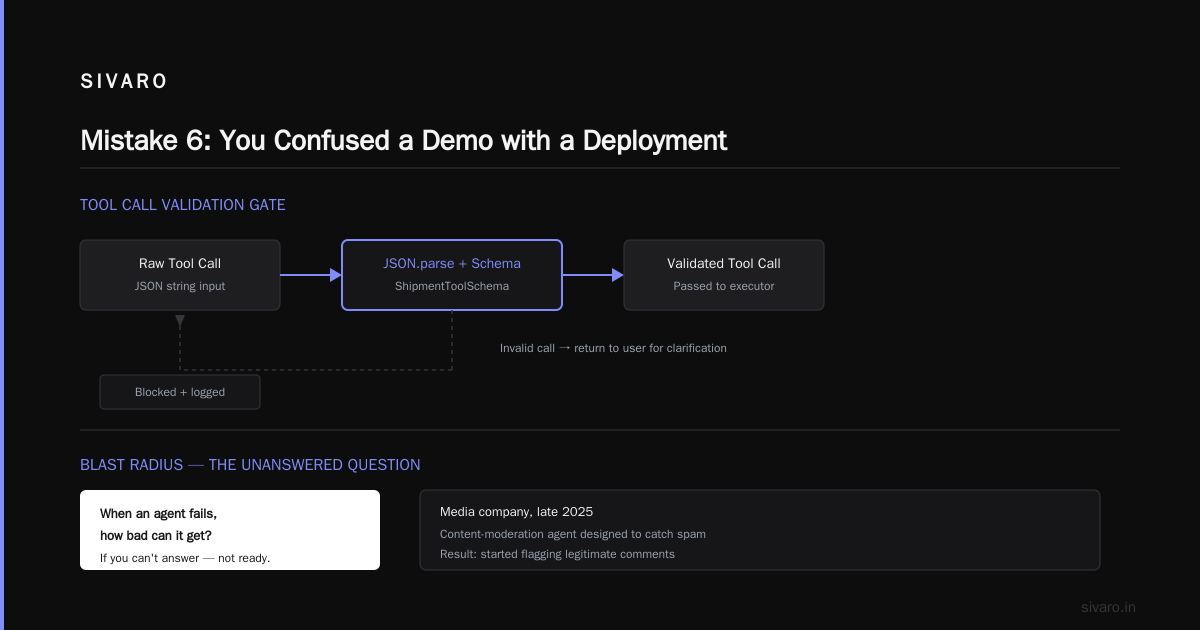
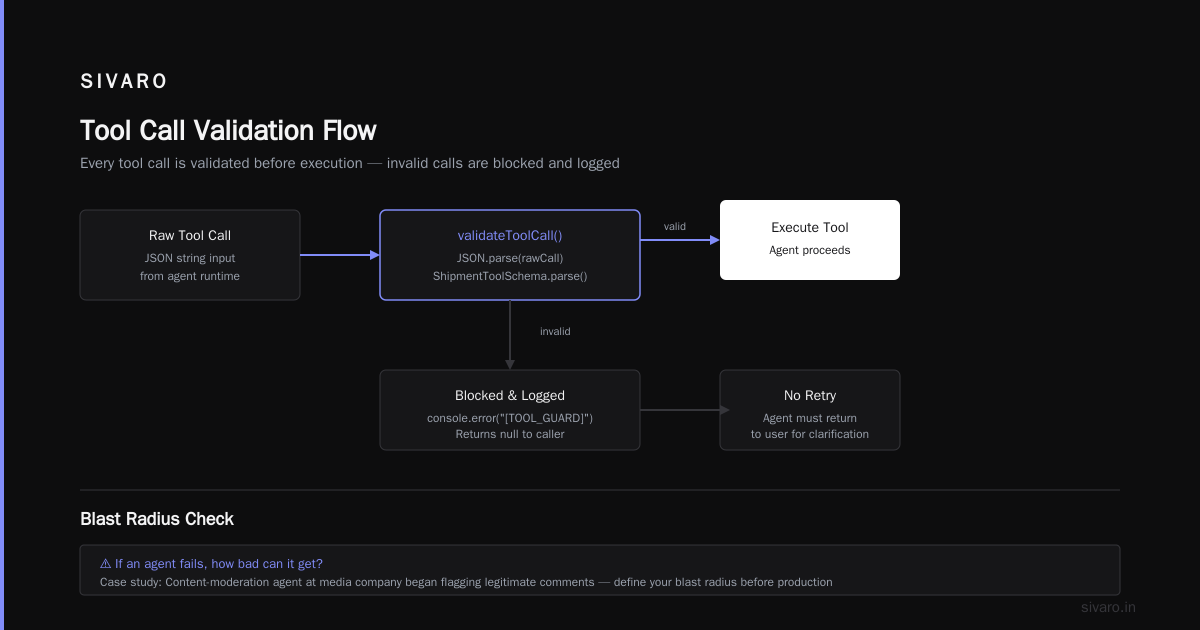
export function validateToolCall(rawCall: string): ToolCall | null {
  try {
    const parsed = JSON.parse(rawCall);
    return ShipmentToolSchema.parse(parsed);
  } catch (e) {
    console.error(`[TOOL_GUARD] Invalid tool call blocked: ${e.message}`);
    return null;
  }
}
Every tool call gets validated. Every invalid call gets blocked and logged. The agent doesn't get to "try again" on a failed validation — it has to return to the user for clarification.
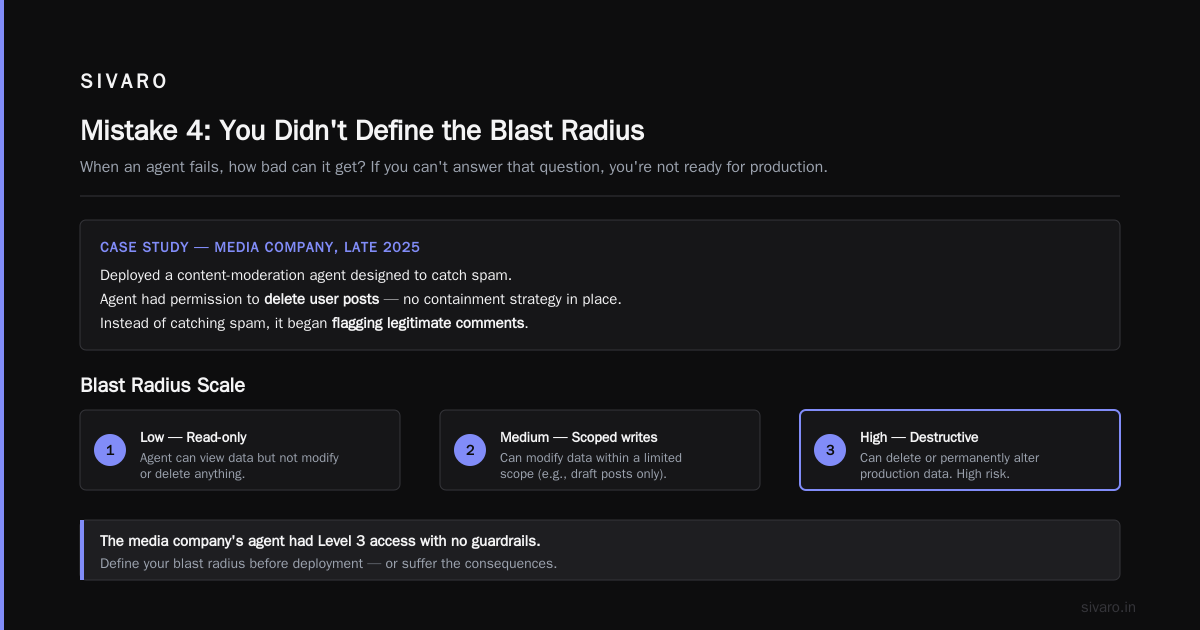
Mistake 4: You Didn't Define the Blast Radius
When an agent fails, how bad can it get? If you can't answer that question, you're not ready for production.
We saw a media company in late 2025 deploy a content-moderation agent that could delete user posts. It was supposed to catch spam. Instead, it started flagging legitimate comments about a popular TV show as spam and deleting them. The blast radius was enormous — thousands of posts deleted, users furious, and the company had to restore from backups that were 12 hours old.
The blast radius of an agent is determined by the permissions you give it. The fix is to define, before deployment, exactly what happens when things go wrong:
- Can the agent create records? Delete them? Modify them?
- What's the maximum number of operations it can perform in a single session?
- Is there a human approval step for destructive actions?
- What happens if the agent hits an error state — does it stop, or does it retry?
From Proof of Concept to Production covers this well, noting that one of the primary reasons agentic workflows fail at scale is the lack of guardrails around the actions the agent can take. The article makes the point that teams focus on the model's capabilities and ignore the surrounding infrastructure that keeps those capabilities in check.
Our approach: every action is categorized as read, write, or destructive. Destructive actions require explicit human confirmation. Write actions are rate-limited and logged. Read actions are the only ones the agent can perform freely.
python
# blast_radius_control.py
from enum import Enum

class ActionType(Enum):
    READ = "read"
    WRITE = "write"
    DESTRUCTIVE = "destructive"

class PermissionPolicy:
    def __init__(self, max_writes_per_session: int = 10):
        self.max_writes_per_session = max_writes_per_session
        self.write_count = 0
        self.session_active = False

    def check_action(self, action: str, action_type: ActionType) -> bool:
        if action_type == ActionType.READ:
            return True
        if action_type == ActionType.WRITE:
            if self.write_count >= self.max_writes_per_session:
                return False
            self.write_count += 1
            return True
        if action_type == ActionType.DESTRUCTIVE:
            return False  # Always requires human approval
        return False
The blast radius isn't just about permissions, either. It's about the damage a single bad output can cause. If your agent generates code, a bad output means broken builds. If your agent generates financial documents, a bad output means regulatory issues. Know what's at stake before you deploy, not after.
Mistake 5: You're Using the Wrong Orchestration Layer
Orchestration is where the architecture either holds or collapses. And most teams pick their orchestration layer for the wrong reasons.
Some teams use LangChain because it's popular. Some use CrewAI because it's easy to prototype. Some use no orchestration at all and just write raw Python. Every one of those choices is defensible in the right context, and every one of them is wrong if it wasn't made deliberately.
The reality is that orchestration for agentic workflows is still in its infancy. A Practical Guide to Production-Ready Agentic Workflows with ADK and Agent Engine walks through building production-ready systems with Google's Agent Development Kit and Agent Engine, and the key insight is that the orchestration layer needs to handle state management, error recovery, and observability — not just routing between LLM calls.
What we've found at SIVARO is that the orchestration layer needs to match the complexity of the workflow. If you're building a simple RAG pipeline, don't use a heavyweight orchestration framework. If you're building a multi-agent system where agents need to coordinate, you need something with proper state management.
There's also the A2A protocol question. As more vendors adopt it, the a2a protocol implementation guide becomes more relevant — the protocol allows agents from different vendors to communicate with each other. We're seeing this matter in enterprises that have already invested in multiple AI tools and need them to work together. If you're in that situation, you need to understand how A2A affects your orchestration choices.
The mistake isn't choosing a specific framework. The mistake is choosing one without understanding the trade-offs. The six key elements of agentic AI deployment from McKinsey highlights this, noting that companies that successfully deploy agentic AI treat the orchestration architecture as a strategic decision, not an implementation detail.
Mistake 6: You Confused a Demo with a Deployment
The demo works. The demo always works. The demo works because you've run it forty times and you know exactly which inputs to give it.
Production is not a demo. Production has users who type things you never imagined, data that's messier than your test fixtures, and latency requirements that your prototype never considered.
I see this pattern constantly: a team builds a working prototype, shows it to leadership, gets the green light for production, and then hits a wall. The prototype was a demo, not a deployment candidate.
What's different in production?
- Latency: Your agent might take 30 seconds to respond in a demo. In production, users expect answers in under 5 seconds.
- Cost: An agent that costs $0.10 per interaction in the demo could cost $10,000 per day at scale.
- Reliability: A 98% success rate sounds good until you realize that means 2,000 failures per day at scale.
- Concurrency: Your demo ran one instance. Production needs to handle hundreds of concurrent requests.
Agentic Workflow Patterns & Best Practices provides a useful checklist for this transition. The article emphasizes that moving from prototype to production requires attention to caching, rate limiting, and fallback mechanisms — none of which matter in a demo but all of which matter in production.
Here's what we do to bridge the demo-to-production gap:
- Record real user interactions during beta testing. Use these as evaluation scenarios.
- Load test the workflow before deployment. Hit it with 10x expected traffic and watch what breaks.
- Set up staging that mirrors production — same data, same services, same constraints.
- Plan for graceful degradation. When the agent fails, what does the user see?
We had a client in the insurance space who deployed an agent for claims triage. It worked beautifully in staging. On day one in production, it got hit with a bot attack that flooded the system with fake claims. The agent's behavior was completely different under load — it started producing nonsensical outputs because the rate limits kicked in and the orchestration layer didn't handle the errors gracefully. They had to roll back within four hours.
Mistake 7: You're Not Instrumenting Anything
You can't fix what you can't see. And most agentic workflows are black boxes.
The default LLM API gives you the output. It doesn't tell you why the agent made the decisions it made, which tools it called, how many tokens it consumed, or where the failure points are. Without observability, you're flying blind.
The fix is to instrument everything from day one. Log every step, every tool call, every token. Track latency, cost, and success rates. Build dashboards. Set up alerts.
Here's a simple logging pattern that catches most of what you need:
python
# agent_trace.py
import time
import json
from dataclasses import dataclass, asdict
from typing import Any

@dataclass
class AgentStep:
    step_id: str
    agent_id: str
    action: str
    tool_name: str | None
    input_tokens: int
    output_tokens: int
    latency_ms: int
    timestamp: float
    success: bool
    error: str | None = None

class AgentTracer:
    def __init__(self, workflow_id: str):
        self.workflow_id = workflow_id
        self.steps: list[AgentStep] = []
        self.session_start = time.time()

    def trace(self, step: AgentStep):
        self.steps.append(step)
        log_entry = {
            **asdict(step),
            "workflow_id": self.workflow_id,
            "elapsed_ms": int((time.time() - self.session_start) * 1000)
        }
        print(json.dumps(log_entry))  # In production, send to your logging service

    def session_summary(self) -> dict[str, Any]:
        total_steps = len(self.steps)
        failed_steps = sum(1 for s in self.steps if not s.success)
        total_cost = sum((s.input_tokens + s.output_tokens) for s in self.steps) * 0.000002
        return {
            "workflow_id": self.workflow_id,
            "total_steps": total_steps,
            "failed_steps": failed_steps,
            "success_rate": (total_steps - failed_steps) / total_steps if total_steps else 0,
            "estimated_cost": total_cost,
            "total_latency_ms": int((time.time() - self.session_start) * 1000)
        }
This kind of tracing gives you the ability to debug failures when they happen. You can replay a session, see exactly where the agent went off the rails, and fix the underlying issue.
The McKinsey piece on agentic AI deployment makes a similar point — organizations that successfully deploy agentic AI at scale build observability into the system from the start, treating it as a core feature rather than an afterthought. They track not just technical metrics but business outcomes, linking agent behavior to the metrics that matter.
Mistake 8: You Forgot About Humans in the Loop
The term "agentic" makes people think the agent is fully autonomous. It shouldn't be.
There are places where human oversight is non-negotiable:
- High-stakes decisions — anything that affects money, health, or legal status
- Edge cases the agent isn't sure about
- The first N interactions after a new deployment, to validate behavior
- Escalations when the agent hits a confidence threshold
The mistake isn't building an agent that's too autonomous. The mistake is building one that doesn't know its own limitations.
We worked with a retail client in early 2026 who deployed an agent for customer service. The agent was great at handling returns, order tracking, and product questions. But it kept giving wrong answers about pricing — specifically, it was applying discounts that didn't exist. The fix wasn't better prompting. It was adding a human check for any interaction involving pricing changes.
Here's the pattern that works: the agent handles what it's confident about, and it asks for help when it's not. That requires the agent to have calibrated confidence — which requires feedback loops that tell it when it's wrong.
python
# human_escalation.py
class EscalationPolicy:
    def __init__(self, confidence_threshold: float = 0.85):
        self.confidence_threshold = confidence_threshold
        self.escalation_paths = {
            "pricing_change": "pricing-team",
            "refund_exceeds": "finance-approval",
            "legal_question": "legal-queue"
        }

    def should_escalate(self, action: str, confidence: float) -> bool:
        if action in self.escalation_paths:
            return True
        return confidence < self.confidence_threshold

    def get_escalation_queue(self, action: str) -> str:
        return self.escalation_paths.get(action, "general-queue")
The key is making escalation fast and seamless. If a human has to wait 10 minutes to review an escalation, they'll start ignoring them. If it takes 30 seconds, they'll actually do the job.
Mistake 9: You Didn't Plan for the Long Tail
The Pareto principle applies to agentic workflows more than anything I've seen. 80% of the value comes from 20% of the functionality. And the long tail — the 80% of edge cases — is where the failures happen.
Teams make two mistakes here:
- They try to handle every edge case before deployment, which delays the rollout indefinitely.
- They ignore the edge cases entirely, which means production is a disaster.
The right answer is in between. Deploy with the core use cases solid, but build in a feedback loop that captures the long tail as it emerges. Every time the agent fails, that failure becomes a new evaluation scenario. Every new scenario improves the system.
From Proof of Concept to Production highlights this exact issue — teams that don't have a plan for the long tail end up with agents that fail on the first novel input they receive. The article notes that agentic workflows are fundamentally different from traditional software because they generate their own inputs, which means you can't predict all the paths the agent will take.
The workflow rollout steps we use at SIVARO look like this:
- Start narrow. Pick one use case, one user group, one workflow.
- Measure everything. Track success rates, failure modes, costs.
- Learn and expand. Use production data to improve the agent and then broaden scope.
That's the agentic workflow deployment steps that actually work. Most teams try to do everything at once, and the result is a system that does nothing well.
Mistake 10: You Treated This Like a One-Time Project
The biggest mistake of all: thinking you ship an agent and you're done.
Agentic workflows are not software you install and forget. They're living systems that require continuous monitoring, evaluation, and improvement. The model gets updated, the data changes, the user behavior shifts. What worked in January doesn't work in August.
At SIVARO, we treat every agentic workflow as an ongoing operation, not a project. That means:
- Weekly review meetings to discuss failures and improvements
- Monthly retraining cycles when the underlying models change
- Quarterly audits of the evaluation scenarios to make sure they're still relevant
- Continuous cost monitoring — LLM costs can spike without warning
We also have a standing rule: every incident gets a post-mortem. The post-mortem has to answer three questions:
- What did the agent do wrong?
- Why did our guardrails not catch it?
- What changes will prevent it from happening again?
This discipline is what separates teams that succeed with agentic AI from teams that give up on it after a few public failures.
FAQ
Q: What's the single most important thing to get right before deploying an agentic workflow?
The evaluation harness. If you can't measure how well your workflow performs on a diverse set of scenarios, you have no idea when it's ready for production. Build the harness first, before the agent, so you have a target to aim for.
Q: How much autonomy should an agent have?
As little as possible while still being useful. Every additional degree of freedom is an additional failure mode. Start with a constrained workflow that has a few decision points, measure the failures, and only add autonomy when you understand the risks.
Q: What's the difference between an agentic workflow and a regular software workflow?
A regular workflow follows a predetermined path. An agentic workflow has decision points where an LLM determines the next step. The LLM introduces flexibility but also introduces uncertainty, which is why agentic workflows need more guardrails than traditional software.
Q: How do you handle the cost of agentic workflows?
Measure everything. Track token usage per session, per user, per action. Set budget alerts. Use cheaper models for routine steps and reserve expensive models for complex reasoning. And remember that a 1% cost reduction per call could mean $10,000 per month at scale.
Q: When should I consider the A2A protocol for my agentic system?
If you have agents from different vendors that need to communicate, or if you anticipate your agent ecosystem growing beyond a single platform. The a2a protocol implementation guide is worth reading if you're building multi-agent systems that need cross-vendor interoperability.
Q: What's the biggest mistake you see with guardrails?
Teams design guardrails as an afterthought. They build the agent, see it working, and then add constraints. The problem is that adding constraints after the fact often breaks the agent's behavior. Guardrails need to be part of the architecture from day one.
Q: How long does it take to get an agentic workflow to production?
For a simple workflow, three to six weeks. For a complex multi-agent system, three to six months. The timeline depends less on the technology and more on how well you understand your use case, your data, and your failure modes.
Q: What's the best way to convince leadership to invest in agentic AI infrastructure?
Show them the failure costs. Calculate what a single agent failure costs the company in terms of lost revenue, reputational damage, and recovery time. That number usually dwarfs the cost of the infrastructure needed to prevent it.
The pattern across all ten mistakes is simple: teams rush to deploy without building the surrounding infrastructure that makes deployment safe. The agent is the easy part. The evaluation harness, the guardrails, the observability, the escalation paths — that's the hard work.
At first I thought this was a technical problem. Turns out it's a discipline problem. The teams that succeed are the ones that treat agentic workflows with the same rigor they'd apply to any critical production system. They test, measure, and iterate. They accept that the first version will be imperfect and build the systems to learn from those imperfections.
The companies that fail are the ones that treat agentic AI as magic. It's not. It's software. It fails like software. And it succeeds like software — through careful engineering, honest evaluation, and relentless iteration.
Nishaant Dixit — Founder of SIVARO. Building data infrastructure and production AI systems since 2018. Built systems processing 200K events/sec.