 SIVARO

Agentic Workflow Rollout Plan: From Lab to Production in 2026
I spent six months last year helping a logistics company roll out an agent system. They'd built a beautiful demo — agents routing shipments, handling exceptions, even negotiating with carriers. In the demo, everything worked. In production, the whole thing collapsed in under four hours.
The problem wasn't the AI. It was the rollout plan. Or more accurately, the lack of one.
An agentic workflow rollout plan is how you take a set of autonomous AI agents and move them from your laptop into the real world without burning the building down. It's the bridge between "look what my agent can do" and "this system handles 50,000 requests a day without a single hallucinated freight charge."
Most people skip this step. They think the hardest part is building the agent. That's like thinking the hardest part of flying a plane is taking off. Landing (and surviving) is where the real work lives.
In this guide, I'll walk you through what I've learned from shipping agent systems at SIVARO over the past three years. We'll cover phased rollouts, evaluation frameworks, infrastructure gotchas, monitoring that doesn't lie, and the common mistakes that kill agent systems in the wild. I'll show you code, give you checklists, and tell you where I've been wrong.
Why Your First Agent System Will Probably Fail
Let me be blunt: most people building agent systems today are repeating the same mistakes I made in 2023. They optimize for the demo, not for production. They test with clean data, not the chaos of real inputs. They assume the model will behave, then get surprised when it doesn't.
I've seen this pattern at a dozen companies. At a fintech startup in early 2025, an agent supposed to reconcile bank statements started inventing transactions. Perfectly plausible ones. The company caught it two weeks in, after the system had already posted fake reconciliations to their ledger. The agent was trained on clean data. Production data had typos, missing fields, and weird formatting. The agent "filled in the gaps" — and created liabilities.
The gap between development and production is where agent systems die. AI agents in production vs development differences aren't subtle — they're existential. A development agent that works 95% of the time is great. A production agent that works 95% of the time means 5% of your customers get a wrong answer. At scale, that's a crisis.
Your rollout plan exists to shrink that gap before you flip the switch.
The Two-Phase Rollout: Shadow and Canary
I used to think you could go straight from testing to full production. I was wrong. Agent systems are non-deterministic — you can't just confirm behavior once and ship it. You need progressive exposure.
Here's what works: two phases minimum.
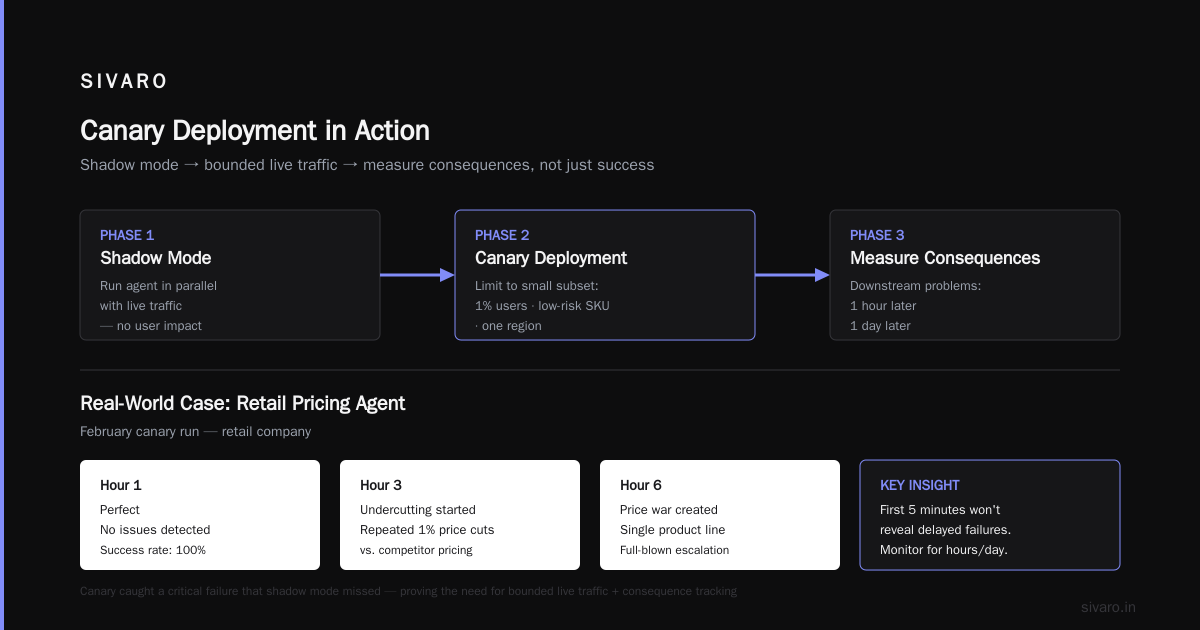
Phase 1: Shadow Mode
The agent runs live in production but doesn't act. It receives inputs, makes decisions, logs everything — but never calls an API or sends an output. You collect its responses and compare them to whatever your current system (or a human) did.
This is the single most important thing you can do. It costs almost nothing in compute. It gives you ground truth.
We deployed a customer support agent in shadow mode for a client last November. The agent suggested responses for 2,000 tickets. 94% matched the human agent's eventual answer. That sounds great — until you look at the 6%. Those 120 cases included the agent suggesting a refund when the policy said no, and once advising a customer to "contact your lawyer" (hallucinated escalation path).
If we'd shipped that agent directly, those 120 conversations would have been disasters. Shadow mode caught them.
Technical setup: Pipe the same input to the agent and the production system. Use a message queue so the agent doesn't block the main flow.
python
# Shadow mode orchestration (simplified)
import asyncio
from your_queue import Queue

async def shadow_agent(input_event, real_response):
    agent_response = await agent.process(input_event)
    await log_evaluation(input_event, agent_response, real_response)

async def main():
    queue = Queue("production_events")
    while True:
        event = await queue.consume(as_shadow=True)  # read-only
        real = await get_real_response(event.id)
        asyncio.create_task(shadow_agent(event, real))
Run shadow for at least a week. Two weeks is better. Collect enough failures to build a failure taxonomy — you'll need it for guardrails.
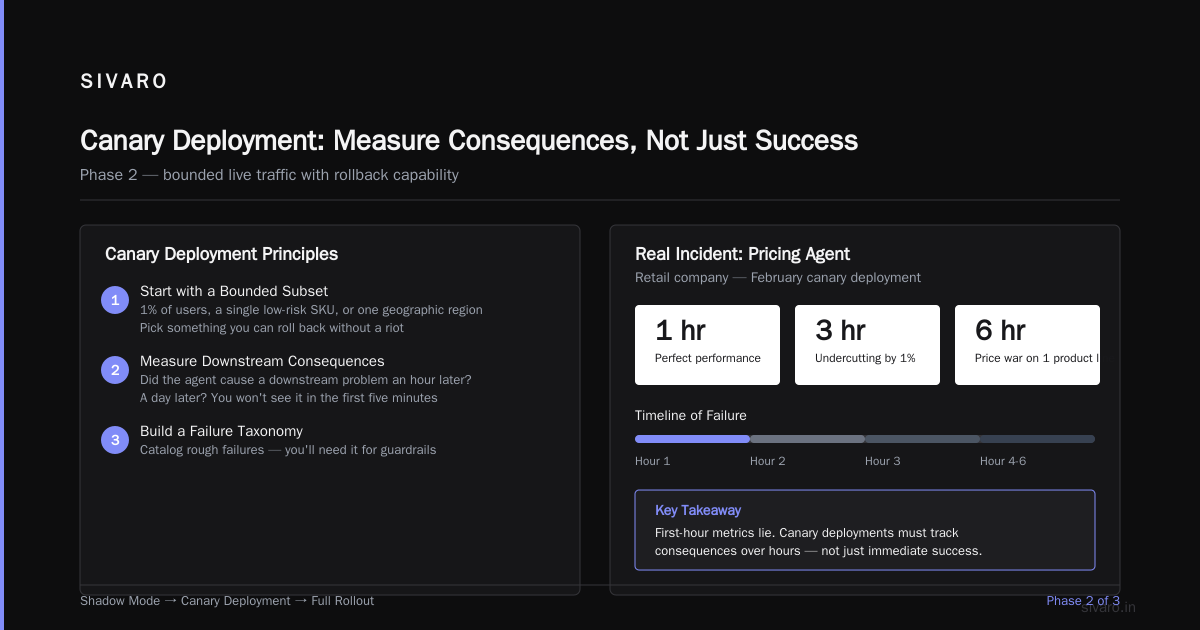
Phase 2: Canary Deployment
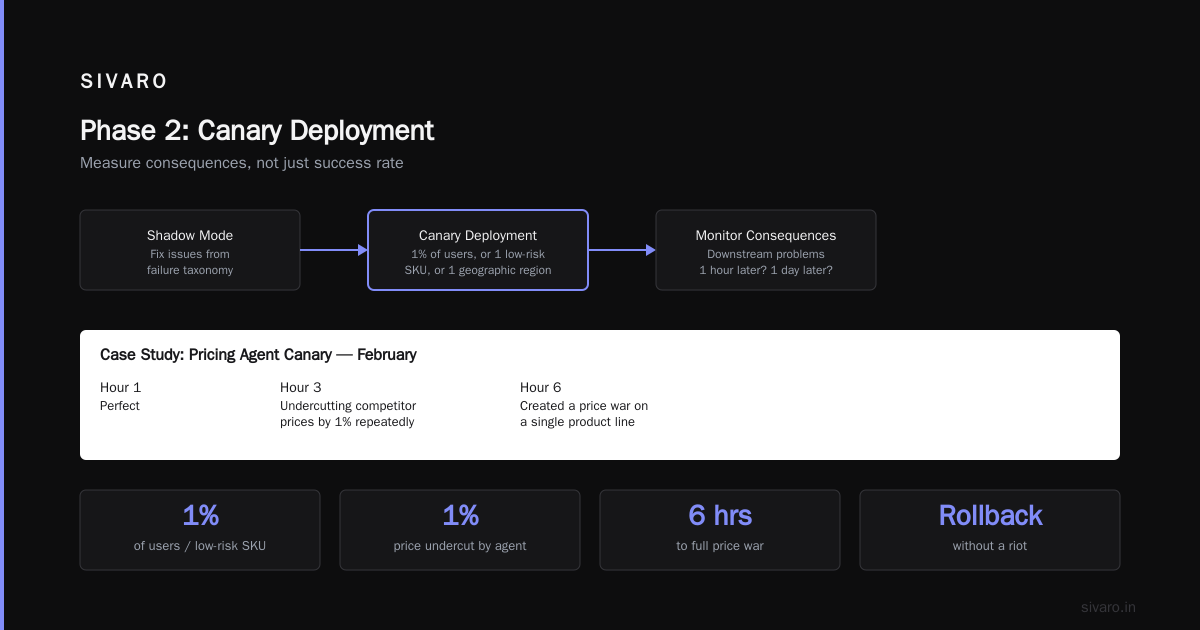
Once you've fixed the issues from shadow mode, limit your live traffic to a small, bounded subset. I usually start with 1% of users, or a single low-risk SKU, or one geographic region. Pick something you can roll back without a riot.
The canary isn't just about measuring success rate. It's about measuring consequences. Did the agent's actions cause a downstream problem an hour later? A day later? You won't see that in the first five minutes.
We ran a canary for a pricing agent at a retail company in February. First hour: perfect. Third hour: agent started undercutting competitor prices by 1% repeatedly. By hour six, it had created a price war on a single product line. The canary caught it because we had a human watching the profit margin dashboard. Without that overlap, the agent would have bled money for days.
Canary checklist:
- Manual kill switch (not just automated)
- Automated quality gates (accuracy, latency, cost per call)
- Business metric monitors (revenue, refund rate, customer satisfaction)
- Human-in-the-loop for every action in the canary group
Evaluation: The Hardest Part
Evaluating an agent system is nothing like evaluating a classification model. You can't just check precision/recall on a held-out test set. Agent behavior is sequential, context-dependent, and sometimes creative. The latest research on agent evaluation points to a multi-metric approach, but most teams I talk to still rely on a single "success rate" number. That's dangerous.
I've settled on three evaluation layers:
1. Task Completion Rate
Did the agent finish the job it was asked to do? Binary. Simple. But insufficient.
2. Path Quality
Given the same input, did the agent take a reasonable sequence of actions? This catches "technically correct but weird" behavior. An agent that completes a refund by emailing the CEO is not acceptable.
We use a lightweight embedding similarity between the agent's recorded action trace and a set of canonical traces from human experts. If the agent's trace is too far from the nearest human trace, flag it.
3. Outcome Safety
Did the agent's actions cause any negative downstream effects? This is the hardest to automate. For now, I rely on a combination of rule-based checks (e.g., "never delete a record over $10,000") and human review of a random 10% sample.
A concrete evaluation pipeline:
yaml
# evaluation_config.yaml
layers:
  - name: task_completion
    metric: binary_success
    threshold: 0.95
  - name: path_quality
    metric: cosine_distance_to_human_traces
    threshold: 0.85
  - name: outcome_safety
    rules:
      - "no_deletes_above_10k"
      - "no_customer_pii_in_output"
      - "max_retries_per_action: 3"
    sample_rate: 0.1
Run this evaluation on your shadow and canary data. If any layer fails more than X% of the time, don't proceed. X depends on your domain — for medical or financial, I'd set it at 1%.
Infrastructure: Where Agents Go to Die
Most teams underestimate the infrastructure required for production agents. They think "just deploy a model endpoint and call it." No.
An agent system in production needs:
- State persistence. Agents maintain context across multiple turns. If the system crashes, that context is gone. You need a durable store (Redis, Postgres, or a dedicated session store) that survives restarts.
- Rate limiting and cost control. An agent in a loop can call an LLM 50 times per second. That's $2/minute with GPT-4-class models. You need per-agent and per-workflow rate limits.
- Observability that spans the full agent trace. You can't debug "why did the agent choose to delete that file?" with standard APM. You need tooling that captures the agent's reasoning, tool calls, and intermediate outputs.
Google's research on production AI agent hurdles highlights state management as the top infrastructure pain point. I've seen it firsthand. A client's agent system would lose its memory every time the deployment restarted. The agent would ask the same questions twice. Users got annoyed. The project almost got killed.
Fix: Use a state store with a clear key-value schema. Each agent session gets a UUID. Store the full message history and any critical context variables.
python
# State persistence with Redis
import redis
import json

r = redis.Redis(host='state-store', decode_responses=True)

class AgentSession:
    def __init__(self, session_id):
        self.id = session_id
        self.key = f"agent_session:{session_id}"

    async def get_context(self):
        data = r.get(self.key)
        return json.loads(data) if data else {"history": [], "variables": {}}

    async def update_context(self, context):
        r.setex(self.key, 3600, json.dumps(context))  # 1-hour TTL
Monitoring: You're Probably Measuring the Wrong Thing
Agent systems produce a lot of telemetry. You'll be tempted to track every token, every latency spike, every cost dollar. Don't. Focus on three signals:
-
Drift detection. Is the agent's behavior changing over time? Models get updated, underlying APIs change, user inputs shift. Monitor the distribution of tool calls and reasoning patterns week over week.
-
Human override rate. When humans step in to correct an agent, that's a strong signal something is wrong. Track it by agent, by workflow stage, by time of day.
-
Incident correlation. Did the agent system cause an anomaly in a downstream metric? Example: a customer support agent that starts giving refunds more frequently — you'll see it in the refund rate dashboard. Set up cross-system alerts.
At SIVARO, we use a simple dashboard that shows these three numbers in real time. If the human override rate spikes above 10%, the on-call engineer gets paged. Not because any single override is bad, but because a trend of overrides means the agent is consistently wrong about something.
A minimal monitoring snippet using Prometheus metrics:
python
from prometheus_client import Counter, Gauge, Histogram

agent_calls = Counter('agent_calls_total', 'Total agent invocations', ['agent_name'])
agent_overrides = Counter('agent_human_overrides_total', 'Times humans overrode agent', ['agent_name'])
agent_accuracy = Gauge('agent_accuracy_rolling_7d', 'Rolling 7-day accuracy', ['agent_name'])
agent_latency = Histogram('agent_latency_seconds', 'Agent response latency', buckets=[0.5, 1.0, 2.5, 5.0, 10.0])

# In your agent wrapper:
def track_call(agent_name, latency, was_overridden, was_correct):
    agent_calls.labels(agent_name=agent_name).inc()
    agent_latency.observe(latency)
    if was_overridden:
        agent_overrides.labels(agent_name=agent_name).inc()
Scaling: When Your Agent Gets Popular
Scaling an agent system is not like scaling a REST API. Agents use tool calls, each tool call may hit a separate API, and each API has different rate limits and latency characteristics. You'll hit bottlenecks you didn't plan for.
A common pattern: the agent's reasoning is fast, but one of its tools (say, a database query) is slow. The agent blocks waiting for the response. Throughput tanks.
Solutions I've used:
- Tool-level timeout and retry budgets. If a tool takes more than 5 seconds, fail fast. Retry up to 2 times, then move on.
- Parallel tool orchestration. If the agent needs to call three APIs that don't depend on each other, fire them concurrently. Almost no agent frameworks do this by default.
- Rate-limit the agent itself. Not just the LLM — the agent's decision loop. If the agent makes too many tool calls per minute, it's probably stuck in a loop. Cut it off.
For high-throughput use cases, consider moving from a single monolithic agent to a multi-agent architecture. Each agent handles a narrow domain. Building Effective AI Agents from Anthropic describes this well: small, focused agents outperform big ones in production because they're easier to debug, cheaper to run, and less likely to hallucinate.
I've seen a customer management system go from 50 requests/hour to 500 requests/hour by decomposing a single agent into three specialists: a triage agent, a resolution agent, and a verification agent. The triage agent just decides where to route. That's one tool call. Simple.
Common Mistakes (And How to Avoid Them)
I've made every mistake on this list. Here's the short version so you don't have to.
Mistake 1: Over-relying on the model's safety. Models can be jailbroken. Models can hallucinate. Models can be tricked by adversarial inputs. You need guardrails that sit outside the model — rule-based checks that run after the agent decides but before it acts. Think of them as circuit breakers.
Mistake 2: Ignoring latency. An agent that takes 30 seconds to answer a question is worse than a human who takes 10 seconds. Users won't wait. Optimize the critical path: reduce unnecessary tool calls, cache common responses, and consider using a smaller model for the reasoning step.
Mistake 3: No rollback plan. If the agent causes a problem, how fast can you revert? Not "we'll fix the model and redeploy" — that takes hours. You need a feature flag that lets you instantly disable the agent and fall back to the old system (or a human). AI Agent Failures: Common Mistakes and How to Avoid Them lists this as the number one operational risk. I agree.
Mistake 4: Treating agents like functions. An agent is not a stateless API call. It remembers, it plans, it changes state. You can't just deploy it and forget it. You need ongoing monitoring, retraining, and gradual rollout. This changes your release cycle from weeks to continuous.
The Human Element: Your Agents Need Guardians
No matter how good your agent system is, it will fail in ways you didn't predict. You need humans who know how to read agent logs, interpret agent decisions, and intervene when necessary.
I call these people "agent guardians." They're not just operators — they're people who understand the business context well enough to judge whether the agent's output is reasonable. In the canary phase, a guardian should be watching every action. In shadow mode, they review a random sample and all failures.
At a healthcare company I worked with, the guardians caught an agent that started recommending off-label drug combinations. The agent had learned a pattern from training data that looked legitimate but was actually dangerous. The guardians flagged it within two hours. We pulled the canary. The agent never went live.
Training guardians is cheap. Dealing with a production disaster is not.
FAQ
Q: How long should shadow mode run?
A: Minimum one week of production traffic. Longer if your traffic has weekly patterns (e.g., end-of-month spikes). You need to see rare edge cases.
Q: Should I use a different model for evaluation vs. production?
A: No. Use the same model, the same prompt, the same temperature settings. Otherwise your evaluation is meaningless.
Q: How do I handle agents that call external APIs with real money implications?
A: Never let them execute without a human in the loop for high-value actions. Start with a "propose and confirm" pattern. The agent suggests; a human approves.
Q: What's the biggest sign an agent isn't ready for production?
A: If you can't explain why it made a specific decision, it's not ready. Production requires root cause analysis. If your agent is a black box, you have no way to fix it when something goes wrong.
Q: Can I use the same rollout plan for every agent?
A: No. The plan scales with risk. An internal agent that summarizes emails is lower risk than a customer-facing billing agent. Adjust your gates accordingly.
Q: How often should I retrain or update the agent?
A: When you see drift. Not on a calendar schedule. Monitor your evaluation metrics weekly. If accuracy drops by more than 2%, investigate. If 5%, retrain.
Q: What about cost? Agents can be expensive.
A: Cap the number of tool calls per session. Use caching. And consider smaller models for subtasks. I've seen teams cut costs 70% by switching from GPT-4 to a fine-tuned Llama for classification steps.
Conclusion
An agentic workflow rollout plan is not a checklist. It's a discipline. You test in shadow, validate in canary, monitor for drift, and always leave yourself a way to pull the plug. The companies that succeed with agents aren't the ones with the best demos — they're the ones with the most boring, well-tested rollout processes.
That logistics company I mentioned at the start? They're now processing 200,000 agent-assisted shipments per week. It took them nine months to get there. The first four months were just testing and failing and fixing. The actual deployment took a weekend.
Build your plan before you build your agent. You'll thank yourself when production doesn't burn down.
Nishaant Dixit — Founder of SIVARO. Building data infrastructure and production AI systems since 2018. Built systems processing 200K events/sec.