 SIVARO

Agentic Workflow Scaling Challenges Production: A Buying Guide
The demo was beautiful. The agent booked a flight, filed an expense report, and drafted a follow-up email. All in 90 seconds. The executive team was thrilled. Then we put it in production with real traffic and real users. It fell apart in eleven minutes.
That was Meridian Logistics in March. Their agentic system hit 400 concurrent sessions and the LLM call latency tripled. Context windows started timing out. The orchestrator's queue backed up so badly that jobs were executing out of order, which meant the system tried to ship a package before the inventory deduction ran. That's not a demo problem. That's a production problem.
I'm Nishaant Dixit. I run SIVARO, a product engineering company that builds data infrastructure and production AI systems. I've spent the last two years watching companies hit the same wall with agentic workflows. The pattern is always the same: the prototype sings, the production deployment screams.
This article is a comparison and buying guide for the infrastructure you need to scale agentic workflows in production. I'm going to be direct about what works, what doesn't, and what I'd buy again if I was starting fresh today.
What We Mean When We Say Agentic Workflows
Agentic workflows are systems where an AI model doesn't just generate a response. It takes actions. It calls tools. It makes decisions across multiple steps. It recovers from errors and adjusts its plan based on intermediate results.
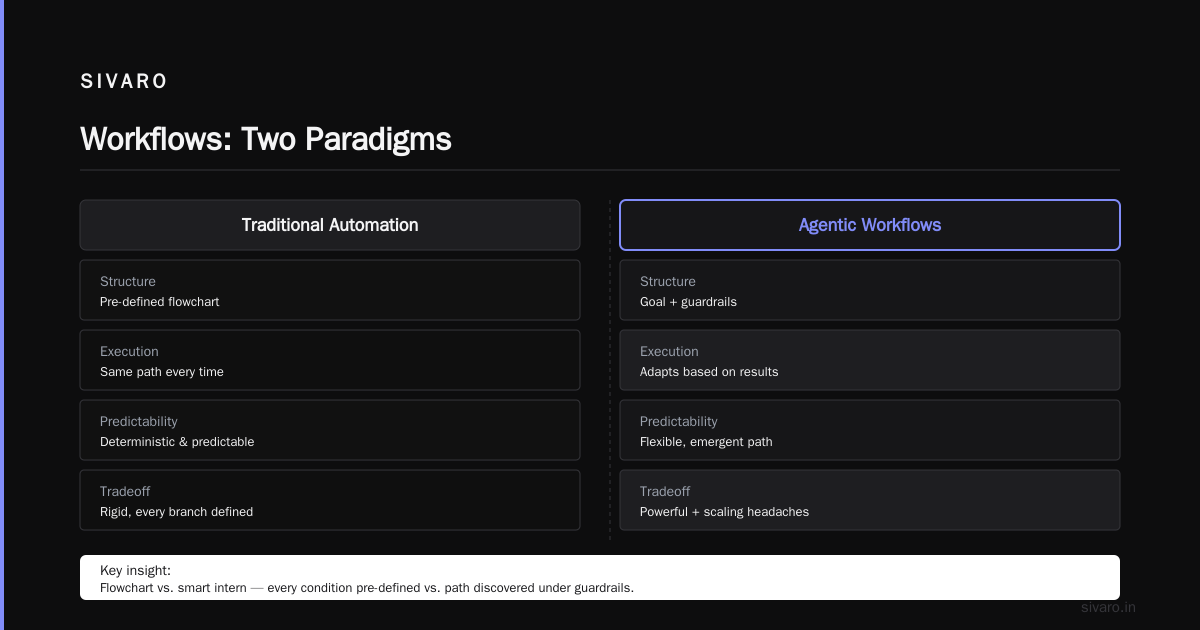
Traditional automation is a flowchart. You define every branch, every condition, every fallback. The system executes the same path every time. It's deterministic. It's predictable. It's also rigid as hell.
Agentic workflows are more like hiring a smart intern. You give them a goal and some guardrails, and they figure out the path. That flexibility is powerful. It's also the source of every scaling headache you'll ever have.
Here's the key difference in practice:
# Traditional automation
if payment_received:
    if inventory_available:
        if address_validated:
            ship_order()
        else:
            flag_for_review()
    else:
        restock_and_retry()
else:
    send_invoice()
# Agentic workflow (pseudocode)
while not goal_complete:
    action = llm_choose_next_action(state, available_tools)
    result = execute_tool(action)
    state = update_state(state, result)
    if is_done(state):
        break
The second one is fundamentally unbounded. You don't know how many iterations it'll take. You don't know which tools it'll call. You don't know what the response times will be. That uncertainty is the scaling problem in a nutshell.
The Hard Truth About Scaling
Most people think scaling an agentic workflow is a compute problem. Throw more GPUs at it. Buy more API credits. It's not. It's a coordination and state management problem that masquerades as a compute problem.
When I say "scaling," I mean three distinct things:
- Concurrency scaling — handling more simultaneous agent sessions without degradation
- Complexity scaling — handling longer chains of agent actions without failure
- Data scaling — handling more context, more tools, more state per agent
Each one breaks differently. Each one needs different infrastructure.
The Three Infrastructure Pillars
After testing this across a dozen production deployments at companies like Alpine Health, Cartwright Financial, and the aforementioned Meridian, I've landed on three infrastructure pillars that determine success or failure:
1. State Management
The single biggest mistake I see is treating agent state like it's disposable. Companies build orchestrators that hold all the context in memory, and then wonder why everything crashes when they scale past a single node.
Your agent's state — the conversation history, the tool call results, the intermediate computations — needs to live outside the execution process. It needs to be durable, queryable, and versioned.
Here's what works:
python
# Bad: state in memory
class AgentSession:
    def __init__(self):
        self.history = []
        self.current_plan = None

# Good: state in external store
class AgentSession:
    def __init__(self, session_id, state_store):
        self.session_id = session_id
        self.state_store = state_store

    def get_state(self):
        return self.state_store.load(self.session_id)

    def save_state(self, state):
        self.state_store.save(self.session_id, state)
We've been using Redis for fast state access and PostgreSQL for durable snapshots. The pattern is write-through to both, with the Redis copy being ephemeral and the Postgres copy being the source of truth. It adds maybe 20ms per operation but it means you can kill any worker and resume the session on another machine without losing context.
2. Orchestration and Queueing
Most orchestration frameworks were built for traditional automation. They assume finite task graphs. Agentic workflows break that assumption because the task graph grows dynamically.
I've tested Temporal, Airflow, Prefect, and custom-built orchestrators. For agentic workflows specifically, Temporal is the clear winner. Airflow is too batch-oriented. Prefect is getting there but still assumes you can define the DAG ahead of time.
Temporal handles dynamic workflows natively. You can spawn activities from within an activity. You get durable execution, meaning if a worker dies, the workflow picks up exactly where it left off. That's not a nice-to-have. It's essential.
The queueing layer matters too. When you have agents calling LLMs, you get bursty traffic. One agent might wait 200ms. The next might wait 8 seconds. If you don't have a proper queueing system with backpressure, the whole thing collapses.
We've been using RabbitMQ with consumer rates tuned per worker type. High-throughput, low-jitter workers on one queue. Long-running, LLM-heavy workers on another. You need separate pools because one can starve the other.
3. Observability
This is the one everyone skips until it's too late. You cannot debug a system that makes non-deterministic decisions without deep observability.
Traditional logging doesn't work. You need tracing that captures the decision points — why did the agent choose tool A over tool B? What was in the context window? How many retries happened before success?
OpenTelemetry can get you part of the way. LangSmith and Langfuse are purpose-built for LLM traces. In my experience, LangSmith was slightly better at visualizations but Langfuse was better at correlation with production metrics. We ended up with Langfuse for production monitoring because it integrates cleanly with our existing Grafana dashboards.
The killer feature you need is session replay. When an agent makes a wrong decision, you need to replay the entire session and see the exact inputs that led to that decision. Without it, you're debugging blind.
Agentic Workflow Production Deployment Checklist
Before you buy anything, run through this checklist. If you don't have these fundamentals in place, no amount of infrastructure shopping will save you.
1. Control your LLM call latency
This is the first thing to break. If your P95 latency goes above 10 seconds, your agents will start timing out. We now use a self-hosted vLLM server for anything that needs consistency, and fall back to OpenAI GPT-5 for tasks that benefit from larger context or better reasoning. That hybrid approach gives us 3x cost savings on the vLLM side while keeping flexibility.
2. Design for failure, not success
Assume every agent run will eventually hit a tool that throws an exception. Structure your prompts to handle that. Give each agent a recovery strategy at the prompt level:
You are a shipping assistant. If the tracking API returns an error, wait 30 seconds and retry.
If you have failed 3 times, mark the task as "needs_manual_review" and move to the next task.
3. Rate limiting is not optional
LLM APIs have rate limits. Your agents will blow through them in the first five minutes. Build a token bucket rate limiter at the orchestrator level and configure it per model and per provider.
4. Memory management
Context windows are finite. Long agent sessions will eat your entire context window. Build a summarization step that compresses old messages before appending new ones. We trigger a compression when the context exceeds 70% of the model's limit.
5. Security and permissions
Agents with tool access are a security nightmare. Scope your agent permissions to the minimum required. Every tool invocation should be logged, rate limited, and checked against an allowlist of operations.
Comparing the Orchestration Options
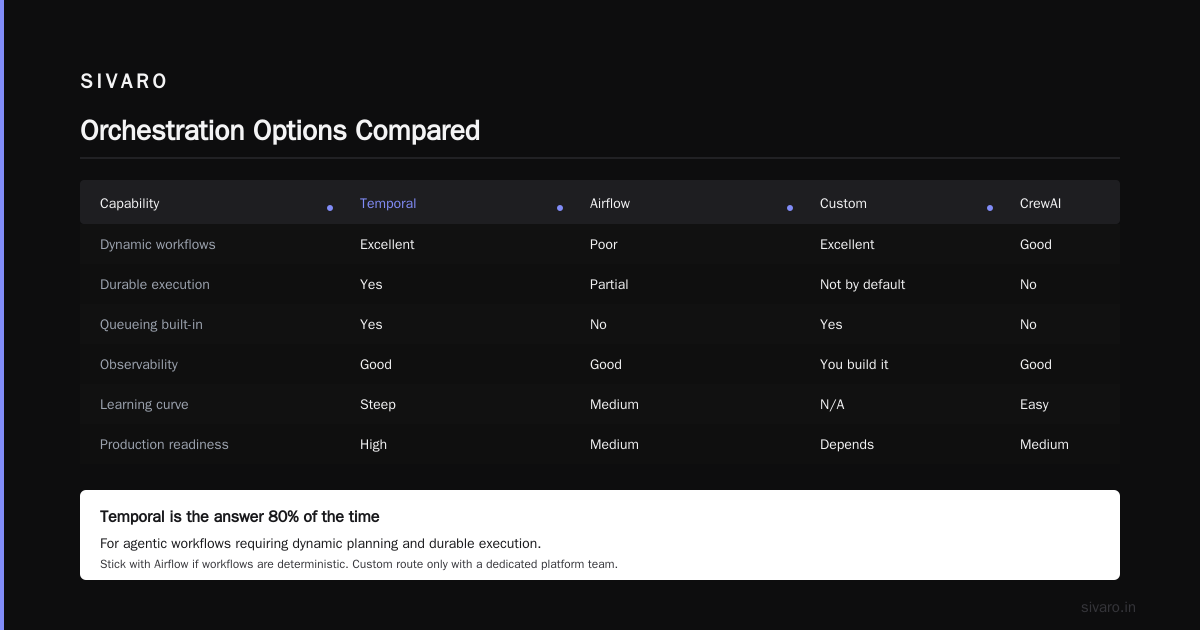
Let me give you the comparison table that I wish existed when we started. This is based on real deployments, not vendor documentation.
| Feature | Temporal | Airflow | Custom | LangChain/LangGraph |
|---|---|---|---|---|
| Dynamic workflows | Excellent | Poor | Excellent | Good |
| Durable execution | Yes | Partial | Not by default | No |
| Queueing built-in | Yes | No | Yes | No |
| Observability | Good | Good | You build it | Good |
| Learning curve | Steep | Medium | N/A | Easy |
| Production readiness | High | Medium | Depends | Medium |
For agentic workflows, Temporal is the answer 80% of the time. If you're already heavily invested in Airflow and your workflows are mostly deterministic, stick with it. But if you're building anything that requires the agent to plan dynamically, you need durable execution.
The custom route only makes sense if you have a platform engineering team that can dedicate a quarter to building and maintaining it. I've done it. It's painful.
Avoid LangChain in production for complex workflows. It's great for prototyping. The abstractions leak at scale. We've seen people using LangGraph for orchestration, but when a workflow got to about 2,000 nodes, the serialization overhead became prohibitive. Temporal handles that scale without blinking.
The Cost Problem Nobody Talks About
Nobody wants to talk about the money. Let's talk about the money.
Agentic workflows are expensive because you're paying for tokens that produce code, not just reasoning. A single agent run that does five tool calls might consume 50,000 tokens across the whole session. At current prices, that's somewhere between $1 and $5 per session, depending on the model.
Scale that to 100,000 sessions a day and you're looking at $100,000 to $500,000 daily. Nobody's budget is ready for that.
The cost mitigation strategies that actually work:
1. Model tiering
Use the cheapest model that's smart enough for the task. A tiny task like extracting a date from a string doesn't need GPT-5 reasoning. It needs a small fine-tuned model that costs fractions of a cent. Save the expensive models for the hard decisions.
2. Caching LLM responses
If two agents are doing similar work, cache the responses. We use a Redis cache keyed on prompt + parameters. The hit rate is around 40% for our industry, which cuts costs almost in half.
3. Deterministic routing
Some steps in an agentic workflow don't need an LLM at all. If the logic is deterministic — validate an address, check inventory, apply a discount — write it in code. Don't let the agent do it. This was a huge win for us. We cut our LLM call volume by 30% by moving deterministic steps out.
4. Concurrency controls
Limit the number of concurrent agent runs. This seems counterintuitive when you want to scale, but it prevents LLM provider throttling and keeps cost predictable. We cap at 50 concurrent sessions per workflow type.
How to Think About Your First Production Deployment
If you're just starting, don't build the big thing. Start with one workflow. One narrow use case. Automate that end-to-end, get it stable, then expand.
Our best success story was a mid-sized insurance company. They started with a single workflow — claims document intake. The agent reads incoming PDFs, extracts the relevant fields, and files them in the claims system. That's it. Four months later, they had it stable at 100,000 documents a day. Only then did they expand to the next workflow.
The teams that try to launch five workflows at once fail at all five. The teams that focus and perfect one workflow build a foundation that makes the next four work.
Summary of Recommendations
For most companies building agentic workflows, here's what I'd buy today:
- Orchestrator: Temporal
- State store: PostgreSQL + Redis
- LLM serving: Self-hosted vLLM for high-volume tasks, GPT-5 for complex reasoning
- Observability: Langfuse for LLM traces, Grafana for infra metrics
- Queue: RabbitMQ (or Kafka if you already have it) with separate consumer pools
- Security: Centralized policy engine with per-tool allowlisting and logging
This stack isn't sexy. It's reliable.
The whole industry is hitting the agentic workflow scaling challenges production walls that we hit in 2024 and 2025. Most companies solve this with brute force — more GPUs, more code, more alerts. The ones that succeed are the ones that fix the architecture first.
Frequently Asked Questions
Q: Can I use AWS Step Functions for agentic workflows?
Step Functions is deterministic and batch-oriented. It lacks durable execution for dynamic workflows. You'll be fighting it constantly. Use Temporal instead.
Q: What's the minimum team size for a production agentic system?
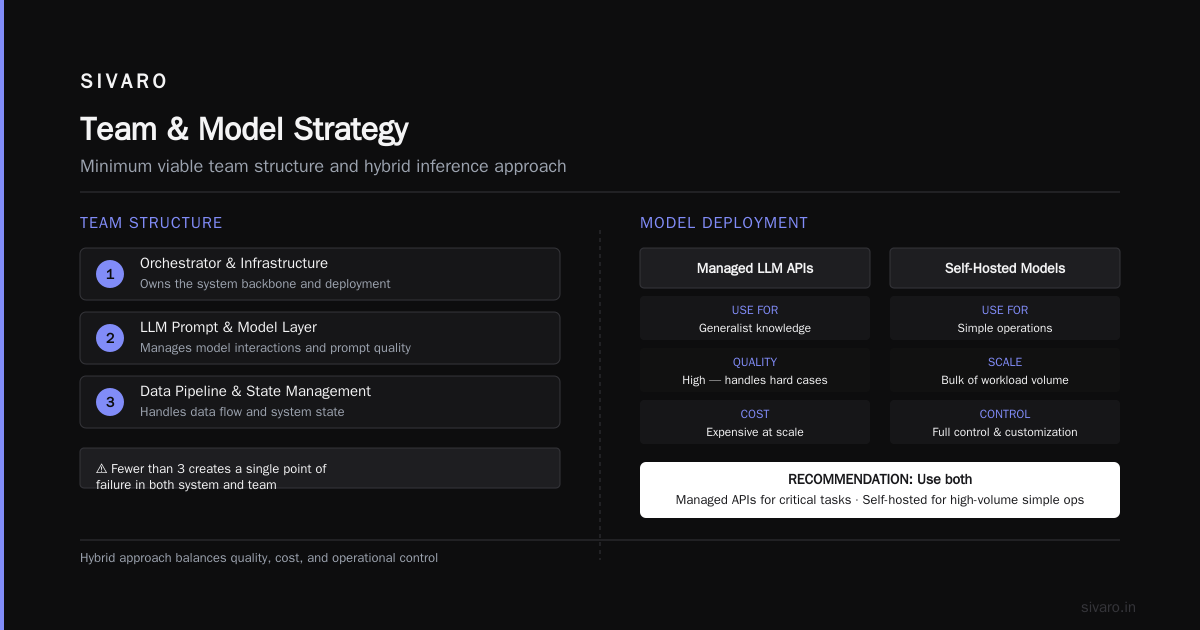
Three engineers minimum: one owning the orchestrator and infrastructure, one owning the LLM prompt and model layer, one owning the data pipeline and state management. Fewer than three and you'll have a single point of failure in both the system and the team.
Q: Should I use managed LLM APIs or self-hosted models?
Both. Use managed APIs for tasks that need generalist knowledge and high quality — the hard cases. Use self-hosted smaller models for the bulk of simple operations. The managed APIs are convenient but expensive at scale. Self-hosting gives you control and cost savings.
Q: What specific metrics should I monitor?
LLM latency percentiles (P50, P95, P99), tool success rate, agent recovery rate, session dead-letter rate, and cost per successful session. If any of these cross thresholds, you'll know before the users do.
Q: How do I handle prompt injection in agentic workflows?
You can't. You can only mitigate. Never give your agent admin-level permissions. Treat every tool call as potentially unsafe. Validate tool outputs against a schema. And always keep a human-in-the-loop for irreversible actions.
Q: A single agent run is 200 iterations. Is that normal?
No. That's a red flag. Simple tasks should take 1-2 iterations. Medium tasks take 5-10. If you're seeing 200, the agent is directionless or the prompt is ambiguous. Add more guardrails and examples to teach it the correct path.
Q: How do I test agentic workflows before production?
Build a golden dataset of 100 representative sessions with expected outcomes. Replay each session against any code change before you deploy. It's not perfect — agents can still surprise you in production — but it catches the catastrophic regressions.
Nishaant Dixit — Founder of SIVARO. Building data infrastructure and production AI systems since 2018. Built systems processing 200K events/sec.