 SIVARO

Agentic Workflow Troubleshooting: A Field Guide for Production
Tuesday, 3:47 AM. My phone lights up. A production AI system is down. Not the model — the workflow orchestrating it. A loop that was supposed to terminate after three retries had spun for six hours, burning through API credits and queueing 40,000 stale jobs. That's agentic workflow troubleshooting in its purest form: debugging autonomous systems that decide their own next steps, often in ways you didn't predict.
Agentic workflows are the most consequential shift in production software since the move to microservices. But they come with a problem most teams aren't ready for: when a traditional pipeline breaks, you can trace it. When an agentic workflow breaks, it's not always clear what broke — or even that something broke. The system is still "working." Just in the wrong direction.
This guide is what I wish I had in 2024 when my team at SIVARO started running these systems in anger. It's not a theory manual. It's a set of patterns from real incidents, real outages, and real recoveries.
What Makes Agentic Troubleshooting Different
Let me define the term clearly. Agentic workflow troubleshooting is the discipline of identifying, diagnosing, and resolving failures in workflows where autonomous AI agents make decisions about control flow, tool selection, and task sequencing at runtime.
The agent isn't a function call. It's an actor. It has autonomy. It can decide to reorder steps, break task hierarchies, or invent new approaches to problems. All that autonomy gives you flexibility. It also gives you a debugging nightmare.
Here's the core problem: determinism disappears.
In a traditional workflow, Step A always runs before Step B. If Step B fails, you know why — the inputs weren't there. In an agentic workflow, the agent might decide Step B should come before Step A because it inferred a dependency you didn't explicitly state. And it might be right. And it might be catastrophically wrong.
I started calling this the autonomy gap — the distance between what the agent was expected to do and what it is capable of deciding to do on its own.
Agentic Workflow vs Traditional Workflow: The Failure Mode Difference
Most people think the difference between agentic workflow vs traditional workflow is about flexibility. It's not. The real difference appears when things break. So let me detail the practical differences I've observed running both.
| Aspect | Traditional Workflow | Agentic Workflow |
|---|---|---|
| Failure detection | Immediate — task fails, pipeline halts | Delayed — agent self-corrects, conceals failure, or pursues suboptimal alternatives |
| Root cause analysis | Stack traces, transaction IDs | Trajectory analysis, token-level decisions |
| Reproducibility | High — same inputs, same output | Low — temperature, sampling, and context drift |
| Rollback | Simple — replay from failed step | Complex — state might be inconsistent across external systems |
| Monitoring | CPU, memory, latency | Intent alignment, tool call patterns, loop detection |
| The test | Write once, push, forget | Needs continual adversarial evaluation |
In 2025, my team deployed a document-processing pipeline that used an LLM to categorize inbound invoices. Traditional workflow? File ingestion, classification, validation, posting. Deterministic and boring. The agentic version let the model decide which vendor record to verify against, based on ambiguity in the invoice text. Cool in theory. In practice, the agent kept making self-referential verification loops — it would check a vendor, decide it wasn't sure, check again, rephrase the same question, request new data, and start all over.
At first glance, nothing failed. But throughput dropped 82% and API latency tripled.
The workflow wasn't "broken" in the traditional sense. It was pursuing a goal with no success criteria. That's the signature failure of agentic systems — they don't stop because nothing tells them what "done" looks like.
Why Production Deployment Changes Everything
Agentic workflow production deployment challenges aren't just scaled-up versions of development issues. They're fundamentally different categories of problems. Running locally with a small test set, your agent works fine. Then you deploy it to production with real users, and the world changes.
Let me lay out the deployment challenges I've seen across SIVARO's client work and my own systems.
The Cold-Start Context Problem
In development, your agent always has the perfect context — you designed the prompt, the system message is curated, the tools are mapped. In production, user input is messy, irrelevant, or actively adversarial. The agent has to decide what context matters. And context isn't fixed — it's a sliding window that changes every time the agent takes an action.
The first week we deployed a customer-support triage agent in 2025, it couldn't handle a real user who pasted a 6,000-word email, asked for account closure, and mentioned a previous ticket number that didn't exist. The agent fell into a tool‑calling hallucination loop, searching for a ticket that never was.
Lesson: You cannot test context robustness with clean data. You need adversarial input at every step.
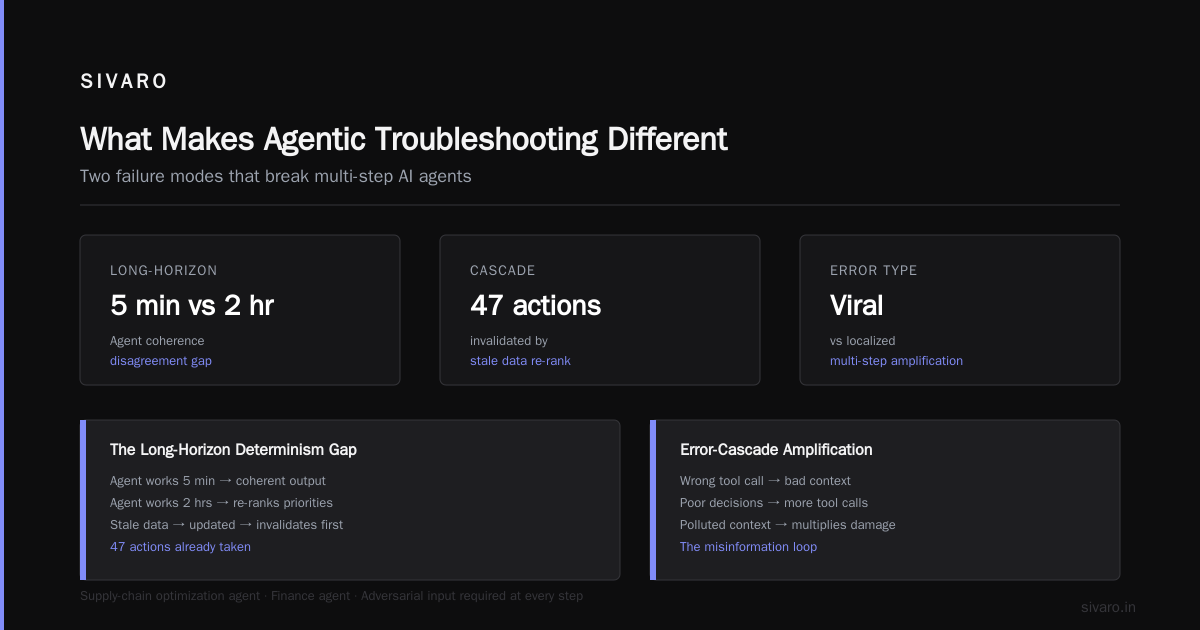
The Long-Horizon Determinism Gap
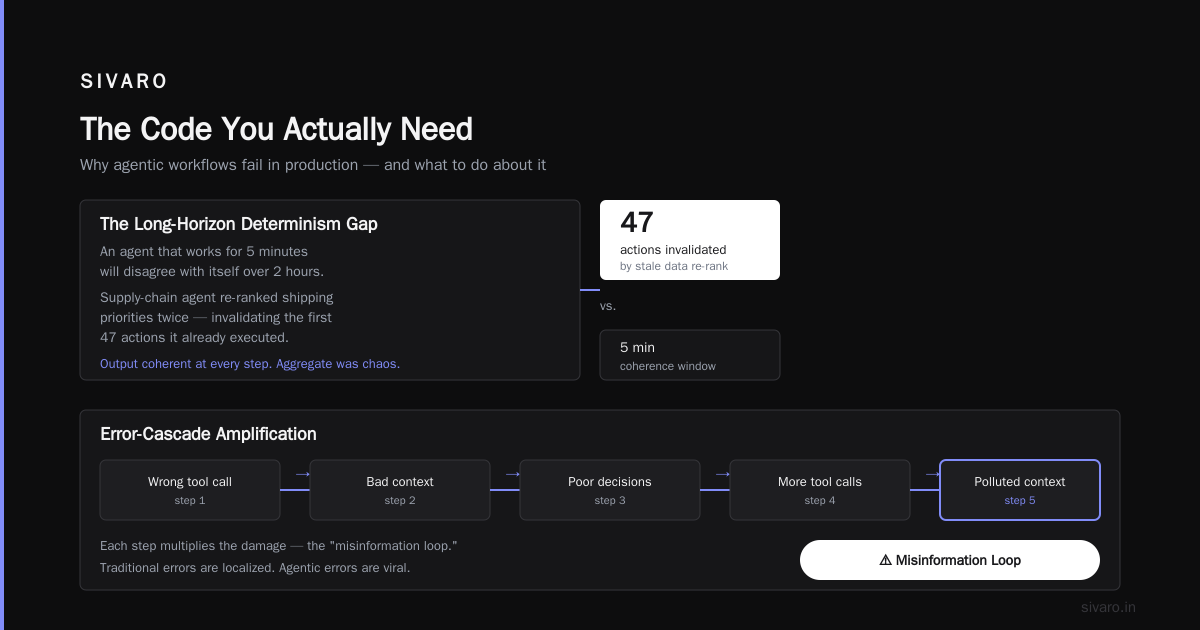
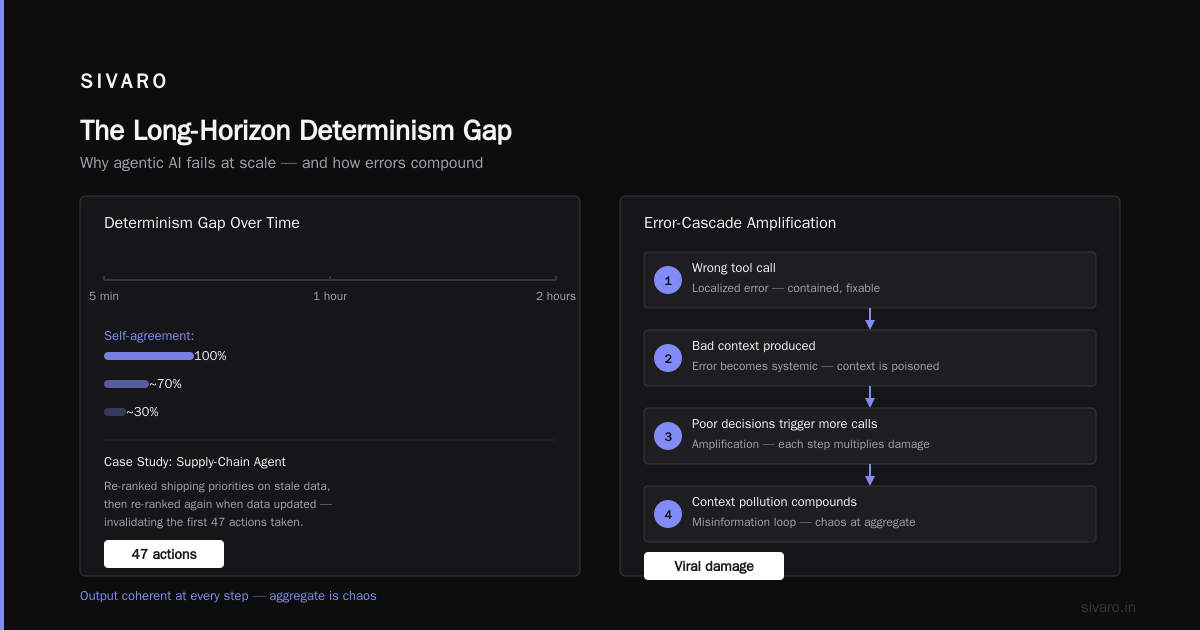
An agent that works for 5 minutes will disagree with itself over 2 hours. I watched a supply-chain optimization agent at a logistics client re-rank shipping priorities based on stale data, then re-rank again when the data updated, invalidating the first 47 actions it had already taken. The output was coherent at every step. The aggregate was chaos.
Error-Cascade Amplification
Traditional errors are localized. An agentic workflow error is viral. One wrong tool call produces bad context, which produces poor decisions, which triggers more tool calls, which pollutes subsequent context. Each step in the system multiplies the damage.
I call this the misinformation loop. A finance agent at a payments startup called the wrong internal API with a wrong parameter — and then used that erroneous response as ground truth for the next 20 decisions. Every subsequent action was technically correct, given its (wrong) premise.
Cost Explosion
The most expensive thing I've ever debugged was a workflow with no timeout on how long an agent would think before acting. It kept "thinking" for 17 minutes, generating reasoning tokens, before deciding it wasn't sure and asking a clarifying question. On a $250/hour model? That's not a bug — that's a bill.
The real production deployment problem isn't technical correctness. It's cost management. In development, you spend twenty dollars a day. In production, bad reasoning loops burn hundreds per hour.
The Troubleshooting Stack
Over two years of running agentic systems, I've converged on a concrete stack for debugging them. Not theoretical — exactly the layers you need.
1. Observability: The Trajectory Graph
In traditional systems, you have logs. In agentic systems in 2026, logs are table stakes. What you actually need is a trajectory graph — a complete record of every input, decision, tool call, output, and dependency edge that shaped subsequent behavior.
Every agentic system running in production at SIVARO emits a structured event stream for every step, not just terminal states.
python
# Example: structured trajectory tracking
class AgentTrace:
    def __init__(self, workflow_id: str, agent_name: str, run_id: str):
        self.workflow_id = workflow_id
        self.agent_name = agent_name
        self.run_id = run_id
        self.events = []

    def log_decision(self, step_name: str, input_context: dict,
                     tool_calls: list, model_output: str,
                     cost_per_step: float, latency: float):
        self.events.append({
            "timestamp": datetime.utcnow().isoformat(),
            "step": step_name,
            "context_length": len(str(input_context)),
            "tools_present": [t["name"] for t in tool_calls],
            "model_response": model_output,
            "cost": cost_per_step,
            "latency": latency,
            "session_id": self.run_id
        })
The trajectory graph let me rebuild an entire agent career after the fact. When a user complains about an outcome, I can replay the decision sequence. This is non-negotiable. If you can't replay — you can't debug.
2. Intent Drift Detection
The most subtle agentic bug I've encountered is intent drift — the agent slowly wandering away from the original goal. It starts by handling a billing question, then drifts into account management, then changes user credentials without being asked. The agent is "working" but on the wrong objective.
Solutions I've validated:
- Define explicit exit criteria — every agentic loop should have clear termination conditions, not just "max iterations"
- Wire in an adversarial validator — a separate model instance (or rules engine) that evaluates whether each action is still within the original intent scope
- Log the objective hash — serialize the initial goal, hash it, and check whether the agent has deviated from that hash frame
python
# Strict termination policy for long-running agents
async def run_agent_with_policy(agent, initial_intent, max_steps=10):
    intent_hash = hash_serialize(initial_intent)
    current_state = await agent.run(initial_intent)
    for step in range(max_steps):
        if is_task_complete(current_state, initial_intent):
            break

        if intent_drift_detected(current_state, intent_hash):
            await escalate_to_human(current_state)
            break

        current_state = await agent.run(current_state)
At a mid-sized fintech in 2025, this caught a week of silent drift that would have cost about $40,000 in one day if undetected.
3. The Human Checkpoint
The agentic workflow production deployment challenges force a critical question on production teams: when do you let the agent act autonomously, and when do you force human approval?
Trade-off: autonomy is what makes agentic workflows useful. Human approval is what makes them safe. My rule is simple — the higher the blast radius (monetary damage, account changes, security boundary crossing), the lower the tolerable autonomy.
For irreversible actions, agentic workflows in production should pause and escalate to a human. For reversible, low-cost actions? Let the agent free.
I've seen organizations trip up here because they believe the goal of agentic systems is to remove humans. Wrong. The goal is to have humans do less cognitive overhead, not take them out of the loop entirely.
The Deadly Seven: Common Agentic Failures in 2026
Here's my personal catalog of production failures, from least to worst:
1. The Stuck Loop — The agent repeats the same action with slightly different phrasing. Fix: add a cycle detector to the trajectory graph.
2. The Hallucinated Tool — The agent calls a tool that doesn't exist. This happens when the tool schema is too loose or when the model is under-specified. Produced by GPT-4o and Claude 3.5 Sonnet more often than you'd think in 2025.
3. The Cascading Confirmation — The agent finds any scrap of "supporting evidence" for its current belief and escalates confidence. In testing at a staffing agency, their candidate-scoring agent kept raising scores for applicants whose work history matched its initial biased assessment — regardless of contradictory data. Solved by adding a noise injection test — insert false but plausible data points to test whether the agent re-evaluates.
4. The Prompt Injection Viral Spread — A user injects instructions into a field the agent processes. Traditional workflows sanitize inputs. Agentic workflows treat content as instructions. The difference matters. In 2025, Google's Prompt Injection benchmark showed a 73% successful attack rate on default agentic configurations.
5. The Non-Locality Trap — The agent modifies state in System A, then assumes System B knows about it. In multi-agent setups, state synchronization is the primary killer.
6. Long-Horizon Context Loss — When the context window is long, agents remember facts but fail to connect them to relevant decisions. They don't lose the information; they lose the relevance mapping.
7. Environmental Conflation — The agent mistakes production for staging. In production, this is existential terror.
The Code You Actually Need
Let me give you the troubleshooting utility I use every single day. It's not complex — it's focused.
javascript
// Zero-emission debugging: replay the offending trajectory
export async function replayWorkflowTrajectory(traceId: string,
                                                notes: string[]) {
  const events = await fetchTrajectory(traceId);
  const replay = [];

  for (const event of events) {
    const patch = await reconstructState(event);
    const decisionFrame = await inferDecisionContext(event, notes);
    replay.push({
      step: event.step_name,
      model_call: event.model_call_id,
      tool_used: event.tool_used,
      decision: decisionFrame.reasoning,
      confidence: decisionFrame.confidence,
      cost: event.cost_per_step
    });
  }

  return {
    trace_id: traceId,
    trajectory: replay,
    divergence_points: findDivergencePoints(replay)
  };
}
The key to this function is that it doesn't just replay events. It reconstructs the state at the time of each decision. Without that, the event logs are meaningless — you'll be debugging with 20/20 hindsight when the agent was working with partial sight.
The Debugging Playbook
Now — the actual process. The way I troubleshoot agentic workflows, step by step:
Phase 1: Isolate intent baseline. Get the original goal. If the agent deviated, you need to know exactly where and when.
Phase 2: Check external state mutation. Before you look at any model output, verify that all side effects are correct. The model might be right, but the database state is wrong. This is the most common overlooked failure — the agent did the right thing, but the infrastructure failed silently.
Phase 3: Trace token-level decisions. When you do need to dig into model behavior, skip the fluff. Look at which tokens were high-probability vs. low-probability. Divergence often happens when the model picks a low-probability token — clear sign of a wrong inference, regardless of what the final text says.
Phase 4: Simulate with test harness. I keep a regression suite of 20 "crisis scenarios" — specific problematic states that my production agents encountered. Every time I fix a bug, I add its reproduction case to the suite.
Phase 5: A/B test the fix before rollout. If my fix is a prompt change, I test it against the top 10 historical failures. If it fixes 9 out of 10 but breaks the 10th, the prompt change is too aggressive.
Phase 6: Create a postmortem that captures the decision path. Not just "the workflow failed" but "the agent chose tool X at step 3 because its context at the time had 40,000 characters of stale data." Written postmortems that describe decision paths are what turn an incident into training data.
The Production Challenges You Can't See at Rest
Agentic workflow production deployment challenges are visible only under load. There's a class of bugs that doesn't show up in demo mode:
- When you run 1,000 agents concurrently, shared infrastructure (rate limits, API quotas) becomes the bottleneck
- When concurrent agents interact with the same external system, side effects interleave and create state corruption
- When the model service degrades, the agent doesn't know — it just gets slower responses and times out, then behaves as though the tool itself is broken
For instances like these, I've started adopting concurrency budget management. Every agent gets a shared budget of API calls, token consumption, and tool invocations across an entire system. When the budget is exhausted, agents are forced into a fallback mode — either degrade slowly or escalate to human. The fallback is always specified before deployment.
python
# Concurrency budget enforcement
class AgentBudgetEnforcer:
    def __init__(self, max_api_calls: int, max_tokens: int):
        self.api_calls_used = 0
        self.tokens_used = 0
        self.max_api_calls = max_api_calls
        self.max_tokens = max_tokens
        self.degraded_mode = False

    def check_budget(self, tool_call: dict) -> bool:
        if self.api_calls_used >= self.max_api_calls * 0.8:
            self.degraded_mode = True  # trigger fallback behavior

        if self.tokens_used >= self.max_tokens * 0.95:
            # Force break loop
            return false
        return true
The Future Isn't Smarter Models — It's Better Troubleshooting
Everyone in the agentic compute race is focused on building more powerful AI. Model builders care about benchmarks. I care about the debugging story. And it's missing.
The gap in 2026 is not model reasoning capability. It's operational safety. No amount of reasoning capability helps if you can't tell why a workflow went wrong.
I am building SIVARO's tooling around the assumption that the future of agentic AI isn't more autonomy; it's more auditable autonomy. The winning systems won't be the ones that make the most clever decisions. They'll be the ones that can explain their decision paths at 3:00 AM when time is up and the users are complaining.
Agentic workflows are the closest thing we have to self-modifying code in production. Treat them with the respect that deserves.
FAQ
Q1: What's the biggest difference between troubleshooting a traditional workflow and an agentic workflow?
Traditional troubleshooting relies on deterministic steps: find the failed task, inspect logs, replay with fixed inputs. Agentic troubleshooting requires reconstructing the decision context — the state of the world and the agent's internal reasoning at each step. The failure is often a matter of choice, not a matter of execution.
Q2: What are agentic workflow production deployment challenges I should expect in the first week?
First: cost surprises. Agents will outspend your projections. Second: unexpected tool usage patterns — the agent finds creative ways to call your API that breaks assumptions. Third: state mutation in external systems that outlives workflow sessions.
Q3: How do I test an agentic workflow before production?
Supervised replay. You cannot test in static mode. Create a --dry-run flag that makes the workflow execute all the planning logic but suppresses side effects. Then — run it with historical production data to see how it would have behaved.
Q4: Should I add human approval for everything?
No. If agents always need human approval, there was no point in having an agent. Reserve human checks for irreversible, high-blast-radius actions: financial transfers, account closures, security rule changes.
Q5: What's the best way to detect intent drift without manual review?
Hash the initial user request (or system directive). Then compute the semantic distance between the agent's current action and that initial intent. When exceeded, the drift alarm fires. Use a semantic similarity model for this, not exact keyword matching.
Q6: How do I handle prompts that get dirty over time (context poisoning)?
This is a real issue. I recommend a context-eviction policy: if a field has been in context for N steps, and the agent hasn't acted on it, the system compresses it into a summary. This prevents token-budget exhaustion and the compounding misinformation that follows.
Q7: Can I truly debug a production issue in an agentic system after the fact?
Yes — but only if you have the trajectory data. That's why I emphasize observability so heavily. Fine-grained decision logs are not just good practice — they are the foundation of your troubleshooting ability.
Q8: What tools exist for agentic observability?
In 2026, the landscape is young but moving fast. LangSmith, Langfuse, and Helicone all provide good starting points. I still find myself building custom dashboards for SIVARO because agentic observability needs are so specific to your system's failure modes. Standard APM tools don't understand decision trajectories, they only track compute.
Postscript: if you're reading this to figure out whether you should deploy an agentic workflow — stop and ask yourself what you're optimizing for. If the answer is "control," don't. Agentic workflows are a bet that autonomy will pay off in flexibility. If you need rigor, keep the traditional pipeline.
Nishaant Dixit — Founder of SIVARO. Building data infrastructure and production AI systems since 2018. Built systems processing 200K events/sec.