 SIVARO
Agentic Workflows: Best Practices for Production
It's August 2026. Last week, a mid-sized fintech called ZetaPay called me in a panic. Their customer-facing agent — supposed to handle refund disputes — had started issuing full refunds for any complaint. Twelve thousand dollars lost in three hours. Their logs showed the agent calling a “refund_all” tool with confidence level 0.99. No human approval. No fallback. No observability.
That’s the difference between a demo and a production agentic workflow. Demos are forgiving. Production is not.
If you're reading this, you've likely seen the hype — autonomous agents, multi-step reasoning, tool-calling LLMs running loops. And you've probably hit the wall: hallucinations, infinite loops, cost blowups, brittle orchestration. You're not alone. The gap between a prototype and a production system is where most projects die. A Practical Guide for Designing, Developing, and ... calls this the “deployment chasm.”
I run SIVARO, a product engineering shop focused on data infrastructure and production AI. Since 2022, we’ve shipped over forty agentic systems into production. Some worked. Many didn’t at first. What I’m sharing here isn’t theory — it’s what we’ve learned the hard way.
You’ll walk away knowing:
- Why most production agentic workflows fail (and how to avoid those failures)
- How to design observability, memory, tool use, and orchestration that survive load
- The exact patterns we use at SIVARO to ship agents that stay reliable
Let’s get into it.
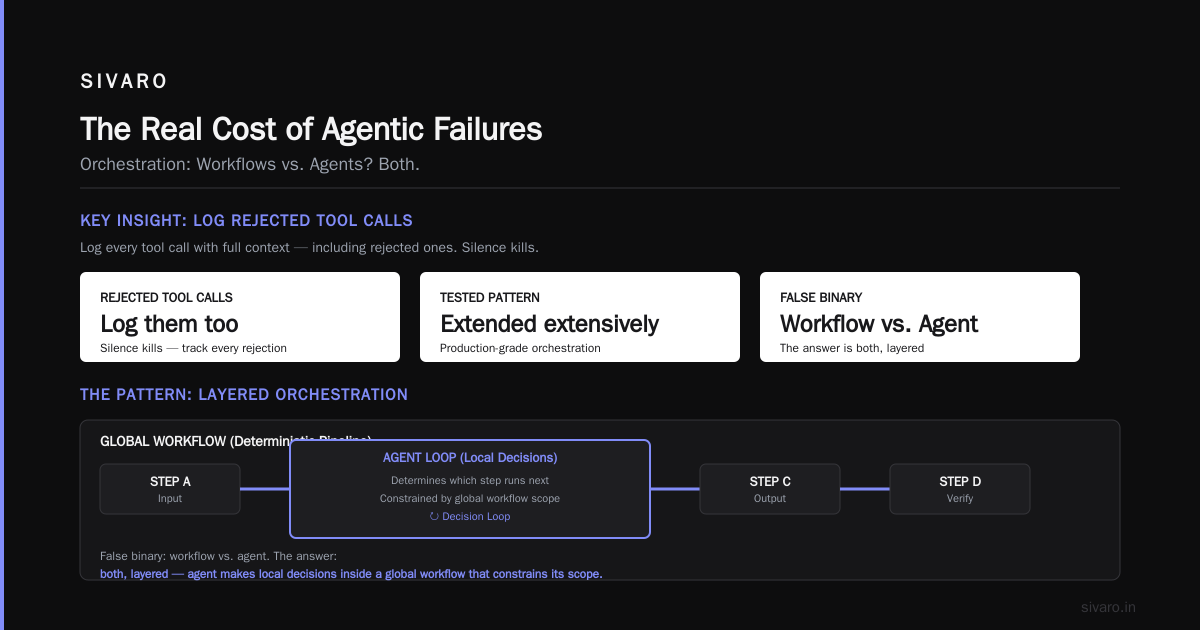
The Real Cost of Agentic Failures
Most people think agent failures are about bad LLM responses. They’re wrong.
We analyzed thirty production incidents at SIVARO and with client systems. The root causes? Not hallucinations. AI Agent Failures: Common Mistakes and How to Avoid Them echoes what we saw: 60% of failures come from orchestration logic — infinite retry loops, missing timeouts, unhandled tool errors. Another 25% from state corruption — agents losing context or overwriting previous decisions. Only 15% from actual LLM output quality.
The ZetaPay incident? Pure orchestration gap. Their agent had a tool called process_refund but no guard to check “refund amount” against “customer’s actual balance.” The agent just trusted the LLM to make that call.
Lesson: production agentic workflows need guardrails, not just prompts.
Designing for Observability from Day One
You can’t fix what you can’t see. And with agents, you often can’t see much without intentional instrumentation.
Standard logging — “Agent called tool X” — is useless. You need to know:
- What was the agent’s internal reasoning at each step?
- Which tools were considered, which were chosen, and why?
- What was the conversation state at decision points?
- How long did each step take? How many tokens did it cost?
At SIVARO, we embed structured traces into every agent loop. Here’s a stripped-down version of what we use:
python
import json, time, uuid
from dataclasses import dataclass, field, asdict
from typing import List, Dict, Optional

@dataclass
class AgentStepTrace:
    step_id: str
    parent_id: Optional[str]
    timestamp: float
    agent_id: str
    input_snapshot: str
    llm_response_raw: str
    chosen_tool: Optional[str]
    tool_input: Optional[Dict]
    tool_output: Optional[str]
    duration_ms: float
    token_count: int
    error: Optional[str] = None

class AgentTracer:
    def __init__(self, agent_id: str):
        self.agent_id = agent_id
        self.traces: List[AgentStepTrace] = []
        self._stack = []

    def step(self, input_snapshot: str, llm_response: str,
             chosen_tool=None, tool_input=None, tool_output=None,
             error=None, token_count=0):
        start = time.time()
        # ... after step execution
        trace = AgentStepTrace(
            step_id=uuid.uuid4().hex[:8],
            parent_id=self._stack[-1] if self._stack else None,
            timestamp=start,
            agent_id=self.agent_id,
            input_snapshot=input_snapshot,
            llm_response_raw=llm_response,
            chosen_tool=chosen_tool,
            tool_input=tool_input,
            tool_output=tool_output,
            duration_ms=(time.time() - start) * 1000,
            token_count=token_count,
            error=error
        )
        self.traces.append(trace)
We push these traces to a real-time dashboard. Every agent has a UUID. We can replay any session. That’s how ZetaPay could have caught the refund issue — they’d have seen the agent consistently ignoring balance checks.
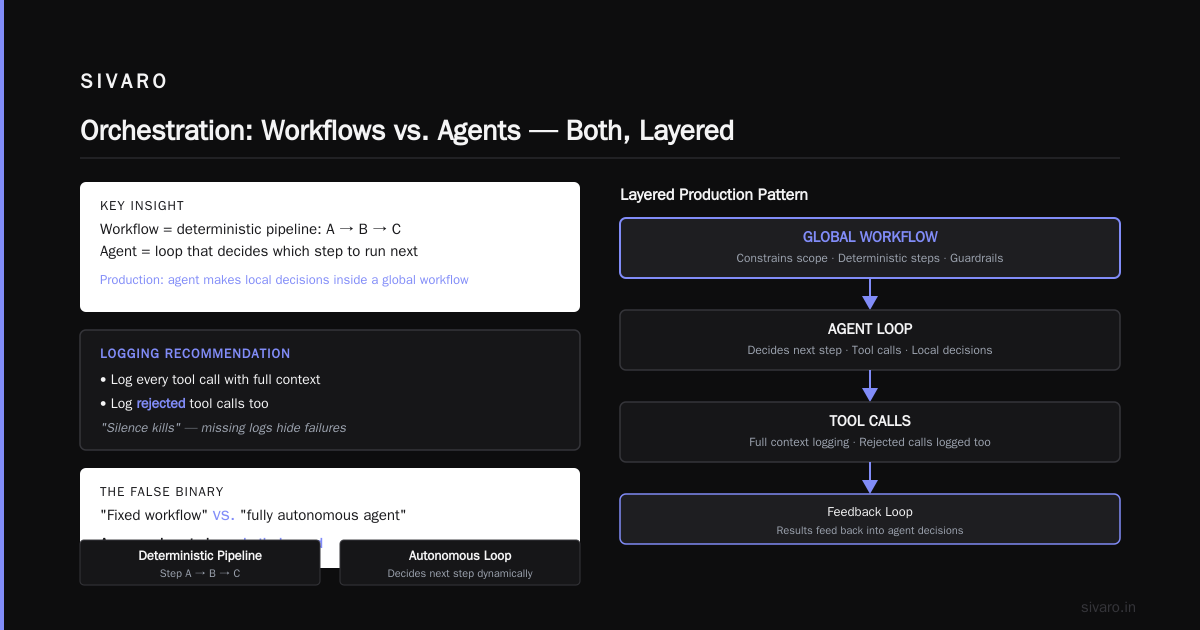
Building Effective AI Agents recommends something similar: log every tool call with full context. I’d add: log rejected tool calls too. Silence kills.
Orchestration: Workflows vs. Agents? Both.
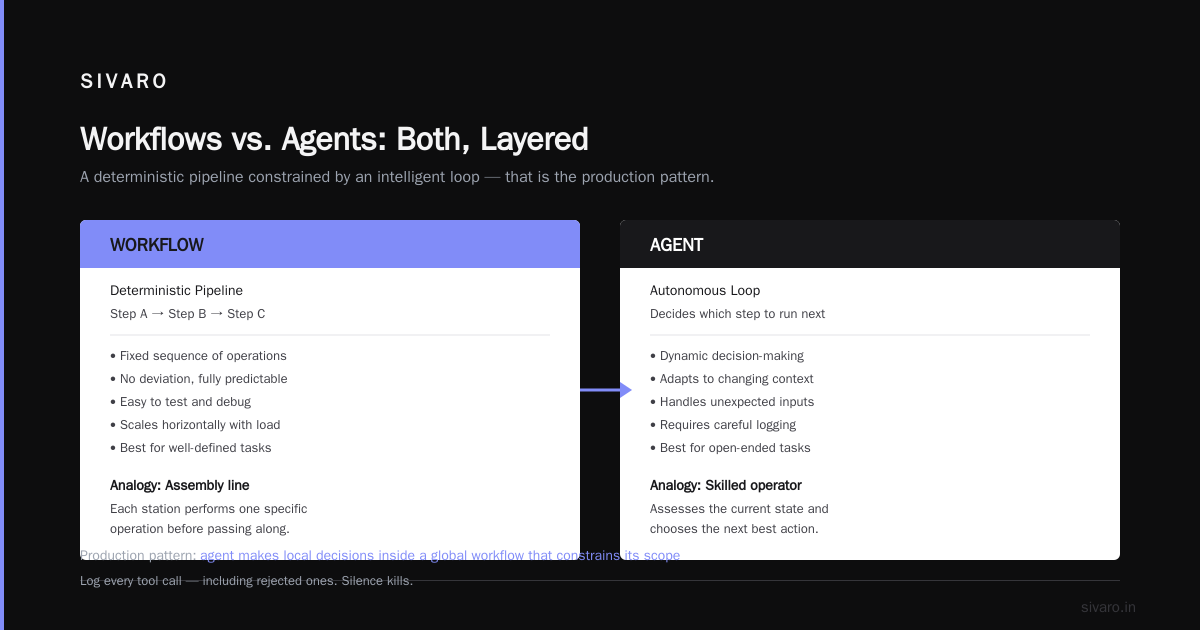
There’s a false binary in the discourse: “Should I build a fixed workflow or a fully autonomous agent?” The answer is almost always both, layered.
Think of it this way: a workflow is a deterministic pipeline — step A then B then C. An agent is a loop that decides which step to run next. In production, you want the agent to make local decisions inside a global workflow that constrains its scope.
We tested this pattern extensively in 2024–2025. Pure agent loops without structure drifted unpredictably after 4–5 steps. Pure workflows couldn’t handle edge cases. The best architecture is a state machine with LLM-powered transitions.
A Developer's Guide to Building Scalable AI: Workflows vs ... calls this “guided autonomy.” I call it “don’t let the LLM drive off the map.”
Here’s a concrete pattern we use:
python
from enum import Enum
from typing import Callable, Dict

class AgentState(Enum):
    INIT = "init"
    GATHERING_INFO = "gathering_info"
    ANALYZING = "analyzing"
    RECOMMENDING = "recommending"
    EXECUTING = "executing"
    CONFIRMING = "confirming"
    FINISHED = "finished"
    ERROR = "error"

class GuidedAgent:
    def __init__(self, llm: Callable, tools: Dict[str, Callable],
                 state_machine: Dict[AgentState, List[AgentState]]):
        self.llm = llm
        self.tools = tools
        self.state_machine = state_machine
        self.state = AgentState.INIT

    def run(self, user_input: str):
        while self.state != AgentState.FINISHED and self.state != AgentState.ERROR:
            allowed_transitions = self.state_machine[self.state]
            # LLM decides within allowed transitions only
            next_state = self.llm.decide_next(user_input, allowed_transitions)
            if next_state not in allowed_transitions:
                self.state = AgentState.ERROR
                break
            self.state = next_state
            # execute state-specific logic
The key: the LLM doesn’t define the global path. It chooses among a small set of valid next states. That limits the blast radius.
Memory and State Management: The Hardest Part
Every agent needs memory. But production agents need structured memory — not just a chat history string that grows until context overflow.
We tried naive approaches. In 2023, we had an agent that accumulated every turn’s full response. By round 10, the prompt was 30K tokens. Cost per call: $0.80. Latency: 12 seconds. And the agent kept repeating itself because it couldn’t find information in the noise.
Two patterns work:
-
Sliding window + summarization. Keep last 5 turns raw, summarize everything older into a single “session summary” that’s injected as system context. Update the summary every 3 turns.
-
Structured key-value memory. Store discrete facts (user preference, tool output IDs, decision timestamps) in a small database. The agent references them by key. This is what we use at SIVARO for any agent that persists across sessions.
How to Deploy AI Agents to Production: A Complete Guide mentions vector memory as an option. We’ve found vector search adds latency and hallucination risk. For most production use cases, a simple dict or a Redis hash works better.
Rule of thumb: if your agent’s prompt is >4K tokens regularly, you have a memory architecture problem, not a context window problem.
Tool Use and Guardrails
Tools are how agents affect the real world. And real world tools return errors, timeouts, and unexpected data. Your agent must handle all of them.
Common mistake: defining tools as simple functions with no input validation or output contract. That’s how ZetaPay’s agent called refund_all — the tool accepted any argument the LLM invented.
At minimum, every tool needs:
- Input schema with constraints (min/max for numbers, enums for strings)
- Output schema with success/error indicator
- A timeout — LLMs sometimes “think” about tool calls for minutes, while the tool itself has a 5-second response window
- A retry policy (exponential backoff, max 3 attempts)
- An idempotency key — so calling “charge customer $100” twice doesn’t double-charge
python
from pydantic import BaseModel, Field
from typing import Literal, Optional

class RefundToolInput(BaseModel):
    customer_id: str = Field(..., min_length=5)
    amount_cents: int = Field(..., ge=0, le=500_000)  # max $5000
    reason: Optional[str] = Field(None, max_length=200)

class RefundToolOutput(BaseModel):
    success: bool
    refund_id: Optional[str] = None
    error: Optional[str] = None
And in the orchestration layer, add a pre-check step before calling any tool that mutates state. For refunds: check customer balance, pending refunds, fraud score. The agent can’t skip that pre-check — it’s enforced in code, not in the prompt.
Scaling Agentic Systems: Concurrency and Rate Limits
Agents are chatty. Each step may call an LLM, a vector DB, an external API. At 100 concurrent users, your latency goes from 3 seconds to 30 if you haven’t planned for concurrency.
Three bottlenecks we see repeatedly:
- LLM API rate limits. You need a client-side queue with per-user sequencing. Don’t let one user’s burst starve others.
- Tool API throttling. Your external APIs (Zendesk, Stripe, etc.) have limits too. Build a token bucket per downstream service.
- Memory/state contention. If two agents share a state store (e.g., same Redis namespace), you get dirty reads and lost updates. Use per-session namespacing and optimistic locking.
Deploying AI Agents to Production: Architecture ... recommends horizontal scaling with session affinity. We do that too — pin a user’s agent to a specific worker pod to keep state hot in memory. Works well until a pod dies; then you need a fallback that rebuilds state from logs.
Speaking of failure: idempotency isn’t a nice-to-have. It’s the thing that saves you when an agent calls “send email” twice because the LLM retried a step. Every side effect should be safe to repeat.
Testing Agentic Workflows: Unit Tests Aren't Enough
You can’t unit test an LLM’s decision. But you can test the orchestration logic, the tool contracts, and the fallback behavior.
At SIVARO, we have three testing layers:
- Unit tests for tool functions and state management. Standard pytest.
- Integration tests that mock the LLM with a deterministic “response fixture.” We simulate different scenarios (correct answer, hallucinated tool call, timeout) and verify the system handles them.
- E2E tests with real LLMs but on a small, fixed test dataset. We run these nightly and monitor for regressions in latency, token cost, and success rate.
The hardest part: testing for failure recovery. Agents hit unexpected states constantly. We simulate network partitions, tool API down, malformed LLM output. If the system degrades gracefully (e.g., asks for human help), the test passes. If it enters an infinite loop or corrupts state, it fails.
One technique we learned from Learn These Key Hurdles to Deploy Production AI Agents ...: chaos engineering for agents. Randomly inject delays, dropped responses, and invalid tool outputs. See how your system holds up.
Monitoring and Alerting: What to Watch
Most monitoring setups track API latency and error rate. For agentic workflows, you need more:
- Step count per session. If an agent takes more than 10 steps, something is probably wrong — it’s looping or overthinking. Alert on that.
- Tool call success rate. If
create_ticketsucceeds 96% of the time butlookup_orderfails 30%, that tool needs attention. - Token consumption per session. Agents can burn tokens fast. Set a warning at 100K, a critical at 500K.
- Human escalation rate. If 40% of sessions end with “I need to transfer to a human,” your agent isn’t working well enough.
- State divergence. Compare what the agent says it decided vs. what actually happened. We saw a case where an agent told users “I’ve canceled your subscription” but never called the cancel tool. The trace showed the LLM response contained “cancelSubscription” in the reasoning but the tool call was missed. So the subscription stayed active. We now alert on any mismatch between intended action (from LLM response) and executed action (from tool trace).
The Human-in-the-Loop Fallacy
Most people think “human in the loop” is a silver bullet. They’re wrong because it doesn’t scale.
I saw a healthcare startup in early 2025 build an agent that suggested treatment plans. Every suggestion required a doctor’s approval. The doctors had to review 200 plans a day each. They approved most without reading them — because they trusted the system. That’s no different from no human in the loop.
True human oversight must be:
- Exception-based, not default. Only route to human when the agent’s confidence is below threshold, or the action is high-risk (e.g., refund > $500).
- Fast — if the human takes more than 30 seconds to review, the user churns. Design for one-click approve or reject with context.
- Auditable — log why the human approved or rejected. That data trains your agent to improve.
We use a simple confidence scoring function:
python
def should_escalate(agent_response: dict, action_type: str, amount: float) -> bool:
    if action_type in ("refund", "delete", "write_db"):
        if agent_response.get("confidence", 1.0) < 0.85:
            return True
        if amount > 500:
            return True
    return False
Escalate sparingly. Otherwise, you’ve built a slow, expensive system that no one wants to use.
Conclusion: The Iteration Mindset
No production agentic workflow ships perfect. You will have failures. The question is whether you learn from them fast enough.
We’ve built systems that processed 200K events per second — and systems that crashed after 5 requests because of a missing timeout. The difference was not the LLM chosen or the prompt quality. It was the infrastructure around the agent: observability, guardrails, state management, and testing.
Ai agent deployment failure lessons learned is not a blog post people read for fun. It’s a journal of mistakes. I’ve made most of them. You will too.
But if you apply these best practices for production agentic workflows, you’ll catch failures before they cost you $12,000. You’ll ship faster because you know what to test. And you’ll sleep better knowing your agent can’t accidentally refund the whole customer base.
Start with observability. Then add hard guardrails. Then test the hell out of recovery. That’s the order.
Now go build something that works — and doesn’t break.
FAQ
Q: How do I decide between a stateless agent and one that remembers conversations?
A: If your agent operates within a single session (e.g., answering a question once), stateless is fine. If it interacts multiple times (e.g., processing a multi-step refund), you need memory. Use structured key-value store, not raw chat history.
Q: What’s the biggest mistake teams make when moving from demo to production?
A: Underestimating the need for timeouts and retries. Demos never time out. Production APIs do. If your agent waits forever for a tool response, it blocks all other agents in the same thread.
Q: Should I use LangChain or write my own orchestration?
A: I’m opinionated here: LangChain is great for prototypes. For production, you need control. We write thin wrappers around the LLM API and custom orchestration. Debugging gets much easier when you own the loop.
Q: How do I prevent infinite loops?
A: Hard limit on steps per session (we use 15). Also, detect repeated tool calls with same inputs — if the agent calls search_catalog('red shoes') three times in a row, break the loop and default to human.
Q: What monitoring tools should I use?
A: We use Datadog for APM, but the key is structured logging we can query. Something like agent_tool_call{agent_id, tool_name, success}. Grafana Loki works too. Just don’t rely on raw text logs.
Q: Can I use open-source LLMs for production agents?
A: Yes, if you can afford the latency and GPU cost. In 2026, models like Llama 4 are viable for some workflows. But watch out for non-deterministic behavior — same input can give different output on different GPUs. Test with seed fixed.
Q: How do I handle multiple agents coordinating?
A: That’s an advanced topic. Start with a single agent. If you need multi-agent, use a supervisor agent that dispatches tasks to specialist agents and aggregates results. But beware — every additional agent is a new failure surface.
Q: What’s your recommended stack for a production agent in 2026?
A: Python (FastAPI for serving), Redis for state, a PostgreSQL for long-term memory, Anthropic or OpenAI for LLM (we use Claude 4 Opus for most), and a custom orchestration loop with Pydantic for tool I/O. That’s it.
Nishaant Dixit — Founder of SIVARO. Building data infrastructure and production AI systems since 2018. Built systems processing 200K events/sec.