 SIVARO
AI Agent Canary Deployment: The Playbook for 2026
You pushed an AI agent to production at 2 PM on a Tuesday. By 2:47, your cost per call had tripled. By 3:12, your support queue was 400 tickets deep. You didn't use a canary.
I'm Nishaant Dixit. I've been building production AI systems since 2018 at SIVARO. I've seen the same pattern repeat across startups and enterprises: teams ship agent updates like they're stateless microservices, then get blindsided when the new model choice, prompt change, or tool-calling logic behaves nothing like the old one.
AI agent canary deployment is the practice of routing a small fraction of real traffic to a new version of an agent while the old version handles the rest. You observe, measure, and decide — promote or abort. Sounds simple. It's not.
This guide walks through what we've learned after running dozens of agent canaries for clients processing 200K+ events per second. You'll get the architecture, the metrics, the gotchas, and the code. No fluff. Real trade-offs.
Why Standard Canary Doesn't Work for Agents
Most teams I meet try to apply classic Kubernetes canary patterns to agents. They spin up a new pod, send 5% of HTTP requests to it, check p99 latency, and call it a day.
That works for a stateless API. It fails for agents because agents are stateful, they call tools, they change downstream systems, and their output quality is subjective. Latency is the least interesting metric here.
Building Effective AI Agents from Anthropic makes this point: agents are unpredictable by design. A small prompt change can cause an agent to choose a different tool, generate a different reasoning trace, or loop infinitely. You can't catch that with a p95 latency alert.
I learned this the hard way in 2024. We were canary-deploying a new retrieval-augmented generation pipeline for a logistics client. The new agent had better recall — we tested offline — but in production it suddenly started calling the shipment-voiding API instead of the tracking API because the prompt wording triggered a tool misidentification. Five percent traffic, five minutes, five thousand voided shipments. No latency spike. No error code. Just chaos.
Standard canary = dangerous. Agent canary requires a different playbook.
The Core Challenge: Evaluation and Detection
If you can't automatically detect that the new agent is worse, your canary is a placebo.
For regular services, you detect via error rates, latency, and throughput. For agents, you need:
- Task success rate: Did the agent accomplish the user's goal? This is often non-binary.
- Action integrity: Did the agent call the right tools in the right order?
- Drift in output format: Did the new agent start producing markdown when the old one used JSON?
- Cost per task: Token count per completion, plus tool invocation costs.
- Cancellation / escalation rate: How often did the agent hand off to a human?
I've seen teams build evaluation pipelines that replay historical logs against both agent versions and compare outputs. That's table stakes. But you also need online evaluation — measuring these metrics in real time from the canary group.
A Practical Guide for Designing, Developing, and ... covers this: you need both offline regression tests and online guardrails. The key is that online guardrails must fire fast enough to stop the rollout before damage compounds.
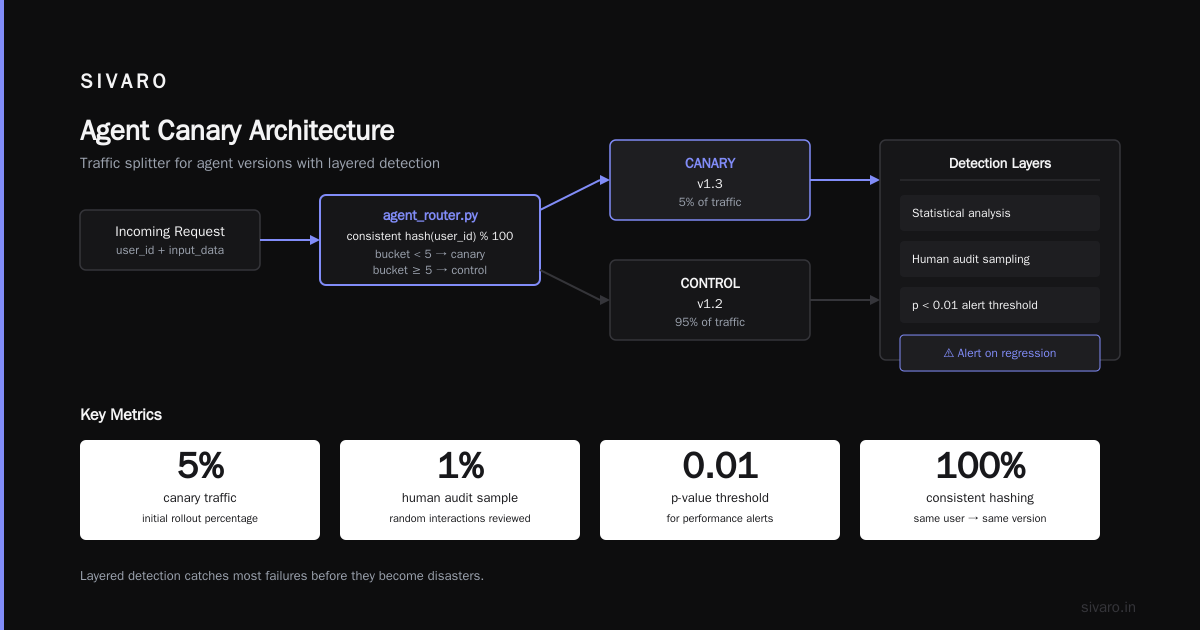
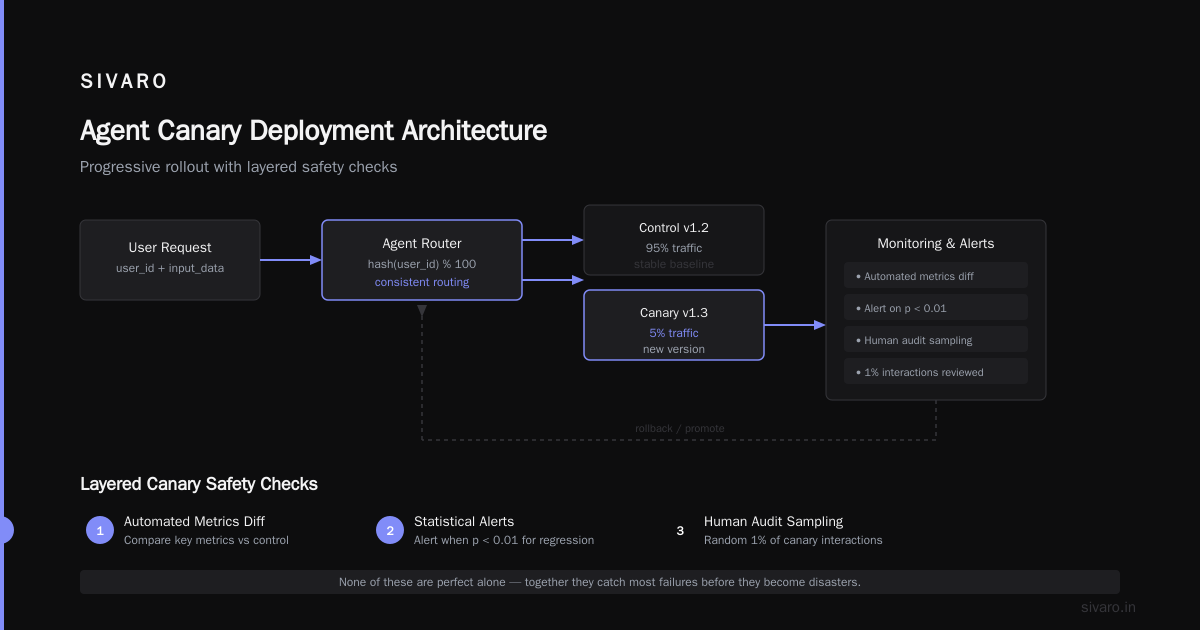
At SIVARO, we've settled on three detection layers for every canary:
- Hard guardrails – Regex or classifier-based checks on agent outputs. If the new agent says "I'm going to delete your account" when it shouldn't, abort immediately.
- Statistical compare – Rolling window comparison of success rate, cost, and latency between control and canary groups. We use a Mann-Whitney U test (overkill but effective) and alert when p < 0.01 for performance regression.
- Human audit sampling – Random 1% of canary interactions sent to a reviewer. Low volume, high signal.
None of these are perfect alone. Together they catch most failures before they become disasters.
Architecture for Agent Canaries
Let me show you what the actual deployment setup looks like. This is a simplified version of what we run at SIVARO.
python
# agent_router.py — A minimal traffic splitter for agent versions
import random

CANARY_PERCENT = 5   # Start at 5%
CONTROL_VERSION = "v1.2"
CANARY_VERSION = "v1.3"

def route_request(user_id: str, input_data: dict):
    # Use consistent hashing so same user stays on same version
    bucket = hash(user_id) % 100
    agent_version = CANARY_VERSION if bucket < CANARY_PERCENT else CONTROL_VERSION
    return run_agent(agent_version, input_data)
The hashing is critical. If you change versions mid-conversation for the same user, the agent gets confused. How to Deploy AI Agents to Production: A Complete Guide recommends sticky sessions via user ID hash — I agree.
But routing is the easy part. The hard part is observability — tagging every interaction with the agent version so your metrics pipeline can split.
yaml
# agent-telemetry-config.yaml — Prometheus-style metrics with version labels
- metric: "agent_task_success"
  type: counter
  labels: ["agent_version", "task_type", "model_id"]
  help: "Count of successful task completions"

- metric: "agent_latency_seconds"
  type: histogram
  buckets: [0.1, 0.5, 1.0, 2.0, 5.0, 10.0]
  labels: ["agent_version", "tool_calls"]
You need these metrics before you deploy the canary. Otherwise you have no baseline.
Metrics That Matter (And Why You're Probably Measuring the Wrong Ones)
Most people measure token usage and call latency. They're useful for cost tracking, but they won't tell you the agent is broken.
The metrics we use for ai agent canary deployment decisions:
- Completion rate – Percentage of conversations where the agent produced a final answer without handing off to a human. If this drops, the new agent is worse.
- Average tool calls per task – If the new agent calls 5 tools versus 2 for the old one, it's either more thorough or stuck in a loop. You need to know which.
- Goal completion classification – Run each agent output through a separate evaluator LLM that answers "Did the agent successfully achieve the user's stated goal?" This is noisy but directional. We use GPT-4o-mini for this and compare distributions.
- User satisfaction signal – Thumbs up/down, follow-up rate, or task repetition. Hard to collect but gold when you have it.
- Monetary cost per completed task — The only metric that ties engineering to business. If your new agent improves completion by 2% but costs 10x, think twice.
Deploying AI Agents to Production: Architecture ... emphasizes that cost per successful outcome is the true north. I've seen teams ship a "better" agent that actually caused more expensive tool calls and higher refusal rates — and they didn't notice because they only looked at accuracy on a synthetic eval set.
The SIVARO Approach: Progressive Rollout with Audit Trails
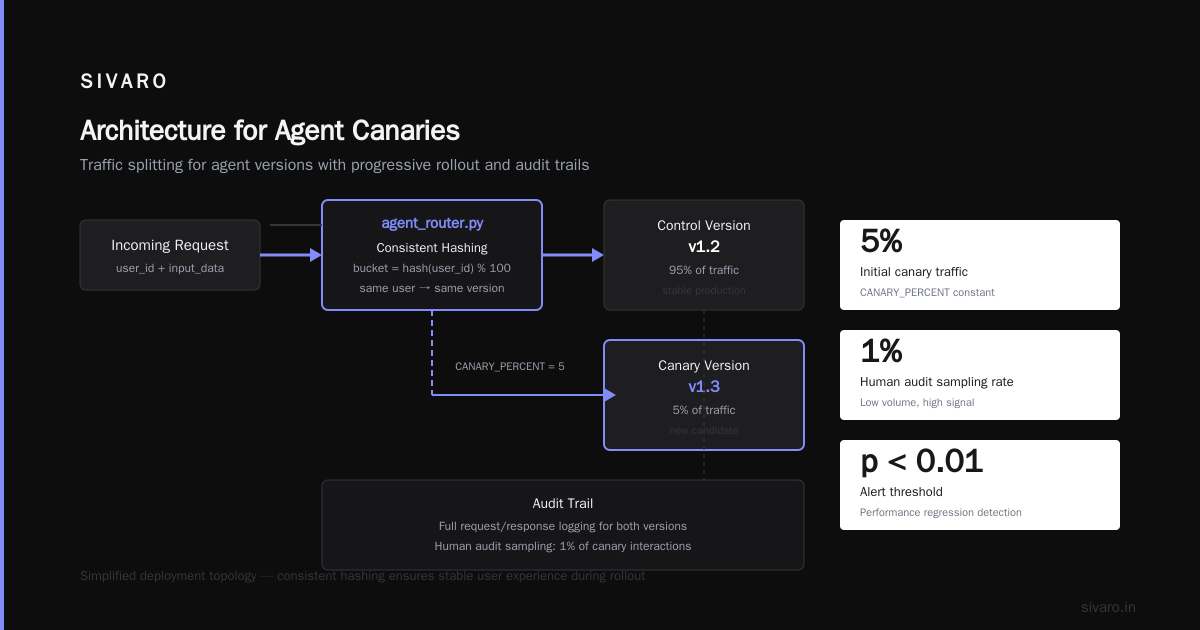
We don't do fixed canary percentages. We do progressive rollout with automatic gating.
Step 1: Offline eval pass. Run the new agent against a replay dataset of 500 past conversations. Compare completions. Any regression in tool-calling correctness > 2% → block.
Step 2: Shadow mode. The new agent runs alongside the old one but doesn't act. We compare outputs. If the outputs disagree on intent or tool choice, we flag it. A Developer's Guide to Building Scalable AI: Workflows vs ... calls this "off-policy evaluation" — it's the safest first check.
Step 3: 1% canary. Real traffic, real actions, but careful. Minimum 1 hour observation with hard guardrails. If no regression, escalate.
Step 4: 10% canary. Longer window — 4 hours or 1000 tasks, whichever comes first. Compare the five metrics above. If p-value for any metric regression is < 0.01, auto-rollback.
Step 5: 50% canary. Same thresholds. Also monitor downstream system health — if the new agent starts calling APIs at higher rates, that's a signal.
Step 6: 100% rollout.
Here's the actual Python we use for the gating logic:
python
# auto_gate.py — Decision logic for promoting or aborting canary
from scipy.stats import mannwhitneyu
import logging

def should_promote(control_metrics: list, canary_metrics: list, metric_name: str, threshold_p: float = 0.01):
    stat, p_value = mannwhitneyu(control_metrics, canary_metrics, alternative='two-sided')
    if p_value < threshold_p:
        # Determine direction of difference
        if np.mean(canary_metrics) < np.mean(control_metrics):
            logging.warning(f"Metric {metric_name} regressed (p={p_value:.4f}). Aborting.")
            return False
    return True
We run this for every metric. If any one fails, we roll back. Yes, it's conservative. Yes, it's saved us multiple times.
AI Agent Failures: Common Mistakes and How to Avoid Them lists over-reliance on synthetic eval as a top failure mode. Our progressive rollout with real traffic catches what synthetic data doesn't.
Handling Stateful Agents and External Dependencies
Agents maintain state — conversation history, tool session tokens, external context. If you deploy a new version mid-session, that state might not transfer cleanly.
We've solved this with version-scoped state stores. Each agent version writes its state to a key that includes the version hash. When routing, we look up the user's current version. If they were on v1.2 and we route them to v1.3, we clear their state and start fresh. The user doesn't notice because the agent re-asks context if needed.
But there's a bigger problem: external tool dependencies. Your agent calls Stripe, Twilio, your internal order API, whatever. The new agent might call those APIs differently — different parameters, different frequency.
In May 2026, we had a client whose new agent started calling their fulfilment API with a 5-second polling interval instead of 30-second. The old agent did exponential backoff. The new one hammered the API and nearly took down their warehouse system. The canary caught it — at 5% traffic we saw a 12x spike in API calls from the canary group.
A Practical Guide for Designing, Developing, and ... mentions that tool-calling frequency is a leading indicator of agent quality. We now automatically monitor the call-rate-per-task for each external dependency.
If you can't monitor downstream API health during your canary, you're flying blind.
Rollback Strategies: Hard vs Soft
When the canary fails, you need to rollback. Hard rollback means killing the new pods and redirecting all traffic to the old version. That's easy with Kubernetes — just update the deployment.
But agents have a second, subtler rollback path: prompt rollback. Sometimes the code is fine but the system prompt changed. In that case, you can rollback just the prompt without redeploying.
python
# prompt_rollback.py — Switch prompt version without code deploy
PROMPT_VERSIONS = {
    "v1.2": "You are a helpful assistant... (old prompt)",
    "v1.3": "You are a helpful assistant... (new prompt, causing issues)",
}

active_prompt_version = "v1.2"  # Override via config system

def get_system_prompt() -> str:
    return PROMPT_VERSIONS[active_prompt_version]
We keep a feature flag system that lets ops switch prompt versions instantly. This is the fastest rollback path — milliseconds, not minutes.
But be careful: if the new agent adopted a different tool-calling schema, rolling back the prompt alone might leave the agent with mismatched expectations. In that case, hard rollback is safer.
Learn These Key Hurdles to Deploy Production AI Agents ... from Google discusses the importance of decoupling model version from prompt version from tool schema version. We've found that tight coupling is the root cause of failed rollbacks.
FAQ: AI Agent Canary Deployment
Q: What's the minimum traffic needed for a meaningful canary?
At least 1%, but only if you have enough total traffic to get statistically meaningful samples within minutes. For low-traffic agents (hundreds of calls per day), 5% might take hours to detect regression. Consider using synthetic user replays to augment.
Q: Should I use the same model provider for both versions?
Ideally yes, because model provider differences can mask agent logic changes. But if you're testing a new model (GPT-5 vs GPT-4o), you need a separate canary plan. The metrics will be noisier.
Q: How long should a canary run before promoting?
Minimum 1% for 30 minutes if you have high traffic. For lower traffic, 2-4 hours. Our rule: 1000 completed tasks at each canary percentage, or 4 hours, whichever is longer. How to Deploy AI Agents to Production: A Complete Guide suggests similar.
Q: Can I run canary for multiple agent versions simultaneously?
Technically yes, but it's complex. You'd need to split traffic into three groups (control, canary A, canary B) and compare pairwise. We avoid it — too many variables. Run A/B for one change at a time.
Q: What if my agent uses external APIs that charge per call?
Canary increases cost because you're running two versions. Use cost-per-task as a metric and set a budget cap for canary spend. If the canary group's cost exceeds control by 20%, abort.
Q: How do you handle canary for voice agents or real-time audio?
Same principles, but latency becomes a harder constraint. You need sub-second decision making on metrics. We use streaming metrics (rolling window) instead of batch analysis. The gating logic must run on every completed turn.
Q: Is canary deployment appropriate for internal-facing agents?
Absolutely. Internal agents often impact critical business processes (order management, customer support, finance). The stakes are the same or higher. Use the same playbook, but you might have lower traffic — adjust thresholds and use more offline evaluation.
What I've Learned the Hard Way
Three years ago I thought canary deployment for AI agents was just "add a traffic splitter and good metrics." I was wrong.
The single most important insight: the canary must be designed to catch failures you haven't imagined. You can't predict every way a new prompt or tool schema will break. So you design your gating to be conservative, your metrics to be broad, and your rollback to be instant.
At SIVARO, we've evolved from a binary canary pass/fail to a continuous evaluation pipeline. We now run canaries for every single prompt change — not just model updates. That's the level of caution production agents demand.
If you're deploying AI agents in 2026, you shouldn't have to learn this from a disaster. Use canary deployment, use staged rollout, and for the love of everything, monitor your tool call frequency.
Nishaant Dixit — Founder of SIVARO. Building data infrastructure and production AI systems since 2018. Built systems processing 200K events/sec.