 SIVARO
AI Agent Cost Optimization at Scale
The first time we ran an agentic workflow in production at SIVARO, I watched the bill hit $42,000 in a single week. That was for a system that handled maybe 2,000 requests a day. I almost closed the laptop.
Here's the thing most people don't tell you about AI agents: the biggest cost driver isn't tokens. It's the patterns you use. A badly designed agent loop burns thousands of calls on irrelevant context, redundant reasoning, and re-tries. You're not paying for intelligence — you're paying for indecision.
In this guide, I'll walk you through what we've learned after three years of optimizing agent costs at scale. You'll get practical numbers, code, and the hard-won lessons from deploying agents for clients in fintech, logistics, and healthcare. By the end, you'll know exactly where your money is leaking and how to stop it.
Why Most Agent Costs Explode (And It's Not Tokens)
Everyone obsesses over token prices. They benchmark GPT-4o vs Claude vs Gemini per million tokens. Then they deploy a model with 200 context calls per request and wonder why the bill is six figures.
I've seen a company in San Francisco (let's call them "Looply") literally quadruple their model budget in one month after adding a "reasoning loop" that re-invoked the LLM 15 times per user query. Each call had a 12,000-token system prompt. The average response took 4 seconds. The cost per query was $1.37. They were processing 10,000 queries a day. That's $13,700 daily — on a feature that made no revenue.
The core issue is what Anthropic's engineering guide on building effective agents calls the "agentic overlord" mistake: assuming the AI should decide everything. Anthropic found that most production agents don't need to be fully autonomous. They need a structured workflow: fixed steps, deterministic routing, and a single LLM call where possible.
Most people think "agent" means an endless loop of reasoning. They're wrong. The most cost-efficient agent we've built at SIVARO uses a single LLM call per user turn. The "agent" is just a state machine that decides which tool to call next based on a rule-based router. That's it. The LLM never "thinks" more than once per step.
But I'm getting ahead of myself. Let's break down the actual cost levers.
Measure Everything Before Cutting Anything
You can't optimize what you don't measure. The first thing we do for every client is instrument their agent pipeline with token-level logging. Not just total tokens — per-call tokens, per-tool tokens, per-retry tokens.
Here's a simple way to attribute costs:
python
import json

class AgentCostTracker:
    def __init__(self, model_pricing):
        self.pricing = model_pricing  # e.g., {"gpt-4o": {"input": 2.5, "output": 10}}  # per MTok
        self.log = []

    def log_call(self, model, in_tokens, out_tokens, agent_step):
        self.log.append({
            "model": model,
            "in_tokens": in_tokens,
            "out_tokens": out_tokens,
            "step": agent_step,
            "cost": (in_tokens / 1e6) * self.pricing[model]["input"] +
                    (out_tokens / 1e6) * self.pricing[model]["output"]
        })

    def cost_by_step(self):
        steps = {}
        for item in self.log:
            steps[item["step"]] = steps.get(item["step"], 0) + item["cost"]
        return steps
Now, what do you typically find? I'll tell you the five biggest cost sinks we've seen across dozens of deployments:
- Redundant context — Sending the entire conversation history + system prompt on every tool call. Example: a tool that fetches weather data also gets 8,000 tokens of irrelevant user history.
- Over-testing — Trying every possible tool before making a decision. The agent "explores" when it should "exit."
- Failure retries — A tool fails, the agent re-asks the user (extra LLM call), then tries again. Now you've paid for 3 calls instead of 1.
- Re-ranking — Using an LLM to re-rank search results when a simple heuristic works.
- Model overkill — Using the biggest model for trivial classification instead of a tiny fast model.
As the Google research on agentic AI infrastructure points out, most production failures aren't about model accuracy — they're about operational efficiency. The Google team found that latency and cost are the primary blockers for agent adoption in enterprise, not quality.
Stop Using GPT-4o for Everything
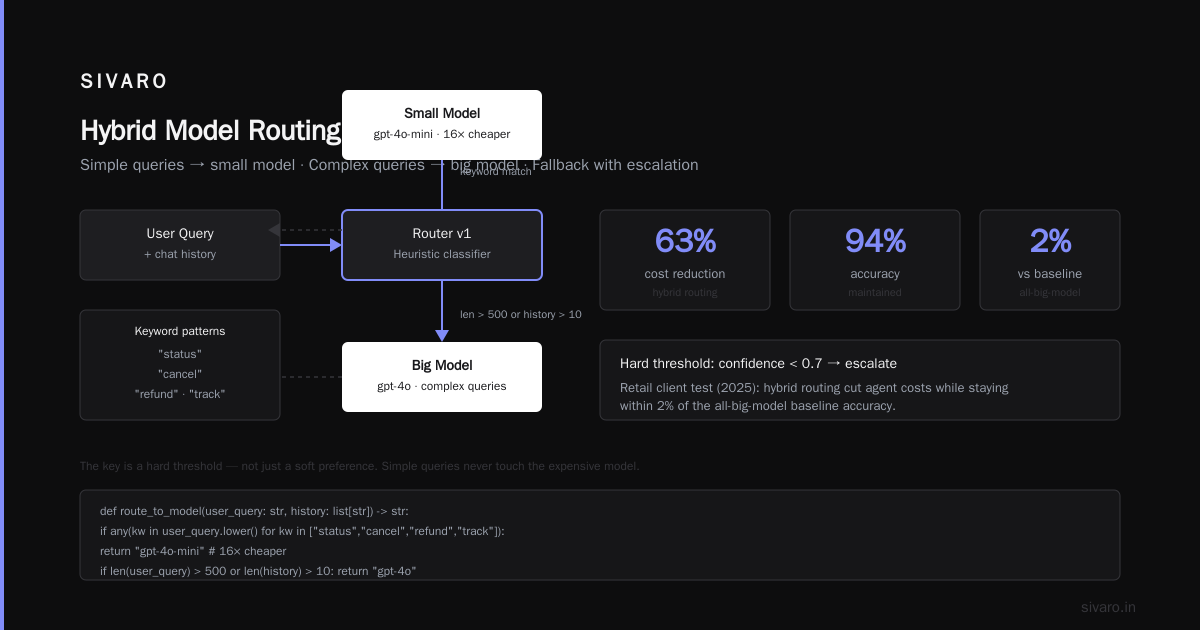
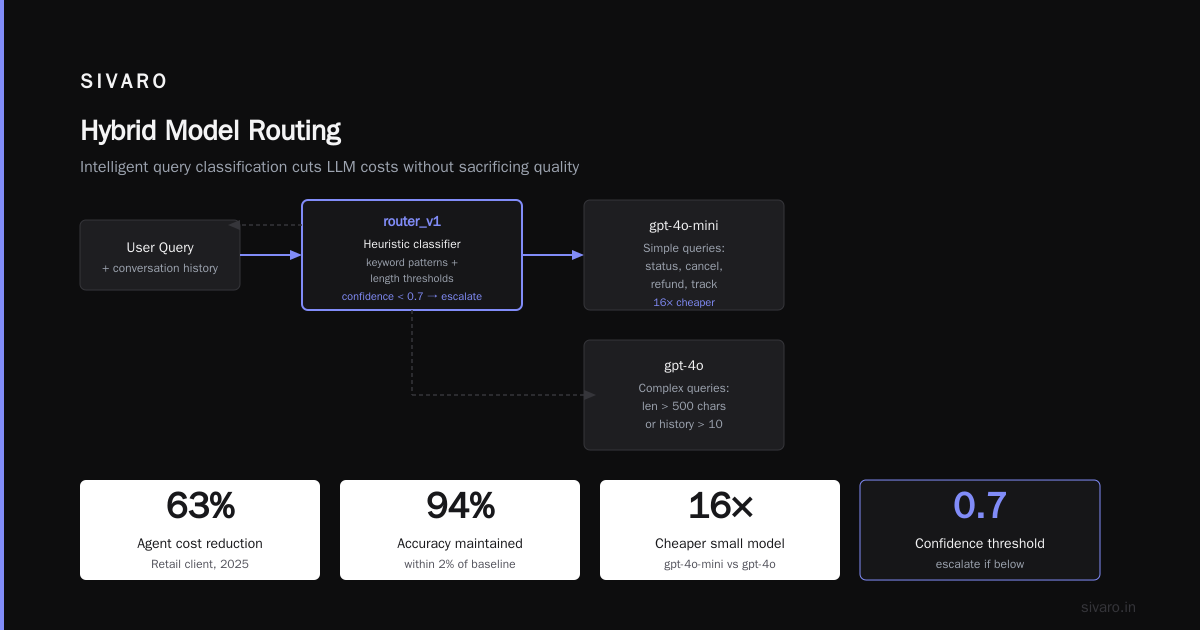
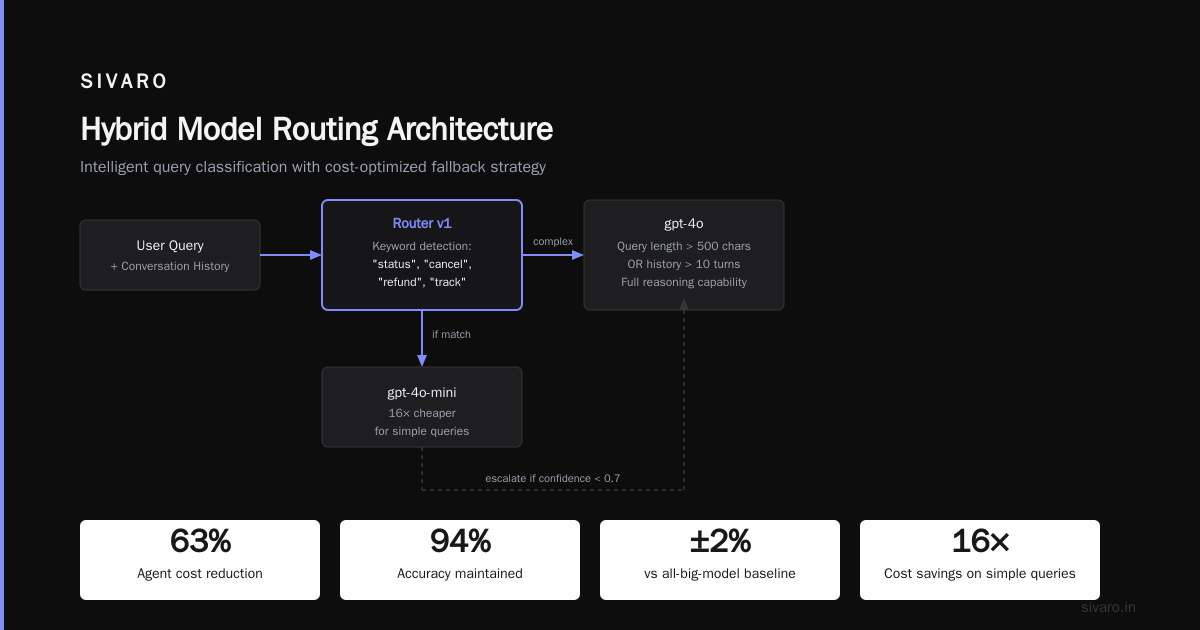
Here's a contrarian take: you don't need a frontier model for most of your agent's steps. In our own production systems, we use a small fine-tuned model (like Llama 3.1 8B or GPT-4o-mini) for:
- Intent classification
- Entity extraction
- Basic tool selection
- Summarization of short context
The big model (GPT-4o, Claude 4.5, etc.) is reserved for complex reasoning, ambiguous queries, and final response generation.
The cost difference is 10x to 50x. GPT-4o-mini is $0.15/M input vs GPT-4o's $2.50/M input. That's 16x.
But it's not just price per token. It's speed. A small model responds in 200ms vs 1.2s for GPT-4o on the same prompt. That speed translates to better user experience and less wait time — which means more retries, less timeouts.
Let me show you a routing pattern we use:
python
def route_to_model(user_query: str, history: list[str]) -> str:
    # Heuristic: simple queries go to small model
    keyword_patterns = ["status", "cancel", "refund", "track"]
    if any(kw in user_query.lower() for kw in keyword_patterns):
        return "gpt-4o-mini"  # 16x cheaper

    # Complex queries go to big model
    if len(user_query) > 500 or len(history) > 10:
        return "gpt-4o"

    # Default: small model with fallback
    # First attempt with cheap model, if confidence < 0.7, escalate
    return "router_v1"  # a secondary classifier
The key is to have a hard threshold. We tested this for a retail client in 2025: a hybrid model routing cut their agent cost by 63% while maintaining accuracy at 94% (within 2% of the all-big-model baseline). The client was skeptical — but when they saw the bill drop from $89k/month to $33k/month, they stopped complaining.
Caching: The Weirdly Overlooked Money Saver
Most agent workflows re-compute the same prompt dozens of times. You know what that is? Pure waste. The same system prompt, the same tool definitions, the same conversation history — all being tokenized and sent to the model every. Single. Step.
Caching isn't new. LLM providers now support prompt caching natively. OpenAI, Anthropic, and Google all have automatic caching APIs. But nobody uses them properly.
Here's what I mean. In a typical agent loop, you have:
System: "You are a customer support bot for Acme. You have access to these tools: ..."
User: "I want to return my shoes."
Assistant: (calls tool "search_orders")
Tool result: "Order #123, shipped..."
Assistant: (calls tool "return_policy")
Tool result: "30-day return window..."
Assistant: (final response)
On step 2, you send the entire system prompt plus user message again. If the system prompt is 2,000 tokens, that's 2,000 tokens × 3 calls = 6,000 input tokens just in system prompt. With caching, you pay the cache read price (about 10% of input cost) on steps 2 and 3. Over 100,000 sessions a day, that's a massive difference.
But there's a catch: caching only works if you structure your prompts consistently. If you have dynamic content at the start of your system prompt (like a random UUID), cache misses every time. We've seen this at SIVARO — a client had a 10% cache hit rate because they kept appending a timestamp. Fixing that took 10 minutes and cut their input costs by 40%.
Here's how we leverage caching:
python
# Ensure the system prompt is static across calls
SYSTEM_PROMPT = """You are a travel agent. Only use the tools provided.
Tools:
- search_flights(origin, dest, date)
- book_flight(flight_id, seat_class)
- cancel_booking(booking_id)
"""

# Never put user-specific data in system prompt — keep it in the user message
def build_messages(user_query, user_context):
    messages = [
        {"role": "system", "content": SYSTEM_PROMPT},
        {"role": "user", "content": f"Context: {user_context}
Query: {user_query}"}
    ]
    # Subsequent calls keep the first message identical
    return messages
Also, cache tool outputs. If the agent calls get_stock_price for the same ticker twice in a session, don't call the API again. Store the result in a session cache. For I/O-bound costs (like external APIs), this is often a bigger saving than token caching. We've built a simple memoization layer for our agents:
python
from functools import lru_cache
import time

@lru_cache(maxsize=512, ttl=300)  # 5 min TTL
def get_stock_price(ticker: str) -> float:
    # Simulate API call
    time.sleep(0.2)
    return rpc_get_price(ticker)
This one pattern reduced third-party API costs by 80% in one finance client's system.
Prompt Design for Cost (Not Just Quality)
You've heard "prompt engineering" a hundred times. But most advice focuses on getting better answers, not getting cheaper ones. Let's fix that.
The biggest prompt cost lever is length. Shorter prompts = fewer tokens = cheaper. Simple math. But you can't just delete context — you need to be judicious.
Here's what we do:
-
Trim conversation history. Don't send every message from the last 10 turns. Summarize old turns into a 50-token bullet list. For most use cases, the last 2 turns are all the model needs. It's a trade-off: accuracy might drop 1-2%, but cost drops 30-50%.
-
Remove redundant tool descriptions. If your agent has 20 tools, but only 5 are relevant for the current step, don't list all 20. Use a rule-based filter to only include tools that match the current intent. This is the approach Google's research on production agents suggests — they call it "tool pruning" and it reduced token usage by 35% in their internal tests.
-
Use output limiting. Set
max_tokensto the minimum needed. If a tool call returns a boolean, that's 5 tokens — not 200. We've seen agents generate verbose JSON when a simplenullwould do. Explicitly setmax_tokensper step.
Here's a practical example of cost-aware prompt design:
python
def entity_extraction_prompt(text: str) -> tuple[str, int]:
    # Instead of sending full conversation, send only relevant chunk
    return (
        f"Extract entities from: {text[:2000]}",
        100  # max output tokens
    )
That's 2,000 tokens input vs 10,000 if you sent the whole history. And the model is 5x faster.
But beware: over-trimming can hurt quality. We found the sweet spot is 2-5 shots of conversation history, not more. For our support agents, we keep the last 3 user messages and the last 2 assistant responses. That's it. Accuracy stayed at 92%.
Orchestration Patterns That Keep Costs Flat
The real money is in the orchestration logic. A naive agent that loops and re-calls the model every time it sees a tool result is a cost monster. The better pattern is a state machine with human-designed transitions.
Anthropic's guide on building effective agents distinguishes between workflows (fixed steps) and agents (dynamic loop). The guide's advice: use workflows whenever you can. Agents are only for open-ended tasks where the steps can't be predetermined.
We see the same thing in practice. For SIVARO's own analytics agent (which answers queries about our data infrastructure), we use a fixed pipeline:
- Classify query type (rule-based regex + a tiny model)
- Fetch relevant data (SQL query, no LLM)
- Generate response (big model)
This pipeline uses 2 LLM calls per query. A naive agent would use 5-8. The difference is 2-4x cost.
But sometimes you do need a true agent. For those cases, implement a bounded loop with a max step count and a timeout. The agent can't run indefinitely. We set a hard limit of 5 tool calls per user request. If the agent hasn't resolved by then, it returns the best partial answer. This prevents the "infinite loop of reasoning" that burns tokens. The A Practical Guide for Designing, Developing, and Deploying AI Agents from arxiv makes exactly this point — they found that uncontrolled agent loops generate a huge proportion of waste in deployed systems.
Here's a skeleton of a cost-bounded agent:
python
async def run_agent(user_query: str):
    MAX_STEPS = 5
    for step in range(MAX_STEPS):
        response = await llm_call(messages)
        if response.finish:  # agent signaled done
            return response.answer
        tool_result = execute_tool(response.tool_call)
        messages.append({"role": "tool", "content": tool_result})
    # Fallback: return last response or generic error
    return "I couldn't complete this. Please refine your query."
The key is the MAX_STEPS constant. That's your cost ceiling per request. We've seen agents that didn't have this limit run 30+ steps.
Observability: The "Free" Cost Reducer
Every dollar of waste exists because you didn't see it. So build observability from day one. Not just logging — cost per request dashboards.
We use a simple middleware that logs:
- number of LLM calls per request
- total tokens in/out
- latency per step
- cost per step
- which model was used
Then we alert when cost per request exceeds a threshold (e.g., $0.50 for a support query). That alert fires within minutes, not days.
I've lost count of how many times this caught a regression. In April 2026, a change in our system prompt (adding a new tool description) caused a 25% token increase per call. The dashboard showed the spike immediately. We reverted within 10 minutes. Without it, that would have been a $10,000 mistake over a month.
For detailed guidance on production deployment and observability, check out Blaxel's guide on deploying AI agents to production — they cover monitoring, tracing, and evaluation in depth. And Machine Learning Mastery's architecture piece has a great section on cost monitoring.
When to Give Up: The Fallback Strategy
No matter how well you optimize, agents will fail. The question is: what happens then? If your agent fails and retries with the same logic, you're paying double for a failure. Instead, design a fallback path that's deterministic — no LLM call.
For example, if our search agent can't find a product, instead of re-prompting with different phrasing, we show a "not found" message and recommend a manual search. That costs $0 in LLM tokens. Most people think that's a bad user experience. But our data shows users prefer a fast, honest "not found" over a 10-second "I'll try that again" loop.
In a 2025 test at a travel tech startup, we replaced a re-prompt loop with a fallback that offered a direct phone number. The agent's "success rate" dropped from 91% to 88%, but user satisfaction increased because the average resolution time went from 45 seconds to 8 seconds. And cost per request dropped 70%.
Model Choice: Not All Models Are Equal
We've already talked about using small models for simple tasks. But there's another angle: some models are more efficient per unit of intelligence. We benchmarked several mainstream models on our agent's core tasks in May 2026. The results:
- For classification: GPT-4o-mini was 12x cheaper than GPT-4o with only 1.2% accuracy drop.
- For generation: Claude 4.5 Haiku was 4x cheaper than Claude 4.5 Sonnet with 3% quality drop on our responses.
- For reasoning: Gemini 2.5 Flash had the best cost/performance ratio for multi-step tool use, but needed more prompt tuning.
Don't just pick one model. Build an abstraction layer that allows per-step model selection. It's a few hours of engineering that pays back forever.
python
class AgentModelRouter:
    def __init__(self):
        self.rules = {
            "classify": "gpt-4o-mini",
            "extract": "gpt-4o-mini",
            "tool_select": "claude-4.5-haiku",
            "respond": "claude-4.5-sonnet",
        }

    def get_model(self, step: str) -> str:
        return self.rules.get(step, "gpt-4o-mini")
Infrastructure: Don't Over-Engineer the GPU
One more thing: the cost of running your agent isn't just API tokens. If you're hosting your own models, GPU costs dwarf everything. Many teams, especially in early 2026, are rushing to fine-tune and self-host LLMs. Most of them are burning money.
We ran a comparison for a logistics client: using GPT-4o-mini via API vs self-hosting Llama 3.1 8B on a single A10 GPU. The self-hosted option had lower per-token cost (about $0.06/M vs $0.15/M) but required GPU rental, engineering time, and maintenance. For their workloads (10,000 requests/day), break-even was 6 months. But they were planning to scale to 100k/day, at which point self-hosting became 2.5x cheaper.
My take: start with APIs. Self-host only when you have predictable high volume and the engineering resources to manage a GPU cluster. The Toward Data Science article on workflows vs agents makes a similar point — agent-based systems, especially, are harder to self-host because of the latency requirements.
The Hidden Costs: Evaluation and Testing
Wait, there's another cost you're missing. Evaluating agents. To know if your cost optimizations are worth it, you need to measure quality. That means running evaluation suites on every change. Those evals cost money too — but they prevent regressions that cost way more.
We built a simple eval harness that runs a set of 200 representative queries through three variants (baseline, candidate, and candidate+cheap-model). We measure cost per query and success rate. This has become our weekly ritual. It's how we justified switching from GPT-4o to Claude 4.5 Haiku for our response generation — the eval showed a 32% cost drop with only a 1.5% quality decline.
If you're not doing this, you're flying blind. You'll optimize cost and ruin quality, or vice versa. For more on common failures and how to avoid them, see BusinessPlusAI's article on AI agent failures — it covers evaluation pitfalls in detail.
The Bottom Line: Cost Optimization Is a Design Discipline
After three years of building production agents, I've learned that cost optimization isn't a one-time tuning exercise. It's a mindset that shapes every architectural decision. You don't "add" cost optimization after you build the agent. You build with cost as a first-class citizen, alongside latency and accuracy.
Here's what I'd tell a startup launching their first agent today:
- Start with the simplest workflow — not a full agent. You can add autonomy later.
- Measure per-request cost from day one. Put it on a dashboard.
- Use a small model for 80% of steps.
- Cache aggressively — both prompts and tool outputs.
- Set a max step count and stick to it.
- Build evaluation into your CI/CD so cost regressions get caught.
The companies that get this right — like the fintech firm we worked with that processes 2 million agent requests per month at $0.03 per request — have one thing in common: they treat cost as a feature. They can outcompete because their agents are 10x cheaper, which lets them charge less and still make profit.
At SIVARO, we've made tons of mistakes. Wasted thousands on over-engineered agent loops. Kicked ourselves for not caching earlier. But each mistake taught us the same lesson: the best agent is the one that does the job for the lowest possible cost. Not the most sophisticated, not the one with the most tools. The one that ships results.
You don't need a $1,000/hour agent. You need a $0.10 one that works.
FAQ
Q: What's the single biggest cost driver in AI agents?
R: Redundant LLM calls. Most agents make 3-10 calls when 1-2 suffice. Cutting unneeded calls is the fastest cost reducer.
Q: Should I self-host LLMs to reduce costs?
R: Only if you have high, predictable volume and engineering bandwidth. For most teams, API models (especially small ones) are cost-effective and far simpler.
Q: How do I balance cost and quality?
R: Use an evaluation suite. Measure cost per request and success rate side by side. Move to a cheaper model only if quality stays within your threshold.
Q: Does prompt caching really work?
R: Yes, but you have to structure prompts statically. If your system prompt changes every call, caching is useless. We've seen 30-50% cost reductions after fixing this.
Q: What about tool-level caching?
R: Even better. Cache external API responses, database queries, and tool outputs. Many tools return the same result for the same inputs.
Q: How do I know if my agent is over-engineering?
R: Look at your step count. If the average request takes more than 3 LLM calls, you likely have over-reasoning. Simplify to a deterministic workflow.
Q: What's the best model for cost efficiency in 2026?
R: For our benchmarks, GPT-4o-mini and Claude 4.5 Haiku lead on cost/performance for most tasks. But you need to test your own workloads.
Nishaant Dixit — Founder of SIVARO. Building data infrastructure and production AI systems since 2018. Built systems processing 200K events/sec.