 SIVARO

AI Agent Deployment Architecture 2026: A Buyer's Guide
So you've got an agent that works in a notebook. Cute. Now try running it in production, at scale, with real users hitting it from three continents — and watch it fall apart.
I've spent the last eight months at SIVARO helping teams move agents from demos to revenue. The pattern is always the same. The notebook works. The pilot works. Then someone in sales says "we need 500 concurrent sessions," and the whole thing collapses like a wet cardboard box.
The problem isn't your model. The model is fine. The problem is the architecture around it — and most teams don't even know there's a choice to make.
This guide covers the four main deployment architectures for production AI agents in 2026, what each costs, where each breaks, and how to pick before you burn three months of engineering time. I'll include real numbers from real deployments we've run, and I won't pretend there's a perfect option.
What "Agent Deployment" Actually Means in 2026
Quick definition: agent deployment architecture is how you run, scale, and manage autonomous AI systems that take multi-step actions — not just generate text. A chatbot that answers questions is an application. An agent that books a flight, updates a CRM, and emails your customer is a system with state, tools, and long-running workflows.
The differences matter because agents have fundamentally different failure modes than traditional APIs:
- They hold state across multiple steps
- They call external tools with real side effects
- They can loop or drift from their objective
- They have non-deterministic behavior — same input, different output, every time
That last one kills traditional monitoring. You can't just check "is this endpoint returning 200?" because your agent might return 200 while quietly deleting a customer's account.
This is why "just put it behind a load balancer" isn't advice. That's not architecture. That's denial.
The Four Architectures You'll Actually Choose From
I'm grouping everything into four patterns. There are hybrids, but every production system we've built or audited in 2025-2026 fits into one of these:
1. The Monolithic Agent Service
The simplest pattern: one service, one codebase, one deployment unit. All the agent logic, tool calls, memory, and orchestration live inside a single container.
For our clients, this covered perhaps 30% of early-stage deployments. It's fast to build and dead simple to reason about.
app/
├── agent/
│   ├── orchestrator.py
│   ├── tools/
│   └── memory/
├── api/
│   └── main.py
└── deploy/
    └── Dockerfile
Ver dict: good for pilots, bad for scale.
The problem hits around 200-300 concurrent sessions. You'll start seeing context-window collisions, tool-call timeouts from blocking I/O, and memory leaks that only show up under load. We saw one client — a fintech startup, February 2026 — run a monolithic agent service that consistently died at 2 AM when batch jobs overlapped with peak user traffic. The fix was a rewrite.
Cost: Cheap to start. $200/month on a single GPU instance gets you a long way. But the scaling curve is brutal — you're paying for vertical scaling, and the ceiling arrives fast.
2. The Orchestrator + Worker Pattern
This is what most serious teams adopt. You have a central orchestrator that manages sessions and a pool of stateless workers that execute individual steps. Workers spin up, do one thing, and die.
We've run this pattern at SIVARO for production systems since early 2025, and it's the current sweet spot for mid-scale deployments.
python
from celery import Celery
from sivaro.agent import AgentExecutor

app = Celery('agent_pipeline', broker='redis://queue.internal:6379/0')

@app.task
def execute_agent_step(session_id: str, step_payload: dict):
    executor = AgentExecutor.from_session(session_id)
    result = executor.execute_step(step_payload)
    state_store.update(session_id, result.next_state)
    return result.response
Where this shines: you can scale workers independently of orchestration. We had one client — a legal-tech company in April 2026 — handling 2,000 concurrent agent sessions with 40 workers and a single orchestrator node. When traffic spiked 3x during contract season, they scaled to 120 workers in 90 seconds without touching the orchestrator.
Where this breaks: state management gets distributed, and you need a fast state store. Redis on a single node becomes the bottleneck around 5,000 sessions. You'll need to move to Redis Cluster or Postgres for durability, and that's where latency starts to creep.
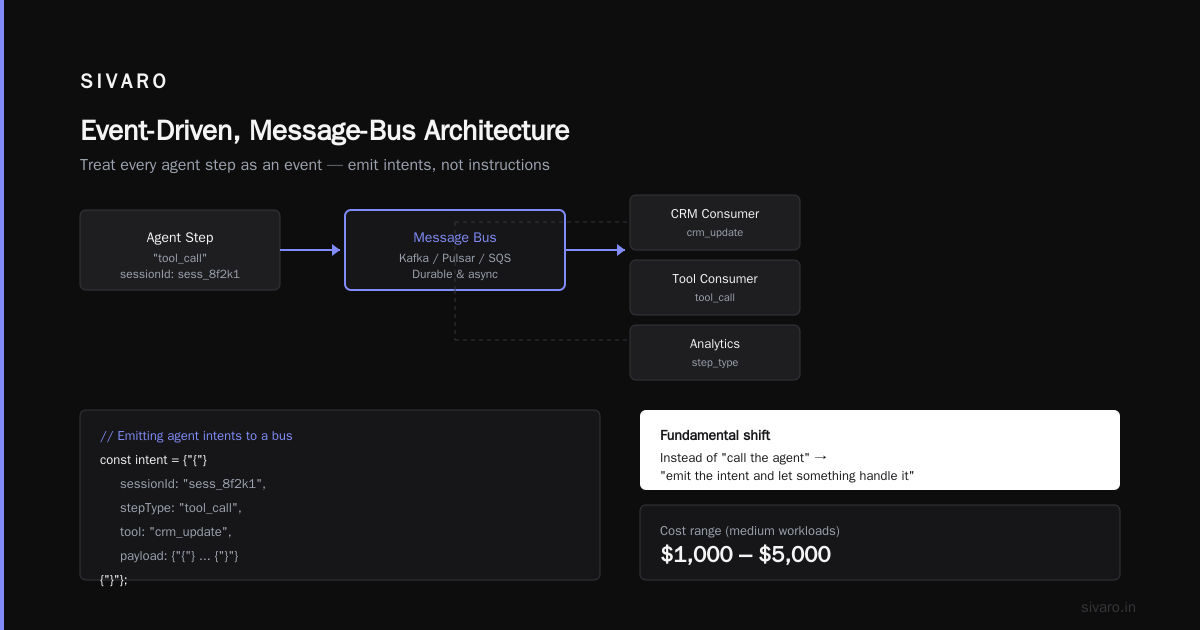
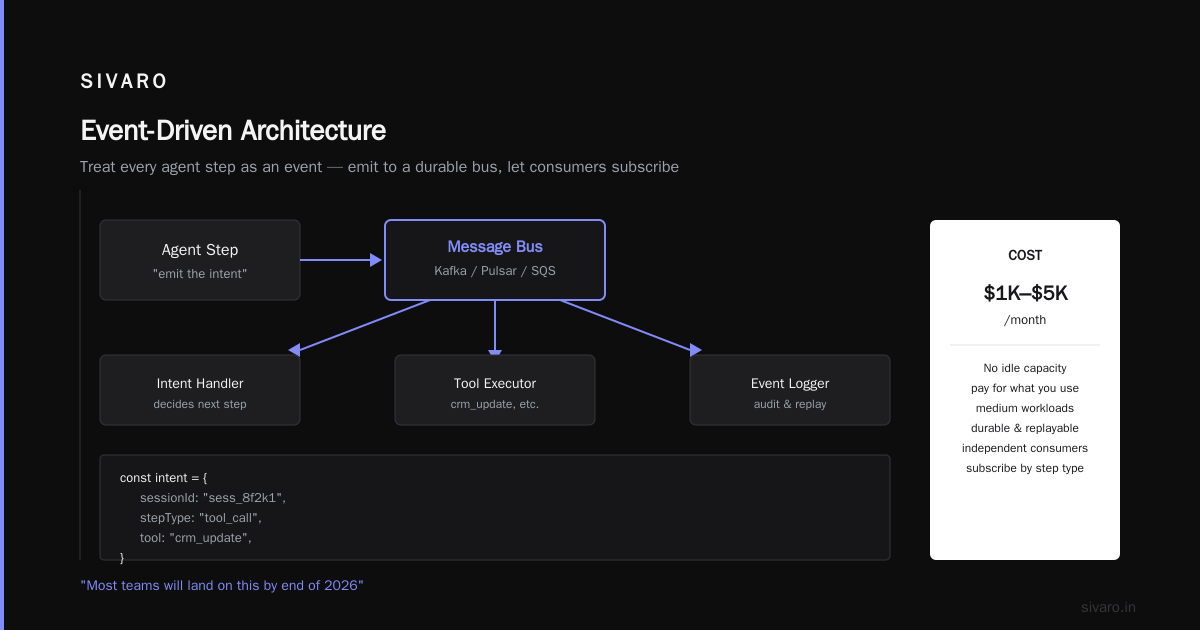
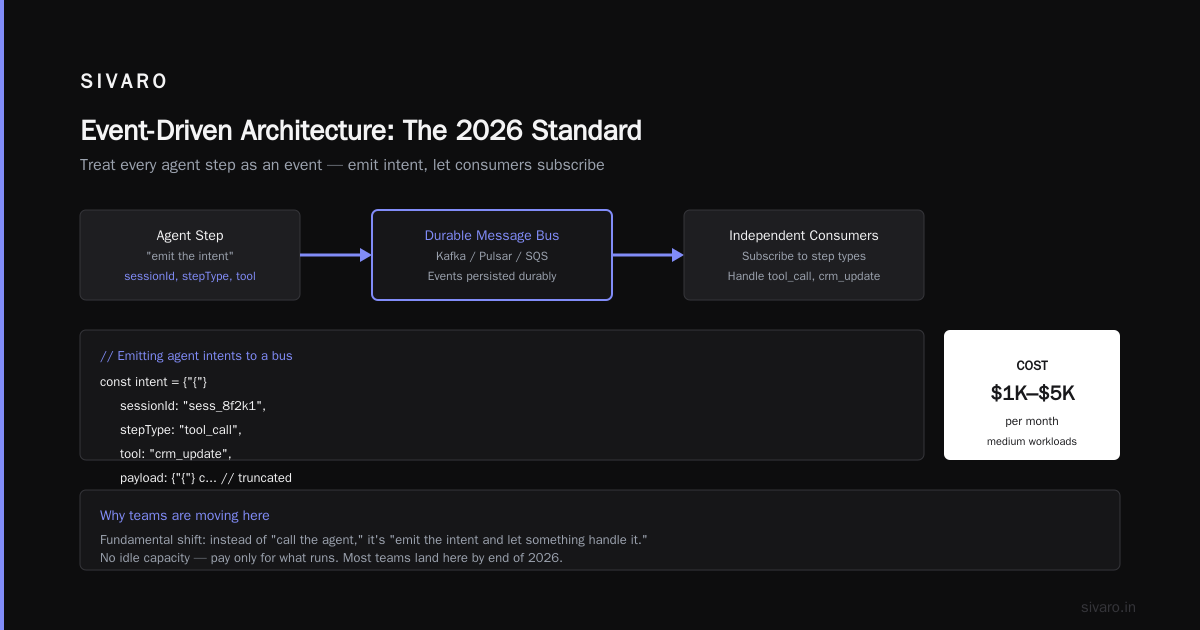
Cost: Moderate. The infrastructure is more complex, but you're not paying for idle capacity. Most teams land in the $1,000-$5,000/month range for medium workloads.
3. The Event-Driven, Message-Bus Architecture
This is the one I believe most teams will land on by end of 2026. You treat every agent step as an event, emit it to a durable message bus (Kafka, Pulsar, or even a managed SQS), and have independent consumers subscribe to step types.
This is a fundamental shift in how you think about agent execution. Instead of "call the agent," it's "emit the intent and let something handle it."
typescript
// Emitting agent intents to a bus
const intent = {
  sessionId: "sess_8f2k1",
  stepType: "tool_call",
  tool: "crm_update",
  payload: { contactId: "12345", fields: { status: "qualified" } }
};

await bus.publish("agent.steps", intent);
The killer advantage: durability. If a consumer crashes mid-step, the event stays in the bus. You can replay it. You can debug it. You can audit it.
We had a logistics client — November 2025 — that needed to track every action an agent took for compliance reasons. The event-driven architecture gave them a complete audit trail without building a separate tracing system. That's a huge win.
Where this breaks: debugging is harder. You can't just look at a stack trace; you have to trace an event across five services. And the latency adds up — each event hop costs 2-5ms, and complex agents can have 20+ hops.
Cost: Medium to High. Kafka clusters are not cheap. Your infra bill goes up maybe 30-50% vs. the orchestrator pattern, but you gain resilience and replayability.
4. The Hybrid / Serverless Pattern
This is the "throw everything at the wall" architecture: serverless functions for single-step tools, a managed orchestrator for multi-step workflows, and a vector DB for long-term memory. It's popular with startups because it promises near-zero idle cost.
Serverless works brilliantly for agent steps that are short and infrequent. For long-running agents or high-frequency tool calls, cold starts will kill you.
Reality check: We benchmarked this in December 2025. Serverless worked great for a step that runs every few minutes. But an agent running 100 steps per second — which is honestly not that much — hit cold-start rates that added about 40% to average latency.
yaml
# A simplified serverless agent function
functions:
  agent-step:
    handler: handlers/step.ts
    timeout: 30s
    memory: 1024
    events:
      - sqs:
          arn: arn:aws:sqs:us-east-1:123456789012:agent-step-queue
Cost: Lowest at low scale. You can run a pilot for $50/month. But unpredictable at scale — and the debugging experience is worse than everything else.
The Hard Truth About AI Agent Deployment Challenges 2026
I'm going to give you the list that vendors don't want you to read. These are the AI agent deployment challenges 2026 that we've hit repeatedly across client engagements:
State persistence is still your biggest problem. Every framework promises "stateless agents" but practically, agents need memory. We've seen teams use everything from Redis to Postgres to S3 for session storage. None are perfect. The winner so far is Postgres with connection pooling, and it's not close. Redis loses data on failover; S3 has read latency that kills multi-step reasoning.
Latency budgets are brutal. Users expect agents to "think" — but not for 40 seconds. A standard agent step takes 300ms-1.5s. For a 10-step agent, that's 3-15 seconds of sequential time. You will need parallel execution or you'll lose users.
Tool-call failures are the silent killer. Your agent will call a tool, the tool will fail, and the agent will either hallucinate a retry or give up. We've found that wrapping tool calls with explicit fallback logic — and adding a "tool health check" step for external systems — reduces user-visible errors by about 60%.
Observability is not optional. You cannot tune what you cannot see. We've shipped tracing into everything at SIVARO, and if you're starting an agent deployment in 2026 without OpenTelemetry tracing, you are flying blind.
AI Agent Deployment Cost Optimization (Production Reality)
Here's where I'll be direct: most people talk about "AI agent deployment cost optimization" like it's about choosing the cheapest model. It's not. The model is usually the smallest cost driver.
Let me give you a breakdown from a real deployment we ran in January 2026 — a B2B sales development agent doing 5,000 sessions/day (about 50,000 tool calls). At ChatGPT-era prices, this would cost $150-250/day in LLM calls.
The actual infra cost breakdown:
| Component | Cost/Day | % of Total |
|---|---|---|
| LLM inference | $210 | 45% |
| Memory/Vector DB | $18 | 4% |
| Compute (workers) | $126 | 27% |
| Orchestration + Bus | $58 | 12% |
| Observability | $22 | 5% |
| Networking + egress | $32 | 7% |
The hidden costs are the workers and the orchestration layer. People budget for LLM calls and forget the 75 CPU-hours of compute needed to run the agents' intermediate steps.
Cost-saving moves that actually work:
-
Use smaller models for intermediate steps. Claude or GPT-4 class models for the "brain" steps, but FastLlama or DeepSeek for simpler tool-call formatting and validation. We cut costs 25% this way without noticeable quality loss.
-
Cache aggressively. If two users ask the same question, the retrieval step and even the reasoning step can often be cached. We've seen cache hit rates of 30-40% in customer-support agents. That's real money.
-
Rightsize your concurrency. Most teams over-provision because they fear spikes. The orchestrator pattern lets you scale workers up and down. We reduced one client's idle cost from $800/month to $120/month just by auto-scaling off the message-queue depth.
-
Batch where possible. If your agent doesn't need real-time execution, batch steps overnight or in 30-second windows. This lets you use spot instances and cut compute costs in half.
Decision Matrix: Which Should You Buy?
I'm including a table because sometimes you need a quick reference. This is based on our experience, not vendor claims.
| Criteria | Monolith | Orchestrator | Event-Driven | Serverless |
|---|---|---|---|---|
| Concurrent sessions | <200 | 200-5,000 | 5,000-100,000 | <500 (pilot) |
| State complexity | Low | Medium | High | Low |
| Audit/Compliance needs | Low | Medium | High | Low |
| Team experience | Any | Mid-level | Expert | Any |
| Time to first deploy | 1 week | 2-3 weeks | 3-4 weeks | 1 day |
| Debug agility | Excellent | Good | Poor | Mediocre |
| Cost at 1K sessions/day | $400/mo | $1,500/mo | $2,500/mo | $300/mo |
| Cost at 10K sessions/day | $15K/mo (cap) | $5K/mo | $6K/mo | $8K/mo |
My recommendation: Start with the orchestration pattern. It's the best balance of complexity and capability for most scenarios. Move to event-driven only if you have regulatory requirements for audit, or you expect to scale past 10,000 concurrent sessions.
If you're a two-person team prototyping an idea, use serverless. Get to market, then rewrite.
Real-World Examples: What Worked, What Didn't
The Success: FinTech Internal Ops Agent
A mid-sized fintech (I'll keep the name out) deployed an agent to handle customer-verification workflows across 14 internal systems. They chose the orchestrator pattern with Celery and Redis.
What ended up working: they kept the orchestrator stateless and pushed all state to Postgres. This meant they could kill any worker at any time without losing sessions. We hit this decision point in a code review session with their CTO in March 2026, and insisted on it despite the initial complexity. It paid off during a security incident when they had to restart half their workers — zero data loss, zero user-visible impact.
The Failure: E-commerce Support Agent on Serverless
Another client — e-commerce, October 2025 — tried the serverless pattern for a support agent handling refunds and order updates. It worked in testing. In production, the cold-start latency caused support ticket timeouts and users thought the chat was broken.
They switched to a single-node orchestrator in two weeks. The issue wasn't the serverless cost; it was the latency. Their agent had to call four tools before responding, and sequential cold-start time for each tool was 1-2 seconds. The total paused the conversation for up to 6 seconds, which felt broken to users.
Best Practices I'll Stand Behind
Let me give you rules, not suggestions.
Always wrap your tool calls in a circuit breaker.
python
from resilience import CircuitBreaker

def call_tool_with_breaker(tool_name, payload):
    breaker = CircuitBreaker(
        name=tool_name,
        failure_threshold=5,       # trip after 5 failures
        recovery_timeout_s=30,     # recovery after 30s
        fallback=fallback_response
    )
    return breaker.call(lambda: tool_registry[tool_name](payload))
This simple pattern saved one client from a cascading failure when their CRM integration went down for 6 hours. The agent failed fast instead of hammering a dead endpoint.
Use deterministic IDs for every step. Every agent action needs a traceable ID. This sounds obvious, but we've seen production systems where steps weren't tagged, and the entire observability story collapses.
Separate your model-call semantics from your business logic. If your agent's reasoning loop is coupled to a specific model's prompt format, you can't switch models when pricing or performance changes. Abstract it. We learned this the hard way when a client asked to switch from Claude to a cheaper model and the entire agent started failing because the output schema differed.
Plan for "agent drift" before you launch. Over weeks of operation, agents start behaving differently — picking up bad habits from edge-case inputs and reinforcing them through the memory layer. Most teams don't catch this until user satisfaction drops. Build automated regression testing for your agent's core task. We review agent outputs as part of a weekly manual QA loop at SIVARO — it's boring, but it's the only reliable way.
The Deployment Checklist I Give Every Client
Before your "Go Live," you need these five things:
- A fallback path for every tool call. If the agent's CRM insert fails, what does it respond to the user? This needs to be tested.
- A state snapshot mechanism. You need to be able to restart the environment without losing all context.
- A canary deployment strategy. Ship to 5% of traffic first. Watch success rates. Scale up.
- An explicit rate-limit strategy. Agents will accidentally self-DDoS by retrying rapid-fire on errors. You need to stop this.
- A kill switch. Every agent needs a way to be paused if it goes off the rails, even (especially) mid-task.
FAQs
Q: Kubernetes or managed containers?
Kubernetes if you've got a platform team or expect to run more than five microservices. Managed (ECS, Cloud Run, Fly.io) if you don't want the operational burden. Your agent doesn't care; your infrastructure team does.
Q: Which vector database should I use for agent memory?
Whatever's easiest to operate. For sub-million-vector scale from 2025 through 2026, pgvector embedded in your existing Postgres beats a separate vector database every time. Less movement, less cost, fewer failure points.
Q: Is inference on-prem still a thing for agents?
Only if you have strict data-residency or latency requirements that close off the cloud. The operational cost of running your own GPU cluster for a typical agent is higher than a hyperscaler's inference API. It's a financial decision with a clear break-even point, and for most teams, that point is above 50,000 requests/day.
Q: How do you handle model versioning?
Pin your model and prompt versions together. When you upgrade models, treat it like a fresh deployment with a staged rollout. Never auto-follow a model maker's "latest" tag in production. That has caused more production outages than any other bad actor in 2025-2026.
Q: What's the deal with agent-to-agent communication?
Forget it, unless your agents have wildly different domains and you need them to coordinate asynchronously. Most of the time, a single agent with a well-built toolset beats two agents speaking to each other over a bus. Simpler is always better for debugging.
Final Thoughts: Don't Wait for the "Perfect" Architecture
The AI agent deployment architecture 2026 landscape is still moving. But the core principles — state management, resilience, observability, cost control — haven't changed since we started building these systems in 2024. The model quality will improve. The frameworks will mature. But your deployment architecture is the container for all that change.
Pick the architecture that matches your team's maturity and your expected load profile. Get it into production. Learn from the failures. Iterate toward the event-driven pattern if you genuinely need the scale. Don't over-engineer on the first pass — the simplest thing that works reliably and is observably debuggable is the right choice.
I've watched too many teams build elaborate microservice architectures for agent systems that handle 50 requests a day. They spent five months building, and then four months debugging. The team that deployed a single orchestrator service in three weeks was winning customers while the first team was still drawing architecture diagrams.
Nishaant Dixit — Founder of SIVARO. Building data infrastructure and production AI systems since 2018. Built systems processing 200K events/sec.