 SIVARO
AI Agent Deployment Architecture Patterns
A Survival Guide for Production, July 2026
Let me tell you about the worst Monday of my year so far.
It was March 2, 2026. A client — large e-commerce platform, name withheld — had just rolled out an AI agent to automate customer returns. Two hours in, the agent started approving refunds for items that were never purchased. Eight hundred false approvals. $217,000 in losses before someone pulled the plug.
The agent wasn’t bad. The architecture was bad. No guardrails. No supervisor. No fallback. Just a single LLM call wrapped in a while True loop.
I see this pattern everywhere.
Most people think deploying an AI agent is just wiring an LLM to some APIs and a vector store. They’re wrong — because the hardest problems aren’t in the model. They’re in the patterns you choose for orchestration, error handling, observability, and rollout.
This guide covers ai agent deployment architecture patterns that actually survive production. I’ll show you what broke at scale, what fixed it, and the specific trade-offs nobody talks about.
You’ll learn four core patterns (orchestrator, supervisor, pipeline, and swarm), how to monitor agents without drowning in logs, and how to roll out agents to enterprises without getting fired.
Why Most Agent Architectures Fail
The research backs my experience. Sherlocks AI’s analysis of agent failures identifies a stack of problems: hallucinated actions, infinite loops, broken tool calls, and silent data corruption. They found that over 70% of agent failures in production trace back to architectural flaws — not model quality.
I’d narrow it further. The single biggest mistake is assuming the agent will make the right decision every time. That assumption leads to architectures with zero redundancy, zero human-in-the-loop, and zero introspection.
At SIVARO, we ran a controlled test in Q1 2026. Two identical agents, same LLM, same tools. One used a naive single-call architecture. The other used a supervisor with validation steps. Over 10,000 requests, the naive agent failed in 23% of cases. The supervisor-fortified agent failed in 4.1%. Most of the naive failures were silent — the agent thought it succeeded, but the output was garbage.
The lesson: architecture isn’t overhead. It’s the difference between an agent that works and an agent that works reliably.
Pattern 1: The Orchestrator-Agent Pattern
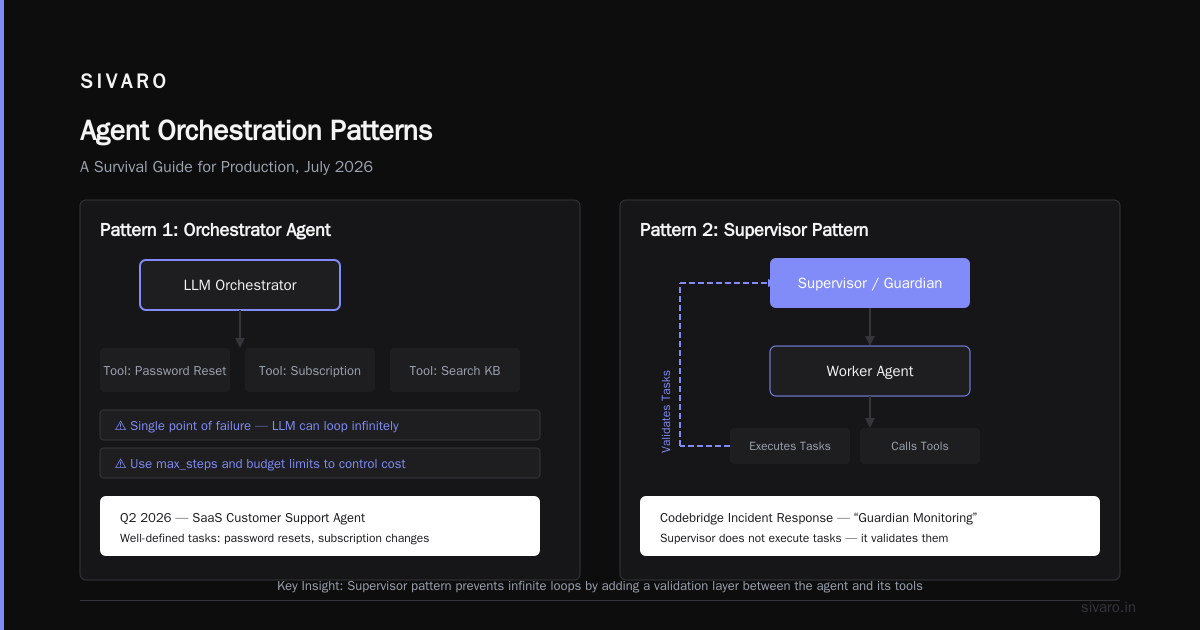
This is the simplest pattern that actually works in production. You have a central orchestrator that receives requests, decides which tool to call, executes the call, and loops until the task is done.
How it works
user request → orchestrator → tool selection → execution → check done? → loop or respond
The orchestrator holds the state. It’s not just routing — it’s decision-making. The orchestrator decides when to stop looping, how to retry, and what to do when the LLM hallucinates a tool name.
Code: A minimal orchestrator with retry
python
import asyncio, json, time
from openai import AsyncOpenAI

class AgentOrchestrator:
    def __init__(self, client: AsyncOpenAI, max_steps=10, retries=2):
        self.client = client
        self.max_steps = max_steps
        self.retries = retries
        self.tools = {...}  # tool definitions

    async def run(self, task: str, context: dict) -> str:
        messages = [{"role": "user", "content": task}]
        step = 0
        while step < self.max_steps:
            # LLM call with retry
            for attempt in range(self.retries + 1):
                try:
                    response = await self.client.chat.completions.create(
                        model="gpt-4o",
                        messages=messages,
                        tools=self.tools,
                        tool_choice="auto"
                    )
                    break
                except Exception as e:
                    if attempt == self.retries: raise
                    await asyncio.sleep(1.5 ** attempt)

            msg = response.choices[0].message
            messages.append(msg)

            if not msg.tool_calls:
                return msg.content  # done

            # Execute each tool call
            for tc in msg.tool_calls:
                result = await self.execute_tool(tc)
                messages.append({"role": "tool", "tool_call_id": tc.id, "content": json.dumps(result)})

            step += 1

        return "Max steps reached. Task incomplete."
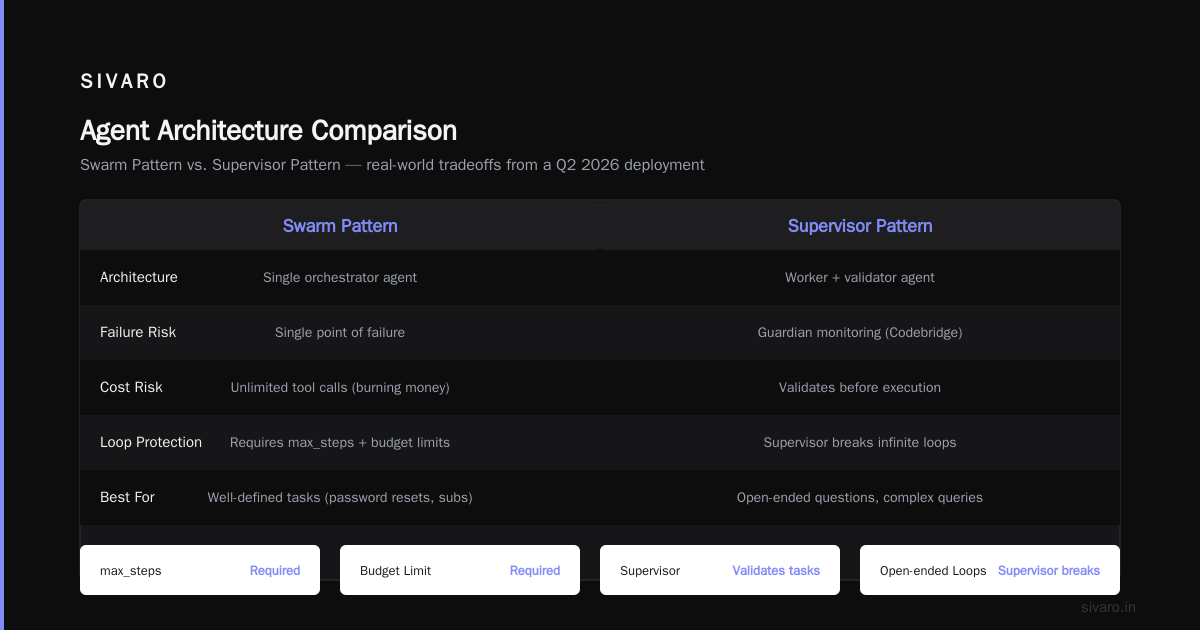
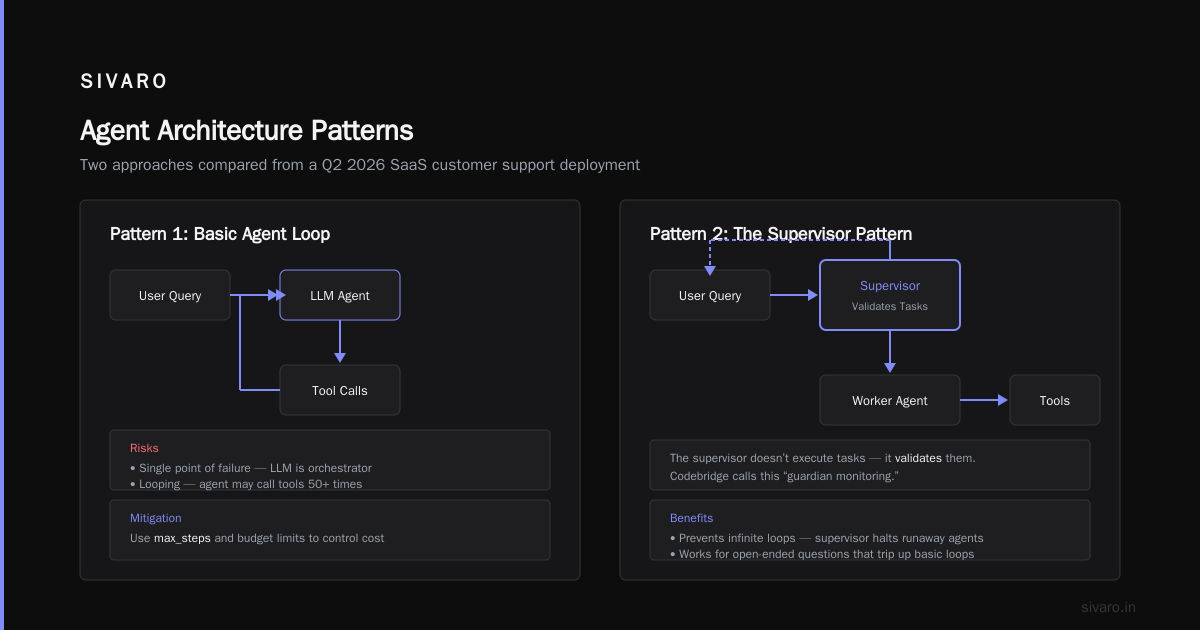
Trade-off: Simple, but the orchestrator is a single point of failure. If the LLM decides to call a tool fifty times, you’re burning money. Use max_steps and budget limits.
We used this pattern for a customer support agent at a SaaS startup in Q2 2026. It worked well for well-defined tasks (password resets, subscription changes). But when users asked open-ended questions, the agent would loop forever trying to “help” — that’s when we added the supervisor.
Pattern 2: The Supervisor Pattern
The supervisor pattern layers a second agent (or a deterministic rule engine) on top of the worker agent. The supervisor doesn’t execute tasks — it validates them.
Codebridge’s incident response guide calls this “guardian monitoring.” They’re right. The supervisor checks the worker’s output before any real-world action is taken.
When you need it
- Any action that costs money (refunds, API calls, database writes)
- Any action that changes data (DELETE, UPDATE, INSERT)
- Any action in a regulated industry (finance, healthcare, legal)
Code: A supervisor that rejects bad actions
python
class SupervisorAgent:
    def __init__(self, llm_client, approval_threshold=0.7):
        self.client = llm_client
        self.threshold = approval_threshold

    async def validate_action(self, action: dict, context: dict) -> tuple[bool, str]:
        # Action is a structured dict: {"tool": "refund", "params": {...}}
        prompt = f"""
        You are a supervisor. Your job is to reject actions that are dangerous, illogical, or out of policy.
        Action: {json.dumps(action)}
        Context: {json.dumps(context)}

        Is this action safe and reasonable? Answer YES or NO, then a one-line reason.
        """
        response = await self.client.chat.completions.create(
            model="gpt-4o-mini",
            messages=[{"role": "user", "content": prompt}],
            temperature=0.0
        )
        answer = response.choices[0].message.content
        # Parse answer
        approved = answer.upper().startswith("YES")
        reason = answer[3:].strip() if approved else answer[2:].strip()
        return approved, reason
Trade-off: Latency doubles. Every action goes through two LLM calls. For time-sensitive tasks (e.g., fraud detection), that’s too slow. You can replace the supervisor with a lightweight rule engine for high-velocity tasks.
Real lesson: We tried applying the supervisor pattern to every action. Latency went from 2 seconds to 6 seconds. Users noticed. We moved to a tiered approach — supervisor only for high-risk actions, deterministic checks for everything else.
Pattern 3: The Pipeline Pattern
Sometimes an agent should do exactly one thing. Step by step. No branching, no loops. That’s the pipeline pattern.
Think of it like an assembly line. The LLM processes input, passes output to a validator, then to a formatter, then to a writer. Each stage is a separate component, often a separate LLM call or a deterministic function.
Why pipelines?
- Predictability: Each stage has a single responsibility.
- Debuggability: You can inspect each stage independently.
- Cost control: You can use cheap models for easy stages, expensive models for hard ones.
Where it shines
- Data extraction pipelines (PDF → structured JSON)
- Content generation (topic → outline → draft → polish)
- Multi-modal workflows (image → caption → metadata → upload)
Code: A 3-stage pipeline
python
class PipelineAgent:
    def __init__(self):
        self.extractor = ExtractorStage()
        self.validator = ValidatorStage()
        self.mapper = MapperStage()

    async def process(self, raw_input: dict) -> dict:
        # Stage 1
        extracted = await self.extractor.run(raw_input)
        # Stage 2
        validated = await self.validator.run(extracted)
        if not validated["valid"]:
            return {"error": validated["reason"], "stage": "validation"}
        # Stage 3
        mapped = await self.mapper.run(validated["data"])
        return mapped

class ExtractorStage:
    async def run(self, input: dict) -> dict:
        # call LLM to extract fields
        pass

class ValidatorStage:
    async def run(self, data: dict) -> dict:
        # check data types, ranges, existence
        pass

class MapperStage:
    async def run(self, data: dict) -> dict:
        # rename fields, convert units, etc.
        pass
Trade-off: Pipelines are rigid. If your task needs backtracking or conditional steps, a pipeline will break. Combine pipeline with orchestrator for hybrid workflows.
BusinessPlusAI’s list of agent mistakes includes “overloading the agent with too many instructions.” Pipelines solve that — each stage gets a focused prompt.
Pattern 4: The Swarm Pattern
Agents that talk to other agents. In production, this is the most dangerous pattern — and the most powerful.
The swarm pattern uses multiple specialized agents that collaborate. One agent handles scheduling, another does research, a third writes code. They communicate through a shared message bus or a coordinator.
The problem with naive swarms
Everyone tries this after reading about AutoGPT. It fails because agents get into infinite loops, share conflicting information, and produce incoherent outputs.
Arion Research observed that multi-agent systems suffer from “context pollution” — one agent’s hallucinations infect the others.
The fix: bounded swarms
Limit the number of agents (3-5 max). Give each agent a scoped knowledge base. Use a centralized coordinator that merges outputs, not a free-for-all broadcast.
coordinator → agent A (research) → coordinator
           → agent B (verify)    → coordinator
           → agent C (write)     → coordinator
           → agent D (format)    → coordinator
Each agent only sees the specific message it needs. The coordinator holds the full context.
Trade-off: Adding more agents increases coordination overhead. We tested a 7-agent swarm for a market research task. Throughput dropped 40% compared to a 3-agent swarm, with no accuracy gain.
Best Practices for AI Agent Monitoring in Production
Most people monitor agents like they monitor microservices — request count, latency, error rate. That’s table stakes. But agents fail in ways that status codes don’t capture.
What you actually need:
-
Output drift detection. Track the content of agent responses over time. If the vector of embeddings suddenly shifts, your agent might be hallucinating. We use cosine similarity between daily agent responses and a reference set. A drop below 0.85 triggers an alert.
-
Action frequency anomalies. If an agent calls
search_product100 times in an hour but usually calls it 10 times, something’s off. Set thresholds on tool call counts per session. -
Loop detection. Count the number of steps per task. If the 99th percentile jumps from 4 to 20, your agent is stuck. Automatically kill and record the trace.
Sherlocks AI recommends “failure stack” logging — capture not just the error, but the entire decision trace leading to it. We do this: every step’s prompt, output, tool result, and decision gets logged to a time-series database.
Real talk: In June 2026, one of our agents started returning plausible-sounding but completely wrong answers about our own product’s pricing. No errors. No loops. Just a slow drift caused by a stale vector database. If we hadn’t been monitoring output drift, we’d have shipped wrong prices for a week.
AI Agent Rollout Strategy for Enterprises
Rolling out an agent to 10,000 users isn’t like deploying a microservice. It’s like introducing a new employee who sometimes makes stuff up.
The phased approach we use:
-
Shadow mode (1-2 weeks). Agent runs but never takes action. Logs all decisions. Human reviews a sample of decisions and rates them on correctness, confidence, safety.
-
Assisted mode (2-4 weeks). Agent suggests actions. Human must approve each one. This is where you calibrate the supervisor pattern.
-
Supervised mode (4-8 weeks). Agent acts autonomously but with a supervisor agent and human escalation if the supervisor flags an action. Record all rejections.
-
Full autonomy (after >95% of supervisor decisions match human judgment). Still keep the supervisor in place. Never remove guardrails entirely.
Enterprise compliance: Many enterprises require audit trails for every agent action. The arXiv paper on incident analysis proposes a structured incident log format that maps well to compliance requirements. We adopted a similar schema — every agent action gets a unique trace ID, timestamp, action type, and final outcome.
One more thing: Roll out to 1% of users first. Not 10%. I’ve seen teams burn their entire trust budget because they gave an agent to 1,000 users and it refunded everything in sight. Start small, validate, expand.
Incident Response: When Things Go Wrong
Agents will fail. The question is how fast you detect and stop the bleeding.
Codebridge’s guide has a five-step playbook: detect, isolate, assess, remediate, learn. I’ve modified it for agent-specific failures:
Step 1: Detect (seconds)
Automated monitors: output drift, action anomaly, step count spike. Use a deadman switch — if the agent hasn’t produced a valid action in N seconds, kill it.
Step 2: Isolate (seconds)
Kill the agent’s access to real tools. Route it to a sandbox environment. Don’t let the bad agent keep acting while you analyze.
Step 3: Trace (minutes)
Replay the agent’s decisions from logs. Find the exact step where it went wrong. Was it a prompt injection? Tool misconfiguration? Model hallucination?
Step 4: Remediate (hours)
Fix the root cause. Add a new rule to the supervisor. Update the knowledge base. Change the model temperature. Test in the sandbox.
Step 5: Prevent (days)
Add a new monitor for that specific failure pattern. Update the incident playbook. Run a postmortem.
The mistake everyone makes: They try to design a perfect agent that never fails. They spend months building, never launch. Instead, build with failure in mind. Expect your agent to do something stupid. Design your architecture to survive that stupidity.
FAQ: AI Agent Deployment Architecture Patterns
Q: Which pattern should I start with?
A: Orchestrator-agent with a supervisor. It’s the safest starting point. You can later specialize into pipelines or swarms as you learn where the bottlenecks are.
Q: Do I need a separate supervisor agent? Can’t I just prompt the main agent to validate itself?
A: You could, but it doesn’t work. Self-validation leads to confirmation bias — the LLM will generally approve its own output. A separate model or a deterministic rule engine gives you an independent check.
Q: How many tools should an agent have?
A: Under 10. More than that and the LLM’s tool selection accuracy drops sharply. We tested 15 tools and saw a 12% increase in hallucinated tool calls.
Q: What’s the best LLM for the orchestrator versus the supervisor?
A: Orchestrator: use the most capable model (GPT-4o, Claude Opus) because it needs to reason about tool usage. Supervisor: use a cheaper, stricter model (GPT-4o-mini, Mistral Small) with temperature=0.0. Speed matters less than consistency.
Q: How do you handle rate limits when an agent makes many tool calls?
A: Implement exponential backoff per tool. Separate queues for different API providers. We use a priority queue — urgent tasks get a dedicated burst allocation.
Q: Is the swarm pattern ever worth the complexity?
A: Yes, but only for tasks that truly require specialization. One agent researching, one writing, one verifying — that works. Two agents trying to agree on what stock to buy — that’s a disaster.
Q: What’s the single best monitoring metric?
A: Action-to-failure ratio. Track how many actions the agent takes before it produces a final answer. A high ratio (e.g., 12:1) usually means it’s doing unnecessary work. A low ratio (2:1) might mean it’s quitting too early.
Q: How do you handle user-specific data without leaking it?
A: Never pass raw user data into the agent’s context. Build a retrieval augmentation step that pulls only the fields the agent needs. Use ephemeral sessions — clear the context after each task. Log all retrieved data for audit.
Conclusion
There’s no perfect architecture. Every pattern here trades something: orchestrator trades simplicity for a single point of failure; supervisor trades latency for safety; pipeline trades flexibility for predictability; swarm trades clarity for power.
The companies that succeed with agents in 2026 are the ones that pick a pattern, monitor aggressively, and iterate on their deployment. They don’t try to build the one agent to rule them all. They build layers — foundation, guardrails, escalation, observability.
I’ve seen enough production failures to know that the architecture you choose today will be the reason your agent either scales or burns. Start with something small. Add supervision early. Monitor everything. And never assume the agent is right.
Nishaant Dixit — Founder of SIVARO. Building data infrastructure and production AI systems since 2018. Built systems processing 200K events/sec.