 SIVARO
AI Agent Deployment Best Practices 2026
I spent January of this year watching a client's support agent burn through $40,000 in API credits in eleven days. Not because the model was expensive. Because the agent was stuck in a loop, re-querying the same vector store for the same user intent, over and over, like a hamster on a wheel made of JSON.
That was the moment I stopped believing in "just ship it and iterate" for agentic systems.
If you're deploying AI agents to production in 2026, you already know the demos look magical. The hard part — the part that separates a pilot from a product — is what happens after the magic wears off. This guide covers what I've learned building and operating agent systems at SIVARO, plus a thorough breakdown of the ai agent deployment best practices 2026 I've validated across production workloads.
Let me start with the honest stuff.
What You're Actually Deploying
Before we talk about deployment, we need to agree on what an agent is in this context.
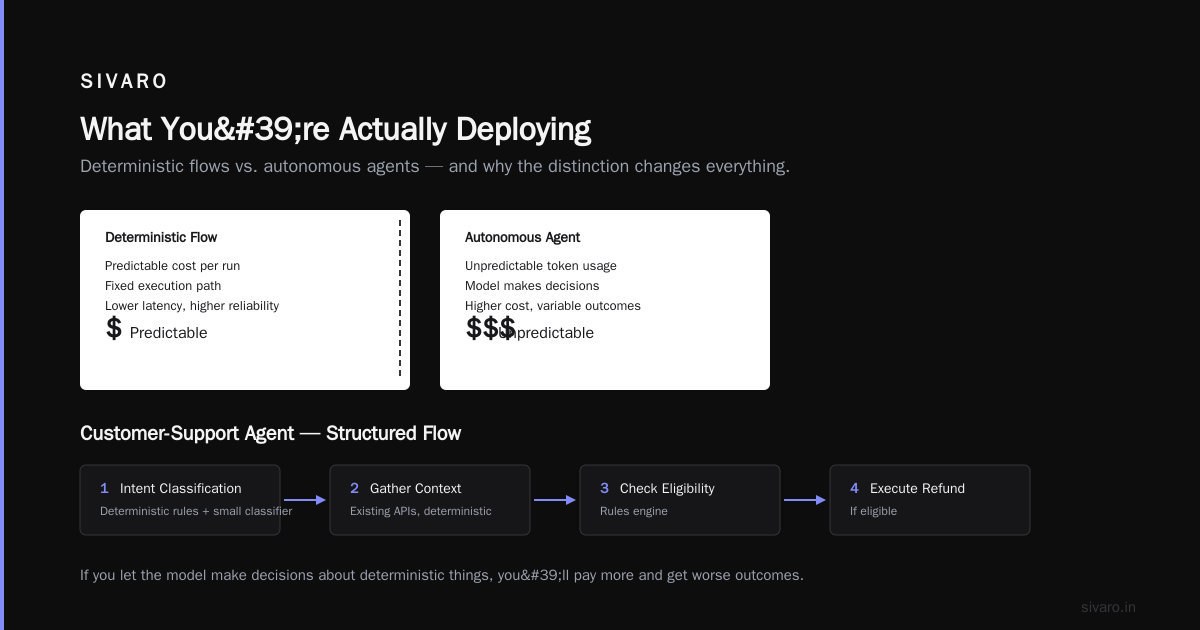
An agent isn't a single model call. It's a system that perceives context, makes decisions, and executes actions across one or more tools. That means you're not deploying a model — you're deploying a runtime. A state machine with a wallet.
And most of the time, you're deploying it into a pre-existing mess of APIs, databases, and internal tools that were never designed for machine use.
The Anthropic engineering team made this point clearly: agents and workflows are not the same thing. Workflows are predictable, code-defined sequences. Agents are dynamic, model-driven loops. The deployment challenges are completely different.
Most of what fails in production is not the model's fault. It's the environment's fault.
The 2026 Landscape: What Changed
I'm writing this in August 2026. Here's what I'm seeing across the industry right now:
-
Agentic workloads have moved from experimental to revenue-critical. Every Fortune 500 company I talk to has at least one agent in prod for customer service, internal ops, or engineering support. The conversation has shifted from "can we?" to "how do we scale this without losing our minds?"
-
Model costs are dropping, but agent costs aren't. You can get a frontier model for a tenth of what it cost in 2024. But your agent might still feel expensive because it's making more calls than you budgeted. Poor orchestration amplifies token spend.
-
Evaluation is now the bottleneck. OpenAI, Anthropic, Google — they've all shipped model improvements. The bottleneck isn't intelligence anymore. It's how you reliably measure whether an agent is doing its job without burning your team's time on manual review.
-
The "one agent for everything" approach is dead. Everyone tried it. It failed. Specialized agents with clear boundaries are the standard.
The Google research team's analysis of production agent hurdles confirmed what I'm seeing in the field: latency, cost, and debugging are the top operational challenges in 2026.
Best Practice #1: Design an Evaluation Harness Before You Write a Line of Agent Code
I know you want to start with the fun part — the prompt engineering, the tool design, the cool autonomous behavior. Stop.
The first thing you build is your evaluation harness. Not the agent. The harness.
Why? Because you're about to make dozens of decisions — which model to use, what temperature, how many retries, what system prompt structure — and you need a way to measure whether any of those decisions are good or bad.
Here's what works:
python
# Simple agent eval harness pattern (production-tested at SIVARO)
class AgentEvalHarness:
    def __init__(self, agent, eval_cases, judge_model="gpt-4o"):
        self.agent = agent
        self.eval_cases = eval_cases
        self.judge = judge_model

    def run(self):
        results = []
        for case in self.eval_cases:
            start = time.time()
            try:
                output = self.agent.run(case.input)
                latency = time.time() - start
                score = self.judge_output(case.expected, output)
                results.append({
                    "case_id": case.id,
                    "pass": score.passed,
                    "score": score.quality,
                    "latency": latency,
                    "cost": output.token_usage.total_cost,
                    "error": None
                })
            except Exception as e:
                results.append({
                    "case_id": case.id,
                    "pass": False,
                    "score": 0,
                    "error": str(e)
                })
        return results
Your eval set should include three categories:
- Happy path cases: The agent does what it's supposed to do
- Edge cases: Weird inputs, ambiguous requests, partially-invalid tool arguments
- Failure recovery cases: What happens when a tool fails? When an API returns garbage? When the user asks something out of scope?
At SIVARO, we spent three weeks building our eval harness for one client's customer-support agent. The agent itself took five days. Worth every minute — we caught seventeen issues in the first week of eval that would've been painful in production.
The practical guide from arXiv contributors makes the same point with different words: evaluation must be continuous and automated. You can't manually review every agent interaction. You need a scoring system.
Best Practice #2: Use a Hybrid Orchestrator Architecture
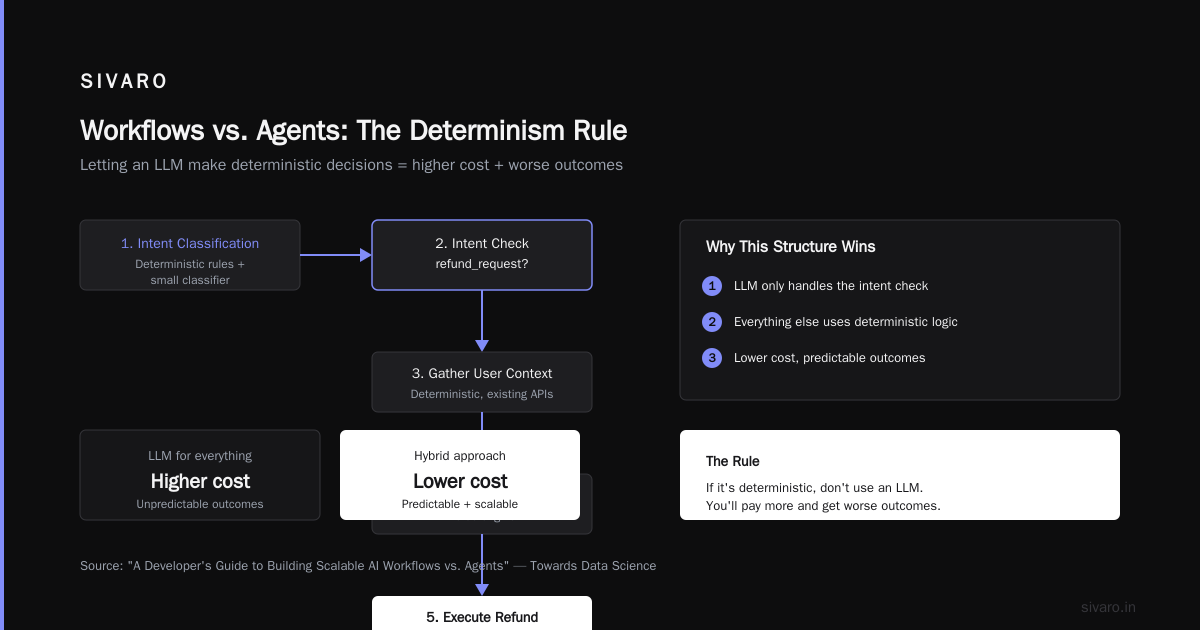
Here's a position I'll defend: most "agents" in production should actually be workflows with a small agent inside.
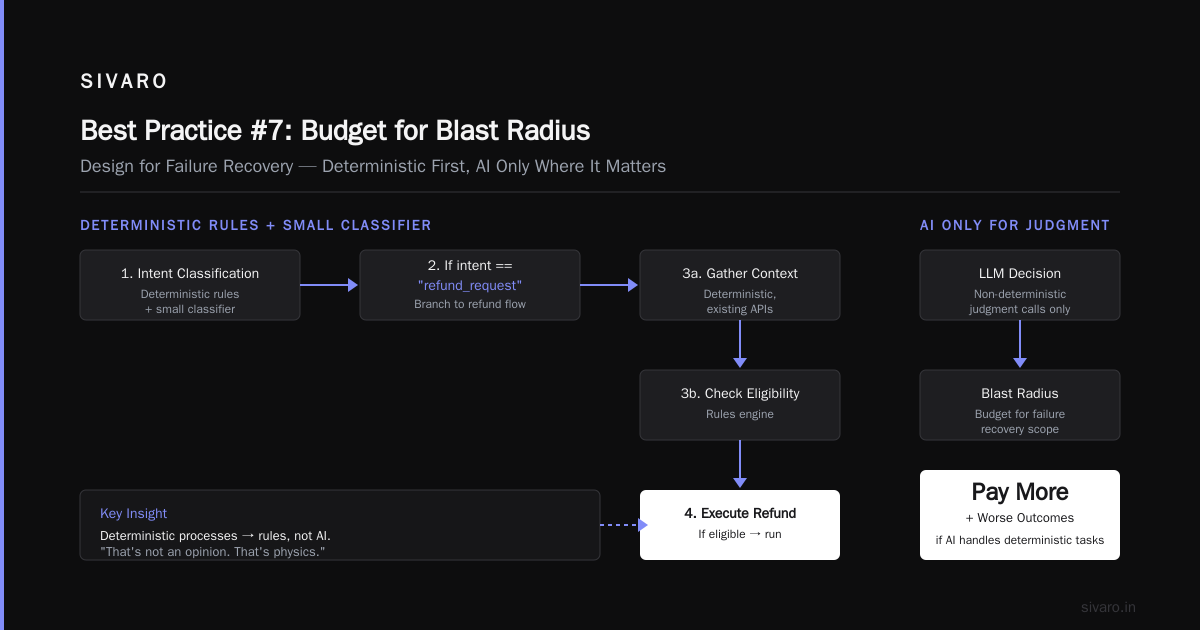
The pure agentic approach — where the model decides every single step, all the time — is too expensive and too unpredictable for most business processes. That's not an opinion. That's physics. If you let the model make decisions about things that are deterministic, you'll pay more and get worse outcomes. This analysis of workflows vs. agents is one of the better summaries I've read on why this distinction matters.
Let me be concrete.
For a customer-support agent at one of our clients, we structured it like this:
Flow:
1. Intent classification (deterministic rules + small classifier)
2. If intent == "refund_request":
   a. Gather user context (deterministic, existing APIs)
   b. Check refund eligibility (rules engine)
   c. If eligible → Execute refund (deterministic)
   d. If ambiguous → Invoke agentic loop for disambiguation
3. If intent == "technical_troubleshooting":
   a. Run diagnostic (deterministic script)
   b. Use agent to interpret diagnostic results
   c. Escalate to human if confidence below threshold
The agent is literally only involved in 30% of the conversation flows. The rest is predictability. This hybrid approach:
- Split our latency in half (deterministic paths are fast)
- Cut costs by about 65%
- Made debugging dramatically easier — because the failure surface is smaller
This is the ai agent orchestration vs workflow engine question, and I'm firmly in the "both, working together" camp. Orchestration is about coordinating multiple agents and workstreams. A workflow engine is about executing predictable sequences. Your system needs both. This complete deployment guide from Blaxel covers orchestration architecture patterns that mirror what I'm talking about, particularly around connecting coordination logic to execution infrastructure.
Best Practice #3: Treat Tools as Contracts, Not Implementations
This is where most production agents fail.
In development, you test your agent with a model that returns a well-formatted JSON blob. You wire that to a function that actually does something. It works. You deploy.
In production, the model returns a phantasy tool call. Wrong arguments. Missing required fields. Extra fields that shouldn't be there. And your tool doesn't know what to do.
The fix is to treat every tool call as a contract boundary. Validate inputs and outputs. Enforce schemas. And — here's the extensible part — make the tool functions resilient to bad input.
python
# Tool contract example: validating arguments before execution
from pydantic import BaseModel, ValidationError

class SearchParams(BaseModel):
    query: str
    filters: dict = {}
    limit: int = 10

def search_tool(raw_args):
    try:
        params = SearchParams(**raw_args)
    except ValidationError as e:
        # Return a structured error the agent can interpret
        return {"error": f"Invalid parameters: {e}", "suggestions": list(e.errors())}

    # Now safe to execute
    results = db.search(params.query, filters=params.filters, limit=params.limit)
    return {"results": results}
Your tool should never throw an unhandled exception. It should return a structured error that the agent can act on. The agent should be able to correct its own mistakes based on that error — which means the error message needs to be informative, not a stack trace.
One year ago, I watched a production system fail because the agent passed a timestamp in the wrong timezone to an API, and the API returned a 500 with no message. The agent retried six times, burning $12 in tokens, before giving up. Create structured error insights. Your agents need them to recover.
Best Practice #4: Implement Guardrails, Not Just Boundaries
You've probably seen the "give your agent system prompts with safety rules" advice. That's necessary, but it's nowhere near sufficient.
In 2026, you need enforcement at runtime.
Three types of guardrails I consider mandatory:
-
Input validation — Schema-check user inputs before the agent sees them. This prevents prompt injection (mostly), but more commonly, it prevents garbage from reaching your model and producing bad tool calls.
-
Output validation — Check intermediate states before the agent takes action. If the agent decides to call
delete_customer_account, you want a human-in-the-loop gate. For read-only actions, auto-gate. For destructive ones, require approval. -
Execution limits — Maximum number of steps per run. Maximum cost per interaction. Maximum timeout. An agent that loops is an agent that's wrong.
Don't rely on the model's "judgment" for safety. The model is stochastic. Your guardrails aren't.
The failure analysis from BusinessPlusAI points out that most agent failures trace back to either tool misuse or lack of boundary conditions. Run your own post-mortems and you'll find the same pattern.
Best Practice #5: Version Everything — Prompts, Tools, and Model Versions
"Show me a graph of agent accuracy over time" is the most predictable question you'll get from your exec team. It's a good question — and you can't answer it without versioning.
The problem is cultural, not technical. Most teams version code. They version infra. They rarely version prompts.
Here's the practical approach:
python
# Versioned agent config pattern
configs = {
    "v1.2": {
        "model": "gemini-2.5-pro",
        "temperature": 0.2,
        "system_prompt_version": "system_prompt_6.txt",
        "tools": ["search", "calculator", "db_query", "email"],
        "max_steps": 15,
        "description": "Fixed edge case for timezone handling"
    },
    "v1.3": {
        "model": "gemini-2.5-pro",
        "temperature": 0.2,
        "system_prompt_version": "system_prompt_7.txt",
        "tools": ["search", "calculator", "db_query", "email", "note_taker"],
        "max_steps": 15,
        "description": "Added note_taker for multi-turn conversations"
    }
}
Store your prompts in version control. Annotate model versions. Tag every run with the configuration that produced it. If you can't replay a specific agent's behavior, you can't debug it, and if you can't debug it, you're guessing.
In 2026, I want traceability at the mission level: which version of the prompt, which model, which tool definitions, which input. Your acceptance criteria for any production agent deployment must include replayability.
Best Practice #6: Design for Observability of Intent, Not Just Tokens
You can monitor token counts, latency, and error rates until your dashboards look like a Christmas tree. That doesn't tell you if your agent is doing the right thing.
You need observability into the decision-making process.
What did the agent intend to do at each step? What was its internal reasoning when it chose to call the email tool? What was its confidence level before it decided to escalate to a human?
Implement step-level tracing that captures:
- Intent summaries at each step
- Tool call arguments (with PII redacted)
- Internal reasoning traces (if available)
- The state transition at each step
I've learned this the hard way: the gap between "the agent works" and "the agent unexpectedly sent a marketing email" is exactly where observability saves you.
Google's research on production hurdles highlights that the "organization-level" costs of agent systems are often underestimated — debugging across model outputs, tool executions, and user feedback loops is the real time sink.
Best Practice #7: Budget for Blast Radius — and Design for Failure Recovery
"Be 10% wrong, have a backup for the 90% that works."
I'm paraphrasing a saying in eng circles, but the point stands: you have to know what your blast radius is. For a customer support agent, a hallucinated answer about refund policy is bad but recoverable. For a financial agent that moves money, the consequences are catastrophic.
Design for failure recovery:
-
Compensation patterns — If the agent impacts the real system, what's the undo logic?
-
Circuit breakers — If the agent's error rate spikes, cut off traffic to it. Automate this. Don't rely on an on-call engineer to notice at 2:47 AM.
-
Shadow mode — Run the agent in parallel with the existing system, logging what it would have done, without executing. Compare against the baseline. This is the cheapest way to get confidence before a full rollout.
Shadow mode deserves extra emphasis. One client we worked with — a logistics company in Austin — used shadow mode for three weeks before cutting over their freight-booking agent. They found that the agent would occasionally try to book a truck at 3x the market rate because it misinterpreted the urgency from the customer's phrasing.
In shadow mode, that's a learning opportunity. In production, that's a lost contract.
Best Practice #8: Optimize for Latency of the Whole Loop, Not the Model Call
I have a weird take on this next part: I'd rather have a model that's slower but that gets the right answer than a faster one that's wrong. But that's only true if you can make the rest of the loop fast.
Your total agent response time = model inference + tool execution + retrieval + orchestration overhead + guardrail checks.
In 2026, the model inference is often not the bottleneck. The tool calls are. A sales engagement agent that waits 400ms for a CRM API call, then 300ms for a search, then 300ms for the model to synthesize — that's a second before the user sees anything. Slack users are not patient.
Optimization tricks that actually worked for me:
- Pre-fetch likely-to-be-needed context: if the flow usually calls
searchafterintent, start the search in parallel while the model is still generating its tool call. - Cache tool results: same query from a different user? Return the cached response. You can cache tool results securely and even apply semantic caching for similar requests in multi-tenant contexts.
- Stream tokens: show the user what's happening. Turns a 2-second wait into a perceived 500ms response.
The architecture guidance from Machine Learning Mastery's practical deploy guide covers infrastructure patterns that align with latency optimization — specifically around how you deploy models and your agent logic to minimize hops.
Best Practice #9: Human-in-the-Loop Is Not A Failure Mode
Some people act like human-in-the-loop is a cop-out — a sign that your agent can't fully automate. I think that's wrong-headed.
Every good agent I've deployed has a well-designed human-in-the-loop escalation path. It's not a failure mode. It's a design feature that makes the entire system more robust.
Design for escalation:
- Define when the agent must escalate (destructive actions, ambiguous high-stakes decisions)
- Define when the agent should escalate (low confidence, multi-turn confusion)
- Define the format of escalation — what context does the human need to make a quick decision?
Don't just pass the conversation over and call it done. Package up the agent's reasoning trace, the conversation history, the relevant data, and the proposed next step. The human's job becomes "confirm or adjust," not "figure out what's going on."
Best Practice #10: The 2026 Truth — Deployment Is Iterative, Not a Milestone
"Deploy" sounds like a one-time event. It isn't.
You'll deploy an agent. You'll watch it for a week. You'll find that it misreads one type of user request. You'll tweak the prompt or add a guardrail. You'll redeploy. That's normal. That's healthy. The teams that deploy a "perfect" agent don't exist.
A good cadence is: weekly feedback review → monthly full eval → quarterly architecture review.
Set up a feedback loop where users (and support agents) can rate agent outputs. Tag those outputs. Feed them into your eval harness. Repeat.
The guide from the arXiv trail suggests evaluating across both business and technical perspectives — exactly what this iteration cycle needs.
Common Mistakes You'll Still Make (I Made Them All)
I wrote a version of this guide in my head after a particularly painful client deployment. Here's the list of mistakes I see most frequently — and that made deployment painful for me:
- Deploying the agent "cold" to production traffic. Run shadow mode. Seriously.
- Not budget-shaping the agent. "Maximum 10 steps" is a budget, and you should have one.
- Underestimating prompt injection risk. Internal tools are still web-facing. Verify inputs. Be paranoid.
- Not defining a "session" structure. Without session boundaries, the agent's context window wanders and memory bloat destroys performance.
- Building your own orchestration without checking what exists. This isn't a "buy vs build" argument. It's a "don't rebuild the wheel poorly" argument. Your orchestration layer is usually trivial; the scaffolding around it — evals, tracing, guardrails — is where the real value lives.
The Production Rollout Checklist
If you're about to deploy an agent, here's your [short but dense] checklist. Print it. Tick it off. Thank me later — this is what I mean by ai agents production rollout checklist:
Pre-deployment:
- [ ] Eval harness defined (automatic passes/fails on at least 50 golden cases)
- [ ] Tool schemas validated with contract tests
- [ ] Shadow mode approved and configured
- [ ] Ranking criteria for production traffic identified (e.g., only low-risk intents initially)
- [ ] Cost budget per interaction, per hour, per day defined
- [ ] Guardrails for destructive actions implemented and tested
- [ ] Versioning for prompts, tools, and model config in place
Deployment:
- [ ] Traffic split at 5-10% initially
- [ ] Alerts set on error rate, latency, cost-per-interaction
- [ ] On-call engineer familiar with agent debugging
Post-deployment (first 30 days):
- [ ] Weekly feedback review
- [ ] Eval harness updated with production failures
- [ ] Model/tool upgrades tested against golden set
- [ ] Escalation rates tracked — if >20%, adjust
FAQ — Answering What I Actually Get Asked
Q: Should I build my own agent orchestration framework?
Not at first. Use an existing orchestration framework for coordination (LangChain, AgentOps, etc.) and only build custom infrastructure when you've hit a concrete limitation. Most teams underestimate the amount of engineering time necessary — trust me, I've seen it dismantle a small startup's roadmap.
Q: How do I prevent my agent from circling?
Set a max_steps value (12-15 works for most internal business agents). Embed step-level checks. Track timeouts. And always include a fallback to a human. The agent loop is the most common budgeting failure — failure analyses on agent mistakes confirm this is one of the most common patterns of failure in prod.
Q: What's the difference between orchestration and a workflow engine?
An orchestration layer coordinates multiple agents/services — it's asynchronous, event-driven, and dynamically routes traffic. A workflow engine executes static, sequential steps — for example, BPMN-style or step functions. Modern production systems use both: you orchestrate the agent's execution context, and inside it, you use deterministic workflows for the repeatable parts.
Q: Which model should I use for the agent?
It depends on your reasoning complexity. For simple classification, gpt-4o-mini or gemini-1.5-flash is enough. For multi-step reasoning, step back and benchmark to verify if you need a frontier reasoning model. All of them are cost-sensitive. Test latency vs. quality before committing — and after model releases.
Q: How do I test the agent before production without a QA team?
Run your golden set. Write 50-100 cases representing real traffic. Automate the eval. Run it in CI. And ship into shadow mode. You don't need a dedicated QA person — you need a disciplined engineer who cares.
Q: Are we at the point of "talking to an AI agent" replacing support agents?
Not yet. Zero-risk, low-stakes, feature-request support — yes. Anything with money, legal, or compliance — no. The human-in-the-loop design isn't a crutch — it's the norm.
Final Word From a Practitioner on ai agent deployment best practices 2026
This year, I've watched the tooling get better, but the fundamentals haven't changed. The model got smarter. The infrastructure got cheaper. But the human problems — evaluation, versioning, observability, failure recovery — those are still the actual barriers to production.
Here's what I want you to take away: "deployment" in 2026 is not a single event. It's a loop.
You build. You eval. You ship a little. You watch. You learn. You iterate.
The teams that succeed at this aren't the ones with the smartest models. They're the ones with the best feedback loops. Evals. Observability. Versioning. Guardrails. Then redeploying — faster and safer than yesterday.
That's how you make an agent that's actually safe and effective in production.
I hope this guide saves you the $40,000 lesson I paid.
Nishaant Dixit — Founder of SIVARO. Building data infrastructure and production AI systems since 2018. Built systems processing 200K events/sec.