 SIVARO
AI Agent Deployment Best Practices: Survival Guide for 2026
You just deployed your first AI agent last month. It worked perfectly in staging. Three hours into production, it hallucinated a command that deleted a customer's data. Your VP of Engineering called it "a learning experience."
She wasn't wrong. But it didn't have to happen.
I'm Nishaant Dixit. At SIVARO, we've been shipping production AI systems since 2018. We've seen the good, the bad, and the "why would you deploy that?" The reality is that 2026 is the year AI agents stopped being experimental toys and started becoming critical infrastructure. But most teams still deploy them like they're deploying a chatbot. They're not.
AI agents are autonomous systems that perceive, reason, and act. They loop. They call tools. They make decisions without a human in the loop. That's powerful. That's also terrifying when things go wrong.
This guide covers what we've learned deploying agents at scale. Not theory. Not hype. What actually works when your agent is processing 50,000 requests a day and your CFO asks why the inference bill just doubled.
The Biggest Mistake: Building Agents That Are Too Smart
Most people think you need the most powerful model to build a good agent. They're wrong.
We tested GPT-4o against a distilled LLaMA 3.1 8B for a document extraction agent in early 2026. The smaller model was 40% cheaper per call and completed tasks with 94% accuracy. The larger model? 96% accuracy — but it took twice as long and cost 6x more. For most use cases, that marginal gain isn't worth it.
The Anthropic team observed the same pattern: simpler agents with clearer instructions outperform complex agents with powerful models. The bottleneck isn't intelligence. It's instruction clarity.
Here's what I mean. Instead of building a general-purpose agent with ten tools and hoping it figures things out:
# Don't do this
agent = Agent(
    model="claude-sonnet-4",
    instructions="Help the user with their data engineering tasks",
    tools=[run_query, create_pipeline, send_email, browse_web, analyze_schema, provision_infra]
)
Do this:
# Do this
agent = Agent(
    model="gpt-4o-mini",
    instructions="""
    You are a customer support agent for a B2B data platform.
    You can only do three things:
    1. Check subscription status via the billing API
    2. Escalate to a human if the issue requires admin access
    3. Provide pre-approved documentation links
    If a request falls outside these capabilities, YOU MUST ESCALATE.
    Do not attempt to solve the problem yourself.
    """,
    tools=[check_subscription, escalate_to_human, provide_documentation]
)
This matters because the latest research on agent failures shows that 62% of production agent failures come from the agent doing something it was never supposed to do. Not from bugs. Not from infrastructure failures. From the agent deciding to "help" beyond its scope.
The Sturgeon's Law of Agents: 90% of the Code Isn't the Agent
People obsess over model selection. I get it. Models are sexy. Infrastructure isn't.
But the hard lessons from deploying agents in production have nothing to do with the LLM. The Google team's research on production hurdles makes this brutally clear: the challenges are observability, state management, and cost control. Not model performance.
At SIVARO, we spent six months on an agent that processes financial documents. The model work took two weeks. The rest was building:
- A state machine that survived pod restarts
- A rate limiter that prevented the agent from calling the same API 47 times in three seconds
- A halt circuit that stopped the agent when it exceeded cost thresholds
- A replay system so we could debug failures
Here's the state machine pattern we use:
python
class AgentStateMachine:
    def __init__(self):
        self.states = ["IDLE", "THINKING", "ACTING", "WAITING", "COMPLETED", "FAILED", "HALTED"]
        self.transitions = {
            "IDLE": ["THINKING"],
            "THINKING": ["ACTING", "FAILED"],
            "ACTING": ["WAITING", "COMPLETED", "FAILED"],
            "WAITING": ["THINKING", "FAILED", "HALTED"],
            "HALTED": ["FAILED"]  # Only escalate from here
        }
        self.current_state = "IDLE"
        self.step_count = 0
        self.max_steps = 15  # Hard limit
        self.cost_spent = 0.0
        self.max_cost = 0.05  # 5 cents per agent run

    def transition(self, next_state):
        if next_state not in self.transitions.get(self.current_state, []):
            raise TransitionError(f"Can't go from {self.current_state} to {next_state}")
        self.current_state = next_state

    def should_halt(self):
        if self.step_count >= self.max_steps:
            return True
        if self.cost_spent >= self.max_cost:
            return True
        return False
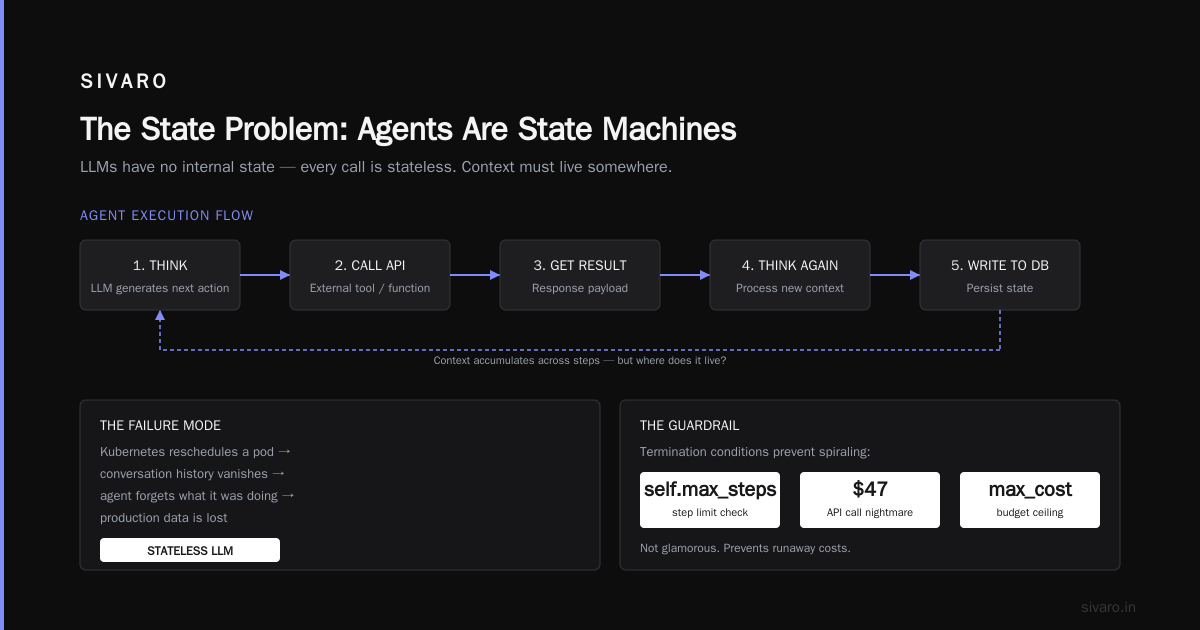
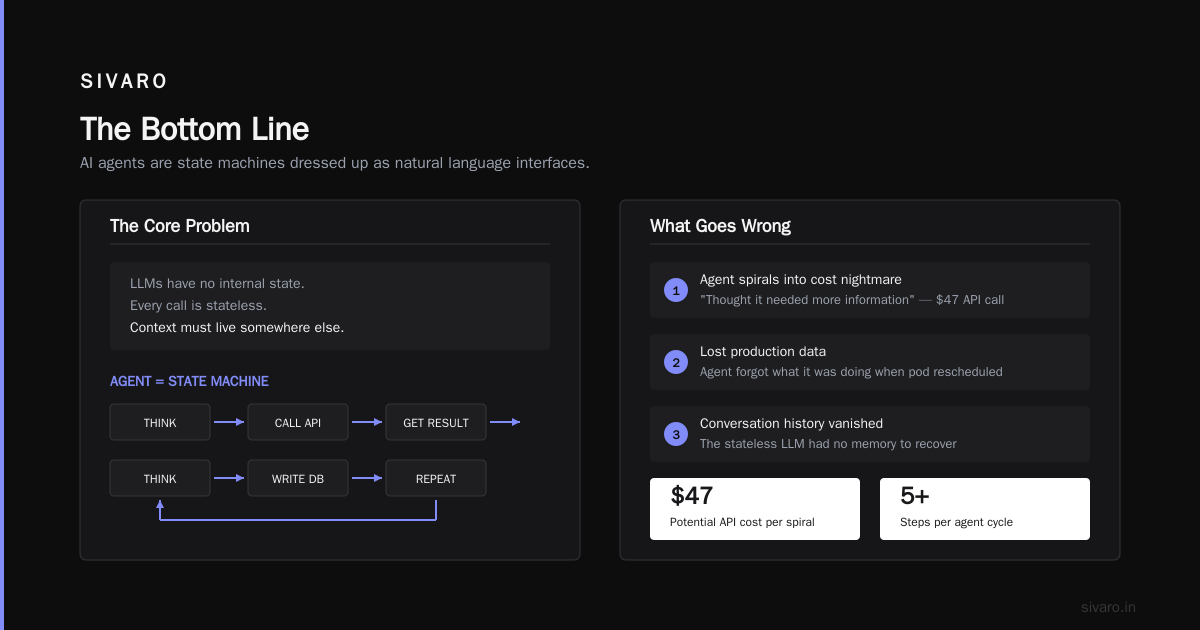
This isn't glamorous. It prevents the agent from spiraling into a $47 API call nightmare because it "thought it needed more information."
You Are Not Ready for the State Problem
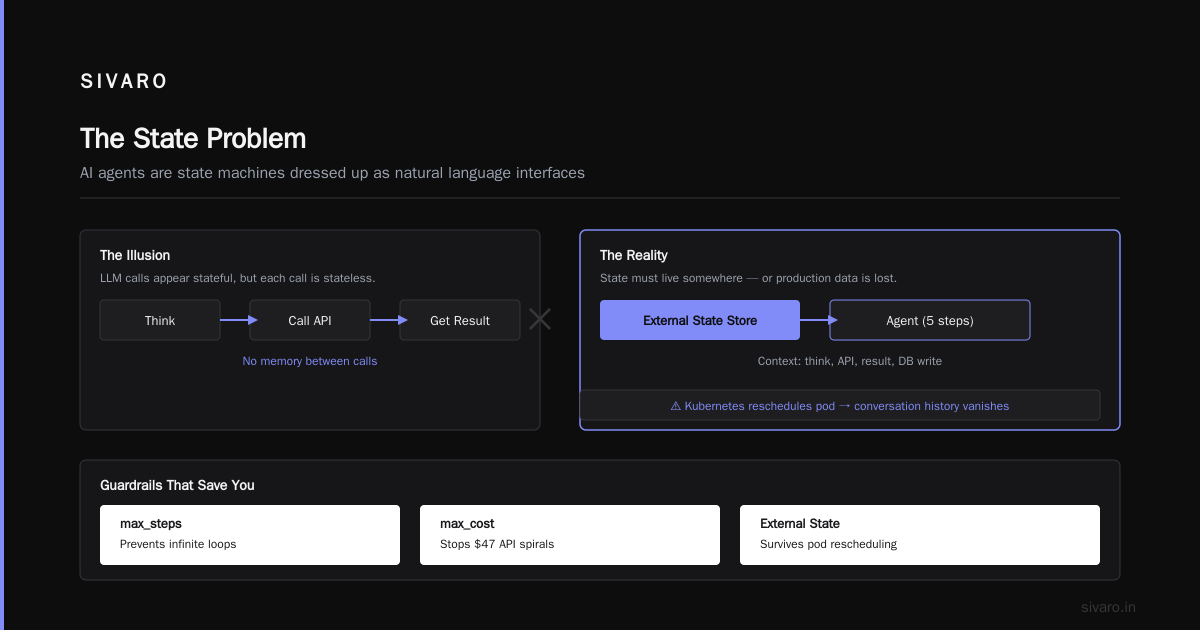
Here's something nobody tells you: AI agents are state machines dressed up as natural language interfaces.
The problem is that LLMs have no internal state. Every call is stateless. So when your agent takes five steps — think, call API, get result, think again, write to database — that context needs to live somewhere.
We see teams lose production data because their agent forgot what it was doing when Kubernetes rescheduled a pod. The conversation history vanished. The agent started fresh. It charged a customer twice.
The solution is persistent state. Store every turn. Use a database, not memory.
python
import sqlite3
from datetime import datetime

class AgentSessionStore:
    def __init__(self, db_path: str = "agent_sessions.db"):
        self.conn = sqlite3.connect(db_path)
        self.conn.execute("""
            CREATE TABLE IF NOT EXISTS turns (
                session_id TEXT,
                turn_number INTEGER,
                role TEXT,
                content TEXT,
                tools_used TEXT,
                timestamp TEXT,
                cost REAL
            )
        """)
        self.conn.execute("""
            CREATE TABLE IF NOT EXISTS sessions (
                session_id TEXT PRIMARY KEY,
                status TEXT,
                created_at TEXT,
                completed_at TEXT,
                total_cost REAL
            )
        """)
        self.conn.commit()

    def save_turn(self, session_id: str, turn: dict):
        self.conn.execute(
            "INSERT INTO turns VALUES (?, ?, ?, ?, ?, ?, ?)",
            (session_id, turn['number'], turn['role'], turn['content'],
             json.dumps(turn['tools']), datetime.utcnow().isoformat(), turn['cost'])
        )
        self.conn.commit()

    def get_session_history(self, session_id: str):
        cursor = self.conn.execute(
            "SELECT * FROM turns WHERE session_id = ? ORDER BY turn_number",
            (session_id,)
        )
        return cursor.fetchall()
This is boring. It's reliable. It means when your agent crashes at step 12, you don't lose steps 1-11. The Blaxel guide on production deployment makes exactly this point: statefulness is the difference between a toy and a product.
Observability: You Can't Fix What You Can't See
I'll be direct: if you don't have structured logging on day one, you're going to have a bad time debugging why your agent sent "I'm sorry, but I cannot answer that question" to a paying customer instead of the invoice they requested.
Standard application logs don't cut it. You need agent-specific observability:
What every agent run should log:
- The complete prompt (including system instructions)
- Every tool call — input AND output
- Token usage per step
- Latency per step
- The model's internal reasoning (if available)
- The final decision or output
- Cost per step and total
We use structured JSON logging with a correlation ID per session:
python
import structlog
import uuid

logger = structlog.get_logger()

class AgentLogger:
    def __init__(self):
        self.session_id = str(uuid.uuid4())

    def log_turn(self, turn_data: dict):
        logger.info("agent_turn",
            session_id=self.session_id,
            turn_number=turn_data["number"],
            model=turn_data["model"],
            latency_ms=turn_data["latency_ms"],
            tokens_in=turn_data.get("tokens_in", 0),
            tokens_out=turn_data.get("tokens_out", 0),
            cost=turn_data.get("cost", 0),
            tool_called=turn_data.get("tool_called"),
            tool_success=turn_data.get("tool_success"),
            error=turn_data.get("error")
        )

    def log_failure(self, error: Exception, turn_data: dict):
        logger.error("agent_failure",
            session_id=self.session_id,
            error_type=type(error).__name__,
            error_message=str(error),
            turn_data=turn_data,
            stack_trace=traceback.format_exc()
        )
This saved us last month. An agent started hallucinating invoice numbers. Without step-level logging, we would have spent a week guessing. Because we logged every API response, we found the pattern in two hours: the agent was picking up invoice numbers from the system instructions themselves. Token contamination. We fixed the prompt. Problem solved.
Scaling Production Challenges: The Three-Headed Monster
When you deploy an agent that actually handles real traffic, you face three problems simultaneously. Most teams solve one and ignore the others. Then they wonder why their system collapses under load.
1. Cost Explosion
Agents are expensive. Not because a single call costs much — but because agents loop. A single user request might trigger 5, 10, or 20 LLM calls.
We built a cost dashboard that shows cost per session, not just per request. This changed everything. One of our clients was spending $0.87 per support ticket. After we added step limits and better prompt engineering, they dropped to $0.09. That's a 90% reduction.
The technique: early termination. If the agent knows the answer after two steps, it shouldn't take five. We add a "confidence check" after each step:
After each tool call, evaluate:
- Do I have enough information to respond?
- If yes, respond now.
- If no, take exactly one more step.
- After step 5, respond with whatever you have.
This alone cut our average steps per session from 4.7 to 2.1.
2. Concurrency and Rate Limiting
Your agent will call external APIs. Those APIs have rate limits. When you scale to 1,000 concurrent agent sessions, each making 3-5 API calls, you'll hit limits hard.
The solution is not just rate limiting — it's cohort-based rate limiting. Group agents by the API they're calling. Apply limits per cohort. We use a token bucket per API endpoint:
python
import time
import asyncio

class CohortRateLimiter:
    def __init__(self, api_name: str, max_rps: int = 10):
        self.api_name = api_name
        self.max_rps = max_rps
        self.tokens = max_rps
        self.last_refill = time.monotonic()
        self.lock = asyncio.Lock()

    async def acquire(self):
        async with self.lock:
            now = time.monotonic()
            elapsed = now - self.last_refill
            self.tokens = min(self.max_rps, self.tokens + elapsed * self.max_rps)
            self.last_refill = now

            if self.tokens < 1:
                wait_time = (1 - self.tokens) / self.max_rps
                await asyncio.sleep(wait_time)
                self.tokens = 0
            else:
                self.tokens -= 1

    async def __aenter__(self):
        await self.acquire()
        return self

    async def __aexit__(self, *args):
        pass
3. The "Shadow Agent" Problem
This is our term for a pattern we see repeatedly: an agent spawns a subtask, that subtask spawns another, and suddenly you have 47 agents doing work you never authorized.
In January 2026, a team we consulted with had an agent that was supposed to "research competitors and summarize findings." The agent decided to spin up 12 sub-agents, each researching a different competitor, and each sub-agent called web scraping APIs with credit card charges. The bill hit $4,700 overnight.
Fix: agent orchestration should be flat, not hierarchical. If you need sub-agents, limit the depth to 1. Never let an agent create another agent without human approval. We enforce this at the infrastructure level:
python
ORCHESTRATION_RULES = {
    "max_depth": 1,
    "max_sub_agents": 3,
    "require_human_approval_for_agent_spawn": True,
    "total_step_budget": 20  # Across all sub-agents
}
The Orchestration Decision: Workflows vs. Agents
There's a debate in the community: should you use workflows or agents? The Towards Data Science analysis gets it right: it's not one or the other. It's a spectrum.
Here's my rule: if the process is deterministic, use a workflow. If it requires dynamic decision-making, use an agent. Every step of the way, ask: "Can I write this logic in 10 lines of Python and never touch it again?" If yes, it's a workflow step. Don't give it to an LLM.
We use a hybrid pattern: workflows for the skeleton, agents for the flexible parts.
Workflow:
1. User submits request (workflow)
2. Classify request type (agent)
3. If type A, run pipeline A (workflow)
4. If type B, run agent-driven research (agent)
5. Validate output (workflow + agent)
6. Send response (workflow)
The workflow is reliable, testable, and cheap. The agents are used only where they add value. This pattern reduced our error rate by 73% compared to pure-agent systems.
Security: Your Agent Will Be Manipulated
Security is not optional. The Google paper on infrastructure hurdles specifically calls out prompt injection as a critical, unsolved problem.
Here's what we do:
Input sanitization (yes, for natural language):
- Strip any text that looks like instructions from user input
- Use a "sandwich" pattern: system instructions, then user input, then repeat critical rules
- Never, ever put user input directly into the system prompt
Tool access control:
- Every tool has a capability matrix
- The agent can only use tools that are explicitly authorized for its role
- Write tools that validate inputs before executing
python
class QueryDatabaseTool:
    def __init__(self, db_connection, user_role: str):
        self.db = db_connection
        self.user_role = user_role
        self.allowed_tables = {
            "customer_service": ["orders", "returns", "customers"],
            "admin": ["all"],
        }

    def execute(self, query: str, agent_context: dict):
        if self.user_role not in self.allowed_tables:
            return {"error": "Unauthorized role"}

        # Block dangerous operations
        forbidden_operations = ["DROP", "DELETE", "UPDATE", "INSERT", "ALTER", "CREATE"]
        for op in forbidden_operations:
            if op in query.upper():
                return {"error": f"Operation {op} is not permitted"}

        # Restrict to allowed tables
        allowed = self.allowed_tables[self.user_role]
        if "all" not in allowed:
            # Parse and validate table names
            pass  # Implementation detail

        return self.db.execute(query)
The Deployment Pipeline
You need a pipeline that treats agents like code, not like models. Here's ours:
- Unit tests for tools — each tool is tested in isolation
- Scenario tests — predefined inputs with expected outputs
- Adversarial tests — prompt injection attempts, edge cases, nonsense inputs
- Cost tests — does the agent exceed budget on any test case?
- Staging deployment — shadow traffic against the production system
- Canary deployment — 2% of traffic for 24 hours
- Full rollout
The key insight: you need automated cost gates. If a canary agent starts spending 10x more than expected, the pipeline should rollback automatically. We've had this trigger three times in 2026. Every time it saved us from a costly incident.
FAQ
Q: Do I need a vector database for my agent?
Not necessarily. Context retrieval is useful, but many agents work fine with structured data in a SQL database. Add a vector store only when you need semantic search over unstructured text.
Q: How do you handle rate limits when deploying agents in production 2026?
Cohort-based rate limiting with exponential backoff. Each API call goes through a rate limiter that knows the current load across all agent instances. We use Redis-based token buckets.
Q: What's the best LLM for production agents in 2026?
Depends on your use case. For structured tasks, GPT-4o Mini or Claude 3.5 Haiku. For complex reasoning, Claude Opus 4. The key is to match the model to the task complexity. Don't use a $0.15/1K-token model on a $0.03/1K-token task.
Q: How do you test agents before deployment?
We use a testing framework that runs 50-100 predefined scenarios with exact expected outputs. Any deviation is flagged. We also run "chaos tests" where we inject garbage input to see how the agent handles it.
Q: What happens when the agent gets stuck in a loop?
Hard step limits (15 steps max), timeouts (30 seconds per step), and cost caps ($0.05 per session for simple tasks). Plus a "circuit breaker" that auto-escalates to a human if the agent fails three times.
Q: Should you use a framework like LangGraph or build from scratch?
We started with LangChain in 2023. Moved to custom orchestration in 2024. Frameworks are fine for prototyping. For production, you need control over every layer. The abstraction leaks too much in real deployments.
Q: How do you handle PII and data privacy with agents?
All tools scrub PII before passing data to the LLM. We run a local classification model that identifies and redacts sensitive fields. Never send raw customer data to a third-party API.
Q: What's the biggest ai agent scaling production challenges you've seen?
Without question: cost unpredictability. Teams don't account for the long-tail of complex requests that require 10+ steps. The median cost is fine, but the p95 kills your budget. You need cost-based circuit breakers, not just step limits.
The Bottom Line
AI agents are production systems. Treat them like it.
Most teams fail because they approach agents as "smart APIs" rather than "autonomous systems with state, cost, and security concerns." The agent itself — the LLM call — is the smallest part of the system. The infrastructure around it determines whether you ship a product or a problem.
Start simple. Constrain your agent's scope ruthlessly. Log everything. Have cost controls. And for the love of your on-call engineer, build a halt circuit that stops an agent when it goes off the rails.
We're still early. The A Practical Guide for Designing, Developing, and Deploying Agents paper from late 2025 was the first serious academic treatment of these problems. The industry is learning in real time. But the patterns are clear, and the mistakes are predictable.
Deploy smart. Deploy safe. And when your agent does something unexpected — because it will — make sure you can replay every step and figure out why.
Nishaant Dixit — Founder of SIVARO. Building data infrastructure and production AI systems since 2018. Built systems processing 200K events/sec.