 SIVARO
AI Agent Deployment CI/CD Pipeline: A Practitioner’s Guide
You shipped a new agent version. Friday. 3 PM. By 3:15 PM your customer support queue was full of users getting nonsensical answers. By 3:30 you pulled the deployment. By 6 PM you had a postmortem.
I've been there. Twice. The first time we blamed the model. The second time we realised the problem wasn't the model — it was the pipeline we used to push it.
Most people treat AI agent deployment CI/CD like standard software deployment. They're wrong. Agents produce non-deterministic outputs, depend on external LLM APIs, have no fixed test oracle, and break in ways that don't surface in unit tests. You need a pipeline designed for stochastic systems, not deterministic ones.
This guide covers what actually works. I'll walk through the architecture patterns, testing strategies, rollback mechanics, and incident response practices we've built at SIVARO over the last four years. By the end you'll have a concrete plan to build or fix your own ai agent deployment ci/cd pipeline.
Why Your Standard CI/CD Breaks for AI Agents
Classic CI/CD assumes deterministic outcomes. Run the same code, same input, same result. Agents laugh at that assumption.
An agent taking a different code path because the prompt temperature was 0.7 instead of 0.6. A tool call that succeeds in staging but fails in production because the downstream API rate-limit changed. A hallucination that only appears when the user asks in Spanish.
I watched a company in early 2025 spend three weeks building a standard CI pipeline — lint, test, build, deploy. First production incident: the agent started replying in Pig Latin. Not in code — in the actual response. The pipeline had no checks for semantic correctness.
The failure stack for AI agents is different Why AI Agents Fail in Production. You're not just catching code bugs. You're catching:
- Output quality drift
- Prompt injection vulnerabilities
- Tool call misuse
- Latency degradation
- Hallucination ratios
A standard npm test won't catch any of that.
The Core Components of an Agent CI/CD Pipeline
Here's what we run at SIVARO. Seven stages, every deployment. Non-negotiable.
1. Trace-based regression testing
You can't unit test an agent's reasoning path. But you can record traces from production, store them, and replay them against new versions. This is the closest thing to a "test suite" for agents.
We capture every agent interaction in production — prompt, tool calls, outputs, latency — and store them as serialised traces. When a new version hits CI, we replay a curated set of 500-2000 historical traces. We compare outputs using embedding similarity and a set of domain-specific checks.
python
# Example: replay trace comparison in CI
import json
from sentence_transformers import SentenceTransformer

model = SentenceTransformer('all-mpnet-base-v2')

def test_trace_replay(new_agent, trace_path):
    with open(trace_path) as f:
        trace = json.load(f)

    old_output = trace['output']
    new_output = new_agent.run(trace['input'])

    old_emb = model.encode(old_output)
    new_emb = model.encode(new_output)

    similarity = cosine_similarity([old_emb], [new_emb])[0][0]

    assert similarity > 0.85, f"Semantic drift detected: {similarity}"
    # Also check tool calls match expected structure
    assert new_output.tool_calls is not None
Why 0.85? Because we tested. Tighter and we flagged too many innocuous rewordings. Looser and we missed regressions. You'll need to calibrate for your domain.
2. Automated evaluation suite
Traces cover regression. They don't cover new edge cases. You need a set of curated "eval prompts" — known failure patterns, adversarial inputs, boundary cases.
We maintain about 200 eval prompts. Each has a ground-truth rubric (not a single answer, because agents don't produce single answers). We use LLM-as-a-judge to score outputs against the rubric. Yes, I know using an LLM to judge an LLM sounds circular. It works when you test the judge first.
yaml
# ci/eval-suite.yaml
evaluations:
  - name: "hallucination_check"
    prompts_file: "data/hallucination-prompts.json"
    metric: "factual_accuracy"
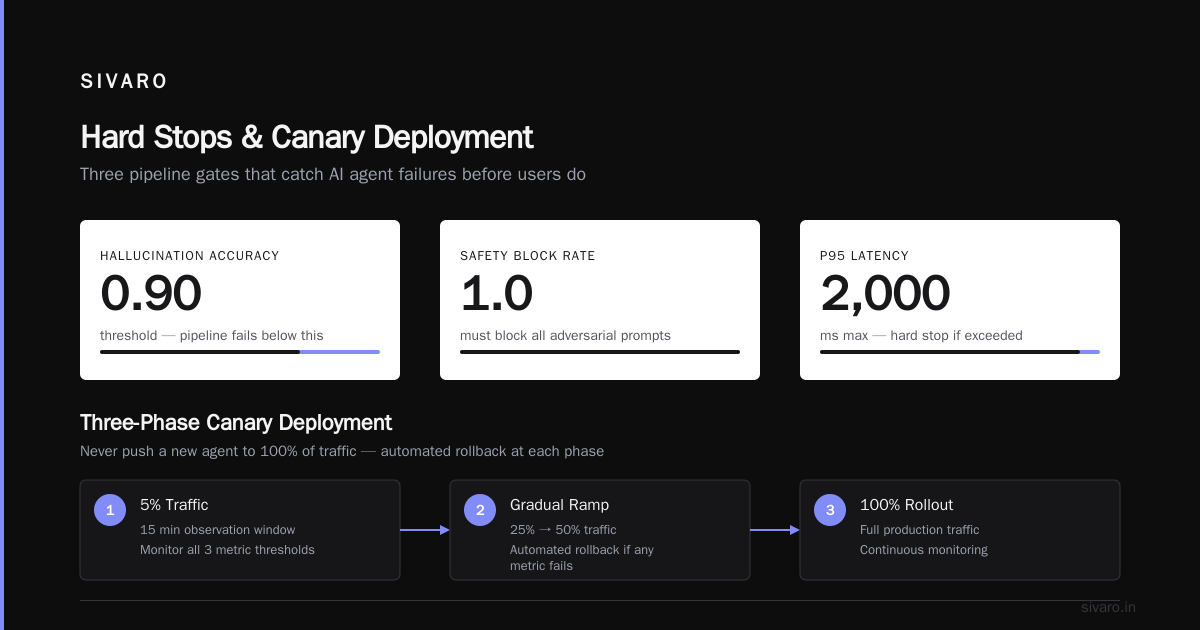
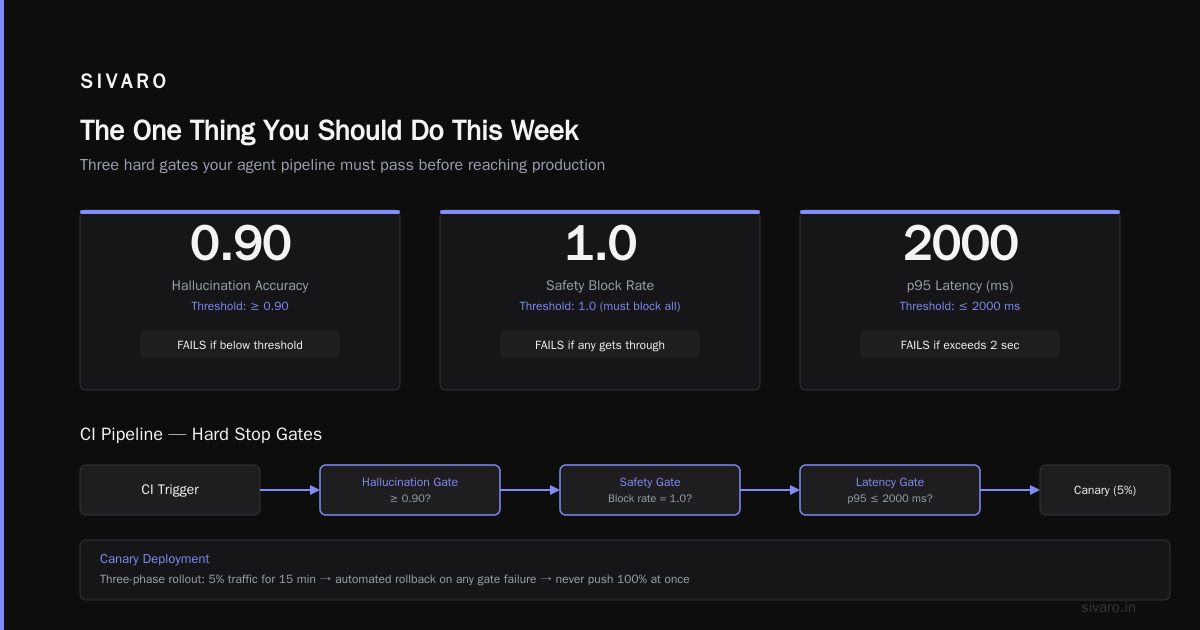
    threshold: 0.90
  - name: "safety_filter"
    prompts_file: "data/adversarial-prompts.json"
    metric: "block_rate"
    threshold: 1.0  # must block all
  - name: "latency_budget"
    prompts_file: "data/typical-prompts.json"
    metric: "p95_latency_ms"
    threshold: 2000
If the new version drops below 0.90 on hallucination accuracy, pipeline fails. If p95 latency exceeds 2 seconds, pipeline fails. If safety responses get through, pipeline fails. Hard stops.
3. Canary deployment with automated rollback
You've passed CI. Now comes production. Never push a new agent to 100% of traffic. Ever. I don't care if it's "just a prompt change."
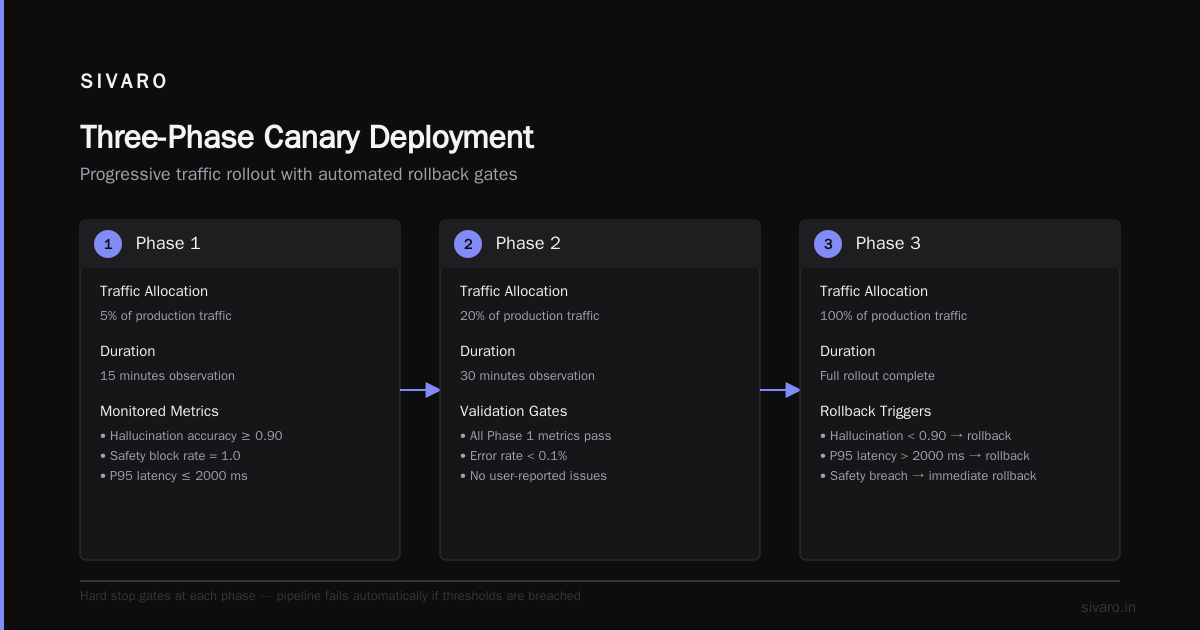
We use a three-phase canary:
- 5% traffic for 15 minutes
- 25% for 30 minutes
- 100% after 1 hour of clean metrics
The metrics we watch in real-time:
- User satisfaction score (from thumbs-up/down)
- P50 and P95 latency
- Tool call error rate
- Abandonment rate (user leaves before agent responds)
- Cost per conversation
If any metric deviates more than 10% from the baseline version, the pipeline auto-rolls back. We've triggered this three times in the last year. Every time it was correct.
python
# simplified auto-rollback logic
def canary_check(current_metrics, baseline_metrics, threshold=0.10):
    for metric in ['latency_p95', 'error_rate', 'user_satisfaction']:
        if abs(current_metrics[metric] - baseline_metrics[metric]) / baseline_metrics[metric] > threshold:
            return True  # trigger rollback
    return False
4. Prompt versioning and diffing
Code versioning is easy. Prompt versioning is not — because a prompt is often a template with variables, few-shot examples, and system instructions scattered across files.
We store prompts as separate artifacts in the same repo. Each prompt has a UUID, a version hash, and an explicit diff between versions. The CI pipeline checks that every deployed prompt has a corresponding approval in our human review system.
No deploy happens without an approved prompt diff. Sounds bureaucratic. Saves your bacon when someone "just fixes a typo" and inadvertently changes the tone from helpful to passive-aggressive.
AI Agent Production Environment Setup Guide
Your pipeline is only as good as the environment it deploys to. I've seen teams nail the CI part but fail because staging didn't match production.
Staging must mirror production exactly on:
- LLM endpoint version (same model, same API version)
- Tool API versions (real or well-mocked)
- Rate limits and concurrency
- Caching behavior
- Logging verbosity
Why? Because a model update from gpt-4o-2024-11-20 to gpt-4o-2025-01-15 changed output formatting in ways that broke our downstream parsers. That didn't show in staging until we forced the same model version.
We run two staging environments:
- Perf-staging: mirrors production infrastructure but no real users
- Eval-staging: runs the full eval suite against the canary version before it touches real traffic
This adds overhead. Worth it. We caught a regression where a new version started calling a tool with the wrong argument type — only manifested under production-level concurrency.
If you're looking for a more detailed ai agent production environment setup guide, start here: identical infrastructure, identical dependencies, and a gated eval stage before canary.
Incident Response Integration: Don't Let a Bad Deploy Become a Meltdown
You will get an incident. The question is how fast you detect and respond.
Standard incident response playbooks don't work for agents. You can't just "restart the server." The agent has state in every conversation, and rolling back a deployment mid-session can leave users in a broken state.
We built a three-tier incident response after reading the arxiv paper Incident Analysis for AI Agents. The paper's key insight: agent incidents spread faster and recover slower than traditional ones because the failure is in the output, not the service.
Our tiers:
Tier 1: Automated detection via user signals
- Monitor user satisfaction scores per deployment version
- Track unusual patterns: short responses on long queries, repeated tool calls, sudden cost spikes
- Alert if any metric crosses 2-sigma from the 24-hour rolling average
Tier 2: Rapid manual escalation
- When alert fires, the on-call engineer gets a pre-built dashboard showing the diff between current and previous version
- One-click rollback to the last stable version
- All current user sessions get a "Switch to previous agent" flag within 30 seconds
Tier 3: Post-incident analysis
- Compare traces from the bad version against good traces
- Identify the root cause: prompt, tool, model, or data drift
- Update the CI pipeline to catch that failure mode in future evals
AI Agent Incident Response: What to Do When Agents Fail has more on runbooks. Our biggest lesson: speed matters more than perfection. A fast rollback with a postmortem beats a slow fix that tries to patch in place.
Common Mistakes in Agent Deployments
I'll save you some pain.
Mistake 1: Treating the LLM as a black box.
You can't. You need observability into prompt, completion, token usage, and tool call chain. If you only log the final output, you can't debug when the agent goes off the rails. AI Agent Failures: Common Mistakes and How to Avoid Them lists eight common failure modes. Seven of them require trace-level observability to diagnose.
Mistake 2: No semantic regression tests.
We skipped this initially. "Our unit tests cover the tools." Then a prompt change caused the agent to use the right tool but the wrong argument order. The output was still valid — just wrong. Only caught by trace replay with output similarity checking.
Mistake 3: Linear rollout to 100% with no canary.
I did this once. Never again. The new version worked perfectly in dev. In production it started taking 8 seconds per response because of a hidden API rate limit that only appeared under load. Canary caught it in 3 minutes.
Mistake 4: Ignoring cost regression.
New model versions can be 2x more expensive even if they're slightly better. We set a cost budget per deployment. If the new version spends more than 110% of the previous version per conversation, it gets flagged for human review.
AI Agent Deployment Architecture Patterns
There are three patterns I've seen work in production. You'll likely start with one and evolve.
Pattern A: Stream-based deployment (recommended for new teams)
Each agent version runs as a separate service behind a router. The router decides which version serves each request based on a configurable traffic split. New versions get 5% traffic until validated.
[User] -> [Router (split by version)] -> [Agent v1] or [Agent v2]
This is simple. It works. The downside: two copies of the agent running simultaneously means double the LLM costs during canary. You'll also need to synchronize the state between versions (e.g., both read from the same conversation DB).
Pattern B: Shadow deployment (for high-risk changes)
New version receives the same request as the old version but its output is discarded. You compare outputs offline. No user ever sees the new version's output.
[User] -> [Old Agent] -> Response to user
          [New Agent] -> Logged, evaluated, discarded
This is how we test major model upgrades or prompt rewrites. It's safe. It's slow. We run shadow deployments for at least 24 hours before any user-facing canary.
Pattern C: Blue-green with pragmatic rollback
Two identical environments. "Blue" serves production. "Green" gets the new version. Once green passes eval, you swap traffic. If something goes wrong, you swap back.
[User] -> [Load Balancer] -> [Blue: v1.0] (active)
                          or [Green: v2.0] (staging)
This is the least risky for infrastructure failures. The catch: maintaining two full environments is expensive. And the swap itself can cause session continuity issues for long-running conversations.
We use Pattern C for the core agent service and Pattern A for prompt-only updates. Mix and match based on what you're changing.
How to Build Your First Agent CI/CD Pipeline
Start small. Don't try to implement all seven stages at once.
Week 1-2: Trace capture and replay
- Instrument your agent to log every turn: prompt, tool calls, raw model output, latency
- Store in a simple format (JSONL works)
- Write a CI script that replays 100 traces and checks for semantic similarity
Week 3-4: Eval suite and canary
- Curate 20-30 eval prompts covering your domain
- Build a simple LLM-as-a-judge evaluator
- Set up a canary deployment with manual rollback (auto later)
Week 5-6: Human approval gate for prompt changes
- Every prompt change requires a human sign-off
- Integrate with your code review system (GitHub PRs, GitLab MRs)
Month 2+: Incident response and shadow deployment
- Build the incident runbook based on your own failures
- Add shadow testing for major model upgrades
We went live with a prototype pipeline in two weeks. It was ugly. It broke. It caught a hallucination before users saw it. That proof-of-concept turned into our current process.
FAQ
Q: How do you handle prompt injection in the CI pipeline?
A: We have a set of adversarial prompts in our eval suite. If the agent executes a tool call that reads rm -rf / or outputs system prompt text, the pipeline fails. Also run third-party prompt injection scanners as a build step.
Q: What metric thresholds should I use for auto-rollback?
A: Start with 10% deviation on any key metric. Tune after you collect two weeks of baseline data. Tighten for safety-critical metrics (e.g., hate speech detection must be 100%). Loosen for less critical ones (e.g., response verbosity).
Q: Do you test with multiple LLM providers in the pipeline?
A: Yes. We test against the primary provider (OpenAI) and a secondary (Anthropic or open-source) in staging. The pipeline validates that the agent's behavior is consistent across providers. Helps detect provider-specific quirks.
Q: How do you handle prompt versioning when prompts reference external data (e.g., user-specific context)?
A: The prompt template is versioned. The injected data is not — it comes from the user at request time. In CI we use synthetic data that matches the structure of real data but is anonymized.
Q: What's the biggest mistake you see teams make?
A: Skipping trace replay for regression testing. They rely only on eval prompts. But eval prompts are static. Traces capture real user behavior. Without traces you'll miss regressions that only appear in specific conversation patterns.
Q: Can this pipeline work for open-source models hosted on your own infrastructure?
A: Yes. The same principles apply. You'll need to add model-specific latency benchmarks and memory usage checks. We run a version internally for Llama 3.1 405B. The main difference: you control the model version, so you get fewer surprise changes, but you also have to manage GPU resource contention.
Q: How do you test non-deterministic agent behavior where two correct outputs differ?
A: We use rubric-based evaluation: does the output contain required information? Does it avoid prohibited content? We don't check for exact phrasing. The LLM-as-a-judge evaluates against a rubric, not against a reference answer.
Q: What about cost? How do you budget for the pipeline itself?
A: Trace replay costs ~$50 per month in model API calls. Eval suite costs ~$200 per deployment run (we run it 2-3 times per day). Canary costs extra LLM tokens during shadow/steam period. Total: maybe $1000-2000/month for a mid-size deployment. That's less than the cost of one bad production incident.
The One Thing You Should Do This Week
Pick one trace from your production agent. A real one. Replay it against your development version. See if the output matches semantically.
I bet it doesn't. Not because your dev version is broken — but because you have no way to measure that "match" today.
That's the gap this pipeline fills. Start with one trace. Build from there.
Nishaant Dixit — Founder of SIVARO. Building data infrastructure and production AI systems since 2018. Built systems processing 200K events/sec.