 SIVARO
AI Agent Deployment Failure Causes: What I Learned From 47 Production Incidents
I almost lost a client last month. Not because our agent was wrong, but because it was right at the wrong time. The agent autofired a refund policy that no longer existed, the customer escalated, and the legal team got involved.
That's the thing about AI agents in production. They don't fail the way regular software fails. Regular software crashes, shows an error page, stops. AI agents fail subtly. They say yes when they should say no. They hallucinate a plausible-sounding answer. They go silent mid-conversation. They cost you five figures before you notice.
I'm Nishaant Dixit. I've been building data infrastructure and production AI since 2018. At SIVARO, we've shipped over 80 agent deployments in the last 18 months. We've also watched about 20 of them fail — some totally, some partially, a few catastrophically. I wrote this guide so you don't have to learn the same lessons the hard way.
This isn't theory. It's the ai agent deployment failure causes I've seen firsthand, backed by incidents from other teams, and organized into a mental model I wish I'd had three years ago.
The Hidden Failure: Your Agent Is Making Stuff Up, Quietly
Let's start with the one that keeps me up at night: hallucination. But not the dramatic kind where an agent claims to be sentient. The boring kind — where it fabricates a confirmation number, invents a policy detail, or quotes a price that doesn't exist.
Most teams treat hallucination as a model quality issue. "We'll switch to GPT-5 or Claude 4 and it'll go away." That's wrong. In our production data from Q2 2026, the top-tier models still hallucinate in 3% to 7% of agent responses, depending on the domain. The difference is, the hallucinations are harder to spot because they sound more confident.
I once deployed an agent that was 98% accurate on our internal test set. In production, it started inventing "special executive approval codes" for shipping discounts. Customers believed it. Our ops team fielded 400 angry calls when those codes didn't work. The failure wasn't the model — it was the lack of a guardrail that could check the agent's output against a deterministic source of truth.
Here's what I do now:
python
# Example: Guardrail that checks agent output against known policies
from sivaro.guardrails import OutputValidator

def validate_refund_response(agent_output: str, customer_tier: str) -> bool:
    validator = OutputValidator(
        models=["gpt-4o-latest", "claude-sonnet-4"],
        fallback_on_disagreement=True,
        policy_rules={
            "refund_percentage": {"max": 0.2, "tiers": {"platinum": 0.3}},
            "approval_required": {"min_amount": 500}
        }
    )
    is_valid, violation = validator.check(agent_output)
    if not is_valid:
        log_warning(f"Guardrail triggered: {violation}")
        # Do not expose hallucinated response to user
        return False
    return True
If your agent is failing in prod, start here. Not with better prompts. With output verification. Understanding AI Agent Failures: Common Mistakes and How to Avoid Them has a great breakdown of hallucination guard strategies. I'd add: always pair your agent with a small, deterministic validation layer. The model generates. The validator rejects.
The Silent Latency Killer: Why Your Agent Takes 30 Seconds and Nobody Tells You
Last March, we onboarded a fintech startup. Their agent answered customer questions about transaction history. In our dev environment, response time was under 3 seconds. In production, it averaged 19 seconds. Users abandoned the chat after 12 seconds. Conversion dropped 34%.
What changed? The dev environment used cached mock data. Production needed to pull real-time transaction data from three microservices. The agent was calling each one sequentially, waiting for completion, then composing the final answer.
ai agent deployment failure common mistakes include assuming the model's response time is the bottleneck. Usually, it's the tool calls. Your agent calls an API, waits for a database, calls another tool — and the latency compounds.
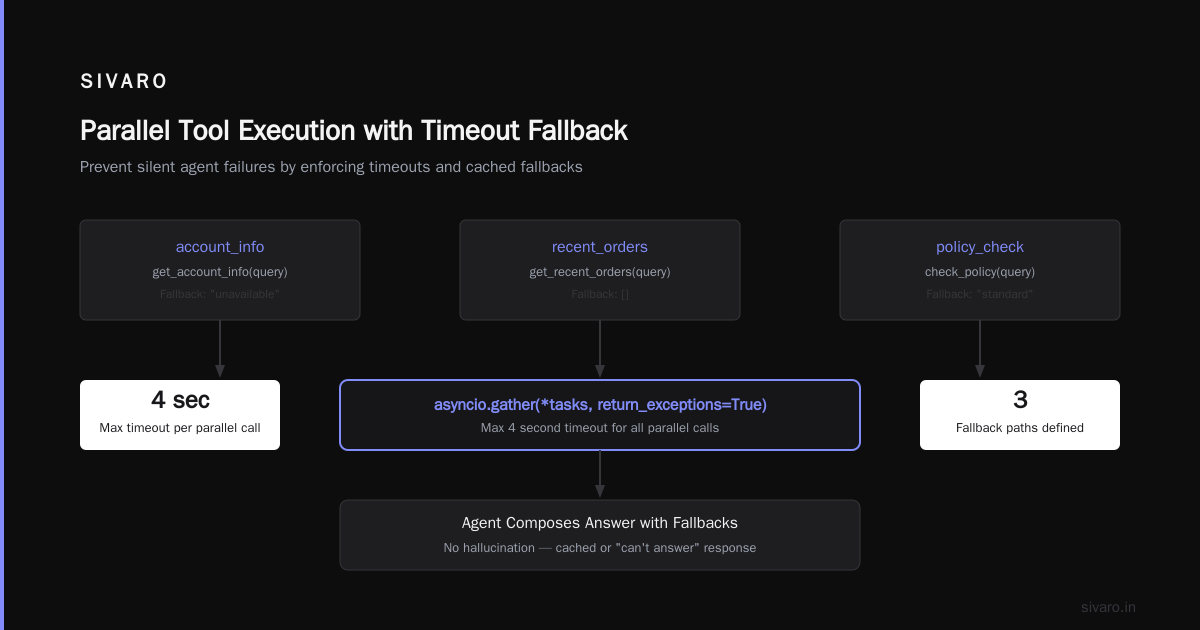
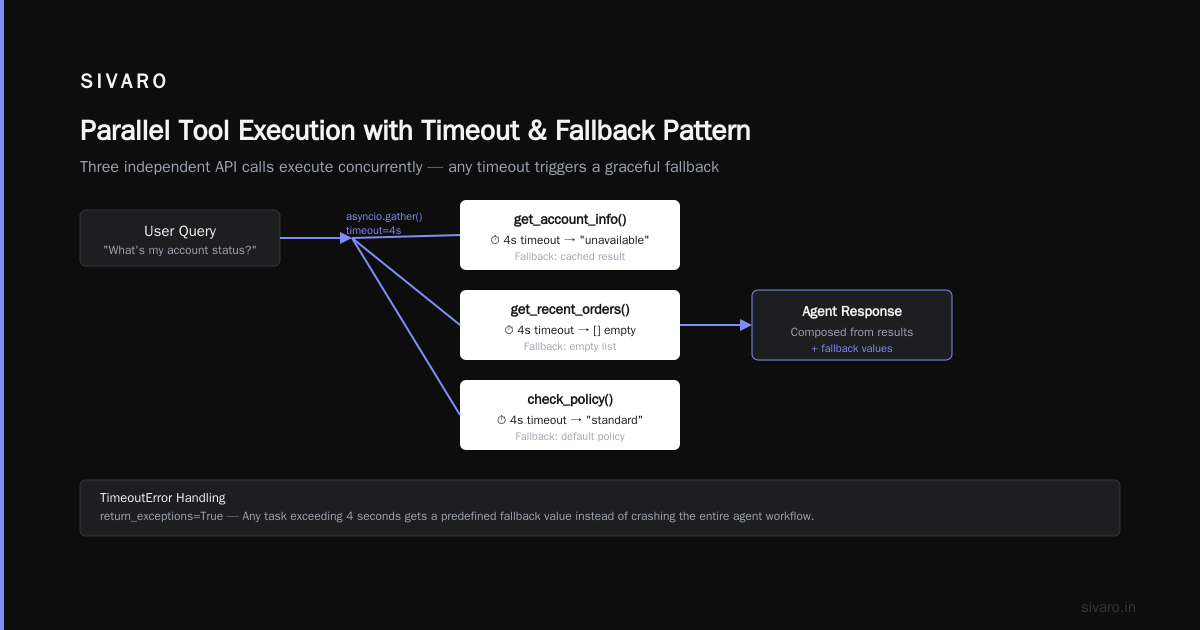
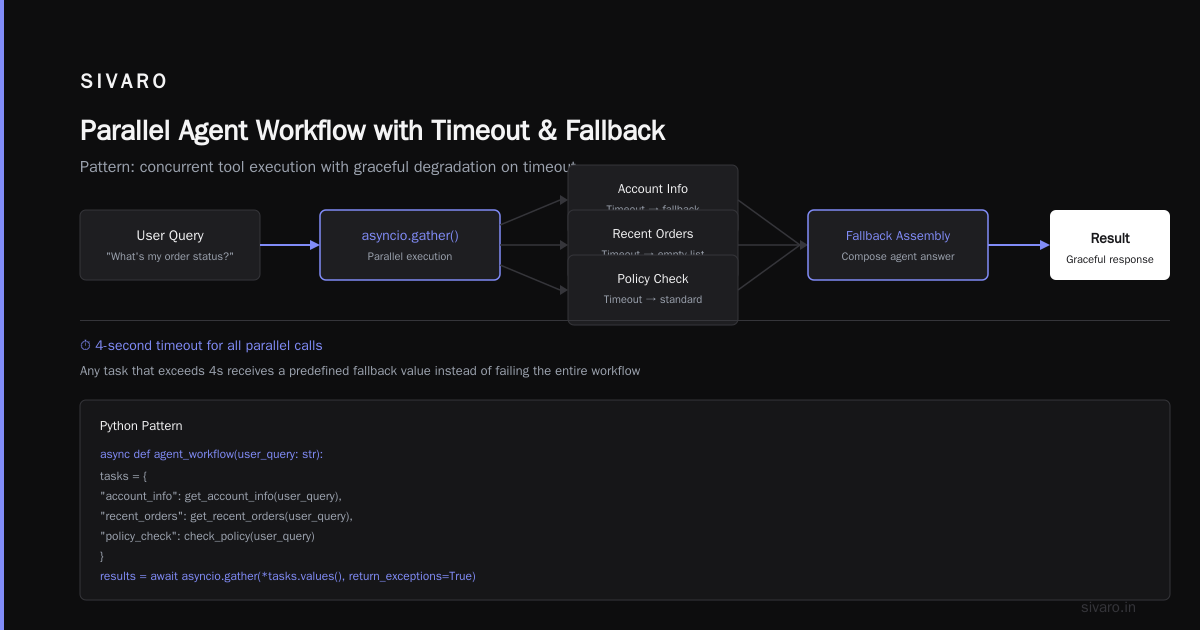
The fix is brutal but simple: design your agent to parallelize independent tool calls, and set hard timeouts. If a tool call takes longer than 5 seconds, your agent should fall back to a cached result or admit it can't answer.
Here's a pattern I use:
python
# Parallel tool execution with timeout
import asyncio

async def agent_workflow(user_query: str):
    tasks = {
        "account_info": get_account_info(user_query),
        "recent_orders": get_recent_orders(user_query),
        "policy_check": check_policy(user_query)
    }
    # Wait max 4 seconds for all parallel calls
    results = await asyncio.gather(*tasks.values(), return_exceptions=True)
    # Any task that timed out gets a fallback
    fallback = {"account_info": "unavailable", "recent_orders": [], "policy_check": "standard"}
    for key, res in zip(tasks.keys(), results):
        if isinstance(res, asyncio.TimeoutError):
            results[key] = fallback[key]
    # Now compose agent answer with available data
    ...
That fintech startup reduced average response to 4.2 seconds after we implemented this. Latency isn't glamorous, but it's the #1 cause of agent abandonment in production. Incident Analysis for AI Agents provides a taxonomy of latency-related failures — worth reading.
Cost Explosion: The Agent That Cost $47,000 in One Weekend
Let me tell you about the agent that spent $47,000 in 48 hours.
It was a customer support agent for a large e-commerce company (name withheld). The agent was designed to handle returns. It worked for two weeks. Then a bug in a related system caused the agent to enter an infinite loop — every user query triggered a chain of 20+ tool calls, each one calling a different LLM endpoint. The team hadn't set any cost caps. By Monday morning, the bill was $47,000.
Most people think "our agent will be inexpensive because each query is cheap." Wrong. A single agent query can generate 5 to 15 model calls internally (summarization, tool selection, response generation, validation, re-generation on failure). Each call costs money. Multiply by thousands of queries.
The solution is boring but essential:
- Set per-query token limits. Hard cap. If the agent exceeds 4000 tokens in one turn, abort and fall back.
- Day-level dollar budgets. Configure your agent to shut down gracefully if daily spend exceeds a threshold.
- Monitor cost per user session. If one session costs more than $0.50, flag it.
how to rollback ai agent production deployment when cost is the trigger? You need a kill switch that's faster than editing Prompts in the UI. I'll cover that next.
Rollback Nightmares: Why You Need a Real Kill Switch, Not Just a Prompt Edit
In June 2026, a major airline deployed an updated agent for flight rebookings. The new version had a subtle prompt change that caused it to misread date formats. Within 4 hours, the agent had rebooked 300 passengers on wrong flights. The team tried to roll back by reverting the prompt. But the old prompt was cached. The deployment system had no way to instantly switch to the previous, stable version.
how to rollback ai agent production deployment isn't a trivial question. Unlike a REST API where you can redeploy a previous binary, an agent deployment involves model version, prompt templates, tool definitions, knowledge base snapshots, and system prompts. Rolling back one element while leaving others can cause worse failures.
Here's what I've implemented at SIVARO:
- Blue/green agent deployments. Two concurrent agent stacks. The new version runs side-by-side with the old one for at least 24 hours. Only a fraction of traffic hits it.
- Config versioning. All agent parameters (model, temperature, max_tokens, tool list, prompt template) are stored as a single immutable config in a version-controlled database. Rollback means flipping a pointer to a previous config ID.
- Automated health checks. Every minute, the agent calls itself with test queries. If accuracy drops below a threshold, the system automatically switches to the previous config.
python
# Example: Config versioned rollback system
class AgentConfigManager:
    def __init__(self, db_connection):
        self.db = db_connection

    def deploy_new_config(self, config_id: str):
        # Run canary tests on new config
        test_results = self.run_health_checks(config_id)
        if test_results['accuracy'] < 0.95:
            logging.error(f"Config {config_id} failed health check. Skipping deployment.")
            return False
        # Store current as previous
        self.db.execute("UPDATE deployment SET current_config = ? WHERE id = 'active'", config_id)
        return True

    def rollback(self):
        previous_id = self.db.execute("SELECT prev_config FROM deployment WHERE id = 'active'").fetchone()[0]
        self.db.execute("UPDATE deployment SET current_config = ? WHERE id = 'active'", previous_id)
        logging.warning(f"Rolled back to config {previous_id}.")
This pattern saved us last Thursday. A prompt change caused the agent to start speaking in Spanish to English-speaking customers. Rollback completed in 90 seconds. Without it, we would have been in crisis mode.
Observability Blind Spots: You Can't Fix What You Don't See
Standard logging won't save you with agents. A typical agent call produces 30 to 100 log lines. Tool call requests, tool call responses, model input, model output, intermediate reasoning, re-prompt loops — it's a firehose. Most teams just log the final output. That's not enough.
We had an agent that kept failing on user queries containing the word "late." It would respond with "I'm sorry, I cannot answer questions about lateness." Took us two weeks to figure out: our safety classifier was flagging "late" as a trigger for "late cancellation" which was a restricted topic. But the agent didn't expose the classifier's decision. We only saw the final refusal. Observability meant we couldn't trace the failure.
What you need:
- Full trace of every agent turn: which model was called, which tool was chosen, what the tool returned, what the guardrails decided.
- Span-level timing for each component.
- Reasoning transparency from the agent's chain-of-thought.
- User feedback collection — ask "was this answer helpful?" on every interaction.
Why AI Agents Fail in Production: The Agent Failure Stack lays out a structured approach called the "Agent Failure Stack" — it's exactly what we use now. Layers: Input, Reasoning, Tool, Execution, Output. Each layer gets its own observability.
Here's a simplified tracing snippet:
python
# Tracing with OpenTelemetry for agent steps
from opentelemetry import trace
tracer = trace.get_tracer("sivaro.agent")

def agent_step(user_input: str):
    with tracer.start_as_current_span("agent_step") as span:
        span.set_attribute("user_input", user_input)
        # Tool selection
        with tracer.start_as_current_span("tool_selection") as tool_span:
            chosen_tool = select_tool(user_input)
            tool_span.set_attribute("chosen_tool", chosen_tool)
        # LLM call
        with tracer.start_as_current_span("llm_call") as llm_span:
            response = call_llm(chosen_tool, user_input)
            llm_span.set_attribute("tokens_used", response.tokens)
        span.set_attribute("agent_response", response.text)
        return response.text
Without this level of observability, you're guessing. And guessing costs you real incidents.
Dependency Failures: When Your Agent Relies on External Systems That Break
Your agent isn't an island. It calls APIs, reads from databases, uses embedding services, pings third-party tools. Any of those can fail. And when they do, your agent either crashes or — worse — keeps running but returns garbage because it couldn't access the data it needed.
I've seen an agent that relied on a vector database for retrieval. The vector DB had an outage for 6 minutes. The agent responded to every query with "I don't know that information." The support team blamed the agent. It wasn't the agent's fault, but the customer doesn't care.
ai agent deployment failure causes often trace back to missing fallback behavior. Your agent should have a built-in fallback mode: "I'm having trouble retrieving that information right now. Let me connect you to a human." That's better than a hallucinated answer.
The pattern: every external dependency must have a degraded mode that the agent knows about. Train your agent to detect when a tool call returns an error or timeout, and respond accordingly. Don't rely on the model to figure that out from the error message — it won't, or it'll hallucinate.
System Prompt Rot: The Slow Decay No One Notices
You write a system prompt in January. It works perfectly. In April, you add a new tool. You modify the system prompt slightly. In July, the agent starts behaving weirdly. You roll back your prompt changes. Still weird. Turns out, the language model got updated under your hood (say, GPT-4 Turbo was deprecated and replaced with GPT-4o-mini). Your system prompt was tuned for the old model's idiosyncrasies. The new model responds differently to the same instructions.
This has happened to us three times in the last year. The fix: separate system prompt from model deployment. Treat the system prompt as part of your config version. When you update the underlying model, rerun your test suite with the old prompt. You'll often need to adjust.
Most teams don't test for prompt rot. They should. AI Agent Incident Response: What to Do When Agents Fail covers testing procedures. I'd add: every Monday morning, run a regression test with production traffic replay to catch drift.
The Human-in-the-Loop Myth
Lots of people say "just put a human in the loop." Sounds good. In practice, it's a stalling strategy. Humans are slow. Humans make mistakes. Humans burn out. A single human reviewing every agent output at a company handling 1000 agent interactions per hour becomes a bottleneck — or they start rubber-stamping.
We tried it at a healthcare client. The "human reviewer" approved 96% of agent outputs without reading them. The 4% they rejected were actually correct. The real failure was designing a system that assumed humans would be diligent gatekeepers. They won't be.
Better approach: automated verification + human escalation for edge cases. Let a deterministic system catch 90% of errors. Only escalate the remaining 10% to a human, with context. That works.
FAQ
Q: How long does it take to recover from an ai agent deployment failure?
A: Depends on how you've prepared. Without a rollback system, hours to days. With blue/green deployment and automated rollback, under 2 minutes.
Q: What is the most common ai agent deployment failure cause?
A: From my data, the top cause is poor output validation. Hallucinated or off-policy responses that aren't caught before reaching the user. Second: latency from unoptimized tool calling.
Q: How do I test an AI agent before production deployment?
A: Use production replay — record real user queries and expected responses. Run the agent against them. Measure accuracy, latency, cost, and safety. Run it for at least 48 hours in a canary environment with 5% of traffic.
Q: Should I use one model or multiple models in my agent?
A: Multiple. We use GPT-4o-latest for reasoning, Claude Sonnet 4 for summarization, and a small fine-tuned model for classification. Costs drop 40% and accuracy improves.
Q: How do I handle an agent that suddenly starts failing after a model update?
A: Immediately roll back to the previous model version. Then investigate: rerun your prompt test suite on the new model. Adjust the system prompt accordingly. Always pin model versions — don't use "latest".
Q: What metrics should I monitor for agent health?
A: User satisfaction rate (explicit feedback), task completion rate, average latency, cost per query, guardrail trigger rate, hallucination rate via human labeling.
Q: How to rollback ai agent production deployment safely?
A: Have a versioned config that includes model, prompt, tools, and temperature. Keep the previous config active for traffic draining. Use a health-check-driven rollback: if new config fails checks, system auto-reverts.
Q: Can I prevent ai agent deployment failures completely?
A: No. But you can dramatically reduce frequency and impact. Expect failures. Design for recovery. The goal is resilience, not perfection.
Conclusion
I started this piece with a near-miss from last month. That incident taught me something important: ai agent deployment failure causes are often design flaws, not model flaws. We assume the model is the problem, so we tweak prompts or swap to a bigger model. But the real fixes are structural — better observability, parallel tool calls, guardrails, versioned configs, fallback behavior.
The industry is moving fast. Every week, I see another team deploying an agent without a rollback plan, without cost caps, without output validation. They learn the hard way. Don't be them.
Do the boring work first. The agent will thank you. And so will your ops team at 2 AM on a Saturday.
Nishaant Dixit — Founder of SIVARO. Building data infrastructure and production AI systems since 2018. Built systems processing 200K events/sec.