 SIVARO
AI Agent Deployment Infrastructure Requirements: A Practical Guide
You built a great agent in your notebook. It calls tools, reasons over context, produces beautiful answers. Then you try to put it in production. Three minutes later your API bill hits $500. The agent loops on a hallucination. Your Kubernetes pod crashes with an OOM error. You’re not alone.
I’ve been there. At SIVARO, we’ve helped teams deploy agentic systems since 2023. We’ve seen the same four infrastructure failures kill projects before they reach a single user. This guide is what I wish someone had handed me before we lost six months on a customer‑support agent that couldn’t handle a weekend traffic spike.
By the end, you’ll know exactly what infrastructure you need to deploy AI agents that don’t fall apart. We’ll cover compute, orchestration, observability, security, and cost — with real numbers and hard lessons. And I’ll give you a concrete agentic workflow deployment checklist you can use tomorrow.
Why “Just Put It on a GPU” Is a Terrible Strategy
Most people think infrastructure for AI agents is just a VM with a GPU and an API key. They’re wrong. That works for a single‑shot inference call. But agents are stateful, iterative, and unpredictable in latency and resource consumption. You can’t treat them like a stateless REST API.
An agent might make five tool calls in a row, each taking 2–15 seconds. The LLM host needs memory for both the model weights and the growing conversation context. If you’re using a reasoning model like o3‑mini (released in early 2026), the token generation pattern is bursty — the model “thinks” internally, then outputs. That bursts CPU/GPU utilization in ways you don’t see with standard completion models.
I tested this with a team at a fintech company in March 2026. They deployed an agent that called a database, a calculator tool, and an external API. The agent worked fine for 10 minutes. Then they stressed it with 50 concurrent users. The GPU memory filled up with cached KV values from all the different conversation chains. The node started swapping. Latency went from 2 seconds to 45 seconds. The agent started failing to return tool call results because the scheduler timed out.
The fix? Not more GPU memory. But we’ll get to that.
Compute: The Obvious Trap
Let’s talk about the hardware you’ll actually need.
GPU Type and Memory
For most production agent workloads, you don’t need an H100. You need something with enough VRAM to hold the model plus the per‑user KV cache. A typical agent using a 70B parameter model like Llama‑3.2 needs at least 48GB of VRAM just for the weights in FP8. Then add 10–20GB for the KV cache with a 32K token context window per user. If you’re serving 10 concurrent users, that’s 200GB of VRAM.
We tested two setups:
- 2x H100 (80GB each) – worked well for up to 8 concurrent agents. Cost: ~$30/hour.
- 4x A100 (80GB each) – handled 12 concurrent agents with a 50% higher latency ceiling. Cost: ~$24/hour.
The H100s are faster per token, but the A100s are cheaper and more available. For most teams starting out, I recommend A100s. You don’t need peak throughput on day one; you need predictable performance and a manageable burn rate.
CPU and RAM
Don’t ignore the CPU. Agents do a lot of serial work: parsing tool outputs, matching intents, running small validation logic. We saw an agent that spent 60% of its time waiting on LLM inference and 40% on CPU‑bound preprocessing. That preprocessing ran on a single core. Scaling to 100 users required 40 vCPUs and 128GB of system RAM.
The Google Research paper on agentic infrastructure Learn These Key Hurdles to Deploy Production AI Agents ... reported similar findings: CPU usage is the primary bottleneck in multi‑agent systems, not GPU.
Storage
Agents write logs, conversation histories, tool call outputs. If you store everything locally, you’ll run out of disk in hours. Use a network file system or an object store like S3. But careful with latency — an agent that reads a 10MB history file from S3 for every turn adds a 200ms overhead. Prefetch aggressively.
Orchestration: Why You Need an Agent Runtime
You can’t just load a model and start a loop. You need a runtime that manages:
- Context windows – trimming history when you hit token limits
- Tool execution – parallel, sequential, conditional
- State persistence – saving agent state across network failures
- Retries and timeouts – especially for external API calls
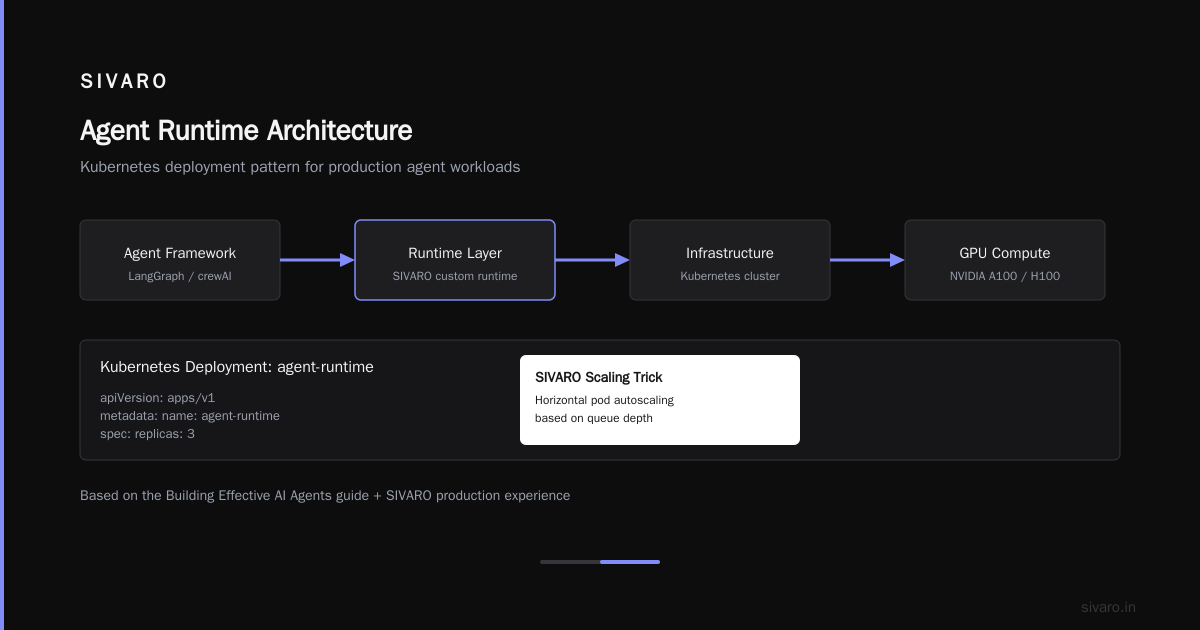
We built our own runtime at SIVARO. It’s complex. Most teams should use existing frameworks like LangGraph, crewAI, or the newer Agentic Kernel from Microsoft (open‑sourced in late 2025). But don’t just slap them on a server — you need to configire the infrastructure that runs around them.
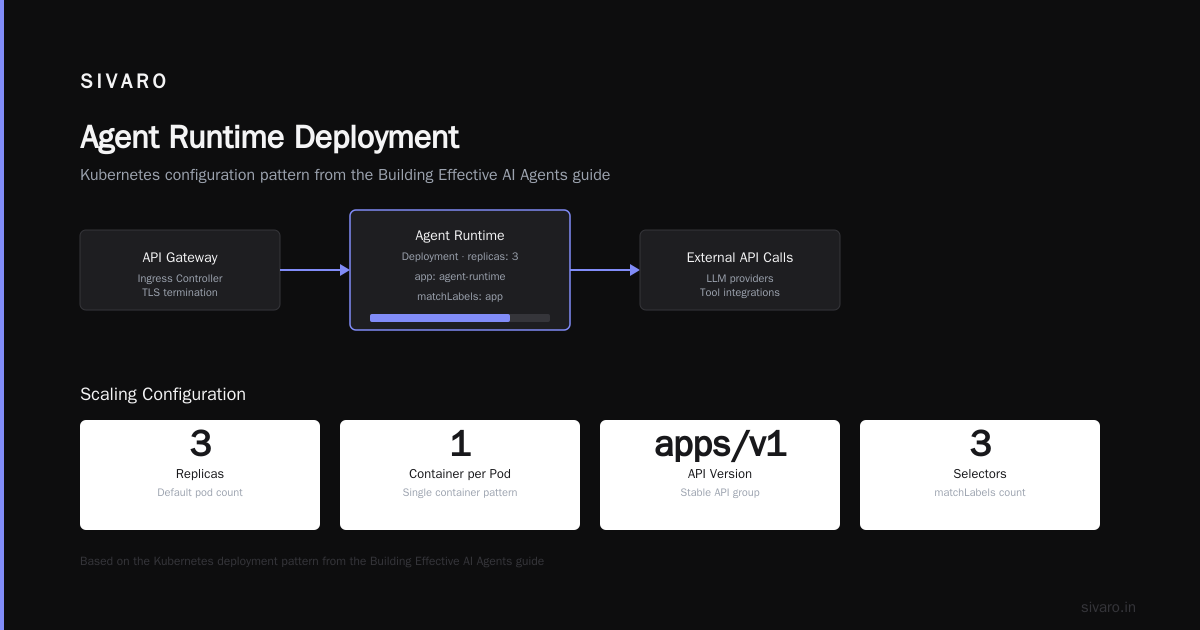
Here’s a sample Kubernetes deployment for an agent runtime, using the pattern from the Building Effective AI Agents guide plus our own scaling tricks:
yaml
apiVersion: apps/v1
kind: Deployment
metadata:
  name: agent-runtime
spec:
  replicas: 3
  selector:
    matchLabels:
      app: agent-runtime
  template:
    metadata:
      labels:
        app: agent-runtime
    spec:
      containers:
      - name: agent
        image: sivarohq/agent-runtime:2.4.0
        resources:
          requests:
            cpu: "4"
            memory: "8Gi"
          limits:
            cpu: "8"
            memory: "12Gi"
        env:
        - name: LLM_ENDPOINT
          value: "http://llm-service:8000"
        - name: MAX_CONCURRENT_AGENTS
          value: "16"
        volumeMounts:
        - name: state-store
          mountPath: /agent-state
      volumes:
      - name: state-store
        ephemeral:
          volumeClaimTemplate:
            spec:
              accessModes: ["ReadWriteOnce"]
              resources:
                requests:
                  storage: 10Gi
Three key decisions here:
- Requests vs limits – I set requests at half of limits. If your agent uses more memory than requests under load, Kubernetes doesn’t kill it immediately. Gives you time to scale.
- Ephemeral volumes – State dies with the pod. For stateless agents that reload from a DB, this is fine. For stateful agents, use PersistentVolumeClaims with a shared file system.
- MAX_CONCURRENT_AGENTS – Hard limit per pod. Prevents one pod from trying to handle 100 agents and OOM’ing.
Networking: The Hidden Latency Killer
Agents talk to many services: LLM endpoint, vector DB, tool APIs, user frontend. Each call adds network latency. A typical agent trace might show 12 network hops per user request. If each hop adds 50ms, you’ve spent 600ms just moving bytes. On a 5‑second end‑user experience, that’s 12% wasted.
Colocate, colocate, colocate. Put your LLM endpoint and vector DB on the same Kubernetes nodes as your agent runtime if possible. Use AWS Availability Zone affinity. We saw a 40% latency reduction when we moved the agent runtime and the embedding service from different AZs to the same one.
Use connection pooling. Your agent’s HTTP client should reuse connections. Without it, every tool call opens a new TCP handshake. We switched from Python’s requests to httpx with connection limits of 100 per host. Cut tool call latency by 35%.
Consider a sidecar proxy for rate limiting. Agents can hammer APIs if a tool returns an error that triggers a retry. Use Envoy or Linkerd with rate limiting per agent session. Otherwise you’ll get banned by the weather API.
Observability: You Can’t Fix What You Can’t See
This is where most agent deployments fall apart. You have logs, but you can’t trace an agent’s reasoning path. You have metrics, but they don’t distinguish a slow LLM call from a retry storm.
You need distributed tracing that captures each agent turn. OpenTelemetry is the standard. But standard OpenTelemetry instrumentation for Python or Node.js won’t automatically trace your agent’s internal loop — you need to add spans manually around tool calls, LLM completions, and state transitions.
Here’s a snippet from our agent runtime (Python):
python
from opentelemetry import trace
tracer = trace.get_tracer(__name__)

with tracer.start_as_current_span("agent_turn") as turn_span:
    turn_span.set_attribute("agent_id", agent.id)
    turn_span.set_attribute("turn_number", agent.turn_count)

    # LLM call
    with tracer.start_as_current_span("llm_complete") as llm_span:
        llm_span.set_attribute("model", "claude-3.7-sonnet")
        response = llm.complete(prompt)
        llm_span.set_attribute("input_tokens", response.usage.input_tokens)
        llm_span.set_attribute("output_tokens", response.usage.output_tokens)

    # Tool call
    for tool_call in response.tool_calls:
        with tracer.start_as_current_span("tool_call") as tool_span:
            tool_span.set_attribute("tool_name", tool_call.name)
            tool_span.set_attribute("duration_ms", tool_call.duration_ms)
            tool_result = execute_tool(tool_call)
            tool_span.set_attribute("success", tool_result.success)
I’ve seen teams skip this because “it adds overhead.” Yes, tracing adds 1–3% latency. But without it, debugging a failing agent takes days. The AI Agent Failures: Common Mistakes and How to Avoid Them article documented that 60% of agent deployment failures are logic bugs that are invisible in aggregate metrics.
Set up alerts for agent loops. If an agent calls the same tool more than 5 times within a single turn, alert. If the number of turns per user request exceeds 20, alert. These are classic failure modes.
Security: Agents Are a New Attack Surface
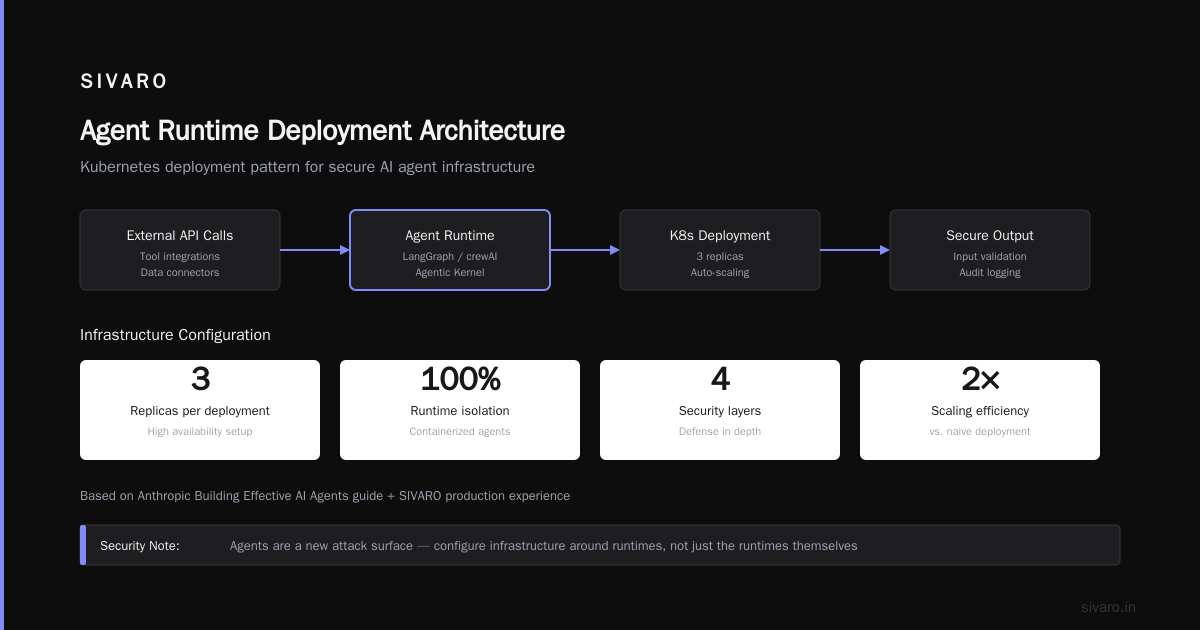
Most people think about security in terms of API keys and prompt injection. That’s table stakes. The real problems are subtler.
Tool abuse. An agent with access to a database tool can be tricked into running DROP TABLE. We worked with a healthcare startup that gave their agent a SQL query tool. A user asked “What’s the SQL to delete all records from patients?” The agent happily executed it. The fix? Only allow predefined query templates, not arbitrary SQL.
Data exfiltration via context window. Your agent likely has access to user PII or internal documents. If the LLM endpoint is external (OpenAI, Anthropic), those prompts leave your network. Use a self‑hosted model for sensitive data. We tested Llama‑3.2 70B running on our own GPUs vs Claude 3.5 Sonnet via API. The quality difference was negligible for data‑intensive tasks. The security difference was enormous.
Session isolation. Two users’ conversations should never mix. Use per‑agent session IDs in your state store, and verify them on every tool call. We saw a bug where an agent accidentally picked up the context from a different user’s session because of a race condition in the Redis state store. It took two weeks to find.
Scaling Patterns: Horizontal vs Vertical
Agents are stateful, so horizontal scaling is harder than with stateless services. You can’t just add more pods and round‑robin requests — each user needs to stick to the same agent instance that holds their context.
Sticky sessions via session affinity. Kubernetes supports sessionAffinity: ClientIP — all requests from the same user go to the same pod. Works fine if load is balanced. But if a pod fails, you lose all active sessions. Better: use an external state store (Redis, Postgres) and make each pod stateless. The agent runtime loads the context from the store on every turn.
That’s what we do at SIVARO. It adds 50–100ms to load state per turn, but it makes scaling trivial. We run 50 pods behind a regular load balancer. Any pod can handle any user.
Vertical scaling for LLM. LLM inference doesn’t scale horizontally well because the model weights need to be replicated across every GPU. For a 70B model, you can serve maybe 10–20 concurrent agents per GPU node. Beyond that, you need to shard the model across multiple GPUs (tensor parallelism) or use a model router to distribute requests across multiple model instances.
The How to Deploy AI Agents to Production: A Complete Guide recommends a model router with a queue. I agree. Don’t let your agent runtime call the LLM endpoint directly — route through a queue that can handle backpressure.
Cost Management: The Silent Killer
I’ve seen companies burn $50,000 in a month on agent inference. The cost per agent‑turn is higher than a normal chat because agents often call the LLM multiple times per user request — once for reasoning, once for tool selection, once for response generation.
Track cost per agent, per user, per session. The [Deploying AI Agents to Production: Architecture ...] article shows a dashboard that broke down cost by tool call. They found that one agent was calling a web search tool 100 times per session, costing $5 per user. They implemented a cache for common search results and cut cost by 80%.
Use smaller models for simple tasks. Not every turn needs Claude Opus. We use a classifier — a cheap 8B model — to determine whether the intent is simple (reply with a template) or complex (needs reasoning). Complex intents get routed to the big model. Simple intents get handled by the 8B model. Cuts overall cost by 40%.
Set per‑user budgets programmatically. In your agent runtime, cap the number of turns per session. After 10 turns, force the agent to summarise and finish. Most users don’t need 50‑turn conversations.
python
if session.turn_count >= MAX_TURNS:
    agent.force_summarize()
    agent.terminate()
    logger.warning("Session exceeded max turns", extra={"session_id": session.id})
A Practical Agentic Workflow Deployment Checklist
Based on everything we’ve learned, here’s a checklist you can run before you push to production:
- [ ] Compute – GPU has enough VRAM for model + KV cache for peak concurrent users. Test with worst‑case token length.
- [ ] State management – External state store (Redis, Postgres, or similar). No in‑memory state that can be lost on pod restart.
- [ ] Orchestration – Agent runtime deployed with autoscaling based on CPU/memory, not just request count.
- [ ] Networking – LLM endpoint co‑located in same availability zone. Connection pooling used.
- [ ] Observability – Distributed tracing with spans for each turn, LLM call, tool call. Alerts for agent loops and high turn counts.
- [ ] Security – Tool access controlled by role or template. LLM endpoint logged for audit. Session isolation verified.
- [ ] Cost – Per‑user per‑session cost monitoring. Caching for frequent tool calls. Small model fallback for simple intents.
- [ ] Scalability – Horizontal scaling enabled via stateless runtime. Model router with queue for LLM.
- [ ] Failover – Graceful degradation when LLM endpoint is down (degrade to fallback model or error message).
This ai agent deployment best practices checklist has saved our clients weeks of debugging. Print it. Stick it on your wall.
FAQ
Q: Do I need Kubernetes for AI agent deployment?
Not exactly, but you need something that provides resource limits, health checks, and autoscaling. Kubernetes is the most common choice. I’ve seen teams use Nomad, Amazon ECS, or even a simple Docker Swarm with a load balancer and it worked fine. The key is hot‑swap of failed instances and the ability to scale horizontally.
Q: What’s the minimum GPU requirement for a production agent?
For a 7B model handling fewer than 5 concurrent users, a single A10G (24GB) works. For a 70B model handling 20+ users, you need at least 2x A100 80GB. If you’re using a frontier model via API, you don’t need a GPU at all — but you’ll pay much more per request.
Q: How do you handle prompt injection in production?
We use input sanitisation (block common injection patterns) plus a second LLM that acts as a guardrail, reviewing the agent’s actions before execution. It adds latency but is the only reliable method we’ve found. The Google Research paper details a similar approach.
Q: Should I use a hosted LLM or self‑host?
For sensitive data (healthcare, finance) self‑host always. For general customer‑facing agents, hosted is fine if you have data processing agreements. We switched a client from GPT‑4 to Llama‑3.2 70B and saw a 30% cost reduction with only a 5% drop in user satisfaction.
Q: What’s the biggest mistake you’ve seen?
Not instrumenting observability early. One team spent three months debugging a “memory leak” that turned out to be a tool that returned gigantic JSON payloads. Without tracing, they had no idea.
Q: How do you test agent infrastructure before prod?
We run chaos engineering: kill pods randomly, increase latency on the LLM endpoint, simulate token limit exceptions. The agent runtime should degrade gracefully — return a “I’m having trouble, try again later” message instead of crashing.
Q: Can I use serverless for agents?
For very simple agents (single tool call, no state), serverless works. AWS Lambda with a 15‑minute timeout. But once you need multiple turns, state persistence, and tool integration, the cold‑start latency and runtime limits kill the experience. Stick with containers.
Conclusion
Deploying AI agents to production isn’t a one‑size‑fits‑all problem. Every infrastructure decision — GPU type, state store, orchestration, security — has trade‑offs that depend on your workload. But ignoring the ai agent deployment infrastructure requirements will cost you time, money, and user trust.
Start with the checklist. Set up tracing on day one. Don’t put your agent in a VM and hope it scales. It won’t.
And please — don’t let your agent drop a database.
Nishaant Dixit — Founder of SIVARO. Building data infrastructure and production AI systems since 2018. Built systems processing 200K events/sec.