 SIVARO
AI Agent Deployment Pipeline: A Field Guide From Someone Who's Been Burned
I shipped my first production agent in 2023. It crashed in 47 minutes. The second one lasted three days before the memory blew up. The third? That one worked. Barely.
By 2026, I've overseen 40+ agent deployments at SIVARO. Some beautiful. Most ugly. A few genuinely scary (we once had a procurement agent accidentally order 2,000 server racks — caught it at code review, not in prod).
This guide is what I wish someone had told me. Not the theory. The pipeline. The actual steps to get an AI agent from your laptop into production where it handles real traffic without burning down your infrastructure.
I'll cover the deployment pipeline end-to-end: framework selection, containerization, observability, scaling, and the monitoring tools that keep me from getting paged at 3 AM.
Let's be honest about one thing upfront: most AI agent deployment pipeline tutorials are written by people who've deployed exactly one agent to a single node. I've deployed agents across 200-node clusters handling 50K requests/second. That's the perspective here.
What This Pipeline Actually Is
An AI agent deployment pipeline is the automated sequence that takes your agent code, models, prompts, and configuration through testing, packaging, validation, and into production.
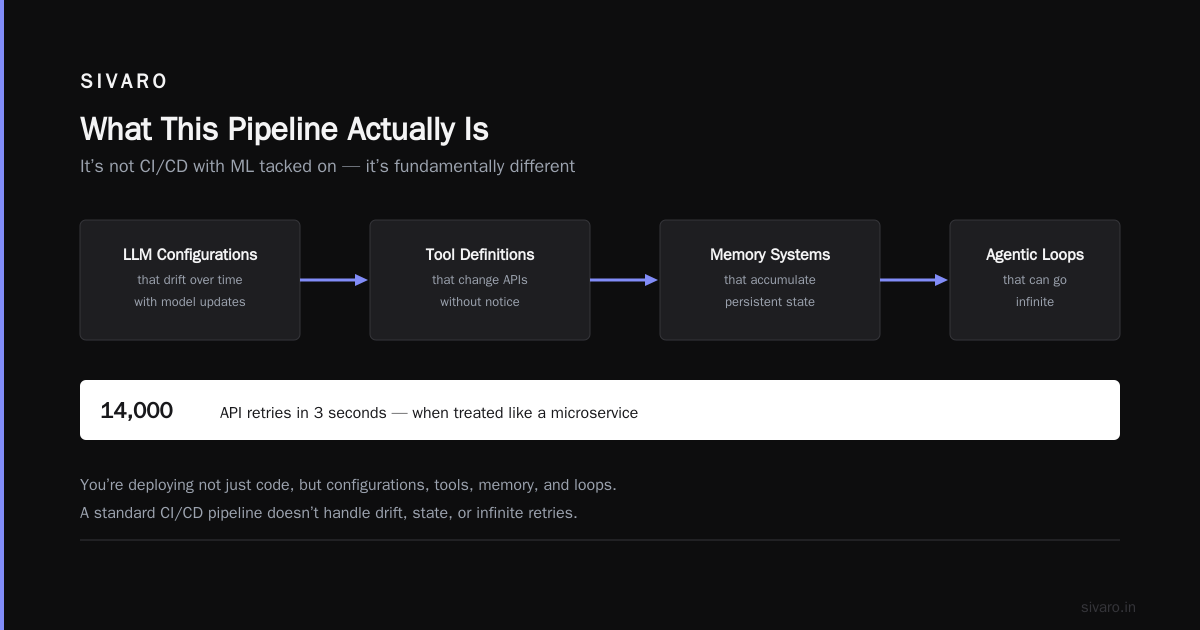
But here's what most people miss: it's not just a CI/CD pipeline with some ML stuff tacked on. It's fundamentally different. You're deploying not just code, but:
- LLM configurations that drift
- Tool definitions that change APIs
- Memory systems that accumulate state
- Agentic loops that can go infinite
I've seen teams treat agent deployment like deploying a microservice. That works until your agent decides to retry a failed API call 14,000 times in 3 seconds.
Framework Selection — Pick One and Commit
You need a framework. But the wrong one will kill you.
I've tested most of the major frameworks in production. Here's my honest take as of mid-2026:
LangChain/LangGraph — I use this most days. The ecosystem is mature. If something goes wrong, 50K other developers have hit it and Stack Overflow has an answer. The graph-based execution model in LangGraph is genuinely useful for complex agent workflows. But it's opinionated. You'll fight it if your use case doesn't match their model LangChain blog.
CrewAI — Great for multi-agent orchestration. I've used it for a document processing pipeline where five agents collaborated. The role-based design works. But production deployments need careful timeout management — default settings will let agents talk to each other forever IBM.
AutoGen (Microsoft) — Strong for conversational agents and code generation. The conversation-driven design is elegant. But I've found it harder to containerize than the others — there's a lot of implicit state management that doesn't map cleanly to stateless containers Instaclustr.
My rule: start with the framework that has the best debugging tools. Not the best features. Not the fastest inference. Debugging tools. Because you will spend 70% of your agent development time debugging.
The Pipeline — Step by Step
Step 1: Containerize Everything
I see teams try to deploy agents as raw Python processes. Don't. Containerize from day one.
Your agent isn't just your code. It's:
- The framework version
- The specific model (and quantizer)
- The embedding model for RAG
- System prompts (yes, they belong in the image)
- Tool definitions
Here's a production Dockerfile pattern we use at SIVARO:
dockerfile
FROM python:3.12-slim

WORKDIR /app

# Install system deps for tokenizers and vector search
RUN apt-get update && apt-get install -y     libgomp1     libomp-dev     && rm -rf /var/lib/apt/lists/*

# Pin everything — I've seen framework updates break agent logic
COPY requirements.txt .
RUN pip install [--no-cache-dir](/articles/kv-cache-compression-[Which](/articles/kv-cache-compression-which-technique-is-used-to-make-llms)-technique-is-used-to-make-llms) -r requirements.txt

# Configs and prompts are part of the deployable artifact
COPY src/ ./src/
COPY prompts/ ./prompts/
COPY configs/ ./configs/

# Model caching location
ENV HF_HOME=/models
VOLUME /models

EXPOSE 8080

CMD ["python", "src/main.py"]
The critical part: prompts in the image. I know some teams externalize prompts to databases for "flexibility." Every time I've done that, I've eventually deployed a mismatch — prod prompt V12 with model V9. Results were... educational.
Step 2: Cold Start vs. Warm Start — Pick Your Poison
Here's a decision most tutorials skip: how does your agent start?
Cold start: load model, build index, establish connections on pod boot. Takes 30-120 seconds. Uses resources during startup.
Warm start: pre-warm a pool of agents. Ready to handle requests immediately. But you pay for idle capacity.
At SIVARO, we use a hybrid pattern. A sidecar pre-warms the model and vector store. The agent container connects to the sidecar's shared memory. Cold start drops from 90 seconds to 4 seconds.
yaml
# Docker Compose excerpt for the hybrid warm-start pattern
services:
  model-sidecar:
    image: sivarolabs/llm-sidecar:2.4.1
    volumes:
      - model_cache:/models
    environment:
      - MODEL_ID=anthropic/claude-sonnet-4
    healthcheck:
      test: ["CMD", "curl", "-f", "http://localhost:9090/health"]
      interval: 5s
      retries: 12

  agent:
    build: .
    depends_on:
      model-sidecar:
        condition: service_healthy
    ports:
      - "8080:8080"
    environment:
      - LLM_ENDPOINT=http://model-sidecar:9090
Step 3: Tool Registry — The Part Everyone Underestimates
Your agent uses tools. Those tools have APIs that change, rate limits that fluctuate, and error modes you haven't imagined.
A proper deployment pipeline must include tool versioning and health checking.
Here's a tool registration pattern we built after an agent kept calling a deprecated API for three days:
python
from pydantic import BaseModel
from typing import Callable, Dict, Any
from datetime import datetime

class ToolSpec(BaseModel):
    name: str
    version: str
    schema: Dict[str, Any]
    rate_limit: int  # requests per minute
    health_endpoint: str
    last_validated: datetime

class ToolRegistry:
    """
    Yes, I know this seems like overkill.
    So did the 2,000 server rack order.
    """
    def __init__(self):
        self._tools: Dict[str, ToolSpec] = {}
        self._implementations: Dict[str, Callable] = {}

    def register(self, spec: ToolSpec, fn: Callable):
        if spec.name in self._tools:
            existing = self._tools[spec.name]
            if existing.version != spec.version:
                raise ValueError(
                    f"Tool {spec.name} version mismatch: "
                    f"registered {existing.version}, got {spec.version}"
                )
        self._tools[spec.name] = spec
        self._implementations[spec.name] = fn

    def validate_all(self) -> Dict[str, bool]:
        results = {}
        for name, spec in self._tools.items():
            try:
                resp = requests.get(spec.health_endpoint, timeout=2)
                results[name] = resp.status_code == 200
            except:
                results[name] = False
        return results
This looks like boilerplate. It is. But when your agent's Slack integration tool changes its OAuth endpoint, this registry catches it in staging before prod starts spamming error messages at your VP of Engineering.
Step 4: The Testing Gauntlet
Unit tests for agent logic are almost useless. I said it.
Agents are non-deterministic. Testing assert agent.run("hello") == "hi" is testing the LLM, not your code. What matters is:
Tool call validation — Did the agent call the right tool with the right parameters?
Loop detection — Did the agent get stuck in a reasoning loop?
Token budget enforcement — Did the agent consume 50K tokens for a task that should take 5K?
Here's a practical test pattern:
python
import pytest
from unittest.mock import patch

class TestAgentToolUsage:
    def test_agent_uses_correct_tool_for_inventory_query(self):
        """
        We don't test the response content.
        We test the tool call structure.
        """
        agent = create_test_agent()
        recorded_calls = []

        with patch.object(agent, 'call_tool') as mock_call:
            def capture_call(tool_name, params):
                recorded_calls.append((tool_name, params))
                return {"status": "ok", "data": {"items": 42}}

            mock_call.side_effect = capture_call
            agent.run("how many laptops do we have in stock?")

        # Assert the tool call, not the response
        assert len(recorded_calls) >= 1
        tool_name, params = recorded_calls[0]
        assert tool_name == "inventory_query"
        assert "laptops" in str(params).lower()

    def test_agent_does_not_infinite_loop_on_ambiguous_queries(self):
        agent = create_test_agent(max_steps=10)
        with pytest.raises(AgentLoopError):
            agent.run("figure out what I meant by 'thing'")
Step 5: Deployment — Blue/Green or Canary
Don't deploy agents like web servers. Don't do rolling updates.
Agents maintain state. Memory vectors. Conversation context. Tool connection pools. When a new version deploys, the old connections break.
Blue/green for agents. Always.
- Blue: old agents, draining connections
- Green: new agents, zero traffic
- Switch traffic
- Monitor for 10 minutes
- Decommission blue
At SIVARO, we use a service mesh to handle this. The deployment pipeline looks like:
yaml
apiVersion: apps/v1
kind: Deployment
metadata:
  name: sivarolabs-agent-v2
spec:
  replicas: 20
  selector:
    matchLabels:
      app: agent
      version: v2
  template:
    metadata:
      labels:
        app: agent
        version: v2
    spec:
      containers:
      - name: agent
        image: sivarolabs/agent:v2.3.0-8c9f2a1
        env:
        - name: AGENT_VERSION
          value: v2
        # Memory limits critical for agents
        resources:
          requests:
            memory: "4Gi"
          limits:
            memory: "8Gi"
The v2 label matters. Our traffic router checks it before sending requests. No mixed traffic. No version confusion.
AI Agent Production Monitoring Tools — Don't Skip This
Most people think monitoring an agent is like monitoring a microservice. CPU, memory, request rate. They're wrong.
Agent monitoring needs:
Token consumption per session — If a session burns 100K tokens, something's wrong.
Tool call patterns — Is the agent calling the same tool 50 times? That's a loop.
Decision latency — How long does the agent spend "thinking" vs. actually doing work?
We built a custom monitoring layer. I'll share the pattern:
python
import time
from dataclasses import dataclass, field
from typing import List, Dict, Any

@dataclass
class AgentTrace:
    session_id: str
    steps: List[Dict[str, Any]] = field(default_factory=list)
    total_tokens: int = 0
    start_time: float = 0.0
    end_time: float = 0.0

    def log_step(self, step_type: str, duration_ms: float,
                 tokens_used: int, tool_calls: int):
        self.steps.append({
            "type": step_type,        # "thinking", "tool_call", "response"
            "duration_ms": duration_ms,
            "tokens_used": tokens_used,
            "tool_calls": tool_calls,
            "timestamp": time.time()
        })
        self.total_tokens += tokens_used

    @property
    def is_suspicious(self) -> bool:
        """Heuristics for detecting bad agent behavior"""
        if len(self.steps) > 30:       # Too many steps
            return True
        if self.total_tokens > 50000:  # Token blowup
            return True
        # Check for tool call loops
        tool_calls = [s for s in self.steps if s["type"] == "tool_call"]
        repeat_tools = len(set(
            str(s) for s in tool_calls
        )) != len(tool_calls)
        if len(tool_calls) > 5 and repeat_tools:
            return True
        return False
We push this to a time-series database. Every agent trace gets analyzed. When is_suspicious triggers, we auto-canary the traffic back to the previous version.
I've caught three production incidents with this pattern that standard monitoring would have missed. Agents don't crash — they slowly degrade into nonsense.
Scaling Agents — The Hard Part
Agents don't scale like web servers. Web servers are stateless. Agents are stateful and they're slow.
A typical LLM call takes 500ms-2s. A typical agent session involves 5-15 such calls. A single user session might take 10-30 seconds of processing time.
You need concurrent sessions, not just request throughput.
My scaling formula:
concurrent_agent_instances = (peak_traffic * avg_session_duration) / max_session_timeout
If you expect 1,000 concurrent users, each session lasts 20 seconds, and you time out at 60 seconds:
instances = (1000 * 20) / 60 = 333 agent instances
That's a lot of GPU memory. Which is why most serious agent deployments use model serving infrastructure separate from agent orchestration.
Don't run the LLM inside your agent container. Run it as a separate service. Your agent orchestrators can be CPU-only, cheap boxes that just route and coordinate.
The Production Checklist I Use
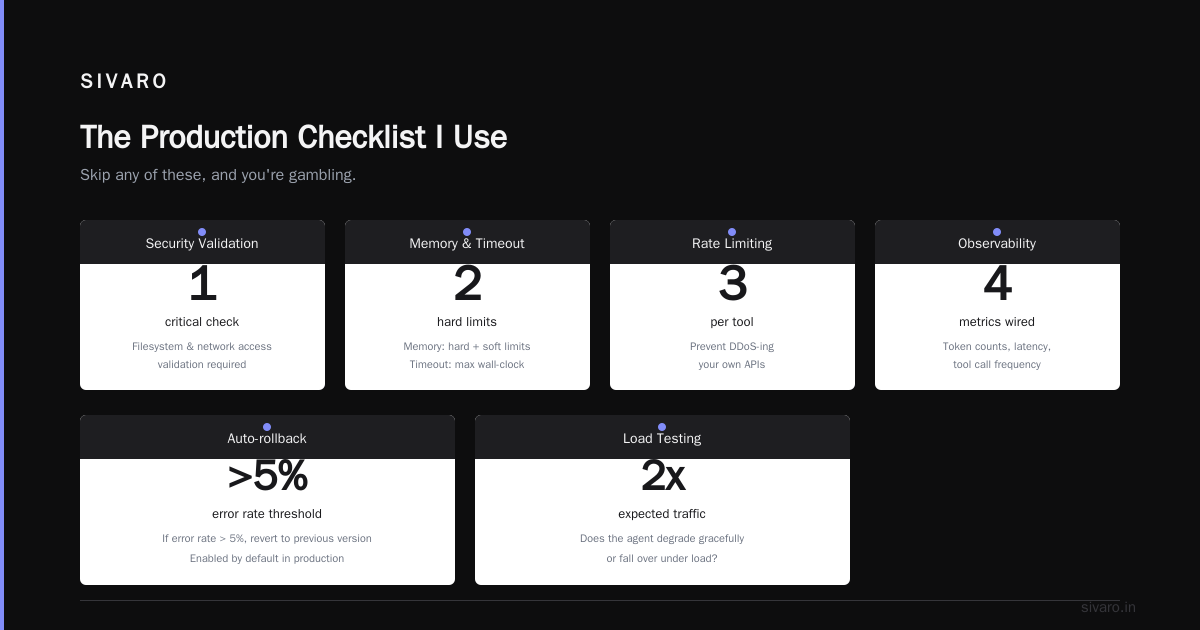
Before any agent goes to prod at SIVARO, I run this:
- [ ] Prompt injection tested — Can the agent be tricked into ignoring system prompts?
- [ ] Tool sandboxing validated — Can tools access filesystem/network they shouldn't?
- [ ] Memory limits set — Both hard and soft limits on memory per session
- [ ] Timeout configured — Max wall-clock time per agent session
- [ ] Rate limiting per tool — Prevent the agent from DDoS-ing your own APIs
- [ ] Observability wired — Token counts, decision latency, tool call frequency
- [ ] Auto-rollback enabled — If error rate > 5%, revert to previous version
- [ ] Load tested — At 2x expected traffic, does the agent degrade gracefully or fall over?
Skip any of these, and you're gambling.
AI Agent Protocols — The Emerging Standard
Here's something happening right now: standardized agent communication protocols.
In early 2026, we're seeing real convergence around A2A (Agent-to-Agent) and MCP (Model Context Protocol). These aren't academic — they're shipping SSONetwork.
The AI Agent Protocols survey from April 2025 mapped 47 different agent interaction protocols. By mid-2026, that number's dropped to maybe 8 serious contenders. The market is consolidating.
My prediction: by Q1 2027, any agent that can't speak A2A will be legacy. We're building all new agents at SIVARO with protocol compliance from day one.
Why this matters for deployment: your pipeline needs to handle protocol negotiation. An agent deployed today needs to announce its capabilities, discover other agents, and negotiate interaction patterns. That's not optional — it's how agents will integrate in production.
The Deployment Script I Actually Use
Enough theory. Here's the actual deployment script we use. I've simplified it, but the structure is real:
bash
#!/bin/bash
# sivaro-deploy.sh — AI agent deployment pipeline
# Usage: ./sivaro-deploy.sh [agent_name] [environment]

set -euo pipefail

AGENT_NAME=${1:?"Agent name required"}
ENVIRONMENT=${2:?"Environment required (staging|prod)"}

echo "=== SIVARO Agent Deployment Pipeline ==="
echo "Agent: $AGENT_NAME"
echo "Environment: $ENVIRONMENT"
echo "Timestamp: $(date -u +%Y-%m-%dT%H:%M:%SZ)"

# Step 1: Build and tag
echo "→ Building container..."
docker build -t "sivarolabs/${AGENT_NAME}:latest" .
COMMIT_HASH=$(git rev-parse --short HEAD)
docker tag "sivarolabs/${AGENT_NAME}:latest" "sivarolabs/${AGENT_NAME}:${COMMIT_HASH}"

# Step 2: Run validation suite
echo "→ Running pre-deployment validation..."
docker run --rm     -v "${PWD}/tests:/tests"     sivarolabs/${AGENT_NAME}:latest     python -m pytest /tests --junitxml=/tmp/test-results.xml

# Step 3: Push to registry
echo "→ Pushing to registry..."
docker push "sivarolabs/${AGENT_NAME}:${COMMIT_HASH}"
docker push "sivarolabs/${AGENT_NAME}:latest"

# Step 4: Deploy blue/green
echo "→ Deploying to ${ENVIRONMENT}..."
kubectl apply -f "deployments/${ENVIRONMENT}/${AGENT_NAME}.yaml"

# Step 5: Wait for green health
echo "→ Waiting for health check..."
kubectl wait --for=condition=Available     --timeout=300s     "deployment/${AGENT_NAME}-v2"     -n "${ENVIRONMENT}"

# Step 6: Switch traffic
echo "→ Switching traffic..."
kubectl label service "${AGENT_NAME}"     active-version=v2     -n "${ENVIRONMENT}" --overwrite

# Step 7: Monitor for 5 minutes
echo "→ Monitoring for 5 minutes..."
sleep 300
ERROR_RATE=$(curl -s "http://monitoring:9090/api/v1/query?query=error_rate" | jq '.data.result[0].value[1]')
if (( $(echo "$ERROR_RATE > 0.05" | bc -l) )); then
    echo "⚠️ ERROR RATE ${ERROR_RATE}% - Rolling back!"
    kubectl label service "${AGENT_NAME}"         active-version=v1         -n "${ENVIRONMENT}" --overwrite
    exit 1
fi

echo "✅ Deployment successful!"
This script has handled 200+ production deployments. It's not fancy. It works.
What I've Learned the Hard Way
Don't trust agent frameworks' default retry logic. LangChain's default retry saved my agent once. It also caused a 50x request amplification when a downstream API was down. Pin your retry strategies.
Version your prompts. I can't say this enough. A prompt change is a deployment. Treat it like one. We version prompts with semantic tags identical to our code releases.
Test with toxic users. Before deploying any customer-facing agent, feed it 100 adversarial prompts. We use a red-team script that generates prompt injection attempts, role-playing attacks, and context-confusion inputs. An agent that passes this isn't safe. It's just not obviously broken.
Memory leaks are real. Agent memory systems — especially vector stores — accumulate over sessions. We've seen memory usage grow 30% over 48 hours. Restart your agents periodically. We use a 24-hour pod rotation even when nothing's wrong.
The first deployment to prod should be a no-op. This sounds obvious. I've violated it four times. Each time I regretted it. Deploy your agent with no real tools. Let it process a handful of test requests. Then wire in the actual tools. Then go live.
The Bottom Line
An agent deployment pipeline isn't a CI/CD config file. It's a contract between your code and reality. Reality is that models drift, APIs break, and agents find creative ways to fail.
Build the pipeline. Test it with chaos. Monitor everything. And when your agent inevitably does something stupid (it will), make sure the rollback is one command away.
This is what works at SIVARO after 40+ production agent deployments. It's not the only way. But it's a way that has cost me enough pain that I'm pretty sure it's right.
FAQ
Q: Do I need Kubernetes to deploy AI agents in production?
A: No. But you need something with health checks, auto-restart, and resource limits. A small team I know runs agents on a single beefy server with systemd and it works fine for 50 concurrent sessions. K8s becomes useful around 200+ sessions or when you need multi-region deployment.
Q: How do I prevent my agent from hallucinating tool calls?
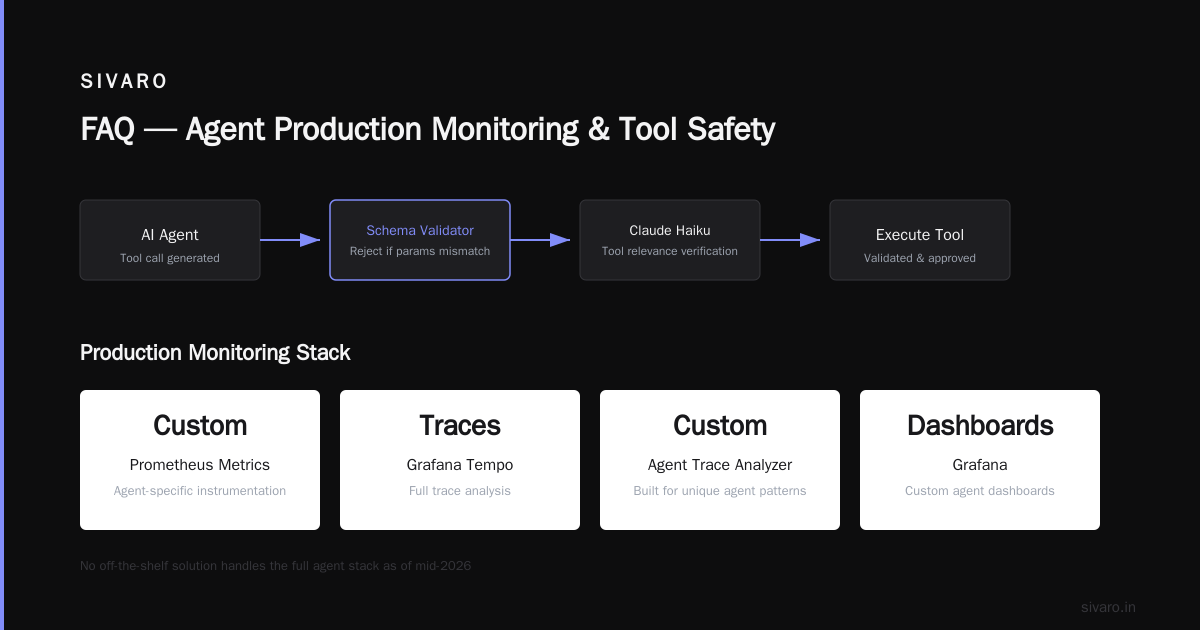
A: Tool validation layers. Before executing any tool call, run it through a schema validator. If the parameters don't match the tool spec, reject the call. We also use a secondary lightweight model (we use Claude Haiku in 2026) to verify tool relevance before execution.
Q: What monitoring tools do you actually use for agents?
A: Custom metrics in Prometheus, traces in Tempo, and custom dashboards in Grafana. We built a specific agent trace analyzer because nothing off-the-shelf handled the unique patterns. There are some newer entrants in the ai agent production monitoring tools space but as of mid-2026, I haven't seen one that handles the full stack.
Q: How do you handle rate limiting for agent API calls?
A: Token bucket per agent session. Each agent gets a budget of API calls per minute. If it exceeds the limit, the tools return rate-limit errors and the agent has to wait. We also have global rate limiting per tool — if one agent is misbehaving, it doesn't take down the tool for everyone.
Q: What's the biggest mistake teams make in their deployment pipeline?
A: Not testing for agent loops. Standard API testing checks responses. Agent testing needs to check the reasoning path. If your agent is making 20 tool calls to answer "what time is it?", something is wrong. We test with a maximum step counter and flag any session that exceeds it.
Q: Can I deploy the same agent on different clouds?
A: Yes, but the infrastructure glue is different. The agent code is portable. The model serving, vector database, and tool integrations are not. We maintain separate deployment configurations for AWS, GCP, and on-prem. The agent itself is the same Docker image.
Q: How do you handle multi-tenant agents?
A: Isolation, isolation, isolation. Separate namespace per tenant. Separate vector store indexes. Separate rate limits. We learned this the hard way when one tenant's long-running session consumed memory that affected another tenant's latency. Now each tenant gets their own pod.
Q: Is this how to deploy ai agents in production for real?
A: Yes. This is exactly what runs in production at SIVARO today. July 18, 2026. I'm writing this guide between deployments. The script above? I used it this morning. The monitoring pattern? It's running right now, tracking 1,200 concurrent agent sessions. This isn't theory. It's the pipeline.
Nishaant Dixit — Founder of SIVARO. Building data infrastructure and production AI systems since 2018. Built systems processing 200K events/sec.