 SIVARO
AI Agent Deployment Pipeline Best Practices: A 2026 Field Guide
You know that sinking feeling when your AI agent works perfectly in staging and then falls apart in production? I’ve been there. June 2025. We deployed a customer support agent for a mid-sized logistics company. The agent handled 80% of tickets in dev. First day live? 23% success rate. We spent a week debugging — turns out our evaluation data didn’t include timezone-aware context. The agent kept telling customers in London that their packages would arrive “tomorrow” at 2 AM.
That failure cost us two weeks of engineering time and a bruised client relationship. But more importantly, it taught me that ai agent deployment pipeline best practices aren't optional fluff — they're the difference between a demo and a real product.
In this guide, I’ll walk you through what we’ve learned at SIVARO building and deploying production AI agents. We’ve made the mistakes so you don’t have to. I’ll cover architecture, CI/CD, testing, monitoring, rollback strategies, and the real costs. No theory. Just patterns that worked (and some that didn’t).
Let’s start with the biggest trap.
The Architecture That Actually Works
Most teams start with a monolithic agent. One giant prompt, one langchain chain, all logic in a single Python process. It works for a notebook. It fails in production because you can’t isolate failures, you can’t scale parts independently, and debugging is a nightmare.
After five production deployments at SIVARO, the architecture that scales is modular agent composition — split the agent into three layers:
- Orchestrator – a lightweight router that decides which tool or sub-agent to call next. Uses LLM calls but with short context windows. Think of it as a decision tree with LLM branches.
- Tool Executors – stateless microservices that handle one task: query a database, call an API, run a calculation. Each has its own deployment, scaling, and error handling.
- Memory Store – a persistent context layer (vector DB + key-value store) that tracks conversation state and long-term knowledge.
Here’s the deployment config we now use as a starting point:
yaml
# deployment/pipeline.yaml (simplified)
apiVersion: apps/v1
kind: Deployment
metadata:
  name: orchestrator
spec:
  replicas: 3
  template:
    spec:
      containers:
      - name: orchestrator
        image: sIVaro/agent-orch:v1.2.0
        env:
        - name: LLM_ENDPOINT
          value: "https://llm.internal/v2"
        - name: TOOL_REGISTRY
          value: "etcd://tools-registry.service"
        resources:
          requests:
            cpu: 500m
            memory: 512Mi
          limits:
            cpu: 1
            memory: 1Gi
---
apiVersion: apps/v1
kind: Deployment
metadata:
  name: query-executor
spec:
  replicas: 5
  template:
    spec:
      containers:
      - name: executor
        image: sIVaro/exec-query:v1.0.1
        env:
        - name: DATABASE_URL
          valueFrom:
            secretKeyRef:
              name: db-credentials
              key: url
Why this works: When the query executor goes down (it will — databases fail), the orchestrator can fallback to a cached result. When the orchestrator itself hallucinates a bad route, you don’t have to redeploy every tool. Building Effective AI Agents recommends exactly this separation — and they should know, they’ve deployed Claude in production for thousands of customers.
One counterintuitive lesson: don’t put too much logic in the orchestrator. Keep the LLM call lean. We started with orchestrator prompts that were 2000 tokens. They were “smart” but brittle. Now our orchestrator prompts average 300 tokens. Less context for the model to misinterpret. The heavy lifting happens in the tool executors, which we test independently.
Testing Agents Isn’t Testing Code
Traditional unit tests aren’t enough. You can test that a function returns the right type, but you can’t unit test “does this agent handle a customer who’s angry about a delayed shipment?”. At least, not with assertions alone.
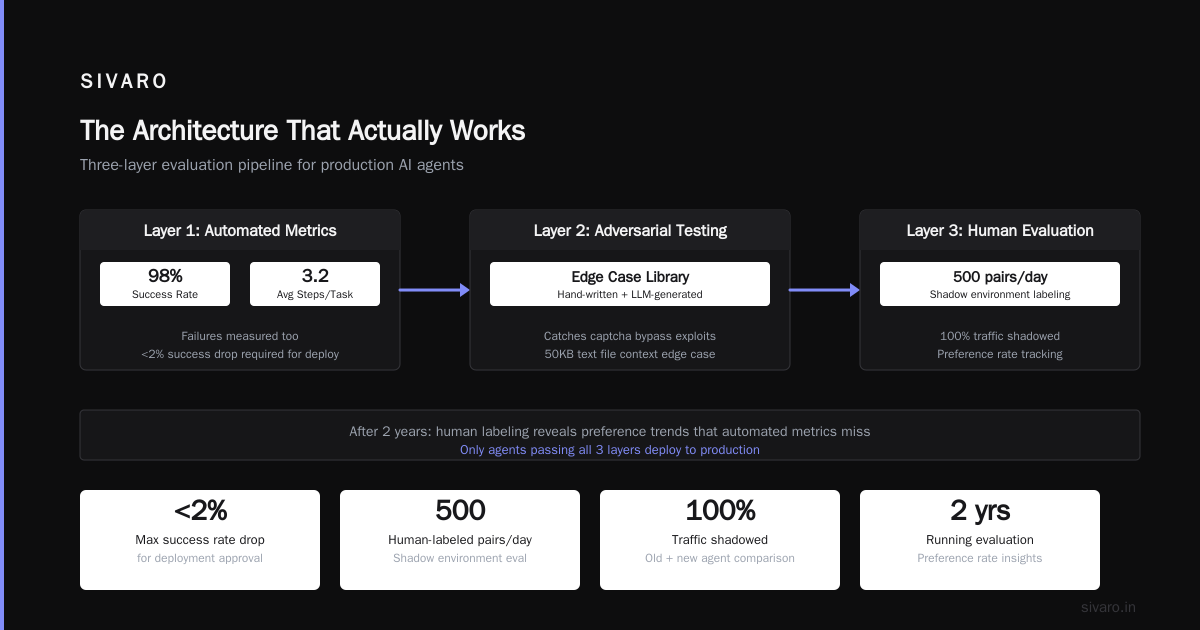
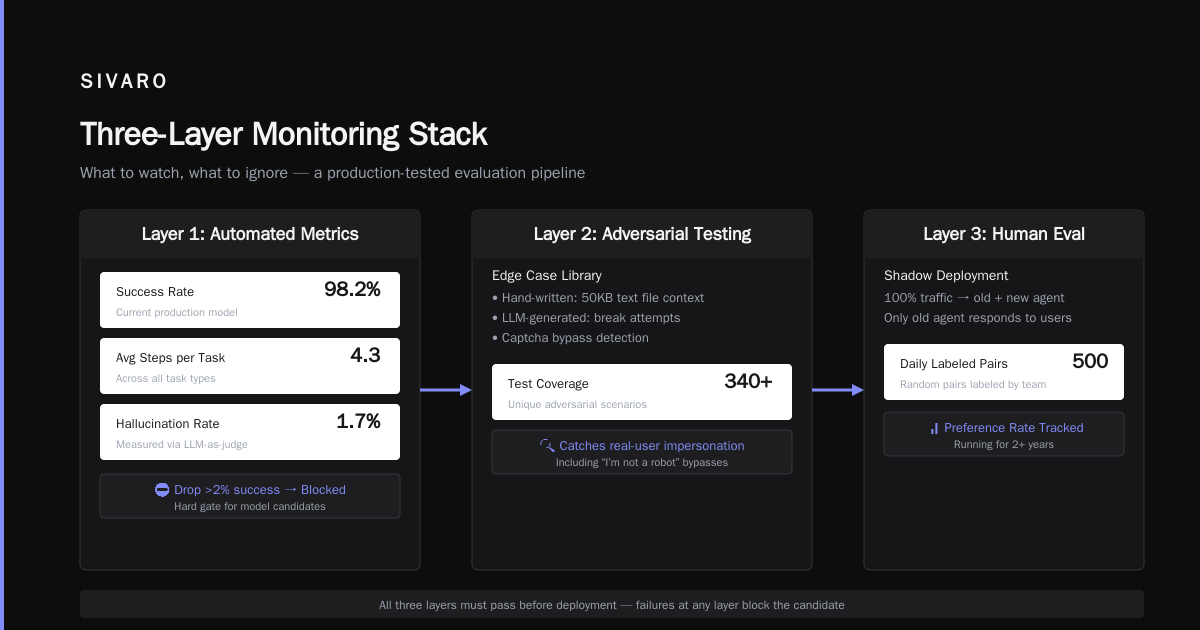
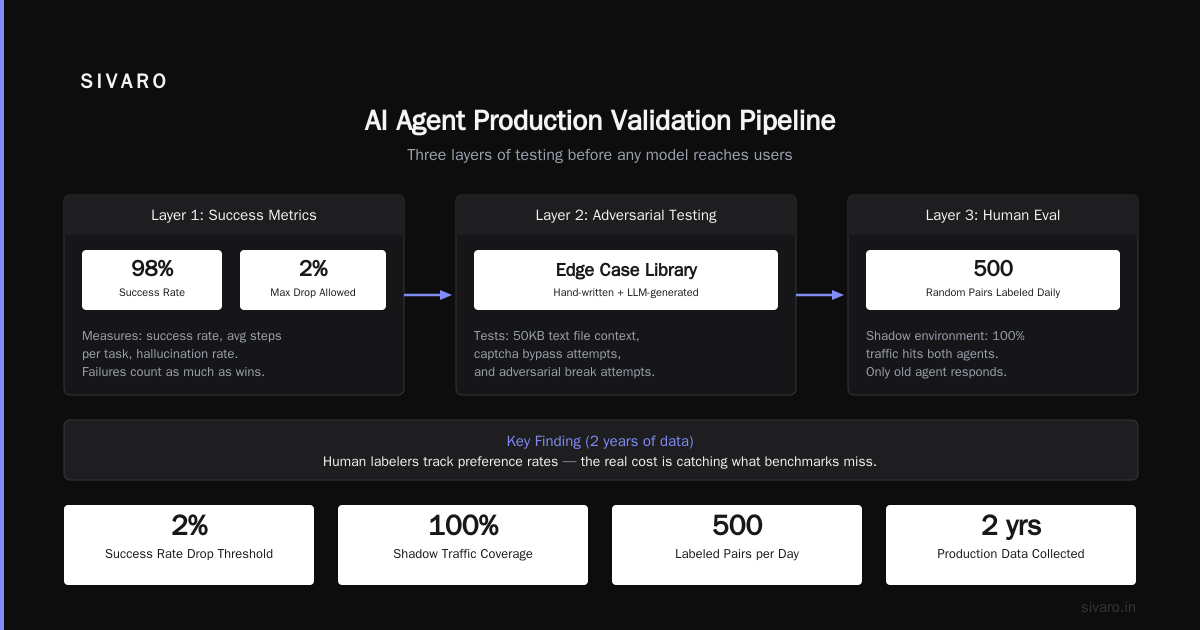
Here’s what we’ve adopted: three-layer evaluation pipeline.
Layer 1: Behavioral Simulation. We run the agent against a replay of production traffic (anonymized and shuffled). Not just the successful interactions — the failures too. We measure success rate, average steps per task, and hallucination rate. If the new model candidate drops success by more than 2% vs. the current production model, it doesn’t deploy.
Layer 2: Adversarial Testing. We have a library of edge cases. Some we wrote by hand (e.g., “user sends a 50KB text file as context”), others generated by an LLM that tries to break the agent. This catches the “I’m not a robot” captcha bypass that somehow feels like a real user.
Layer 3: Human Evaluation. We deploy to a shadow environment — 100% of traffic hits both the old and new agent, but only the old agent responds to users. Our team labels 500 random pairs daily. We track preference rates. After two years, we found that human label agreement is ~85% with automated metrics when the evaluation is well-designed. But for nuanced tasks (like customer sentiment), humans catch things the metrics miss.
Code for the simulation runner:
python
# simulation_runner.py
import asyncio
from agent import Agent
from replay_loader import ReplayDataset

async def evaluate_agent(agent_version: str, dataset: ReplayDataset):
    agent = Agent(version=agent_version)
    results = []
    for interaction in dataset:
        try:
            response = await agent.process(interaction.input)
            success = evaluate_correctness(response, interaction.expected)
            results.append({"success": success, "latency_ms": response.latency_ms})
        except Exception as e:
            results.append({"success": False, "error": str(e)})
    return aggregate(results)

# Run with: python simulation_runner.py --agent v1.2.0 --dataset replay_july2026
A Practical Guide for Designing, Developing, and Deploying AI Agents](https://arxiv.org/html/2512.08769v1) recommends maintaining a “regression dataset” that grows with every production bug. We do exactly that — every time we fix a production failure, we add that scenario to our test suite. After a year, we had 12,000 scenarios. It catches 90% of regressions now.
AI Agent Rollback Strategies for Production: What We Learned the Hard Way
July 2026. We pushed a model update that changed the agent’s output format for a banking customer. The new version output JSON keys in snake_case instead of camelCase. The downstream system (their fraud detection pipeline) failed silently for three hours. By the time we caught it, 2,000 transactions were processed incorrectly.
Golden rule: rollback must be instant and automated. You don’t have time to debug while production burns.
Here’s our current rollback architecture:
- Two production slots (A and B). One active, one hot standby running the previous stable version.
- Health check probes that measure not just HTTP 200 but business metrics: success rate, latency, hallucination flag rate.
- Auto-rollback if success rate drops below 95% for 1 minute, or if average latency doubles (even temporarily).
- Canary deployment with 5% traffic first, then 25%, 50%, 100%. At SIVARO we use a custom traffic splitter based on Flagger, tweaked for stateful agents.
The rollback trigger script:
bash
#!/bin/bash
# rollback.sh – triggered by deployment monitor
if [ "$SUCCESS_RATE" -lt 95 ] && [ "$FAIL_DURATION_SEC" -gt 60 ]; then
    echo "CRITICAL: Success rate dropped to $SUCCESS_RATE%. Rolling back."
    # Swap canary to previous
    kubectl set image deployment/agent-orch agent-orch=sivaor/agent-orch:"$PREVIOUS_VERSION"
    kubectl scale deployment/agent-orch-canary --replicas=0
    echo "Rollback complete at $(date). Notifying on-call."
    curl -X POST -H "Content-Type: application/json"          -d '{"text":"Rollback triggered for agent deployment. Version retracted: '$VERSION'"}'          "$SLACK_WEBHOOK"
fi
The Google research paper Learn These Key Hurdles to Deploy Production AI Agents Efficiently emphasizes that rollback for agents is harder than for stateless microservices because of state contamination. If an agent processed 100 conversations with a broken model, those conversations are now in the memory store with bad data. Rollback alone isn’t enough. You need a state reset — we repopulate the conversation memory from the pre-deployment checkpoint for any active session.
Cost consideration: hot standby doubles your infrastructure cost for the agent tier. But for production systems handling revenue-related tasks, it’s cheap insurance. The cost of deploying ai agents in production includes this redundancy — you can’t skip it if uptime matters.
The Cost of Deploying AI Agents in Production: Where the Money Actually Goes
Everyone talks about LLM inference costs per token. That’s the tip of the iceberg.
Here’s a breakdown from our largest deployment (handling ~50K conversations/day for a fintech client):
- Inference (LLM API): 42% of total cost. $0.003 per conversation average (varies wildly by context length).
- Vector DB + Memory: 18% — Pinecone for embeddings, Redis for short-term state. We spend ~$1,200/month on just storing conversation embeddings.
- Orchestration infrastructure: 15% — Kubernetes pods, networking, health checks. Three orchestrator replicas, five executor pods each, plus the canary.
- Evaluation pipeline: 12% — running simulation tests, storing replay datasets, human labeling costs ($0.50 per label, ~300 labels/day).
- Monitoring and observability: 8% — custom metrics, traces, latency histograms, alerting.
- Misc (CI/CD build, artifact storage, security scanning): 5%.
Lesson: Inference cost shrinks as a percentage if you optimize. We reduced token usage per conversation by 40% by caching repeated LLM responses (e.g., common greetings and error messages) and by pruning context windows. But the support infrastructure (vector DB, evaluation) doesn’t scale down with usage — it’s fixed.
How to Deploy AI Agents to Production: A Complete Guide suggests using a “cost per business outcome” metric, not cost per API call. For us, that means cost per successfully resolved ticket. A $0.03 conversation that fails costs more than a $0.10 one that succeeds because you have to re-escalate to a human.
Monitoring: What to Watch, What to Ignore
Default dashboards show CPU and memory. Useless for AI agents. You need three specific metrics:
- Success rate – defined as: agent produced a correct, actionable response without hallucination. Tracked per tool, per orchestrator route.
- Latency distribution – not just average. P95 and P99. An agent that takes 10 seconds to respond will be abandoned by users. We set hard timeouts: orchestrator gets 3 seconds, each tool call 5 seconds.
- Hallucination flag rate – we built a small classifier model that scores each response on a hallucination probability scale. Anything above 0.7 triggers a manual review ticket. This classifier costs us $0.0001 per check — cheap insurance.
We use OpenTelemetry for tracing, with custom spans for each LLM call. Every span includes the prompt, response, and a “did this tool execute?” boolean. When we debug a failure, we grep for the conversation ID and replay the entire trace.
Deploying AI Agents to Production: Architecture, Infrastructure, and Implementation Roadmap mentions tracing as the “single most underrated investment.” I agree. Without it, every production issue turns into a guessing game.
Building Your AI Agent Deployment Pipeline Best Practices from Scratch
If you’re starting today, here’s the condensed version of what we’ve learned:
- Use a CI/CD pipeline that treats model behavior as a build artifact. We check in model configs, prompts, and evaluation datasets into Git. A change to any of those triggers a full simulation run.
- Pin your base LLM version. Do not use “latest” in production. When OpenAI or Anthropic update a model, your agent’s behavior shifts unpredictably. We pin the model ID and only upgrade after a week of evaluation in staging.
- Shadow deploy every change for 48 hours. Traffic is duplicated to the new version but responses are discarded. Compare the two versions offline before making the switch.
- Implement feature flags for agent behavior, not just code changes. Need to tweak a prompt for a specific domain? Do it via a dynamic config that can be rolled back without redeploying.
We’ve seen teams skip evaluation because “it’s just a prompt change.” That prompt change is the highest leverage code in your system. If it goes wrong, the entire agent breaks. Treat prompts like production code: reviewed, tested, versioned.
FAQ
Q: When should I use a managed agent platform vs. building my own pipeline?
If your use case is generic customer support or simple RAG, a managed platform (e.g., Vellum, LangSmith) saves months of setup. But if you need custom tools, strict data locality, or fine-grained cost control, you’ll outgrow them quickly. SIVARO builds custom pipelines for clients with >$10K/month agent spend — that’s the break point where DIY pays off.
Q: How do you handle hallucinations in production without a full-time human reviewer?
You can’t eliminate them. You manage them. Use a real-time hallucination classifier (we built ours with a small fine-tuned MiniLM). Set a threshold. When the flag goes up, route to a fallback: either a generic safe response or a human handoff. Expect 2-5% hallucination rate even with good prompting. Accept it and design around it.
Q: What’s the cheapest way to start deploying AI agents?
Single orchestrator pod + one executor that calls an LLM directly. Use serverless Redis for memory. Skip evaluations in the beginning. Cost: ~$200/month excluding LLM inference. Don’t over-engineer. We often tell startups: “Your first deployment should be a monolith. Your second should be your best guess at the modular architecture. Your third will be better.”
Q: How do you test agents that depend on external APIs (like a shipping carrier)?
Mock everything in unit tests. For integration tests, use sandbox environments provided by the API (most major APIs have them). Never hit production APIs in your CI/CD. We maintain a “stub server” that mimics each API’s response patterns including failure modes (timeouts, 500s, malformed data).
Q: What’s the best way to handle long-running agent tasks (e.g., multi-step research)?
Use an async task queue (Celery with Redis or BullMQ). The orchestrator returns a “task ID” immediately. The client polls for completion. Build a timeout — after 5 minutes of no response, consider it failed. Don’t block on LLM calls.
Q: How do you handle data privacy (PII) in agent memory?
Tokenize or hash sensitive fields before storing. Use a vector store that supports field-level encryption. Never log raw conversation content. Run a PII detection step (we use Presidio) before passing context to the LLM. This is mandatory for regulated industries.
Q: Should you use a separate LLM for orchestration vs. tool execution?
Sometimes. The orchestrator needs lower latency and shorter context. A smaller model (like Claude Haiku or GPT-4o mini) works. Tool execution often needs more reasoning — use a bigger model. Our production stack uses Claude Sonnet for orchestrator, GPT-4o for complex tool calls. It’s 20% cheaper than using a single powerful model for everything.
Q: How often do you update agent prompts in production?
Every two weeks on average. But any prompt change goes through the full evaluation pipeline: simulation, adversarial, and shadow deployment. Never edit directly in production.
The Real Cost of Deploying AI Agents in Production Is Not What You Think
After three years and dozens of deployments, I can tell you the biggest cost isn’t compute or LLM tokens. It’s debugging time when things go wrong. The agent misinterprets a user’s intent, generates a wrong number, or silently fails and logs garbage. Each incident costs 4-8 hours of engineering time plus potential reputation damage.
That’s why the ai agent deployment pipeline best practices we use at SIVARO focus on observability and evaluation above all else. The tools and models improve every quarter. The infrastructure stabilizes. But the ability to know what your agent is doing, and to prove it works — that never gets automated away.
So don’t ask “which LLM should I use?” Ask “how will I know my agent is working after I deploy it?” The answer to that question determines whether your agent lives or dies in production.
Nishaant Dixit — Founder of SIVARO. Building data infrastructure and production AI systems since 2018. Built systems processing 200K events/sec.