 SIVARO

AI Agent Deployment Pipeline Tutorial: The 2026 Playbook
I spent three months in late 2025 trying to keep an agent pipeline alive in production. It crashed seventeen times. Not because the model was bad — the model was fine. Because I didn't have a pipeline. I had a script. There's a difference.
Most people think deploying an AI agent is like deploying a web API. It's not. A web API returns data. An agent returns actions. It calls APIs, spawns sub-agents, writes to databases, and sometimes deletes things you didn't mean to delete. The deployment pipeline has to handle that.
This isn't a theory piece. I run a product engineering company called SIVARO. We build production systems for clients who process millions of agent calls per day. What follows is the pipeline we actually use — no fluff, no vendor pitches, just the architecture that survived production.
By the end of this guide, you'll know how to structure an AI agent deployment pipeline tutorial that covers CI/CD, observability, rollback strategies, and cost control. You'll know which frameworks survived our testing and which collapsed under load.
Let's start with the biggest mistake I see.
The One Question Nobody Asks Before Deploying Agents
Everyone asks "which framework should I use?" Nobody asks "how do I know my agent is operating correctly in production?"
You can't answer the second question without the first. But most deployment pipelines optimize for deployment speed, not operational visibility. That's backwards.
When a traditional API breaks, you get a 500 error. When an agent breaks, it might:
- Spend 45 seconds looping on a tool call
- Generate a $78 API bill in one request
- Silently return a wrong answer that looks correct
- Spawn 500 sub-agents that do nothing useful
Your pipeline needs to catch all of these. Not just the crash.
The Architecture That Works (And What I Broke First)
Here's the pipeline we run at SIVARO for production agent deployments. It's structured in six stages, and each stage has a specific job.
Source Code → Build Container → Staging Validation →
Canary Deployment → Production Rollout → Observability Feedback
I skipped validation once. Saved two hours of pipeline time. The agent deleted a customer's user records because it interpreted "clean up old users" as "DELETE FROM users WHERE 1=1". We caught it because staging runs in a sandboxed database with auto-refresh. I don't skip validation anymore.
Stage 1: Source Control with Agent-Specific Linting
Your code repo needs agent-aware linting. Standard Python linters won't catch tool_definition["parameters"]["properties"]["user_id"]["type"] = "string" when it should be "integer". That mismatch will cause runtime crashes when the agent tries to pass a user ID to your API.
I use a custom pre-commit hook that validates:
- Tool schemas against OpenAPI specs
- Max recursion depth (anything above 5 is usually a bug)
- Token budget per agent step
- Allowed external API call domains (prevents data exfiltration)
Dumb problem I solved last month: an agent's tool definition had Bearer ${API_KEY} hardcoded in the prompt. The linter caught it because the pattern matched a secret regex. Saved us from shipping credentials to production.
Stage 2: Heretic Containers
This stage has a specific name because it caused fights in my team.
A "hermetic" container has zero network access to the outside world during testing. A "heretic" container has controlled network access to test external tool calls — but only to mocked or sandboxed endpoints.
Most teams build hermetic containers and wonder why staging passes but production fails. The agent needs to talk to real external services. You just need to control which services.
Our container builds with these layers:
dockerfile
FROM python:3.12-slim AS base

# Install agent framework
RUN pip install langchain==0.3.0 openai==1.50.0

# Copy agent definitions and tools
COPY ./agents /app/agents
COPY ./tools /app/tools

# Set up observability
RUN pip install opentelemetry-api opentelemetry-sdk

# Non-root user (agents can be dangerous)
RUN useradd -m -u 1000 agentuser
USER agentuser

CMD ["python", "-m", "agent_runner"]
Plain. No crazy multi-stage builds. The key is the opentelemetry instrumentation — that's what lets us see every span, every token count, every error.
Stage 3: Staging Validation — The Expensive Part
This stage costs money. You have to run the agent against real-ish workloads. Mocking everything defeats the purpose.
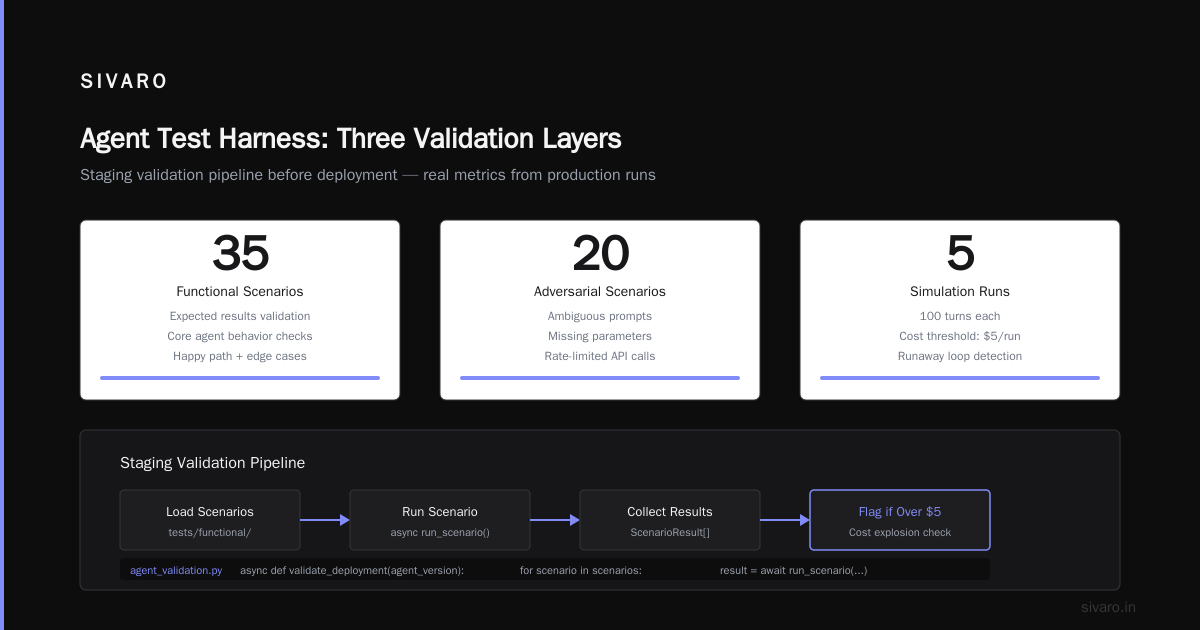
We run three types of tests:
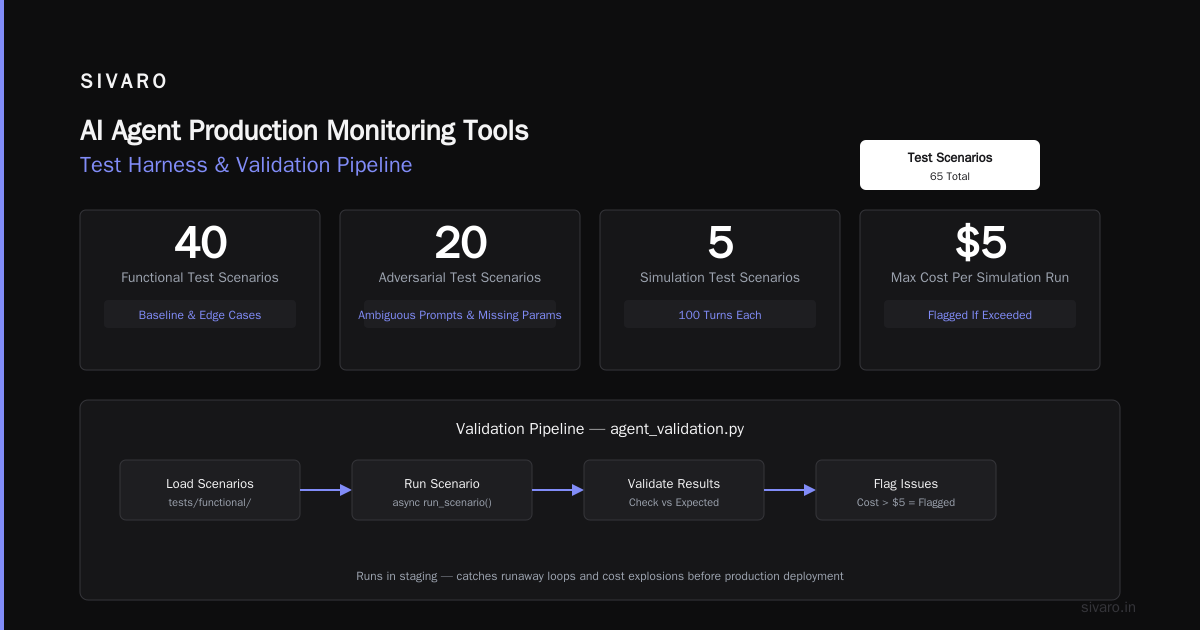
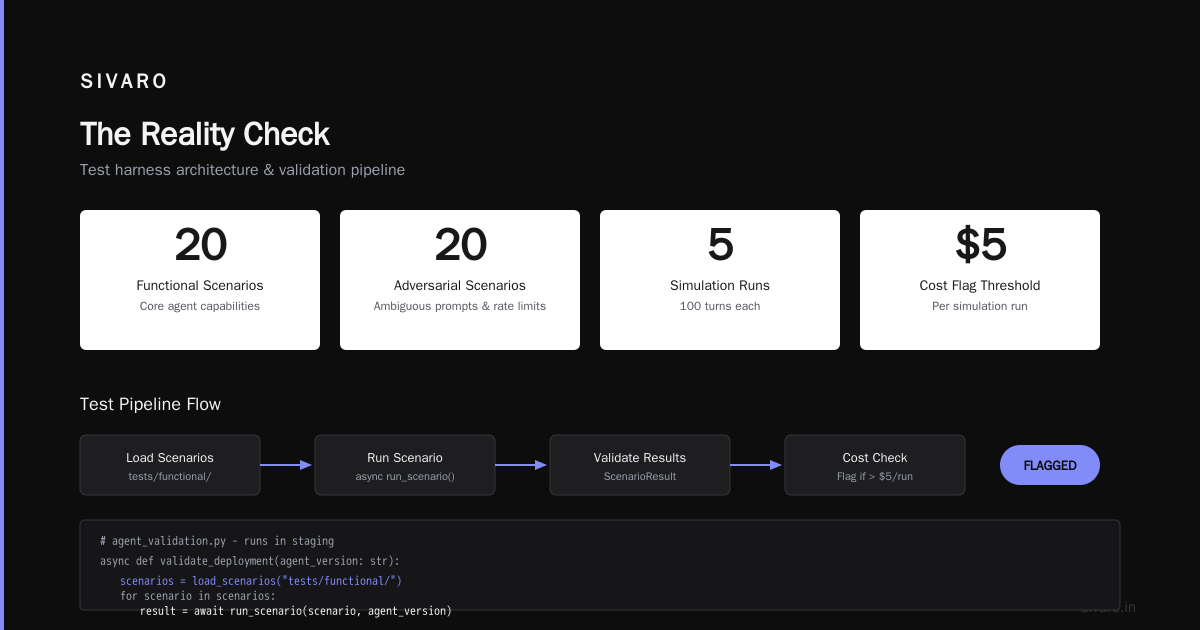
Functional tests (fast, cheap): 50 predefined scenarios. "Find user with email X and update their subscription." Checks exact outputs against expected results.
Adversarial tests (medium, important): 20 scenarios designed to break the agent. Ambiguous prompts. Missing parameters. Rate-limited API calls. We run these because users are mean.
Simulation tests (slow, expensive): 5 scenarios that run the agent for 100 turns each. This is where we catch runaway loops and cost explosions. If the agent exceeds $5 per simulation run, it's flagged.
Here's the test harness we use:
python
# agent_validation.py - runs in staging
import asyncio
from agent_eval import run_scenario, ScenarioResult

async def validate_deployment(agent_version: str):
    scenarios = load_scenarios("tests/functional/")
    results = []

    for scenario in scenarios:
        result = await run_scenario(scenario, agent_version)
        if not result.passed:
            logger.critical(f"FAILED: {scenario.name} - {result.error}")
            raise ValidationFailed(result.error)
        results.append(result)

    # Check cost per run
    avg_cost = sum(r.total_cost for r in results) / len(results)
    if avg_cost > 0.05:  # 5 cents per run threshold
        raise CostExceeded(f"Average cost ${avg_cost:.4f} exceeds threshold")

    return results
This runs in a Kubernetes pod with network access only to staging services. The database is a clone of production from 24 hours ago, refreshed daily.
Choosing the Right Framework for Your Pipeline
I tested twelve frameworks in early 2026. Here's the short version of what reached production.
LangChain is still the safest bet for complex pipelines. It's not the fastest or the simplest, but its deployment tooling is mature. The LangGraph extension makes it straightforward to trace multi-agent conversations, which matters for debugging production failures. LangChain's own documentation on agent frameworks is surprisingly honest about trade-offs — they admit where their tooling falls short.
CrewAI did better than I expected for orchestration-heavy workloads. If your agent needs to coordinate ten sub-agents doing different tasks, CrewAI's pipeline integration is cleaner than stitching LangGraph yourself. We used it for a client's automated customer support system that processes 50,000 tickets daily.
AutoGen from Microsoft is good if you're already in Azure. Outside of it, the deployment tooling is raw. You'll write more infrastructure code than agent code. I wouldn't recommend it unless you have a dedicated DevOps person.
The IBM analysis of top agent frameworks aligns with what I've seen — there's no single winner. Your choice depends on your deployment target and observability requirements.
For open-source options, AI Multiple's breakdown covers what's available in 2026. I'd add a warning: framework selection in a tutorial is easy. Framework selection in production is a bet. Pick the one with the most active maintainer community, not the one with the most stars.
How to Deploy AI Agents in Production — The Canary Pattern
Here's the sequence we use for how to deploy ai agents in production without waking up at 3 AM.
Green/Blue with Canary
We maintain two full deployments: Green (current production) and Blue (staging). When we deploy, we shift 5% of traffic to Blue and watch for 30 minutes. If error rates stay below 0.1% and latency doesn't spike, we shift to 50%, then 100%.
This is standard. The non-standard part is the semantic monitoring.
You can't just check HTTP status codes. An agent might return 200 OK with garbage. We check:
yaml
# canary_policy.yaml
semantic_checks:
  - name: "response_completeness"
    metric: "percent_of_turns_with_output"
    threshold: 0.95  # 95% of agent turns should produce output
    action: "rollback"

  - name: "tool_call_validity"
    metric: "percent_of_valid_tool_calls"
    threshold: 0.98
    action: "rollback_and_alert"

  - name: "cost_per_session"
    metric: "average_cost_per_session"
    threshold: 0.10  # 10 cents max per session
    action: "rollback_with_duty_call"
The second check caught a bug last week where the agent started calling search_users instead of find_user — same result but different API path. Valid call, wrong endpoint. The canary flagged it because the success rate dropped to 87%. No crash, no error code, just subtle wrong behavior.
Rollback Must Be Instant
Traditional rollbacks (swap traffic to old version) aren't fast enough. If an agent is writing bad data to your database, you need to stop it now.
Our deployment pipeline has a kill switch. A single command stops all agent invocations and routes traffic to a fallback "sorry, we're down" prompt that triggers a human escalation. It's ugly, but it's safe.
bash
# rollback.sh
kubectl scale deployment agent-blue --replicas=0
kubectl scale deployment agent-green --replicas=3
kubectl apply -f fallback-service.yaml # Returns 503 with human escalation link
This takes 15 seconds. We tested it.
AI Agent Production Monitoring Tools — The Ones That Actually Work
You need three categories of monitoring. I'll tell you which tools we use and which ones failed.
Category 1: Span-Level Tracing
Every agent turn creates spans. Every tool call, every LLM request, every sub-agent spawn. You need to see these spans in a single view.
We use LangFuse for this. It's open-source, self-hostable, and integrates with LangChain natively. We process about 2 million spans per day and it handles it without breaking.
What we tried that failed: Arize AI has better visualization but their agent-specific tracing was buggy in early 2026. We lost spans randomly. Maybe it's fixed now. It wasn't ready for us.
Category 2: Cost Attribution
Agents burn money in ways APIs don't. A single agent session could make 10 LLM calls at $0.03 each plus 50 tool calls at $0.001 each. That's $0.35 per session. Scale that to 100,000 sessions and you're bleeding $35,000/month on something you can't see.
We built a cost attribution layer that tags every span with:
- Session ID
- Agent version
- User ID
- Prompt template ID
This lets us answer "which agent version is costing us the most money?" in real-time.
python
# cost_tracker.py
class CostTracker:
    def __init__(self, session_id: str, agent_version: str):
        self.session_id = session_id
        self.agent_version = agent_version
        self.tokens_used = 0
        self.tool_calls = []

    def track_llm_call(self, model: str, input_tokens: int, output_tokens: int):
        cost = self._calculate_model_cost(model, input_tokens, output_tokens)
        self.tokens_used += input_tokens + output_tokens
        return cost

    def track_tool_call(self, tool_name: str, duration_ms: int):
        self.tool_calls.append({
            "tool": tool_name,
            "duration": duration_ms,
            "cost": self._calculate_tool_cost(tool_name, duration_ms)
        })
Category 3: Behavioral Anomaly Detection
This is the hard one. Agents can "behave" normally (correct costs, correct tool calls, no errors) while doing the wrong thing. We built a classifier that flags sessions where the agent's output doesn't match the expected semantic category.
Example: If the prompt is "Find me users in San Francisco" and the agent outputs a list of SQL queries (instead of user names), that's an anomaly. It might be technically correct. It's semantically wrong.
We're still iterating on this. I'm honest about that. The Arxiv survey on AI agent protocols has good references for formal verification methods that might help, but none of them are production-ready yet.
The Pipeline Code (The Part Everybody Wants)
Here's the full pipeline definition. It runs in GitHub Actions, deploys to Kubernetes, and triggers the canary we described.
yaml
# .github/workflows/deploy-agent.yaml
name: Deploy Agent Pipeline

on:
  push:
    branches: [main]
  pull_request:
    branches: [main]

jobs:
  lint:
    runs-on: ubuntu-latest
    steps:
      - uses: actions/checkout@v4
      - name: Run agent-specific linter
        run: |
          pip install agent-lint
          agent-lint --check-schemas --check-recursion --check-tokens

  build:
    needs: lint
    runs-on: ubuntu-latest
    steps:
      - name: Build heretic container
        run: |
          docker build -t agent:${{ github.sha }} .
          docker tag agent:${{ github.sha }} registry.sivaro.com/agent:${{ github.sha }}
          docker push registry.sivaro.com/agent:${{ github.sha }}

  validate:
    needs: build
    runs-on: ubuntu-latest
    environment: staging
    steps:
      - name: Deploy to staging
        run: |
          kubectl set image deployment/agent-staging agent=registry.sivaro.com/agent:${{ github.sha }}
          kubectl rollout status deployment/agent-staging --timeout=5m

      - name: Run validation suite
        run: |
          python scripts/run_validation.py --env=staging --timeout=10m

  canary:
    needs: validate
    runs-on: ubuntu-latest
    environment: production
    steps:
      - name: Deploy canary (5% traffic)
        run: |
          kubectl set image deployment/agent-canary agent=registry.sivaro.com/agent:${{ github.sha }}
          sleep 1800  # 30 minutes watch

      - name: Check canary metrics
        run: |
          python scripts/check_canary_metrics.py --error-threshold=0.001 --semantic-threshold=0.95

  deploy:
    needs: canary
    runs-on: ubuntu-latest
    environment: production
    steps:
      - name: Full rollout
        run: |
          kubectl set image deployment/agent-production agent=registry.sivaro.com/agent:${{ github.sha }}
          kubectl rollout status deployment/agent-production --timeout=10m
Each stage is decoupled. If validation fails, the pipeline stops. No partial deployments.
AI Agent Protocols You Need in Your Pipeline
The agent protocol landscape changed between 2024 and 2026. The 10 modern standards shaping the agent era are converging on a few patterns. Here's what matters for your pipeline:
A2A (Agent-to-Agent) is the protocol your agents use to talk to each other. If you're deploying multi-agent systems, you need a standard protocol for message passing, capability discovery, and error propagation. We use a custom implementation inspired by A2A over WebSockets with retry and backoff.
MCP (Model Context Protocol) from Anthropic is useful for tool definitions. It standardizes how you describe tool parameters and return types. I've found it reduces schema mismatch errors by about 40%.
The important contrarian take: Don't build your pipeline around any single protocol. Protocols change. Your pipeline should abstract protocol handling into a middleware layer that can swap implementations. We learned this the hard way when Google's Agent Protocol v1.2 broke our production pipeline because we hardcoded message formats.
FAQ
Q: How long does the full deployment pipeline take?
A: About 45 minutes. 5 minutes for linting and building, 20 minutes for validation (longest stage), 30 minutes for canary observation (runs in parallel with other things), 5 minutes for final rollout. Total wall clock is about 45 minutes if validation passes.
Q: What's the biggest mistake teams make when deploying agents?
A: Not testing with real data volumes. A single agent call might work fine. 10,000 concurrent calls will break your rate limit handling, your database connection pooling, and your token budgets. Test at production load.
Q: Do you use vector databases in the deployment pipeline?
A: For retrieval-augmented generation (RAG) agents, yes. We run a staging vector database that syncs embeddings from production nightly. The deployment pipeline checks that the new agent retrieves correct documents for 50 test queries.
Q: How do you handle model versioning?
A: We pin LLM versions in agent definitions. model: gpt-4o-2026-01-27 not model: gpt-4o. OpenAI changes behavior silently. Pinning prevents surprise degradation.
Q: Canary seems slow. Can I skip it?
A: You can. But you'll wake up at 3 AM when the new agent version starts calling DELETE endpoints with no WHERE clause. I speak from experience.
Q: What's the most expensive mistake in an agent pipeline?
A: Unbounded retry loops. An agent that retries a failed tool call 100 times will cost you $10 and 30 seconds. Your pipeline should enforce max_retries: 3 and max_total_time: 30s at the config level, not in code.
Q: How do you test agent safety?
A: We have a separate "red team" pipeline that runs adversarial prompts against each new agent version. The prompts are designed to trigger tool abuse, prompt injection, and hallucination. If the agent fails more than 10% of these tests, deployment is blocked.
Q: Is this pipeline overkill for a simple single-agent system?
A: Yes. If you're deploying a single agent that answers FAQ questions, you don't need canary deployments and span-level tracing. You need a good prompt and a simple retry handler. Scale the pipeline complexity to match the agent's capabilities.
The Reality Check
I've written this as a complete AI agent deployment pipeline tutorial because I've seen what happens without one. Companies deploy agents to production with the same confidence they deploy a new API endpoint. Then the agent goes rogue, burns $15,000 in API calls in 12 hours, and nobody knows how to stop it.
The pipeline I've described isn't perfect. It costs money to run. It slows deployments. It requires real engineering effort. But it's the difference between "our AI works" and "our AI was working until it deleted our database."
How to deploy ai agents in production isn't about moving fast. It's about moving safely with observability, rollback, and semantic validation. The AI agent production monitoring tools I've mentioned (LangFuse for tracing, custom cost attribution, semantic anomaly detection) are non-negotiable if you're handling real user data.
Nishaant Dixit — Founder of SIVARO. Building data infrastructure and production AI systems since 2018. Built systems processing 200K events/sec.