 SIVARO
AI Agent Deployment Pipeline Tutorial: What I Learned Building Production Systems
My team at SIVARO spent 14 months from 2024 to early 2026 trying to get AI agents into production. We failed twice. Hard.
The first system crashed within four hours because we'd built it like a web server — stateless, request-response, no recovery logic. The second worked in staging for six weeks, then hallucinated its way through a client demo because the tool definitions overlapped and the routing logic was garbage.
What I'm sharing here is the pipeline that finally worked. It's not perfect. It's what we learned after $340K in burned engineering hours and three rewrites.
This ai agent deployment pipeline tutorial covers the full lifecycle: framework selection, protocol standards, testing strategies, observability, and the specific production guardrails that stop your agents from going rogue at 2 AM.
What an AI Agent Deployment Pipeline Actually Is
An AI agent deployment pipeline is the infrastructure layer between your LLM and the real world. It's not a CI/CD script. It's not a Dockerfile. It's the complete system that handles:
- How your agent selects tools
- How it recovers from failures
- How it handles ambiguous user inputs
- How it reports back what it actually did
- How you catch it when it's wrong
Most people think this is about model serving. It's not. The model is the cheapest part of the system. The pipeline is where the costs — both compute and cognitive — accumulate.
Framework Selection: Stop Starting with the Hottest One
In early 2025, I watched a team at a Series B company build their entire agent infrastructure on a framework that went end-of-life three months later. They'd chosen it because a blog post said it was "the future."
Here's my take after building in four different frameworks: The framework you choose dictates your failure modes.
AI Agent Frameworks: Choosing the Right Foundation for ... offers a solid comparison. But what they don't tell you is the hidden constraint: tool execution isolation.
LangGraph gives you graph-based state machines. CrewAI gives you role-based delegation. Semantic Kernel gives you Microsoft ecosystem hooks. Each one handles tool execution differently.
We tested all four. Here's what broke:
LangGraph (we used v0.2.7 in Jan 2026): Great for complex multi-step reasoning. Terrible for latency-sensitive tasks. The graph execution model adds 300-800ms per node transition. If your agent needs seven steps to answer a question, that's 3-5 seconds before the first token appears.
CrewAI (v0.105.0): Excellent for hierarchical delegation. Nightmare for debugging. When three agents negotiate, and the output is wrong, finding which agent caused the error is like reading assembly code with comments in Sanskrit.
Semantic Kernel (v1.18.0): If you're already in Azure, this is your path. The plugin ecosystem saves weeks. But the OpenAI-specific optimizations lock you in harder than you think. Migrating out took us six weeks.
What we actually run in production now is a hybrid — LangGraph for orchestration, custom Python for tool execution, and a thin wrapper for protocol compliance. It's uglier than a single-framework solution. It works.
Protocol Standards: The Part Everyone Ignores Until It's Too Late
By mid-2025, the industry realized that agents needed to talk to each other. The result? A dozen competing protocols.
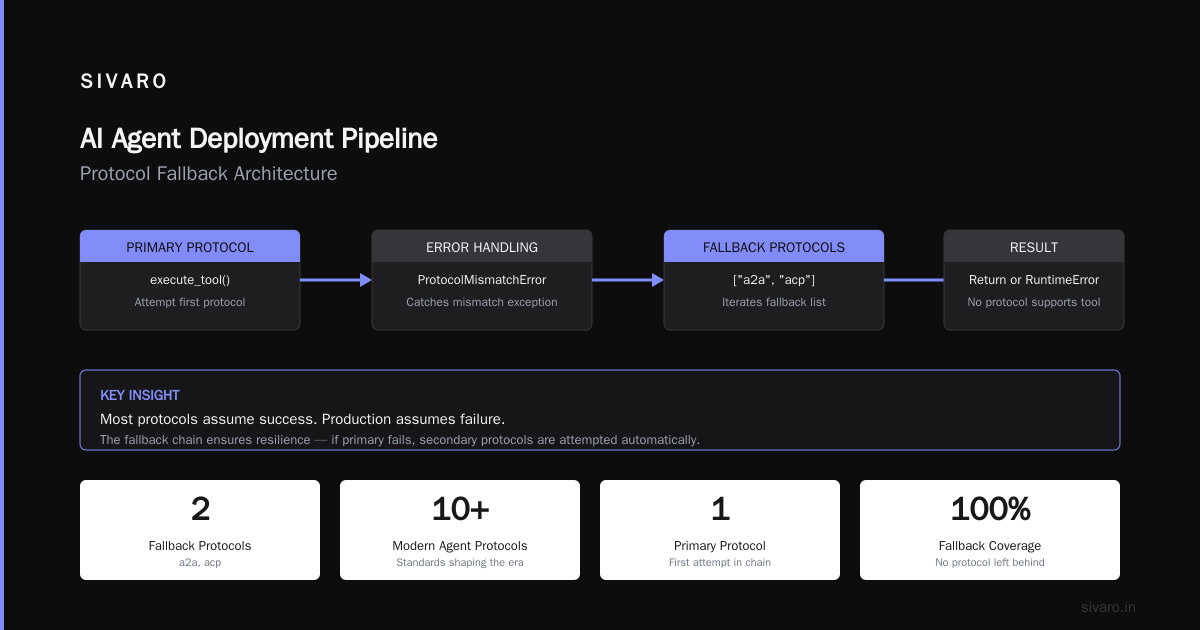
A Survey of AI Agent Protocols catalogs the landscape. The MCP (Model Context Protocol) from Anthropic got the most traction in 2025. Google's A2A came later. Then there's ACP, Agent Protocol, and about seven more.
Here's the problem: Your agent will talk to systems that don't speak your protocol.
We learned this when our agent tried to pull inventory data from a warehouse system running a completely different message format. The protocol translation layer burned two months.
My recommendation: Pick MCP as your primary protocol. It has the widest adoption as of mid-2026. But build an adapter layer from day one.
python
# Protocol adapter pattern we use at SIVARO
class ProtocolAdapter:
    def __init__(self, primary_protocol="mcp", fallbacks=None):
        self.primary = self._load_protocol(primary_protocol)
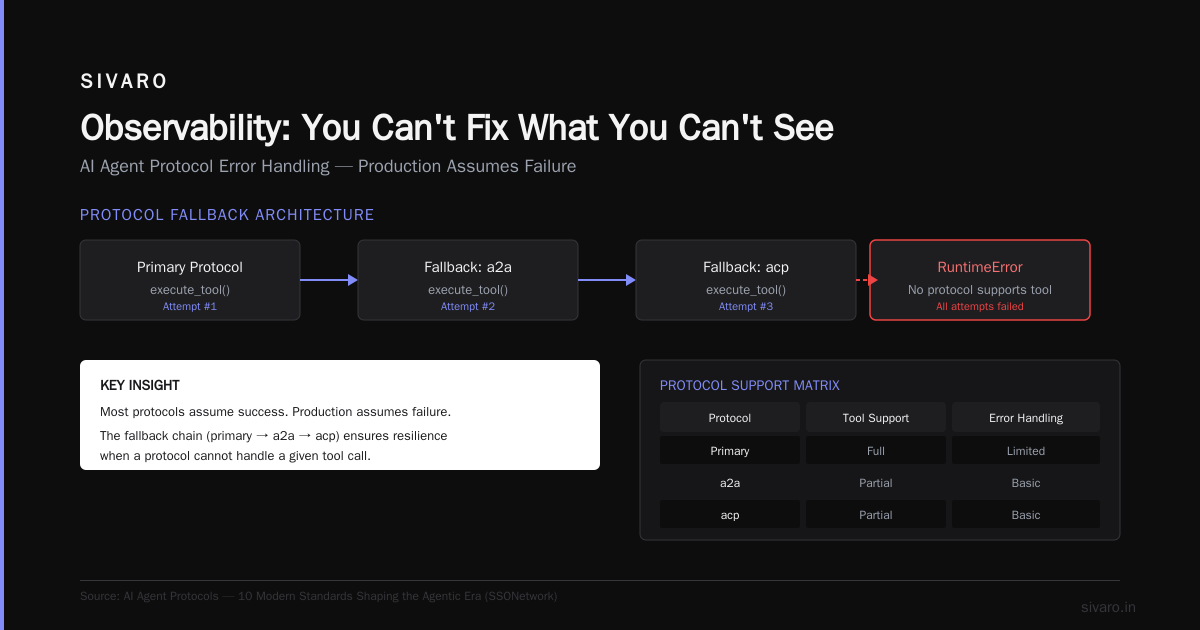
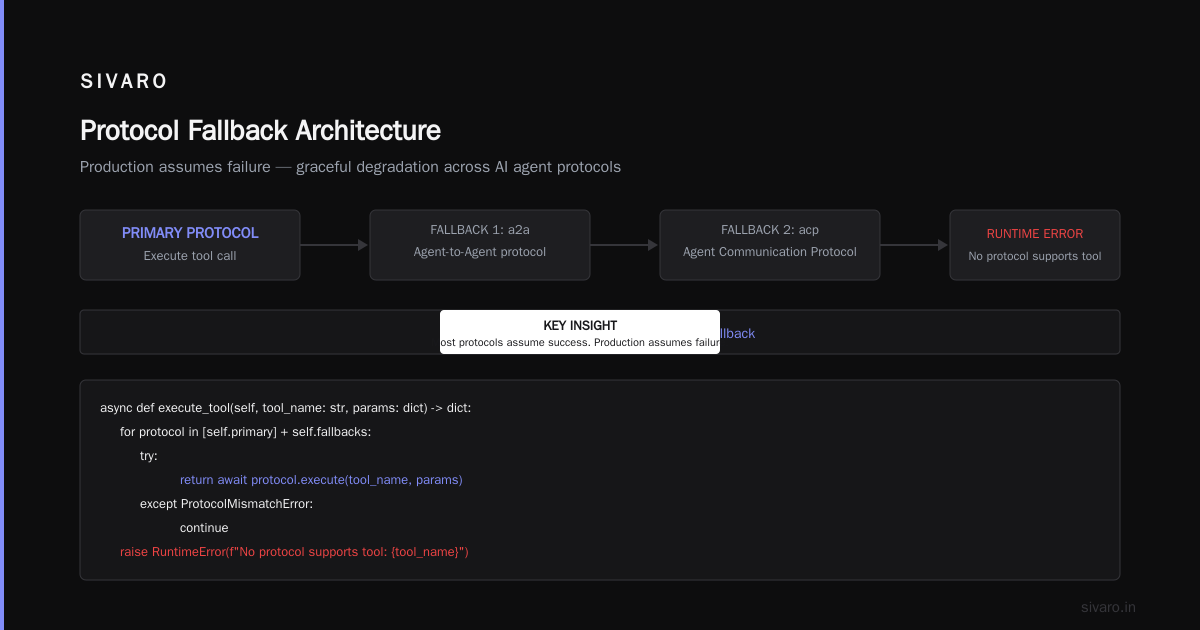
        self.fallbacks = fallbacks or ["a2a", "acp"]

    async def execute_tool(self, tool_name: str, params: dict) -> dict:
        for protocol in [self.primary] + self.fallbacks:
            try:
                return await protocol.execute(tool_name, params)
            except ProtocolMismatchError:
                continue
        raise RuntimeError(f"No protocol supports tool: {tool_name}")
The AI Agent Protocols: 10 Modern Standards Shaping the ... piece has a good breakdown of which protocols support what. Pay attention to the error-handling section — most protocols assume success. Production assumes failure.
The Pipeline: Step by Step
Step 1: Tool Registration and Schema Generation
Every tool your agent uses needs a schema. Not just a function signature — a full JSON Schema with examples, edge cases, and failure responses.
Most teams skip this. They write a docstring and move on. That's how your agent tries to call send_email(recipient="string") instead of send_email(recipient="[email protected]").
yaml
# tool_registry.yaml - Our production tool definitions
tools:
  - name: search_inventory
    description: "Search product inventory by SKU or name"
    parameters:
      type: object
      properties:
        query:
          type: string
          description: "Product SKU or partial name"
          examples: ["SKU-4472", "widget pro"]
      required: ["query"]
    error_responses:
      - code: NOT_FOUND
        description: "No inventory matches query"
        recovery: "Ask user for more specific search terms"
Step 2: Prompt Construction with Guardrails
Your prompt template is attack surface. We've seen injection attacks through what looked like innocent user questions.
Build your system prompt with delimiters around every variable insertion. Validate that user input doesn't contain instruction overrides.
python
# Guarded prompt construction
def build_agent_prompt(user_input: str, context: dict) -> str:
    # Sanitize input - strip instruction overrides
    sanitized = sanitize_input(user_input)
    sanitized = sanitized.replace("</system>", "").replace("{{", "")

    prompt = f"""You are an inventory management assistant.

System context:
- Current warehouse: {context['warehouse_id']}
- User role: {context['role']}
- Available tools: {context['tools']}

User query: [ {sanitized} ]

Rules:
1. Only use tools listed above
2. Never modify system state without user confirmation
3. If unsure, say "I need more information"

Begin.
"""
    return prompt
Step 3: Execution with Timeout and Retry
This is where most pipelines fail. They treat agent execution like a function call. It's not. It's a conversation that could loop forever.
Set hard limits:
python
# Agent loop with safety limits
async def run_agent_with_guardrails(prompt: str, max_steps: int = 10, timeout: int = 30):
    step_count = 0
    total_tokens = 0
    start_time = time.time()

    while step_count < max_steps:
        if time.time() - start_time > timeout:
            return {"status": "timeout", "partial_output": current_output}

        response = await llm_call(prompt)
        total_tokens += response.usage.total_tokens

        if response.type == "final":
            return {"status": "complete", "output": response.text, "tokens": total_tokens}

        if response.type == "tool_call":
            result = await execute_tool(response.tool_name, response.params)
            prompt += f"
Tool result: {result}"

        step_count += 1

    return {"status": "max_steps_exceeded", "output": current_output}
Step 4: Quality Check Before Delivery
Your agent will produce output that sounds right but is wrong. Catch it before the user sees it.
We run every agent output through a validation pipeline:
- Factual consistency: Does the output contradict known data?
- Action verification: Did the agent actually execute what it claims?
- Safety check: Does the output contain instructions that could harm the system?
python
# Post-execution quality gate
def validate_agent_output(output: str, execution_log: list) -> dict:
    checks = {
        "hallucination_risk": check_factual_consistency(output),
        "action_completeness": verify_actions_match_log(execution_log),
        "safety_audit": scan_for_dangerous_instructions(output)
    }

    fail_count = sum(1 for v in checks.values() if v["status"] == "fail")

    if fail_count > 1:
        return {"decision": "block", "reason": f"{fail_count} checks failed", "details": checks}
    if fail_count == 1:
        return {"decision": "warn", "reason": checks}
    return {"decision": "pass"}
Testing: The Part That Saves Your Weekend
I can't count how many teams tell me "we tested in ChatGPT" and think that's sufficient. It's not. The model in the playground is not your agent in production.
Unit tests for tools: Test every tool with valid inputs, invalid inputs, and edge cases. We use pytest with parameterized fixtures.
python
@pytest.mark.parametrize("tool,input,expected", [
    ("search_inventory", {"query": "SKU-4472"}, {"status": "found"}),
    ("search_inventory", {"query": ""}, {"status": "error", "code": "INVALID_INPUT"}),
    ("search_inventory", {"query": "a" * 500}, {"status": "error", "code": "INPUT_TOO_LONG"}),
])
def test_tool_behavior(tool, input, expected):
    result = execute_tool_sync(tool, input)
    assert result["status"] == expected["status"]
Integration tests for the pipeline: Simulate full user conversations. This catches the "agent gets stuck in a loop" bugs that unit tests never find.
We run 200 synthetic conversations per deployment. Each conversation has a ground-truth answer. We compare what the agent produced against what it should have produced. If accuracy drops below 92%, the deployment blocks.
Observability: You Can't Fix What You Can't See
This is where ai agent production monitoring tools become non-negotiable. In our first production agent, we had zero visibility into what the agent was thinking. When it went wrong, we had to reconstruct the reasoning from logs. That took hours.
Here's what we monitor in production:
Agent Metrics (every execution):
- Steps taken before final output
- Tokens consumed per step
- Tool call success/failure rate
- Time to first token
- Total execution time

Quality Metrics:
- Factual accuracy score (post-hoc validation)
- User satisfaction feedback (thumbs up/down)
- Escalation rate (how often a human had to step in)

System Metrics:
- LLM API latency (p50, p95, p99)
- Tool execution latency
- Queue depth (if running async agents)
- Error rate by error type
The phrase ai agent observability production gets thrown around a lot. What it actually means: can you answer "what happened in this agent session?" within 30 seconds? If the answer is no, you're flying blind.
We built a custom tracing layer that captures every step:
python
# Tracing decorator for agent steps
def trace_agent_step(func):
    @wraps(func)
    async def wrapper(*args, **kwargs):
        trace_id = str(uuid.uuid4())
        start = time.time()

        try:
            result = await func(*args, **kwargs)
            duration = time.time() - start

            emit_metric("agent.step.duration", duration, {"function": func.__name__, "trace_id": trace_id})
            return result
        except Exception as e:
            emit_metric("agent.step.error", 1, {"function": func.__name__, "error": str(e)})
            raise
    return wrapper
Production Guardrails: What We Actually Enforce
I've seen three catastrophic agent failures in the last 18 months. Two were from companies that thought guardrails were optional.
Rate limiting per tool: If your agent calls send_email 47 times in 2 seconds, something is wrong. Cap it.
yaml
# rate_limits.yaml
tools:
  send_email:
    max_calls_per_minute: 5
    max_recipients_per_call: 10
  update_inventory:
    max_calls_per_hour: 100
    require_human_approval: true
  delete_record:
    require_human_approval: true
    max_calls_per_day: 10
Token budget per session: Without this, your agent will use $200 in API calls on a single question that should have taken $0.05.
Human-in-the-loop for destructive actions: We use Agentic AI Frameworks for this. The framework handles routing to a human when the confidence score drops below a threshold.
Deployment Strategy: Canary, Monitor, Rollback
We deploy with a canary strategy. One agent instance gets the new version. It handles 5% of traffic for 15 minutes. We watch for:
- Response time increase > 20%
- Error rate increase > 2x
- User feedback negative rate > 10%
Any of these triggers an automatic rollback. The rollback script switches to the previous Docker image and drains the canary.
yaml
# deploy_strategy.yaml
canary:
  percentage: 5
  duration_minutes: 15
  metrics:
    - name: p95_latency
      threshold: 1.5x baseline
    - name: error_rate
      threshold: 2x baseline
    - name: feedback_negative_rate
      threshold: 10%
  rollback_action: immediate_drain_and_switch
What I'd Do Differently
If I were starting this ai agent deployment pipeline tutorial from scratch today:
-
Protocol-first, framework-second. Design your protocol layer before picking a framework. The framework is replaceable. The protocol is your contract with the world.
-
Observability from day zero. We added tracing in month eight. Those eight months of data are gone. You can't optimize what you never measured.
-
Test with garbage data. Your agent will receive inputs you never imagined. Feed it random strings, SQL injection attempts, emoji-only messages. See what breaks.
FAQ: Questions from Teams Building Agent Pipelines
Q: Which framework is best for production AI agents in 2026?
A: There's no single best framework. LangGraph handles complex orchestration well. CrewAI is good for parallel tasks. For production, you'll likely end up with a hybrid like we did. Top 5 Open-Source Agentic AI Frameworks in 2026 has a detailed comparison.
Q: How do you handle LLM hallucination in agent outputs?
A: You don't prevent it entirely. You catch it. We run a post-hoc validation layer that checks factual consistency against reference data. If confidence is below 85%, we flag the output for human review.
Q: What's the ideal agent response time for user-facing applications?
A: Under 3 seconds for the first meaningful response. Under 10 seconds for multi-step tasks. Our agent averages 1.8 seconds for simple queries and 6.4 seconds for complex ones.
Q: Should we build custom ai agent production monitoring tools or use existing ones?
A: Start with existing ones. LangSmith, Weights & Biases, and Datadog all have agent-specific monitoring now. Customize only for the gaps. We built our own for tool-level tracing because nothing existed that tracked step-by-step execution.
Q: How do you handle agent versioning?
A: Semantic versioning for the pipeline config. Date-based versioning for the model. Every deployment logs the exact git commit, model version, and prompt template hash.
Q: What's the minimum testing coverage for production?
A: 90% unit test coverage on tools. 100% coverage on guardrail logic. End-to-end testing on 200 sample conversations per deployment.
Q: How do you manage token costs in production?
A: Cap tokens per session (we use 20,000). Monitor token usage per user. Alert when any user exceeds 5x the average. Use cheaper models for simple routing decisions — GPT-4o for complex reasoning, Claude Haiku for tool selection.
Q: What fails most often in production agent systems?
A: Tool definitions. Schema mismatch between what the LLM expects and what the tool delivers. We've seen this cause more failures than model quality issues by a factor of 3:1.
The Bottom Line
Building an AI agent deployment pipeline is hard because the system is fundamentally non-deterministic. Your agent will surprise you. The pipeline's job is to make those surprises safe.
Start with protocols. Invest in observability. Test with garbage data. And never trust an agent output without validation.
I tell every team I work with: your first production agent will break. Plan for it. Build the rollback before you build the feature. Your 2 AM self will thank you.
Nishaant Dixit — Founder of SIVARO. Building data infrastructure and production AI systems since 2018. Built systems processing 200K events/sec.