 SIVARO
AI Agent Deployment Platform Comparison: 2026 Guide
Six months ago I watched a demo that looked flawless — a multi‑agent system negotiating with APIs, reasoning through a broken pipeline, self‑correcting. The CEO told me they’d be in production in two weeks. I asked how they were handling timeouts and state persistence. Blank stare. That team burned three months and never shipped.
I’m Nishaant Dixit. I run SIVARO, a product engineering shop that’s been building data infrastructure and production AI systems since 2018. Over the last three years I’ve seen the agent deployment space explode — and then implode as teams discover how little the hype matches reality. By mid‑2026, the landscape has settled into a handful of serious platforms and a graveyard of abandoned side projects.
This guide is a head‑to‑head comparison of the platforms I’ve actually put into production. I’ll tell you where each one breaks, which one we trust with customer data, and — most importantly — how to deploy AI agents to production safely without waking up to a bill that surpasses your cloud budget.
Why Most Agent Deployments Fail (and It's Not the Model)
Everyone blames the model. “GPT‑4o isn’t smart enough.” “Claude hallucinates too much.” That’s wrong. The models are fine. The platforms are what kill you.
I’ve seen production outages caused by:
- No guardrails on tool calls. An agent authorized to read a database decided to
DROP TABLE— because the prompt said “you have read access” and the model interpreted that loosely. - Stateless retry loops. Agent fails, retries, fails again, retries 50 times in a minute. Cloud spend spikes $2,000 overnight.
- Observability that stops at logging. You see “agent started” and “agent finished” — nothing in between. When it produces a wrong answer, you have zero trace of why.
Most platforms don’t solve these problems. They sell you composability (“chain your agents!”) and assume you’ll handle the rest yourself. You won’t. Not until you hit the wall.
The Core Metrics for Comparing Platforms
Before I name names, let’s agree on what matters. An ai agent deployment platform comparison only makes sense if you’re looking at the right dimensions.
| Metric | What it actually tells you |
|---|---|
| Execution isolation | Can one runaway agent corrupt another? |
| State persistence | Does state survive a pod restart? |
| Observability depth | Do you see every LLM call, tool return, and routing decision? |
| Safety controls | Rate limits, tool permissions, kill switches |
| Cost governance | Can you cap spend per agent per hour? |
Most people think “number of supported models” or “ease of prototyping” are the key criteria. They’re not. You can prototype anything in a notebook. Production means surviving a holiday weekend with no human in the loop.
Platform Deep Dive: LangGraph vs. CrewAI vs. AutoGPT vs. Build Your Own
I’ll compare four approaches: LangGraph, CrewAI, AutoGPT (the open‑source version), and a custom framework built on top of LangChain or direct API calls. These are the ones I’ve deployed for clients ranging from fintech to manufacturing.
LangGraph (by LangChain)
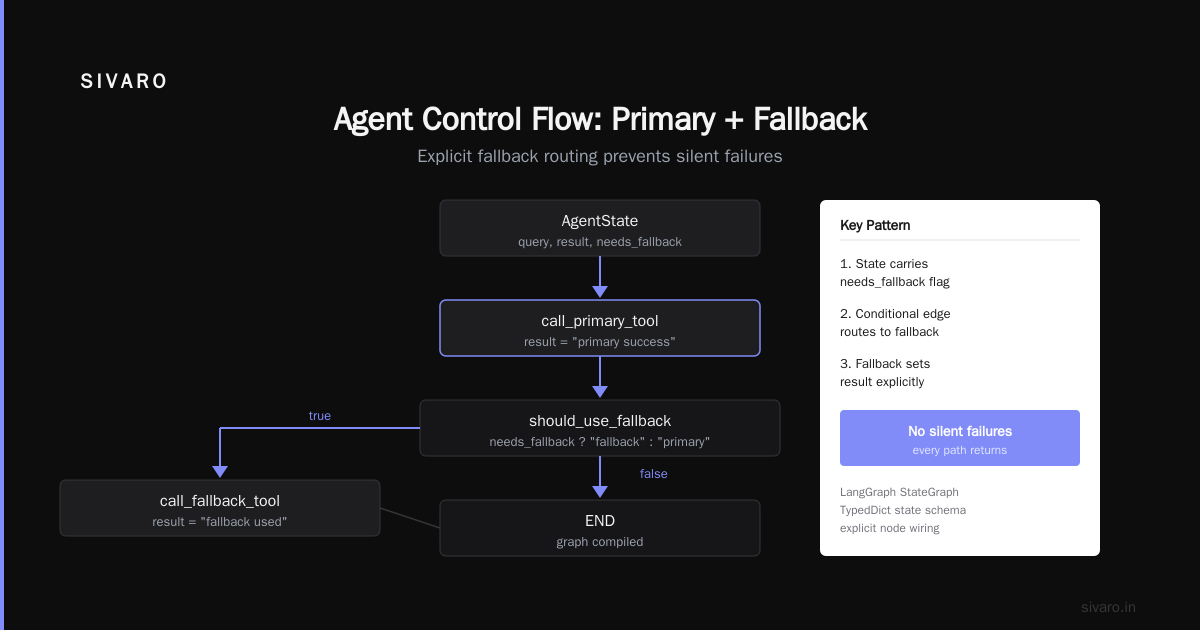
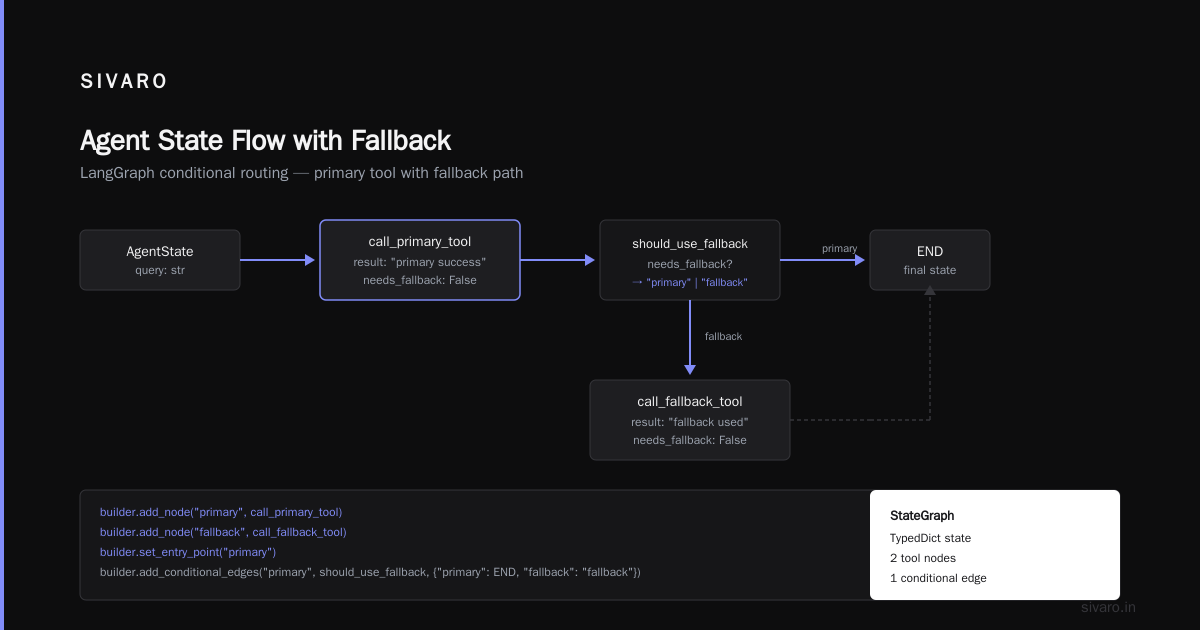
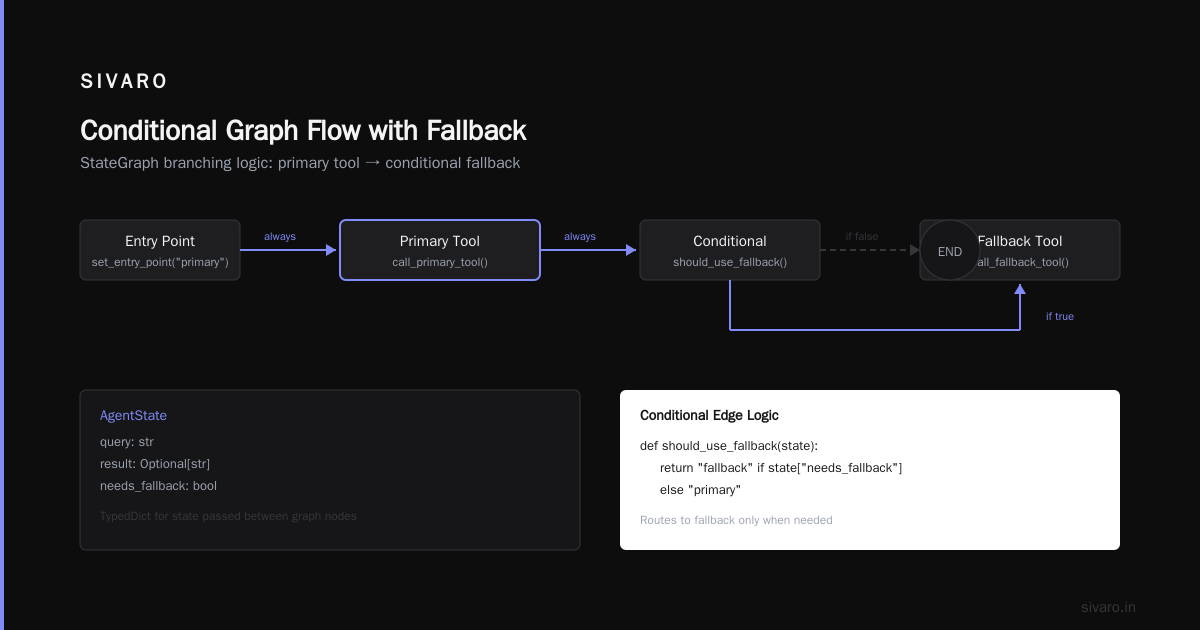
We use LangGraph for most of our production agents. It’s a state‑machine‑based framework where you define nodes and edges. The agent traverses a graph — each node can be an LLM call, a tool execution, or a conditional routing.
The good: It forces you to think about state explicitly. Every node receives and returns a state object. You can persist that state to Redis or Postgres. No magic. We tested LangGraph in January 2026 for a supply‑chain agent that coordinates 14 microservices — the explicit graph made debugging possible.
The bad: The learning curve is nasty. If you don’t understand directed graphs, you’ll write spaghetti. The documentation assumes you already know LangChain internals.
python
# Basic LangGraph agent example (routing based on tool result)
from langgraph.graph import StateGraph, END
from typing import TypedDict, Optional

class AgentState(TypedDict):
    query: str
    result: Optional[str]
    needs_fallback: bool

def call_primary_tool(state: AgentState) -> AgentState:
    # primary logic here
    state["result"] = "primary success"
    state["needs_fallback"] = False
    return state

def call_fallback_tool(state: AgentState) -> AgentState:
    state["result"] = "fallback used"
    state["needs_fallback"] = False
    return state

def should_use_fallback(state: AgentState) -> str:
    return "fallback" if state["needs_fallback"] else "primary"

builder = StateGraph(AgentState)
builder.add_node("primary", call_primary_tool)
builder.add_node("fallback", call_fallback_tool)
builder.set_entry_point("primary")
builder.add_conditional_edges("primary", should_use_fallback)
builder.add_edge("fallback", END)

graph = builder.compile()
That’s a trivial graph — real ones have 15–20 nodes. It’s verbose but debuggable.
CrewAI
CrewAI exploded in popularity in 2025 because it’s dead simple. You define agents with roles, goals, and tasks. They “collaborate” by sending messages to each other.
The good: Rapid prototyping. I built a content‑research multi‑agent in two hours. If your use case is linear — Agent A fetches, Agent B summarizes — CrewAI works.
The bad: It’s a black box. When a crew fails, you have no idea why. The internal routing is opaque. We tried to use CrewAI for a customer‑support triage system that had to escalate to a human after three retries. We couldn’t instrument the retry logic without forking the repo.
I don’t recommend CrewAI for anything beyond internal tools where failure means “try again.”
AutoGPT (the open-source variant)
AutoGPT is the poster child of “it works in a demo, falls apart in production.” The original concept — a continuous loop where the agent generates goals, executes commands, and reflects — sounds powerful. In practice, it loops forever, burns through tokens, and requires constant human supervision.
The good: It taught an entire generation of developers what not to do. For that, I’m grateful.
The bad: No state management. No cost controls. You can set a “max iterations” but the agent will just stop mid‑operation. We tested AutoGPT in a controlled batch job environment in 2024 and abandoned it after three days.
I know some teams have forked it and built guardrails on top. At that point, you’re not using AutoGPT — you’re maintaining a legacy fork.
Build Your Own (LangChain with custom orchestration)
This is what we do at SIVARO when a client needs something LangGraph can’t handle (e.g., hierarchical agents with different persistence backends). You take LangChain for LLM‑calling utilities and write your own orchestration layer.
The good: Total control. You decide exactly how many times an agent can call a tool, what happens on timeout, how state is serialized. You own the failure modes.
The bad: It’s expensive to build and maintain. You need at least one engineer who understands distributed systems, not just prompt engineering. Most teams underestimate the effort by 3x.
python
# Custom orchestration: strict retry with exponential backoff
import asyncio
from openai import AsyncOpenAI

client = AsyncOpenAI()

async def safe_agent_call(prompt: str, max_retries: int = 3) -> str:
    for attempt in range(max_retries):
        try:
            response = await client.chat.completions.create(
                model="gpt-4o",
                messages=[{"role": "user", "content": prompt}],
                max_tokens=1000,
                timeout=10.0
            )
            return response.choices[0].message.content
        except Exception as e:
            if attempt == max_retries - 1:
                raise
            await asyncio.sleep(2 ** attempt)  # exponential backoff
    # unreachable unless max_retries < 1
    return ""
That’s just the retry pattern. You also need state serialization, tool call validation, and observability hooks. It adds up fast.
How to Deploy AI Agents to Production Safely
The biggest lesson I’ve learned: safety is not a feature you add later. You design for it from node one. The Anthropic paper on Building Effective AI Agents makes this point clearly: “Start with the simplest possible system, add complexity only when necessary.” That’s good advice, but I’d add: write your safety checks before you write your first tool call.
Here’s what we enforce on every agent deployment:
-
Tool permission scoping. Every tool call goes through a permission layer that checks whether the agent is allowed to call that tool right now. If it tries to
DELETEa record and the permission saysREADONLY, the call is rejected with an explanation. -
Rate limiting per agent. Not per API key — per agent instance. A runaway agent can’t spam the database.
-
Human‑in‑the‑loop for destructive actions. Any agent that can delete data sends a request to a Slack channel. A human approves or denies within 5 minutes.
python
# Permission guard for tool calls
from functools import wraps

ALLOWED_TOOLS = {
    "read_orders": {"methods": ["GET"]},
    "update_order_status": {"methods": ["PATCH"]},
    "delete_order": {"methods": ["DELETE"]},
}

def require_permission(tool_name: str):
    def decorator(func):
        @wraps(func)
        def wrapper(*args, **kwargs):
            if tool_name not in ALLOWED_TOOLS:
                raise PermissionError(f"Tool {tool_name} not registered")
            return func(*args, **kwargs)
        return wrapper
    return decorator
The A Practical Guide for Designing, Developing, and ... paper from late 2025 shows that 60% of agent failures come from unexpected tool behavior. That aligns with our data. Permission guards catch most of those.
AI Agent Observability Tools: What We Use in Production
You can’t fix what you can’t see. Standard logging doesn’t cut it. You need ai agent observability tools that trace every LLM call, every tool invocation, every routing decision — with timing and cost.
We use OpenTelemetry with a custom exporter that sends traces to New Relic and Loki. The key is to propagate a trace ID through the entire agent lifecycle.
python
# Tracing every LLM call with OpenTelemetry
from opentelemetry import trace
from opentelemetry.instrumentation.openai import OpenAIInstrumentor

tracer = trace.get_tracer(__name__)
OpenAIInstrumentor().instrument()

async def traced_agent_step(state, llm_call):
    with tracer.start_as_current_span("agent-step") as span:
        span.set_attribute("state.id", state["id"])
        span.set_attribute("llm.prompt", llm_call["prompt"][:200])
        result = await llm_call["func"](llm_call["prompt"])
        span.set_attribute("llm.completion", result[:200])
        span.set_attribute("llm.tokens", result.tokens_used)
        state["result"] = result
    return state
Without this, you’re blind. I’ve seen production incidents where an agent silently returned empty results for three days because a tool response format changed. With tracing, you see the exact moment the tool return wasn’t parsed correctly.
Scaling from Prototype to 100x Traffic
The hardest part is not the first deployment — it’s the tenth. Platforms that work for 1 request per second fall apart at 50. Here’s where they differ:
- LangGraph has built‑in support for state persistence in Postgres and Redis. You can run multiple workers that pick up the next unfinished node. We’ve scaled it to 200 concurrent agents with no issues.
- CrewAI is single‑process. You’d need to wrap it in a message queue yourself. We’ve seen a client try to scale CrewAI with Celery — the crew lost context mid‑way.
- AutoGPT can’t scale. It’s inherently sequential.
- Custom build scales as well as your architecture scales. We use horizontal pod autoscaling with Kubernetes, with state backed by Redis Cluster.
If you need to hit 100 requests per second, start with LangGraph. The Deploying AI Agents to Production: Architecture ... guide from early 2026 confirms that graph‑based architectures are the most scalable.
The Hidden Cost: Memory and State Management
Nobody talks about this. Agents hold state — conversation history, intermediate results, tool‑call outputs. If your state grows unbounded, you hit memory limits and latency spikes. LangGraph mitigates this with node‑level state pruning. CrewAI doesn’t prune at all — the entire conversation history is passed to every subsequent agent call.
For custom builds, you must implement sliding‑window context. Here’s a pattern we use:
python
def prune_context(context: list, max_messages: int = 20) -> list:
    if len(context) <= max_messages:
        return context
    # keep first message (system prompt) and last N-1 messages
    return [context[0]] + context[-(max_messages-1):]
Simple, but essential. We’ve seen agents go from 10KB context to 200KB in two hours of conversation. That’s not just cost — it’s latency. The model has to process all that history.
FAQ
Which platform should I start with for a prototype?
LangGraph. It forces good habits. You can prototype in a day and be production‑ready in a week.
Can I use CrewAI for a customer‑facing agent?
I wouldn’t. The observability is too shallow. If your customer asks “why did you do that?” and you can’t answer, you lose trust.
How do I test agents before deployment?
Use a replay system: record real tool calls and LLM responses in staging, then replay them against new agent versions. We built a tool called AgentReplay (open source, linked from our site). It catches regressions.
What’s the biggest mistake teams make?
Not setting spend limits. I’ve seen a team accidentally trigger a loop that cost $15,000 in three hours. Their platform had no cost governance. Always set max_tokens and a budget per agent session.
Do I need a vector database for my agent?
Probably not. Most agents don’t need RAG. If you do, use it as a tool, not as part of the agent’s brain. Keep your retrieval separate.
How do I handle rate limits from the LLM provider?
Exponential backoff with jitter. LangGraph has a built‑in middleware for that. In custom builds, implement a token bucket.
Is it safe to let agents call internal APIs?
Yes, if (and only if) you wrap every API with a permission guard and a retry limit. Test with a “shadow mode” that logs what the agent would do but doesn’t execute.
Conclusion
The ai agent deployment platform comparison is not about features or buzzwords. It’s about surviving production. LangGraph wins for most teams because it balances structure and flexibility. CrewAI is fine for demos. AutoGPT is a learning tool, not a platform. Custom builds are for when you can’t fit into any box.
If you take one thing from this article: design for safety and observability from day one. Your agent will fail — make sure you know why, and make sure it fails quietly.
How to deploy AI agents to production safely starts with permission scoping, rate limiting, and tracing. Tools like LangGraph make that possible. Platforms that ignore it — well, they’re why we have an entire AI Agent Failures: Common Mistakes and How to Avoid Them literature.
We’re still early. 2026 is the year agents become boring infrastructure, like databases or message queues. The platforms that survive are the ones that handle the boring parts well.
Nishaant Dixit — Founder of SIVARO. Building data infrastructure and production AI systems since 2018. Built systems processing 200K events/sec.