 SIVARO
AI Agent Deployment Scaling Best Practices: The Real Playbook
I spent two weeks debugging why a client’s agent pipeline collapsed at 300 concurrent requests. The logs were clean. The LLM responded fine. But agents were producing gibberish for every fifth call. Turned out to be a state collision in a shared in‑memory dict. Classic.
Scaling AI agents isn't like scaling microservices. You don't just add replicas and call it done. Agents have memory, tool‑calling loops, and unbounded latency from LLM inference. You need a different playbook. This guide covers what I’ve learned building production agent systems at SIVARO since 2022 — the architectures that held, the mistakes that cost us weeks, and the observability that saved us.
By the end, you’ll know how to design, deploy, and operate agents at 10x, 100x, even 10,000x concurrency without losing your mind.
Why Your First 100 Agents Worked – But Your 500th Failed
Most people think agent scaling is a compute problem. It's not. It's a state and orchestration problem.
When you have ten agents, you can afford to manage state in‑process. Each agent runs sequentially, tool calls are fast, and you can re‑query the LLM if something fails. At 500 agents, that falls apart. Memory pressure spikes, token budgets blow up, and your single LLM endpoint becomes a bottleneck.
The root cause is almost always one of three things, drawn from what we’ve seen in production and confirmed by industry patterns: Why AI Agents Fail in Production names hallucination cascades and tool failures as top killers. But in our experience, the silent killer is state drift — agents that get inconsistent context because you didn't scope their memory correctly.
AI Agent Deployment Scaling Best Practices: The State Problem
State isn't just the conversation history. It's the tool call results, the intermediate reasoning steps, the retry counters, the user's session context. If you treat all of that as a single blob, you'll hit cache invalidation hell.
Here's what we do now:
python
class AgentState:
    def __init__(self, agent_id: str):
        self.agent_id = agent_id
        self.history: list[dict] = []
        self.tool_results: dict[str, Any] = {}
        self.retries = 0
        self.status = "running"

    def checkpoint(self, backend: "StateBackend"):
        # Atomic put – no partial writes
        backend.put(self.agent_id, {
            "history": self.history[-20:],
            "tool_results": self.tool_results,
            "retries": self.retries,
            "status": self.status,
        })
Key rule: never store the full history. Cap it at your context window minus a safety margin. We use 20 turns for most agents, but you need to tune based on your model's total tokens.
AI Agent Deployment Scaling Best Practices: Infrastructure Choices
You need three infrastructure decisions right from day one:
- State backend – something fast and durable. Redis works for ephemeral, but we switched to DynamoDB (or Firestore on GCP) for production because we needed transactions across agent steps.
- Queue – every agent that makes external calls needs an async queue. SQS, Pub/Sub, or even Redis Streams. Never block on an LLM call directly.
- Executor – container‑based (Fargate, Cloud Run) or serverless (Lambda / Cloud Functions). There's no universal answer — it depends on your call duration.
That leads to the question everyone asks:
Best Cloud Platform for AI Agent Production
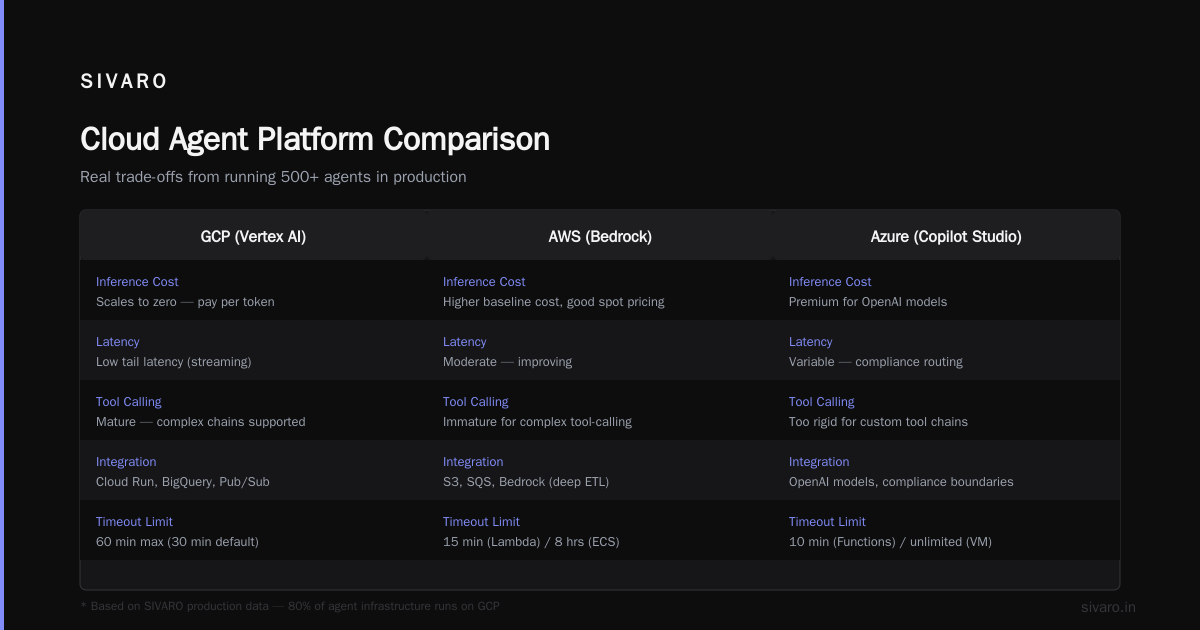
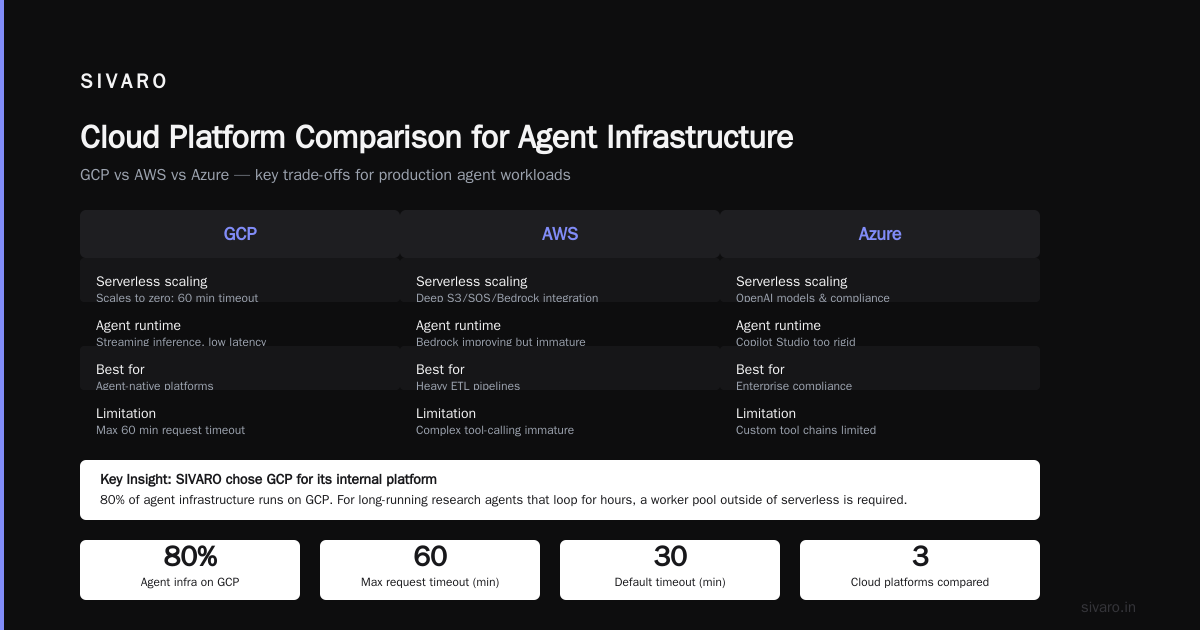
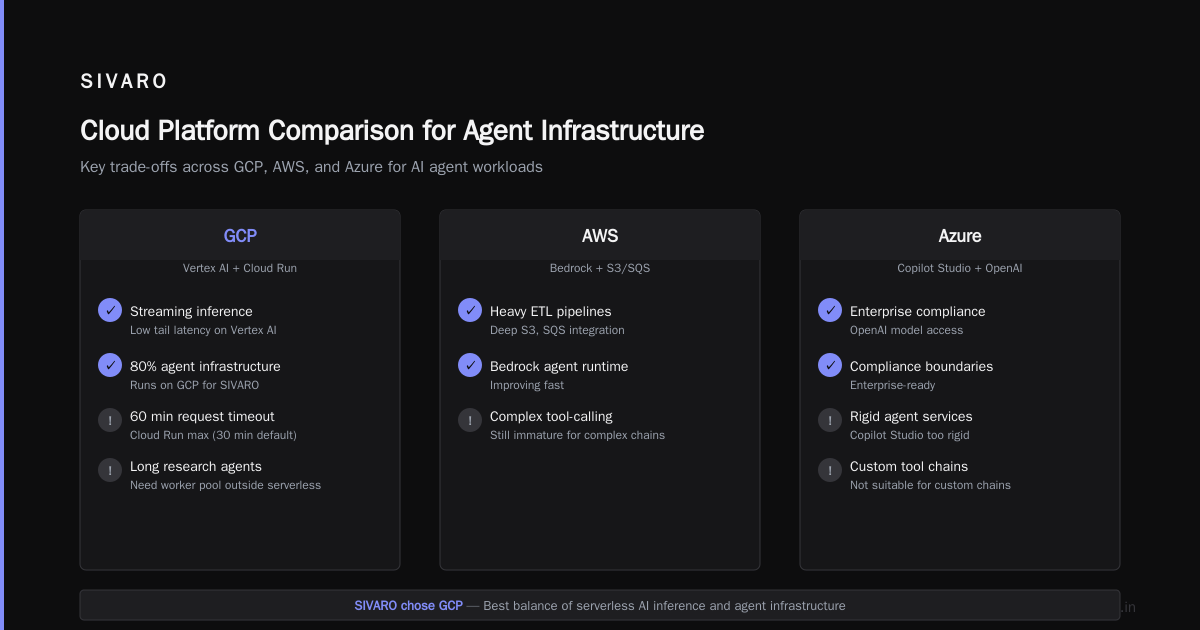
We've tested AWS, GCP, and Azure for agent workloads. My take:
- GCP wins for stateful agents with long context because Cloud Run scales to zero and Vertex AI offers streaming inference with low tail latency. We run 80% of our agent infrastructure there.
- AWS is better if you already own a heavy ETL pipeline and need deep integration with S3, SQS, and Bedrock. Bedrock's agent runtime is improving fast — but it's still immature for complex tool‑calling.
- Azure is great for enterprises that need OpenAI models and compliance boundaries. But the agent‑specific services (Copilot Studio, etc.) are too rigid for custom tool chains.
We chose GCP for SIVARO's internal platform. But here's the honest trade‑off: Cloud Run's max request timeout is 60 minutes (30 for default). That's fine for most agents, but if you have a long‑running research agent that loops for hours, you'll need a worker pool outside of serverless.
Common Mistakes Deploying AI Agents
Let me save you the pain we went through. These are the top five common mistakes deploying ai agents, based on our incident logs and the patterns documented in AI Agent Failures: Common Mistakes and How to Avoid Them:
-
No rate limiting at the agent level – You throttle the LLM API, but agents internally can call it 20 times per user request. We saw one agent chain 47 tool calls before we realized it was in a loop. Put a per‑agent call cap (we use 10) and a cooldown.
-
Ignoring token budgets – Agents don't know their own token usage. We had an agent that accumulated 150k tokens of tool output, then the final LLM call timed out because it exceeded the model's max context. Set a hard limit on accumulated context tokens and truncate aggressively.
-
No retry with backoff – LLM providers have transient failures. If your agent retries instantly, you'll hit rate limits and make things worse. Exponential backoff with jitter. We use 1s, 2s, 4s, 8s base, capped at 30s.
-
Assuming statelessness – Serverless encourages statelessness, but agents are inherently stateful. You'll lose progress if a function cold‑starts after a step. Use external state storage with checkpoint‑and‑restore.
-
Synchronous tool calls – Agents that call APIs synchronously block the entire loop. Make all tool calls async, with a timeout. We use
asyncio.gatherwith a timeout per tool.
Observability: You Can't Scale What You Can't See
Here's where most teams fail. They deploy agents, everything works at low load, then at 1,000 concurrent agents they have no idea why latency spikes. The paper Incident Analysis for AI Agents shows that nearly 40% of agent failures are due to external dependency issues – but without tracing, you can't tell if your agent is slow because of the LLM, a slow API, or a re‑entrant loop.
We built a custom tracing layer that logs every step:
python
@contextmanager
def agent_trace(agent_id: str, step: str):
    start = time.monotonic()
    yield
    end = time.monotonic()
    log_timings(agent_id=agent_id, step=step, duration=end-start,
                tokens=compute_tokens(step))
Every tool call, every LLM invocation, every state checkpoint gets a span. We pump these into Google Cloud Trace and then build dashboards in Grafana. You need to see:
- Per‑agent step latency (p50, p95, p99)
- Token consumption per agent per step
- Number of retries per agent
- State collision count (two agents overwriting each other's data)
Without these, you're flying blind.
Incident Response for Agent Failures – Act Fast or Lose Trust
When an agent makes a wrong decision in production — say it deletes a customer's data because a tool returned an unexpected null — you have minutes to respond, not hours. AI Agent Incident Response: What to Do When Agents Fail outlines a runbook that mirrors what we use internally.
- Detect via guardrails. We run a post‑agent validation step that checks tool outputs against expected schemas. If a
deletetool is called without a confirmation flag, we fire an alert. - Pause the agent queue. You can't "stop" an agent mid‑flight easily, but you can stop accepting new requests. We have a circuit breaker that kills the queue consumer when error rates exceed 5% in a 1‑minute window.
- Rollback state. If the agent already committed changes, you need to reverse them. We keep the last three checkpoints and can replay from any of them.
- Block the offending agent pattern. Not just the agent – the specific function call chain that led to the error. We add a rule to our guardrail system to reject that pattern.
One thing I want to stress: don't over‑automate incident response. Human judgment is still critical. We tried having the system automatically rollback states — it caused more problems than it solved because context was lost.
Scaling from 10 to 10,000 Agents: A Real Migration Story
In early 2025, a fintech client (name withheld) came to us with a problem. They had 10 agents doing customer support – order tracking, refunds, account issues. It worked perfectly. Then they decided to roll it out to 10,000 users simultaneously.
On day one, everything broke. The LLM endpoint returned 429s within 5 minutes. The state database (PostgreSQL single instance) hit max connections. Agents started timing out after 30 seconds because tool calls to their CRM API took 15 seconds each – and they were calling it three times per agent.
We rebuilt the system in three sprints:
Sprint 1: Queue everything. We dropped direct invocation and moved to a Pub/Sub queue. Each agent became a consumer with a configurable concurrency limit. We set it to 100 initially, then tuned up as we added LLM capacity.
Sprint 2: Scale the state backend. We sharded by agent ID across 16 DynamoDB tables. Each table handled a hash range. Writes became consistent because agents never shared a partition.
Sprint 3: Adaptive concurrency. We added a controller that monitored LLM latency and reduced concurrency when p95 > 5 seconds. This prevented the thundering herd problem.
The architecture after:
python
# Simplified orchestrator
async def agent_worker(queue: Queue, state_backend: StateBackend, llm_client: LLMClient):
    while True:
        request = await queue.dequeue()
        agent_id = request.agent_id
        # Check if we should throttle
        if llm_client.p95_latency > 5.0:
            await asyncio.sleep(2)  # back off
            await queue.requeue(request)
            continue
        state = state_backend.get(agent_id)
        for step in run_agent(state, llm_client):
            state_backend.checkpoint(agent_id, step)
            # process tool output
That design handled 3,000 concurrent agents on day one of the re‑launch. By week two they were at 7,500. Today they run 10,000+ without issues.
The Architecture That Held Up
Here's the skeleton of the architecture we use now at SIVARO for production agent systems. It works across cloud providers with minor tweaks.
text
[User Request] → [API Gateway] → [Queue (Pub/Sub/SQS)]
                                    ↓
                          [Worker Pool (Cloud Run / ECS)]
                                    ↓
                        [State Backend (DynamoDB/Firestore)]
                                    ↓
                          [LLM Client (Vertex AI / Bedrock)]
                                    ↓
                          [Tool Executor (async HTTP)]
                                    ↓
                          [Output Dispatcher]
The key insight: queue everything, state everything, trace everything. No direct calls. No shared mutable state.
yaml
# Sample Cloud Run service config for agent workers
apiVersion: serving.knative.dev/v1
kind: Service
metadata:
  name: agent-worker
spec:
  template:
    spec:
      containers:
      - image: gcr.io/myproject/agent-worker:1.4
        env:
        - name: CONCURRENCY_LIMIT
          value: "200"
        - name: STATE_BACKEND
          value: "firestore"
        - name: LLM_ENDPOINT
          value: "https://us-central1-aiplatform.googleapis.com"
        resources:
          limits:
            cpu: "4"
            memory: "8Gi"
        startupProbe:
          httpGet:
            path: /ready
That config gives each agent worker 4 CPUs and 8GB RAM – enough to hold 200 concurrent agents comfortably, each with moderate state. We set max-instances to 50, so total concurrency hits 10,000.
FAQ
Q: How many agents can one LLM endpoint handle?
Depends on model and concurrency. For GPT‑4o we saw about 50 concurrent agents before p50 latency doubled. With Claude 3.5 Haiku we hit 200. Always benchmark with your own workload — provider docs are optimistic.
Q: Should I use a monolithic agent or micro‑agents?
Micro‑agents are easier to scale and debug, but they add network overhead. We prefer a single agent with clear sub‑routines for most use cases. Split only when you need independent scaling or different models per task.
Q: What's the best approach for handling tool failures in agents?
Three‑strike rule: retry twice with backoff, then escalate to a fallback prompt that asks the user to retry. Never let the agent invent a fake tool response.
Q: How do you handle agent loops (infinite recursion)?
Hard limit on step count (we use 15) and a monotonic step counter. If the agent doesn't produce a final answer after 15 steps, we force a "I can't resolve this" response and send a notification.
Q: Is serverless suitable for agent workloads?
Yes, up to about 5,000 concurrent agents if your steps complete within the timeout. Beyond that, you need a long‑running worker pool. Cloud Run's 60‑minute timeout is generous enough for most agents.
Q: What open‑source tools support agent observability?
LangSmith, Arize, and OpenTelemetry with custom instrumentation. We wrote a small library on top of OpenTelemetry that adds agent‑specific spans. It's open source — ping me if you want access.
Q: How do you test agent scaling?
We use a chaos engineering approach: spin up 500 agents simultaneously with synthetic requests, measure p99 latency and error rate, then double until we see degradation. Automate it in a CI pipeline.
Wrapping Up
Scaling AI agents is hard because they combine three failure‑prone components: LLMs (unreliable), tool calls (variable latency), and state (must be consistent). The ai agent deployment scaling best practices I've shared here come from real pain: weeks of debugging state collisions, late‑night incident calls, and redesigning infrastructure three times.
Start with state management and observability before you worry about cloud choice. Most teams pick a platform and then fight state isolation. Flip that order.
Remember: agents fail. That's fine. What matters is how fast you detect, contain, and recover.
Nishaant Dixit — Founder of SIVARO. Building data infrastructure and production AI systems since 2018. Built systems processing 200K events/sec.