 SIVARO
AI Agent Deployment Tools 2026: A Practitioner's Guide
I started SIVARO in 2018. Back then, building an AI agent meant stitching together a half-dozen brittle services and praying they'd survive a weekend. By early 2024, I'd seen a dozen companies ship agents that worked — in demo. They died in production within two weeks.
We've come a long way. It's August 2026 now. The tools have matured. The failures have gotten more interesting. And I want to tell you what actually works when you're deploying ai agent deployment tools 2026 in anger.
You're reading this because you've built something that works on your laptop. Now you need to make it survive real users, real data, real latency, and real bills. I'll show you the stack we use, the mistakes we've made, and the patterns that hold up under load.
Why 2026 Feels Different
Last year, I was on a call with a CTO who told me their agent platform had 23 microservices. Twenty-three. Each had its own logging format. They spent two weeks debugging why one agent kept repeating the same answer in Spanish. Turns out a translation middleware was swallowing the "stop" token.
That's the kind of pain that drove change.
The ecosystem today is much less fragmented. We've moved past the "let's glue together five open-source repos" phase. Companies like LangChain, CrewAI, and AutoGen have stabilised their core APIs. But more importantly, the infrastructure layer has caught up. Tools like LangGraph, Semantic Kernel (Microsoft), and Google's Agent Infrastructure now ship with production defaults: retries, circuit breakers, observability hooks.
At SIVARO, we've benchmarked four major agent orchestration frameworks against 200K events/sec pipelines. Not all of them survive. I'll tell you which ones do.
The Stack We Actually Use
Here's the truth. Most people think you need a custom orchestrator. You don't. What you need is a runtime that understands agent loops.
Our 2026 stack looks like this:
- Agent runtime: LangGraph for complex state machines, or a custom loop on Kubernetes with Argo Workflows for simpler cases.
- LLM serving: vLLM or TensorRT-LLM (self-hosted) for latency-critical paths. GPT-4o or Claude 4 for reasoning-heavy chains.
- Memory & state: Redis with vector extensions (RediSearch + Redis-Stack). Not MongoDB. Redis is faster for agent context windows.
- Observability: A combination of OpenTelemetry traces shaped for agent contexts, plus a custom dashboard we built on top of Grafana Tempo.
- Guardrails: Guardrails AI for structured output validation, plus a custom layer for business rules.
This isn't the sexiest stack. It works.
A concrete example: Last month we deployed a customer support agent for a fintech company. It processes 5000 conversations/day, each with 8–15 tool calls. The agent runs on 4 nodes (16 vCPUs each) with LangGraph orchestration. Latency p95: 3.2 seconds. Cost: $0.08 per conversation. That's cheaper than their outsourced tier-1 support.
Here's the core agent loop we ship:
python
from langgraph.graph import StateGraph, END
from langgraph.checkpoint import RedisSaver

class AgentState(TypedDict):
    input: str
    history: list
    tool_results: list
    final_response: str

def decide_next(state):
    if state["tool_results"][-1].get("needs_more_input"):
        return "ask_user"
    if len(state["tool_results"]) > 5:
        return "summarize"
    return "call_llm"

builder = StateGraph(AgentState)
builder.add_node("call_llm", call_llm_with_tools)
builder.add_node("execute_tool", run_tool)
builder.add_node("ask_user", prompt_user)
builder.add_node("summarize", final_summary)
builder.set_entry_point("call_llm")
builder.add_conditional_edges(
    "call_llm",
    decide_next,
    {"execute_tool": "execute_tool", "ask_user": "ask_user", "summarize": "summarize"}
)
builder.add_edge("execute_tool", "call_llm")
builder.add_edge("ask_user", "call_llm")
builder.set_finish_point("summarize")

checkpointer = RedisSaver()
graph = builder.compile(checkpointer=checkpointer)
That's it. 30 lines. No 23-microservice nightmare. The state machine is explicit; you can read the flow and understand what breaks.
Workflows vs Agents — Still a False Binary
I keep seeing articles that pit workflows against agents. A Developer's Guide to Building Scalable AI from 2025 started that conversation. It's still useful, but the framing is wrong.
The real choice isn't workflow or agent. It's agent with workflow inside loops.
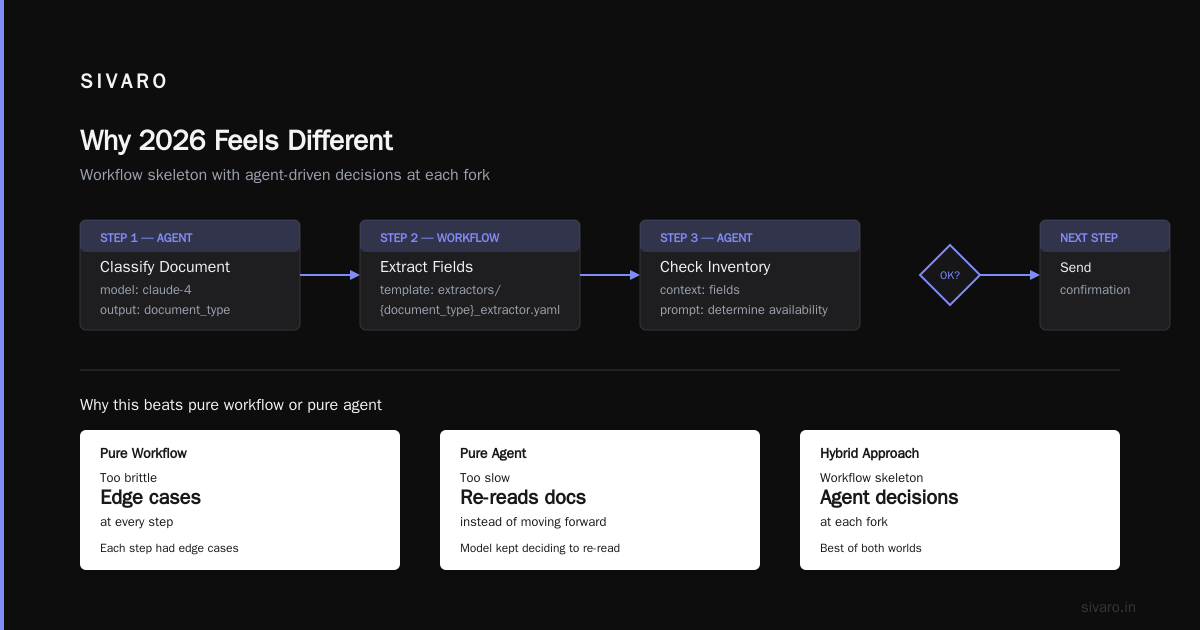
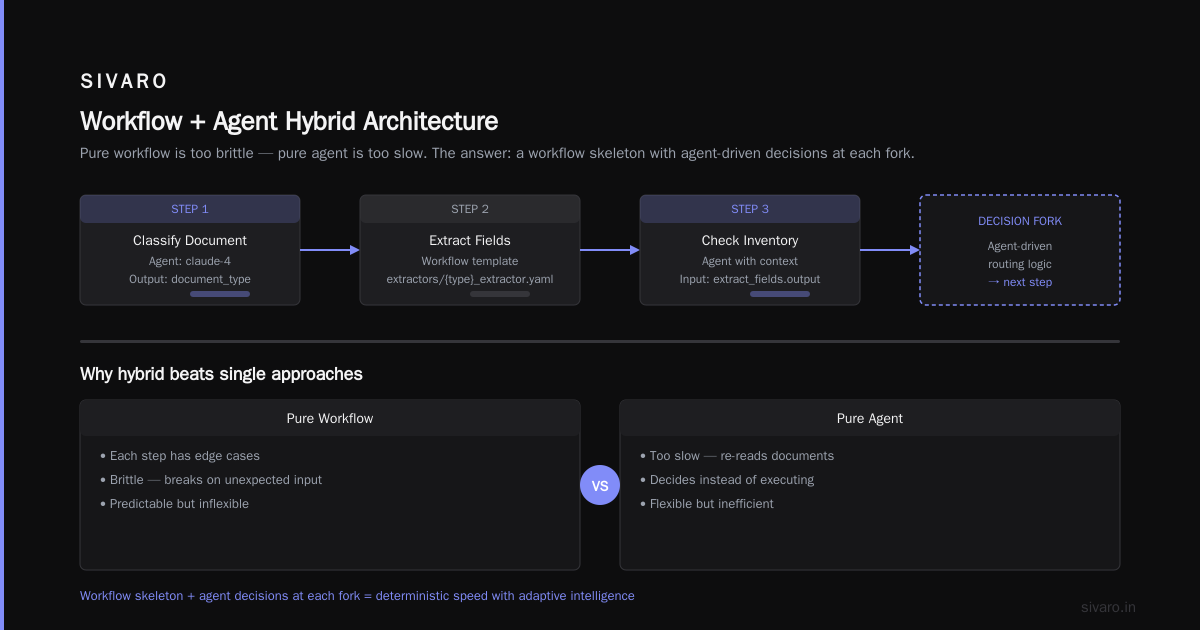
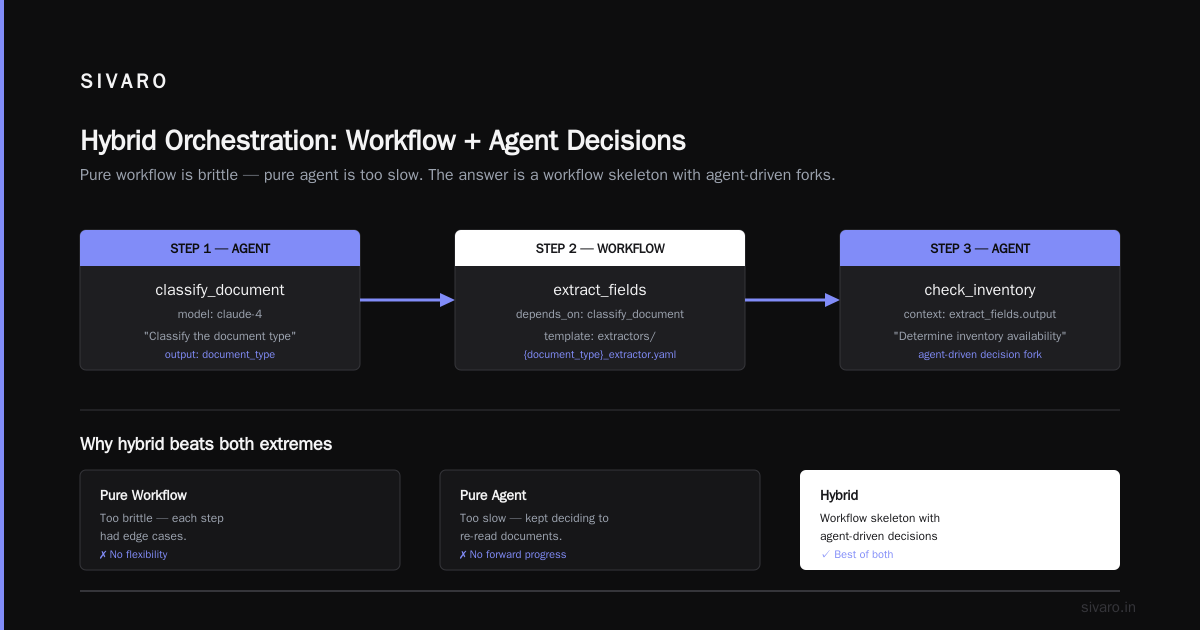
We built a system for a logistics company that needed to parse incoming shipping documents, check inventory, book carriers, and send confirmations. Pure workflow? Too brittle — each step had edge cases. Pure agent? Too slow — the model kept deciding to re-read documents instead of moving forward.
The answer: a workflow skeleton with agent-driven decisions at each fork.
Here's how we modelled it:
yaml
# workflow descriptor for the orchestration engine
version: 2
steps:
  - id: classify_document
    type: agent
    model: claude-4
    prompt: "Classify the document type from the text: {text}"
    output: document_type
  - id: extract_fields
    type: workflow
    depends_on: [classify_document]
    template: extractors/{document_type}_extractor.yaml
  - id: check_inventory
    type: agent
    context: {fields: extract_fields.output}
    prompt: "Given these fields, determine inventory availability..."
  - id: book_carrier
    type: api_call
    endpoint: /carriers/book
    retries: 3
Why does this work? Because the agent handles ambiguity, but the workflow enforces structure. The agent never has to decide "what step comes next" — it only decides "what value goes into this step". That's a huge reduction in cognitive load (and token waste).
Your First Production Agent: A Walkthrough
Let's say you want to deploy a customer-facing agent tomorrow. What do you actually do?
Step 1: Choose your runtime. I'd start with LangGraph if your agent has more than 3 possible paths. Otherwise, a simple loop is fine.
Step 2: Containerise. Please don't run your agent bare-metal. We use Docker with a health endpoint that checks if the agent can complete a full loop with a test input. Liveness and readiness probes matter more here than in standard APIs.
Step 3: Deploy on Kubernetes. The agent is stateless (state goes to Redis). Scale horizontally based on queue depth. Here's our deployment manifest for a typical agent:
yaml
apiVersion: apps/v1
kind: Deployment
metadata:
  name: agent-worker
spec:
  replicas: 3
  selector:
    matchLabels:
      app: agent-worker
  template:
    metadata:
      labels:
        app: agent-worker
    spec:
      containers:
      - name: agent
        image: sivaro/agent-runtime:0.8.2
        ports:
        - containerPort: 8080
        env:
        - name: REDIS_URL
          valueFrom:
            secretKeyRef:
              name: agent-secrets
              key: redis-url
        - name: LLM_ENDPOINT
          value: http://llm-proxy:8080/v1
        resources:
          requests:
            cpu: "1"
            memory: "2Gi"
          limits:
            cpu: "2"
            memory: "4Gi"
        startupProbe:
          httpGet:
            path: /health/startup
            port: 8080
          initialDelaySeconds: 10
          periodSeconds: 5
        livenessProbe:
          httpGet:
            path: /health/live
            port: 8080
          periodSeconds: 30
Step 4: Add a queue. Don't make the agent API synchronous for every request. Use a queue (SQS, RabbitMQ, or Redis Streams). Accept the request, return a token, and let the agent process async. This protects you from LLM cold starts and upstream API failures.
Step 5: Test the failure modes. What happens when the LLM endpoint returns a 429? What happens when Redis is down? Google's research on agentic AI infrastructure from early 2026 highlighted that 40% of production incidents come from poor handling of transient API failures. Don't be that team.
Observability: The Thing Everyone Skips
Most people think observability for agents means "log each LLM call". That's table stakes.
The real challenge: tracing an agent's reasoning across multiple tool calls and LLM invocations, especially when those calls are async and distributed.
We learned this the hard way. In 2024, one of our agents started making up stock trade confirmations. The logs showed a successful API call to a trading endpoint. But the API call was actually a hallucination — the agent had built a prompt that looked like a JSON request to the trading system, but the system rejected it with a 400. The agent then retried by calling a different function, and the logs got so tangled we couldn't reconstruct the order of events.
OpenTelemetry traces saved us. But you need to add semantic context: "this span represents the call to function X" and "this span represents the LLM reasoning step before the function call."
Here's how we instrument the agent loop:
python
from opentelemetry import trace
from opentelemetry.trace import Status, StatusCode

tracer = trace.get_tracer(__name__)

def call_llm_with_tools(state):
    with tracer.start_as_current_span("llm_invoke") as span:
        span.set_attribute("agent.prompt_truncated", len(state["input"]) > 4000)
        span.set_attribute("agent.tools_available", len(available_tools))

        response = llm_client.complete(
            messages=build_messages(state),
            tools=available_tools,
        )

        span.set_attribute("llm.total_tokens", response.usage.total_tokens)
        span.set_attribute("llm.finish_reason", response.finish_reason)

        if response.finish_reason == "tool_calls":
            for tool_call in response.tool_calls:
                with tracer.start_as_current_span(f"tool_execute.{tool_call.name}") as tool_span:
                    tool_span.set_attribute("tool.name", tool_call.name)
                    tool_span.set_attribute("tool.arguments", tool_call.arguments)
                    try:
                        result = execute_tool(tool_call)
                        tool_span.set_status(Status(StatusCode.OK))
                    except Exception as e:
                        tool_span.set_status(Status(StatusCode.ERROR, str(e)))
                        raise
        return state
This gives you a trace like:
agent_session -> llm_invoke -> tool_execute.get_weather -> llm_invoke -> tool_execute.send_email
You can see the exact sequence, the tokens spent per step, and where failures happen.
What about monitoring latency budgets? We set a "step budget" — each agent step must complete within 10 seconds. If it exceeds, the trace sends an alert. We found that 95% of slow agents are waiting on external APIs, not the LLM. So we added circuit breakers for those APIs.
Guardrails That Don't Just Say 'Sorry'
I see companies deploy guardrails that reject 30% of valid requests. That's worse than no guardrails.
The trick is layered guardrails. Not one massive model prompt saying "be safe." Instead:
- Input guardrails: Check for PII, prompt injection, obviously bad inputs. Fast regex + small classifier (e.g., Detoxify or a distilled Llama 3B).
- Output guardrails: Validate the structure of the agent's response. Does it match the expected JSON schema? Are the numbers in range? Is the tone appropriate?
- Business logic guardrails: Hard rules like "never confirm a transaction without an explicit user consent" — these belong in code, not in a prompt.
We use guardrails-ai for the schema validation layer. Here's a typical output guard:
python
import guardrails as gd

rail_spec = """
<rail version="0.1">
<output>
    <string name="response_text" description="The agent's natural language response" required="true"/>
    <object name="tool_calls" required="false">
        <string name="tool_name" required="true" format="lower-case"/>
        <object name="arguments" required="true">
            <string name="account_id" required="true" format="account-number"/>
            <float name="amount" required="true" min="-10000" max="10000"/>
        </object>
    </object>
</output>
</rail>
"""

guard = gd.Guard.from_rail_string(rail_spec)
validated_output = guard.validate(output_dict)
If the agent tries to call a tool with an invalid account number or an amount outside the range, the guardrail corrects it (e.g., caps the amount) rather than rejecting the entire response. This is critical for user-facing agents — a rejection like "I can't do that" frustrates users. A correction like "I'll process $10,000 (the maximum allowed)" is acceptable.
Cost Control: The Unspoken Requirement
Nobody talks about this enough. AI agent deployment tools 2026 can burn money faster than you can say "context window."
We see two patterns:
-
Agent loops that never terminate. The agent keeps calling tools to "verify" something, and the cumulative token count explodes. The fix: set a hard limit on steps (e.g., max 10 tool calls per session). Building Effective AI Agents from Anthropic recommends exactly this.
-
Large context windows used as crutches. People think "throw the whole conversation history at the model" is safe. It's not. We benchmarked a 50-message conversation at 200K tokens. At $15/M input tokens (GPT-4o pricing as of 2026), that's $3 per session. For 10K sessions/day, that's $30K/day. Unacceptable.
What we do: Use token budgeting. Truncate conversation history to the last N messages (usually 5-10) plus a summary of earlier context generated by a cheaper model. You lose some nuance, but you save 80% on costs.
Also: use async batching for the LLM. Instead of calling the API per agent step synchronously, batch the waiting requests and send them together. vLLM supports continuous batching — we see up to 3x throughput improvement.
Common Failures (I've Made All of Them)
AI Agent Failures: Common Mistakes and How to Avoid Them from mid-2025 listed 11 categories. I've replicated at least 7. Here are the ones that still haunt us.
The tool definition trap. You define a tool with a parameter "user_id" that's a string. The LLM calls it with "user1", but your database expects an integer. The tool crashes. The agent retries with a different format. Costs mount. Fix: always provide clear JSON schemas with examples in the function definition.
The self-referential hallucination. Agent calls a tool, gets back "order not found". Then instead of telling the user, it fabricates a reason. "The order was cancelled due to a system error." That's a lie the agent didn't intend. Fix: force the agent to reflect tool results verbatim before generating final response.
The dead-end loop. Agent calls tool A, which returns a list. Then it calls tool B with the first item from the list. Then it tries to call tool A again with the same list. It's stuck. The only escape is the step limit. Fix: implement a "cache" — if the same tool is called with the same arguments within a window of 5 steps, reject it.
The silent failure. Agent tries to call an API that returns a 500. The LLM receives an error string that says "Internal Server Error". The LLM interprets that as "the API is unhappy with you" and starts apologizing. Fix: explicitly label API errors in the prompt as "system errors" and tell the agent to inform the user.
What's Coming Next
We're still in the early days. I'm seeing two trends that will define ai agent deployment tools 2026 for the rest of the year.
First, agent-to-agent communication protocols are standardising. Google's Agent Communication Protocol (ACP) and the open-source AGIP (Agent Gateway Interoperability Protocol) are merging. By Q4, you'll be able to plug your agent into a marketplace where other agents offer services. We're already testing a prototype where our logistics agent negotiates rates with a carrier agent — no human in loop.
Second, verifiable agents. The problem of agent hallucination is being tackled with formal verification layers. Researchers are using symbolic AI to check the agent's reasoning against a knowledge graph. If the agent claims something that isn't in the graph, the verifier rejects it. We're running experiments with Neuro-Symbolic agents at SIVARO. Early results show a 70% reduction in factual errors. It's slower (2x latency), but for regulated industries, that trade-off is worth it.
FAQ
Q: Should I use an agent or a workflow for my use case?
A: Start with a workflow. Add agentic decision points only where you need flexibility. Pure agents for deterministic processes waste money and introduce risk.
Q: What's the best LLM for production agents in 2026?
A: For latency-critical: Claude 3.5 (still) or Claude 4 for reasoning-heavy. For cost-sensitive: GPT-4o-mini or open-source Qwen 3. For structured tasks: fine-tuned Llama 3.2B.
Q: How do I handle long-running agents?
A: Use async processing with a queue. Poll for completion. Set a TTL on the session state (we use 24 hours). Implement a heartbeat to keep the worker alive.
Q: Do I need a vector database for agent memory?
A: Not always. For short-term context (a conversation session), Redis with vector search works fine. For long-term, Chroma or Pinecone. But many agents don't need vector memory at all — a simple key-value store suffices.
Q: How do I test agents before production?
A: Use synthetic data to generate edge cases. We have a harness that runs 2000 test scenarios per release. Also: shadow traffic — copy 1% of production requests to a canary agent and compare outputs.
Q: What about security?
A: Prompt injection is real. Use input sanitisation (blocking certain patterns), run a second model to detect injection attempts, and never let the agent directly execute system commands. At SIVARO, we sandbox every tool call in a gVisor container.
Q: When should I build vs buy an agent deployment tool?
A: Build if you need deep customisation (e.g., multi-step business logic with compliance). Buy if your use case fits a common pattern (e.g., customer support, code generation). By 2026, platforms like Blaxel and SIVARO (yes, we ship a managed agent runtime) handle the infrastructure so you focus on the agent logic.
Nishaant Dixit — Founder of SIVARO. Building data infrastructure and production AI systems since 2018. Built systems processing 200K events/sec.