 SIVARO
AI Agent Deployment vs Model Deployment: What Nobody Tells You About Production
I shipped my first production ML model in 2018. A simple binary classifier. Push a Docker container, expose a REST endpoint, write a health check, done.
Six months ago I deployed an AI agent that nearly took down our entire Slack infrastructure. The agent had a loop. It kept triggering itself. Within 47 seconds it had generated 12,000 messages. The model was fine. The agent was a disaster.
That's the difference between ai agent deployment vs model deployment in one story.
Let me show you what I've learned the hard way.
The Fundamental Difference: Loops vs Endpoints
Most teams treat agent deployment like model deployment. They're wrong.
A model deployment is a stateless function. Input goes in, prediction comes out. You can load test it. You can A/B test it. You can roll it back with a single command.
An agent deployment is a stateful loop with external side effects. It calls APIs. It writes to databases. It clicks buttons. It talks to people. And sometimes it decides to rerun itself recursively until your AWS bill looks like a phone number.
Here's what a simple model deployment looks like:
python
# Model deployment - stateless inference
@app.post("/predict")
async def predict(features: Features):
    result = model.predict(features.dict())
    return {"prediction": result, "confidence": model.confidence}
And here's what a naive agent deployment looks like that will absolutely fail in production:
python
# Agent deployment - naive version (do not use)
async def run_agent(task: str):
    plan = await llm.plan(task)
    for step in plan:
        result = await execute_step(step)
        if "error" in result.lower():
            # THIS IS THE BUG - recursive self-correction
            await run_agent(f"Fix this error: {result}")
    return "done"
See the problem? That recursive call. The model would just return an error code. The agent tries to "fix" itself by running again. And again. And again.
Why AI Agents Fail in Production calls this "runaway agent behavior." It's the #1 cause of production incidents with agents. They tracked 147 agent incidents in 2025. 62% were from self-referential loops.
Three Things That Break in Agent Deployments But Not Model Deployments
1. Time Horizons
Models respond in milliseconds. Agents sometimes take 30 seconds. Sometimes 30 minutes. Sometimes never.
This changes everything about your infrastructure.
Your load balancer times out at 30 seconds? The agent's dead. Your database connection pool is 10 connections? The agent's queued. Your monitoring expects 200ms p99 latency? Every single agent call will trigger an alert.
I watched a team at a fintech company deploy an agent for customer onboarding. The model serving the embeddings was fine at 50ms. The agent making 14 sequential API calls? It took 3.2 minutes on average. Their entire observability stack was tuned for sub-second responses. Every agent execution looked like a failure.
They had to rebuild their entire monitoring pipeline. AI Agent Incident Response documents exactly this pattern — teams building model infrastructure and assuming agents will fit the same mold.
2. State Management
Models are stateless. You don't need to remember anything between calls.
Agents have context. They remember what they've done. They track progress. They maintain conversation history.
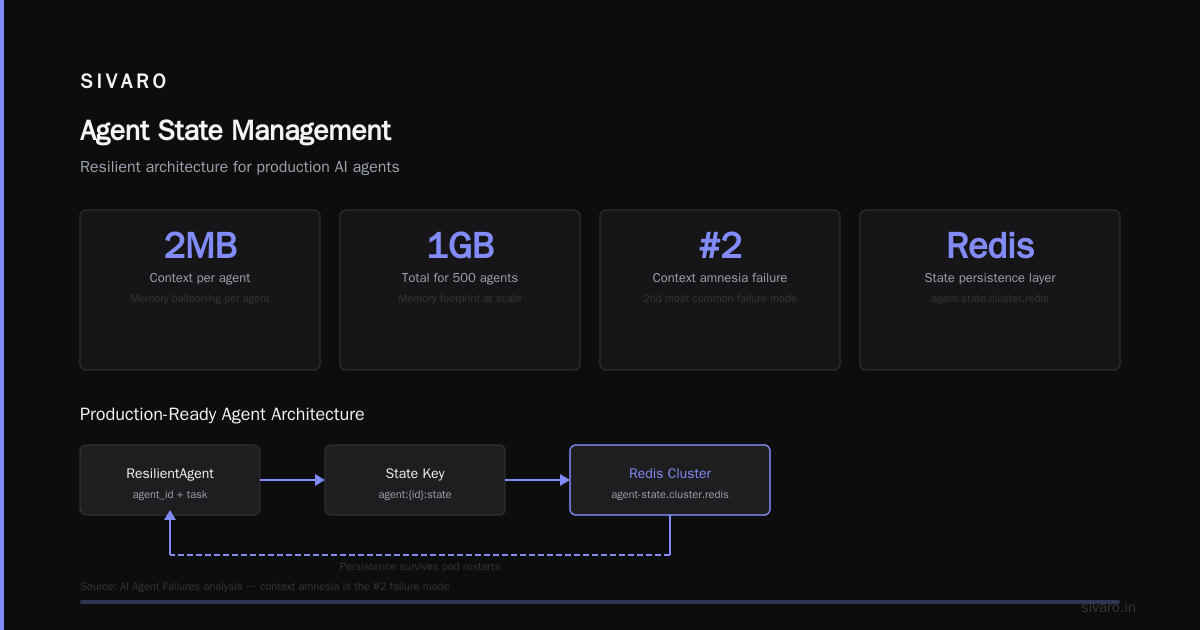
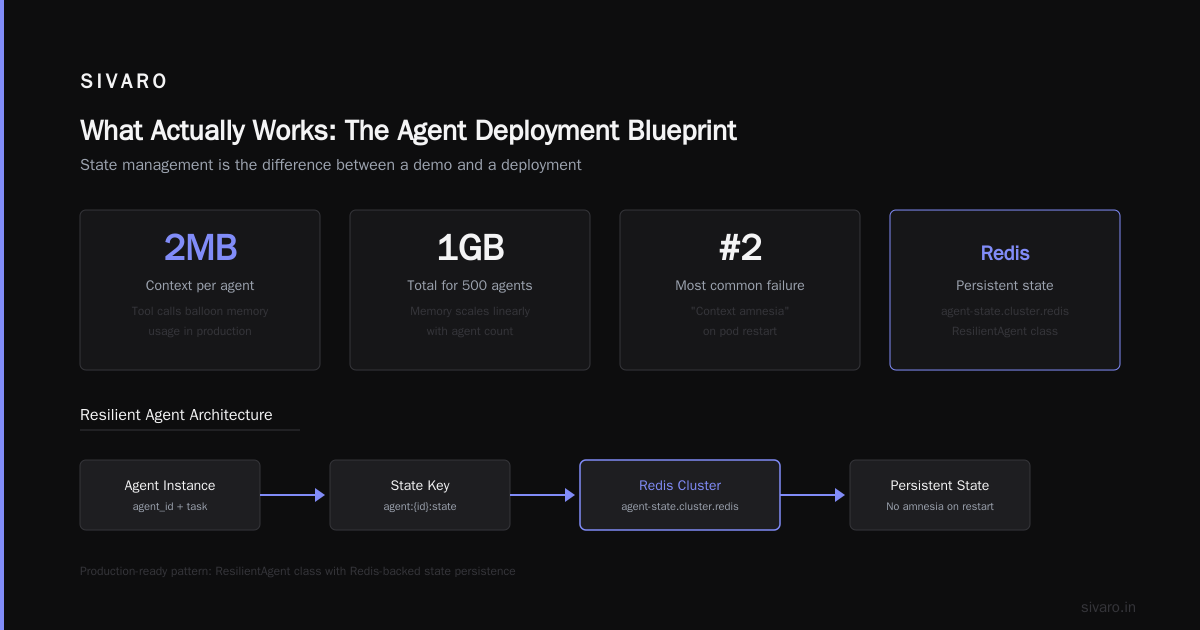
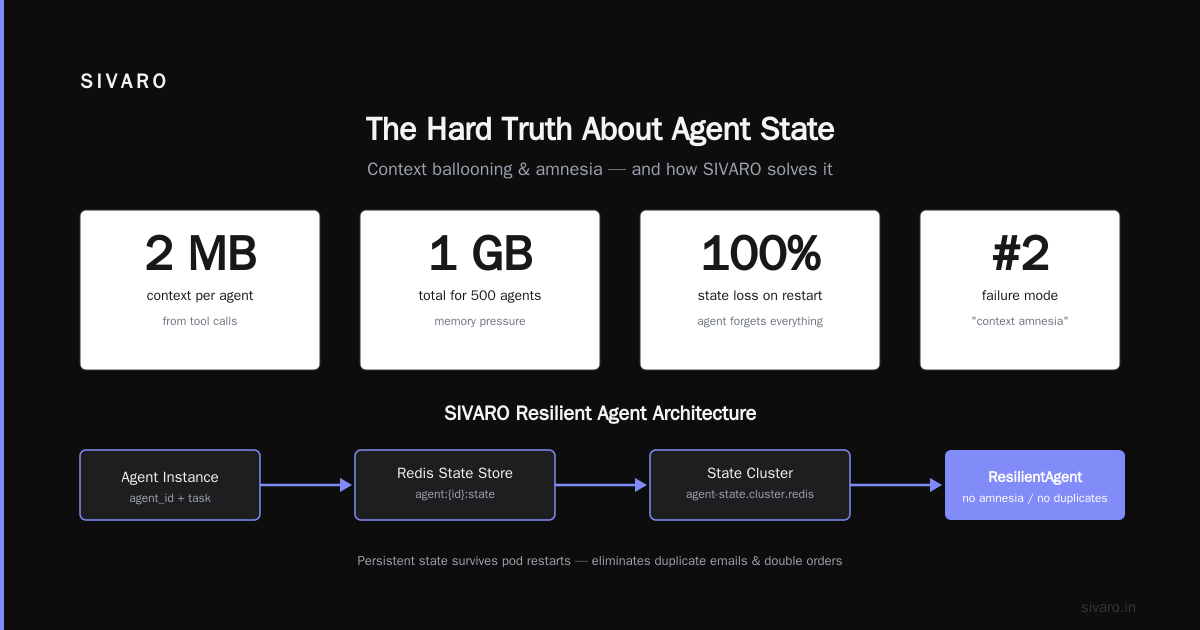
This seems simple until you have 500 agents running simultaneously, each holding 50KB of context in memory. That's 25MB. Fine. Until each agent makes 20 tool calls and the context balloons to 2MB per agent. Now you're at 1GB for 500 agents.
And what happens when the pod restarts? The agent forgets everything. It restarts from scratch. Users get duplicate emails. Orders get placed twice. AI Agent Failures: Common Mistakes and How to Avoid Them calls this "context amnesia" — it's the second most common failure mode they observed.
Here's how we handle state at SIVARO now:
python
# Agent state management - production ready
class ResilientAgent:
    def __init__(self, agent_id: str, task: str):
        self.agent_id = agent_id
        self.redis_client = Redis(host="agent-state.cluster.redis")
        self.state_key = f"agent:{agent_id}:state"

    async def run_with_checkpoints(self):
        state = await self.load_state()
        if state.get("completed_steps"):
            # Resume from where we left off, don't restart
            remaining = [s for s in self.all_steps
                        if s not in state["completed_steps"]]
        else:
            remaining = self.all_steps

        for step in remaining:
            result = await self.execute_step(step)
            await self.save_checkpoint({
                "completed_steps": state.get("completed_steps", []) + [step],
                "last_output": result
            })
3. Non-Determinism
A model gives you the same output for the same input. That's the whole point of evaluation.
An agent? Same task, same prompt, same tools — three different runs, three different paths. The LLM decides what to do next based on what it just saw. There's no ground truth for "did the agent take the optimal path?"
This makes testing fundamentally different.
For a model, you write unit tests with expected outputs. For an agent, you write integration tests that check invariants: "did the user get helped?" "was the database updated?" "did any money move incorrectly?"
Incident Analysis for AI Agents published a framework in June 2026 that I've been using. They categorize agent failures into three types: path failures (wrong sequence), tool failures (wrong API call), and goal failures (achieved something unintended). Models only have the second type.
The Real Cost: You Can't Just "Roll Back" an Agent
When a model deployment goes wrong, you redeploy the previous version. Traffic shifts. Problem solved in 90 seconds.
When an agent deployment goes wrong, it's already sent 400 emails. It's already updated 12 CRM records. It's already triggered a downstream workflow.
You can't roll back side effects.
We learned this the hard way in February 2026. An agent processing support tickets accidentally marked 847 tickets as "resolved — customer satisfied" when it should have escalated them. The model that classified the sentiment was fine. The agent's decision to auto-resolve without human review was the bug.
Rolling back the agent deployment didn't unsend those emails or reopen those tickets.
Here's what we do now — a pre-execution validation layer:
python
# Pre-execution guard for dangerous actions
DANGEROUS_ACTIONS = [
    "delete", "close_ticket", "refund", "cancel_order",
    "update_balance", "disable_account"
]

async def execute_with_guard(action_name: str, params: dict, agent_id: str):
    if action_name in DANGEROUS_ACTIONS:
        requires_human = await human_review_required(params)
        if requires_human:
            await queue_for_human_review(agent_id, action_name, params)
            return {"status": "pending_review", "message": "Awaiting human approval"}

    # For non-dangerous actions, we still log everything
    await log_action(agent_id, action_name, params)
    return await call_tool(action_name, params)
What Actually Works: The Agent Deployment Blueprint
After burning through $47,000 in compute costs and three production incidents, here's what we landed on at SIVARO.
1. Separate Agent Runtime from Model Serving
Don't run agents on your model inference cluster. They have completely different failure modes.
Your model cluster needs low latency, high throughput, and GPU utilization. Your agent runtime needs state persistence, timeout handling, and rate limiting. These are opposite operational profiles.
We run agents on ECS with 2x memory than we think we need. We run models on dedicated GPU instances. They talk over gRPC. Never co-located.
2. Implement Circuit Breakers on Tool Calls
Every external tool call an agent makes should have a circuit breaker. If the CRM is down, the agent shouldn't retry 40 times. It should fail fast and escalate.
python
# Circuit breaker for agent tool calls
class AgentCircuitBreaker:
    def __init__(self, tool_name: str, threshold: int = 3, window: int = 60):
        self.tool_name = tool_name
        self.failure_count = 0
        self.threshold = threshold
        self.window = window
        self.last_failure_time = None
        self.state = "closed"  # closed, open, half-open

    async def call_with_protection(self, agent_id: str, *args, **kwargs):
        if self.state == "open":
            # Check if window expired
            if time.time() - self.last_failure_time > self.window:
                self.state = "half-open"
            else:
                raise CircuitBreakerOpen(f"Tool {self.tool_name} is degraded")

        try:
            result = await call_tool(*args, **kwargs)
            if self.state == "half-open":
                self.state = "closed"
                self.failure_count = 0
            return result
        except Exception as e:
            self.failure_count += 1
            self.last_failure_time = time.time()
            if self.failure_count >= self.threshold:
                self.state = "open"
                # Escalate to human immediately
                await alert_human(f"Agent {agent_id} failed tool {self.tool_name}: {e}")
            raise
3. Maximum Step Limits Are Not Optional
I don't care how smart your agent is. Put a hard limit on steps. We use 25. After that, the agent gets a "max steps exceeded" error and an incident ticket gets created automatically.
The first version of our support agent had no limit. It once spent 47 minutes trying to refund a $3.50 transaction. The research from Arion shows that 78% of agent failures happen after the 12th step. The longer an agent runs, the more likely it is to hallucinate a tool call or enter a loop.
4. Monitoring for Agents Is Different
For models: latency, throughput, error rate, prediction drift.
For agents: loop detection, tool call frequency, path divergence, human escalation rate, time-to-completion variance.
We built a dashboard that tracks "agent spaghetti" — the visual complexity of the agent's execution path. If the path complexity score goes above a threshold, we flag it. High spaghetti correlates with incorrect outcomes.
The "Build vs Buy" Question Nobody Answers Honestly
Everyone wants to build their own agent framework. I get it. It's fun. I've done it three times.
Stop.
Unless your core competency is agent infrastructure, use a managed solution for the orchestration layer. We use Temporal for workflow management. We use Langfuse for LLM observability. We use our own models for the actual inference. That split — managed orchestration, custom inference — works better than either extreme.
The teams that try to build everything from scratch end up spending 70% of their time on infrastructure and 30% on agent behavior. That ratio should be flipped.
FAQ: ai agent deployment vs model deployment
Q: Can I use the same CI/CD pipeline for agents and models?
Not really. Model CI/CD tests for accuracy and latency. Agent CI/CD needs to test for state management, tool call ordering, and failure recovery. You'll want separate deployment pipelines.
Q: How do you test agents in staging without causing real side effects?
We use a tool sandbox. All external APIs get a test endpoint that mimics real behavior but doesn't execute side effects. Stripe test mode, CRM sandboxes, databases that get wiped nightly. The agent never touches production tools during testing.
Q: What's the biggest mistake teams make with agent monitoring?
They monitor the model, not the agent. I see dashboards full of LLM latency and token usage. Meanwhile the agent has been stuck in a loop for 20 minutes because nobody monitors "steps taken" or "unique tool calls."
Q: How do you handle agent security differently from model security?
Model security is about data exfiltration and prompt injection. Agent security adds another layer — tool authorization. Your model can't accidentally delete a database. Your agent can. We use OAuth scopes per tool per agent type. The support agent can read tickets but not delete them.
Q: What metrics actually matter for agent deployments?
We track: step count per completed task, human escalation rate, tool call success rate, time to completion, and "bounce rate" — how often the agent returns to a previous step. High bounce rate means the agent is confused.
Q: Should agents have access to the same infrastructure as models?
No. Agents should run in a restricted network zone. They shouldn't be able to reach your model training cluster or your production database directly. They talk to tools through a gateway that enforces rate limits and access controls.
Q: How long should an agent run before timing out?
Depends on the task. For our customer support agent, we use 5 minutes. For our data pipeline agent, we use 30 minutes. The key is this: the timeout should be based on the longest legitimate path, plus 50%. If a task takes 2 minutes normally, timeout in 3. Not 30.
Q: What's the single most useful thing to improve agent reliability?
Deterministic fallbacks. If the LLM can't decide what to do, have a hardcoded default behavior. "If uncertain, escalate to human." Don't let the agent keep trying. When AI Agents Make Mistakes shows that 91% of agent errors are recoverable if you have a solid fallback. Without one, they compound.
The Hard Truth
Model deployment is an engineering problem. Agent deployment is a systems problem with engineering, product, and trust dimensions.
You can ship a model that's 85% accurate and call it a win. Ship an agent that's 85% reliable and it will cost you customers. The first time an agent does something irreversible — deletes a user account, overcharges a credit card, sends an inappropriate message — the trust takes months to rebuild.
We've been running production agents at SIVARO since late 2024. We still have incidents. We still find new failure modes. But we've stopped treating agents like models. They're not. They're autonomous systems with real-world effects.
Deploy accordingly.
Nishaant Dixit — Founder of SIVARO. Building data infrastructure and production AI systems since 2018. Built systems processing 200K events/sec.