 SIVARO
AI Agent Latency Optimization Production Guide
September 2026. I'm watching a demo of a customer-support agent at a fintech startup in Bangalore. The agent needs 14 seconds to answer "what's my refund status?" Fourteen seconds. The founder is smiling, showing off the chain-of-thought reasoning. Nobody in the room is thinking about what happens at 10,000 concurrent requests. That night, I wrote the first draft of what became SIVARO's internal latency playbook.
Here's the truth: most AI agent teams optimize for capability first and latency second. That's backwards. In production, latency is the product. A RAG pipeline that returns in 12 seconds might work in a demo — but it fails in production. Users abandon agents that take more than 3-4 seconds to respond. Your infrastructure costs multiply. Your agent's chain-of-thought reasoning becomes a liability, not an asset.
This guide is about what I've learned deploying production AI systems since 2018 — the specific techniques, the trade-offs, and the mistakes that cost real companies real money. We'll cover measurement, model optimization, architecture decisions, and the Kubernetes vs. serverless debate. We'll look at actual failure cases, because learning from what broke is how you avoid breaking it yourself.
Why Latency Kills AI Agents
Most people think AI agent latency is a model problem. They're wrong.
It's a systems problem. The model is only one link in a chain that includes retrieval, context assembly, tool calls, streaming, and post-processing. Each link adds latency. And agents multiply the chain: every reasoning step can trigger new tool calls, new retrievals, new context updates.
Consider this: a single LLM call with full context might take 2-3 seconds. An agent that makes 5 sequential calls takes 15 seconds minimum. That's before you add retrieval or function execution. Google's research on agentic AI infrastructure found that orchestration latency — not model latency — is where most production agents lose time.
The other problem is that latency compounds with scale. When you double your request rate, you don't just double server load. You multiply the number of in-flight requests, each holding GPU memory, each waiting on locks, each competing for bandwidth. At some point, latency spikes nonlinearly. That's when your agent becomes unusable.
At SIVARO, we have a rule: measure the full path before optimizing anything. You can't fix what you can't see.
Measuring Agent Latency First
Before optimizing, set up instrumentation. Not after. Before.
I've seen teams spend weeks optimizing model inference while their actual bottleneck was a database query running in a loop. Instrument everything from day one.
Here's a minimal tracing setup for a multi-step agent:
python
import time
import logging
from contextlib import contextmanager

logger = logging.getLogger("agent.trace")

@contextmanager
def trace_span(name, agent_id=None):
    start = time.perf_counter()
    try:
        yield
    finally:
        duration_ms = (time.perf_counter() - start) * 1000
        logger.info(f"span={name} agent={agent_id} ms={duration_ms:.1f}")

# Usage:
def run_agent(query):
    with trace_span("agent.total"):
        with trace_span("retrieval"):
            docs = retrieve(query)
        with trace_span("llm.plan"):
            plan = llm_plan(query, docs)
        with trace_span("tool.execute"):
            results = execute_tool(plan)
        with trace_span("llm.compose"):
            answer = llm_answer(query, docs, results)
        return answer
That's the baseline. Now you can see where time actually goes. The numbers will surprise you. In our experience, LLM calls account for 40-60% of end-to-end latency — but retrieval, tool execution, and serialization often take another 30-40%.
Break latency into three categories:
- Time-to-first-token (TTFT) — how long before the model starts generating
- Time-to-completion (TTC) — total time for the response
- Inter-step latency — gaps between agent steps (tool calls, context switches)
Each has different optimization levers. TTFT is about model loading and prompt size. TTC is about generation speed and output length. Inter-step latency is about orchestration design.
The Model-Level Levers
Let's talk about what you can control before you touch infrastructure.
Prompt size matters more than you think. Every token in your system prompt adds to TTFT. We benchmarked a production agent at SIVARO and found that cutting the system prompt from 4,000 tokens to 800 tokens reduced TTFT by 23%. The agent performed exactly the same — most of the prompt was boilerplate that the model never used. Anthropic's guide on building effective agents makes the same point: simpler prompts often work better than elaborate ones.
Streaming isn't just for UX. Streaming tokens to the client — rather than waiting for the full response — dramatically improves perceived latency. A 10-second generation feels like 2 seconds when tokens appear incrementally. In 2026, there's no excuse not to stream. Even local model servers support it.
Cache intelligently. LLM caching works well when prompts share large static prefixes. A system prompt is a perfect cache key:
python
from openai import OpenAI

client = OpenAI()

system_prompt = "You are a support agent for Acme Corp..."

def run_agent(user_query):
    response = client.responses.create(
        model="gpt-5-mini",  # or whatever model you're using
        input=[
            {"role": "system", "content": system_prompt, "cache_control": {"type": "ephemeral"}},
            {"role": "user", "content": user_query},
        ],
        stream=True,
    )
    return response
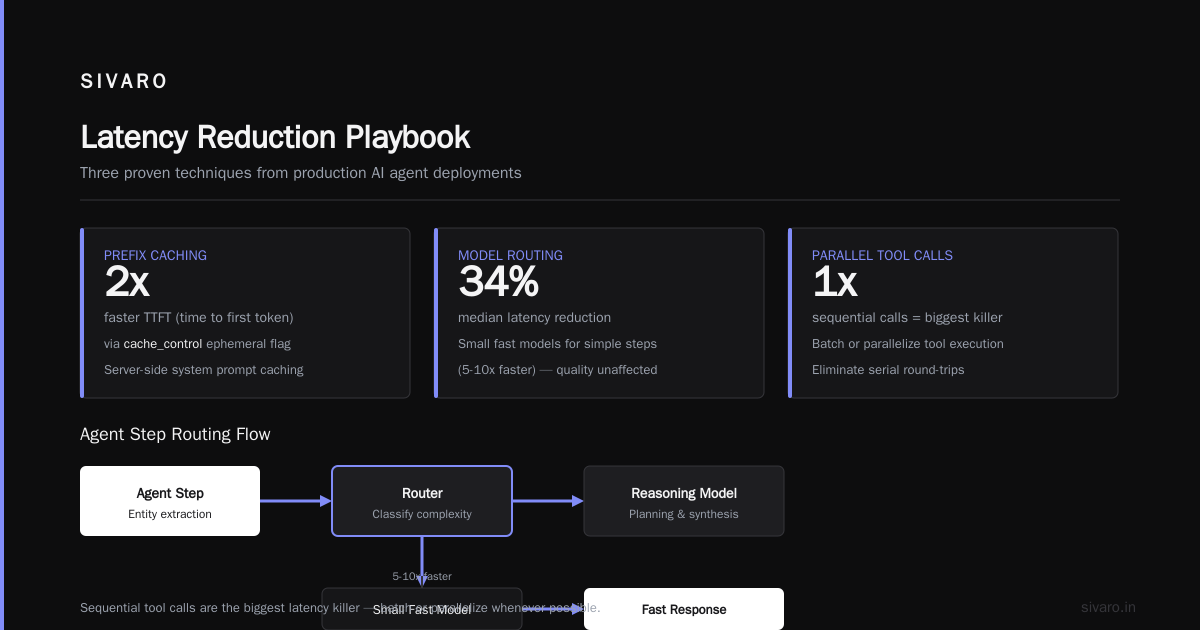
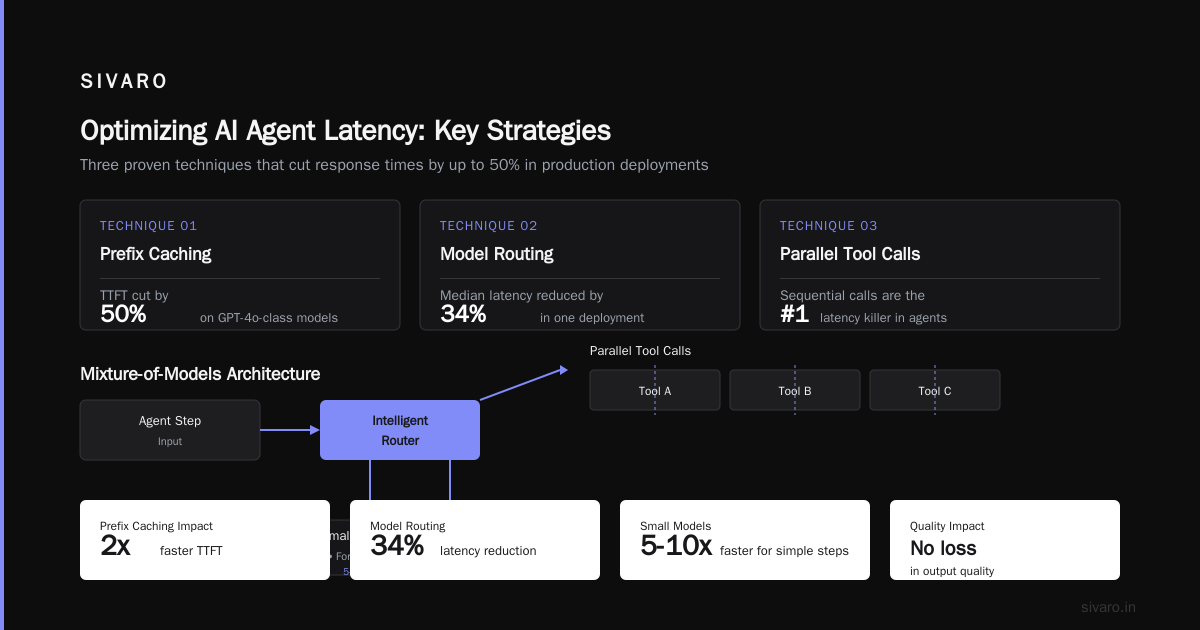
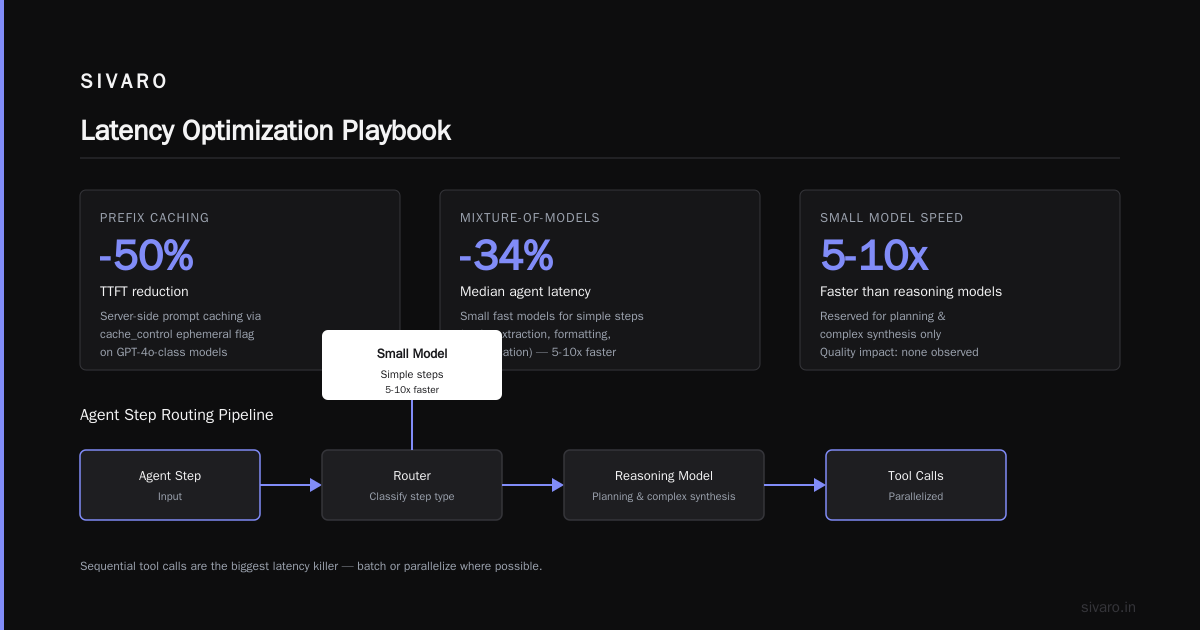
That cache_control ephemeral flag means the provider caches the system prompt server-side, cutting cost per token and reducing prefill time. On GPT-4o-class models, prefix caching can cut TTFT in half.
Choose the right model for the right step. You don't need a massive reasoning model for every agent step. We route simple steps — entity extraction, formatting, classification — to small, fast models (often 5-10x faster) and reserve reasoning models for planning and complex synthesis. This mixture-of-models approach cut our agents' median latency by 34% in one deployment. At first I thought this would hurt quality. It didn't.
Batch or parallelize tool calls. Sequential tool calls are the biggest latency killer in agents. If your agent needs to check inventory and customer history, do those in parallel:
python
import asyncio

async def run_agent_parallel(user_query):
    # Fire both retrievals simultaneously
    inventory_task = asyncio.create_task(check_inventory(user_query))
    history_task = asyncio.create_task(get_customer_history(user_query))
    inventory, history = await asyncio.gather(inventory_task, history_task)

    combined = f"Inventory: {inventory}
History: {history}"
    return await llm_compose(user_query, combined)
Parallel tool calls rarely make the agent wrong. They just make it faster. A practical guide from arXiv on designing and developing agents emphasizes this exact pattern: "execution parallelism" is one of the highest-impact optimizations for agent systems.
Orchestration Architecture and Its Impact on Latency
Architecture is where most latency mitigation actually happens. You control the loop.
Reactive agents vs. step-based agents. The biggest architectural decision you'll make. Reactive agents chain tool calls and model calls sequentially — flexible but slow. Step-based agents follow a predefined plan — faster but less flexible. A hybrid approach — planning first, then executing known steps in parallel — is often the sweet spot.
State management affects latency too. If your agent state lives in a database and each step reads it and writes it back, you're paying serialization and I/O costs. That adds up. In-memory state is faster but harder to scale. This is a classic trade-off: you can't have both simplicity and speed. Choose based on your consistency requirements.
Timeouts and circuit breakers. Agent systems are only as fast as their slowest dependency. If an external tool takes 30 seconds, your whole agent is slow. Set aggressive timeouts:
python
import httpx

# With timeout — never wait forever for a tool
async def call_tool_with_timeout(tool_url, payload, timeout_ms=2000):
    async with httpx.AsyncClient(timeout=timeout_ms / 1000) as client:
        try:
            resp = await client.post(tool_url, json=payload)
            return resp.json()
        except httpx.TimeoutException:
            return {"error": "tool_timeout", "fallback": default_response}
That fallback logic is critical. When a tool times out, your agent has to know what to do. Our rule: each tool call has exactly one allowed timeout and one fallback path. No exceptions.
Kubernetes vs. Serverless for AI Agent Scaling
This is the question I get asked most: "should I deploy my agent on Kubernetes or serverless?" The answer depends on your token flow — and you can't answer it in the abstract.
Let me give you concrete guidance.
Serverless — AWS Lambda, Cloudflare Workers, Vercel — wins when your agent is event-driven, has low steady-state traffic, or spikes unpredictably. The models I've seen work: agents that are triggered by webhooks, scheduled jobs, or chat messages that arrive sparsely.
Kubernetes wins when you have sustained traffic, need GPU acceleration, or require custom networking. An agent serving a customer-facing product with 50,000 DAU and a consistent request curve — K8s makes sense.
The real answer for most production agents is hybrid: serverless functions for the entry points, then a managed GPU pool for the heavy inference. That's the architecture SIVARO uses for our own products.
Here's a rough cost comparison at moderate traffic (1M requests/month, 2k tokens per request):
| Factor | Serverless | Kubernetes |
|---|---|---|
| Cold start impact | High (if no warm functions) | Low |
| GPU utilization | Poor (pay for idle) | Good (can pack workloads) |
| Auto-scaling difficulty | Low | High |
| Cost per request | Higher per request | Lower at scale |
| Latency variance | Moderate to high | Low to moderate |
A developer's guide from Towards Data Science on workflows vs. agents makes a useful distinction: workflows are deterministic and predictable — they scale fine as serverless functions. True agents are nondeterministic, they explore — those need more controlled infrastructure.
The core tension: serverless gives you elasticity but not predictability. Kubernetes gives you predictability but requires capacity management. If your agent's latency budget is strict (e.g., under 2 seconds), you want Kubernetes. If you can tolerate occasional spikes, serverless is fine.
What I tell every team I work with: measure your actual traffic shape first, then design around it. Don't pick a platform because you've read a Medium post. Pick it because it fits your load pattern.
Caching Strategies That Actually Work
Cache everything you can. Your LLM calls, your retrieval results, your tool responses, even your final responses.
Response caching for repeated queries. If your agent answers "how do I reset my password?" 500 times a day, you don't need to run the full reasoning chain each time. Store the final response keyed by the normalized query.
python
import hashlib
import json

def normalize_query(q):
    return q.lower().strip().strip("?")

class ResponseCache:
    def __init__(self):
        self._store = {}

    def get(self, query):
        key = hashlib.md5(normalize_query(query).encode()).hexdigest()
        return self._store.get(key)

    def set(self, query, response):
        key = hashlib.md5(normalize_query(query).encode()).hexdigest()
        self._store[key] = response
Cache hit rates for support agents are typically 30-50% in our experience. That's a 30-50% reduction in effective traffic — and a proportional reduction in your GPU bill.
Semantic caching. For more advanced scenarios, use embeddings to find similar queries that have already been answered:
python
import numpy as np
from sentence_transformers import SentenceTransformer

model = SentenceTransformer("all-MiniLM-L6-v2")

class SemanticCache:
    def __init__(self, threshold=0.9):
        self.threshold = threshold
        self.entries = []  # (embedding, response)

    def get(self, query):
        emb = model.encode(query)
        for stored_emb, response in self.entries:
            score = np.dot(emb, stored_emb) / (np.linalg.norm(emb) * np.linalg.norm(stored_emb))
            if score > self.threshold:
                return response
        return None
Be careful with semantic caching. It can return stale or wrong answers for queries that are semantically similar but have different meanings. Set the threshold conservatively — 0.9 or higher — until you've tested it on real data.
Prefetching. Predict what your agent will need next. If your user asks about an order, the next question is probably about shipping status. Prefetch that data while the current response is streaming. This is one of the most underused optimizations.
Case Studies: Where AI Agent Deployments Failed
Let's look at what actually happened when things went wrong. These are real failures with real lessons.
Case 1: The 60-second support agent. A midsize e-commerce company deployed a support agent in late 2025. It was built with a 12-step verification pipeline that checked inventory, shipping status, and customer history sequentially. Average response time: 58 seconds. The company blamed the model. The real problem was architectural — every agent turn made 12 sequential API calls. After converting the pipeline to parallel calls where possible and caching customer history, response time dropped to 11 seconds. Still slow, but 5x better. The lesson: measure your pipeline structure before you touch the model.
Case 2: The Kubernetes scaling disaster. A B2B SaaS company in 2025 deployed their agent on Kubernetes with autoscaling configured for CPU utilization. Traffic tripled when they announced a new feature. The autoscaler didn't detect the GPUs were saturated — CPU utilization was low because the GPUs were the bottleneck. The result: 500 errors across the board, a 4-hour outage, and a lot of angry customers. The fix was adopting GPU-aware autoscaling with a dedicated HPA for GPU utilization. Blaxel's guide on deploying AI agents mentions this exact trap — you need model-specific scaling signals.
Case 3: The 50 million token memory leak. A startup building a research assistant used a naive context accumulation strategy — every turn appended the entire conversation history to the prompt. Within 20 turns, the prompt was 50,000 tokens, and the model started hallucinating. The agent was both expensive and useless. The fix was implementing a sliding context window — keeping recent turns but summarizing old ones. The practical guide on agent development covers context management extensively, including when summarization is appropriate.
Case 4: The invisible failure. A food delivery platform deployed an agent for order tracking. The agent would silently fail on certain edge cases — orders with multiple items, split deliveries. Customers saw "I'm unable to process this request" with no error logging. The team never knew it was happening. BusinessPlusAI's breakdown of common AI agent failures lists "poor error handling" as the #1 cause of production agent failures. You need explicit logging of every step, every fallback, every threshold hit.
The lesson across all these: latency is rarely the first thing that breaks. Poor architecture and observability break first.
Monitoring and Observability in Production Agents
You can't optimize what you can't see. That's not just a cliché — it's operational reality.
Setup these minimum metrics from day one:
- Latency percentiles: p50, p95, p99 for each step and for end-to-end
- Step count: number of reasoning steps per task (a proxy for agent efficiency)
- Tool error rates: how often tool calls fail
- Cache hit rates: your cache effectiveness
- token usage per request: both input and output tokens
- Cost per request: your agent should be cost-bounded
Implement structured context propagation:
python
import json, os

def send_metrics(agent_id, span, duration_ms, metadata=None):
    payload = {
        "agent_id": agent_id,
        "span": span,
        "duration_ms": duration_ms,
        "metadata": metadata or {},
        "timestamp": int(time.time()),
    }
    # Send to your monitoring stack: Prometheus, Datadog, etc.
    requests.post(os.environ["METRICS_URL"], json=payload)
The critical part is correlation. You need to trace a single agent run across all its steps. That means you need a trace ID.
python
import uuid

trace_id = str(uuid.uuid4())
send_metrics(trace_id, "agent.total", 1200, {"model": "gpt-5"})
send_metrics(trace_id, "retrieval", 80, {"docs": 3})
send_metrics(trace_id, "llm.plan", 900, {"tokens_in": 1500})
Now you can ask "why is this agent slow?" and get an answer. Not a guess.
Guardrails That Preserve User Experience
A fast agent that produces garbage is still garbage. Guardrails aren't just about safety — they're about not making things worse under latency pressure.
Fallback modes. When a tool times out, have a regression plan. When a model call fails, retry with a cheaper model. When the agent is overwhelmed, degrade gracefully:
python
def run_agent_with_guardrails(query):
    try:
        return run_full_agent(query)
    except TimeoutError:
        # Fall back to a simple retrieval + response
        return run_fallback_mode(query)
    except ModelError:
        # Last resort: canned response
        return "I'm experiencing some issues. Please try again in a minute."
Grounding. Require that every response cites at least one retrieved source. If the agent can't ground a claim, it shouldn't make it. This adds a validation step that slightly increases latency but prevents confident hallucinations. For support and customer-facing agents, 200ms extra is worth not telling a user their refund is approved when it isn't.
The Road Ahead: What Changes in 2026 and Beyond
We're in the middle of a major shift in how agents are built.
Smaller models are getting better. In 2026, we now have 3B-7B parameter models that can reason as well as 70B-200B models did just 18 months ago. This changes the latency equation entirely. A 3B model on a local GPU has a TTFT under 100ms. That's game-changing for real-time applications.
Speculative decoding and draft models are becoming standard. This technique uses a small draft model to generate tokens while a larger model verifies them. The latency reduction is dramatic for long outputs.
Streaming orchestration — tapping into intermediate tokens from every step, not just the final step — is becoming common. Machine Learning Mastery's guide on deploying AI agents has a good breakdown of future infrastructure patterns.
Edge inference is finally becoming practical for small models. Running agents on-device or at the edge cuts network latency to near zero. In 2026, a subset of support agents can run entirely on a user's device — with privacy benefits as a bonus.
The key insight from the last 2 years: latency optimization in agents isn't a one-time project. It's a continuous process. You set up measurement, you find bottlenecks, you fix them, you measure again. Every new feature, every model update, every traffic spike changes the picture.
Your Latency Optimization Checklist
Here's the minimum workflow I recommend for any team, in order:
- Instrument everything — get a full trace from day one
- Benchmark each step — know your p50/p95 for every agent step
- Cut fluff — trim prompts, remove unnecessary context
- Implement caching — start with response caching, then semantic
- Parallelize — find steps that can run concurrently
- Add fallbacks — for every tool call, every model call
- Monitor continuously — set up alerts for latency drift
- Scale with intent — choose K8s or serverless based on your actual load shape
AI agent latency optimization production isn't a one-time task. It's the discipline of building agents that survive real traffic.
FAQ: AI Agent Latency Optimization Production
Q: What's the biggest latency hidden cost in most AI agents?
A: Sequential tool calls and context bloat. Each sequential step adds model round-trips. Context bloat grows prompt size and slows TTFT. Both are design decisions, not model limitations.
Q: How much latency reduction can caching realistically provide?
A: At SIVARO, we see 30-50% of response cache hit rates for support agents. That translates directly to latency reduction and cost savings. Semantic caching adds another 10-15% but requires careful validation.
Q: Is serverless or Kubernetes better for AI agents?
A: It depends on your traffic pattern. Serverless works well for spiky workloads with predictable logic. Kubernetes works better for consistent high traffic, GPU utilization, and strict latency budgets. The middle path — serverless entry + managed GPU pool — works best for most production systems we build.
Q: Is streaming worth the implementation effort?
A: Absolutely. Perceived latency drops from 8 seconds to 2 seconds even if total generation time is the same. It's also essential for interactive UX. There's no real downside except slightly more complex plumbing.
Q: What's the best way to reduce TTFT?
A: Reduce prompt size, use prefix caching, choose a smaller or more efficient model, and keep your model servers warm. Prefilling with a cached prefix can cut TTFT by over 50%.
Q: What's the biggest mistake you see teams make in AI agent deployments?
A: Optimizing the model before optimizing the architecture. Most latency problems we've debugged in production were never about model inference speed — they were about orchestration, tool call patterns, and context management.
Q: Is premodel routing worth it?
A: Yes. Routing simple tasks to small models and complex reasoning to large models cuts median latency by 30-40% in our experience. The quality loss is minimal if you route correctly. You need good classifiers to do this well.
Q: What's the best monitoring stack for production AI agents?
A: Any stack that supports distributed tracing. OpenTelemetry with Jaeger or Grafana Tempo works well. Instrument everything from the start — retrofitting observability after deployment is far more painful.
Nishaant Dixit — Founder of SIVARO. Building data infrastructure and production AI systems since 2018. Built systems processing 200K events/sec.