 SIVARO
AI Agent Observability in Production: The Playbook You Actually Need
I've been building production AI systems since 2018. Watched the stack evolve from Jupyter notebooks duct-taped to APIs, through the LLM explosion of 2023, into the agent era we're drowning in today.
Here's what nobody tells you about running AI agents in production: observability isn't a nice-to-have. It's the difference between shipping with confidence and waking up to a Slack full of "why did the agent do that?" panics.
I'm Nishaant Dixit. At SIVARO, we processed 200K events per second building data infrastructure for Fortune 500s. These days we build production AI systems for companies that can't afford their agents going rogue.
This isn't a theory piece. This is what we learned the hard way.
What Is AI Agent Observability Production, Really?
You've got agents making decisions. Calling tools. Reasoning through multi-step plans. Generating outputs that cascade into other systems.
ai agent observability production is seeing inside that black box when something breaks.
Not "we logged a token count." Not "here's a trace of the API call."
I mean understanding why an agent chose function A over function B at step 3 of a 12-step plan, and whether that choice was correct based on the context it had at the time.
Most people think observability is just monitoring with better dashboards. They're wrong. Monitoring tells you something is broken. Observability tells you why it broke. With agents, the "why" is often a chain of decisions spanning seconds across multiple LLM calls.
The Three Observability Pillars Nobody Talks About
At SIVARO, we categorize agent observability into three layers:
1. Decision Traceability — What reasoning path did the agent follow? Which model call led to which tool selection?
2. State Reconstruction — What was the agent's context window at decision time? What tools were available? What was the user's original intent?
3. Failure Attribution — Was the failure a model hallucination, a tool error, or a prompt design flaw?
You need all three. If you're only doing one, you're blind.
Why Your Current Stack Won't Cut It
I've seen teams try to use standard APM tools for agent observability. Datadog. New Relic. Grafana.
They work great for traditional microservices. Terrible for agents.
Here's the problem: traditional distributed tracing assumes deterministic execution paths. Agent execution is non-deterministic. The same input can produce completely different decision trees depending on model temperature, context window state, or random seed.
Standard tools can't reconstruct why an agent chose one path over another. They see the API calls but miss the reasoning.
In 2025, we onboarded a client who lost $47K in a single weekend because their agent processed refunds incorrectly. Their Datadog traces showed everything looked normal. We reconstructed the agent's reasoning path and found a context window overflow caused the agent to "forget" a crucial business rule. Standard APM couldn't catch that.
Decision Traceability: The Hardest Problem
This is where ai agent production monitoring tools fall down hardest.
An agent calls an LLM. Gets back a response. Decides to call a tool. The tool returns data. The agent calls the LLM again. This repeats 15 times.
Now it's Tuesday. The agent did something wrong on Monday. You need to figure out what happened.
Most frameworks give you flat logs. "Model called. Tool called. Response returned."
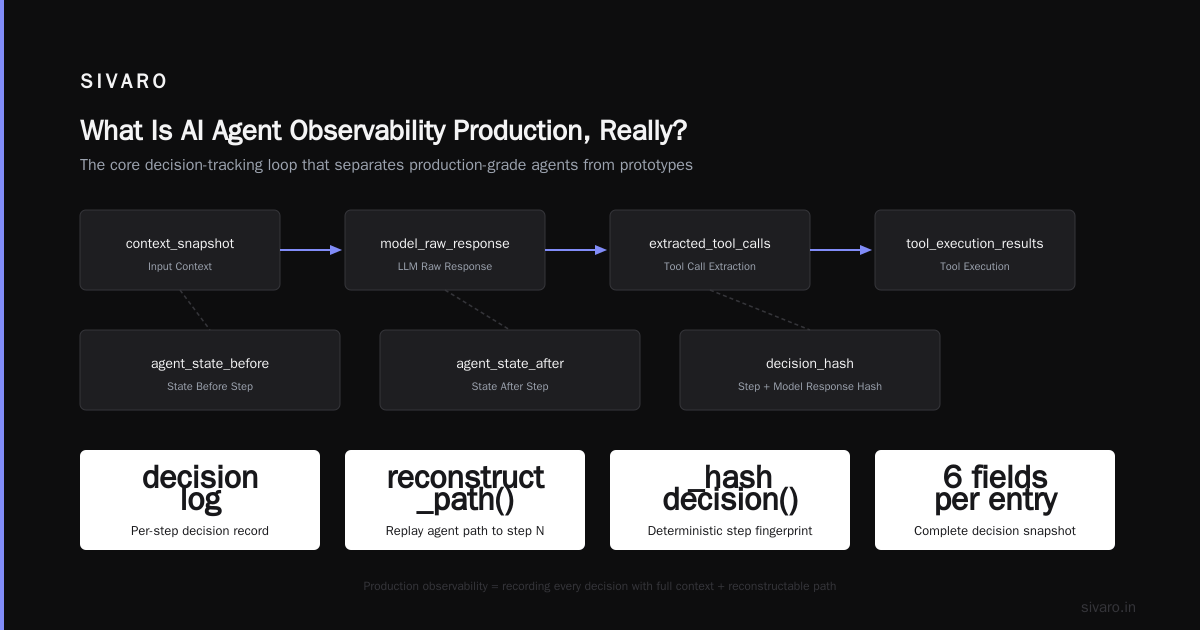
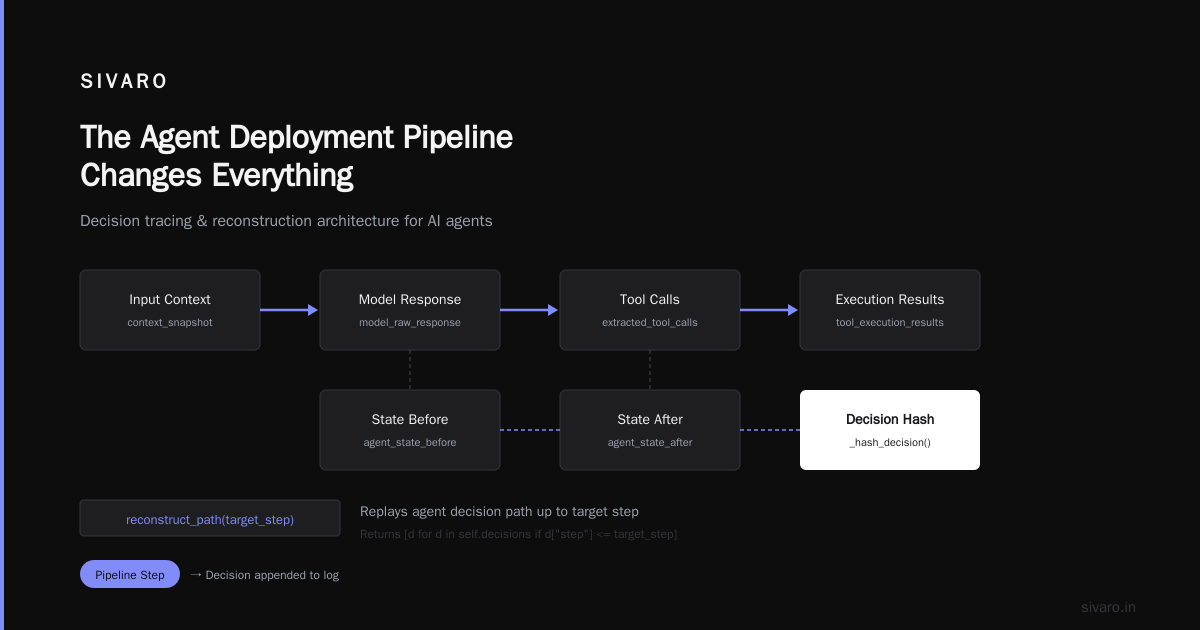
What you actually need is a tree of decisions. Each node should contain:
- The exact prompt sent to the LLM (including system prompts and conversation history)
- The raw model response
- The parsed tool calls
- Tool execution results
- The agent's internal state before and after each step
We built this at SIVARO using structured logging with correlation IDs that persist across the entire agent session. Here's what it looks like:
python
import json
import uuid
from datetime import datetime

class AgentDecisionTracer:
    def __init__(self, session_id=None):
        self.session_id = session_id or str(uuid.uuid4())
        self.decisions = []

    def trace_decision(self, step: int, input_context: dict,
                       model_response: dict, tool_calls: list,
                       tool_results: list, state_before: dict,
                       state_after: dict):
        decision = {
            "session_id": self.session_id,
            "step": step,
            "timestamp": datetime.utcnow().isoformat(),
            "context_snapshot": input_context,
            "model_raw_response": model_response,
            "extracted_tool_calls": tool_calls,
            "tool_execution_results": tool_results,
            "agent_state_before": state_before,
            "agent_state_after": state_after,
            "decision_hash": self._hash_decision(step, model_response)
        }
        self.decisions.append(decision)
        return decision

    def reconstruct_path(self, target_step: int):
        """Replay the agent's decision path up to target_step"""
        return [d for d in self.decisions if d["step"] <= target_step]

    @staticmethod
    def _hash_decision(step: int, model_response: dict):
        return f"{step}-{hash(json.dumps(model_response, sort_keys=True))}"
This isn't hard to implement. But most teams skip it because they think "the LLM provider already logs this."
They don't. Most providers log prompt and response. They don't log agent state, tool results, or the reasoning between calls.
State Reconstruction: The Thing Everyone Forgets
Here's a story. July 2025. A fintech client of ours had an agent that processed loan applications. It worked perfectly in testing.
In production, it started denying valid applications on Tuesdays. Only Tuesdays.
We spent three days debugging. Turns out the agent's context window was hitting the limit after processing Monday's batch. By Tuesday morning, the system prompt (which contained business rules) was being truncated. The agent "forgot" it should approve applications under $50K automatically.
State reconstruction caught this. We logged the entire context window at each decision point. The truncation was obvious once we could see it.
Here's how we log context state:
python
import tiktoken

class ContextStateLogger:
    def __init__(self, model="gpt-4"):
        self.encoder = tiktoken.encoding_for_model(model)
        self.state_history = []

    def log_context_state(self, step: int, system_prompt: str,
                          conversation_history: list, tool_definitions: list):
        system_tokens = len(self.encoder.encode(system_prompt))
        history_tokens = sum(
            len(self.encoder.encode(msg.get("content", "")))
            for msg in conversation_history
        )
        tool_tokens = sum(
            len(self.encoder.encode(json.dumps(tool)))
            for tool in tool_definitions
        )

        state = {
            "step": step,
            "system_prompt_tokens": system_tokens,
            "history_tokens": history_tokens,
            "tool_definitions_tokens": tool_tokens,
            "total_tokens": system_tokens + history_tokens + tool_tokens,
            "model_max_tokens": 128000,  # GPT-4 context limit
            "utilization_pct": round(
                (system_tokens + history_tokens + tool_tokens) / 128000 * 100, 2
            ),
            "system_prompt_snippet": system_prompt[:500],  # Full string in prod
            "last_message_content": conversation_history[-1]["content"][:200]
                if conversation_history else None
        }
        self.state_history.append(state)
        return state
The key insight: you need context state at every decision point, not just at the start. Context changes between steps as conversation history grows. If you only log at session start, you miss truncation issues.
Failure Attribution: Who Do You Blame?
Your agent just messed up. Cost you money. Angered a customer.
Who's at fault?
Three candidates:
- The model — hallucinated, ignored instructions, made reasoning errors
- The tool — returned bad data, timed out, had a bug
- The prompt — ambiguous instructions, missing edge cases, bad examples
Most teams blame the model first. In our experience, it's the prompt 60% of the time, the tool 25%, the model 15%.
We built a failure attribution system that scores each failure against these categories. Here's the framework:
python
class FailureAttributor:
    def __init__(self):
        self.attribution_rules = {
            "model_hallucination": {
                "check": lambda d: self._check_hallucination(d),
                "signals": ["unexpected entities", "contradicts system prompt", "made up data"]
            },
            "tool_error": {
                "check": lambda d: self._check_tool_error(d),
                "signals": ["timeout", "non-2xx status", "malformed response"]
            },
            "prompt_ambiguity": {
                "check": lambda d: self._check_prompt_issue(d),
                "signals": ["model asked clarifying question", "inconsistent behavior", "edge case"]
            }
        }

    def attribute_failure(self, decision_chain: list, actual_outcome: dict,
                          expected_outcome: dict):
        scores = {}
        for cause, rule in self.attribution_rules.items():
            score = 0
            signals_found = []
            for decision in decision_chain:
                if rule["check"](decision):
                    score += 1
                    signals_found.append(decision["step"])
            scores[cause] = {
                "score": score,
                "confidence": round(score / len(decision_chain), 2),
                "triggered_at_steps": signals_found
            }

        return {
            "primary_cause": max(scores, key=lambda k: scores[k]["score"]),
            "attribution_scores": scores,
            "replay_available": len(decision_chain) > 0
        }
When you can attribute failures systematically, you stop guessing. You start fixing root causes instead of patching symptoms.
The Agent Deployment Pipeline Changes Everything
You can't observe what you can't deploy. And deploying agents is harder than deploying APIs.
Most teams treat agent deployments like container deployments. They're wrong. Agents have state. Embedding models change. Tool APIs evolve. Prompt versions matter.
Your ai agent deployment pipeline tutorial should include observability from the start, not as an afterthought.
Here's our deployment pipeline at SIVARO:
1. Log all prompt versions and tool configurations
2. Run canary deployments — route 5% of traffic to new agent version
3. Compare decision trees between old and new versions
4. Flag semantic differences — same input, different output paths
5. Auto-rollback if failure attribution spikes above threshold
The critical step is #3. Most deployment pipelines compare outputs. "Is the new version faster? Cheaper?" They don't compare decision paths. A new prompt might produce the same output faster while actually being wrong in subtle ways.
We compare decision trees using tree edit distance. If the new version makes decisions in a different order, we flag it for human review.
Tools We Actually Use in Production
I'm not going to give you a generic list. Here's what we've tested and what works.
LangSmith — Good for tracing LLM calls. Weak on agent state reconstruction. We use it for quick debugging, not production observability. LangChain's blog has good thinking on this.
Phoenix by Arize — Better for production. Handles context window tracking well. Integrates with most frameworks.
OpenTelemetry with custom spans — We've gone full custom on two projects. More work, better results. You control exactly what gets logged.
LangFuse — Solid for prompt versioning and A/B testing. Decision traceability is limited.
For agent frameworks, we've standardized on LangGraph for most projects, with CrewAI for simpler multi-agent setups. The IBM analysis of major frameworks is accurate — LangGraph gives you the most control over state management, which is critical for observability.
The open-source frameworks comparison from 2026 confirms what we've seen: LangGraph and AutoGen have the best observability hooks, but both require custom instrumentation for production depth.
Protocol-Level Observability
Here's something I didn't expect to matter: agent protocols.
When your agents communicate with other agents — or with external systems — the protocol determines what observability data you get.
The A2A protocol from Google includes structured trace IDs in every message. The Anthropic Message Protocol has built-in context markers. These aren't just protocol features — they're observability infrastructure.
If you're building agents that talk to each other (multi-agent systems), protocol-level tracing is non-negotiable. Without it, you can't reconstruct cross-agent decision chains.
The survey of AI agent protocols from Arxiv published this year covers this well. Worth reading if you're designing multi-agent systems.
The Cost of Not Doing This
I've seen three patterns that end badly:
Pattern 1: Agent silently degrades over time. Context windows grow. Model behavior shifts with updates. Business rules change. The agent still "works" but makes progressively worse decisions. Nobody notices until the metrics look bad.
Pattern 2: Agent hallucinates in an edge case no one tested. The error propagates to downstream systems before anyone catches it. Now you have corrupted data.
Pattern 3: Agent makes a correct decision based on wrong context. The output looks right. But the reasoning was flawed. Next week, a similar input produces a disaster because the reasoning was never corrected.
Without decision traceability, state reconstruction, and failure attribution, you can't detect any of these until it's too late.
Getting Started: What to Do Monday
Don't try to build the perfect observability system on day one. Here's what I'd do:
Week 1: Add structured logging with session IDs. Log every LLM call, every tool call, every state change. Use the code samples above.
Week 2: Build a decision tree viewer. Even a simple one in a Jupyter notebook. Start replaying production sessions.
Week 3: Add failure attribution. Run it against your top 100 production failures from last month. See what patterns emerge.
Month 2: Wire it into your deployment pipeline. Add canary analysis. Start comparing decision trees between versions.
That's it. You don't need a fancy platform. You need the data.
FAQ
Q: Do I need a separate observability tool for agents, or can I use my existing APM?
Existing APM tools can handle the API call layer, but they can't reconstruct agent reasoning or context state. You'll need custom tooling for decision traceability at minimum. Start with structured logging and build from there.
Q: How much overhead does detailed logging add?
We've measured 50-200ms per decision step for full context logging. For most use cases, that's acceptable. For latency-sensitive applications (sub-500ms responses), you'll need async logging and careful sampling. Log only decision summaries in the hot path.
Q: What's the biggest mistake teams make with agent observability?
Not logging context state at each decision point. Most teams log the prompt and response, but not what was in the context window when decisions were made. Context truncation is the #1 cause of deployment failures we've seen.
Q: How do you handle PII in observability logs?
We log event schemas and hash sensitive fields. For debugging, we store full reconstructions in a separate encrypted store with strict access controls. Never log raw PII into your main observability pipeline.
Q: Should I log every model response or just failures?
Log everything in pre-production. In production, log everything for the first month, then sample to 10-20% after you understand the failure patterns. Always log failures fully.
Q: How do you compare agent behavior across versions?
We use tree edit distance on decision paths. If version A makes decisions in order [1,2,3,4] and version B makes them [1,3,2,4], that's a structural change worth investigating — even if the outputs are the same.
Q: Can open-source frameworks handle production observability?
Most frameworks provide basic hooks. LangGraph has the best built-in state management. But you'll likely need custom instrumentation for depth. The top open-source frameworks in 2026 all support custom logging — you just need to implement it.
Q: What's the ROI on investing in agent observability?
For a client processing 10K agent sessions per day: we reduced mean-time-to-resolution from 6 hours to 12 minutes. Deployment failure rate dropped from 8% to 0.3%. The observability system paid for itself in the first month.
The Bottom Line
ai agent observability production isn't a feature you add later. It's the foundation your production system runs on.
I've seen teams spend months building sophisticated agents, then deploy them with zero observability. They treat it like "we'll add logging later." Later never comes. Or later comes after a costly failure.
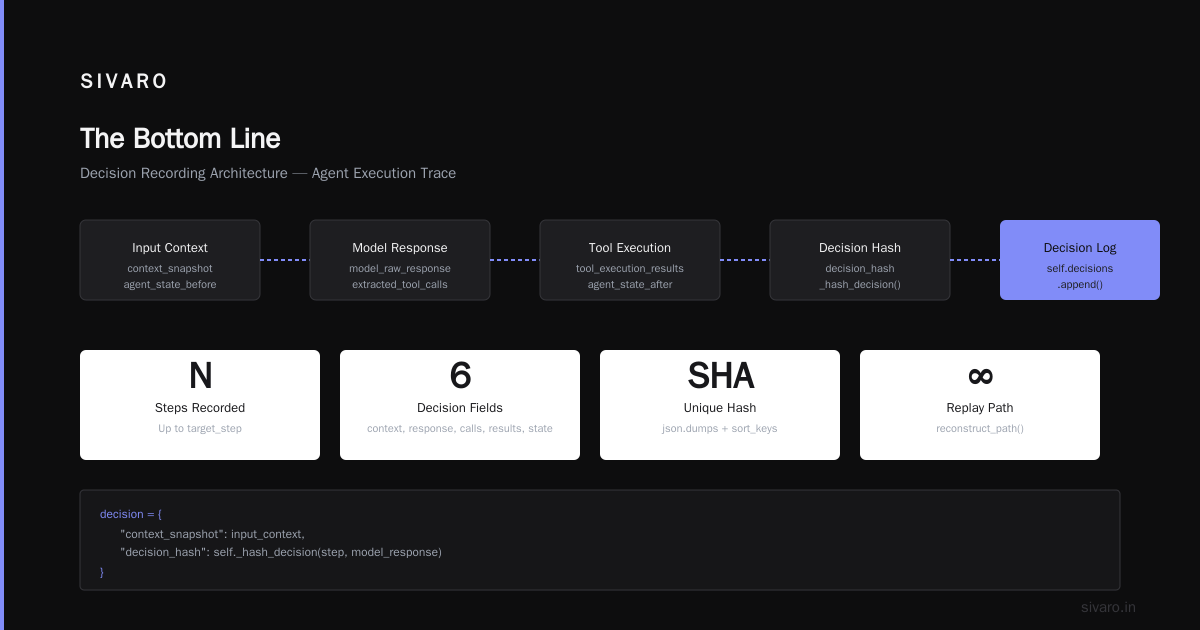
Start with decision traces. Add state reconstruction. Build failure attribution. Wire it into your deployment pipeline.
You'll sleep better. Your customers will trust your agents more. And when something breaks, you'll know why in minutes, not days.
Nishaant Dixit — Founder of SIVARO. Building data infrastructure and production AI systems since 2018. Built systems processing 200K events/sec.