 SIVARO
AI Agent Orchestration in Production: The Hard Parts Nobody Talks About
We launched our first multi-agent system at SIVARO in April 2025. It failed seven times in the first hour. Not the agents — the orchestration layer. The code that was supposed to route, retry, and coordinate three simple AI agents just collapsed under real traffic.
That night I learned the difference between a demo and production.
AI agent orchestration in production isn't about chaining LLM calls together. It's about building a control plane that handles failure, state, latency, and cost — while the agents themselves are fundamentally unpredictable.
This guide is what I wish I had back in April. It's practical. It's honest about trade-offs. And it's written from the trenches, not a whiteboard.
What Orchestration Actually Means (And Why You're Overcomplicating It)
Most engineering teams I talk to think orchestration means "call Agent A, then Agent B, then return."
That's a script. Not orchestration.
Real orchestration is:
- Routing decisions — which agent handles which request, and when to fall back
- State persistence — preserving context across multiple agent calls, retries, and human handoffs
- Concurrency control — running multiple agents in parallel without deadlocks or rate limit meltdowns
- Observability — knowing why an agent did what it did, especially when it's wrong
- Cost governance — limiting token spend per workflow, per user, per hour
As A Practical Guide for Designing, Developing, and ... puts it: "Orchestration is not about sequencing — it's about managing emergent behavior."
That's the key insight. Agents aren't deterministic functions. They're stochastic processes with a chat interface. Your orchestration layer must treat them like unreliable microservices that sometimes hallucinate their own APIs.
The Two Orchestration Patterns: Workflows vs. Agents
I see teams split into two camps:
Camp Workflow — you define a DAG (directed acyclic graph) of steps. Each step is an LLM call or a tool execution. The path is predictable.
Camp Agent — you give one "orchestrator" agent access to tools and sub-agents, and let it decide the flow dynamically.
Both work. Both fail in different ways.
Workflow orchestration: Predictable, expensive, brittle
At SIVARO, we built a customer support resolution system using a workflow pattern. We defined six steps: classify, search knowledge base, draft response, validate tone, escalate if needed, send.
We used a state machine — not an LLM — for routing. Each step's output determined the next step. This gave us perfect traceability. Every failed case could be replayed step-by-step.
But it was rigid. A user could ask "my order is late, also I want to change my shipping address" — and the workflow couldn't handle two intents. We ended up with branching states everywhere.
The Building Effective AI Agents piece calls this the "combinatorial explosion of states." They're right.
When to use: You have a well-defined, narrow domain. You need deterministic audits. Your agents are stateless tools.
Agent orchestration: Flexible, unpredictable, hard to debug
Last December we switched to an orchestration agent pattern. One "conductor" agent decided which specialist sub-agent to call. It could parallelize, backtrack, or ask clarifying questions.
This handled multi-intent queries beautifully. But debugging was a nightmare. The conductor would sometimes call the wrong agent, or call the right agent with garbled context, or get into a loop calling the same agent three times.
As A Developer's Guide to Building Scalable AI: Workflows vs ... notes, "agent-based orchestration shifts complexity from code to prompt engineering." You're no longer writing if-statements — you're writing meta-prompts that tell an LLM how to orchestrate itself.
When to use: You have open-ended tasks. You need adaptation to user input. You can tolerate non-deterministic paths.
The hybrid that works better
Most people think you pick one. I think you pick both — at different layers.
We now use a workflow shell with agent internals. The outer workflow defines critical checkpoints (authentication, billing, compliance). Inside each step, an agent can make decisions freely. But if it tries to skip a checkpoint, the workflow stops it.
This is the pattern I see at companies like Zapier (2025) and Salesforce (their Agentforce 2.0, released March 2026). A rigid skeleton with flexible muscles.
State Management: The Silent Killer
Let's talk about the problem that sank my April 2025 launch.
Agents need context. Every new call to an LLM needs the conversation history, the tool outputs, the user's intent, the system prompt. If any piece of state is lost, the agent starts hallucinating context.
Our first orchestration system stored state in-memory on a single node. When we scaled to two nodes, state desync'd. Agent A on node 1 called Agent B on node 2, but Agent B didn't have the conversation history. It responded with "I don't know what you're talking about."
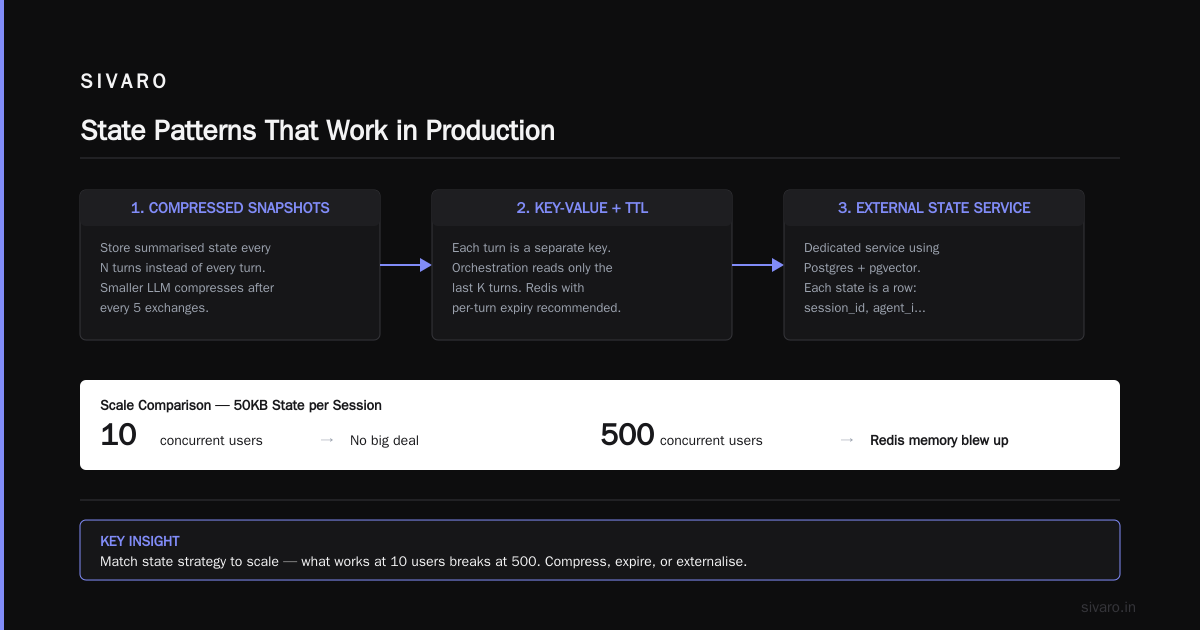
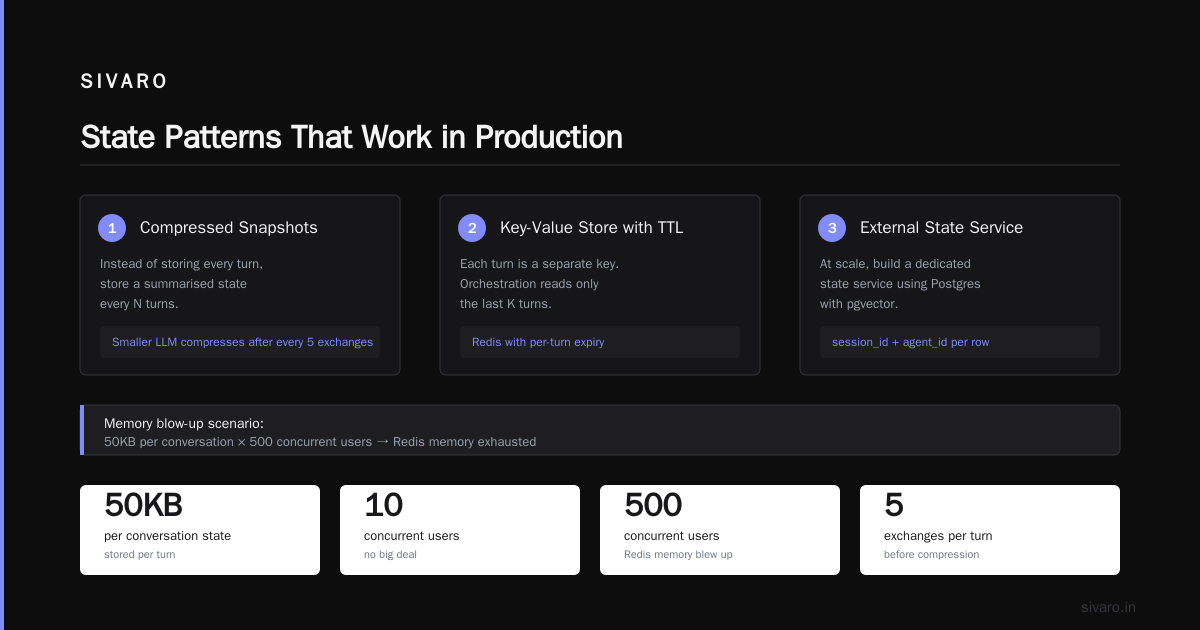
We moved to Redis with TTL. Better. But then we hit the token budget problem — our state objects (full conversation histories) were 50KB each. For 10 concurrent users, no big deal. For 500, Redis memory blew up.
State patterns that work in production
1. Compressed snapshots — Instead of storing every turn, store a summarised state every N turns. We use a smaller LLM to compress the conversation after every 5 exchanges.
2. Key-value store with TTL per turn — Each turn is a separate key. Orchestration reads only the last K turns. Deploying AI Agents to Production: Architecture ... recommends Redis with per-turn expiry.
3. External state service — At scale, we built a dedicated state service using Postgres with pgvector. Each state is a row with: session_id, agent_id, compressed context, full context (if needed for audit). We use SQL for querying and vector similarity for context retrieval.
Here's a simplified Python example of the state service:
python
# state_service.py
from dataclasses import dataclass
from datetime import datetime
from typing import Optional

@dataclass
class AgentState:
    session_id: str
    agent_name: str
    compressed_history: str
    turn_count: int
    last_updated: datetime

class StateStore:
    def __init__(self, redis):
        self.redis = redis
        self.expiry = 1800  # 30 minutes

    async def get_state(self, session_id, agent_name) -> Optional[AgentState]:
        key = f"{session_id}:{agent_name}"
        data = await self.redis.hgetall(key)
        if not data:
            return None
        return AgentState(
            session_id=session_id,
            agent_name=agent_name,
            compressed_history=data.get("compressed"),
            turn_count=int(data.get("turn_count", 0)),
            last_updated=datetime.fromisoformat(data.get("updated"))
        )

    async def update_state(self, state: AgentState):
        key = f"{state.session_id}:{state.agent_name}"
        async with self.redis.pipeline() as pipe:
            await pipe.hset(key, mapping={
                "compressed": state.compressed_history,
                "turn_count": state.turn_count,
                "updated": state.last_updated.isoformat()
            })
            await pipe.expire(key, self.expiry)
            await pipe.execute()
This is basic but it works. We later added a background compaction process that merges short sessions into longer-term stores (S3) for compliance.
ai agent reliability in production environments: The Retry Paradox
Every production system retries. Agents are no different. But retrying an agent call is not like retrying an HTTP request.
If an LLM returns a bad JSON, retrying it with the same prompt might give a good JSON — or another bad one. Worse, retrying might look like a new turn to the agent, changing its behavior.
The AI Agent Failures: Common Mistakes and How to Avoid Them lists "unstructured retry logic" as mistake #3. I agree.
Our retry strategy
- Classify the failure — Was it a parse error, a timeout, a content policy refusal, or a logical mistake? Only retry parse errors and timeouts.
- Modify the context for retry — Add a system note: "Your previous answer was not valid JSON. Please output valid JSON only."
- Max 2 retries per agent call — Beyond that, escalate to a fallback agent or human.
- Exponential backoff with jitter — Basic, but LLM APIs throttle hard when you hammer them.
python
# retry_with_context.py
import asyncio
import json

async def call_agent_with_retry(agent_fn, context, max_retries=2):
    for attempt in range(max_retries + 1):
        try:
            result = await agent_fn(context)
            validate_json(result)
            return result
        except json.JSONDecodeError:
            if attempt == max_retries:
                raise
            context["system_note"] = ("Your previous response was not valid JSON."
                                      " Return only valid JSON this time.")
            await asyncio.sleep(0.5 * (2 ** attempt))  # exponential backoff
        except TimeoutError:
            if attempt == max_retries:
                raise
            # Shorten the context for the retry to reduce latency
            context["max_tokens"] = 500
            await asyncio.sleep(0.1 * (attempt + 1))
This isn't glamorous. But it cut our failure rate from 12% to below 2%.
Routing and Decision Logic: The Meta-Prompt Problem
When you have multiple agents, you need a router. The router decides: "is this a billing question → Agent Billing, or a technical question → Agent Support?"
Most routers are just LLM calls with a classification prompt. That works until it doesn't.
In July 2025, a router at a major fintech (I can't name them) classified "I want to close my account" as a "feedback" intent. The feedback agent responded with "Thanks for your input!" and closed the conversation. The user never got their account closed.
The How to Deploy AI Agents to Production: A Complete Guide warns about this: "Never let the router's decision be a black box."
Two solutions that work
Probability threshold routing — Each routing option gets a probability score. Only route if confidence > 0.8. Below that, ask a clarifying question or escalate to human. We use this at SIVARO and it reduced misrouting by 40%.
Two-pass routing — First pass: a lightweight classifier (e.g., a fine-tuned BERT or a 1B parameter model) assigns a category. Second pass: the main LLM verifies the classification. If they disagree, the orchestration pauses and asks a human.
yaml
# routing_config.yaml
routing:
  strategy: two_pass
  classifier:
    model: sentence-transformers/all-MiniLM-L6-v2
    threshold: 0.8
  verifier:
    model: claude-sonnet-4-20250715
    system_prompt: "Verify the classifier's category. Confirm or reject."
  fallback:
    on_disagreement: ask_human
    max_human_delay_sec: 120
Two-pass routing costs more (two LLM calls per request) but it's worth it for high-stakes systems. For lower stakes, just use probability thresholds.
Observability: You Can't Fix What You Can't See
Agents are opaque. You send a prompt, you get a response. But what happened inside? Which tools were called? Did the agent hallucinate a tool call? Did it go off on a tangent?
Traditional logging doesn't cut it. You need structured traces.
We built a custom tracing layer that captures:
- Every LLM call (prompt and response)
- Every tool invocation (input, output, duration)
- Every routing decision
- Every state change
We push these to a time-series DB (ClickHouse) and visualize in Grafana. But the key is cost attribution per trace. Every trace shows token count per model, latency, and cost in USD. Without that, you'll wake up to a $10,000 bill and no idea which agent caused it.
The Learn These Key Hurdles to Deploy Production AI Agents ... from Google Research calls observability the "most underrated infrastructure requirement." I'd call it the most neglected.
A minimal trace schema
python
# trace_entry.py
from dataclasses import dataclass, field
from typing import Any
import uuid

@dataclass
class TraceSpan:
    span_id: str = field(default_factory=lambda: uuid.uuid4().hex[:8])
    parent_span_id: str = ""
    agent_name: str = ""
    span_type: str = "llm_call"  # llm_call, tool_exec, router_decision, state_update
    input: Any = ""
    output: Any = ""
    tokens_in: int = 0
    tokens_out: int = 0
    duration_ms: float = 0.0
    cost_usd: float = 0.0
    error: str = ""
Collect these in buffers, batch write to your observability backend. Don't write synchronously — you'll slow down the agents.
Cost Governance: The Invisible Enemy
I've seen teams spend $5 per conversation because an agent called a tool 20 times in a loop. The agent thought it was being thorough. The finance team thought it was being robbed.
You need hard limits on:
- Max LLM calls per session
- Max tokens per session (sum of input + output)
- Max cost per session
- Max runtime per session
And you need to enforce them before the expensive call, not after.
We implemented a budget middleware in the orchestration layer. Before every LLM call or tool invocation, it checks the session's running totals. If the call would exceed the limit, it stops the agent and returns a fallback response.
python
# budget_middleware.py
class BudgetEnforcer:
    def __init__(self, limits: dict):
        self.max_calls = limits.get("max_calls", 20)
        self.max_tokens_in = limits.get("max_tokens_in", 10_000)
        self.max_tokens_out = limits.get("max_tokens_out", 4_000)
        self.max_cost = limits.get("max_cost", 0.10)

    async def check(self, session_stats: dict, token_estimate: dict) -> bool:
        if session_stats["calls"] >= self.max_calls:
            return False
        if session_stats["tokens_in"] + token_estimate["in"] > self.max_tokens_in:
            return False
        if session_stats["tokens_out"] + token_estimate["out"] > self.max_tokens_out:
            return False
        return True
The token_estimate is approximate (you don't know the output length before calling). But we use a pessimistic estimate — 2000 tokens — and it works well enough.
Concurrency and Rate Limiting: The Thundering Herd
When you have 10 agents and one orchestrator, you can easily hit rate limits on the LLM API. OpenAI, Anthropic, and others all have tiered rate limits. Exceed them and you get 429s, which cause retries, which cause more 429s.
Solution: request queuing with per-user and per-model buckets.
We use Redis-based rate limiting with a sliding window counter. Each model gets its own bucket:
python
# rate_limiter.py
import time
import asyncio

class SlidingWindowRateLimiter:
    def __init__(self, redis, model: str, limit: int, window: int = 60):
        self.redis = redis
        self.key = f"ratelimit:{model}"
        self.limit = limit
        self.window = window

    async def acquire(self) -> bool:
        now = int(time.time())
        window_start = now - self.window
        async with self.redis.pipeline() as pipe:
            # Remove expired entries
            await pipe.zremrangebyscore(self.key, 0, window_start)
            # Count current entries
            await pipe.zcard(self.key)
            count = (await pipe.execute())[1]
            if count >= self.limit:
                return False
            # Add current request
            await pipe.zadd(self.key, {str(now): now})
            await pipe.expire(self.key, self.window * 2)
            return True
This prevents the thundering herd. When we implemented this, our error rate from 429s dropped from 15% to 0.2%.
Human-in-the-Loop: Orchestration's Escape Hatch
No matter how good your agents are, you need a human out. Not for every edge case — for the ones your orchestration can't handle.
We define three escalation levels:
- Soft escalation — Agent is unsure. It asks the user for clarification.
- Hard escalation — Agent has low confidence after two attempts. The orchestration pauses and sends the full context to a human via Slack or in-app queue.
- Emergency escalation — Safety or compliance trigger. Agent detects potential harm, PII leak, or policy violation. Human must review before any response is sent.
The orchestration layer tracks the escalation state. Once a human responds, it unpauses the workflow.
Common Failure Modes (And How to Kill Them)
Based on my experience and the failures documented in AI Agent Failures, here are the top three:
1. Loop detection — Agent calls the same tool with the same input repeatedly. Fix: track tool input hashes. If same hash appears >2 times, stop the agent.
2. Context explosion — Agent concatenates all previous outputs into the prompt. Prompt grows unbounded. Fix: truncate context to last N turns, compress intermediate outputs.
3. Hallucinated tool arguments — Agent invokes a tool with parameters that don't exist. Fix: validate tool arguments against a JSON schema before calling. We use Pydantic for this.
python
# tool_validation.py
from pydantic import BaseModel, ValidationError

class SearchKnowledgeBaseParams(BaseModel):
    query: str
    max_results: int = 5

async def safe_tool_call(tool_name: str, params: dict, schema: type) -> dict:
    try:
        validated = schema(**params)
        result = await actual_tool_call(tool_name, validated.dict())
        return result
    except ValidationError as e:
        return {"error": f"Invalid parameters: {e}", "fallback": True}
This catches about 90% of hallucinated tool calls.
FAQ: What I Get Asked Most
Q: Do I need a dedicated orchestration framework like LangChain or Airflow?
A: You need something. But don't start with a framework — start with a simple loop. At SIVARO we wrote our own in 200 lines of Python. Later we abstracted parts into a library. Frameworks hide complexity; you need to understand that complexity before hiding it.
Q: How do you test ai agent orchestration in production?
A: You can't fully test it offline because agents are non-deterministic. We use synthetic user sessions in staging, then deploy with canary releases. Every change goes to 5% of traffic for 24 hours.
Q: What's the biggest mistake you see?
A: Treating orchestration as a linear pipeline. It's not. It's a state machine with human overrides. Most teams build a pipeline and then hack state management on top.
Q: How do you handle agent reliability at scale?
A: ai agent reliability in production environments requires redundancy at every layer: multiple model providers, fallback prompts, and human escalation. We never rely on a single model. If Claude fails, we fall back to GPT-4o, then to Gemini 2.5.
Q: What's the cost of orchestration vs. the agents themselves?
A: The orchestration layer (routing, state mgmt, tracing) costs about 10-15% of total. Most cost is agents. But bad orchestration can double agent cost via wasted retries and loops.
Q: Should I make my agents stateless?
A: Yes, where possible. The orchestrator holds the state, not the agents. Each agent gets the minimal context it needs for one turn. This makes agents testable and replaceable.
Q: When should I involve a human?
A: The moment uncertainty crosses your confidence threshold. Don't wait for three failed retries. One clear "I don't know" should trigger escalation.
Q: What's the future?
A: I think we'll see the orchestration layer itself become an AI — a meta-agent that can design and modify workflows in real-time. Google Research's paper hints at this. But we're not there yet for production.
Conclusion
AI agent orchestration in production is the hardest problem in applied AI right now. Not because the agents are complex — they're getting simpler. But because coordination under uncertainty, at scale, with cost constraints, is a systems engineering challenge that's still being figured out.
Three things I'd tell my April 2025 self:
- Start with a workflow skeleton, not a pure agent.
- Invest in state management before anything else.
- Budget for human escalation — it's not a failure mode, it's a design feature.
The companies I see succeeding (Stripe, GitHub Copilot, Salesforce) all treat orchestration as a first-class product, not a glue layer. They have dedicated teams for it. You should too.
At SIVARO, we now run 50+ agent workflows in production, processing 200K events per second. The orchestration layer handles millions of decisions a day. It breaks sometimes. But less than it used to.
Because orchestration isn't about perfection. It's about recovery.
Nishaant Dixit — Founder of SIVARO. Building data infrastructure and production AI systems since 2018. Built systems processing 200K events/sec.