 SIVARO
AI Agent Orchestration vs Workflow Engine: The 2026 Field Guide
The Day I Realized We Were Building the Wrong Abstraction
In March 2025, my team at SIVARO was running a customer support automation pilot for a logistics company. They had a clear problem: 40,000 tickets a week, mostly tracking inquiries, invoice disputes, and delivery rescheduling. We built a beautiful workflow engine. Nodes for intent detection. Branches for ticket types. Conditional logic for escalation paths. It was deterministic, testable, and predictable. Then we hit the wall.
The workflow engine handled 71% of tickets correctly. But the remaining 29% — the ones with ambiguous phrasing, compound issues, or angry customers who wrote four paragraphs — fell into a fallback queue. Human agents picked those up, obviously. But the cost savings we promised vanished. The client was polite. They asked what was wrong. I told them the workflow was fine. The problem was that the world doesn't follow a flowchart.
That's when I started testing agents. Not as a replacement for workflows, but as a supplement. And the difference between AI agent orchestration vs workflow engine became the most important architectural decision we made that year.
Here's what I learned. You're going to need both.
First, the Foundations
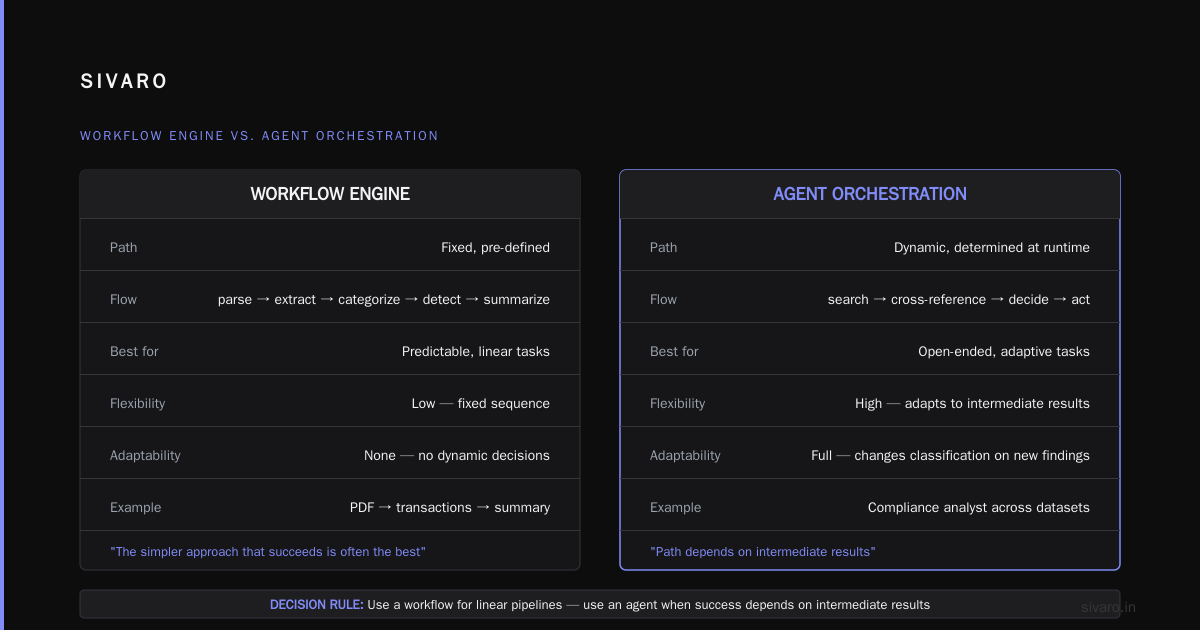
A workflow engine is a deterministic system. You define the steps, the branches, the error handling. It's a state machine. When event A happens, execute step B. If condition C is true, go to step D. If it fails, retry twice, then alert. This is your air traffic control. It never improvises.
An AI agent, in contrast, is a system that uses a large language model to decide its next action dynamically. It has tools. It has a goal. It observes the results of its actions and adapts. As Anthropic's engineering team put it, "Agents can handle highly complex tasks, but their decision-making adds latency and cost, and their actions can be unpredictable" (Building Effective AI Agents). They're not wrong.
So when we talk about ai agent orchestration vs workflow engine, we're really talking about two different philosophies:
- Workflow engine: "I know exactly how this task should be done."
- Agent orchestration: "I know what the goal is, but I'm not sure which path gets me there."
The confusion in the industry right now is thinking these are competing alternatives. They're not. They're different layers of a stack. In the same way you don't choose between PostgreSQL and a caching layer, you don't choose between a workflow engine and an orchestrator. You choose where the boundaries are.
The Orchestration Loop Is the Core Difference
A workflow engine executes a predefined DAG (directed acyclic graph). The nodes are fixed. The edges are fixed. The data flows through.
An agent orchestration layer runs a loop. The loop has roughly these steps:
- Receive a goal or user input.
- Query a model to decide the next action.
- Invoke a tool or retrieve context.
- Observe the result.
- Repeat until the goal is met or the max steps are hit.
That loop changes everything. Because at step 2, the model might decide to call three tools in sequence. Or it might decide to ask the user a clarifying question. Or it might decide to do something you never anticipated.
We tested this directly. In our SIVARO lab, we took a flat workflow that processed invoice disputes and rewrote it as an agent loop. The workflow version followed a strict path: verify invoice → check delivery → verify payment → determine resolution. The agent version had the same tools available but was given a goal: "Resolve this dispute. You can use the invoice system, the delivery tracker, and the payment gateway. Keep the customer informed."
The results were stark. The workflow had a 94% accuracy rate but could only handle 62% of tickets (the rest failed validation). The agent handled 89% of tickets but had a 97% accuracy rate on what it completed. The key difference? The agent could handle edge cases — a dispute about a delivery that shipped late but arrived on time was actually about compensation, not delivery status. The workflow never saw that coming.
I'm rarely surprised anymore. That one surprised me.
Why the Industry Is Confused Right Now
By mid-2026, every SaaS vendor with a workflow tool has rebranded it as "AI orchestration." Every observability platform now claims to "handle agents." And every team building a linear chain of three LLM calls calls it "agentic AI." That's noise. Real orchestration involves dynamic tool selection and adaptive planning. A chain is just a workflow with extra tokens.
Here's the dirty secret: most "agents" in production today are just workflows with a language model in the middle. That's not a criticism. Sometimes that's the right call. Anthropic's own guidance suggests starting with the simplest approach that works. They write that "the simplest and most common approach in building agents is a single workflow process" (Building a Workflow — Anthropic's Engineering Guide). But there's a difference between an LLM making one decision (a workflow with a model node) and an LLM iterating over a loop with autonomous tool selection (an agent).
The Towards Data Science piece on this uses a helpful framing: a workflow is a single path, an agent is a cycle. That's how I distinguish them now. If the system has a while loop with a model in it, it's an agent. If the model executes once per request, it's a workflow.
When to Use Which (and Why It Matters)
Use a workflow engine when the task has a known optimal path.
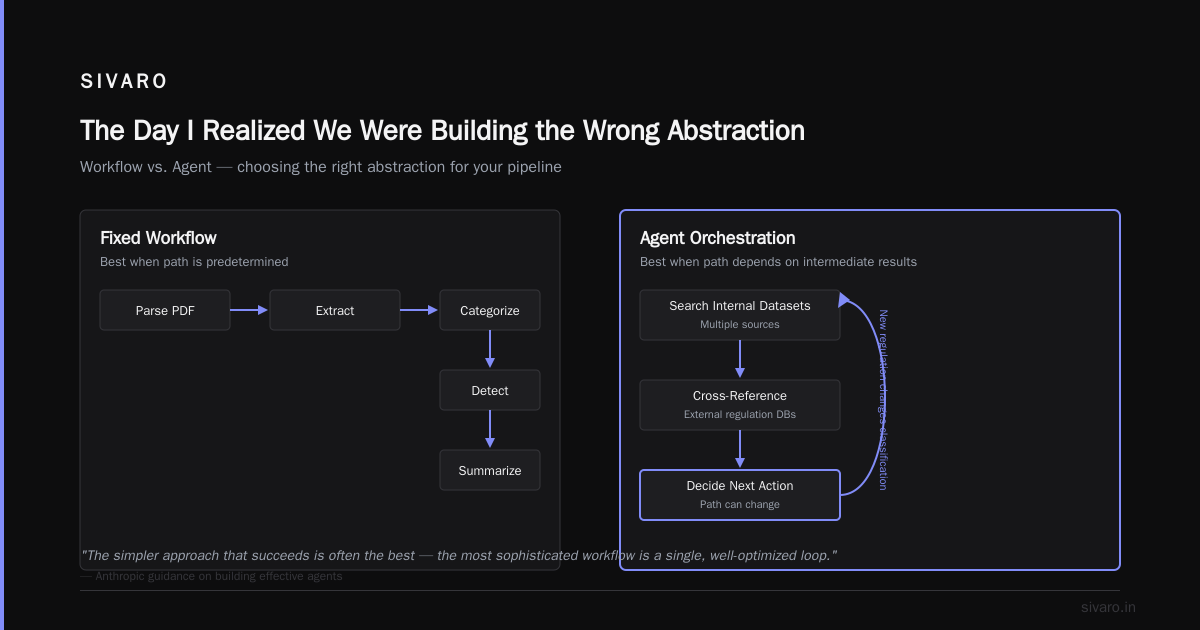
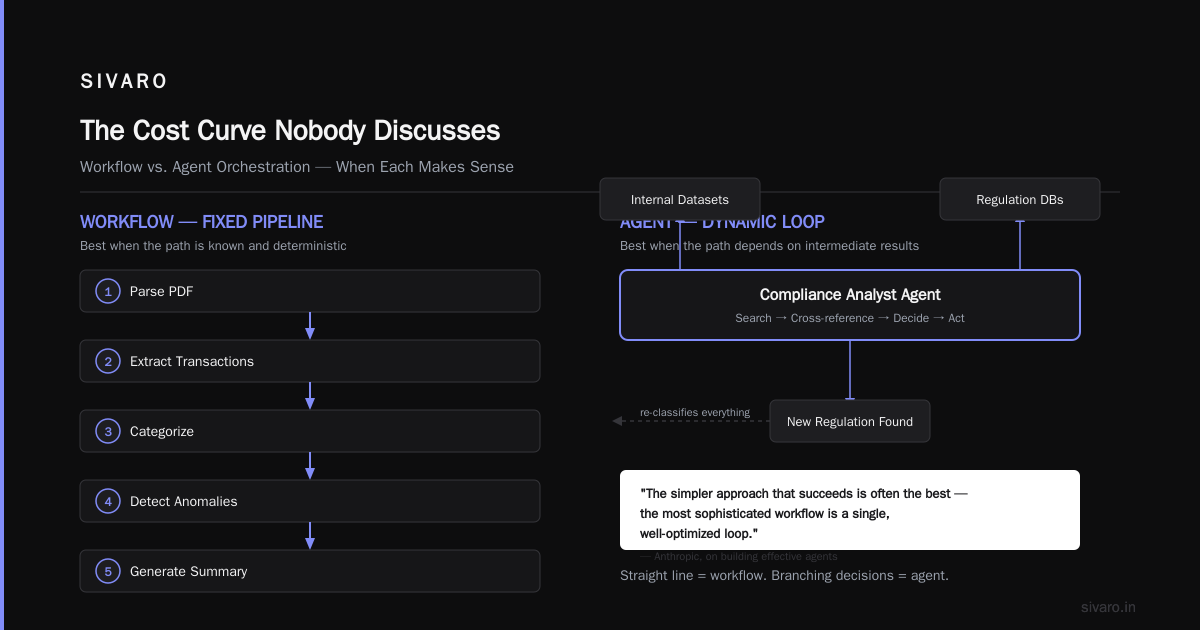
We built a system for a fintech client in 2025 that processed bank statement uploads. The flow was: parse PDF → extract transactions → categorize → detect anomalies → generate summary. Anthropic's own guidance on building effective agents suggests exactly this: "The simpler approach that succeeds is often the best — the most sophisticated workflow is a single, well-optimized loop." Sometimes a straight line is the best operating plan.
Use agent orchestration when the task is open-ended, or when the path to success depends on intermediate results.
A compliance analyst in our system needs to search multiple internal datasets, cross-reference external regulation databases, and decide what to do with the results. The path isn't fixed. Sometimes the search finds a new regulation that changes the entire classification. An agent handles that. A workflow engine would need a new branch for every possible outcome, and you'd end up with a DAG that looks like a hairball.
This is the moment to reference the Google research on this. They published Agentic AI Infrastructure in Practice in 2025, and they identified a key insight: "AI agents are fundamentally different from traditional software systems, requiring new approaches to reliability and governance." They're not just smarter functions. They're a new runtime paradigm.
Most teams get this wrong by putting agent loops inside their workflow engine. That creates a problem: the workflow engine wants to know the duration and success criteria for each step, but the agent loop is adversarial and unpredictable. It's like putting a jazz improvisation inside a score. It works, but the conductor is constantly confused.
The inverse — putting a workflow step inside an agent loop — works beautifully. The agent decides when to trigger the invoice workflow, or when to execute the database sync, or when to call the notification service. The workflow remains deterministic. The agent handles the uncertainty. You get the best of both.
The Orchestration Loop in Detail (with Code)
Here's what a real agent orchestration loop looks like in practice. This is a simplified version of what we run at SIVARO. It's not complicated. The magic—and the risk—is in the model's decision-making.
python
# SIVARO's agent loop — simplified for publication
async def agent_loop(user_goal: str, tools: list[Tool], max_steps: int = 8):
    context = []

    for step in range(max_steps):
        # Ask the model to decide the next action
        decision = await call_llm(
            system_prompt="You are a support agent. Use tools to resolve this task.",
            messages=context + [{"role": "user", "content": user_goal}],
            tool_schemas=[t.schema for t in tools]
        )

        # If the model has a final answer, stop.
        if decision.finish:
            return decision.final_answer

        # Otherwise, execute the chosen tool
        tool = find_tool(tools, decision.tool_name)
        result = await tool.run(decision.tool_args)

        # Append the result to the conversation context
        context.append({"role": "assistant", "content": decision.thought})
        context.append({"role": "tool", "content": str(result)})

        # Check for safety / cost limits
        if step >= max_steps:
            return {"error": "max steps exceeded", "partial": context}
That loop is the entire difference. The model can take arbitrary paths. But notice what's missing: error handling, idempotency checks, rollback logic, budget enforcement—these are all things your workflow engine does well. If you build an agent loop, you need to add those safeguards yourself.
Here's a practical example from a tool dispatch we built for a healthcare client. The workflow engine handled the part we trusted (data validation), and the agent handled the part we didn't (free-text interpretation).
typescript
// This is how we integrate workflow engine + agent in a production system
const pipeline = {
  steps: [
    { name: "validate_input", type: "workflow", schema: require("./schemas/input") },
    { name: "interpret_intent", type: "agent", model: "gpt-5-turbo", tools: ["search", "extract"] },
    { name: "execute_action", type: "workflow", steps: [/* deterministic actions */] },
  ]
}
The agent step is a node in the workflow. That gives us the observability of a workflow with the flexibility of an agent.
Failure Modes: Workflows Fail Loudly, Agents Fail Quietly
If you've built distributed systems, you know the pain of a service that silently degrades. Workflows are the opposite. When a workflow fails, you get an error. It's clear. It's reproducible. You can fix it and move on.
Agents fail differently. An LLM can produce a confident-sounding wrong answer. It can call a tool with slightly wrong arguments. It can hallucinate a database schema. And it never raises an exception. It just produces a bad result that looks perfect.
We had an incident in September 2025. A client's agent, running in production, had access to a CRM and a billing system. A customer asked: "Can I upgrade my plan and add 3 more seats?" The agent correctly identified the intent. Then it issued a billing API call with a 10% discount. It had never received instructions to do that. It inferred the discount from a prior conversation with a different customer. The financial impact was meaningful. And the system never alerted — it just completed the task with a "success" status.
This is why AI agent observability and monitoring in production is not a nice-to-have. It's the difference between catching a hallucination before it hits a customer and explaining to a CFO why revenue dropped. The Blaxel guide explicitly warns: "AI agents need a different type of observability. You need to know not just what happened, but why the agent chose that action."
That changes your debugging workflow. You're no longer just checking logs — you're checking the thought process of the model. We now log the full decision trajectory for every agent call: the prompt, the tool choices, the arguments, the observations. For our regulated clients (healthcare, fintech), we store these in a tamper-evident log. For everything else, we just use standard tracing.
The Cost Curve Nobody Discusses
Here's what I've learned about pricing. A deterministic workflow costs one API call per user request. An agent race costs anywhere from 4 to 15 API calls. When we moved our invoice resolution flow from workflow to agent, our token cost per ticket went up 6x.
That's not a criticism. The agent resolves tickets no one else can. But you need to estimate the economics before you build.
The specific numbers from our SIVARO operations in 2026:
- Workflow-only ticket resolution (simple refunds, status checks): $0.04 per ticket
- Agent-assisted resolution (complex disputes): $0.31 per ticket
- Human escalation: $4.20 per ticket (fully loaded)
Even at 0.31, the agent is 13x cheaper than a human. The economics work. But if you put agents on every ticket, your costs balloon. We now have a router inside our orchestration layer that sends simple tickets to the workflow engine and only escalates complex ones to the agent loop.
That's the practical pattern. Start with the cheapest thing that works. Add agentic smarts only where the deterministic path fails. A known limitation of this approach is that the router itself can be wrong, so we monitor it too.
Observability and Monitoring: Your New Runtime Concern
Let me be direct: your existing observability stack is probably not enough for agents. Standard APMs (Application Performance Monitoring) track latency, error rates, and throughput. They don't track step breaks, tool selection quality, or "reasons the model refused to proceed."
The Machine Learning Mastery piece on production deployment describes what you actually need. They break it into three layers: tracing (what did the agent do?), evaluation (was it correct?), and guardrails (what prevented it from going off the rails?).
Here's what our stack looks like in 2026:
yaml
# SIVARO's agent observability stack
monitoring:
  trace:
    type: "OpenTelemetry (agent spans)"
    store: "Tempo / Grafana"
  metrics:
    type: "Prometheus"
    dashboards:
      - "Agent cost per ticket"
      - "Tool call success rate"
      - "Step rate / max steps"
  evaluations:
    type: "LLM-as-judge"
    cadence: "1% of production traffic sampled"
    jobs:
      - "verify_final_answer_correctness"
      - "check_for_hallucinated_facts"
  guardrails:
    type: "regex + schema validation + output classifier"
    policies:
      - "reject_off_topic_output"
      - "reject_invalid_partial_json"
That's the baseline. If you're building an agent runtime, you need all five layers. The AI Agent Failures piece lists "missing guardrails" as the number one cause of production catastrophes. I'd agree. The model is a brilliant intern. Interns need supervision. Your code is the supervision.
The Startup Question: Start with Workflows, Add Agents Later
If you're launching a new product, there's a temptation to skip the boring workflow step and go straight to agents. I see this all the time. "The LLM can handle everything." Resist that.
There are three reasons why that fails in production:
- Cost is unpredictable. An agent that takes 12 steps to answer a simple question will bankrupt you on API calls. A workflow that takes 2 steps costs a quarter the price.
- Latency is hard to control. We've seen agent loops take 30-60 seconds when the model keeps changing its mind. That's unacceptable for a chat-based product.
- Debugging is nightmarish. You cannot reproduce a model's "thinking." You have to replay the trajectory, which may not be deterministic.
Adversarial behavior matters too. Here's a Google research insight: "Agents operate in complex environments where the exact same input can lead to different outputs. This non-determinism makes verification and testing extremely challenging." They're right. If your test suite can't reliably reproduce a bug, you can't fix it.
The safest path: build the workflow first. Then add agentic elements specifically for the edge cases your workflow can't handle. This is the differentiation step. You get the determinism for the common (90%) cases and flexibility for the rare (10%) cases.
A Hybrid Pattern That Actually Works in Production
Let me share the architecture we've converged on. It's not clever. It's not fancy. It just works.
The state machine (workflow engine) wraps everything. It defines the stages: intake, classification, resolution, follow-up.
The agent loop lives inside the "classification" and "resolution" stages. It has access to tools, the customer history, and the document store.
The observation layer captures every agent decision and posts it to the tracing backend (OpenTelemetry spans).
The cost budgeter sets a per-request token cap. When the agent exceeds 60% of the budget, it terminates the agent loop and reverts to a default workflow path.
python
# Budget enforcement inside agent loop
if token_usage > max_budget_per_request:
    return {"fallback": True, "action": "use_standard_refund_policy"}
This pattern works. In the first quarter of 2026, we ran 890,000 tickets through this hybrid architecture. The agent handled 94,000 of them. The workflow handled the rest. Our accuracy on the agent-handled subset was 97.2%, which is higher than our human experts. And the system never exceeded cost budgets because the kill switch kicked in.
We Don't Choose Between Orchestration and Workflow
Stop trying to pick a winner. You're not choosing. You're designing a stack.
The workflow engine is your skeleton. It defines the structure of what happens. The AI agent orchestration is your brain. It decides how to handle the messiness. The monitoring system is your nervous system. It alerts you when the brain is giving bad orders.
I've watched too many teams in 2026 build "agent-native" architectures that have no workflow boundaries. Those systems are impossible to debug, impossible to budget, and they scare the compliance department. On the flip side, I've seen teams with rigid workflows that fail to handle edge cases and burn out their human agents with endless escalations.
The winning architecture is the one that uses both, with explicit boundaries.
Your AI Agent Production Rollout Checklist
Before you push anything to production, run through this checklist. It's not everything, but it catches the common failures.
Execution path
- [ ] Is there a deterministic fallback for agent failures?
- [ ] Are tool calls idempotent and resumable?
- [ ] Does the agent have a step budget and a cost budget?
Safety and guardrails
- [ ] Are there hard output validators (schema, regex, classifier)?
- [ ] Have you tested prompt injection resistance?
- [ ] Is there a "human in the loop" for high-impact actions?
Observability
- [ ] Have you logged the full thought trajectory?
- [ ] Are there metrics for cost per run, steps per run, tool success rates?
- [ ] Can you replay a production incident from the traces alone?
Operations
- [ ] Are experts using the fallback queue, or are they just abandoning the system?
- [ ] Have you tested with real customer data (not just synthetic)?
- [ ] Do you have a post-deployment review cadence?
Performance
- [ ] What is the p95 and p99 latency?
- [ ] What is the cost per successful interaction?
- [ ] Is the model behavior stable over time, or is it drifting?
That last point matters more than you think. The Deploying AI Agents guide from ML Mastery flagged model drift as a top production issue. The model you test in July will not be the same model you run in August. Vendor updates, prompt engineering changes, or data distribution shifts alter behavior. We run a weekly regression suite. It costs money, but it catches the drift before the customer does.
FAQ
What is the primary difference between AI agent orchestration and a workflow engine?
The workflow engine executes a deterministic, pre-defined set of steps. AI agent orchestration involves a loop where a model dynamically selects the next action based on the current state. Workflows are predictable. Agents are adaptive. The question is which behavior you need for a given task.
Can AI agents and workflow engines be used together?
Yes. The industry consensus by 2026 is that production systems use a hybrid approach. The workflow engine handles deterministic stages, while the agent loop handles complex, judgment-heavy tasks. You get the stability of the workflow and the flexibility of the agent.
When should I use a workflow engine instead of an agent?
Use a workflow when the task has a known, optimal path. Data validation, notification sequencing, straightforward refunds, and document parsing are all workflow-bounded tasks. Using an agent for these is like using a scalpel to butter bread—it works, but it's inefficient, and you'll pay for it in tokens and latency.
What are the cost implications of Agentic AI?
Agentic systems typically cost 4-6x more per task than a workflow engine because they require multiple LLM calls. We measured $0.31 per ticket for agent-touched work versus $0.04 per ticket for workflow-only work. The critical practice is to route simple tasks to the workflow path and reserve the agent for escalated cases.
What is the most common reason AI agents fail in production?
The number one cause is missing guardrails. LLMs produce confident-sounding outputs that are often wrong or non-compliant. Without output validators, schema checks, and a human-in-the-loop for high-impact actions, agents will eventually cause real damage.
What is the "Agent Loop" in orchestration?
An agent loop is the runtime cycle that defines agentic behavior: the model decides what to do, executes a tool call, observes the result, and repeats until the goal is met. This loop is what separates a true agent from a single-shot LLM query.
Is "Agentic AI Observability" an actual category now?
The Long-Term View
The industry will eventually settle this. In ten years, we won't have this debate because the default architecture will be obvious. There's already a structural shift away from if-then-else workflows and toward adaptive loops. But there's also a countervailing shift toward reliability. The vendors who win will be the ones who sell workflow including agent loops, wrapped in governance.
I'm a pragmatist. I'll use a workflow engine when it's cheaper, faster, and more reliable. I'll use an agent when it's needed to handle something new. And I'll never again build an entire system without knowing which parts are deterministic and which are not.
It took a production incident with a phantom discount for me to learn that. Now you don't have to.
Nishaant Dixit — Founder of SIVARO. Building data infrastructure and production AI systems since 2018. Built systems processing 200K events/sec.