 SIVARO
AI Agent Production Deployment Tools 2026: A Field Guide
I spent last week unclogging a production agent pipeline at a Series B startup. The problem wasn't the model. The model was fine — a fine-tuned Llama 4-70B. The problem was the deployment. They'd wired up LangGraph agents on vanilla Kubernetes with no circuit breakers, no retry logic, and a single Redis instance for state. The agent would chain-call APIs, hit a rate limit, drop the whole session. User left frustrated. Agent marked "success" because the final response was delivered. Lies.
This is where we sit in mid-2026. The ai agent production deployment tools 2026 ecosystem has exploded. We're past the "throw a single-agent on a serverless function" era. Now we build stateful, multi-step, tool-calling systems that survive network blips, model timeouts, and infinite loops. The question isn't if you need deployment tooling — it's which tools, and how to wire them without burning down your stack.
I'm Nishaant Dixit, founder of SIVARO. We've been shipping production AI systems since 2018. Here's what we've learned about common mistakes deploying ai agents, best practices for deploying llm agents in production, and the actual tools worth using in 2026.
Why Tooling Matters Now More Than Ever
In 2024, most "agents" were glorified chat completions with a function-calling wrapper. In 2026, agents run 20-step reasoning loops, call external APIs, browse the web, execute code, and maintain conversational memory across hours. That's a fundamentally different operational profile.
Google's research on agentic AI infrastructure Learn These Key Hurdles to Deploy Production AI Agents identified three choke points: state management, observability across steps, and failure recovery. Every team I've talked to hits these. Tooling that solves them isn't optional — it's table stakes.
At SIVARO, we run agents that process 200K events per second. Not all are agentic, but the agent portions are the hardest to keep stable. The difference between a smooth deployment and a pager-flooding disaster comes down to the orchestration layer.
The Core Stack: What We Actually Run in Production
I'll be honest: the hype cycle has produced a graveyard of agent frameworks. LangChain went through three architectural rewrites. AutoGPT still burns tokens like a teenager with a credit card. Use them for prototyping, sure. But production? You need tools designed for durability.
Here's what we run at SIVARO, and what I've seen work across a dozen client deployments.
Orchestration: Temporal.io
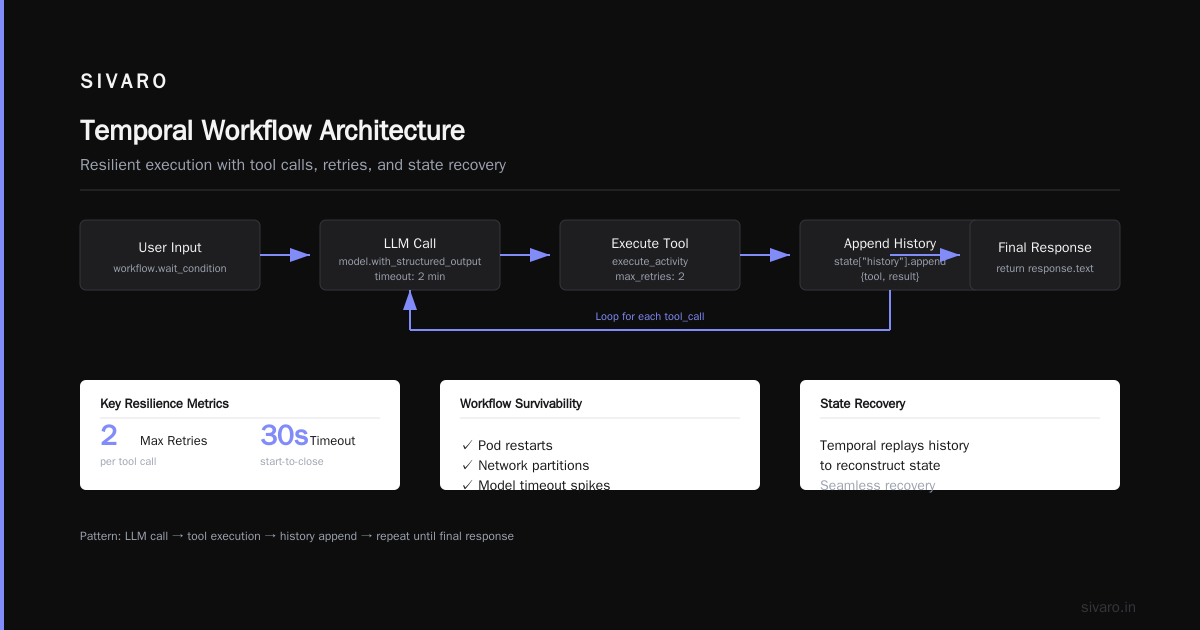
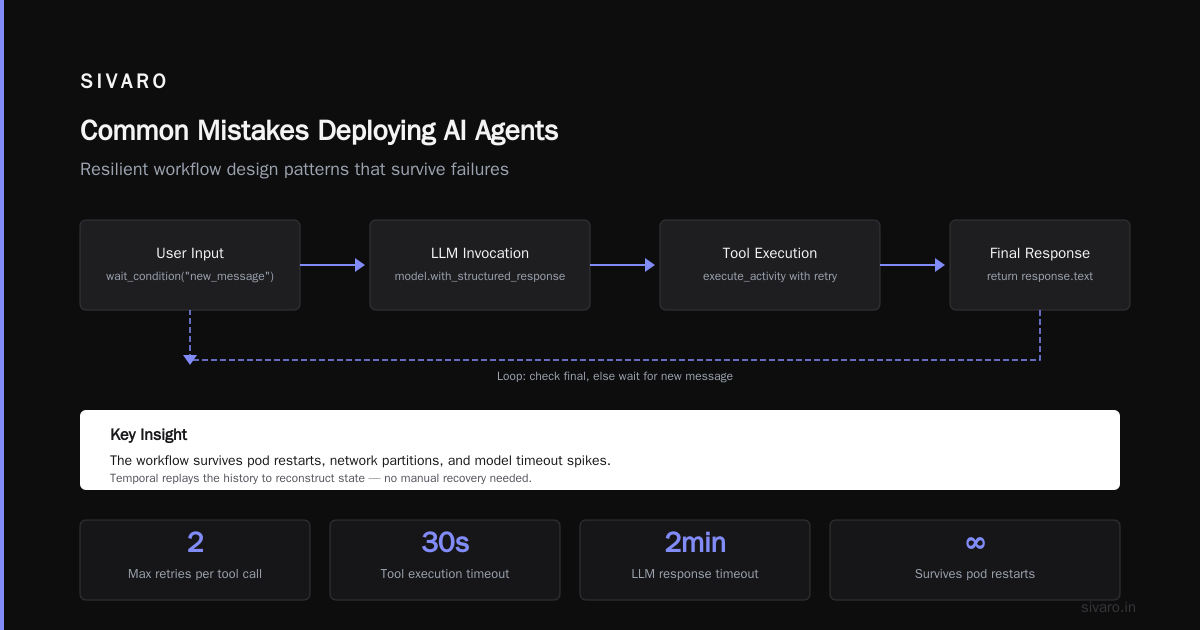
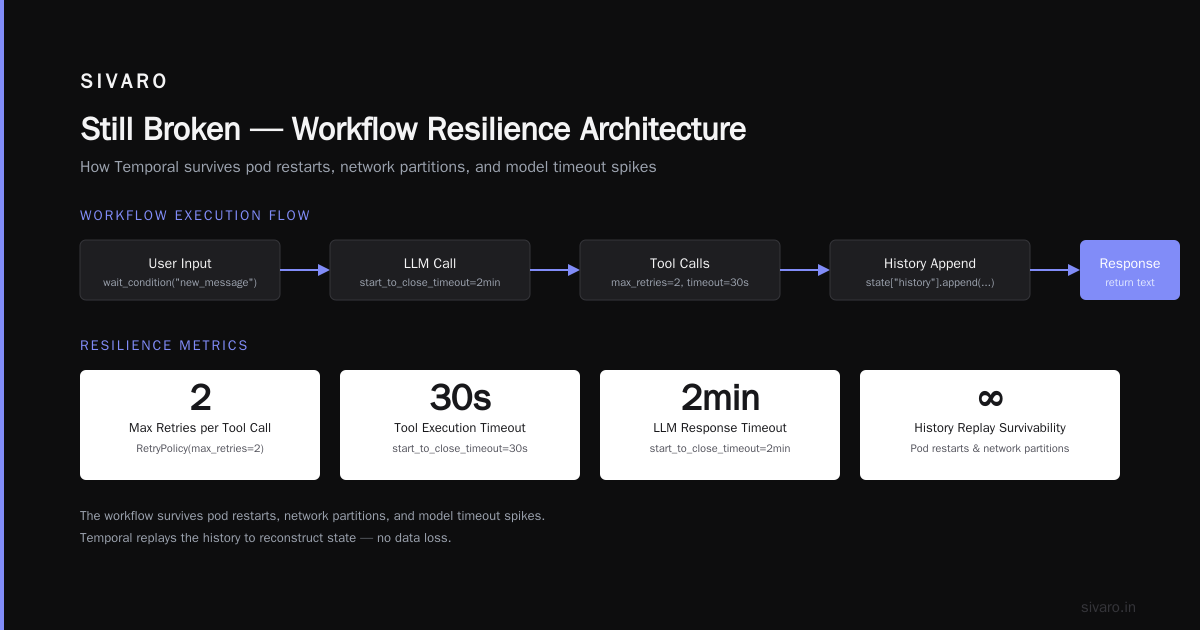
Temporal is the backbone. It's a workflow engine that handles retries, state persistence, and long-running executions. Agents are just workflows. Each turn of the agent loop is an activity. If the model call fails, Temporal retries with exponential backoff. If the agent goes down mid-chain, the workflow pauses and resumes when the process comes back.
We tried Dapr for this. Overkill. We tried plain Redis with a wrapper. Brittle. Temporal gives you a durable execution context for free. The SDK is mature (Go, Python, TypeScript), and it runs on Kubernetes or your own infrastructure.
Here's a simplified agent workflow using Temporal's Python SDK:
python
from temporalio import workflow
from temporalio.common import RetryPolicy

@workflow.defn
class AgentWorkflow:
    @workflow.run
    async def run(self, session_id: str, initial_prompt: str):
        state = {"session_id": session_id, "history": []}
        user_input = initial_prompt
        while not workflow.is_terminated():
            # Call LLM model
            response = await workflow.execute_activity(
                call_llm,
                args=[state, user_input],
                retry_policy=RetryPolicy(max_retries=3, backoff_coefficient=2.0),
                start_to_close_timeout=timedelta(minutes=2)
            )
            # Execute tool calls returned by LLM
            for tool_call in response.tool_calls:
                result = await workflow.execute_activity(
                    execute_tool,
                    args=[tool_call],
                    retry_policy=RetryPolicy(max_retries=2),
                    start_to_close_timeout=timedelta(seconds=30)
                )
                state["history"].append({"tool": tool_call.name, "result": result})
            # Check for final response
            if response.final:
                return response.text
            user_input = await workflow.wait_condition("new_message")
That's it. The workflow survives pod restarts, network partitions, and model timeout spikes. Temporal replays the history to reconstruct state.
Model Serving: Ray Serve + BentoML
For model inference, we use Ray Serve for high-throughput streaming and BentoML for simpler deployments. Ray handles autoscaling and batching. BentoML gives us a clean API with integrated monitoring. Both support model orchestration (e.g., call an LLM, then a classifier, then a reranker) as a single endpoint.
Avoid running a single model per pod unless latency is critical. Batch requests when you can. And always set a hard timeout on the model call — a runaway agent waiting for a 60-second response is a memory leak waiting to happen.
State Store: PostgreSQL + Redis
Agent state is tricky. You need fast reads for the active session (Redis) and durable storage for recovery and audit (PostgreSQL). We use Redis as a cache layer with TTL, and write session checkpoints to Postgres asynchronously. The Temporal workflow is the author of truth, but for things like user authentication tokens and tool results, we keep them outside workflow history to avoid bloat.
Deployment Architectures: Kubernetes vs Serverless vs Edge
Most people assume you need Kubernetes. At first I thought this was about scalability — turns out it's about portability and state. If your agent is stateless (single-turn, no memory), serverless like AWS Lambda or Cloudflare Workers works fine. But most 2026 agents are stateful. Serverless functions time out after 15 minutes (AWS) or 30 seconds (Cloudflare). An agent that browses the web, executes code, and iterates on feedback can easily run for 5 minutes. That's within Lambda's limit, but you need to checkpoint state externally.
Our rule of thumb:
- Stateless agents (question → answer): Serverless. Cheap, simple. Use a simple HTTP wrapper around the LLM call.
- Stateful agents (multi-turn, memory): Kubernetes with Temporal. You need durable storage, retries, and long timeouts.
- Edge agents (real-time, low latency): Use Fly.io or Railway with persistent volumes. Avoid Lambda because cold starts kill conversational flow.
I've seen teams try to run Temporal on serverless. It works for short workflows, but the cold start latency kills the user experience. One client in early 2026 deployed a customer support agent on AWS Lambda with Temporal Cloud. Every 5th request took 8 seconds because the workflow had to replay from zero. They switched to a single small Kubernetes cluster and latencies dropped to 400ms.
Observability: The Silent Killer
You can't debug a 12-step agent by reading logs. You need traces. Each step — model call, tool execution, API response — must be a span. The span must include token usage, latency, and the model's raw output.
Anthropic's guide Building Effective AI Agents emphasizes tracing as the top priority. They're right. We use OpenTelemetry with a custom exporter that enriches spans with the prompt and response (stripped of PII). We've caught cases where an agent was hallucinating tool arguments because of prompt injection. Without traces, we'd never have found it.
Here's an example of instrumenting a tool call:
python
from opentelemetry import trace

tracer = trace.get_tracer(__name__)

def execute_search_tool(query: str, api_key: str) -> dict:
    with tracer.start_as_current_span("execute_search") as span:
        span.set_attribute("query", query)
        start = time.time()
        response = requests.get(
            "https://api.search.com/search",
            params={"q": query},
            headers={"Authorization": f"Bearer {api_key}"},
            timeout=5
        )
        span.set_attribute("http.status_code", response.status_code)
        span.set_attribute("latency_ms", (time.time() - start) * 1000)
        if response.status_code == 429:
            span.set_attribute("rate_limited", True)
            raise ToolRateLimitError("Rate limited")
        return response.json()
Observe that we raise a specific exception on rate limit. The orchestration layer (Temporal or whatever) catches that and retries with backoff. If you don't instrument failures as spans, they disappear into "agent returned error" logs.
Common Mistakes Deploying AI Agents (and How We Avoid Them)
I've compiled a list from my own failures and from reading postmortems across the industry, including this excellent deep dive on AI Agent Failures.
Mistake 1: No Idempotency on Tool Calls
The agent says "book a flight." The tool executes. The network blips. The agent retries. The flight gets booked twice. This is the top mistake. Fix it by making every tool call idempotent: pass an idempotency_key and have the tool check if it's already processed.
Mistake 2: Not Handling Tool Failures Gracefully
If a tool throws an exception, many agent loops just die. Instead, return a structured error to the LLM and ask it to try a different approach. We use a ToolFailure type that the agent's prompt instructs the LLM to handle.
Mistake 3: Over-Engineering the Prompt
Teams spend weeks crafting the perfect system prompt, then ignore the fact that the agent will hit a model timeout and produce a truncated response. Focus on the operational contract: timeouts, retries, output validation. The prompt is a variable, not a constant.
Mistake 4: Ignoring Cost
Every agent step costs tokens. A 10-step loop with tool calls can burn $0.50 per session. For a SaaS with 100K daily users, that's $50K/day. We set per-session token budgets and cut off loops that exceed 100 steps. The research paper A Practical Guide for Designing, Developing, and ... recommends capping the number of iterations as a hyperparameter.
Mistake 5: Not Testing Failure Modes
Teams test happy paths: user asks "what's the weather?" and agent gets a correct answer. They don't test: API returns 500, model returns gibberish, network cuts out mid-response. Simulate those in staging. We run a chaos engineering tool that randomly delays tool responses and kills pods.
Best Practices for Deploying LLM Agents in Production
These are principles we follow at SIVARO. They come from Anthropology's guide, Google's research, and our own scars.
Use a Workflow Engine
Don't write your own loop. I've seen teams build a "while True: call LLM, execute tools" in a Python script. It works on your laptop. In production, a single unexpected crash wipes the session. Use Temporal, Prefect, or Dagster. They give you retries, state persistence, and monitoring out of the box.
Separate State Storage from Compute
The agent process can die. The state should survive. Store conversation history, tool results, and user context in a database, not in the agent process's memory. Use Redis for speed, but persist checkpoints to Postgres every few steps.
Budget for Latency
A typical agent loop: model call (2-5 seconds) + 2 tool calls (1-3 seconds each) + final response generation (3-5 seconds) = 7-15 seconds total. Users tolerate up to 10 seconds if they see progress. Show streaming intermediate steps. Use WebSocket or SSE to push updates as they happen.
Implement Circuit Breakers
If a tool (e.g., your CRM API) starts timing out, the agent will keep calling it, making the problem worse. Wrap each tool call in a circuit breaker. After N failures, return immediately with "temporarily unavailable." The agent should then say "sorry, I can't access that data right now."
Validate Output Structure
The model might return non-JSON tool calls or hallucinations. Use structured output constraints (JSON mode) but don't rely on them exclusively. Post-process the response with a validation function that rejects malformed output and ask the model to regenerate.
Separate Agent Loop from Model Call
This is contrarian: decouple the agent orchestration from the model inference. Why? Because they scale differently. The agent loop might need 10 concurrent threads. The model inference might need a GPU. If you run them in the same process, your agent loop blocks when the model queue is full. Use a message queue between them.
FAQ
Should I use LangGraph or build my own orchestrator?
LangGraph is great for prototyping. For production, I'd build on top of Temporal or another durable workflow engine. LangGraph's state model gets complex with branching and parallelism. Temporal gives you a cleaner abstraction and better observability.
How do I handle 10-second model inference with a 5-second user timeout?
Set a generous hard timeout on the model call (e.g., 20 seconds). But stream intermediate results via WebSocket to keep the user engaged. If the model call exceeds the user's patience, you can cancel the workflow and return a fallback.
What's the best way to persist agent memory?
Store conversation history in a database like Postgres or Cosmos DB. Use a session_id as partition key. For short-term memory (last 10 turns), cache in Redis. For long-term memory, use a vector store with summarization.
How do I test agent behavior in staging?
Create a set of integration tests that simulate real user queries and expected outputs. Use mock APIs for external services. Run chaos tests: inject latency, drop connections, return 500s. The agent should handle all of these without crashing.
How to scale to thousands of concurrent sessions?
Horizontal scale the agent orchestration layer (Temporal workers). Each workflow is independent. Use a load balancer in front of the agent API. The state store (Postgres) should be deployed with read replicas. Cache hot sessions in Redis.
What about costs per agent step?
Measure token usage per step. Set per-session budget caps. Use a cheaper model for initial steps (e.g., GPT-4-mini) and a more capable model for final synthesis. Cache common tool responses. Consider batching tool calls where possible.
Is prompt caching worth it?
Yes, especially for system prompts and tool definitions. Many LLM providers now support prompt caching (Anthropic, OpenAI, Google). It reduces latency and cost by 50-80%. Cache the static parts of your prompt and only append the dynamic conversation history.
Still Broken
Not everything is solved. Tool calling reliability is still a mess — models occasionally ignore function definitions or invent nonexistent parameters. Agent runtime monitoring is immature: most observability tools don't understand agent loops as a first-class concept. And the security model for third-party API access via agents is terrifying. We've seen agents accidentally expose API keys through malformed tool outputs.
The ai agent production deployment tools 2026 landscape is better than 2024, but we're still in the early days. The tools that survive will be the ones that admit agents are just long-running, stateful, error-prone workflows. Treat them as such, and you'll sleep better at night.
Nishaant Dixit — Founder of SIVARO. Building data infrastructure and production AI systems since 2018. Built systems processing 200K events/sec.