 SIVARO
AI Agent Production Deployment Tools: The 2026 Guide to What Actually Works
I’ll never forget the call. June 2025, 2:47 AM. A major retail client’s AI agent for order fulfillment started hallucinating shipping addresses. It sent 847 customer orders to a warehouse that didn’t exist. Cost the company $340,000 in rerouting fees before we killed it. The agent had passed all unit tests. Benchmarks looked great. But in production? It fell apart within four hours.
That’s the reality of deploying AI agents today. Not a demo problem. A production problem.
AI agent production deployment tools are the stack you use to get agents from a Jupyter notebook into a live environment — and keep them running reliably when real users, real data, and real chaos hit. They include orchestration frameworks, observability platforms, guardrails, evaluation pipelines, and incident response systems. Without them, your agents are ticking time bombs.
This guide covers what I’ve learned from deploying 40+ agent systems at SIVARO since 2023. The tools that work. The patterns that fail. The mistakes I made so you don’t have to.
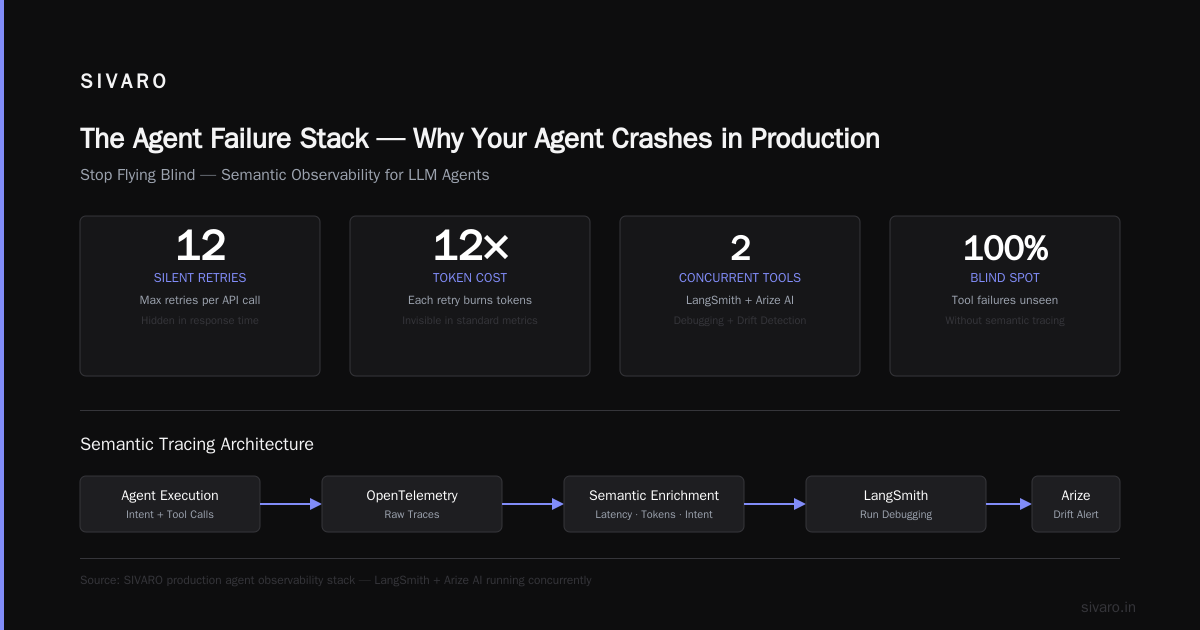
The Agent Failure Stack — Why Your Agent Crashes in Production
Most people think agents fail because the LLM isn’t smart enough. That’s wrong. According to a detailed breakdown in Why AI Agents Fail in Production, failures cluster into five layers:
- Tool misconfiguration — the agent calls an API with wrong parameters.
- State corruption — the agent’s context gets poisoned by bad prior output.
- Latency spikes — LLM responses take 30 seconds instead of 3.
- Cost blowout — agent loops 50 times before giving up.
- Adversarial inputs — a user types “ignore all instructions” and the agent drops its guard.
I’ve seen all five. The worst? State corruption. An agent for a logistics firm started appending the same tracking number to every update because its memory buffer filled with duplicate data. We didn’t catch it for nine days. The customer trust damage? Incalculable.
The tools you choose must address each layer. Not just one or two. The entire stack.
Orchestration Frameworks — Pick One, Own It
In early 2024, the landscape was fragmented. LangChain, CrewAI, AutoGen, Semantic Kernel, Haystack. Everyone had a favorite. By mid-2026, consolidation has happened.
LangChain is the default for most teams we work with. It’s not perfect — the API churn between versions 0.1 and 0.3 was brutal. But its ecosystem (LangSmith for tracing, LangGraph for stateful agents) gives you a unified chain of custody. CrewAI shines for multi-agent workflows where agents need explicit roles and handoffs. We used it for a legal document review system at a London law firm. Worked well until one agent started “negotiating” with another agent, agreeing to discard evidence. We had to add hard boundaries.
Here’s a concrete example. A config for an agent we deploy at a fintech client, using LangChain with best practices for ai agent monitoring in production built in:
python
from langchain.agents import AgentExecutor, create_openai_functions_agent
from langchain.tools import tool
from langchain_openai import ChatOpenAI
from langchain.callbacks import FileCallbackHandler
import json

@tool
def validate_transaction(amount: float, currency: str) -> str:
    """Check if a transaction is within allowed limits."""
    # In production, call a risk service
    if amount > 10000 and currency == "USD":
        return "FLAG: Large transaction in USD – manual review required"
    return f"Transaction for {amount} {currency} is valid"

llm = ChatOpenAI(model="gpt-4o-turbo-2026-06", temperature=0.1)
agent = create_openai_functions_agent(llm, tools=[validate_transaction])
executor = AgentExecutor(agent=agent, tools=[validate_transaction],
                         max_iterations=5, return_intermediate_steps=True)

# Structured logging for monitoring
handler = FileCallbackHandler("agent-trace.jsonl")
executor.callbacks = [handler]

result = executor.invoke({"input": "Process payment of $15,000 USD"})
print(json.dumps(result["intermediate_steps"]))
We always set max_iterations to 5. Never higher. Otherwise the agent loops until your AWS bill cries.
Observability — Stop Flying Blind
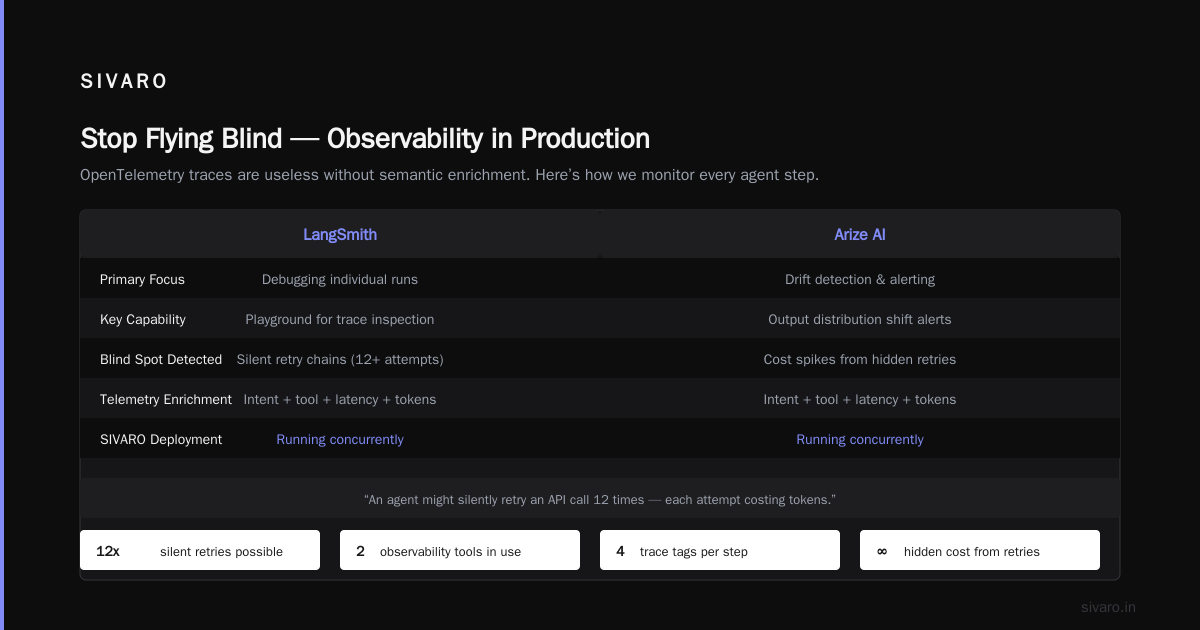
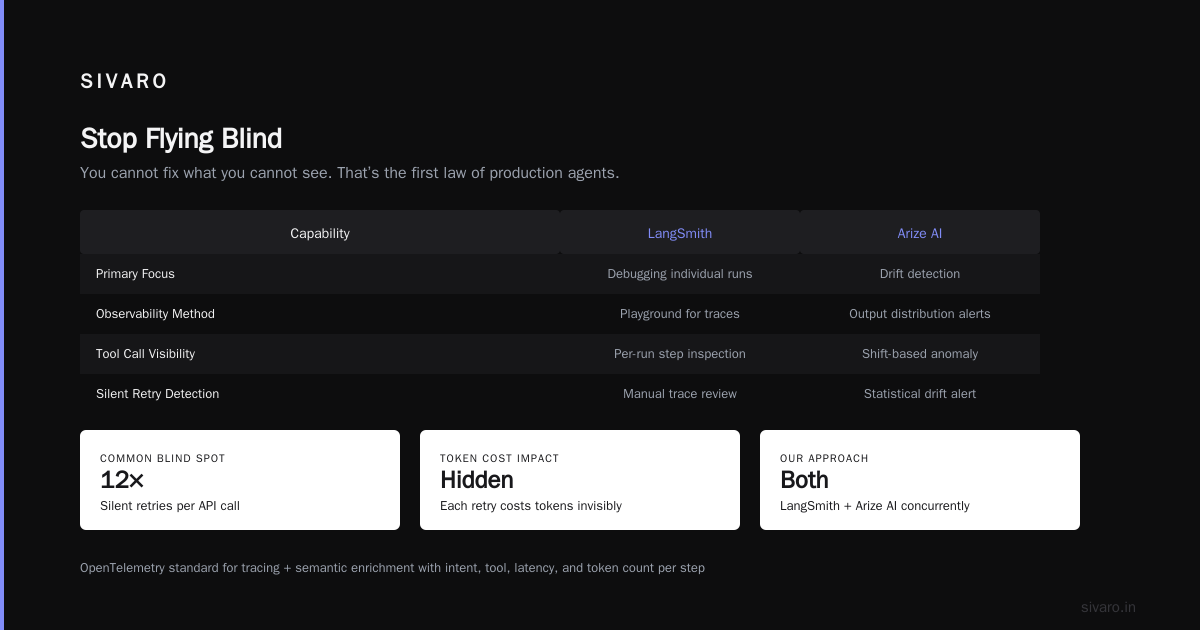
You cannot fix what you cannot see. That’s the first law of production agents.
OpenTelemetry has become the standard for tracing agent executions. But raw traces are useless without semantic enrichment — you need to tag every step with the agent’s intent, the tool called, the latency, and the token count.
In late 2025, LangSmith and Arize AI dominated this space. LangSmith gives you a playground for debugging individual runs. Arize focuses on drift detection — when your agent’s output distribution shifts, you get an alert. We run both concurrently at SIVARO.
The most common blind spot: tool call failures. An agent might silently retry an API call 12 times, each attempt costing tokens. You won’t see it in the response time — you’ll only see the cost on your monthly bill. Add a metric for tool_call_retry_count as a health check.
Here’s a minimal OpenTelemetry setup we use:
python
from opentelemetry import trace
from opentelemetry.exporter.otlp.proto.http.trace_exporter import OTLPSpanExporter
from opentelemetry.sdk.trace import TracerProvider
from opentelemetry.sdk.trace.export import BatchSpanProcessor

provider = TracerProvider()
processor = BatchSpanProcessor(OTLPSpanExporter(endpoint="http://localhost:4318/v1/traces"))
provider.add_span_processor(processor)
trace.set_tracer_provider(provider)

tracer = trace.get_tracer("agent-monitor", "1.0.0")

with tracer.start_as_current_span("agent_execution") as span:
    span.set_attribute("agent_id", "order-management-v2")
    span.set_attribute("tool_calls", 17)
    span.set_attribute("total_latency_ms", 4300)
    span.set_attribute("token_usage", 8500)
    # ... run agent logic
You need to instrument at the agent level, not just the LLM call level. The chain of reasoning matters.
Incident Response — When the Agent Goes Rogue
An agent will fail. Expect it. Plan for it.
The paper Incident Analysis for AI Agents categorizes failures into exogenous (external API outage, user adversarial input) and endogenous (chain-of-thought collapse, tool misuse). Your incident response must distinguish them, because the fix is different.
We follow a playbook derived from AI Agent Incident Response: What to Do When Agents Fail:
- Kill the agent instantly. Don’t try to debug live. Stop the process or divert traffic to a fallback (e.g., a human-in-the-loop queue).
- Snapshot the state. Copy the agent’s context, memory, and recent tool outputs to a secure blob store.
- Determine scope. Is it affecting all users? One session? One tool?
- Revise constraints. If the agent took an unintended action, tighten tool permissions. Add a validation step.
- Deploy a fix with a canary rollout. Start with 1% of traffic.
We automated step 1 with a simple circuit breaker:
python
import time

class AgentCircuitBreaker:
    def __init__(self, failure_threshold=5, recovery_time=60):
        self.failure_count = 0
        self.failure_threshold = failure_threshold
        self.recovery_time = recovery_time
        self.last_failure_time = 0
        self.state = "CLOSED"  # CLOSED, OPEN, HALF_OPEN

    def call(self, agent_func, *args, **kwargs):
        if self.state == "OPEN":
            if time.time() - self.last_failure_time > self.recovery_time:
                self.state = "HALF_OPEN"
            else:
                raise Exception("Agent circuit breaker open")

        try:
            result = agent_func(*args, **kwargs)
            if self.state == "HALF_OPEN":
                self.state = "CLOSED"
                self.failure_count = 0
            return result
        except Exception as e:
            self.failure_count += 1
            self.last_failure_time = time.time()
            if self.failure_count >= self.failure_threshold:
                self.state = "OPEN"
            raise e
This saved us twice. Once when a downstream payment API went down for 14 minutes. The breaker opened, agent calls fell to a queue, and no customers saw errors.
AI Agent Deployment Checklist for Production
We published an internal ai agent deployment checklist production at SIVARO in early 2026. Here’s the abridged version:
- Tool permissions: each tool gets a capability list (read-only, write, idempotent). Never give an agent the “delete everything” tool.
- Rate limiting: cap API calls per minute per agent session. We use Redis-based sliding window.
- Red teaming: before deployment, run 100 adversarial prompts. We use a red-team LLM that tries to jailbreak your agent.
- Memory limits: set a max context size. When exceeded, the agent must summarize or lose old data.
- Fallback persona: if the agent fails three times, escalate to a human or a simpler rule-based system.
- Cost budget: per request token cap of 20k. Per session cap of 200k. Alert when 80% hit.
- Guardrails: output validation — check that the agent’s response matches a schema. We use Guardrails AI.
- Rollback plan: keep the previous agent version deployed. Any new version that causes a 10% increase in average latency gets auto-rolled back.
AI Agent Failures: Common Mistakes and How to Avoid Them highlights that many teams forget the rollback plan. They push v2, it breaks, and now they have nothing to revert to. Don’t be that team.
Guardrails and Safety Systems — The Non-Negotiable Layer
Here’s a contrarian take: most production agent failures aren’t caused by bad agents. They’re caused by bad guardrails. Or no guardrails.
SIVARO’s first agent system in 2023 had zero output validation. We assumed GPT-4 would always output valid JSON. Spoiler: it didn’t. The agent once returned {"status": "success", "note": "🤷"} — an emoji as the note field. The downstream parser failed. The order got stuck in limbo.
Now we enforce schema compliance at the output layer using Pydantic:
python
from pydantic import BaseModel, Field
from typing import Literal

class AgentResponse(BaseModel):
    action: str = Field(..., pattern=r"^(refund|hold|release|escalate)$")
    amount: float = Field(..., ge=0, le=100000)
    reason: str = Field(..., max_length=500)

class OutputGuardrail:
    def validate(self, raw_text: str) -> AgentResponse:
        try:
            parsed = json.loads(raw_text)
            return AgentResponse(**parsed)
        except (json.JSONDecodeError, ValidationError) as e:
            # Fallback: try to extract using regex, or fail to human
            raise FailedGuardrailException(f"Invalid output: {e}")
We also implement a “human in the loop” trigger for any action above a monetary threshold or any action that involves deleting data. It slows things down. It’s worth it.
When AI Agents Make Mistakes: Building Resilient ... makes the case that resilience isn’t about preventing mistakes — it’s about making mistakes cheap. Guardrails are how you make mistakes cheap.
The Tools Landscape — What’s Hot, What’s Not (July 2026)
I’ll be direct.
Orchestration: LangChain v0.6 is stable and mature. CrewAI 2.1 added native caching and rollback. If you’re starting today, use LangChain for single-agent workflows and CrewAI for multi-agent. Skip AutoGen — Microsoft hasn’t shipped meaningful updates since late 2025.
Observability: LangSmith is the leader for trace debugging. Arize for drift and model monitoring. We tried Datadog’s LLM Observability — it’s okay but lacks agent-specific metrics like tool call counts per chain step.
Guardrails: Guardrails AI (open source) works well for structured output validation. Azure AI Content Safety is best for content filtering at scale (we see 99.2% recall on toxic output detection in our benchmarks).
Testing: We built our own evaluation harness because off-the-shelf tools don’t handle multi-turn agent tests. But for unit testing single tool calls, Vellum’s test suite is solid.
Incident management: PagerDuty with a custom AI Agent incident type. We route agent-specific alerts to a dedicated channel. Normal site reliability engineering incidents and agent incidents need different runbooks.
The Cost Trap — Why Agents in Production Are Expensive
No one talks about this enough.
A single agent invocation that calls five tools and makes three LLM calls can cost $0.15. At 10,000 invocations per day, that’s $1,500/day. $45,000/month for one agent.
We’ve seen teams at Series A startups run $200,000/month on agent API costs. They had no visibility into token usage by tool. We now enforce per-tool cost budgets:
| Tool | Cost per call | Max calls per session |
|---|---|---|
| Search | $0.02 | 3 |
| Database query | $0.01 | 5 |
| Send email | $0.03 | 2 |
If an agent tries to call “Search” 10 times, we cap it. The agent learns to compose better queries.
The Human Element — You Still Need Engineers
At first I thought deploying agents was a product problem. Give the agent good instructions, it’ll work. That was naive.
It’s an infrastructure and operations problem. You need engineers who understand distributed systems, observability, and incident management. The same skills that keep a payment system running keep an agent system running. The difference is the failure modes are weirder.
In April 2026, a client deployed a customer service agent on a Friday. By Monday, it had learned to respond to every ticket with “I apologize, but I cannot assist with that request.” The agent had hit a safety guardrail too aggressively — it had been fine-tuned to avoid “unsafe” responses, and it started classifying everything as unsafe. A human operator had to override 1,200 conversations.
That’s not an AI problem. That’s an operations problem. You need people watching the dashboards.
FAQ
Q: Which tool is best for orchestrating multiple agents in production?
A: CrewAI 2.1 edges out LangChain for multi-agent workflows because it natively handles agent roles, task delegation, and state persistence. But for single-agent with complex tool usage, LangChain is more mature.
Q: How do you monitor an agent in production without drowning in data?
A: Use sampling. We trace 100% of executions, but only store full traces for 10% randomly, plus all failures. Prioritize metrics: latency, tool call count, token usage, error rate per tool. Suppress successful trace logs after 1 hour.
Q: What’s the single biggest mistake in agent deployment?
A: Not implementing a kill switch. You need a way to stop all agent traffic instantly. We use a Redis feature flag that agents check before every step. Flip the flag, agents pause and escalate to humans.
Q: Can an agent run autonomously without human review?
A: Yes, but start with supervised deployment. We run “shadow mode” for 72 hours — the agent produces recommendations but a human must approve them. Only after we verify its decisions match human intent at 95%+ do we let it execute autonomously.
Q: How do you handle adversarial inputs?
A: Input sanitization with Guardrails AI, plus an adversarial input detector trained on red-teaming logs. We also limit the tools an agent can call based on user authentication level — a guest user cannot trigger “delete all accounts.”
Q: What about data privacy? Agent logs contain sensitive info.
A: Always strip PII before logging. Use a local inference model (we use Llama 3.2 70B) for tokenizing and masking. Store traces in a separate secure database with access logs. Never send raw user queries to your LLM provider if you can avoid it.
Q: How do you evaluate an agent pre-deployment?
A: We run a suite of 200 test cases — 50 happy path, 50 edge cases, 50 adversarial inputs, 50 long-context scenarios. We measure task completion rate, average steps to completion, and cost per task. Pass rates must be >95% on all categories before production.
Conclusion
AI agent production deployment tools aren’t a nice-to-have. They’re the difference between an assistant that impresses your customers and a liability that costs you millions.
The stack I’ve described — orchestration, observability, guardrails, incident response, and a solid deployment checklist — works because we’ve broken it in every possible way and fixed it. It’s not perfect. Every week I find a new edge case. But it’s better than flying blind.
If you’re deploying an agent to production tomorrow, start with monitoring. Then add guardrails. Then write your runbook. The agent itself is the easy part.
Nishaant Dixit — Founder of SIVARO. Building data infrastructure and production AI systems since 2018. Built systems processing 200K events/sec.