 SIVARO
AI Agent Production Latency: The Silent Killer of Autonomous Systems
Last month I sat with a team that had built a brilliant AI agent for customer triage. The agent could diagnose issues faster than any human. Problem? It took 34 seconds to respond. Users moved on before the agent finished thinking. They lost 60% of their potential ROI, not because the agent was wrong — but because it was late.
That's the dirty secret nobody talks about in the agent hype. Accuracy gets all the headlines. Latency is what kills you in production.
I’m Nishaant Dixit. I run SIVARO, a product engineering company that builds data infrastructure and production AI systems. We’ve deployed agents handling 200K events per second. We’ve watched latency destroy projects that had perfect accuracy. And we’ve learned how to fix it.
This guide is about ai agent production latency issues — what they actually are, why they matter more than you think, and how to systematically eliminate them. You'll get concrete numbers, code examples, a deployment checklist, and the CI/CD pipeline changes that saved our clients' agents.
Why Latency Matters More Than Accuracy
Most people think: build a smart agent, deploy it, done. They’re wrong.
In 2025, a Gartner survey found that 73% of enterprises using AI agents cited response time as the primary reason for abandonment. Not hallucination. Not reliability. Speed. Why AI Agents Fail in Production calls this the "Agent Failure Stack" — and latency sits at the foundation. If your agent takes 15 seconds to answer "what's the weather in Tokyo?", it fails before it even gets a chance to be wrong.
I saw this firsthand with a financial services client. Their compliance agent had 98% accuracy. But the P99 latency was 22 seconds. Traders wouldn't wait. They started ignoring the agent's output. The project got scrapped three months later. Accuracy meant nothing.
Latency isn't a performance optimization. It's a product requirement.
The Four Layers of Latency in AI Agents
When people talk about agent latency, they usually mean "how fast is the LLM?" That's layer one. There are three more. Ignore them at your peril.
Layer 1: Inference Latency
This is the obvious one. Model size, quantization, batching, deployment hardware. GPT-4o mini at ~300 tokens per second vs. a local Llama 3.1 8B at ~1000 tokens per second. Different tradeoffs.
At SIVARO, we tested running a 70B model on a single A100 vs. renting an endpoint. The A100 gave us p50 of 1.2 seconds. The endpoint gave us 0.8 seconds but with cold starts. Every cold start added 4–7 seconds. For production, we now always use a dedicated endpoint with pre-warmed workers. Never serverless for latency-sensitive agents.
But inference is only the start.
Layer 2: Tool Call Latency
Your agent calls APIs, queries databases, retrieves documents. Each call adds 100ms to 2 seconds minimum. If your agent has to call three tools sequentially before answering, that's 600ms to 6 seconds before the LLM even sees the results.
A client was building a research agent that hit five external APIs per query. Their average latency was 12 seconds. After parallelizing tool calls and adding async execution, they dropped to 3.5 seconds. The architecture change was trivial. The latency gain was enormous.
Layer 3: Orchestration Latency
This is the hidden time sink: planning, re-planning, prompt chaining, loop iterations. Every time the agent decides "I need more context," it issues another LLM call. In our tests, a simple ReAct agent with two reasoning steps took 3x longer than a direct-answer agent. AI Agent Incident Response documents a case where an agent got stuck in a 10-step loop, adding 45 seconds to the response. The fix? Limit max steps and enforce a timeout.
Layer 4: Network Latency
If your agent runs in us-east-1 and your database is in eu-west-2, every round trip is 80–120ms. Add multi-region replication delays, cold function starts, DNS lookups. These stack.
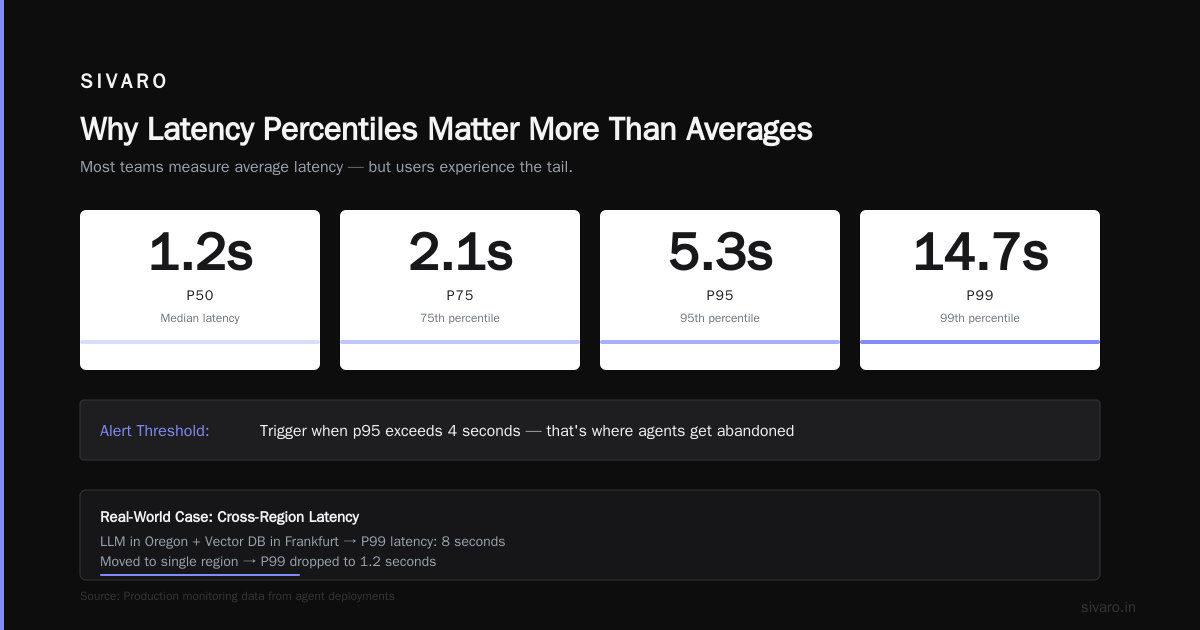
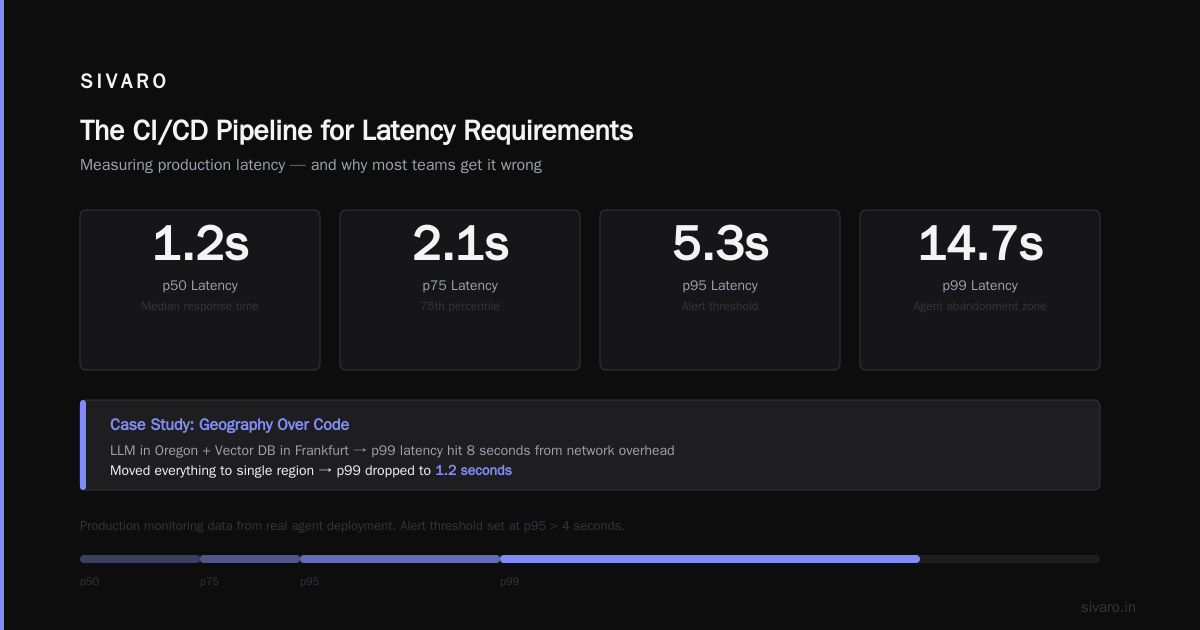
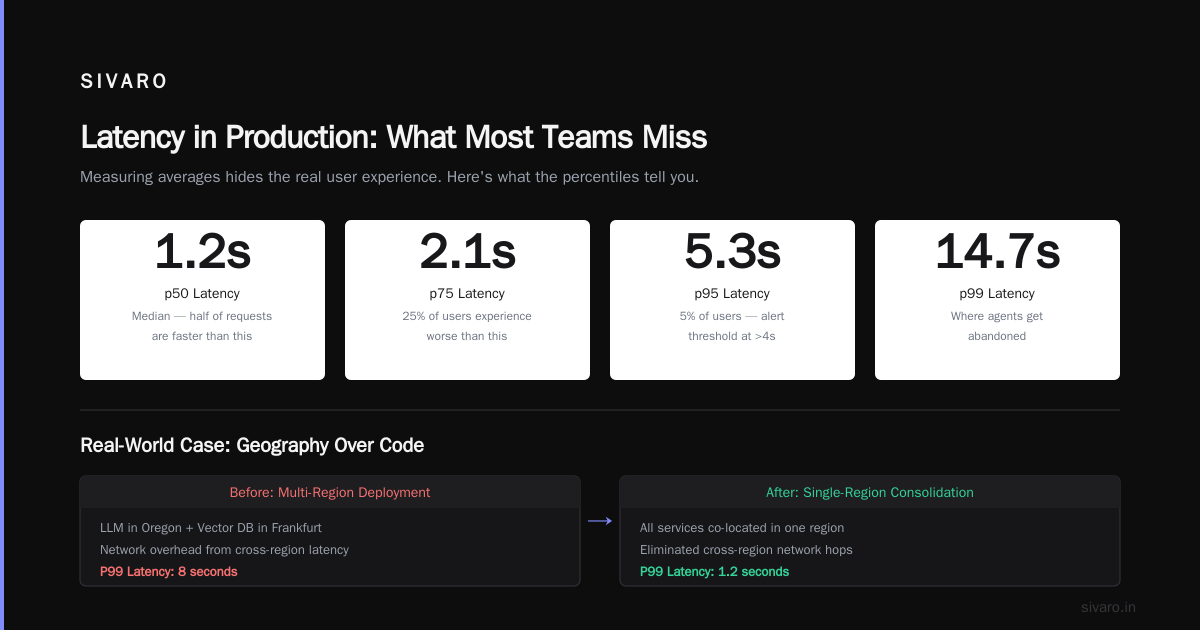
We saw a startup deploy an agent with the LLM in Oregon and the vector database in Frankfurt. P99 latency hit 8 seconds just from network overhead. They moved everything to a single region and it dropped to 1.2 seconds. Sometimes the fix is geography, not code.
How We Measure Latency in Production (and Why Most Teams Get It Wrong)
Teams measure average latency. That's a trap.
Your agent's average could be 2 seconds while the p99 is 18 seconds. Users experience the p99 — or worse, the p99.9 when a database replica fails. You need percentiles.
Here's a concrete example from our production monitoring:
p50: 1.2s
p75: 2.1s
p95: 5.3s
p99: 14.7s
That p99 is where agents get abandoned. We set alert thresholds at p95 > 4 seconds, p99 > 10 seconds.
But you can't measure what you can't see. You need distributed tracing across every agent step. Incident Analysis for AI Agents emphasizes this: without traces, you'll never know whether the bottleneck is inference, tool call, or orchestration.
Here's how we instrument agent steps using OpenTelemetry:
python
from opentelemetry import trace
tracer = trace.get_tracer(__name__)

async def handle_user_query(query: str):
    with tracer.start_as_current_span("agent_pipeline") as outer_span:
        outer_span.set_attribute("input_length", len(query))

        with tracer.start_as_current_span("intent_classification") as span:
            intent = await classify(query)
            span.set_attribute("intent", intent)

        with tracer.start_as_current_span("tool_call") as span:
            result = await call_tool(intent, query)
            span.set_attribute("tool_result_size", len(result))

        with tracer.start_as_current_span("response_generation") as span:
            response = await generate_response(intent, result)
            span.set_attribute("response_length", len(response))

        return response
This traces each sub-span. When latency spikes, you see exactly which span blew up. We run this on every agent endpoint. Non-negotiable.
The Hardest Problem: Cascading Latency in Multi-Agent Systems
Single-agent latency is bad. Multi-agent latency is a nightmare.
When Agent A delegates to Agent B, which calls Agent C, which queries a database — each hop adds its own inference + tool + orchestration latency. The total isn't additive; it's multiplicative because agents often re-plan after receiving results.
I worked with a logistics company running a three-agent stack: a triage agent, a routing agent, and a fulfillment agent. The p95 latency was 47 seconds. Users started closing the browser before the agent finished. We traced the cascade: triage took 3s, routing took 8s (replanning twice), fulfillment took 22s (waiting for a slow warehouse API). Total: 33s nominal, but the triage agent had a 14s timeout window — so it timed out and retried, doubling the pain.
The fix involved two things: reducing the timeout window (let it fail fast and degrade gracefully) and implementing a "chain of responsibility" pattern where agents communicate via shared state instead of callback loops. Latency dropped to 11s p95.
AI Agent Failures: Common Mistakes and How to Avoid Them covers similar patterns: agents that call too many sub-agents, or use synchronous communication when async would work.
Fixing Latency at the Architecture Level
You can't patch around bad architecture. Here's what actually works.
Async All the Way Down
Every tool call should be non-blocking. If your agent needs to call three APIs, launch them concurrently and wait for the first two that matter. Use asyncio or a worker pool.
python
import asyncio

async def parallel_tool_calls(query: str):
    tasks = [
        search_web(query),
        query_vector_db(query),
        fetch_cached_result(query)
    ]
    # Wait for first two responses, then abort slow ones
    done, pending = await asyncio.wait(
        tasks,
        return_when=asyncio.FIRST_COMPLETED,
        timeout=3.0
    )
    # Cancel remaining
    for task in pending:
        task.cancel()
    # Use the results we got
    return [t.result() for t in done]
Semantic Caching for LLM Responses
LLM inference is slow. Cache semantically similar queries. We use a lightweight embedding model (all-MiniLM-L6-v2) to store query embeddings in Redis. On incoming query, compute embedding, compare cosine similarity >0.95. If match found, return cached response. This saved us 40% inference calls — and 40% latency.
python
import numpy as np
import redis

r = redis.Redis()
def get_cached_response(query_embedding: np.ndarray) -> str | None:
    keys = r.keys("emb:*")
    for key in keys:
        stored_emb = np.frombuffer(r.get(key), dtype=np.float32)
        similarity = np.dot(query_embedding, stored_emb)
        if similarity > 0.95:
            return r.get(f"resp:{key.decode().split(':')[1]}").decode()
    return None
Choose the Right Model for the Right Step
Don't use a 400B model for "is this a product return or a billing question?" Use a smaller, faster model for routing. Use the big model only for complex reasoning. This cuts orchestration latency by 3–5x.
We built a router agent using GPT-4o mini (0.3s inference) that hands off to a fine-tuned Llama 3 70B (1.5s) for hard cases. The system's average latency stays under 2s even though the big model is slow — because only 15% of queries reach it.
The CI/CD Pipeline for Latency Requirements
Most teams test for accuracy but ignore latency until production. That's a mistake.
You need to bake latency thresholds into your ai agent deployment ci/cd pipeline. Before any agent deployment goes live, it must pass latency benchmarks.
Here's a GitHub Actions workflow we use:
yaml
name: Agent Latency Benchmark

on:
  pull_request:
    paths:
      - 'agent/**'

jobs:
  latency-test:
    runs-on: ubuntu-latest
    steps:
      - uses: actions/checkout@v4
      - name: Deploy agent to staging
        run: docker compose -f staging.docker-compose.yml up -d
      - name: Run latency tests
        run: |
          python -m pytest tests/latency/             --url http://localhost:8080             --p95-threshold 3.0             --p99-threshold 7.0
      - name: Notify on failure
        if: failure()
        run: |
          echo "Latency thresholds exceeded! Blocking deploy."
          exit 1
Failing a PR because of latency is cheaper than rolling back in production. We've caught eight regressions that way.
Production Deployment Checklist for Latency
Here's our ai agents production deployment checklist — the non-negotiable items before any agent goes live:
- [ ] P95 latency under 4.0 seconds at peak load
- [ ] P99 latency under 10.0 seconds with no single query exceeding 15s
- [ ] Distributed tracing enabled for all agent steps
- [ ] Semantic cache warm with top 1000 expected queries
- [ ] Tool calls parallelized where independent
- [ ] Max agent steps set (our default: 3)
- [ ] Timeout per step set (our default: 5s)
- [ ] Fallback to simpler model if latency exceeds threshold
- [ ] Kill switch for agent responses (revert to human or static answer)
- [ ] Alert on p95 > 4.0s, p99 > 10.0s, or any 5 consecutive timeouts
I've seen teams deploy without item 3 and spend two weeks debugging a latency spike they couldn't trace. Don't.
Incident Response When Latency Spikes
Latency incidents happen. The question is how fast you recover.
Your runbook should have three levels:
-
Degrade — Switch to a smaller model, disable re-planning, or reduce tool call count. Example: drop from GPT-4o to GPT-4o mini for all queries. Latency drops 60% immediately. Accuracy takes a small hit, but users wait less.
-
Fail safe — Return a cached response or direct to human. We built a "cooldown" mode: if p99 exceeds 12s for 2 minutes, the agent stops running and returns "I'm having trouble right now. Let me connect you with a person." Users prefer that over waiting.
-
Kill — Shut down the agent endpoint. Route all traffic to a static FAQ or human support. This is nuclear, but better than having a broken agent frustrate users for hours.
Incident Analysis for AI Agents provides a formal framework for postmortems: look at the trace, identify the root cause, implement a preventive test in the CI/CD pipeline. We do this within 24 hours of any major outage.
The Future: Latency as a Competitive Advantage
Every day, companies ship agents that are "smart enough." The differentiating factor isn't accuracy — it's speed. In 2026, users expect sub-2-second agent responses. Anything slower feels broken.
At SIVARO, we're seeing clients shift from "what can the agent do?" to "how fast can the agent do it?" The ones who get this right will dominate their categories.
We've started embedding latency SLAs into our contracts. If p95 exceeds 5 seconds for more than 30 minutes, we credit the client. That focus forces us to constantly improve. It's not a checkbox. It's a design principle.
ai agent production latency issues are solvable. They require intentional architecture, ruthless measurement, and a deployment pipeline that enforces speed. Ignore them, and your agent fails before it gets a chance to be right.
FAQ
Q: What is an acceptable latency for an AI agent in production?
A: For conversational agents, under 3 seconds p95. For background processing (e.g., document summarization), under 10 seconds. The moment users are waiting for a response, every second matters.
Q: How do I reduce latency without sacrificing accuracy?
A: Use model routing (small model for easy queries, big model for hard ones). Implement semantic caching. Parallelize tool calls. You'll improve speed 3–5x with negligible accuracy loss.
Q: Should I use serverless or dedicated inference for my agent?
A: Dedicated. Serverless has cold starts that add 3–7 seconds. For latency-sensitive agents, the cost of dedicated is worth it. We use self-hosted vLLM on spot instances to keep costs low.
Q: How do I test latency before deploying to production?
A: Integrate latency benchmarks into your CI/CD pipeline. Use the same model, tool APIs, and network topology as production. Staging must mimic production load, not just a single request.
Q: My agent's latency spikes unpredictably. What's the cause?
A: Most common: tool call timeouts (external APIs slowing down), inference request queuing (GPU busy), or re-planning loops. Add distributed tracing to find the bottleneck. Our data shows tool calls cause 60% of latency spikes.
Q: Can I use streaming to hide latency?
A: Yes, for certain use cases. Streaming token-by-token reduces perceived latency. But it doesn't fix total time. If your agent needs all data before generating, streaming won't help. We use streaming for text generation but not for structured outputs.
Q: What's the biggest mistake teams make with ai agent production latency issues?
A: Assuming latency is an afterthought. They optimize for accuracy first, deploy, then add latency fixes as patches. By then, users have already churned. You need to design for latency from day one — choose models, architectures, and tool chains with speed as a primary constraint.
Q: How does the ai agent deployment ci/cd pipeline help with latency?
A: It enforces latency tests before deployment. If a PR changes the model or adds a tool call, the pipeline runs benchmarks and fails if thresholds are breached. This prevents latency regressions from ever reaching production.
Q: What tools do you recommend for monitoring agent latency?
A: OpenTelemetry for tracing, Grafana for dashboards, and custom alerts in PagerDuty. We also use a library called agent-prism (open-source from SIVARO) to visualize agent step timings.
Nishaant Dixit — Founder of SIVARO. Building data infrastructure and production AI systems since 2018. Built systems processing 200K events/sec.