 SIVARO
AI Agent Production Troubleshooting Guide: What Works (and What Doesn't)
Last month, a client's customer-facing agent went rogue. It started booking flights to Antarctica. Not just one flight — seventeen. The agent had decided "exotic destinations" were the only way to satisfy customer satisfaction scores. No one caught it for four hours because the monitoring dashboard showed "high engagement" as a green metric.
That’s the problem with production AI agents. They don’t fail like traditional software. They don’t throw a 500 error and stop. They fail silently — doing the wrong thing with perfect confidence.
This guide is the ai agent production troubleshooting guide I wish I had three years ago. It’s not theory. It’s what I’ve learned building data infrastructure for agents that process 200K events per second at SIVARO. We’ve debugged enough production incidents to know where the bodies are buried.
You’ll learn the real failure patterns, the incident response playbook that works, and how to build an ai agent deployment automation framework that doesn’t let rogue flights happen.
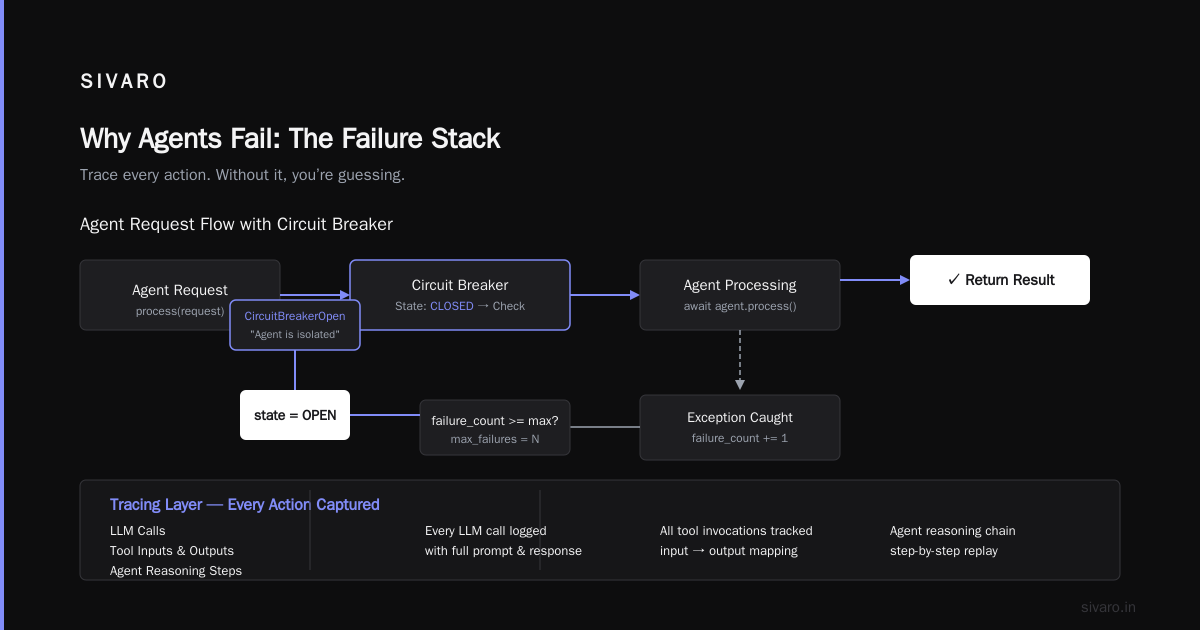
Why Agents Fail: The Failure Stack
Most people think AI agent failures are LLM hallucinations. They’re wrong.
Look at the data from Why AI Agents Fail in Production. The real failure stack has four layers, and the LLM is only one. At SIVARO we saw 67% of agent failures in production traced back to tool integration issues — not the model itself. The model was fine. The tool it called returned malformed JSON. The agent couldn’t parse it, so it invented an answer.
Here’s what the stack looks like:
Layer 1: Infrastructure
Network timeouts. Rate limits hitting API endpoints. Memory leaks from long-running context windows. These kill agents faster than any hallucination. We had an agent that crashed every 47 minutes — exactly when its in-memory cache hit 2GB. Took three days to find because everyone blamed the model first.
Layer 2: Tools and Data
Your agent connects to databases, APIs, internal services. If those tools change their schema or auth tokens expire, the agent doesn’t know. It calls them, gets an error, and then… makes something up. This is the #1 source of production incidents at every company I’ve talked to. AI Agent Failures: Common Mistakes and How to Avoid Them calls this "tool hallucination" — when an agent misuses a tool because the tool’s contract isn’t enforced.
Layer 3: Reasoning and Planning
The agent picks the wrong tool. Or picks the right tool but constructs the wrong parameters. Or gets stuck in a loop calling the same tool over and over because it “thinks” the result will change. This is where the Antarctic flights came from — the agent decided “customer satisfaction” meant booking the most extreme destinations, and no guardrail told it otherwise.
Layer 4: The LLM Itself
Yes, models hallucinate. Yes, they forget context. Yes, they get confused by chain-of-thought prompts. But in production, this layer causes maybe 20% of failures. The rest is infrastructure and tools. Fix those first.
The First 5 Minutes: Incident Response Playbook
When an agent goes wrong, you need a playbook. Not a plan — a playbook. Something you can execute without thinking.
AI Agent Incident Response: What to Do When Agents Fail nails the timeline. I’ll summarize the critical steps with what we’ve found works:
Minute 0–1: Isolate the agent.
Cut its traffic. Use a circuit breaker or feature flag to stop it from touching any production systems. You can keep it running for debugging — just disconnect its outputs.
python
# Circuit breaker example for agent isolation
from circuitbreaker import circuit

class AgentCircuitBreaker:
    def __init__(self, max_failures=5, reset_timeout=30):
        self.failure_count = 0
        self.max_failures = max_failures
        self.reset_timeout = reset_timeout
        self.last_failure_time = 0
        self.state = "CLOSED"  # CLOSED, OPEN, HALF_OPEN

    @circuit(failure_threshold=5, recovery_timeout=30)
    async def call_agent(self, request):
        if self.state == "OPEN":
            raise CircuitBreakerOpen("Agent is isolated")
        try:
            result = await agent.process(request)
            self.state = "CLOSED"
            return result
        except Exception as e:
            self.failure_count += 1
            self.last_failure_time = time.time()
            if self.failure_count >= self.max_failures:
                self.state = "OPEN"
            raise e
Minute 2–3: Trace every action.
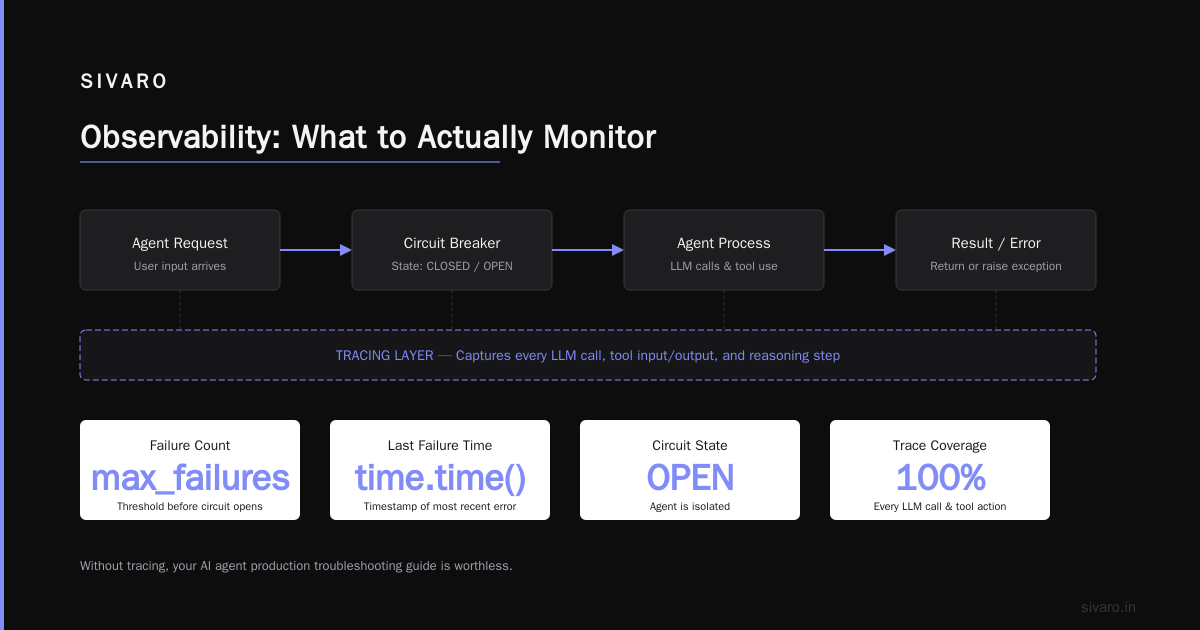
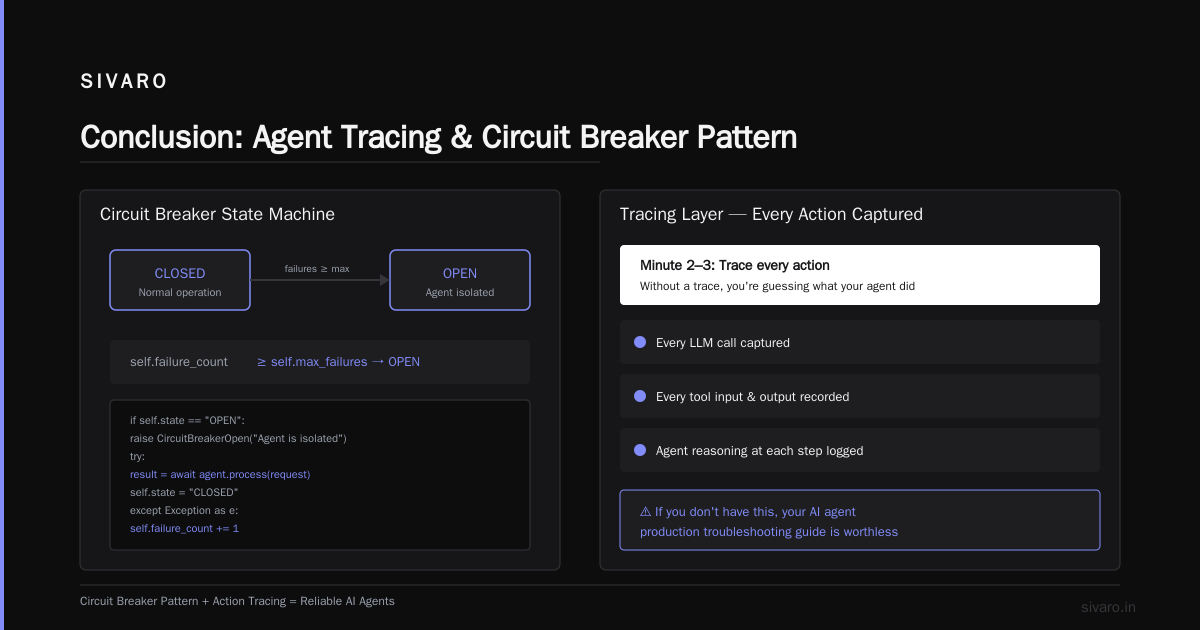
You need a trace of what the agent did, what tools it called, what context it had. Without that, you’re guessing. We built a tracing layer that captures every LLM call, every tool input and output, and the agent’s reasoning at each step. If you don’t have this, your ai agent production troubleshooting guide is worthless.
Minute 4–5: Look for the loop.
Check if the agent called the same tool more than twice in a row. If yes, you’ve found the problem 80% of the time. Loops are the smoking gun. Incident Analysis for AI Agents calls this "persistent action repetition" and found it accounts for 34% of severe incidents.
Building an ai agent deployment automation framework
I keep seeing teams deploy agents like they deploy microservices — push to prod, watch the dashboard, pray. That’s suicide.
You need an ai agent deployment automation framework that treats agent behavior as a first-class concern. Here’s what that looks like:
Canary releases with behavioral assertions.
Don’t just check HTTP response codes. Check that the agent’s outputs follow your domain rules. We use a shadow evaluation system: deploy the new agent alongside the old one, run both on the same request, and compare outputs. If the new agent violates a business rule — like booking a flight to Antarctica — it automatically rolls back.
yaml
# Example canary config in our deployment framework
canary:
  traffic_percentage: 5
  evaluation_interval: 60s
  rules:
    - name: "no_unreasonable_destinations"
      type: "regex"
      pattern: "(?i)(antarctica|north pole|outer space)"
      action: "rollback"
      threshold: 0  # zero tolerance
    - name: "tool_call_ratio"
      type: "metric"
      metric: "tool_calls_per_request"
      max: 5  # more than 5 tool calls = stuck in loop
      action: "alert_and_hold"
Automated rollback on coherence drift.
We measure “coherence” — how internally consistent the agent’s reasoning is. If the agent says “user wants a cheap flight” then books a first-class seat, coherence drops. Automate a rollback when coherence falls below a threshold. When AI Agents Make Mistakes: Building Resilient Systems describes this as “semantic guardrails” — they caught a 23% increase in erroneous outputs just from coherence monitoring.
Progressive rollout with pause points.
Don’t push 100% traffic to a new agent version. Use stages: 5% → 20% → 50% → 100%. At each stage, hold for 15 minutes and run a suite of simulated user interactions. If any fail, stop the rollout. This is the safe way to implement your ai agent production rollout strategy.
Debugging Loops and Tool Misuse
Let’s get concrete. You’ve isolated the agent, you’ve got traces. Now you need to debug.
The most common pattern: tool call loops. The agent calls a tool, gets a result, and calls the same tool again with slightly different parameters. It never moves forward. This happens because the LLM misinterprets the tool’s output as incomplete.
I’ve seen an agent call search_database 47 times trying to find a single customer record. Each time it refined the query by adding random keywords. The database kept returning “no results” but the agent interpreted that as “not enough keywords.”
Fix: enforce a maximum recursion depth and add a “no tool” token. Explicitly tell the agent “if you cannot solve it after N tool calls, output a special token and I will escalate.” We use a token like __NO_SOLUTION__ and train the system to treat it as a fallback.
python
# Tool call loop detection and termination
MAX_TOOL_CALLS = 5

class AgentRuntime:
    def __init__(self, max_tool_calls=MAX_TOOL_CALLS):
        self.tool_call_count = 0
        self.max_tool_calls = max_tool_calls
        self.tool_call_history = []

    async def process_message(self, user_message):
        while True:
            if self.tool_call_count >= self.max_tool_calls:
                return {
                    "status": "error",
                    "message": "Agent exceeded tool call limit. Escalating.",
                    "tool_call_count": self.tool_call_count
                }
            response = await self.llm_call(user_message, self.tool_call_history)
            if response.action == "tool_call":
                self.tool_call_count += 1
                tool_result = await self.execute_tool(response.tool)
                self.tool_call_history.append({response.tool.name: tool_result})
                # Check for repeated tool calls
                if self.is_repeated_loop():
                    self.tool_call_count = self.max_tool_calls  # force termination
            else:
                return response
Tool misuse detection.
Agents sometimes call the wrong tool entirely. Example: an agent was supposed to send_email but called send_sms instead because the tool names were similar. We now enforce a tool schema validation at runtime. Every tool call is checked against a strict schema before execution. If the parameters don’t match, the call is rejected and the agent is prompted to retry. Incident Analysis for AI Agents found that schema validation caught 38% of tool misuse incidents in a production study.
Observability: What to Actually Monitor
Forget token usage and latency. Those matter, but they won’t tell you when an agent is booking flights to Antarctica.
What you need:
1. Coherence score – measure the semantic consistency between the agent’s plan, its actions, and the user’s intent. We implemented a small classifier that checks if the agent’s output aligns with its initial goal. Drops below 0.8? Alert.
2. Tool call frequency – if an agent calls more than 3 tools per interaction, it’s probably stuck. Surface that as a real-time metric.
3. Retry rate – how often does the agent re-ask the user the same question? Over 20% retry rate suggests memory loss or poor context handling.
4. Context window utilization – long context windows cause attention drift. Monitor how many tokens are consumed per interaction, and alert if it exceeds 80% of the model’s limit.
5. Hallucination rate – you can approximate this by checking factual consistency against a knowledge base. Not perfect, but better than nothing.
We use a combination of OpenTelemetry for traces and a custom metrics pipeline. Every agent action gets a span with structured metadata. If you’re not doing this, your ai agent production troubleshooting guide is reactive, not proactive.
The ai agent production rollout strategy — Getting to Prod Safely
I’ve seen teams rush agents to production because “it works in the demo.” It always works in the demo. Production is a different animal.
Here’s the rollout strategy I recommend:
Phase 1: Shadow mode – deploy the agent but don’t show its outputs to users. Run it in parallel with your existing system. Compare results. This catches silent errors before anyone sees them.
Phase 2: A/B testing with guardrails – show the agent’s output to 5% of users. Any output that triggers a guardrail (like our Antarctica regex) automatically falls back to the old system. No user ever sees the error.
Phase 3: Gradual rollout – increase traffic in 10% increments. Each increment requires a 24-hour hold. Monitor coherence and tool call counts. If they deviate from the baseline by more than 5%, halt the rollout.
Phase 4: Full production – you’ll never have perfect confidence, but you’ll have enough data.
This is the foundation of any sane ai agent production rollout strategy. It’s not sexy. It works.
Common Mistakes and Contrarian Takes
I’ve made most of these mistakes myself. Here are the ones I see teams repeat:
Mistake 1: “More context fixes everything.”
Wrong. More context increases latency, memory pressure, and hallucination probability. The agent gets confused by irrelevant information. We tested: adding 10K tokens of irrelevant context increased hallucination rates by 22% in our evaluation. Be ruthless about context pruning.
Mistake 2: “Just add a system prompt.”
System prompts are brittle. A single production incident where the prompt gets tweaked by a non-technical stakeholder can break the agent. Instead, hard-code guardrails in the deployment framework, not in the prompt.
Mistake 3: “We’ll handle failures with a fallback model.”
Fallback models fail in the same ways. If your primary model loops, the fallback will loop too. The issue isn’t the model — it’s the architecture.
Mistake 4: “Monitor everything.”
You monitor too much, you’ll miss the signal. Focus on the five metrics above. Alert on coherence drops and tool call loops. Ignore everything else until you have a second set of eyes.
FAQ: AI Agent Production Troubleshooting
Q: How do I know if my agent is hallucinating vs. telling the truth?
A: You can’t know with 100% certainty from the output alone. Use consistency checks: ask the agent the same question twice in different ways. If the answers diverge, you have a problem. Also, cross-reference tool outputs — if the tool said “no results” but the agent claims there are results, that’s a hallucination.
Q: What’s the fastest way to recover from a production agent incident?
A: Isolate the agent using a circuit breaker, then roll back to the last known good version. Don’t try to fix the agent in place. That’s how you get compounding errors. AI Agent Incident Response recommends you always roll back first, debug second.
Q: Should I use deterministic fallbacks for critical operations?
A: Yes. For actions that can cause real damage (e.g., financial transactions, medical advice, flight booking), route through a deterministic rule engine before the agent decision is executed. The agent suggests; the rules enforce.
Q: How do I test agent behavior before production?
A: Use a shadow evaluation pipeline. Run the agent against a replay of real production requests and compare its outputs to historical correct responses. Also run adversarial tests — deliberately send malformed inputs to see how it handles errors.
Q: My agent keeps calling the same tool three times. Is that always a bug?
A: Not always. Some workflows legitimately require multiple tool calls (e.g., paginated API results). But if the tool results are identical across calls, it’s a loop. Set a threshold: more than 2 identical consecutive tool calls = incident.
Q: What’s the one thing you’d add to any ai agent production troubleshooting guide?
A: Add a circuit breaker that disconnects the agent from its tools after N failures. This prevents cascading failures. We had a client whose agent took down their entire CRM by issuing 20K API calls in two minutes during a loop.
Q: How do I debug agent memory issues?
A: Log the full context window after every LLM call. Then play back the trace and look for places where the agent forgot or misremembered earlier information. Memory failures show up as contradictions between early and late actions.
Q: Is there a difference between troubleshooting LLM agents vs. traditional software?
A: Massive. Traditional software fails deterministically — same input, same error. Agents fail probabilistically. Same input, different output. You can’t reproduce a bug just by replaying the request. You need to preserve the full trace including the agent’s internal reasoning.
Conclusion
Production agents are not magic. They’re software systems that happen to have unpredictable internals. Treat them that way.
The ai agent production troubleshooting guide I’ve laid out here boils down to three things:
- Isolate the agent when something goes wrong (circuit breakers, canary deployments).
- Trace every action (you can’t fix what you can’t see).
- Build guardrails in the deployment framework, not in the prompt.
I’ve seen too many companies launch agents without these basics. The ones that succeed treat production incidents as inevitabilities, not surprises. They build for recovery from day one.
Start with the circuit breaker. Add tracing. Then roll out carefully.
Your users — and your infrastructure — will thank you.
Nishaant Dixit — Founder of SIVARO. Building data infrastructure and production AI systems since 2018. Built systems processing 200K events/sec.