 SIVARO
AI Agent Production vs Dev Environment: The Real Gap
September 14, 2026. I'm watching a demo that should have taken forty seconds take nine minutes. The agent gets stuck in a retry loop on a rate limit that never existed in staging. The customer is polite. The room is warm. I know exactly what went wrong because I wrote the same bug a year earlier.
The gap between dev and production for AI agents isn't a configuration issue. It's a category difference. Your dev environment proves the agent can work. Production proves it will work under conditions you didn't design for and can't fully predict.
This article covers what actually breaks when agents hit production, the infrastructure decisions that matter, and the testing strategies that separate shipped systems from abandoned demos. I'll reference what we've learned at SIVARO building production agent systems since 2022, plus lessons from teams at Anthropic, Google, and others who've published their own post-mortems.
Why Your Dev Environment Is Lying to You
Here's the uncomfortable truth about the "ai agent production vs dev environment" gap: your dev environment is a simulation of reality, and it's a bad one.
In dev, you have a small context window. Your agent sees one task, maybe two. The tool calls are mocked or simple. The latency is fine because there's no load. The model is whatever version you pinned last week.
In production, your agent sees the full messy context. A user interrupt happens mid-task. A tool returns malformed JSON. The retry logic fires, and now you're hitting a rate limit you didn't know existed. The model gets deprecated mid-quarter. Your downstream API changes its schema without telling you.
The arXiv practical guide on agent design makes a point I've seen play out in real systems: production agents don't fail because the LLM reasoning is bad. They fail because the surrounding system — the orchestration, the tool contracts, the retry policies, the observability — wasn't built for the variance that production introduces.
I've told clients this: your agent works in dev because dev is a movie set. Lights are placed. Lines are rehearsed. Production is improv. The audience shows up unannounced, and the stage collapses.
What Dev Environments Hide
Let me be specific about what your local setup or staging environment masks. This isn't theory — these are failures I've either made or watched clients make.
Model Nondeterminism
You test an agent ten times in dev. It works nine times, fails once. You shrug. "Probabilistic system," you say, and ship it.
In production, with real traffic, that 10% failure rate happens hundreds of times a day. Each failure is a customer complaint. Each retry costs money. Each loop burns tokens.
The Google research on agentic AI infrastructure hurdles highlights that nondeterminism is the single biggest jump from non-agentic systems. A classic API endpoint returns the same output for the same input. An agent doesn't. Any test strategy that doesn't account for distribution of outputs, not just a single correct output, is going to fail you.
Tool Execution vs Tool Stubs
In dev, your tool calls hit a sandbox or a mock. The weather API returns perfect JSON. The database has three rows. The payment gateway is "test mode."
In production, tools fail. They're slow. They return data in shapes you didn't anticipate. They have idempotency requirements. Blaxel's deployment guide points out that production agents need retry policies, timeout handling, and fallback strategies for every single tool — not just for the agent's main loop.
I had a client in early 2025 whose agent looked flawless in staging. Their document processing tool worked every time. Two days after launch, the tool started failing on 5% of production documents. The agent's error handling replied with "I'm sorry, I couldn't process that," which was technically graceful but operationally useless. No retry. No escalation. No logging. 5% of daily volume was dozens of silent failures every hour.
Rate Limits and Token Budgets
Dev environments have no real traffic. Your model provider's tier is the same, sure, but the request volume is orders of magnitude lower. The first time your production agent hits a concurrent request spike, you discover your rate limit handling is a try/except that swallows the error and returns a canned response.
Token budgets are worse. In dev, your agent's context stays small because you're testing one task at a time. In production, agents accumulate context across a session. That 8K token context in dev becomes 40K tokens in production, and now your costs are 5x your projection and your latency has tripled.
The Infrastructure Divide
Architecturally, dev and production agents need different bones. Let me walk through the pieces that matter most.
State Management
In dev, state lives in memory. The agent runs, completes, program exits. Fine for testing.
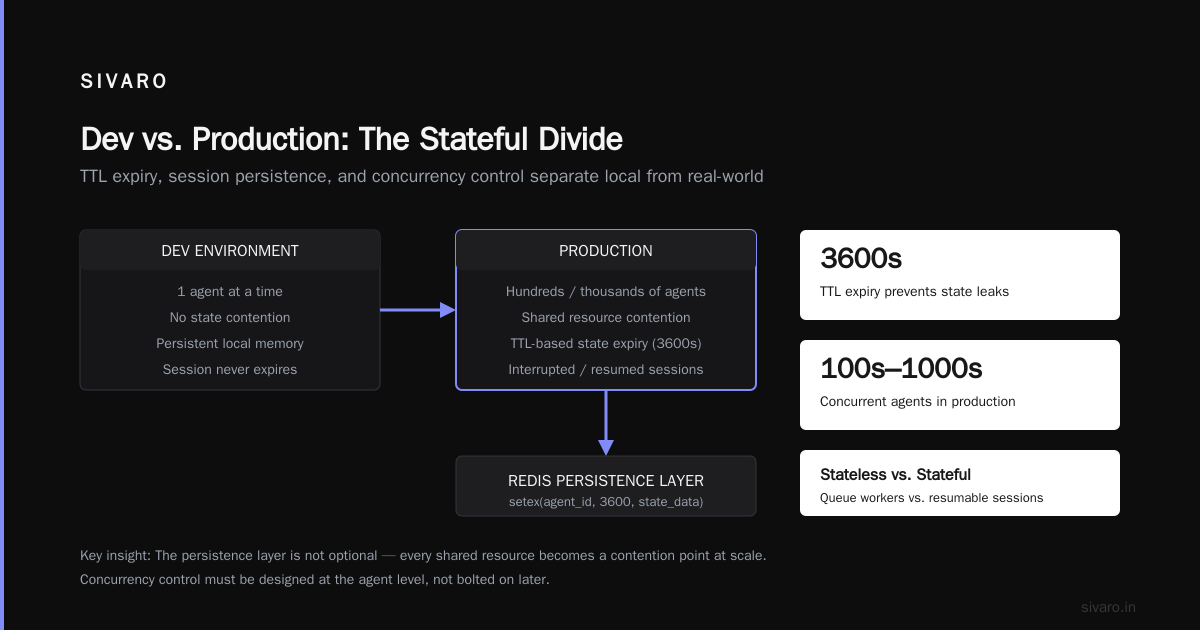
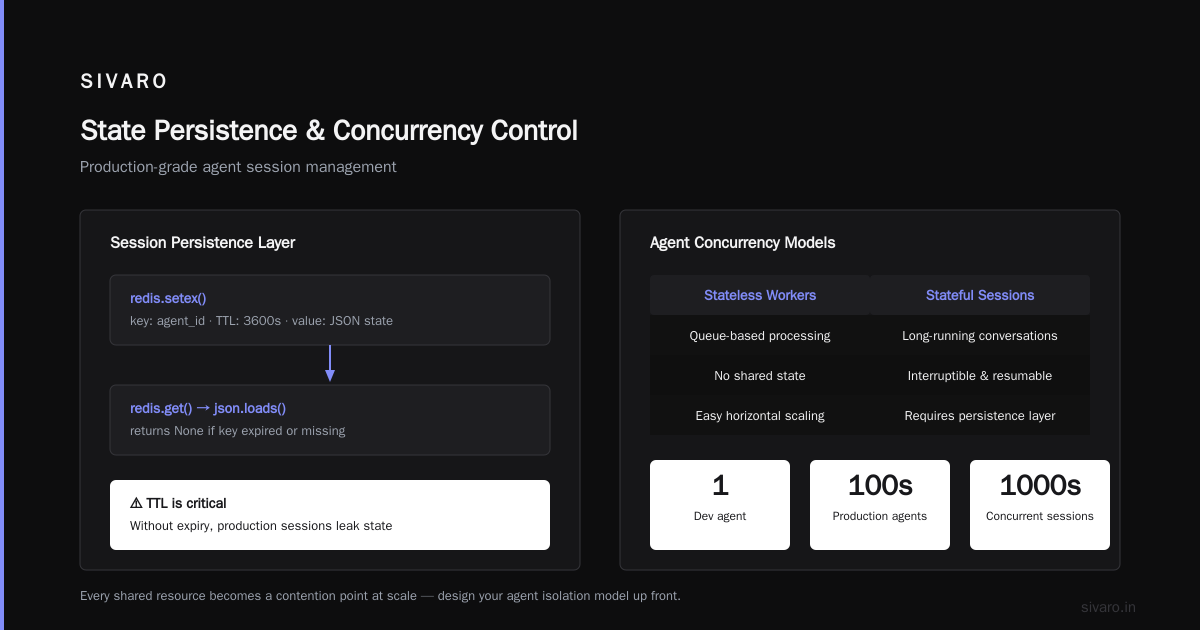
In production, your agent's state needs to survive across requests, across retries, across process restarts. You need a durable state store. Redis, Postgres, or a purpose-built agent state store. The machinelearningmastery deployment architecture guide lays out the fundamental layers: the agent runtime, the state layer, the tool execution layer, and the orchestration layer. Each of these needs production-grade persistence, not the in-memory toy versions you use locally.
Here's the pattern we use at SIVARO:
python
# Dev: state lives in memory
class DevAgentState:
    def __init__(self):
        self.context = []
        self.current_task = None

# Production: state survives process death
import redis

class ProductionAgentState:
    def __init__(self, redis_client):
        self.redis = redis_client
        self.prefix = "agent_state:"

    def save(self, agent_id, state_data):
        # Write-through with TTL for session cleanup
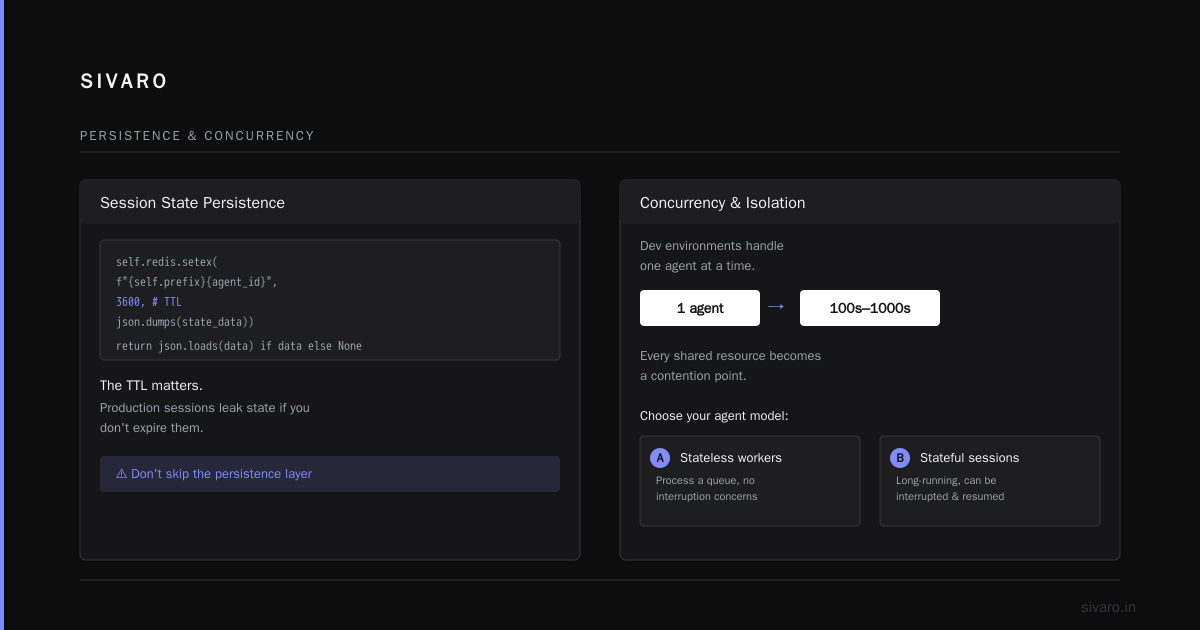
        self.redis.setex(
            f"{self.prefix}{agent_id}",
            3600,
            json.dumps(state_data)
        )

    def load(self, agent_id):
        data = self.redis.get(f"{self.prefix}{agent_id}")
        return json.loads(data) if data else None
The TTL matters. Production sessions leak state if you don't expire them. Find a setup that works for you, but don't skip the persistence layer.
Concurrency and Isolation
Dev environments handle one agent at a time. Production handles hundreds or thousands. Every shared resource becomes a contention point.
You need concurrency control at the agent level. Which means: are your agents stateless workers processing a queue, or stateful long-running sessions that can be interrupted and resumed?
Anthropic's engineering guide on building effective agents describes the spectrum — from single-step workflows to fully autonomous agents. The production infrastructure requirements differ dramatically based on where you fall on that spectrum. A workflow that processes a queue can be horizontally scaled behind a load balancer. A stateful agent handling a multi-step user conversation needs session affinity, checkpointing, and resume-capable orchestration.
Most teams I've worked with underestimate this. They build for the happy path, then discover their agent framework doesn't support checkpointing when the underlying process gets killed.
The Model Access Layer
Your dev environment probably calls the model provider directly. Production needs a model access layer that handles:
- Model version pinning with gradual rollout
- Fallback to a different model when the primary is down or degraded
- Prompt versioning (your prompts WILL change, and you need to track which prompt version produced which output)
- Cost tracking per agent per session
- Latency budget enforcement
python
class ModelRouter:
    def __init__(self, primary, fallback, timeout_ms=5000):
        self.primary = primary
        self.fallback = fallback
        self.timeout_ms = timeout_ms

    async def complete(self, messages, trace_id):
        try:
            async with timeout(self.timeout_ms):
                return await self.primary.complete(messages)
        except TimeoutError:
            log_warning(trace_id, "Primary model timed out, falling back")
            return await self.fallback.complete(messages)
        except RateLimitError:
            # Wait with exponential backoff, or downgrade capability
            await self.wait_and_retry()
            return await self.primary.complete(messages)
This router isn't fancy. But without it, your production agent dies the first time your model provider has a five-minute incident. And providers do have incidents. OpenAI had multiple notable outages in 2024 and 2025. Anthropic too. Your agent needs a fallback story.
Testing Strategies That Actually Matter
You can't test production agent behavior the way you test traditional software. Unit tests still exist, for the deterministic parts. But the agent's reasoning loop requires different approaches.
Golden Dataset Testing
Build a dataset of real production inputs and expected outcomes. Run every new agent version against this dataset. Track the percentage of acceptable outcomes.
"Acceptable" is the key word. Because agents are probabilistic, you don't want a strict equality check on the output. You want a rubric-based evaluation. Did it complete the task? Did it not harm anything? Did it use the tools appropriately?
The arXiv practical design guide recommends building this golden dataset from production logs, not from hand-crafted examples. Production-observed scenarios capture the messiness you didn't think to test for.
Simulation Testing
Use a sandbox that simulates production conditions. Not just mocked tools — actual external services in a test tenant. Include deliberate failures: rate limits, timeouts, malformed responses.
This is where "ai agents in production lessons learned" gets concrete. At SIVARO, we run a chaos harness against our agents. Every deployment candidate runs through:
- Tool latency at the 95th percentile (slow, as production can be)
- Tool failures at 5% rate
- Model token truncation
- Context overflow
- Concurrent session contention
If an agent can't handle these conditions in simulation, it absolutely can't handle them in production.
Evaluation as a Pipeline Stage
Any serious agent deployment pipeline has at least three stages:
- Unit tests for deterministic logic
- Golden dataset evaluation with rubric scoring
- Simulation run against production-shaped chaos
Only after passing all three does a candidate get promoted to canary.
BusinessPlusAI's agent failure analysis identifies lack of evaluation as one of the top causes of production failures. I'd go further — most teams I've talked to evaluate their agent once, on the happy path, with three hand-written examples, then ship. The result is predictable.
ai agent vs workflow automation production
This is where the "ai agent vs workflow automation production" decision actually matters. A lot of what people call "agents" are really workflows. And the production behavior difference is significant.
A workflow is a deterministic sequence of steps. Each step might call an LLM, but the orchestration is hardcoded. If Step A completes, Step B always runs. The error handling is uniform — fail, retry, or escalate.
An agent has a more open-ended loop. The LLM decides which tool to call next, in what order, and when to stop. The decision-making is inside the loop, not outside of it.
The Towards Data Science comparison of workflows and agents makes this point well: production constraints often push you toward workflows, because they're easier to observe, debug, and control.
My rule of thumb:
- If the task has a defined sequence with known decision points, use a workflow. It's cheaper, deterministic, and easier to test.
- If the task genuinely requires exploring multiple paths based on intermediate results, use an agent.
- If you're not sure, start with a workflow and add agentic flexibility only where the workflow demonstrably fails.
I've seen teams build agents for tasks that were fundamentally workflows. The agent hallucinated a step that skipped the compliance check. The workflow wouldn't have. That's not a model failure — it's an architecture failure. In production, the consequences of that freedom were costly.
Production Trade-offs
Workflows are easier to operate. You can measure each step's latency and error rate independently. You can scale individual steps horizontally. You can add circuit breakers per step.
Agents are harder to operate. The path through the agent is nondeterministic. You can't predict which tools will be called in which order. Your observability needs to capture the decision trace, not just the step outcomes.
That doesn't mean agents are wrong. But the production burden is real. If you don't have the infrastructure to trace agent decisions, you don't have infrastructure for agent production.
Failure Modes You'll Meet in Production
Let me walk through the most common production failure modes, from the BusinessPlusAI analysis and my own experience:
Infinite Loops Without Exit
An agent that calls a tool, gets a result, calls again with a slight variation, gets the same result, calls again... Production needs max iteration limits and loop detection. Track tool call signatures and abort if the same call repeats with identical arguments.
python
MAX_ITERATIONS = 20
seen_calls = set()

for step in range(MAX_ITERATIONS):
    call = await agent.next_action()

    call_hash = hash(f"{call.tool_name}:{call.arguments}")
    if call_hash in seen_calls:
        agent.abort("Detected repeated tool call, aborting loop")
        break
    seen_calls.add(call_hash)

    result = await execute(call)
    agent.add_observation(result)
This saved us more than once. One of our production agents got stuck voting on itself in a multi-agent negotiation pattern — each agent saw the other agent's output and responded, oscillating for 30 minutes before the timeout killed it. The hash check catches the cycle immediately.
Context Window Overflow
In dev, your context stays small. In production, long sessions accumulate tokens. If you hit the context limit mid-task, the agent either truncates (losing critical early context) or fails entirely.
Production solutions: sliding windows, summarization, or hierarchical context management. Summarize older turns into a compact summary node, keep the recent turns full fidelity.
Tool Contract Violations
The tool returns a response shape that breaks your parser. In dev, tools return what you expect. In production, they return nulls, extra fields, renamed fields, or just garbage.
Production agents need defensive parsing for every tool output. Don't assume the schema — validate it.
python
def safe_parse_tool_result(raw_result, schema):
    try:
        parsed = json.loads(raw_result)
        return schema.validate(parsed)
    except (json.JSONDecodeError, ValidationError) as e:
        # Log the raw result for debugging
        log_error("Tool contract violation", raw_result)
        # Return a controlled failure the agent can reason about
        return {
            "error": "Tool returned malformed data",
            "retry": False  # Don't retry, this is a contract issue
        }
Cascading Failures
One tool gets slow, the agent's timeouts fire, retries pile up, the downstream system gets overloaded, the whole chain collapses. The Google research paper calls this the "thundering herd" problem. Your agent fleet needs circuit breakers and bulkhead isolation. If the search tool is failing, don't let every agent hit it simultaneously.
Monitoring and Observability
You can't debug what you can't see. Production agents need three layers of observability:
Decision Tracing
Every agent decision — the prompt sent, the model response, the tool call chosen, the tool result received — needs to be logged with a trace ID. This is the difference between "the agent failed" and "the agent made this specific wrong decision at step 4 of 12."
We use a structured logging format:
json
{
  "trace_id": "7f9c1e3a-...",
  "agent_id": "checkout_agent_v3",
  "session_id": "user_8472",
  "step": 4,
  "action": "tool_call",
  "tool": "payment_processor",
  "input": {"amount": 149.99, "currency": "USD"},
  "model_response": "I'll call payment_processor with amount 149.99",
  "duration_ms": 2300,
  "result": "success"
}
Cost Telemetry
Every token costs money. Every tool call costs money. Every retry costs money. You need per-agent, per-session cost tracking. If a specific agent's average cost creeps up, that's a signal that something changed — usually a prompt drift or a tool becoming slower.
Health Metrics
Traditional health checks don't work for agents. An agent can be "healthy" — running, responsive — while producing garbage. You need quality telemetry:
- Task completion rate
- Average steps per task
- Tool failure rate
- Human escalation rate
- User satisfaction (if applicable)
Track these per agent version. When you deploy a new version, compare its quality metrics to the previous version. Blaxel's guide is right that this is where most deployment pipelines are missing the mark.
Guardrails and Safety
Production agents touch real systems. They create records, send emails, update databases, trigger payments. The margin for error is real money.
Guardrails are non-negotiable:
Action Whitelists
In dev, let the agent call anything. In production, define an explicit whitelist of allowed actions. Every action outside the whitelist gets blocked or escalated to a human.
python
ALLOWED_ACTIONS = {
    "query_customer": {"max_records": 100},
    "create_ticket": {"max_attachments": 5},
    "update_status": {"allowed_statuses": ["open", "pending", "resolved"]},
}

def validate_action(action, args):
    if action not in ALLOWED_ACTIONS:
        raise ActionDenied(action)
    constraints = ALLOWED_ACTIONS[action]
    for key, limit in constraints.items():
        if key in args and args[key] > limit:
            raise ActionDenied(f"{action} {key} exceeds limit")
Human Approval Gates
High-impact actions need human approval. Not every action — you'll kill the agent's usefulness. But payment execution, data deletion, external communications — these need a human in the loop.
Hallucination Detection for Factual Claims
If your agent generates factual assertions, you need some verification. This might be RAG-based retrieval to ground claims in a knowledge base, or it might be a cross-check against a structured fact source. Embedding-based similarity can catch gross hallucination cases but won't catch subtle ones. Be honest about the limits of your detection — it's a safety net, not a solution.
The Migration Path
You don't go from dev to production in one weekend. Here's the path we recommend:
Phase 1: Shadow Mode
Run your agent in production with real inputs, but read-only. The agent produces outputs that nobody acts on. This gives you a quality baseline with zero risk.
Phase 2: Co-pilot Mode
The agent proposes actions, humans approve them. You measure the agent's proposed action quality, the approval rate, and the rejection patterns.
Phase 3: Supervised Autonomy
The agent acts on its own for low-impact actions. High-impact actions still require human approval. You monitor the quality metrics closely.
Phase 4: Full Autonomy
The agent acts independently within its guardrails. You maintain observability and have kill switches and rollback paths.
This staged approach might feel slow, but it's the difference between a system you can trust and a system that burns you. The machinelearningmastery roadmap takes a similar view — phased deployment with gates per phase.
A Final Note on "ai agents in production lessons learned"
I've been building production agent systems for four years. The pattern is always the same: the developer environment shows you the agent's potential, and production shows you its operational reality.
The lessons that keep getting learned:
- Your model output is only one layer. The orchestration, state, tool contracts, and guardrails are what actually determine production success.
- Test with production-shaped chaos, not hand-picked happy paths.
- Design for failure before you design for success. Agents will fail. Your system needs to handle it gracefully.
- Workflows beat agents for most deterministic tasks. Choose agent autonomy only where it genuinely adds value.
- Observability is the foundation. You cannot operate what you cannot see.
The gap between dev and production will never fully close. But if you build with production in mind from the start — durable state, model routing, tool contract validation, loop detection, staged deployment — the journey from demo to deployed system gets a lot shorter.
FAQ
Q: What's the biggest difference between dev and production for AI agents?
The failure modes. Dev environments sanitize away latency, rate limits, tool failures, and context bloat. Production hits all of them simultaneously, often at scale. Your agent has to be designed for variance, not for the happy path.
Q: How much does production infrastructure cost compared to dev?
At least 3-5x dev costs. You're paying for durable state storage, observability tooling, fallback models, and the compute to run evaluation harnesses. Token costs also go up sharply because real sessions accumulate more context than test scenarios.
Q: Do I need a workflow or a full agent?
Start with a workflow. If you find yourself writing code to handle decision branches that depend on intermediate results, and the branching gets complex, consider moving to an agent. The agent decision loop is worth it only when workflow logic becomes unmanageable.
Q: Can I use the same framework for dev and production?
The framework is mostly irrelevant. What matters is whether your surrounding infrastructure — state store, model router, guardrails, observability — is production-grade and integrated. A framework that works in dev won't save you in production if your state isn't durable.
Q: How do I evaluate if my agent is production-ready?
Three gates: golden dataset rubric evaluation, simulation testing with injected failures, and a staged deployment starting with shadow mode. If your agent survives all three, you have decent evidence. It's not certainty, but it's a lot better than a demo.
Q: What are the common mistakes teams make when going to production?
Skipping evaluation stages, letting agents access too many tools without guardrails, no fallback model, no loop detection, and ignoring cost telemetry. The BusinessPlusAI failure analysis lists most of these, and I've seen each one in real engagements.
Q: How often do production agents need to be updated?
Model providers update frequently. Tool APIs change. Your understanding of what works in production shifts as you observe real behavior. Plan for weekly evaluation runs and bi-weekly deployment of agent version updates, if your volume and risk tolerance demand it.
Q: What metrics should I track for production agents?
Task completion rate, average steps per task, tool failure rate, escalation rate, cost per session, p95 latency from initiation to completion, and trace-level coverage. Each of these tells you something different about system health.
The gap is real. But it's bridgeable. Build the infrastructure, run the evaluation, deploy in stages, and observe relentlessly. That's the whole playbook.
Nishaant Dixit — Founder of SIVARO. Building data infrastructure and production AI systems since 2018. Built systems processing 200K events/sec.